
SAG-Wiki



Lightweight and easy. Fast indexing. Precise retrieval.
A lightweight knowledge base for people and agents. Index and search your local files without LLM calls, then ask questions with answers you can trace to the source.
https://github.com/user-attachments/assets/e9c5499d-6057-4add-ac7e-f57eae381a2f
PDF basic text can become searchable before background OCR and table enhancement finish. Independent basic indexing keeps supported local Office/RTF documents moving, while PDF segments reuse loaded models. See the changelog for release-specific changes and the bilingual documentation for usage. The download link below points to the latest published stable Release.
Contents
Project · Technology · User Guide · Agent Guide · Developer Guide · Community
SAG-Wiki in one minute
Download the latest desktop release for macOS and Windows
Install for your agent
Install https://github.com/Zleap-AI/SAG-Wiki/blob/main/cli/skills/sag/SKILL.md and follow its setup flow for my current project.The installer size excludes optional document conversion components and recognition models downloaded on demand.
Add a folder to make your documents, notes, and code searchable. Find a passage, ask a question across files, open the source behind an answer, or give your coding agent access to the same knowledge base.
- Light: no separate database to install; optional recognition components download separately.
- Fast: index a million characters in approximately 200 ms, with no LLM calls for indexing or retrieval.
- Precise: our original SAG2 retrieval technology outperforms RAG, GraphRAG, and other approaches.
The indexing figure above concerns text indexing, excluding document conversion, OCR and table recognition; it is not a whole-PDF completion-time estimate.
Read and edit Markdown, preview HTML, explore related documents, or search from the terminal. PDF, Office, and EPUB documents convert out of the box; image recognition and audio/video transcription are optional components.
For image-heavy DOCX/PPTX files where only text is needed, enable Office text only in Settings → File settings (off by default). Images and embedded objects are skipped before loading; text inside images is not recognized. See the folder guide.
How it compares
| Capability | SAG-Wiki | LLM Wiki | Typical vector RAG |
|---|---|---|---|
| Getting started | Add a local folder | Have an agent read sources and maintain wiki pages | Import documents, split them, and build a vector index |
| Preparing knowledge | No LLM calls or embeddings | An LLM writes and updates summaries and links | An embedding model encodes document chunks |
| Knowledge you search | Original documents, with passage locations | Generated, interlinked wiki pages | Indexed document chunks |
| File changes | Watch local files and update the index | Have the agent revise affected pages | Update affected chunks and embeddings |
| Finding information | SAG2 evidence retrieval across files | Navigate and query the maintained wiki | Retrieve by vector similarity, optionally with reranking |
| Everyday use | Desktop search, cited Q&A, document editing, and relationship exploration | Agent workflows and a Markdown editor | Depends on the application |
| Agent access | CLI and a ready-to-install Skill | Instructions for maintaining and reading the wiki | Application-specific tools or APIs |
The comparison uses Karpathy's LLM Wiki pattern and the standard vector RAG workflow. Features vary by implementation.
Technology
SAG-Wiki runs on SAG2, our original retrieval method. It builds a local index without embeddings or LLM calls, then uses Jev evidence scoring and query-time expansion to find supporting passages across documents. LLMs are used when you choose to generate an answer.
https://github.com/user-attachments/assets/bcdf9dbf-7535-41d6-bd22-bde0ea824525
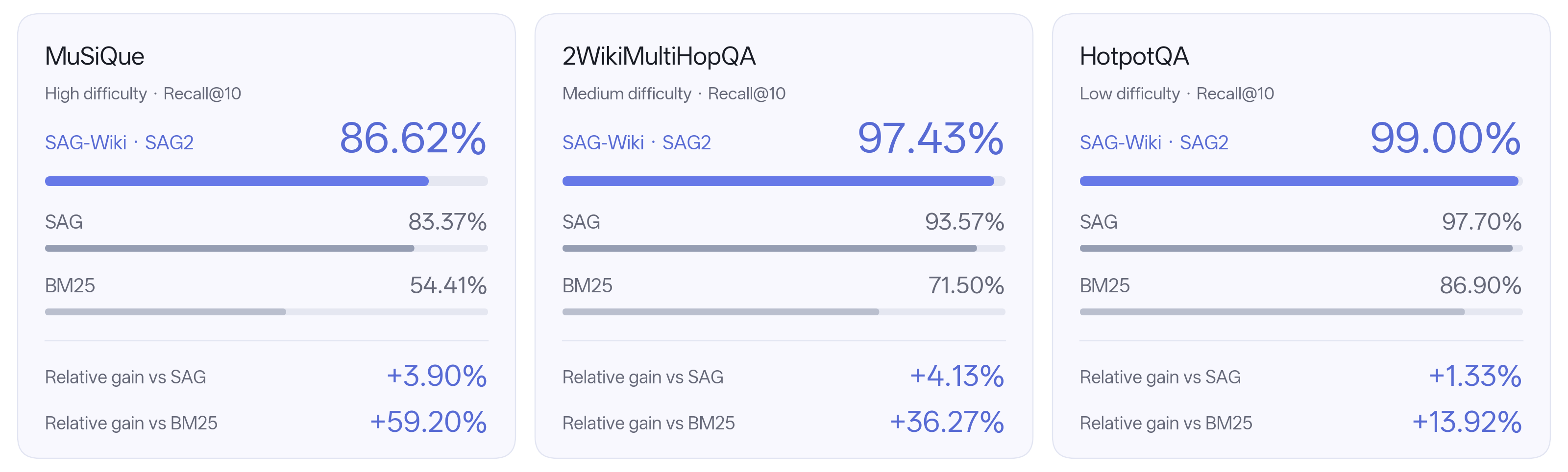
SAG-Wiki is represented by its underlying SAG2 benchmark results. Recall@10 measures evidence recall in the first ten results. SAG2 uses 1,000 questions per benchmark; MuSiQue was used for method development. SAG and BM25 are reference values from the original SAG paper. Difficulty labels are presentation categories; relative gains use the displayed scores.
Read the SAG2 paper · For the method, benchmark results, and reproduction code, see SAG-Benchmark.
User Guide
| Feature | What you need |
|---|---|
| File indexing and quick search | Add a folder; no API key needed |
| SAG2 semantic retrieval | Configure a decision model; supply an API key when required |
| Cited Q&A | Configure an answer model and API key; SAG2 retrieval also requires a decision model |
SAG-Wiki itself is free and open source. External service charges depend on your chosen provider. Original files stay on your machine; in-depth retrieval and Q&A send the required questions, document passages, or context to the services you configure.
1. Download and add a folder
Download the macOS DMG from the latest release link above, open it, and drag SAG Wiki into Applications. The macOS app, bundled CLI, and DMG are Developer ID signed and notarized by Apple.
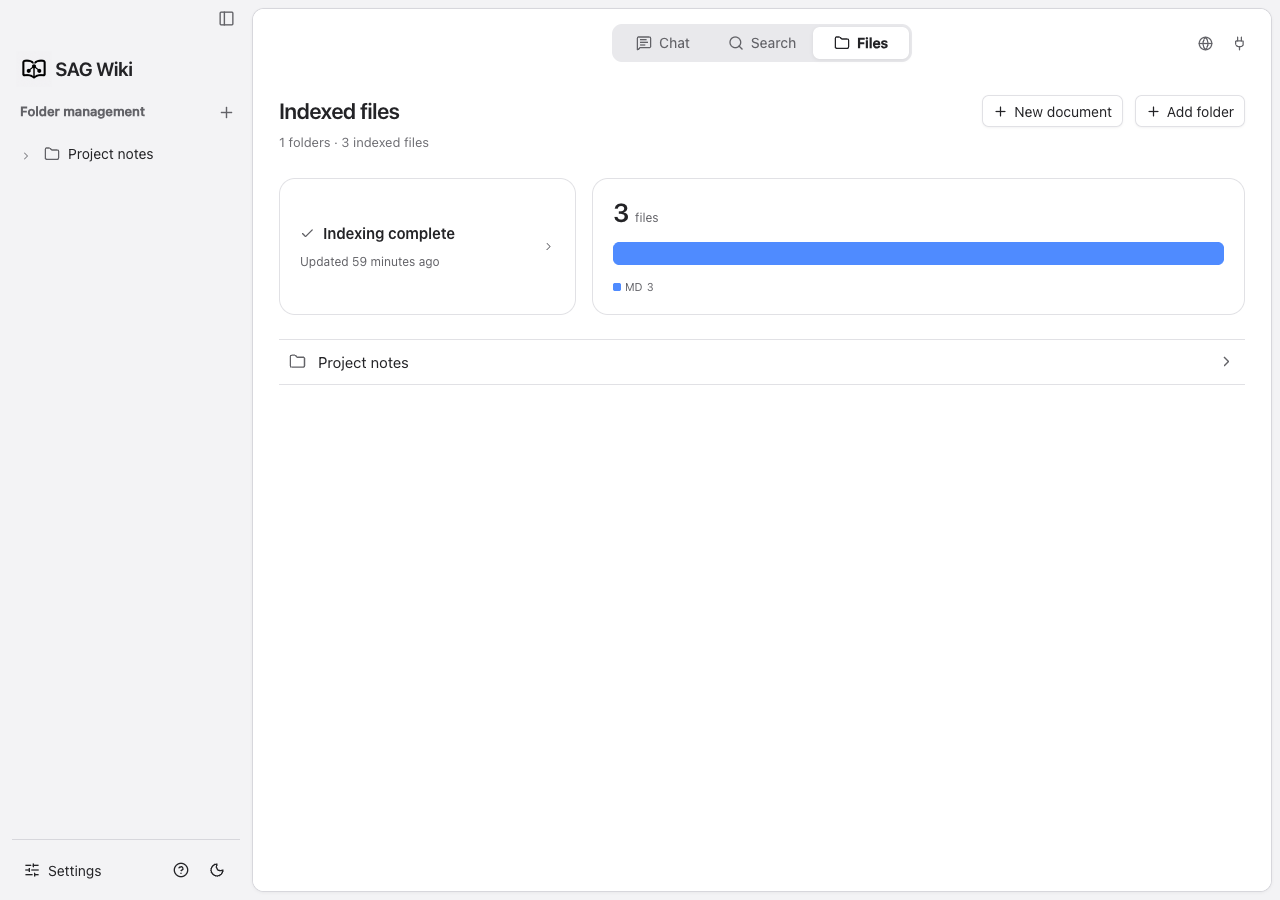
Install and open SAG-Wiki, switch the sidebar to Folders, then click + beside folder management to add the folder you want to search. Your files stay in their original locations.
2. Search your files
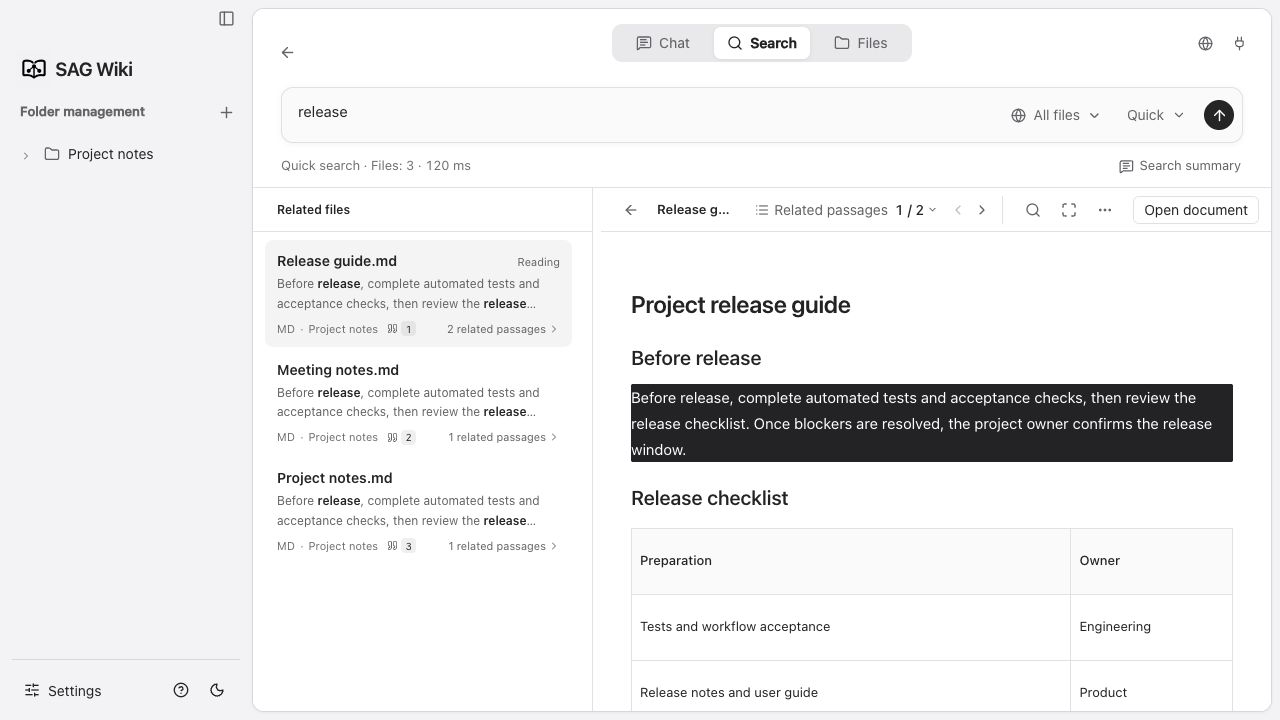
Use Search as soon as basic text is indexed. For mixed or scanned PDFs, OCR and table enhancement continue in the background; file-list states show whether basic text is searchable, enhancement is pending/running, or enhancement failed. Existing text remains searchable after an enhancement failure; image-only scans become searchable only after recognized text is indexed. Wait for completion and check the original for full coverage. Quick search works locally; configure a decision model in Settings → Models for in-depth semantic retrieval.
For a local Jev-compatible decision model, select Custom and enter its model name and base URL (for example, http://127.0.0.1:8000/v1), or its complete /systemone or /decisions endpoint. Choose No authentication under Decision model authentication if the service does not require an API key; this omits the authorization header and removes the saved decision model key. The service must implement Jev’s state, questions, and answers.*.noul protocol. For the CLI, run sag config --url http://127.0.0.1:8000/v1 --model YOUR_MODEL --auth none. To switch back to a keyed service, use --auth bearer --key-stdin and enter that service’s key.
3. Ask questions and check the source
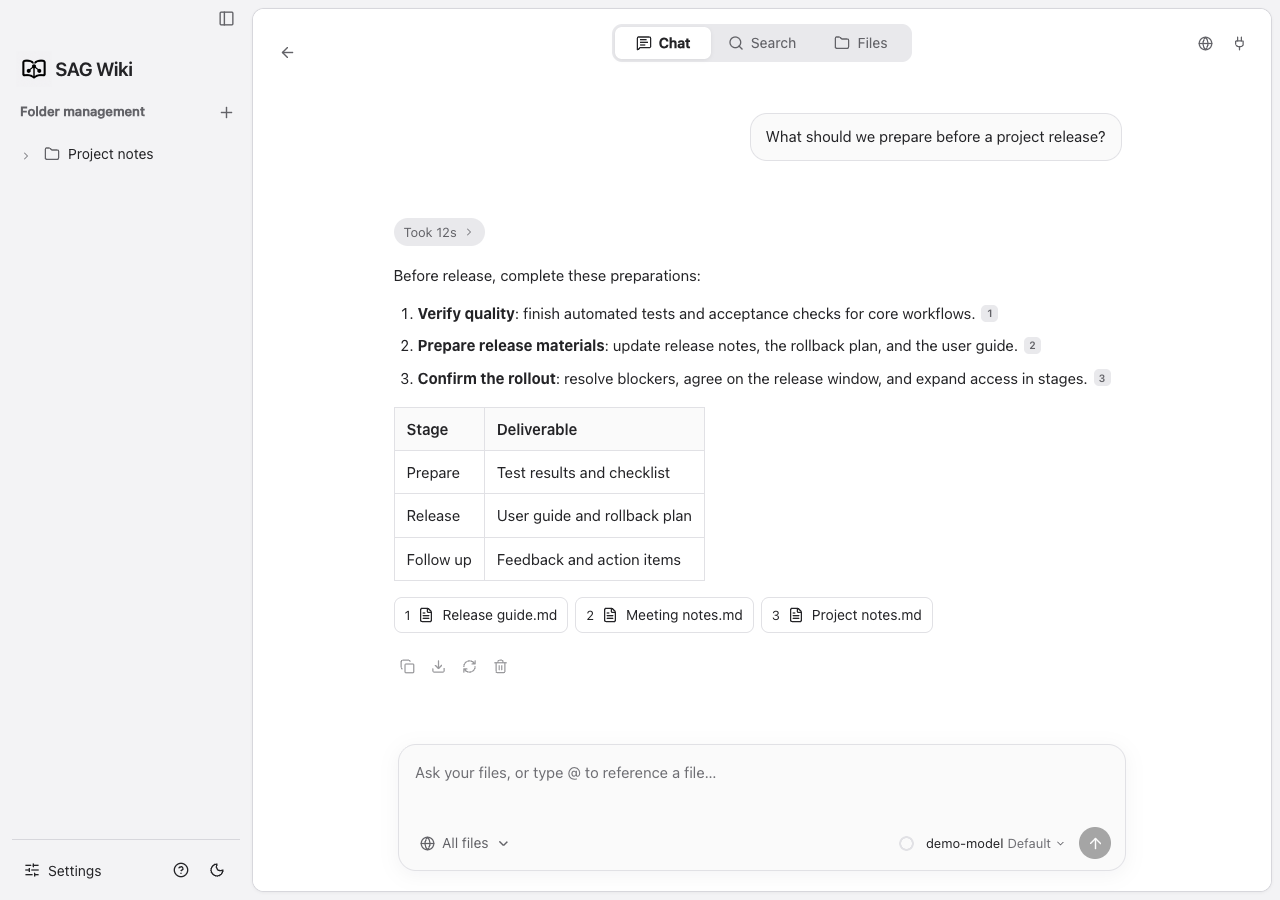
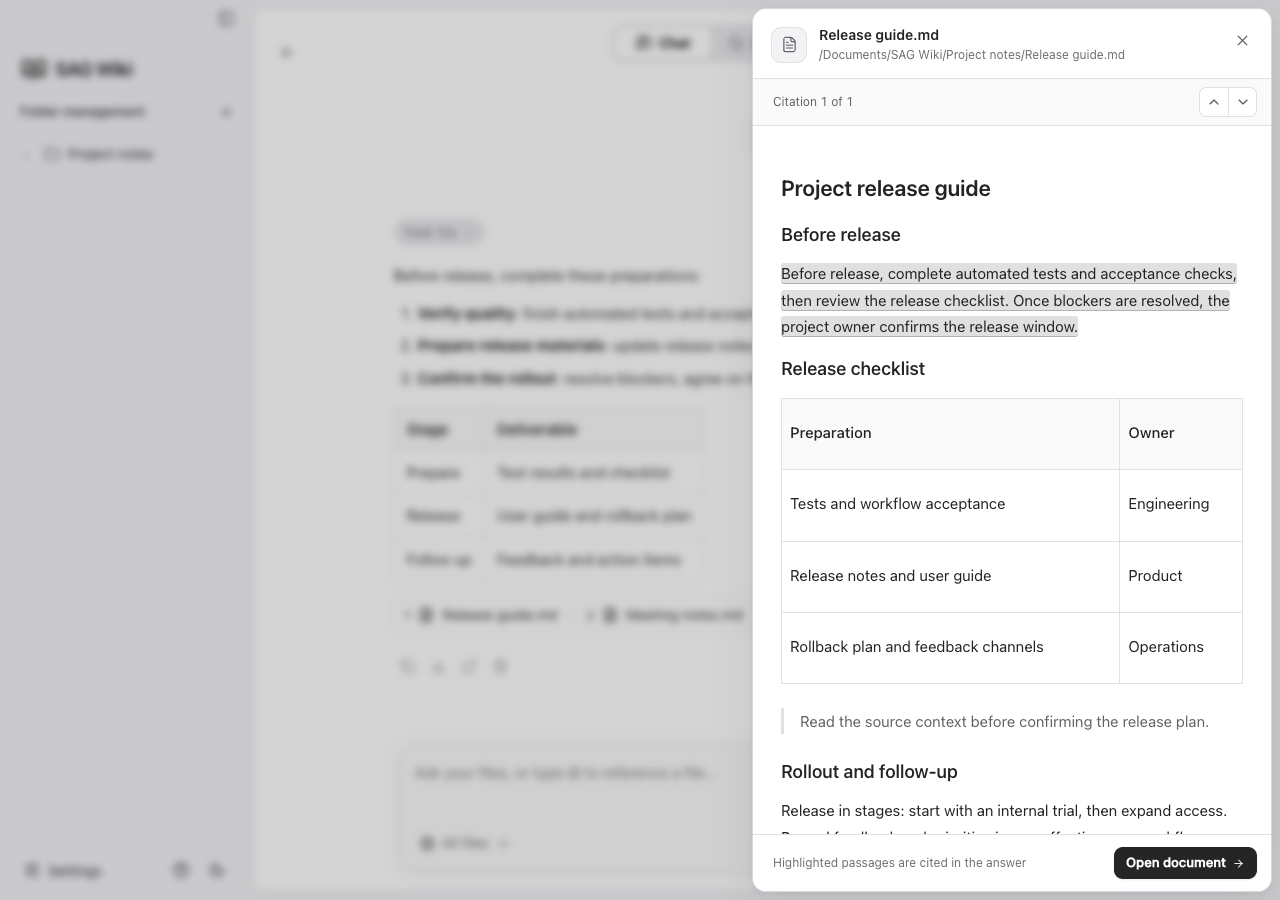
Configure your answer model in Settings → Models, then ask in Chat. Use @ to select files, and click a citation to see the passage supporting the answer.
Agent Guide
Give your agent this one sentence:
Install https://github.com/Zleap-AI/SAG-Wiki/blob/main/cli/skills/sag/SKILL.md and follow its setup flow for my current project.SAG supports Claude Code, Codex, and OpenCode. The Skill includes CLI installation, configuration, project indexing and verification. The CLI works without SAG Wiki desktop and shares its settings and knowledge base when the desktop is installed. Existing settings are reused; API-key-authenticated semantic search needs your own decision model key, entered privately in a terminal. The GitHub Skill link is the canonical installation entry; the agent retrieves its supporting files from the same directory.
With Node.js 18 or later installed:
npm install -g @zleap-ai/sagThe published npm package includes macOS Apple Silicon, Windows x64 and Linux ARM64 / x86_64 binaries (Linux verified on Ubuntu 24.04 and Debian 12). It requires no Rust toolchain or source compilation. Installing the CLI does not install the desktop app.
Manual installation and usage
If sag is already installed, reuse it. Otherwise run the npm command above, then verify the command and complete first-time decision model setup in a terminal:
sag --version
sag
Install the linked Skill folder, including SKILL.md and references/, at the location for your agent:
| Agent | Skill folder |
|---|---|
| Codex | ~/.agents/skills/sag/ |
| Claude Code | ~/.claude/skills/sag/ |
| OpenCode | ~/.config/opencode/skills/sag/ |
Start a new agent session. In the project you want to search, add the folder and confirm indexing is ready before searching:
sag add
sag check
sag "Where is permission checked?" . -m 5
For a large folder, use sag add --timeout 3600 to increase the wait limit. An expired wait does not remove the folder or stop background indexing; use sag list --json to inspect progress.
See the Skill's setup guide for the complete agent workflow and the CLI guide for other commands.
Developer Guide
The Rust CLI is the runtime foundation. The sag executable starts a shared local service; both terminal commands and the Tauri desktop connect to it through the same client. Indexing, retrieval, and model configuration live in one core, and remain available after the desktop exits.
flowchart TD
    Desktop["Desktop · Svelte + Tauri"] --> Client["sag-client"]
    Agent["Terminal / Agent · sag CLI"] --> Client
    Client --> Service["sag service serve · Rust core"]
    Service --> Local["Local files + SQLite index"]
    Service --> Jev["Jev · evidence retrieval"]
Service --> LLM["LLM · answer generation"]| Directory | Contents |
|---|---|
src/ | Desktop interface |
src-tauri/ | Desktop system features and service connection |
cli/ | Command-line entry point and Skill installation |
core/ | Indexing, retrieval, and Q&A |
client/, protocol/ | Client communication and protocol |
Follow the environment guide to prepare Node.js, Rust, and your platform's Tauri development dependencies, then run:
git clone https://github.com/Zleap-AI/SAG-Wiki.git
cd SAG-Wiki
npm ci
npm run tauri dev
After changes, run npm run check and npm test; the checks section lists all validation commands. See the development guide, architecture, and documentation index for builds and implementation details.
Contributing and License
Contributions are welcome through Issues and Pull Requests. For changes to the application, follow the development guide; retrieval research and reproduction code live in SAG-Benchmark.
SAG-Wiki is released under the MIT License. Third-party notices are in src-tauri/licenses.
Community
Join the SAG community on Discord or WeChat to connect with maintainers and other users.
| Discord | |
|---|---|
 |  |