ZONOS2

ZONOS2 is our latest text-to-speech model trained on more than 6 million hours of varied multilingual speech, delivering expressiveness and quality on par with—or even surpassing—top TTS providers at low latency with MoE. ZONOS2 excels at high-fidelity and naturalistic voice cloning.
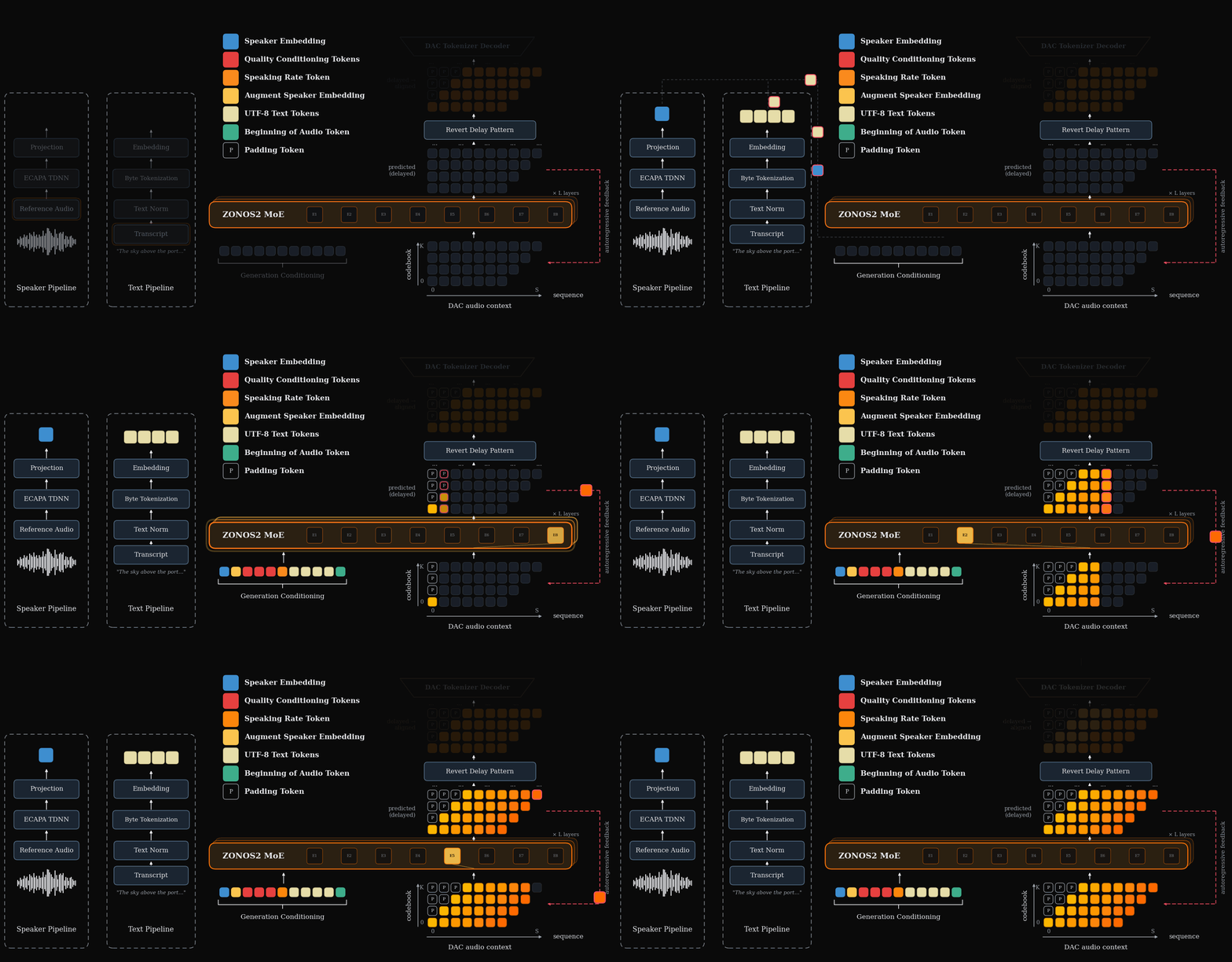
During inference we use nemo TN normalized UTF-8 bytes and an ECAPA-TDNN embedding to generate DAC tokens with our MoE backbone. An inference overview can be seen below.
Language support is as follows.
| Tier | Languages |
|---|---|
| Tier 1 | English, Mandarin Chinese, Japanese |
| Tier 2 | Korean, Russian, Italian, Portuguese, French, Spanish, Vietnamese, German, Hebrew, Dutch |
| Tier 3 | Swedish, Hindi, Tamil, Telugu, Thai, Norwegian, Bengali, Tagalog, Arabic, Danish, Indonesian, Polish, Ukrainian, Romanian, Finnish, Hungarian, Lithuanian, Estonian, Slovak, Croatian, Latvian |
For local inference we provide a high-performance TTS inference server built on Mini-SGLang.
For more details and speech samples, check out our blog.
We also have a hosted version available at cloud.zyphra.com/audio-playground.
Quick Start
Platform Support: Linux only (x86_64). Requires NVIDIA GPU with CUDA toolkit matching your driver version (
nvidia-smito check).
1. Installation
Requires uv.
git clone https://github.com/Zyphra/Zonos2.git
cd Zonos2
uv sync
2. Launch the TTS Server
uv run python -m zonos2 --model-path Zyphra/ZONOS2 --tts-default-voices-dir ./default_voices/
uv run always uses the project environment, so no venv activation is needed.
The server starts on http://localhost:1919 by default. TTS mode is auto-detected for zonos2 models.
--tts-default-voices-dir <folder> pre-populates the web UI with voice-clone
speakers from disk; the folder is scanned recursively for speaker audio
(.wav, .mp3, .flac, .m4a, .ogg, .opus, .aac, .webm) and saved
embeddings (.npy, .npz). The newest voice is selected automatically on
startup.
3. Generate Speech
curl:
curl -X POST http://localhost:1919/tts/generate \
  -H "Content-Type: application/json" \
  -d '{"text": "Hello world", "stream": true}' \
  --output output.pcm

# Convert to WAV
ffmpeg -f f32le -ar 44100 -ac 1 -i output.pcm output.wav
Web UI: Open http://localhost:1919/ in your browser.
Python API (offline inference)
You can also run the engine directly in a Python script, without starting a
server, via TTSLLM:
from zonos2.message import TTSSamplingParams
from zonos2.tts import TTSLLM

tts = TTSLLM(model_path="Zyphra/ZONOS2")

results = tts.generate(
    ["Hello from the offline Python API.", "Batched prompts work too."],
    TTSSamplingParams(seed=42),
)

for i, result in enumerate(results):
    print(f"frames={len(result['audio_tokens'])}, eos_frame={result['eos_frame']}")
    tts.save_audio(result["audio"], f"output_{i}.wav")
API Reference
POST /tts/generate
Full-featured TTS endpoint with streaming support.
Request body:
| Parameter | Type | Default | Description |
|---|---|---|---|
text | string | required | Text to synthesize |
language | string | en_us | Text-normalization language: en_us, en_gb, fr_fr, de, es, it, pt_br, ja, cmn, ko |
text_normalization | bool | true | Verbalize numbers, dates and currency before synthesis (false = raw byte tokenization) |
temperature | float | 1.15 | Sampling temperature |
topk | int | 106 | Top-k sampling |
top_p | float | 0.0 | Nucleus (top-p) sampling threshold; 0 disables |
min_p | float | 0.18 | Min-p probability filter; 0 disables |
max_tokens | int | null | model max | Maximum audio tokens. Omit or set null to use the model context limit; long prompts are clamped to remaining context. |
fade_out_ms | float | 0.0 | Cosine fade-out applied to the audio tail; 0 disables |
repetition_window | int | 50 | Recent generated frames to check per codebook; 0 disables |
repetition_penalty | float | 1.2 | Per-codebook repetition penalty strength; 1.0 disables |
repetition_codebooks | int | 8 | Number of codebooks from CB0 upward to penalize; negative means all |
seed | int | null | null | Random seed for reproducibility |
speaking_rate_enabled | bool | false | Set true to use model speaking-rate conditioning when another speaking-rate field is present |
speaking_rate_bucket | int | null | null | Exact model speaking-rate bucket to prepend before text |
speaking_rate | float | null | null | Target speaking rate in cleaned UTF-8 bytes per second; mapped to a bucket |
speed | float | null | null | OpenAI-style multiplier; 1.0 maps to the model's neutral speaking-rate bucket |
quality_enabled | bool | true | Enable quality-bin conditioning on supported models |
quality_buckets | object | list | null | {"trailing_silence_s": 3} | Per-feature quality bucket indices (keyed by feature name, or a list in feature order) |
quality_values | object | list | null | null | Raw quality metric values, mapped to buckets server-side (alternative to quality_buckets) |
clean_speaker_background | bool | false | Mark the reference voice as having a clean background (supported models) |
accurate_mode | bool | true | true = accurate mode (closer voice match), false = expressive mode |
stream | bool | true | Stream audio chunks |
Response: Raw PCM audio (audio/pcm, float32, 44.1 kHz, mono). Headers include X-Audio-Sample-Rate, X-Audio-Channels, X-Audio-Format.
POST /v1/audio/speech
OpenAI-compatible endpoint.
Request body:
{
  "model": "zonos2",
  "input": "Hello world",
  "voice": "alloy",
  "response_format": "pcm"
}
For speaking-rate-enabled checkpoints, set speaking_rate_enabled to true
and use speaking_rate_bucket for exact bucket control, speaking_rate for
bytes-per-second control, or speed for OpenAI-style multiplier control.
Citation
If you find this model useful in an academic context please cite as:
@misc{zyphra2025zonos,
  title     = {Zonos V2 Technical Report},
  author    = {Gabriel Clark, Sofian Mejjoute, Mohamed Osman, George Close, Beren Millidge},
  year      = {2026},
}