Hermes Browser Extension
Browser-native side panel for Hermes Agent — connect active web context to your local or remote Hermes runtime.
Created by Jon Komet (
@abundantbeing). Community extension for Hermes Agent by Nous Research.
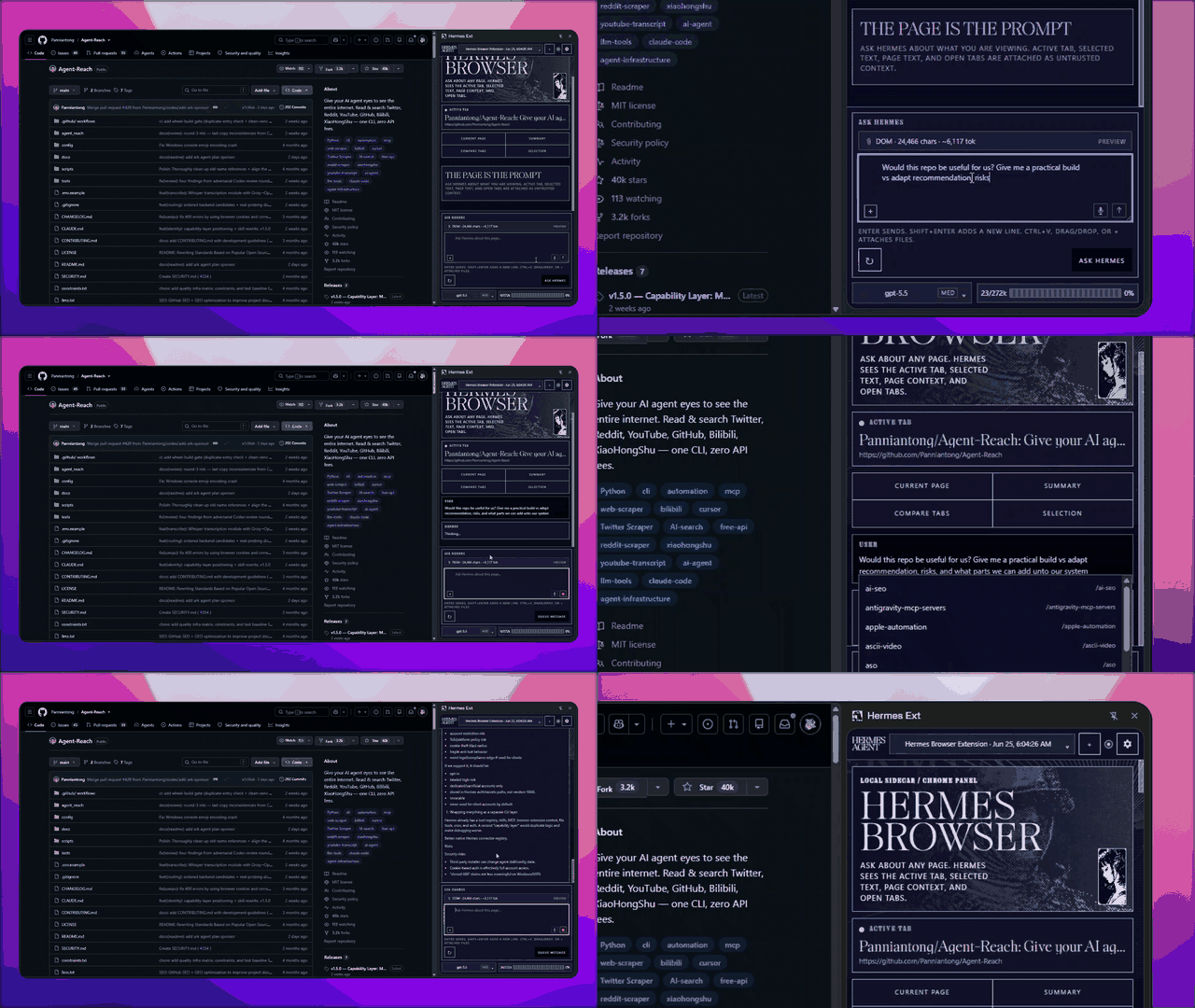
Public alpha · Load unpacked · Local/remote Hermes API · Full Hermes runtime tools
Not on the Chrome Web Store yet.
What it is
Hermes Browser Extension is not a browser chatbot. It is a Chrome/Edge/Chromium side panel for the real Hermes Agent runtime. It talks to your Hermes Gateway/API server — local by default, remote when you configure a reachable URL — so it can use the models, tools, skills, sessions, memory, and MCP servers already configured in Hermes.
This repo is specifically for the Hermes Browser Extension: the Chrome/Edge/Chromium side-panel integration for Hermes Agent.
Visual tour
| Side panel | Theme settings | Local agents |
|---|---|---|
 |  |  |
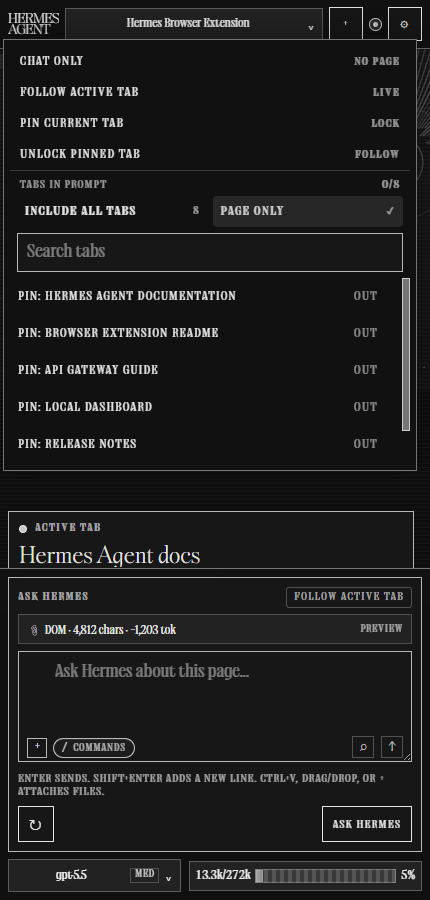
| Browser behavior | Page-only context | Hermes compatibility |
 |  |  |
Highlights
- Chrome/Edge/Chromium MV3 side panel powered by the Side Panel API.
- Connects to a configurable local or remote Hermes API server. Default:
http://127.0.0.1:8642. - Supports dashboard WebSocket mode when you have a signed-in remote Hermes dashboard tab and no API key.
- Auto-syncs connected Hermes providers/models, profiles, skills, sessions, and capabilities.
- Keeps runtime plugins available in the same Hermes session. For example, a connected social or messaging plugin can add account, post, and trend context while the extension supplies browser-page context.
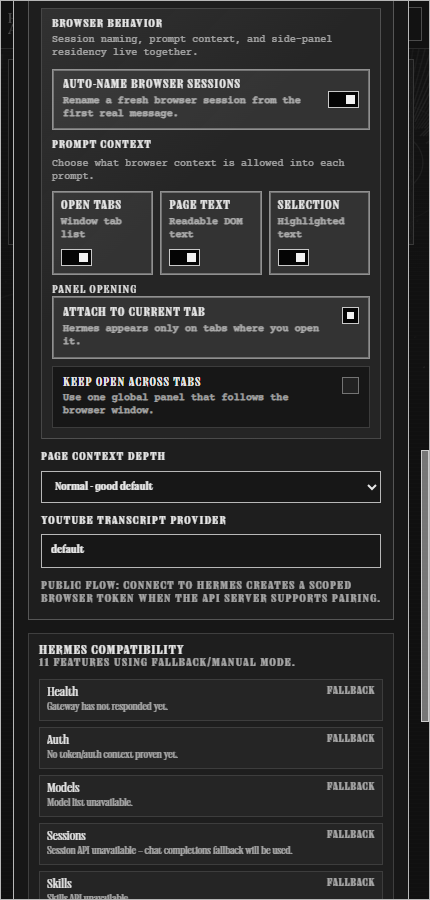
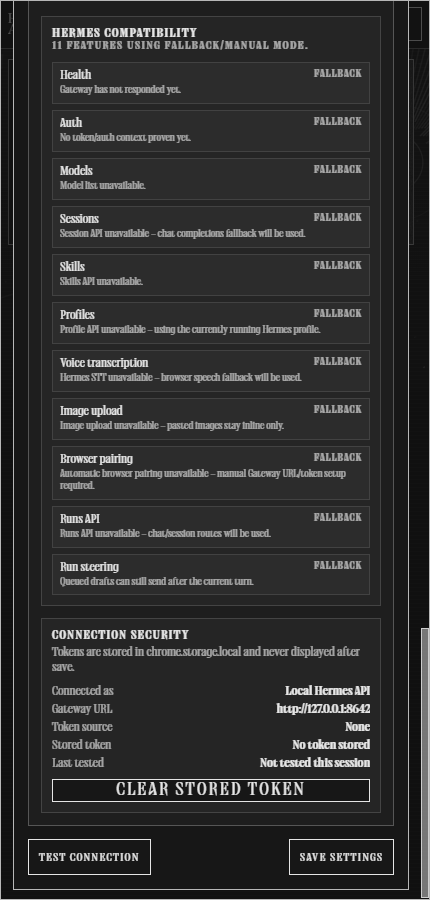
- Shows a Hermes compatibility panel so older gateways degrade into explicit fallback/manual modes instead of broken route errors.
- Adds Copy Diagnostics for v0.1.9 support reports: browser family, version/build, gateway origin, capability flags, context mode, and last visible error with tokens/page content stripped.
- Sends active tab/browser context into a persisted Hermes session, or switches to Chat only when you do not want browser context attached.
- Adds a composer-header context menu for Chat only, following the active tab, pinning a specific tab, and choosing which open tabs appear in the prompt.
- Opens as a tab-attached side panel by default, with a setting to keep the panel global across tabs.
- Opens with a keyboard shortcut (
Alt+Hby default, customizable atchrome://extensions/shortcuts). - Keeps pinned-tab conversations isolated with per-tab local history and Hermes session bindings.
- Adds quick commands for common browser-context work, including
/summarize,/explain,/rewrite,/tabs, and/action-items. - Adds a collapsible “What Hermes saw” receipt after each sent turn for transparent context/debugging.
- Shows a live Tool Activity Strip while Hermes streams, so tool calls appear as structured runtime activity instead of raw
[tool]markdown appended into answers. - Classifies upstream Hermes runtime/tool exceptions as connected-with-warning diagnostics when the gateway is reachable, including the known Python
NoneType/int()traceback class. - Captures active tab title/URL, open tabs, selected text, readable page text, metadata, headings, forms, links, and buttons where available.
- Supports voice dictation through Hermes audio transcription when available, with Browser speech fallback when the connected runtime does not expose STT.
- Wraps webpage text as untrusted context before sending it to Hermes.
- Streams Hermes responses and falls back to non-streaming chat when needed.
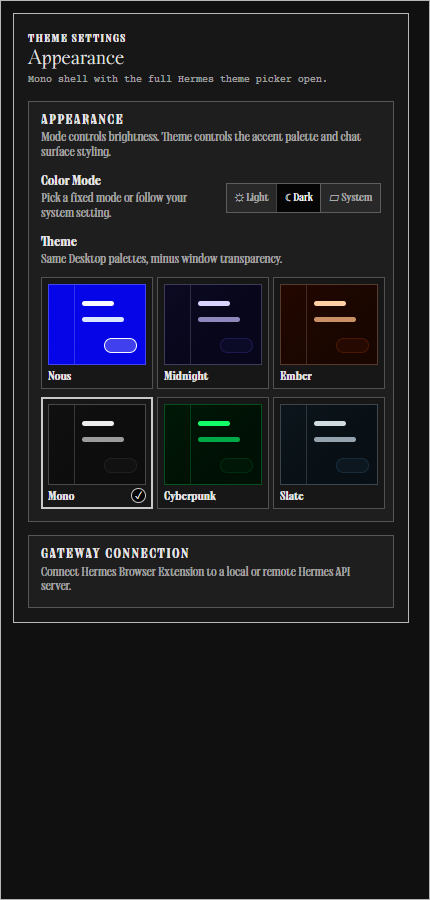
- Includes Desktop-style appearance settings: Light/Dark/System mode plus Nous, Midnight, Ember, Mono, Cyberpunk, and Slate themes.
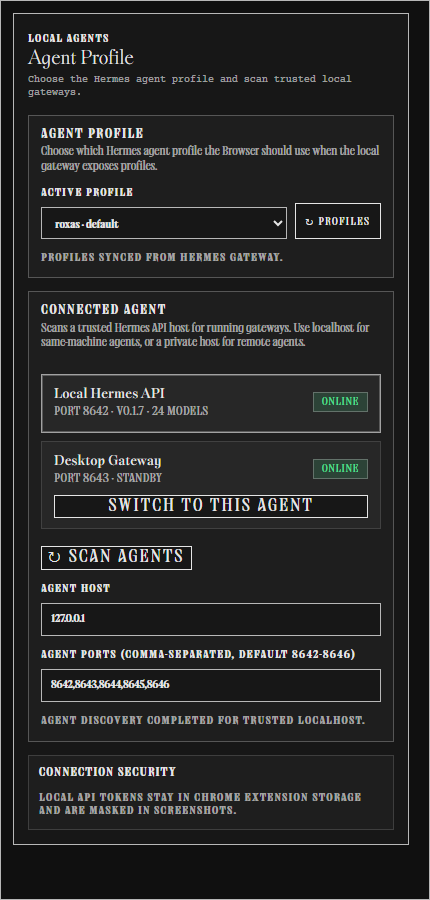
- Includes a localhost agent picker for switching between trusted local Hermes API gateway ports.
- No
debugger,nativeMessaging, click/type/form-submit, cookies, history, bookmarks, downloads, or browser-control permissions in v0.1.
Requirements
- Hermes Agent installed and working.
- Hermes Gateway/API server enabled locally or on a reachable remote machine.
- Node.js 20+.
- Chrome, Edge, Brave, Comet, or another Chromium browser with Side Panel API support (Chrome 114+ baseline).
v0.1.9 compatibility matrix
| Surface | Supported in v0.1.9 | Fallback / note |
|---|---|---|
| Chrome / Edge / Chromium 114+ side panel | Yes | Primary public support target. |
| Brave / Comet / Chromium forks | Best-effort | Must expose the Chromium Side Panel API and extension clipboard permissions for Copy Diagnostics. |
| Firefox / Safari | Preview only | Diagnostics now report browser family, but cross-browser support is not shipped yet. |
| Local Hermes API server | Yes | Default path: http://127.0.0.1:8642. |
| Remote API server | Yes, explicit URL/token only | Use trusted LAN/Tailscale/VPN or HTTPS reverse proxy; do not expose Hermes naked to the internet. |
| Remote dashboard WebSocket | Best-effort | Chat/session/model path only; REST-only profile/skills/image-upload surfaces remain unavailable. |
| Browser Context Protocol | Yes | Extension emits hermes.browser.context.v1 payloads and keeps prompt-embedded fallback. |
| Companion plugin | Private prototype only | Optional fail-soft skeleton in companion-plugin/; not required for public v0.1.9. |
| Browser control / Runs UI / debugger / nativeMessaging | No | Deferred until supportability, action policy, approvals, and logs exist. |
Quick start
1. Clone and build
git clone https://github.com/abundantbeing/hermes-browser-extension.git
cd hermes-browser-extension
npm install
npm run build
The loadable extension is generated at:
dist/2. Load unpacked in Chrome/Edge
- Open
chrome://extensionsoredge://extensions. - Enable Developer mode.
- Click Load unpacked.
- Select this repo's
dist/folder — not the repo root and notextension/. - Pin/click the Hermes extension icon to open the side panel.
After code updates, run npm run build again and click Reload on the Hermes Browser Extension card in the browser extensions page.
Connect to Hermes
Local API server
Local-only is the safest default. Put this in ~/.hermes/.env on the machine running Hermes:
API_SERVER_ENABLED=true
API_SERVER_HOST=127.0.0.1
API_SERVER_PORT=8642
API_SERVER_KEY=<your-api-server-key>
API_SERVER_CORS_ORIGINS=chrome-extension://<your-extension-id>
Start or restart the gateway:
hermes gateway runVerify the API server:
HERMES_GATEWAY_URL=http://127.0.0.1:8642
HERMES_API_TOKEN='<your-api-server-key-or-browser-token>'
curl "$HERMES_GATEWAY_URL/health"
curl -H "Authorization: Bearer $HERMES_API_TOKEN" "$HERMES_GATEWAY_URL/v1/models"
Then in the extension side panel:
- Click Connect to Hermes and approve locally if your Hermes Desktop/gateway supports the approval flow.
- If approval is not available yet, click Manual setup.
- Choose Local gateway.
- Use Gateway URL
http://127.0.0.1:8642. - Paste your scoped browser token or
API_SERVER_KEY. - Click Test connection, then Save settings.
- Open a normal
https://page and ask:Summarize this page in one sentence.
Remote API server
For a remote Hermes machine, bind the API server to a reachable trusted interface and keep CORS narrow:
API_SERVER_ENABLED=true
API_SERVER_HOST=0.0.0.0
API_SERVER_PORT=8642
API_SERVER_KEY=<your-api-server-key>
API_SERVER_CORS_ORIGINS=chrome-extension://<your-extension-id>
Use a private same-LAN/Tailscale/VPN host with HTTP, or put the API server behind a trusted HTTPS reverse proxy for public/proxied access. Do not expose the Hermes API server naked to the public internet. The Hermes API server can access the real Hermes runtime and tools.
Examples:
http://192.168.1.50:8642
http://hermes-desktop.local:8642
https://hermes.example.com
In the extension side panel:
- Choose Remote gateway.
- Paste the remote API URL, including
http://orhttps://. - Paste the API key/browser token.
- Click Test connection.
With a key present, Remote means Remote API server and does not force HTTPS. With the key blank, Remote means Remote dashboard WebSocket and requires an https:// dashboard URL.
Remote dashboard mode, no API server
If you run Hermes elsewhere and only expose the OAuth-gated dashboard, select Remote, enter the dashboard's https:// URL, and leave the API key blank. With no key, the extension connects over the dashboard's /api/ws socket instead of the REST API server.
Auth uses a single-use WebSocket ticket minted from a signed-in dashboard tab:
- Open the dashboard URL in a normal browser tab and sign in, and keep that tab around.
- The extension mints the ticket first-party from that tab, then opens the socket.
- Test connection opens the socket and loads models, which confirms the whole path.
Limitations in this mode: image attachments are inline-only, and the skills/profiles lists are unavailable because those are REST-only and the dashboard's REST surface is not reachable cross-origin.
What syncs after connection
After connection, the side panel loads from the connected Hermes gateway:
/v1/models— all providers/models Hermes can enumerate, including provider-qualified IDs./api/sessions— recent Hermes sessions grouped by source./v1/skills— slash-command skill suggestions in the composer./v1/profiles— profile picker when the gateway exposes profile metadata./v1/capabilities— feature flags such as audio transcription and Browser upload support.
The DOM/context chip should show a non-zero page-context count on normal readable pages. Browser internal pages such as chrome://extensions are intentionally restricted.
Install with Hermes / Computer Use
You can ask Hermes to help install it:
Install Hermes Browser Extension from https://github.com/abundantbeing/hermes-browser-extension. Clone it, run npm install, run npm run build, then use computer use to open chrome://extensions, enable Developer mode, load the dist folder unpacked, and help me connect it to my local or remote Hermes Gateway API server. Do not reveal, print, screenshot, or commit my API key.Security model
Hermes Browser Extension is intentionally conservative in v0.1:
- Local API server by default; remote API server support requires an explicit URL, token, and CORS allowlist.
- Strong bearer/API key required for API access.
- Page content is wrapped as untrusted context before it reaches Hermes.
- Read-only browser context capture: no click, type, form-submit, checkout, download, or browser-control behavior.
- No
debugger,nativeMessaging,cookies,history,downloads, orbookmarkspermissions. - Restricted pages include browser internals, extension pages, and obvious banking/crypto/password/payment/health/government-tax categories.
See SECURITY.md, PERMISSIONS.md, DATA-FLOW.md, and PRIVACY.md for details.
Troubleshooting
I loaded the extension but nothing works
Make sure you loaded dist/, not the repo root. The selected folder must contain manifest.json directly.
Chrome still shows an older version after updating
The browser is still using an old unpacked folder or an unpacked extension card that was not reloaded. For v0.1.9, the source manifest, built dist/ manifest, and release archive should all contain manifest.json version 0.1.9.
Fix:
- Extract/download the v0.1.9 release or run
npm run buildlocally. - Open
chrome://extensionsoredge://extensions. - On the Hermes Browser Extension card, click Reload.
- If it still shows an older version, click Remove, then Load unpacked again and select the fresh v0.1.9
dist/folder. - Click service worker / Inspect views only for debugging; it is not the version source.
Filing a support issue
Open Settings → Support diagnostics → Copy Diagnostics and paste the report into the GitHub issue or support thread.
The copied block includes version/build, browser family, gateway origin, connection state, runtime capability flags, selected model/provider, context mode, extractor mode, and last visible error. It intentionally excludes API keys, bearer tokens, cookies, page text, selected text, tab titles, and full tab URLs.
The side panel says it cannot connect
Check that Hermes Gateway/API server is running and reachable from the browser:
curl http://127.0.0.1:8642/health
# or, for remote mode:
curl http://<trusted-remote-host>:8642/health
If /v1/models fails, check API_SERVER_KEY, the extension's stored API key/browser token, and API_SERVER_CORS_ORIGINS. For remote mode, the browser extension origin (chrome-extension://<id>) must be allowlisted on the Hermes machine.
The side panel shows a runtime warning but still says connected
v0.1.9 separates gateway reachability from upstream Hermes runtime/tool failures. If /health works but Hermes raises a runtime traceback, the Browser stays connected and shows the warning instead of turning the whole connection red.
For tracebacks like int() argument must be a string, a bytes-like object or a real number, not 'NoneType', check the Hermes Agent logs on the machine running the gateway. If the traceback mentions computer_use or cua-driver, run:
hermes computer-use doctorThat diagnostic belongs to the Hermes runtime/tool layer, not to Browser extension packaging or Chrome permissions.
Native Hermes computer use is not working
Hermes Browser Extension does not request browser-control permissions and does not drive pages itself. Native desktop control comes from Hermes Agent's computer_use toolset via cua-driver.
On the machine running Hermes, verify computer use directly:
hermes tools list
hermes computer-use status
hermes computer-use doctor
If doctor says the driver is missing:
hermes computer-use installThen start a fresh Hermes session with the toolset enabled:
hermes -t computer_use chatCommon blockers from the Hermes docs:
- Windows over SSH runs in Session 0 and cannot see the interactive desktop; use the console/RDP session or the cua-driver Windows autostart pattern.
- Elevated/admin windows cannot be driven by a normal-integrity Hermes process on Windows.
- macOS needs Accessibility + Screen Recording permissions.
- Linux needs a reachable X11/Wayland display and AT-SPI.
The DOM chip says 0 chars
Open a normal https:// page and refresh context. Browser internal pages (chrome://, edge://, extension pages, devtools, etc.) are restricted by design.
Microphone says blocked or voice dictation does not start
Chromium side panels can suppress microphone permission prompts. Hermes Browser Extension handles this with capability-gated voice modes:
- Hermes STT when the connected Hermes runtime advertises audio transcription.
- Browser speech fallback when Hermes STT is unavailable and Chromium exposes Web Speech.
- A visible Hermes Voice Dictation tab when the side panel cannot capture the mic directly.
Suggested flow:
- Click the mic button in the side panel.
- If the side panel cannot capture the mic, a Hermes Voice Dictation tab opens.
- In that tab, click Start dictation. This click is the permission gesture Chromium expects.
- Speak, then click Stop + transcribe or Stop speech depending on the active mode.
- The transcript is sent back to the side panel composer automatically.
If Chromium still says the mic is blocked, click Open microphone settings in the voice tab and set Microphone to Allow for chrome-extension://<the Hermes extension id>/, then return to the voice tab and try again.
The first-run Connect flow is unavailable
Use Manual setup with your local/remote Gateway URL and API key. The native Desktop approval flow is still evolving during alpha.
GitHub PR/Issue auto-review
This repo includes two Hermes review runners:
npm run review:watch— local poller for open PRs/issues. This works now from a machine that can reach Hermes and is authenticated withgh.npm run review:event— GitHub-event runner for future GitHub Actions/webhook wiring. It expectsGITHUB_EVENT_NAME,GITHUB_EVENT_PATH, andGITHUB_REPOSITORY.
The local poller checks open PRs and issues, computes a stable signature from PR head SHA or issue title/body, and only reviews changed targets. It upserts one bot comment per PR/issue with a stable marker. PR diffs and issue bodies are treated as untrusted input.
Local setup:
# Uses gh auth token, local API_SERVER_KEY from ~/.hermes/.env,
# and http://127.0.0.1:8642 by default.
npm run review:watch
Optional overrides:
HERMES_REVIEW_REPO=abundantbeing/hermes-browser-extension
HERMES_REVIEW_GATEWAY_URL=http://127.0.0.1:8642
HERMES_REVIEW_API_KEY=<api-server-key-or-scoped-token>
HERMES_REVIEW_MAX_TARGETS=3
HERMES_REVIEW_STATE_FILE=~/.hermes/hermes-browser-review-state.json
For a GitHub-hosted Actions runner later, HERMES_REVIEW_GATEWAY_URL must be reachable from GitHub. A runner cannot reach http://127.0.0.1:8642 on your personal machine; use a remote Hermes API server behind Tailscale/VPN/HTTPS or a self-hosted GitHub runner on the same network. Pushing .github/workflows/* also requires a GitHub token with workflow scope.
Dry-runs:
npm run review:watch:dry-run

GITHUB_EVENT_NAME=pull_request_target \
GITHUB_EVENT_PATH=./event.json \
GITHUB_REPOSITORY=abundantbeing/hermes-browser-extension \
GITHUB_TOKEN=<github-token> \
npm run review:event:dry-run
Development
npm test
npm run check:js
npm run check:manifest
npm run verify
npm run build
npm run package
Project layout:
extension/
  manifest.json       MV3 extension manifest
  background.js       side panel behavior
  content.js          page context collector
  sidepanel.html      side panel UI
  sidepanel.css       side panel styling
  sidepanel.js        Hermes API client + UI state
  voice-dictation.*   visible extension voice recorder fallback for blocked side-panel mic capture
  request-permissions.* visible extension mic-permission helper page
  sidepanel-preview.html static visual QA preview
  assets/             local Hermes fonts, icons, and imagery
  lib/browser-context-protocol.mjs versioned read-only browser context protocol helpers
  lib/runtime-events.mjs stable runtime/tool event names for Browser UI normalization
  lib/support-diagnostics.mjs redacted Copy Diagnostics support report helpers
  lib/common.mjs      shared prompt/context/security utilities
companion-plugin/     private fail-soft Browser companion prototype skeleton
scripts/
  build.mjs           copies extension/ to dist/
  check-manifest.mjs  validates required manifest assets/permissions
  hermes-review-github-event.mjs PR/issue event runner for GitHub Actions/webhooks
  hermes-review-watch.mjs local PR/issue review poller
  package.mjs         creates artifacts/hermes-browser-extension.tar.gz
tests/
  common.test.mjs     utility behavior tests
Relationship to Hermes Agent
Hermes Agent is an open-source project by Nous Research. Hermes Browser Extension is a community extension by Jon Komet that connects to a local or remote Hermes API server. It is designed to live at the edge of the ecosystem without adding core tool-schema footprint.
Useful links:
- Hermes docs: https://hermes-agent.nousresearch.com/docs
- Hermes API server docs: https://hermes-agent.nousresearch.com/docs/user-guide/features/api-server
- Hermes upstream repo: https://github.com/NousResearch/hermes-agent
Star History
Author
Built by Jon Komet (@abundantbeing).
License
MIT. See LICENSE.