Awesome CircuitPython


A curated list of awesome CircuitPython guides, videos, libraries, frameworks, software and resources.
CircuitPython is Adafruit's branch of MicroPython designed to simplify experimentation and education on low-cost microcontrollers. It makes it easier than ever to start prototyping by requiring no upfront desktop software downloads. With CircuitPython you can write clean and simple Python code to control hardware instead of having to use complex low-level languages like C or C++ (what Arduino uses for programming). It's great for beginners!
Contents
- CircuitPython.org
- Adafruit Learning System Guides
- Community
- Videos
- Books
- Code
- Frameworks
- Hardware
- Newsletter
- In the news
- Art, logos, graphics
- Social media
- Podcasts
- Events
- Swag
- Talks
- Contributing
CircuitPython.org
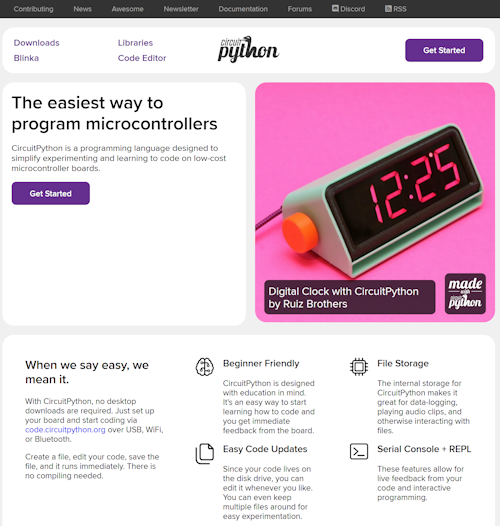
CircuitPython.org is the first stop on the information snake highway. Here you can see all the supported boards and download the specific firmware for each one, including beta, latest, and previous versions. Downloads can be sorted by: maker, features, name, and more. At this time there are over 500 boards supported in the CircuitPython family!
Adafruit Learning System Guides
- Welcome to CircuitPython! - An overview of CircuitPython and the community.
- CircuitPython Essentials - Learning the essential functions of CircuitPython.
- learn.adafruit.com CircuitPython - All Adafruit Learning Guides on CircuitPython.
Community
- Adafruit CircuitPython Discord channel #CircuitPython - 24/7 chat and support on CircuitPython including a weekly podcast.
- CircuitPython Weekly Meeting - Video archive of weekly community meeting via Discord, starting from September, 2017.
- Adafruit CircuitPython Forums - The Adafruit discussion forum on CircuitPython.
- Reddit r/circuitpython - a subreddit devoted to CircuitPython.
- MicroPython Slack - a Slack channel for MicroPython users. You can get an invitation here.
- MicroPython Meetup - online and in Melbourne, Australia once a month, and Blog.
Video
Educational
-
CircuitPython Parsec - Adafruit's John Park's lessons on using CircuitPython for a variety of tasks.
-
CircuitPython School - lessons and projects in Professor John Gallaugher's course Physical Computing: Art, Robotics, and Tech for Good at Boston College.
-
CircuitPython Projects - fun maker, electronics programming, and robotics projects, all courtesy of Professor John Gallaugher, who teaches Physical Computing at Boston College.
-
CircuitPython Hardware Tutorials - YouTube videos by educator Brogan M. Pratt.
-
How to Program a Robot in Python: Beginners Guide - YouTube videos by educator Brogan M. Pratt.
Books
- Getting Started with Circuit Playground Express by Anne Barela - Introduction and discussion of the Circuit Playground Express including programming via CircuitPython, MakeCode and Arduino.
- CircuitPython Development Workshop by Agus Kurniawan - This book helps you to get started with CircuitPython development. This book uses the Adafruit ItsyBitsy M0 Express board for development.
- CircuitPython for beginners with Adafruit Circuit Playground Express & Mu - In Japanese by author Aoyama_PROD, September, 2019 from TechBookFest.
- Python for Microcontrollers: Getting Started with MicroPython - by Donald Norris - Program your own MicroPython projects with ease—no prior programming experience necessary.
- Programming with MicroPython - by Nicholas H. Tollervey, includes CircuitPython - Discusses the MicroPython language.
- Wearable Tech Projects by Sophy Wong - Contains many wearable projects using CircuitPython.
- Learning IoT with Python and Raspberry Pi by E.I. Horvath, E.A. Horvath
- Make Music with the Circuit Playground Express by Rick Leander - Twelve projects that make music, sound and noise with Circuit Python.
- Ten Games for the Circuit Playground Express by Rick Leander - Ten classic games adapted for Circuit Python.
- Initiation au langage CircuitPython et à la puce nRF52840 - A French introduction to CircuitPython and the nRF52840.
Code
- CircuitPython Board Software Versions: Select per board at CircuitPython.org.
- CircuitPython API Reference - A list of functions and documentation available for CircuitPython.
- CircuitPython Essentials - Learning the essential functions of CircuitPython.
- Circuit Playground Express CircuitPython API Reference - The functions and documentation specific to the Circuit Playground Express using CircuitPython.
- CircuitPython GitHub Repository - The source code for CircuitPython on GitHub.
- Adafruit CircuitPython Libraries - Current Adafruit CircuitPython Libraries. There are over 150+ libraries available. More on Libraries on CircuitPython.org.
- CircuitPython Community Libraries - CircuitPython Community Libraries. There are over 45+ libraries available.
- Adafruit Blinka - SBC Compatibility - CircuitPython Libraries on Raspberry Pi and other compatible single-board computers (SBC) running Linux.
- Awesome List for the RP2040 Macropad - A list of awesome Macropad applications, macros, 3D printed plans, and more.
- Tod Kurt's CircuitPython Tips and Tricks - A collection of tips and tricks for CircuitPython. Also available as an Adafruit Learn Guide.
- Tod Kurt's CircuitPython
synthioTips and Tricks - More tips and tricks from Tod Kurt about CircuitPython'ssynthiolibrary.
Frameworks
- code.circuitpython.org - the online CircuitPython code editor - edit code and download to your device via WiFi, Bluetooth or USB.
- The Mu Editor, IDE, REPL, and plotter for CircuitPython - The recommended offline Python editor for CircuitPython.
- For developers, Mu: A Python Code Editor - The documentation for Mu.
- Using Microsoft VSCode for CircuitPython (GitHub) and Microsoft Marketplace.
- Thonny, a Python IDE for beginners - An editor with support for CircuitPython and MicroPython.
- Glider: An app for editing Python on mobile devices wirelessly - Also a video, in development.
- A helper for CircuitPython development with Atom - A helper for the Atom editor.
- Microsoft Device Simulator Express - Virtual Circuit Playground Express and CircuitPython programming in Visual Studio Code (no longer maintained).
- PewPew workshops - Materials, examples, libraries and hardware for running Python game programming and electronics workshops with a minimum of problems.
- The CircuitPython Online IDE Version 2.1 - A browser based IDE for CircuitPython by River Wang
Hardware
All supported boards may be viewed at circuitpython.org to include descriptions, pictures, and compatible CircuitPython builds. For Single-Board Computers, the list of boards is under the Blinka category.
Looking to add a new board to CircuitPython? It's highly encouraged! Adafruit has four tutorials to help you do so:
- How to Add a New Board to CircuitPython
- How to add a New Board to the circuitpython.org website
- Adding a Single Board Computer to PlatformDetect for Blinka
- Adding a Single Board Computer to Blinka
CircuitPython sensors and accessories - Complete listing of sensors, LCDs, displays, robotics, breakout boards, and more.
python.digikey.com - Digi-Key electronics has a listing of all Python-supported boards on their site in one location including CircuitPython and MicroPython boards.
Newsletter
- Adafruit Daily, Python for Microcontrollers - A weekly newsletter on MicroPython, CircuitPython, and Python on single-board computers (SBC). A spam-free list.
- Contribute to newsletter - Guidelines on contributing to the newsletter.
- Archives of all newsletters - List of every newsletter published from the start, November 2016.
- Python on Hardware weekly Videocast - Ladyada and PT review the highlights of the newsletter every week in this video series. The broadcast is also on iTunes, YouTube, IGTV (Instagram TV), and XML.
News
- Adafruit's Fruit Jam is a Raspberry Pi Pico 2 powered, credit card sized computer - Tom's Hardware, February 5, 2025
- The Past, Present, and Future of CircuitPython - Hackaday interviews Limor "Ladyada" Fried about CircuitPython, August, 2023.
- CircuitPython on the Adafruit.com/blog - Adafruit Blog posts discussing CircuitPython.
- CircuitPython Show Episode 1: Kattni Rembor - Host Paul Cutler interviews CircuitPython team member Kattni Rembor, March 1, 2022.
- Scott Shawcroft Works On Bare-Metal Raspberry Pi CircuitPython as Adafruit Plans an E Ink Computer - Hackster.io, December 2021.
- The Real Python Podcast Episode 75: Building With CircuitPython & Constraints of Python for Microcontrollers - Scott Shawcroft, August 27, 2021.
- embedded.fm Podcast Episode 372: The Motivation of Creativity - interview with Anne Barela, CircuitPython team member and Python on Microcontrollers Editor, May 6, 2021.
- DroneBot Workshop: Raspberry Pi Pico with CircuitPython - March 5, 2021.
- Changing Lives through Open Source, Passion and Mentoring - the keynote talk at PyOhio, July 27, 2019 by Kattni Rembor.
- Control servos with CircuitPython and Raspberry Pi - The MagPi Magazine, Issue 84, Melissa LeBlanc-Williams, July, 2019.
- PyDev of the Week: Scott Shawcroft - July 1, 2019.
- Scott Shawcroft: History of CircuitPython - A discussion of CircuitPython for the core developers of Python, PyCon 2019.
- Five Things You Didn't Know Python Could Do - YouTube video, June 19, 2019.
- PyCon2019 Keynote - Light Up Your Life - With Python and LEDs - By Nina Zakharenko. Python opens a whole new world of working with wearable electronics. The slides are also available.
- Learn Hardware Programming with CircuitPython - A course offered by Codecademy in collaboration with Adafruit.
- Use CircuitPython boards on the TI-83 Premium CE calculator - CircuitPython runs on Texas Instrument calculators.
- Scott Shawcroft Is Squeezing Python Into Microcontrollers - IEEE Spectrum Magazine article on the Python programming language for makers.
- Circuit Playground Express 4-H edition approved - The 4-H branded version was approved by the USDA, this is the first CircuitPython powered board that is also 4-H approved!
- CircuitPython in Space - CircuitPython provides an approachable and logical means of conducting science with hardware. Paired with low-cost hardware shown to work in space, we can enable an new generation to question and explore the unknown. With the necessary “satellite stuff” already baked in, students can spend their time trying something new rather than reinventing the wheel.
- Adafruit PyPortal: GUI meets CircuitPython in a Big Way - Disrupt It Yourself podcast on CircuitPython and the IoT device, PyPortal.
- Cool Tools - Sophy Wong Talks Circuit Playground Express including CircuitPython.
- CircuitPython for Rapid Microcontroller-Based Prototyping and Development - Digi-Key on the open source community's efforts adapting specific microcontrollers and dev boards to support serious microcontroller development using CircuitPython.
- HackSpace Magazine - Issue 17 - CircuitPython powered Adafruit Grand Central M4 Express review.
- Python on Hardware Means Choices for Makers - By Liz Clark - Apress. CircuitPython (a fork of MicroPython that is designed from the ground up to be beginner friendly.) This allows end users to use Python for their electronics hardware projects similar to how they may have used C/C++ with the Arduino IDE.
- Method's Magazine - Methods eZine: Design Trends & the Transformation of Everything features Python on hardware, page 35 - PDF.
- HackSpace Magazine - Issue 15 - CircuitPython makes the cover on HackSpace Magazine with feature article, and projects.
- Community call for what is wanted and needed in CircuitPython by year: 2018, 2019, 2020, 2021, 2022, 2023, 2024, and 2025.
- CircuitPython in MicroSolutions Digital Magazine - Microchip’s MicroSolutions, “Python on Microcontrollers” in Design Corner article. MicroSolutions is Microchip’s bi-monthly digital magazine.
- CircuitPython Snakes its Way onto Adafruit Hardware - An article by MAKE on CircuitPython.
- Adafruit Circuit Playground Express review - Raspberry Pi reviews the Circuit Playground Express.
- The Amp Hour #383 - An Interview with Scott Shawcroft.
- CircuitPython on Hackaday - Hackaday posts related to CircuitPython.
- CircuitPython on hackster.io - Posts on hackster.io related to CircuitPython.
- CircuitPython on MAKE - CircuitPython related content on MAKE.
Art
- CircuitPython Art Pack! Logos, banners, photos and Blinka! - Adafruit art relating to CircuitPython.
- Python Cheat Sheet - An up to date, consise reference for Python (regular Python or CPython) syntax
Social
- #CircuitPython tagged on Twitter, latest - Twitter posts tagged CircuitPython.
- CircuitPython Twitter - Twitter account aggregator for CircuitPython news and more.
- #CircuitPython tagged on Mastodon
- CircuitPython videos on YouTube, latest - YouTube posts tagged CircuitPython.
- #CircuitPython tagged photos & videos on Instagram - Posts on Instagram tagged CircuitPython.
- CircuitPython - micropython.org forums - Articles on the MicroPython forums tagged for CircuitPython.
- CircuitPython tagged on Reddit - Reddit posts relating to CircuitPython.
- CircuitPython community on Reddit - Dedicated home of CircuitPython on reddit r/circuitpython/.
- CircuitPython on Hackaday.io - Curated list of projects on hackaday.io.
- CircuitPython on hackster.io - Python on hardware projects on hackster.io including CircuitPython.
- CircuitPython on Instructables - How-tos, guides, and more, using CircuitPython on Autodesk's Instructables.
Podcasts
- Weekly community chat on Adafruit Discord server CircuitPython channel - Audio / Podcast edition - Audio from the Discord chat space for CircuitPython, meetings are usually Mondays at 2pm ET, this is the audio version on iTunes, Pocket Casts, Spotify, and XML feed.
- The CircuitPython Show - an interview podcast with people in the CircuitPython community hosted by Paul Cutler.
- The Best Python Podcasts - The Best Python Podcasts.
- The Bootloader - hosted by CircuitPython community members Paul Cutler and Tod Kurt, this podcast often covers CircuitPython topics.
Events
- Weekly community chat on Adafruit Discord server CircuitPython channel - The Discord chat space for CircuitPython, meetings are usually Mondays at 2pm ET.
- Weekly Adafruit Show-and-tell, Wednesday 7:30pm ET on YouTube LIVE - The weekly Adafruit Show-and-tell program often has CircuitPython-related projects on display.
- ASK AN ENGINEER, Wednesday 8pm ET on YouTube LIVE - The longest running YouTube live show about electronics, information on CircuitPython each week during "Python on hardware segment".
Swag
- CircuitPlayground lanyard - CircuitPlayground lanyard featuring Blinka.
- Blinka the CircuitPython Sticker - A sticker featuring Blinka, the CircuitPython mascot.
- Blinka the CircuitPython Temporary Tattoo - A temporary tattoo featuring the Blinka character.
- CircuitPython 9 release poster - CircuitPython release version 9 poster (out of stock).
- CircuitPython 8 release poster - CircuitPython release version 8 poster (out of stock).
- CircuitPython 7 release poster - CircuitPython release version 7 poster (out of stock).
- CircuitPython 6 release poster - CircuitPython release version 6 poster (out of stock).
- CircuitPython 5 release poster - CircuitPython release version 5 poster (out of stock).
- CircuitPython 4 release poster - CircuitPython release version 4 poster featuring Nordic (out of stock).
- CircuitPython 3 release poster - CircuitPython release version 3 poster (out of stock).
- Blinka the CircuitPython Limited Edition Enamel Pin - An enamel pin with the CircuitPython mascot (out of stock).
Talks
- CircuitPython 入门 - CircuitPython 程序!An entry level CircuitPython tutorial in Chinese 01: From zero to Hello World (YouTube).
- Changing Lives through Open Source, Passion and Mentoring - Changing Lives through Open Source, Passion and Mentoring, Keynote by Kattni Rembor at PyOhio 2019.
- CircuitPython: Python on hardware - CircuitPython: Python on hardware by Dave Astels at PyCon Canada.
- Embedded Programming for everyone using MicroPython and CircuitPython - Embedded Programming for everyone using MicroPython and CircuitPython by Ayan Pahwa at FOSSASIA Summit.
- EuroPython 2019 talk video: Nicholas Tollervey – Tools of the Trade: The Making of a Code Editor - Nicholas Tollervey.
- EuroPython 2019 talk video: Radomir Dopieralski – Game Development with CircuitPython - Radomir Dopieralski.
- Extending MicroPython: Using C for good - A look at how MicroPython can be extended to add features and improve performance. By Matt Trentini at PyCon Australia.
- Hanselminutes Technology Podcast – Learning CircuitPython with Scott Shawcroft - Scott Shawcroft.
- Lighting Macro Photographs with CircuitPython - Lighting Macro Photographs with CircuitPython by Stacy Morse at PyCon Australia.
- Max Holiday - CircuitPython in space, SmallSats and more! - Max Holiday.
- MicroPython & the Internet of Things - MicroPython & the Internet of Things by Damien George at GOTO 2016.
- PyCon2019 Keynote: Python on Hardware – Nina Zakharenko - Nina Zakharenko.
- PyCon India - 2019 Interactive Hardware Poster Presentation powered by CircuitPython by Ayan Pahwa and Aakanksha Agrawal - Ayan Pahwa and Aakanksha Agrawal.
- VIDEO: PyCascades – Light Up Your Life – With Python and LEDs - Nina Zakharenko.
- Writing fast and efficient MicroPython - Writing fast and efficient MicroPython by Damien George at PyCon Australia.
- More Fun with Hardware and CircuitPython -- IoT, Wearables, and More! - Nina Zakharenko at PyCon 2021.
- EuroPython 2022 talk video: Radomir Dopieralski - Game Development with CircuitPython - Radomir Dopieralski
- Connecting Old to New with CircuitPython: Retrocomputer input devices on modern PCs - Jeff Epler at PyCon 2024
- Cutting the USB Cord: Wirelessly Programming CircuitPython - Scott Shawcroft at PyCascades 2024
Contributing
Contributions and suggestions are always welcome! Please make pull requests from your own fork to modify Awesome CircuitPython.
The workflow is explained in detail here: Adafruit : Contribute to CircuitPython with Git and GitHub.
Contribution Workflow Overview
- Fork this repository on GitHub.
- Clone the forked repo to your drive.
- Add a remote using owner adafruit and the original URL.
- Fetch the remote.
- Merge adafruit or main.
- Create a branch.
- Make a change.
- Commit and push to your repo.
- Create a pull request on the official repo.
- Once accepted, repeat by merging from the official repo to your fork's master, and re-branch.
Questions? We're happy to help you to contribute on Discord.
License & Trademarks

To the extent possible under law, the authors have waived all copyright and related or neighbouring rights to this work.
Last updated: July 21, 2025