Dim
Dim is a paradigm for general-purpose agents that grow into the environments they inhabit.




An event-driven Timeline connects what an agent senses to what it does next. The runtime is built entirely from plugins. A plugin written in Rust, TypeScript or Python can give the agent a new way to act and the vocabulary to understand when to use it.
In the Rust alpha, you can ask Dim to write a TypeScript tool for itself in a session with permission to do so. Once the plugin loads, Dim can call the tool on its next model request, edit the implementation and reload it in the same session. Plugin authoring inside Dim
Install
Install the Rust alpha from dimcode-alpha and launch it with dima. We plan to ship the Rust implementation through the existing dimcode npm package and its dim command. Today that package distributes the earlier TypeScript CLI.
With Node.js ^22.19.0 || >=23.11.0 and npm optional dependencies enabled, run this from a repository you want to explore:
npm install -g dimcode-alpha@alpha
dima
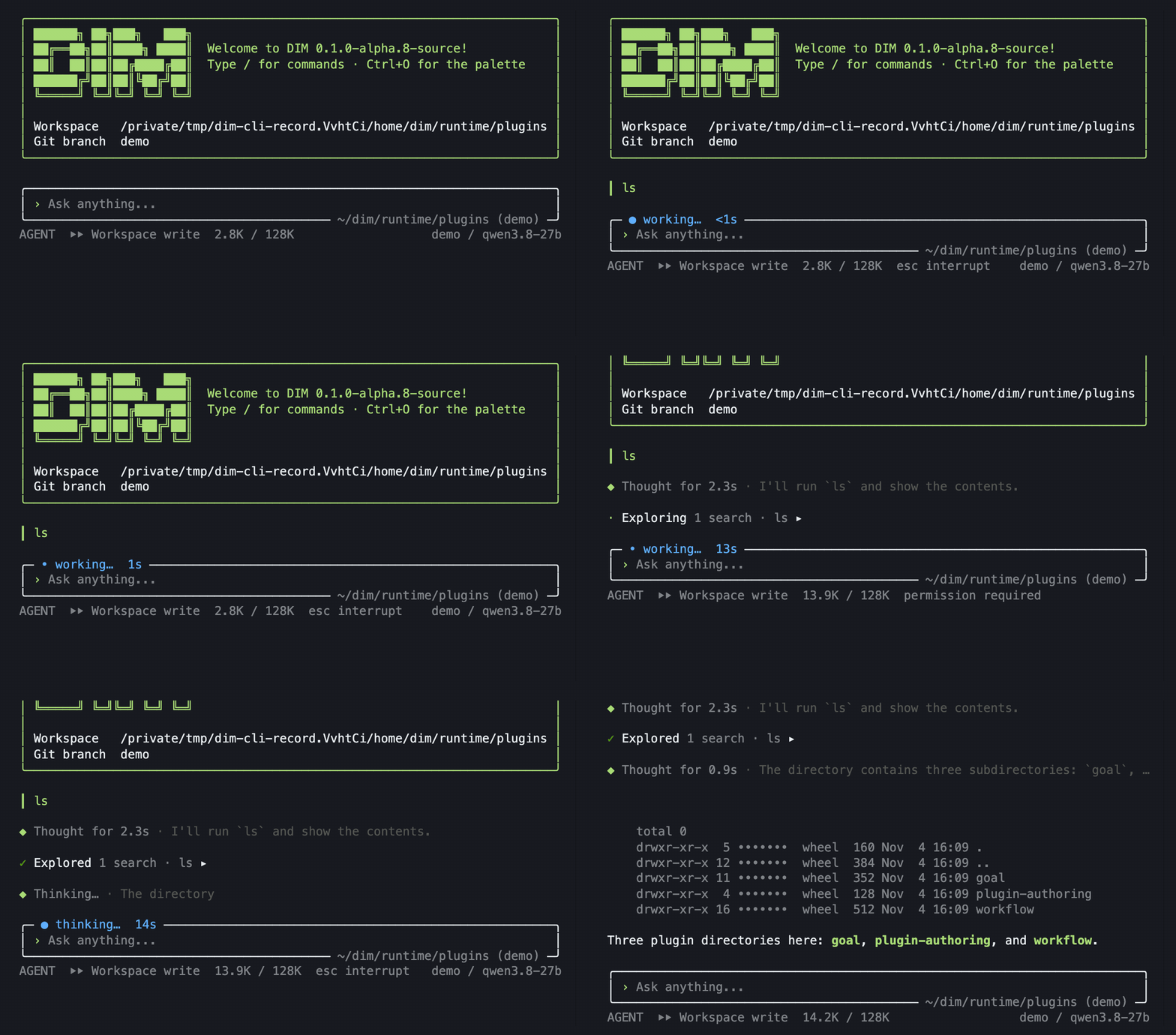
Sign in with /login or select a configured model with /models. Type ls in the chat and press Enter. In this session Dim asks to run ls -la in runtime/plugins. Choosing Allow once lets it list the three plugin directories.
For a read-only investigation, start dima --permission read-only in the retry example workspace and ask:
Read src/retry.py to see what happens when every attempt fails. Open a branch to read tests/test_retry.py. Does the existing test cover that case?
Use /lines to follow either investigation. To inspect the events that connect them, see Timeline export.
Safety. Read-only mode allows workspace reads and refuses agent file writes and shell commands. Process isolation is configured separately. Plugins, hooks and MCP servers can execute code when enabled. Project-supplied entries start disabled until you enable them locally. Permission controls · Plugin and command trust
How Dim adapts
- Grow across languages. A Python plugin can provide a service that a TypeScript or Rust part calls by name. The service contract stays the same when its implementation changes. How Dim uses rutis · TypeScript authoring guide
- Let events drive behavior. Each branch commits facts to its Timeline in sequence. Subscribed parts act on those facts and record the outcome, so a later part can pick up where the first left off. On restart, a part can recover its state without repeating a past action. Timeline · Event flows
- Discover what the environment means. A plugin can introduce an action, describe when to use it, and register a guide entry for the signals it sends. Each branch adopts its own tool declarations. An input guide explains the eight channels of model-facing text, including how to distinguish an operator’s instruction from a reading or a tool result. A plugin can also record an event for another part to consume without putting it in the model’s context. Tool declarations · Model-facing text · Event contract
- Follow two leads as one agent. A child branch inherits the parent’s history through a specific event. From there each line builds and compacts its own model context. Parent and child share a workspace and can exchange findings while they work. Branch design
Clients, tools and model protocols
The Rust harness can be embedded as a library. The App Server hosts it with persistence and workspace tools, and exposes sessions to clients. The terminal CLI is one such client. Architecture · Harness foundation
| Entry point | What it connects |
|---|---|
| Native CLI and Web | The CLI keeps output in terminal scrollback. Open /web for the Web workspace, /resume to reconnect to a saved session, or use dima --prompt TEXT for a single turn. CLI contract · Web workspace |
| Agent Client Protocol (ACP) | ACP clients such as acpx can launch dima acp over stdio. The gateway connects to the local App Server and handles protocol I/O, session projection and reconnection. Model selection and managed login depend on the daemon’s capabilities. ACP implementation · Client acceptance, including Lody |
| Model Context Protocol (MCP) | MCP servers supply tools alongside native tools. Servers supplied by an ACP client are scoped to its session and their configuration is discarded afterwards. Older daemons without this capability ignore the list. The gateway supports one workspace root. Session-scoped MCP · MCP OAuth |
| Model providers | Aimux connects the harness to OpenAI Chat Completions, OpenAI Responses, Anthropic Messages, Gemini GenerateContent and compatible chat endpoints. The optional Dim account plugin supplies managed login. Model host · Dim account plugin |
An ACP client can also start a source-built binary with an explicit home and model configuration:
./target/debug/dimcode acp \
  --home /absolute/path/to/isolated-home \
  --model-config /absolute/path/to/model.json
API-key setup
For Bash, from a source checkout:
mkdir -p .dev
cp crates/dim-agent-aimux/examples/openai.json .dev/model.json
export OPENAI_API_KEY=your-key
In .dev/model.json, set the provider endpoint and credential environment-variable name. Set both defaultModel.modelId and the corresponding model entry’s id to a model your account can use. Start the installed alpha with that configuration:
dima --model-config "$PWD/.dev/model.json" --permission read-onlyThe alpha keeps its state in ~/.dimcode-alpha and can coexist with the earlier CLI. Non-alpha Rust builds use ~/.dimcode by default. Sessions and account files are not automatically migrated. API-key providers work independently of the account plugin. Alpha package and platform details · App Server
Daily development
Install Rust through rustup. Cargo selects the version pinned in rust-toolchain.toml. The native API-key build needs no Node or pnpm. Run the following from the repository root. Build prerequisites
./dev --model-config "$PWD/.dev/model.json"To use the same configuration on later runs, copy .env.example to the ignored .env.dev and set DIMCODE_MODEL_CONFIG to the absolute JSON path. Leave DIMCODE_PROVIDER and DIMCODE_MODEL unset to use its default, or set both to select a catalog entry. The launcher rebuilds the native executable, restarts the development daemon and retains sessions under ~/.dimcode-dev. Use DIMCODE_HOME or --home for another isolated home and --cwd for another workspace. Development contract
./dev --prompt "Explain this project"  # run one turn, then detach
./dev --resume SESSION_ID             # reconnect to the saved session
./dev restart                         # rebuild and restart
./dev stop                            # stop without building
./dev web                             # serve the Web workspace until Ctrl+C
./dev check                           # run formatting and compilation checks
To build without the launcher:
cargo build --locked -p dimcode
./target/debug/dimcode --home /absolute/path/to/isolated-home \
  --model-config "$PWD/.dev/model.json"
The CLI also accepts redirected stdin for a single turn. Ctrl+C during a turn requests a stop and waits for it to settle. At idle, Ctrl+C or EOF detaches. Empty approval answers deny the action, and a noninteractive run that needs approval exits with a nonzero status. dimcode --help and --version work without starting a daemon.
Workspace
| Code | Responsibility |
|---|---|
| Runtime, types, capabilities | Agent and session lifecycles, Timelines, event contracts, input, model execution, permissions and branches |
| App Server, client, ACP gateway | Session hosting, persistence, RPC transport, product events, questions and protocol adapters |
| dimcode, native CLI, npm | One executable for the CLI and its app-server subcommand, plus platform packaging and command aliases |
| Model host, Dim account | Model protocols and account-enabled builds. Account OAuth client IDs are supplied at build time |
| Tests, xtask | Extension and integration flows, architecture boundary checks, generated graphs and measurements |
Verify
cargo fmt --all -- --check
cargo clippy --workspace --all-targets --locked -- -D warnings
cargo test --workspace --locked
cargo run --locked -p xtask -- check
node --test scripts/*.test.mjs
Public source verification uses local HTTP fixtures for model flows. For standalone binaries, node scripts/build-all.mjs builds the release targets or accepts a single target such as --target darwin-arm64. The resulting dist/dimcode-<platform> executable includes the App Server. Web assets can be installed separately or compiled in with the embedded-web Cargo feature. Cross-compiling the script’s Linux and Windows targets requires Zig, cargo-zigbuild and the corresponding Rust target. GitHub-hosted runners build the draft GitHub Releases. Build environment · Release packaging and cross-compilation · Release procedure · Documentation index
Third-party components and licenses
Dim’s original source is licensed under MIT. The distribution retains upstream licenses and copyright notices. Distribution notices
| Component | Use and attribution |
|---|---|
| rutis | Plugin loading, named services and cross-language bindings. Dim’s rutis integration |
| Aimux | Vendored model protocol implementations, distributed under MIT. Pinned source · Local patches · License |
| grok-build and Ratatui | The native terminal uses components from xAI’s grok-build, including its Ratatui-derived inline terminal. The distribution carries the Apache-2.0 license and upstream attributions under licenses/grok-build/. Source and revision · Notices |
| Rust, Web and plugin dependencies | Native archives include licenses/RUST-THIRD-PARTY-NOTICES.txt and licenses/aimux/. The Web workspace ships THIRD-PARTY-NOTICES.txt, including the SIL Open Font License for Geist and Geist Mono. Bundled TypeScript plugins retain their npm license files. Full inventory |