WhatsApp Backup Tools

Overview
WhatsApp Backup Tools is a suite to archive and access your WhatsApp data. Consists of two complementary programs:
- wab-archiver (WhatsApp Backup Archiver) organises your WhatsApp media into a structured folder hierarchy using metadata from the WhatsApp database. Instead of an unstructured dump, you get a browsable archive sorted by contact or group, year, and direction (Sent/Received), with original message timestamps preserved.
- wab-viewer (WhatsApp Backup Viewer) lets you browse and search your archived chats through a local web UI, replicating WhatsApp Web.
Both tools run locally — no data leaves your machine. Windows, Linux, and macOS are supported. Python 3.11 required.
⚠️ These tools are designed to run on a backup copy of your WhatsApp data — never on live device files. The archiver always makes a copy of your data.
Whatsapp Backup Viewer screenshots
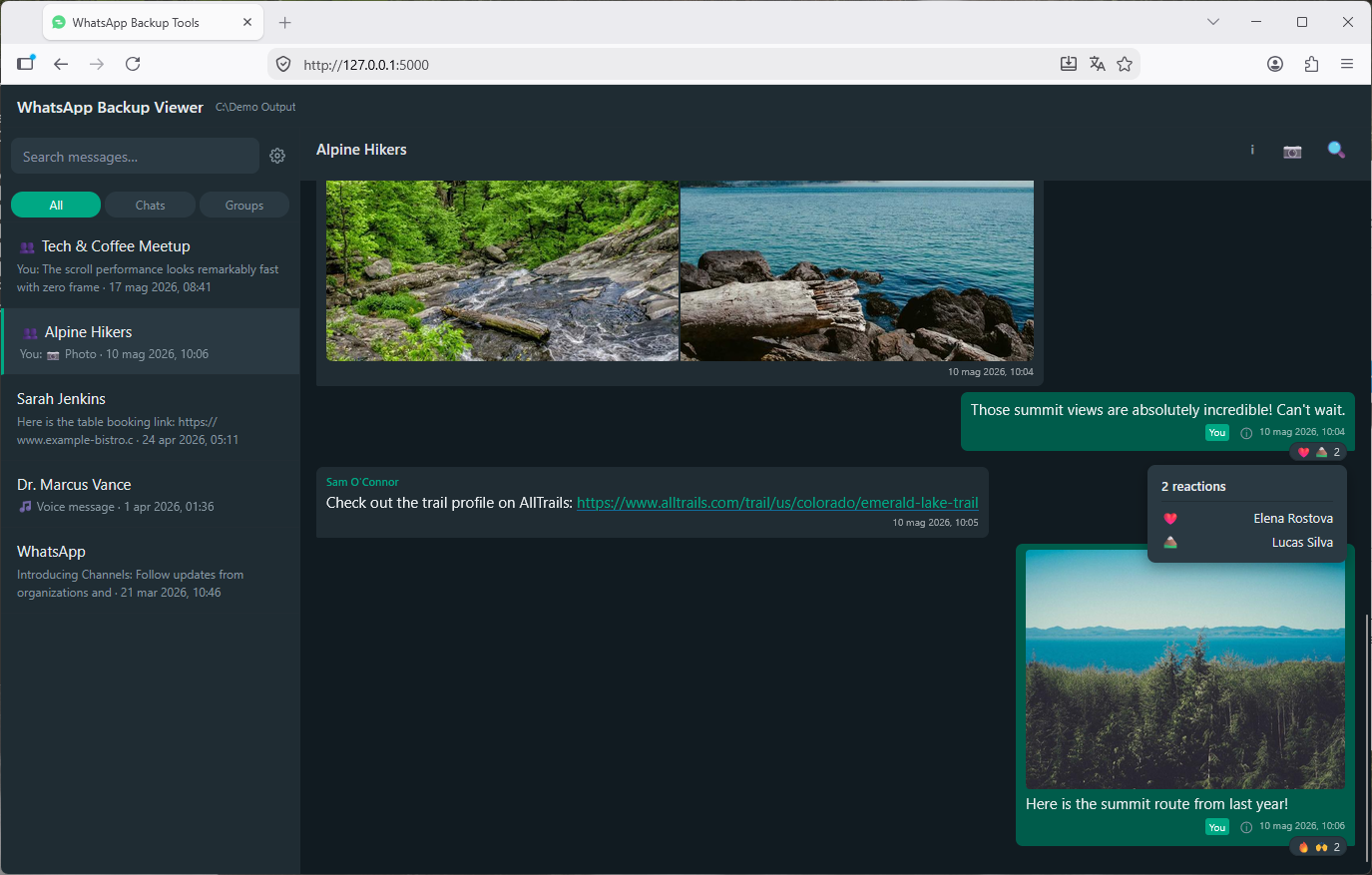
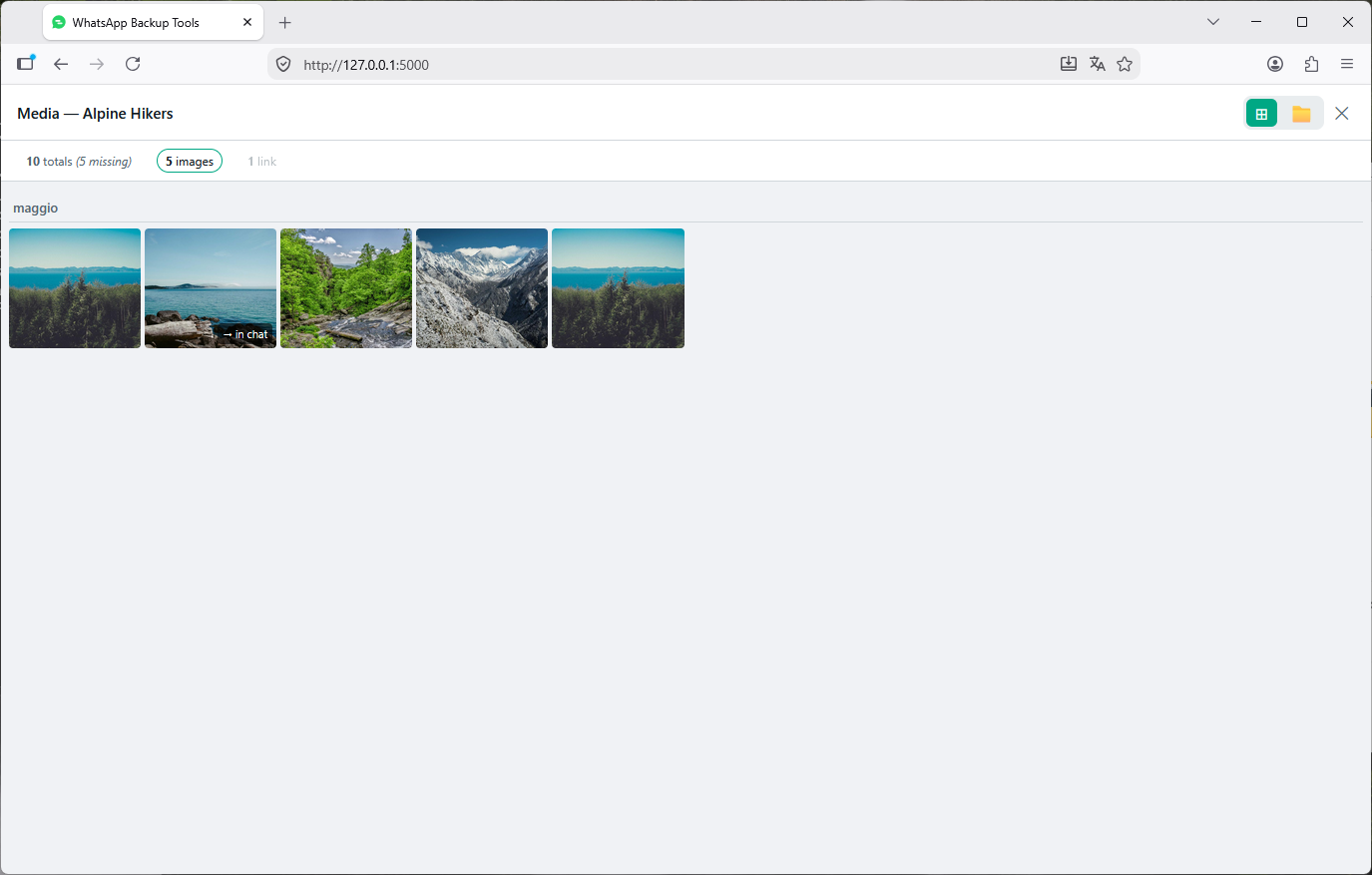
Table of Contents
Ready to begin? Skip directly to Installation & Quick Start.
- Features
- Archive Structure
- Installation & Quick Start
- Re-running the Archiver
- Prerequisites
- Known Limitations
- Star History
- Credits
- Development Philosophy
- Disclaimer
Features
WhatsApp Backup Archiver
Organise and preserve your WhatsApp media in a clean, human-readable structure.
- Structured & Human-Readable: Organises media into
Contacts/andGroups/sorted by year andSent/Received, with original WhatsApp message timestamps preserved. - Smart Identity Tracking: Automatically detects contact renames, phone number migrations, and groups with identical names across runs.
- Safe & Incremental Runs: Skips identical files, never overwrites existing media, merges multiple backup roots (
--wa-root), and exports duplicate/missing media CSV audit reports. - Cross-Platform Support: Works with both Android (no root required) and iOS (via device backups), with optional restore mode to reconstruct Android media layouts.
- Supported Media: Images, Videos, Audio, Voice notes, Video messages, Animated GIFs, Documents, Stickers, and Contact cards (.vcf).
WhatsApp Backup Viewer
Explore and search your archived chats through a local web UI replicating WhatsApp Web.
- Authentic WhatsApp Web UI: Fast, responsive layout with dark and light themes, customizable font size, and regional date formats.
- Rich Chat Timeline: Chronological chat history with reactions, quoted replies, delivery/read receipts, and smooth scrolling even in massive conversations.
- In-Browser Media Player & Gallery: Stream video and voice notes with seeking, open photos in a lightbox, and explore chat media via thumbnail grid or folder tree.
- Full-Text Search & Navigation: Search across all chats or within a single conversation, jump directly to matches, or jump to specific dates with the date picker.
Archive Structure
After a successful run, the archive is organised as follows:
<output>/
├── Contacts/
│   ├── John Doe (0039123456789)/
│   │   ├── 2023/
│   │   │   ├── Received/
│   │   │   └── Sent/
│   │   └── 2024/
│   │       ├── Received/
│   │       └── Sent/
│   └── Unknown (0044987654321)/
│       └── 2022/
│           └── Received/
├── Groups/
│   ├── Family Chat/
│   │   ├── 2023/
│   │   └── 2024/
│   └── Work Team/
│       └── 2024/
├── Whatsapp Databases/       ← Extracted/decrypted WhatsApp databases (iOS & Android)
│   ├── ChatStorage.sqlite
│   ├── ContactsV2.sqlite
│   └── ...
├── .wa_media_archiver.db
├── wab-archiver.log
├── missing_media_report.csv
├── duplicate_media_report.csv
└── source_conflicts_report.csv  ← only when multiple --wa-root roots produce conflicting copies
- Files in Contacts folders retain their original filename
- Files in Groups folders have the sender name appended:
IMG-20230115-WA0001_JohnDoe.jpg - Your own sent media in groups is appended with
_Me - All copied files have their modified date set to the original WhatsApp timestamp
- Contact folder names use the
00prefix for phone numbers (e.g.0039...), not+
Installation & Quick Start
To organize and view your WhatsApp data on your computer, the tool needs two things from your phone: your WhatsApp Database and your WhatsApp Media.
Everything is processed 100% locally on your computer — no data leaves your machine. See docs/prerequisites.md for full system requirements.
Step 1: Install the Tool
Ensure Python 3.11+ is installed, then install from PyPI:
pip install whatsapp-backup-tools💡 Windows users: If
pipis not recognized, runpy -m pip install whatsapp-backup-toolsinstead.
Alternative installation methods (offline wheel, clone, or running without pip)
- Pre-built wheel (.whl): Download from GitHub Releases and run:
pip install whatsapp_backup_tools-x.xx-py3-none-any.whl - Local clone:
git clone https://github.com/auanasgheps/whatsapp-backup-tools.git cd whatsapp-backup-tools pip install . - Manual execution without pip:
python -m wab_archiver --help
python -m wab_viewer --help
Step 2: Get the Files from Your Phone
Follow the step-by-step guide for your device to extract your database and sync your media:
- 🤖 Android Setup Guide:
- Turn on End-to-End Encrypted Backup in WhatsApp and note your 64-digit key.
- Sync your media folder automatically over USB via ADB (
--from-adb) or use Syncthing.
- 🍏 iOS / iPhone Setup Guide:
- Turn off in-app WhatsApp encrypted backup.
- Create a local device backup on your computer with Finder (macOS) or Apple Devices / iTunes (Windows).
Step 3: Archive & View
You can run the archiver using command-line arguments as shown below, or simplify recurring runs by using a configuration file (config.toml). See the Command Reference & Config File Guide for details.
1. Run the Archiver
Run a preview (--dry-run) first to verify your paths and encryption key:
Android example:
wab-archiver archive \
  --msgstore "/path/to/WhatsApp/Databases/msgstore.db.crypt15" \
  --e2e-key YOUR_64_CHAR_KEY \
  --wa-root "/path/to/WhatsApp" \
  --output "/path/to/my-archive" \
  --dry-run
(Alternatively, if your phone is connected via USB, use --from-adb to pull and decrypt the database automatically.)
iOS example:
wab-archiver archive \
  --ios-backup "/path/to/Backup/<UDID>" \
  --output "/path/to/my-archive" \
  --dry-run
Once the dry run completes without errors, remove --dry-run to create your archive!
💡 On Windows, replace the line continuation
\with`(PowerShell) or^(cmd.exe).
💡 Paths with spaces: If your folder paths contain spaces, remember to enclose them in quotes (e.g."/path/to/my folder").
💡 Tip: Avoid repeating long terminal commands by generating a settings file withwab-archiver config generate. See Configuration Files.
2. Open the Local Chat Viewer
Point wab-viewer to your archive folder:
wab-viewer "/path/to/my-archive"Open your browser at http://127.0.0.1:5000 to browse, search, and relive your chats. See the Viewer Guide for all features.
Re-running the Archiver
The archiver is safe to re-run on an existing archive:
- Files already copied with identical content will be silently skipped
- Files with the same name but different content will be renamed with a numeric suffix and logged as a warning
- New media not yet in the archive will be copied normally
- If a contact has been renamed since the last run, their folder on disk will be automatically renamed to match, keeping the archive consolidated
- Recommended: use the config file to keep settings for easier re-runs
Prerequisites
- Python 3.11 or later is required
- Android:
- End-to-end encrypted backup must be enabled in WhatsApp before pulling the database. Root is not required
- ADB is installed
- iOS/iPadOS:
- End-to-end encrypted backup must be disabled
- An iOS backup on your computer
See docs/prerequisites.md for full setup instructions: E2E backup configuration, database extraction (Android and iOS), contacts pull, and locating your media folder.
Known Limitations
Archiver
- Year folders reflect the local time of the machine running the script, not UTC. A message sent just after midnight on 1 January will be filed under the new year only if your machine's clock agrees. This is intentional — the archive reflects your local experience of when media was shared
- iOS restore mode is not supported. Restore mode reconstructs the Android
Media/folder layout, which has no equivalent on iOS. Runningwab-archiver restoreon an iOS archive exits with a clear error - iOS number change tracking is best-effort. Contacts present in the device address book are consolidated automatically. Contacts not saved to the address book appear as separate folders
Viewer
- Timeline scope: Call history and poll interactions are not yet rendered in the chat timeline.
- See viewer known limitations for full details on profile push names, receipts, and platform variations.
Star History
Credits
- Inspired by Wa_Immich_Tagger by mac12m99 — provided the initial Android DB query pattern
- iOS backup reading approach inspired by whatsapp-chat-exporter by KnugiHK
Development Philosophy
Handling personal communication archives requires high standards for data integrity and privacy. This project is built on three core engineering pillars:
- Strict Verification: Over 570 unit, integration, and UI tests validate everything from multi-root media deduplication to SQLite transaction safety.
- Domain Rigor: Deep reverse-engineering of proprietary WhatsApp artifacts across both mobile operating systems (cryptographic pipelines, protobuf varints, and auxiliary databases).
- Developed with AI: Modern AI coding tools were leveraged as pair programmers to accelerate implementation and broaden test coverage, strictly guided by human architectural design and verified against automated CI suites.
Disclaimer
WhatsApp Backup Tools are not affiliated, associated, authorised, endorsed by, or in any way officially connected with WhatsApp LLC, or any of its subsidiaries or its affiliates.
The project is provided 'as is' without any express or implied warranties.