OpenClaw on AWS with Bedrock
Your own AI assistant on AWS — connects to WhatsApp, Telegram, Discord, Slack. Powered by Amazon Bedrock. No API keys. One-click deploy. From ~$30/month.
English | 简体中文



Why This Exists
OpenClaw is the fastest-growing open-source AI assistant — it runs on your hardware, connects to your messaging apps, and actually does things: manages email, browses the web, runs commands, schedules tasks.
The problem: setting it up means managing API keys from multiple providers, configuring VPNs, and handling security yourself.
This project solves that. One CloudFormation stack gives you:
- Amazon Bedrock for model access — 10 models, one unified API, IAM authentication (no API keys)
- Graviton ARM instances — 20-40% cheaper than x86
- SSM Session Manager — secure access without opening ports
- VPC Endpoints — traffic stays on AWS private network
- CloudTrail — every API call audited automatically
Deploy in 8 minutes. Access from your phone.
Quick Start
One-Click Deploy
- Click "Launch Stack" for your region
- Wait ~8 minutes
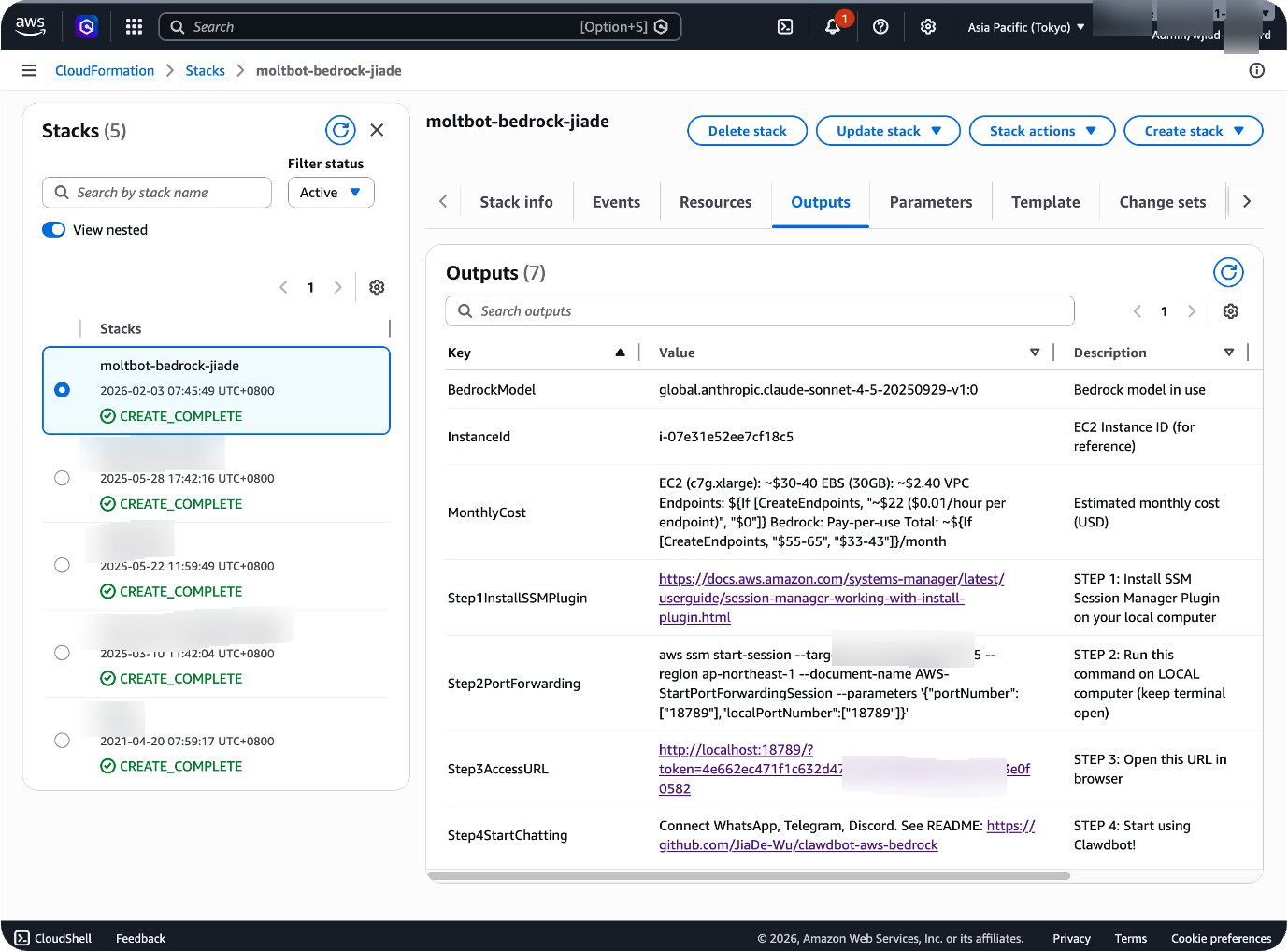
- Check the Outputs tab
| Region | Launch |
|---|---|
| US West (Oregon) |  |
| US East (Virginia) | |
| EU (Ireland) | |
| Asia Pacific (Tokyo) | |
Prerequisites: Bedrock model access is automatic — no manual enablement required. No SSH key needed — access via SSM Session Manager only.
After Deployment
🦞 Just open the Web UI and say hi. All messaging plugins (WhatsApp, Telegram, Discord, Slack, Feishu) are pre-installed. Tell your OpenClaw which platform you want to connect — it will guide you through the entire setup step by step. No manual configuration needed.
# 1. Install SSM Session Manager Plugin (one-time)
#    https://docs.aws.amazon.com/systems-manager/latest/userguide/session-manager-working-with-install-plugin.html

# 2. Start port forwarding (keep terminal open)
INSTANCE_ID=$(aws cloudformation describe-stacks \
  --stack-name openclaw-bedrock \
  --query 'Stacks[0].Outputs[?OutputKey==`InstanceId`].OutputValue' \
  --output text --region us-west-2)

aws ssm start-session \
  --target $INSTANCE_ID \
  --region us-west-2  # change to your deployment region \
  --document-name AWS-StartPortForwardingSession \
  --parameters '{"portNumber":["18789"],"localPortNumber":["18789"]}'

# 3. Get your token (in a second terminal)
TOKEN=$(aws ssm get-parameter \
  --name /openclaw/openclaw-bedrock/gateway-token \
  --with-decryption \
  --query Parameter.Value \
  --output text --region YOUR_REGION)

# 4. Open in browser
echo "http://localhost:18789/?token=$TOKEN"
CLI Deploy (Alternative)
aws cloudformation create-stack \
  --stack-name openclaw-bedrock \
  --template-body file://clawdbot-bedrock.yaml \
  --capabilities CAPABILITY_IAM \
  --region us-west-2

aws cloudformation wait stack-create-complete \
  --stack-name openclaw-bedrock --region us-west-2
🎯 Deploy with Kiro AI
Prefer a guided experience? Kiro walks you through deployment conversationally — just open this repo as a workspace and say "help me deploy OpenClaw".
Connect Messaging Platforms
Once deployed, connect your preferred platform in the Web UI under "Channels":
| Platform | Setup | Guide |
|---|---|---|
| Scan QR code from your phone | docs | |
| Telegram | Create bot via @BotFather, paste token | docs |
| Discord | Create app in Developer Portal, paste bot token | docs |
| Slack | Create app at api.slack.com, install to workspace | docs |
| Microsoft Teams | Requires Azure Bot setup | docs |
| Lark / Feishu | Community plugin: openclaw-feishu | — |
Full platform docs: docs.openclaw.ai
What Can OpenClaw Do?
Once connected, just message it:
You: What's the weather in Tokyo?
You: Summarize this PDF [attach file]
You: Remind me every day at 9am to check emails
You: Open google.com and search for "AWS Bedrock pricing"
| Command | What it does |
|---|---|
/status | Show model, tokens used, cost |
/new | Start fresh conversation |
/think high | Enable deep reasoning mode |
/help | List all commands |
Voice messages work on WhatsApp and Telegram — OpenClaw transcribes and responds.
Architecture
You (WhatsApp/Telegram/Discord)
  │
  ▼
┌─────────────────────────────────────────────┐
│  AWS Cloud                                  │
│                                             │
│  EC2 (OpenClaw)  ──IAM──▶  Bedrock         │
│   (public subnet)         (Nova/Claude)     │
│        │                                    │
│   Internet Gateway    CloudTrail            │
│   (direct access)     (audit logs)          │
└─────────────────────────────────────────────┘
  │
  ▼
You (receive response)
- EC2: Runs OpenClaw gateway in public subnet (~1GB RAM, c7g.large recommended)
- Bedrock: Model inference via IAM (no API keys)
- SSM: Secure access, no public ports
- Internet Gateway: Direct internet access (no NAT Gateway cost)
- VPC Endpoints: Optional private network to Bedrock (+$88/mo for 6 interface endpoints, S3 Gateway free)
- CloudWatch: Auto-recovery, health monitoring, log shipping (optional, +$4/mo)
Models
Switch models with one CloudFormation parameter — no code changes:
| Model | Input/Output per 1M tokens | Best for |
|---|---|---|
| Nova 2 Lite (default) | $0.30 / $2.50 | Everyday tasks, 90% cheaper than Claude |
| Nova Pro | $0.80 / $3.20 | Balanced performance, multimodal |
| Claude Opus 4.6 | $15.00 / $75.00 | Most capable, complex agentic tasks |
| Claude Opus 4.5 | $15.00 / $75.00 | Deep analysis, extended thinking |
| Claude Sonnet 4.5 | $3.00 / $15.00 | Complex reasoning, coding |
| Claude Sonnet 4 | $3.00 / $15.00 | Reliable coding and analysis |
| Claude Haiku 4.5 | $1.00 / $5.00 | Fast and efficient |
| DeepSeek R1 | $0.55 / $2.19 | Open-source reasoning |
| Llama 3.3 70B | — | Open-source alternative |
| Kimi K2.5 | $0.60 / $3.00 | Multimodal agentic, 262K context |
Uses Global CRIS profiles — deploy in any region, requests auto-route to optimal locations.
Cost
Typical Monthly Cost (Light Usage)
| Component | Cost (us-west-2) | Optional |
|---|---|---|
| EC2 (c7g.large, Graviton) | ~$53 | Default (2 vCPU, 4GB RAM) |
| EBS (30GB gp3 x2) | $4.80 | Required (root + data volumes) |
| CloudWatch Monitoring | ~$4 | ✅ Disable to save ~$4/mo |
| VPC Endpoints (6 interface) | ~$88 | ✅ Enable for private network (+$88/mo, S3 Gateway free) |
| ALB + CloudFront | $22.80 | ✅ Enable for public access (+$22.80/mo) |
| AWS WAF | ~$10 | ✅ Only if deploy to us-east-1 (+$10/mo) |
| Bedrock (Nova 2 Lite, ~100 conv/day) | $5.55 | Pay-per-use (~6M input + 1.5M output tokens/mo) |
| Total (default: VPCe OFF, monitoring ON) | ~$67/mo | EC2 + CloudWatch + Bedrock (saves $34/mo, no NAT) |
| Total (minimal: VPCe OFF, monitoring OFF) | ~$63/mo | Save ~$4/mo by disabling CloudWatch (saves $38/mo vs old default) |
| Total (VPC Endpoints ON) | ~$155/mo | Add ~$88/mo for 6 interface endpoints across 2 AZs (S3 Gateway free) |
| Total (public access, no WAF) | ~$90/mo | Add $22.80/mo (ALB + CloudFront) |
| Total (public + VPCe, no WAF) | ~$178/mo | Add $111/mo (VPCe + public access) |
| Total (full security: public + VPCe + WAF, us-east-1) | ~$188/mo | Add $121/mo (full security stack) |
Cost optimization: Use
t4g.medium($24/mo) orr7g.medium($30/mo, 8GB RAM) instead of c7g.large to save ~$30/mo. Enable VPC Endpoints only if you need private network routing (adds ~$88/mo for 6 interface endpoints). NAT Gateway removed — saves $34/mo vs previous architecture.
Always included at no extra cost:
- 2GB swap (prevents OOM crashes)
- Health check cron (port + HTTP + channel connectivity, every 5 min)
- OS security patches (unattended-upgrades, automatic)
- IMDSv2 enforcement (HttpTokens: required, no v1 fallback)
openclaw doctor --fixpost-install validation- systemd memory limits (graceful restart before OOM at 80% memory)
- Internet Gateway access (direct outbound connectivity, no NAT Gateway cost)
- Node.js 22.22.0 pinned (prevents breakage from bad releases)
- S3 Gateway VPC Endpoint (free, no hourly charge)
Pricing notes:
- All costs based on AWS Official Pricing API for us-west-2 (accessed May 2026)
- EC2 c7g.large: $0.0725/hour = ~$53/month (verified via AWS Pricing API)
- VPC Interface Endpoints: $0.01/hour/AZ × 2 AZs = $14.60/month per endpoint
- NAT Gateway removed: Saves $32.85/hour + ~$1.80 data processing = ~$34/month
Cost Breakdown by Configuration
| Configuration | Monthly Cost | What You Get |
|---|---|---|
| Default (VPCe OFF, monitoring ON) | ~$67 | EC2 c7g.large ($53) + EBS 60GB ($4.80) + CloudWatch ($4) + Bedrock Nova 2 Lite ($5.55). Traffic via Internet Gateway to AWS public endpoints (TLS encrypted). SSM-only access. Saves $34/mo (no NAT Gateway). |
| Minimal (VPCe OFF, monitoring OFF) | ~$63 | Above minus CloudWatch monitoring. Save ~$4/mo. Lose auto-recovery, health alarms, log shipping. Saves $38/mo vs old architecture. |
| Private Network (VPCe ON, monitoring ON) | ~$155 | Default + 6 interface VPC endpoints across 2 AZs ($14.60/endpoint/mo × 6 = $87.60): Bedrock Runtime, Bedrock Mantle (conditional), SSM, SSM Messages, EC2 Messages, CloudWatch Logs. S3 Gateway endpoint free. Add ~$88/mo (includes data processing). All AWS API traffic stays on private network (never touches internet). |
| Public Access (VPCe OFF, no WAF) | ~$90 | Default + ALB ($22.27) + CloudFront ($0.53). Add $22.80/mo. HTTPS via CloudFront, but CloudFront→ALB uses HTTP (not end-to-end TLS). No Layer 7 WAF. |
| Public + Private Network (VPCe ON, no WAF) | ~$178 | Above + 6 VPC endpoints. Add $111/mo total. |
| Full Security (public + VPCe + WAF, us-east-1 only) | ~$188 | Above + AWS WAF (~$10): Web ACL + 5 managed rules (SQL injection, XSS, bad inputs, Linux protection, rate limiting 1000 req/5min). Add $121/mo total. ⚠️ WAF only works in us-east-1 — other regions silently skip WAF (no Layer 7 protection, only Shield Standard Layer 3/4). |
Save Money
- Use Nova 2 Lite instead of Claude → 90% cheaper inference ($0.30 vs $3-15 per 1M input tokens). Already default ✅
- Use Graviton (ARM) instead of x86 → 20-40% cheaper EC2. c7g.large (~$53/mo) vs r5.large x86 ($92/mo). Already default ✅
- No NAT Gateway → Saves $34/mo vs previous architecture. Instance in public subnet with direct Internet Gateway access. New default ✅
- Use smaller instance type → t4g.medium ($24.53/mo, 4GB RAM) saves $28.40/mo (54% cheaper) vs c7g.large. Trade-off: Less CPU for Docker sandbox. Good for light usage (<10 users).
- Use r7g.medium → $39.13/mo (8GB RAM) saves $13.80/mo (26% cheaper) vs c7g.large. More memory for plugins/embeddings, but only 1 vCPU.
- Default config (VPCe OFF) → saves ~$88/mo vs private network. Traffic goes via Internet Gateway to AWS public endpoints (TLS encrypted). Best cost/benefit ratio for most use cases. ✅
- Skip public access (
EnablePublicAccess=false) → saves $22.80/mo (no ALB + CloudFront). Use SSM Session Manager only. Already default ✅ - Disable monitoring (
EnableMonitoring=false) → saves ~$4/mo (lose auto-recovery alarms, health metrics, log shipping to CloudWatch). Not recommended for production. - AWS Savings Plans → 30-40% off EC2 for 1-3 year commitment. c7g.large: ~$53/mo → ~$31.76-37.05/mo (save $15-21/mo). Must commit to instance family (c7g). Best for long-term deployments.
vs. Alternatives
| Option | Cost | What you get |
|---|---|---|
| ChatGPT Plus | $20/person/month | Single user, no integrations, web UI only |
| This project (1 user) | $67/month | 3.4x more expensive, but full control + integrations |
| This project (3 users) | $22.33/person/month | Close to ChatGPT, multi-user, WhatsApp/Telegram/Discord/Slack |
| This project (5 users) | $13.40/person/month | 33% cheaper, economy of scale |
| This project (10 users) | $6.70/person/month | 67% cheaper, way more features |
| This project (20 users) | $3.35/person/month | 83% cheaper, enterprise scale |
| This project (50 users) | $1.34/person/month | 93% cheaper, large organization |
| Local Mac Mini | $0 server + $20-30 API | Hardware cost, manage yourself, electricity cost |
Break-even point: ~3-4 users (same cost as ChatGPT Plus) — improved from 5 users after NAT Gateway removal
Configuration
Instance Types
| Type | Monthly (us-west-2) | vCPU | RAM | Architecture | Use case |
|---|---|---|---|---|---|
| t4g.small | $12 | 2 | 2GB | Graviton ARM | Personal (minimal), burstable |
| t4g.medium | $24.53 | 2 | 4GB | Graviton ARM | Best value (save $28.40/mo vs c7g.large) |
| t4g.large | $49 | 2 | 8GB | Graviton ARM | Medium teams, burstable |
| c7g.large | $53 | 2 | 4GB | Graviton ARM | Default (compute-optimized for Node.js + Docker) |
| c7g.xlarge | $106 | 4 | 8GB | Graviton ARM | Heavy compute workloads |
| r7g.medium | $39.13 | 1 | 8GB | Graviton ARM | Memory-optimized (save $13.80/mo, good for plugins/embeddings) |
| r7g.large | $78 | 2 | 16GB | Graviton ARM | Heavy usage / many plugins |
| r5.large | $92 | 2 | 16GB | x86 | x86 compatibility + memory |
Cost source: AWS Pricing API (accessed May 2026)
Parameters
| Parameter | Default | Description |
|---|---|---|
OpenClawModel | global.amazon.nova-2-lite-v1:0 | Bedrock model ID - Nova 2 Lite offers best price-performance for everyday tasks. 10 models available: Nova 2 Lite, Claude Sonnet 4.5, Nova Pro, Claude Opus 4.6, Claude Opus 4.5, Claude Haiku 4.5, Claude Sonnet 4, DeepSeek R1, Llama 3.3 70B, Kimi K2.5 |
OpenClawVersion | 2026.4.27 | OpenClaw version. 2026.3.24 (no model approval needed, WeChat compatible), 2026.4.5 / 2026.4.10 / 2026.4.27 (auto-discovery, embeddings), or latest (not recommended for production) |
InstanceType | c7g.large | EC2 instance type. Graviton (ARM) recommended. c7g = compute-optimized (recommended, 2 vCPU for Node.js + Docker sandbox), r7g/r6g = memory-optimized (plugins, embeddings), t4g = burstable (cost-optimized). 14 ARM + 7 x86 instance types available |
CreateVPCEndpoints | false | Create VPC endpoints for private network access (~$88/mo for 6 interface endpoints across 2 AZs: Bedrock Runtime, Bedrock Mantle (conditional on region), SSM, SSM Messages, EC2 Messages, CloudWatch Logs. Each endpoint: $0.01/hour/AZ × 2 AZs × 730 hours = $14.60/mo. Plus data processing charges. S3 Gateway endpoint free). Default OFF to minimize cost. Traffic goes via Internet Gateway to AWS public HTTPS endpoints instead (TLS encrypted, no security downside for most use cases). Enable only if compliance requires private network routing (adds ~$88/mo). |
EnableMonitoring | true | Enable CloudWatch monitoring, EC2 auto-recovery + reboot alarms, metrics (memory, disk, swap), and log shipping (~$4/mo). Recommended ON for production |
EnableSandbox | true | Install Docker for sandboxed command execution (recommended for group chats and untrusted code). Adds ~500MB disk usage |
EnableDataProtection | false | Retain both EBS volume and S3 bucket when stack is deleted (protects against accidental data loss). Set to true for production |
EnablePublicAccess | false | Enable public HTTPS access via ALB + CloudFront (~$25/mo). When disabled, access via SSM Session Manager only (secure, no open ports). ⚠️ Security Note: CloudFront → ALB connection uses HTTP (not HTTPS), meaning origin traffic is unencrypted. This is an accepted tradeoff for simplicity. For full end-to-end encryption, add ACM certificate + HTTPS ALB listener (see SECURITY.md). |
EnableWAF | true | Enable AWS WAF for CloudFront (Layer 7 DDoS protection, SQL injection, XSS, bad inputs, rate limiting 1000 req/5min, ~$10/mo). ⚠️ CRITICAL LIMITATION: WAF only works in us-east-1. If you deploy in other regions (e.g., us-west-2, ap-northeast-1, eu-west-1), the WAF will be silently skipped and you won't get Layer 7 protection. Deploy in us-east-1 to enable WAF, or accept that other regions only get Shield Standard (Layer 3/4 DDoS protection). |
AllowedCountries | (empty) | CloudFront geographic restrictions (geo-blocking). Leave empty (default) to allow worldwide access, or specify comma-separated ISO 3166-1 alpha-2 country codes to restrict access to specific countries only (e.g., AU,US,GB,JP). Useful for compliance (GDPR, data residency) |
Deployment Options
Standard (EC2) — This README
Best for most users. Fixed cost, full control, 24/7 availability.
Multi-Tenant Platform (AgentCore Runtime) — README_ENTERPRISE.md
✅ E2E verified — Full pipeline running: IM → Gateway → Bedrock H2 Proxy → Tenant Router → AgentCore Firecracker microVM → OpenClaw CLI → Bedrock → response. Demo Guide →
Turn OpenClaw from a single-user tool into an enterprise platform: every employee gets an isolated AI assistant in a Firecracker microVM, with shared skills, centralized governance, and per-tenant permissions. Zero changes to OpenClaw code.
Telegram/WhatsApp message
  → OpenClaw Gateway (IM channels, Web UI)
  → Bedrock H2 Proxy (intercepts AWS SDK HTTP/2 calls)
  → Tenant Router (derives tenant_id per employee)
  → AgentCore Runtime (Firecracker microVM, per-tenant isolation)
  → OpenClaw CLI → Bedrock Nova 2 Lite
  → Response returns to employee's IM
| What you get | How | Status |
|---|---|---|
| Tenant isolation | Firecracker microVM per user (AgentCore Runtime) | ✅ Verified |
| Shared model access | One Bedrock account, per-tenant metering (~$1-2/person/month) | ✅ Verified |
| Per-tenant permission profiles | SSM-based rules, Plan A (prompt injection) + Plan E (audit) | ✅ Verified |
| IM channel management | Same setup as single-user (WhatsApp/Telegram/Discord) | ✅ Verified |
| Zero OpenClaw code changes | All management via external layers (proxy, router, entrypoint) | ✅ Verified |
| Shared skills with bundled SaaS keys | Install once, authorize per tenant | 🔜 Next |
| Human approval workflow | Auth Agent → admin notification → approve/reject | 🔜 Next |
| Elastic compute | Auto-scaling microVMs, burst capacity, pay-per-use | ✅ Verified |
| Metric | Value |
|---|---|
| Cold start (user-perceived) | ~3s (fast-path direct Bedrock) |
| Cold start (real microVM) | ~22-25s (background, user doesn't wait) |
| Warm request | ~5-10s |
| Cost for 50 users | |
| vs ChatGPT Plus (50 users) | $1,000/month |
→ Full Multi-Tenant Guide · → Roadmap
🏢 Enterprise Digital Workforce Platform — enterprise/
NEW — Turn OpenClaw into a centrally managed digital workforce for your entire organization. Each employee gets a role-specific AI agent with unique identity, permissions, memory, and knowledge — all governed by IT, without modifying a single line of OpenClaw code.
Built on top of the Multi-Tenant AgentCore Runtime, the Enterprise platform adds:
┌─────────────────────────────────────────────────────────┐
│  Admin Console (19 pages) + Employee Portal (5 pages)    │
│  React + Tailwind + FastAPI + DynamoDB + S3              │
├─────────────────────────────────────────────────────────┤
│  Three-Layer SOUL Architecture                           │
│  Global (IT locked) → Position (dept admin) → Personal   │
│  Same LLM, completely different agent identities         │
├─────────────────────────────────────────────────────────┤
│  Enterprise Controls                                     │
│  RBAC (admin/manager/employee) · Skill governance        │
│  Audit trail + AI anomaly detection · Usage tracking     │
│  Memory persistence · Knowledge base (Markdown in S3)    │
└─────────────────────────────────────────────────────────┘
| Design Principle | What It Means |
|---|---|
| Zero invasion | Controls OpenClaw via workspace files (SOUL.md, TOOLS.md). No fork, no patch. Upgrade OpenClaw independently. |
| Serverless-first | Firecracker microVM per request via AgentCore. 20 agents = ~$65/mo (vs ChatGPT Team $500/mo). |
| Security by design | No open ports, no hardcoded credentials, tenant isolation, IAM least privilege, comprehensive audit. |
| File-first knowledge | Markdown in S3, not a vector DB. Zero infra cost, human-readable, scope-controlled. |
| What's Included | Details |
|---|---|
| 24 pages | Dashboard, Org Tree, Agents, SOUL Editor, Workspace, Skills, Knowledge, Monitor, Audit, Usage, Approvals, Settings, Playground + 5 Portal pages |
| 35+ API endpoints | FastAPI with DynamoDB single-table design, S3 operations, JWT auth |
| 3-role RBAC | Admin (full), Manager (department-scoped), Employee (portal only) |
| 10 SOUL templates | SA, SDE, DevOps, QA, AE, PM, Finance, HR, CSM, Legal |
| 26 skills | Role-filtered with allowedRoles/blockedRoles manifests |
| Sample org | 20 employees, 20 agents, 13 departments — seed scripts included |
→ Enterprise Platform Guide · → Enterprise Roadmap
EKS (Kubernetes) — For Container-Native Deployments
Run OpenClaw agents on Amazon EKS with Terraform. Supports AWS Global and China regions.
→ EKS Deployment Guide (EN) · → EKS 部署指南 (中文)
macOS (Apple Silicon) — For iOS/macOS Development
| Type | Chip | RAM | Monthly |
|---|---|---|---|
| mac2.metal | M1 | 16GB | $468 |
| mac2-m2.metal | M2 | 24GB | $632 |
| mac2-m2pro.metal | M2 Pro | 32GB | $792 |
24-hour minimum allocation. Only use for Apple development workflows — Linux is 12x cheaper for general use.
| Region | Launch |
|---|---|
| US West (Oregon) | |
| US East (Virginia) | |
🇨🇳 AWS China (Beijing/Ningxia)
Uses SiliconFlow (DeepSeek, Qwen, GLM) instead of Bedrock. Requires a SiliconFlow API key.
| Region | Launch |
|---|---|
| cn-north-1 (Beijing) | |
| cn-northwest-1 (Ningxia) | |
→ China Deployment Guide (中国区部署指南)
Security
| Layer | What it does |
|---|---|
| No SSH | Zero SSH keys, zero SSH ports. SSM Session Manager only. |
| IAM Roles | No API keys — automatic credential rotation via EC2 instance profile |
| IMDSv2 Enforced | Instance metadata requires secure token (HttpTokens: required, no v1 fallback) |
| SSM Session Manager | No public ports (22/3389/18789), session logging, encrypted tunnel |
| VPC Endpoints (optional) | Bedrock + SSM traffic stays on AWS private network (never touches internet) |
| SSM Parameter Store | Gateway token stored as SecureString (KMS-encrypted), never written to disk |
| Supply-chain protection | Docker via GPG-signed repos, NVM via download-then-execute (no curl | sh), npm registry hardcoded |
| Docker Sandbox | Isolates code execution in group chats (prevents host compromise) |
| CloudTrail | Every Bedrock API call audited (who, when, what model, what input/output) |
| Public subnet (no public IP) | EC2 in public subnet without public IP, outbound via Internet Gateway |
| Security groups | Minimal ingress (ALB only if public access enabled), full egress |
| Network ACLs | Stateless firewall on VPC endpoint subnets (conditional, HTTPS + ephemeral only) |
⚠️ WAF Regional Limitation
AWS WAF for CloudFront distributions must be created in us-east-1 due to CloudFront being a global service. This means:
- ✅ Deploy in us-east-1: Full WAF protection (SQL injection, XSS, rate limiting, bad inputs)
- ⚠️ Deploy in other regions (us-west-2, ap-northeast-1, eu-west-1, etc.): WAF is silently skipped
- You still get AWS Shield Standard (Layer 3/4 DDoS protection) — always enabled, no cost
- You still get CloudFront managed prefix list (ALB only accepts traffic from CloudFront)
- You still get custom header validation (prevents direct ALB access)
- You DON'T get Layer 7 WAF protections (SQL injection, XSS, rate limiting)
Recommendation: If Layer 7 WAF is critical for your use case, deploy the stack in us-east-1. Your EC2 instance and Bedrock requests will still be regional (low latency), only the CloudFront WAF needs to be in us-east-1.
Reliability
The stack includes multiple layers of self-healing (always enabled, no extra cost):
| Layer | What it does | Frequency |
|---|---|---|
| Port health check | Detects dead gateway process, auto-restarts | Every 5 min |
| HTTP health check | Detects hung/deadlocked gateway, auto-restarts | Every 5 min |
| Channel monitoring | Detects disconnected Telegram/Discord/WhatsApp via openclaw status, auto-restarts | Every 30 min |
| systemd Restart=always | Auto-restarts on crash | Immediate |
| 2GB swap | Prevents hard OOM kills on low-memory instances | Always on |
| systemd MemoryMax | Graceful restart at 80% memory (before OOM killer) | Always on |
| Node.js version pin | Prevents breakage from bad Node releases (pinned to 22.22.0) | At install |
| OS security patches | Unattended-upgrades for security fixes | Daily |
openclaw doctor | Config validation and auto-repair post-install | At install |
With EnableMonitoring=true (default, +$4/mo):
| Layer | What it does |
|---|---|
| EC2 auto-recovery | Recovers instance on underlying hardware failure |
| EC2 reboot alarm | Reboots on instance status check failure |
| CloudWatch metrics | Memory, disk, swap usage (5-min intervals) |
| CloudWatch Logs | Setup, health check, and update logs shipped to CloudWatch |
Community Skills
Optional extensions for OpenClaw:
- S3 Files Skill — Upload and share files via S3 with pre-signed URLs (auto-installed by default)
- Kiro CLI Skill — AI-powered coding via Kiro CLI
- AWS Backup Skill — S3 backup/restore with optional KMS encryption
Shell Access via SSM (No SSH)
The instance has no SSH key and no SSH port open. All access is via SSM Session Manager.
# Start interactive session (get instance ID from CloudFormation Outputs)
aws ssm start-session --target i-xxxxxxxxx --region us-west-2

# Switch to ubuntu user
sudo su - ubuntu

# Run OpenClaw commands
openclaw --version
openclaw gateway status
openclaw doctor --fix

# View logs
journalctl -u openclaw-gateway.service -f
tail -f ~/.openclaw/*.log

# Alternative: Use EC2 Console > right-click instance > Connect > Session Manager
Why no SSH? SSM is more secure:
- No exposed port 22 (reduces attack surface)
- Automatic session logging to CloudTrail/S3
- Temporary credentials (no long-lived SSH keys)
- IAM-based access control (no key rotation)
- Encrypted tunnels (AES-256)
Troubleshooting
Common issues and fixes: TROUBLESHOOTING.md
Step-by-step deployment guide: DEPLOYMENT.md
Contributing
We're building the enterprise OpenClaw platform in the open — from single-user deployment to multi-tenant digital workforce. Whether you're an enterprise architect, a skill developer, a security researcher, or just someone who wants a better AI assistant, there's a place for you.
Areas where we need help most:
- Enterprise platform testing (RBAC, SOUL injection, permission boundaries)
- End-to-end multi-tenant testing
- Skills with bundled SaaS credentials (Jira, Salesforce, SAP)
- Agent-to-agent orchestration
- Cost benchmarking (AgentCore vs EC2)
- Security audits and penetration testing
→ Roadmap · → Contributing Guide · → GitHub Issues
Resources
- OpenClaw Docs · OpenClaw GitHub
- Amazon Bedrock Docs · SSM Session Manager
- OpenClaw on Lightsail (official AWS blog)
Support
- This Project: GitHub Issues
- OpenClaw: GitHub Issues · Discord
- AWS Bedrock: AWS re:Post
Built with Kiro 🦞