Geospatial Agent on AWS
An AI agent that analyzes satellite imagery for any location on Earth using natural language. Ask about vegetation health, water bodies, or wildfire damage — get real results from Sentinel-2 imagery, rendered on an interactive map.
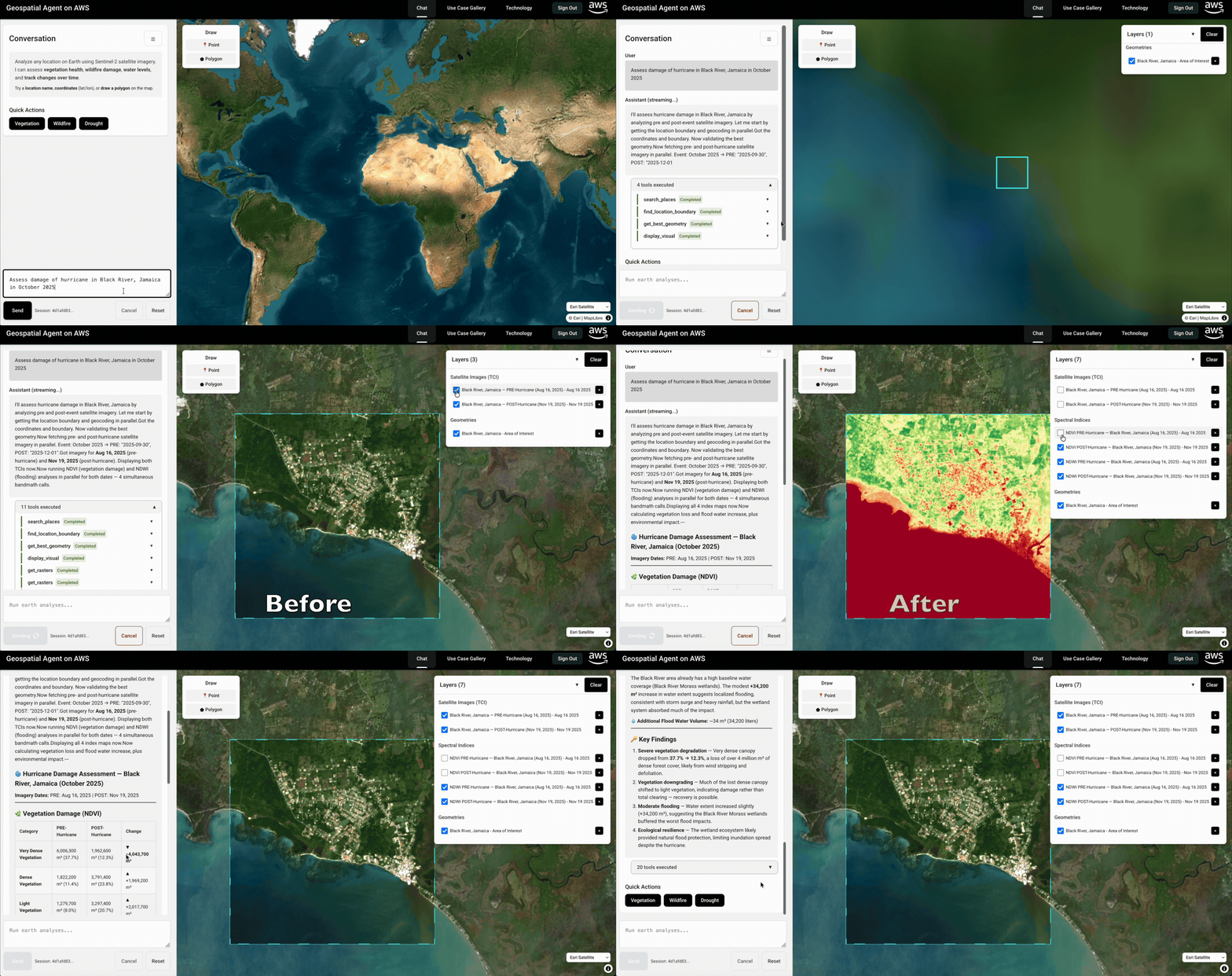
Full deployment: ~15 minutes | 3 components (agent + tile server + frontend)
Example Queries
"Show vegetation health for Central Park, New York"                              --> NDVI vegetation health map
"Assess wildfire damage near Pacific Palisades, Los Angeles in January 2025"     --> NBR burn severity map
"Compare water levels for Folsom Lake, California 2021 vs 2022"                  --> NDWI water body analysis
"Show vegetation status for Hyde Park, London"                                   --> NDVI with OSM boundary
Architecture
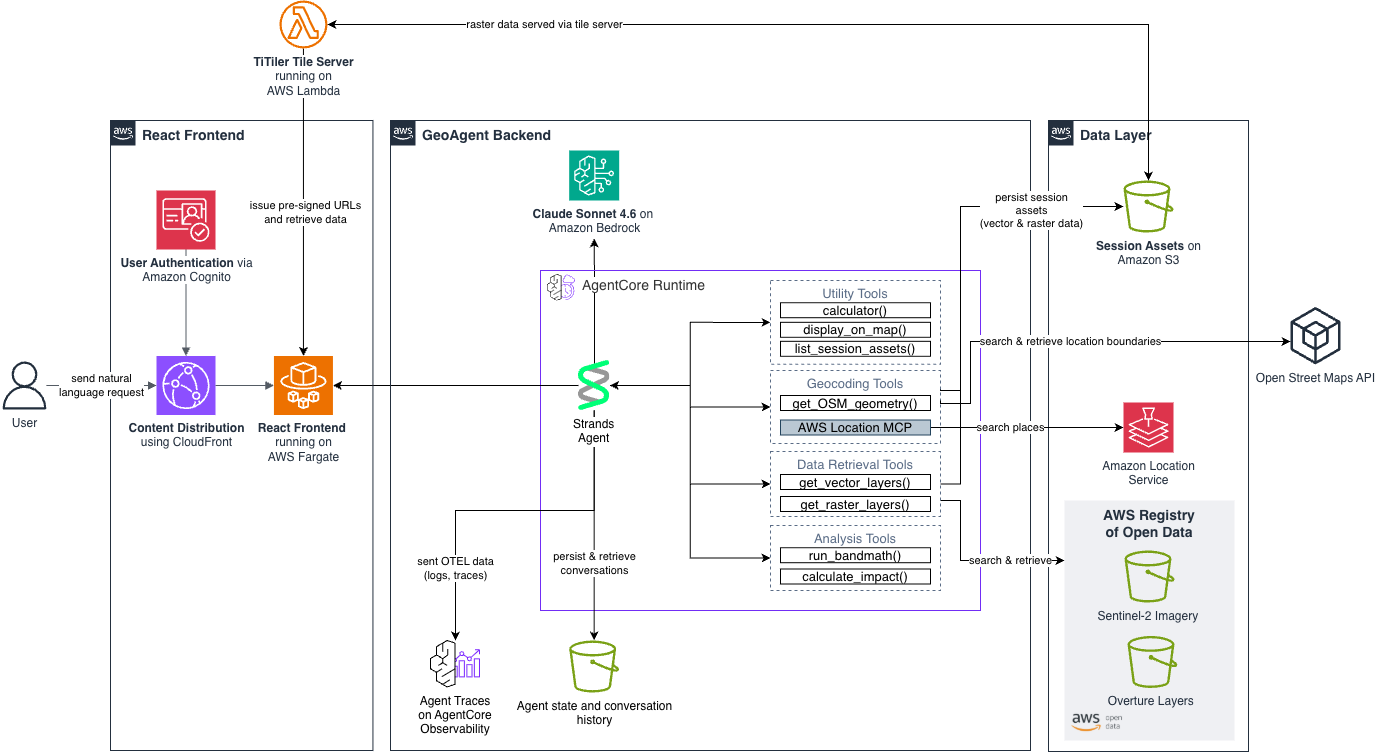
| Component | Technology |
|---|---|
| Agent | Strands Agents with Claude Sonnet 4.6 on Amazon Bedrock AgentCore Runtime |
| Tools | Sentinel-2 imagery, NDVI/NDWI/NBR analysis, OSM boundaries, Amazon Location Service (MCP) hosted on AgentCore Runtime |
| UI | React + TypeScript + MapLibre GL on ECS Fargate behind CloudFront, wt. Cognito auth |
Project Structure
├── geo_agent/           # Core AI agent (Python)
├── react-ui/            # Web UI (React + Express)
├── frontend-cdk/        # UI infrastructure (CDK)
├── titiler-cdk/         # Tile server (CDK)
└── use-cases/           # Pre-configured scenarios
Prerequisites
- AWS CLI configured with appropriate permissions
- Docker installed and running
- Python 3.10+ with pip
- Node.js 20+ (
nvm use 20) - AWS CDK:
npm install -g aws-cdk - AgentCore CLI:
pip install bedrock-agentcore==1.1.2 bedrock-agentcore-starter-toolkit==0.3.0 - Bedrock model access for Claude Sonnet 4.6 in us-east-1 (granted automatically - ensure IAM/SCPs don't restrict it)
Note: All Python dependencies (strands-agents, boto3, geospatial libraries) are handled automatically by Docker during deployment. The AgentCore CLI is only needed for the
agentcore configureandagentcore launchcommands.
Deployment Guide
This guide walks through deploying all three components:
- Geo Agent — AgentCore agent with satellite analysis tools (~5 min)
- TiTiler — Satellite imagery tile server (~2 min)
- React UI Frontend — Web interface with authentication (~7 min)
Initial Setup (run once)
Set shell variables used throughout the deployment. These persist for your terminal session:
# Auto-detect your AWS account ID
export AWS_ACCOUNT=$(aws sts get-caller-identity --query Account --output text)
export AWS_REGION=us-east-1
export S3_BUCKET_NAME=geospatial-agent-on-aws-${AWS_ACCOUNT}

# Verify
echo "Account: $AWS_ACCOUNT | Region: $AWS_REGION | Bucket: $S3_BUCKET_NAME"
Bootstrap CDK (first time only):
cdk bootstrap aws://${AWS_ACCOUNT}/${AWS_REGION}
Part 1: Deploy the Geo Agent
Step 1: Create S3 Bucket
aws s3 mb s3://${S3_BUCKET_NAME} --region ${AWS_REGION}
Step 2: Create AgentCore Role
python geo_agent/agentcore_utils/create_cdk_agent_role.py \
  --agent-name geospatial-agent-on-aws \
  --s3-bucket ${S3_BUCKET_NAME}
This creates geospatial-agent-on-aws_role_info.json locally and the IAM role.
Step 3: Configure Environment
cd geo_agent
cp .env.example .env

# Auto-populate required values
sed -i.bak \
  -e "s|AWS_REGION=.*|AWS_REGION=${AWS_REGION}|" \
  -e "s|S3_BUCKET_NAME=.*|S3_BUCKET_NAME=${S3_BUCKET_NAME}|" \
  -e "s|AGENTCORE_ARN=.*|AGENTCORE_ARN=arn:aws:iam::${AWS_ACCOUNT}:role/agentcore-geospatial-agent-on-aws-role|" \
  .env && rm -f .env.bak
Optional: Edit
geo_agent/.envto changeAWS_REGIONorMODEL_ID, or to add Langfuse keys.
Note: If you have an existing
.bedrock_agentcore.yaml, delete or back it up before deploying. The deploy scripts will create a new one.
Step 4: Deploy Agent
./deploy.sh
Optional: Deploy with Langfuse observability — Sign up at langfuse.com, add these to
geo_agent/.env, then run./deploy_with_langfuse.shinstead:LANGFUSE_SECRET_KEY=sk-lf-your-secret-key LANGFUSE_PUBLIC_KEY=pk-lf-your-public-key LANGFUSE_BASE_URL=https://cloud.langfuse.com
Step 5: Test Agent (optional)
agentcore invoke '{"prompt": "Show vegetation health for Central Park, New York"}'
Save the Agent Runtime ARN for Part 3:
export AGENT_RUNTIME_ARN=$(grep agent_arn .bedrock_agentcore.yaml | awk '{print $2}')
echo "Agent ARN: $AGENT_RUNTIME_ARN"
cd ..
Part 2: Deploy TiTiler
TiTiler serves satellite imagery tiles for the React UI. This deployment is required for the frontend to display satellite imagery.
cd titiler-cdk
npm install
npx cdk deploy --require-approval never
Deployment time: ~2 minutes. Deploys a Lambda-based tile server with API Gateway and API key.
Grab TiTiler URL and API key from the stack outputs
TITILER_URL=$(aws cloudformation describe-stacks \
  --stack-name TitilerStack --region ${AWS_REGION} \
  --query 'Stacks[0].Outputs[?OutputKey==`ApiUrl`].OutputValue' --output text)

API_KEY_ID=$(aws cloudformation describe-stacks \
  --stack-name TitilerStack --region ${AWS_REGION} \
  --query 'Stacks[0].Outputs[?OutputKey==`ApiKeyId`].OutputValue' --output text)
TITILER_API_KEY=$(aws apigateway get-api-key \
  --api-key ${API_KEY_ID} --include-value \
  --query 'value' --output text --region ${AWS_REGION})

echo "TiTiler URL: $TITILER_URL"
Write these to the frontend .env so the React UI can load tiles:
cat > ../react-ui/frontend/.env << EOF
VITE_TITILER_URL=${TITILER_URL}
VITE_TITILER_API_KEY=${TITILER_API_KEY}
EOF
Verify (optional):
curl -s -H "x-api-key: ${TITILER_API_KEY}" ${TITILER_URL}healthz
Expected:
{"versions":{"titiler":"0.24.2","rasterio":"1.4.3",...}}
cd ..
Part 3: Deploy React UI Frontend
Configure
cd frontend-cdk
cp .env.example .env

# Set your admin email (receives temporary login password)
export ADMIN_EMAIL=your-email@example.com

# Auto-populate .env from shell variables
sed -i.bak \
  -e "s|AGENT_RUNTIME_ARN=.*|AGENT_RUNTIME_ARN=${AGENT_RUNTIME_ARN}|" \
  -e "s|S3_BUCKET_NAME=.*|S3_BUCKET_NAME=${S3_BUCKET_NAME}|" \
  -e "s|AWS_REGION=.*|AWS_REGION=${AWS_REGION}|" \
  -e "s|ADMIN_EMAIL=.*|ADMIN_EMAIL=${ADMIN_EMAIL}|" \
  .env && rm -f .env.bak
Deploy
npm install
./deploy.sh -y

# Or if you use finch
./deploy_finch.sh -y
What gets deployed: VPC, ECS Fargate with auto-scaling, ALB, CloudFront (HTTPS), Cognito auth, WAF.
First Login
# Get your application URL
aws cloudformation describe-stacks \
  --stack-name GeospatialAgentStack \
  --query 'Stacks[0].Outputs[?OutputKey==`ApplicationURL`].OutputValue' \
  --output text
- Open the CloudFront URL in your browser
- Login with your
ADMIN_EMAILand temporary password (sent via email) - Set a new secure password (min 12 chars, mixed case, numbers, symbols)
Upload Use Case Scenarios (optional)
cd ..
aws s3 sync use-cases/ s3://${S3_BUCKET_NAME}/use-cases/
Managing Users
Add new users: AWS Console -> Cognito User Pools -> geospatial-agent-dev -> Create user
Monitoring
# Live tail application logs
aws logs tail /ecs/geospatial-agent-dev --follow --region ${AWS_REGION}

# Run diagnostics
cd frontend-cdk && ./scripts/diagnose.sh
Fast Updates (Code Changes Only)
# From frontend-cdk directory — rebuilds container only
./scripts/quick-update.sh
Local Development (React UI)
For local development without deploying to AWS:
Backend
cd react-ui/backend
cp .env.example .env

# Auto-populate (requires agent deployed in Part 1)
sed -i.bak \
  -e "s|AGENT_RUNTIME_ARN=.*|AGENT_RUNTIME_ARN=${AGENT_RUNTIME_ARN}|" \
  -e "s|S3_BUCKET_NAME=.*|S3_BUCKET_NAME=${S3_BUCKET_NAME}|" \
  -e "s|AWS_REGION=.*|AWS_REGION=${AWS_REGION}|" \
  .env && rm -f .env.bak

npm install
npm run dev  # http://localhost:3001
Frontend
# In a new terminal
cd react-ui/frontend
npm install
npm run dev  # http://localhost:5173
Note: Local development bypasses Cognito authentication.
Cleanup / Teardown
./teardown.sh
Destroys all deployed resources: CDK stacks, AgentCore agent, S3 bucket, secrets, and log groups.
Agent Tools
The agent has access to these tools for geospatial analysis:
| Tool | Purpose |
|---|---|
search_places | Geocode location names via Amazon Location Service MCP Server |
find_location_boundary | Get precise boundaries from OpenStreetMap |
get_best_geometry | Smart validation combining both sources |
get_rasters | Fetch Sentinel-2 satellite imagery |
run_bandmath | Calculate NDVI (vegetation), NDWI (water), NBR (burn) indices |
display_visual | Send results to frontend for map display |
The Amazon Location Service MCP Server is bundled inside the agent container and runs as a local MCP stdio process alongside the agent on AgentCore Runtime — no separate deployment needed.
Development
Debugging:
- CloudWatch Logs:
/aws/bedrock-agentcore/runtimes/geospatial_agent_on_aws - Langfuse Traces: Available if configured in
.env
Documentation
- React UI: See
react-ui/README.mdfor frontend architecture details - Frontend CDK: See
frontend-cdk/README.mdfor deployment and authentication - TiTiler: See
titiler-cdk/README.mdfor tile server deployment - Use Cases: See
use-cases/README.mdfor creating custom scenarios
Authors
Contributing
See CONTRIBUTING.md for guidelines on how to contribute to this project.
License
This project is licensed under the MIT-0 License. See LICENSE for details.