Synthetic Monitoring with Nova Act CLI
Automated synthetic monitoring for e-commerce workflows using Amazon Nova Act and Bedrock AgentCore. Browser-based synthetic tests run serverlessly on AgentCore Runtime with SNS alerting on failures.
Architecture
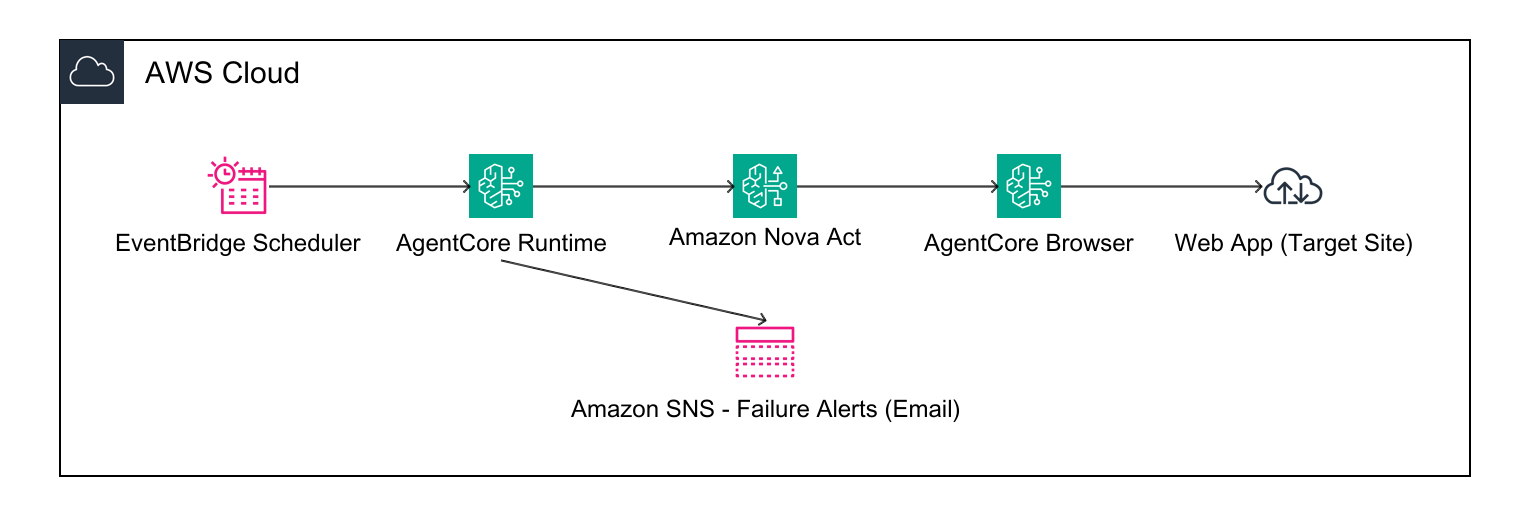
- Nova Act: AI-powered browser automation for e-commerce journey testing
- AgentCore Runtime: Serverless container execution
- AgentCore Browser: Secure, isolated browser sessions with CDP access
- EventBridge Scheduler: Automated workflow execution every 10 minutes
- SNS: Failure alerts for journey failures and infrastructure alarms
Project Structure
├── workflow.py              # Main workflow with all test journeys
├── deploy.py                # Deployment script (idempotent)
├── cdk_stack.py             # Production CDK stack (alarms, DLQ, IaC)
├── app.py                   # CDK app entry point
├── cdk.json                 # CDK configuration
├── test_all_journeys.py     # Test script — runs all journeys against AgentCore
├── requirements.txt         # Python dependencies
├── architecture-base.png    # Solution architecture diagram
├── .actignore               # Files excluded from deployment
└── README.md
Test Journeys
The workflow supports three journey types via the journey_type payload parameter:
| Journey | Description |
|---|---|
login | Basic login with valid credentials, verify products page |
ecommerce | Full flow: login → add to cart → checkout → order confirmation → logout |
login_failure | Attempts login with invalid credentials — verifies the rejection mechanism works. Triggers SNS alert only if wrong credentials succeed (auth bypass detected). |
Any journey that returns status: "failed" (or throws an exception) automatically sends an SNS notification.
Prerequisites
- Python 3.11+
- Docker (Docker Desktop or Colima)
- AWS CLI v2 configured with credentials
- AWS account with access to: Nova Act, Bedrock AgentCore, ECR, IAM, EventBridge, SNS
Quick Start
1. Setup
python -m venv .venv
source .venv/bin/activate
pip install -r requirements.txt
2. Deploy
# Basic deploy
python deploy.py

# Deploy with SNS failure notifications
python deploy.py --email your-email@example.com
This will:
- Validate prerequisites (Python, Docker, AWS)
- Build and push Docker container to ECR
- Deploy to AgentCore Runtime
- Create EventBridge schedule (every 10 minutes)
- Create SNS topic and subscribe email (if
--emailprovided) - Grant SNS publish permission to the workflow execution role
The deployment is idempotent — safe to run multiple times.
3. Test
python test_all_journeys.pyRuns both ecommerce and login_failure journeys sequentially against AgentCore Runtime and prints a summary.
You can also run individual journeys via the CLI:
source .venv/bin/activate

# E-commerce flow
act workflow run --name synthetic-monitoring-workflow \
  --payload '{"journey_type": "ecommerce", "target_url": "https://www.saucedemo.com/"}' \
  --tail-logs

# Login failure detection
act workflow run --name synthetic-monitoring-workflow \
  --payload '{"journey_type": "login_failure", "target_url": "https://www.saucedemo.com/"}' \
  --tail-logs
SNS Notifications
When --email is passed to deploy.py:
- An SNS topic
synthetic-monitoring-alertsis created - The email is subscribed (check inbox to confirm)
- The workflow execution role gets
sns:Publishpermission
Any journey that fails will send an email with the journey type, target URL, duration, and which steps failed.
Monitoring
- Workflow runs: Nova Act Console
- AgentCore Runtime: AgentCore Console
- Schedules: EventBridge Console
Note: Console links default to us-east-1. Switch region in the console if deploying elsewhere.
# List workflows
act workflow list

# Show workflow details
act workflow show --name synthetic-monitoring-workflow
Updating
Edit workflow.py, then redeploy:
python deploy.pyThis builds a new container and updates the runtime with zero downtime on the schedule.
Cleanup
python deploy.py --cleanupRemoves the EventBridge schedule, IAM roles, SNS topic, and workflow. ECR images must be deleted manually:
aws ecr delete-repository --repository-name nova-act-cli-default --forceProduction Deployment (CDK)
Note: The CDK stack is a standalone alternative to
deploy.py's EventBridge schedule — do not run both, or you'll get duplicate schedules triggering the same agent. Usedeploy.pyfor exploration, or the CDK stack for production. If using CDK, skipdeploy.pyentirely or use it only to deploy the agent (without its schedule).
Prerequisites for CDK deployment:
- Node.js 18+ and AWS CDK CLI (
npm install -g aws-cdk) - CDK bootstrap (one-time):
cdk bootstrap aws://<account>/<region>
For repeatable deployments with CloudWatch alarms, dead-letter queues, and multi-region support, use the CDK stack:
# Step 1: Deploy the workflow to AgentCore Runtime (agent only, no schedule)
source .venv/bin/activate
act workflow create --name synthetic-monitoring-workflow  # skip if already exists
act workflow deploy --name synthetic-monitoring-workflow --source-dir . --entry-point workflow.py
act workflow show --name synthetic-monitoring-workflow  # Note the Agent Runtime ARN

# Step 2: Deploy production infrastructure via CDK
cdk deploy --context agentRuntimeArn=<ARN from step 1>

# Optional: specify alert email
cdk deploy --context agentRuntimeArn=<ARN> --context alertEmail=oncall@example.com
If you previously ran
python deploy.pyand it created a schedule, delete it first:aws scheduler delete-schedule --name synthetic-monitoring-workflow-schedule
The CDK stack adds:
- EventBridge schedule with dead-letter queue
- CloudWatch alarm on DLQ depth (failed invocations)
- CloudWatch alarm on missing invocations (monitor stopped running)
- SNS topic with email subscription for all alerts