Smart Home Assistant Agent — Agent Harness 管理平台
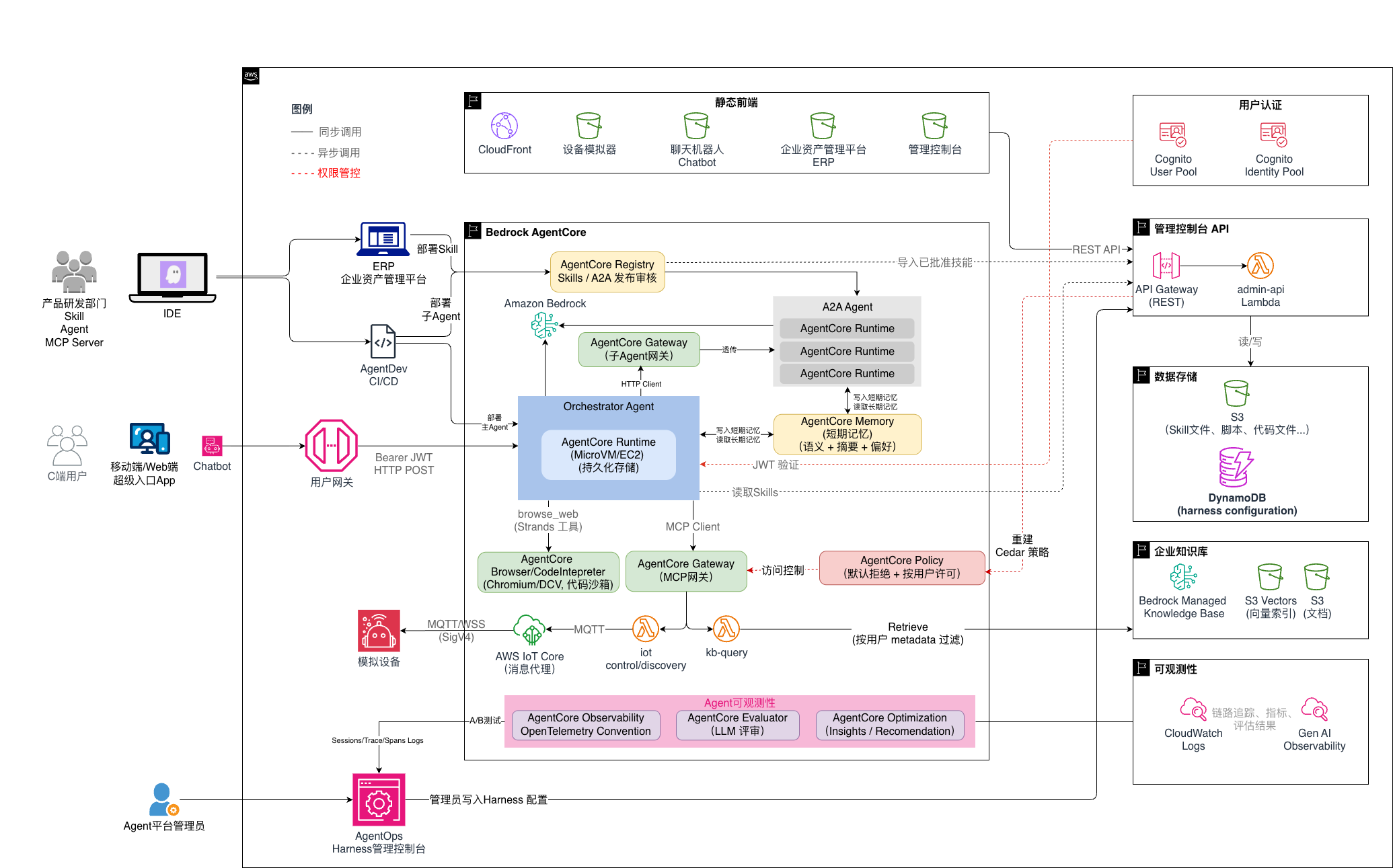
Agent Harness 管理平台,以智能家居场景为示例,展示如何在 AWS AgentCore 上构建完整的 Agent 运维管控体系:技能编排、模型选择、工具权限(per-user Cedar 策略)、企业知识库、外部集成、会话监控、长期记忆查看和质量评估。
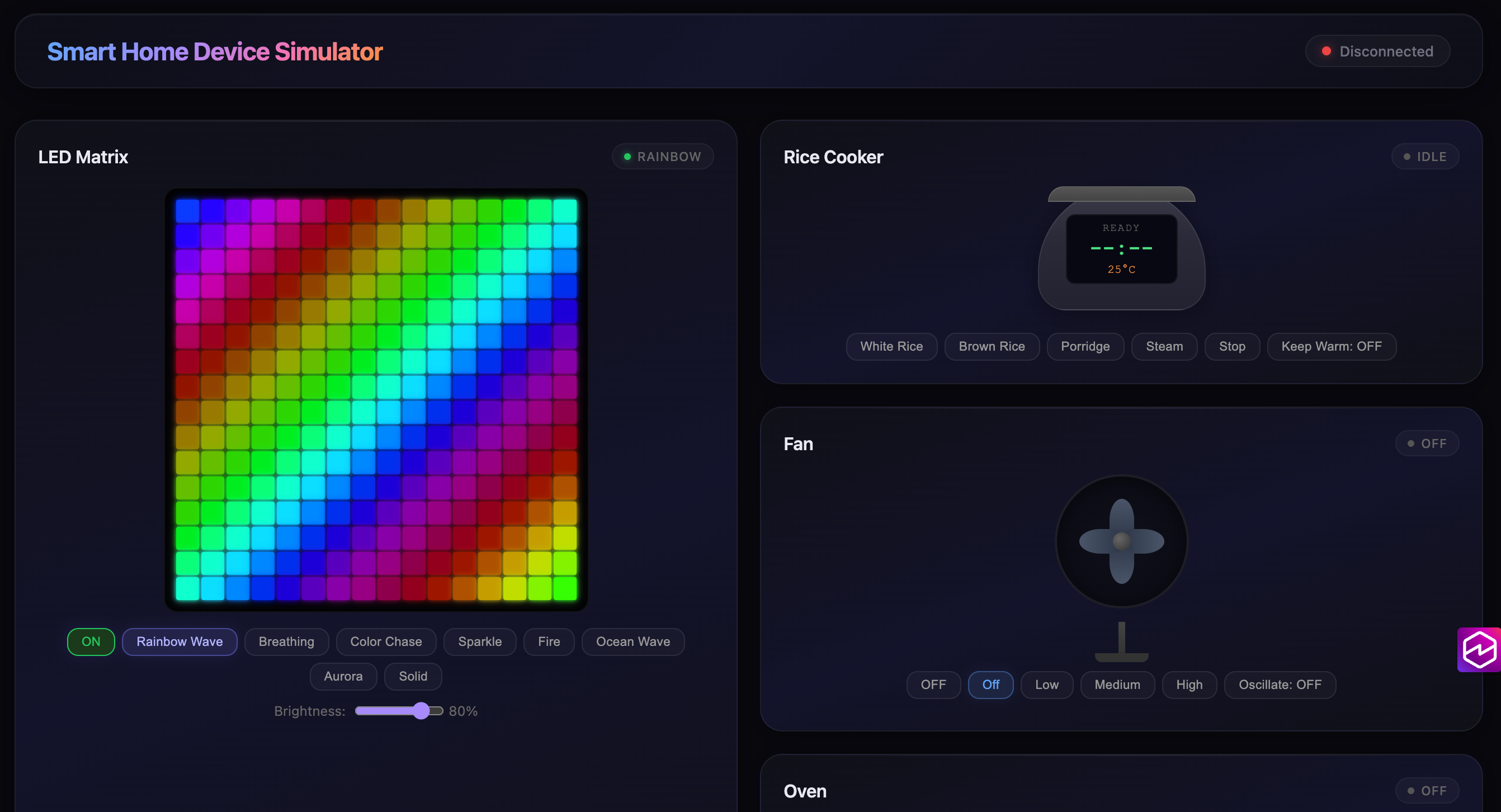
基于 AWS AgentCore Runtime/Memory/Gateway 构建的 AI 智能家居控制系统。用户可以通过聊天机器人用自然语言文字或实时语音对讲(Nova Sonic 双向流式)控制模拟 IoT 设备(LED 矩阵灯、电饭煲、风扇、烤箱)。管理控制台按 Discover / Build / Deploy / Assess 四个阶段组织 18 个页面,覆盖 Agent 全生命周期,其中 Overview 页内置 Agent 运维统计大屏(实时健康、Token 成本归因、评估漂移、版本发布状态)。Skill ERP 网站让普通用户可以自助发布技能到 AWS Agent Registry,审批通过后一键导入到技能目录。
实现原理、架构图、协议细节 请参见
docs/architecture-and-design.md。本 README 专注于部署和使用。
设计理念(先读这一节)
九个 Agent(一个编排器 + 八个 A2A 专家)跑在各自的 AgentCore Runtime 上。真正值得看的
不是拓扑,而是哪些设计是被实测和线上故障逼出来的。完整版见
docs/agent-design-principles-zh.md,每条都配
代码位置(文件 + 符号名)与数字;这里只列最反直觉的五条。
1. 会碰用户数据的 tool 必须是工厂,不能是列表。 启动时建一次 tool 列表会把第一个
到达的用户钉死在后续每个请求上 —— 不报错、不打日志,Agent 照样流畅回答。这是一个长得
像"系统正常"的跨用户数据泄漏。common/server.py 按请求重建(tools_factory(caller));user_id 从闭包里
来,不出现在任何模型可见的签名里 —— 模型能填的参数,prompt injection 就能填。
2. 多数"性能优化"的预期实测方向是错的。 Spec 5 四个延迟阶段里只有 S2(委派时带设备清单,-10%) 符合预期,下面这些预期都被自己的测量推翻:
| 预期 | 实测 |
|---|---|
| Prompt caching 降延迟(AWS 文档:最高 85%) | 延迟 2%(噪声内),但 token 降 98% |
| 并行委派需要新建 | Strands 本来就并发,坏的是 transport(第三个委派直接崩) |
| 预热能省冷启动 | 闲置 100 分钟后首调只慢 0.3s —— 没东西可省,方案作废 |
| 流式透传把 TTFT 从 30s 降到个位数 | 做不到:模型必须等 tool 返回才能写正文 |
所以先建测量工具(scripts/measure-baseline.py)再动手,不是流程洁癖 —— 三条优化互相
影响,不固定测量方法就只能"声称"改善。
3. 延迟要分清哪部分不是你的。 24.3s 平均耗时里 7.1s 花在 AgentCore 里、还没进 容器:全新 session id 约 7s,复用约 0.4s。所以"16s 快路径"其实是 8s Agent 工作 + 8s 平台建会话。只报 wall 会把平台冷启动记在 harness 账上 —— 两个方向都会错。
4. tool 的 description 压得住 system prompt。 S2 把设备清单塞进委派消息、prompt
改成"别再调 discover_devices",部署两次都没效果 —— 因为 discover_devices 自己的
docstring 还写着 "Call this FIRST, every time"。它贴在模型正要决策的那个 tool 上,所以
它赢。回复里完全看不出来:答案一直是对的,优化从来没发生。
5. 要防的不是崩溃,是"静默成功"。 这个系统历史上几乎每个 bug 都报告成功:redeploy
"成功"却把所有 A2A 授权作废;大屏"没有数据"整整六天像是系统闲置;agentcore deploy
成功但打包的是旧代码。对策每次都一样 —— 在声称做了这件事的代码之外去断言它:读
span 不读回复文本、按 botocore service model 校验而不是按文档、把部署副本和仓库
diff 一遍。
前置条件
| 条件 | 版本 | 用途 | 安装方式 |
|---|---|---|---|
| Node.js | >= 18.x | 构建 React 应用、运行 CDK | 下载安装包 或 nvm |
| npm | >= 9.x | 包管理 | 随 Node.js 一起安装 |
| Python 3 | >= 3.12 | AgentCore 部署脚本、Agent 代码 | 下载安装包 或系统包管理器 |
| AWS CLI | >= 2.x | AWS 凭证配置 | 官方安装指南 |
| agentcore CLI | >= 0.13.0 | 部署 AgentCore 资源(Gateway / Runtime / Memory) | npm install -g @aws/agentcore · Starter Toolkit 文档 |
| boto3 | >= 1.43.67 | 部署脚本中的 AgentCore / Agent Registry API 调用 | 见下方快速开始的 pip install(scripts/01-install-deps.sh 会自动升级) |
| AWS 账号 | — | 需开通 Bedrock AgentCore、Claude Sonnet 4.6 和 Nova Sonic 模型访问权限 | 见下方说明 |
agentcore CLI 走 npm,不是 pip。 早期版本的本文档写的是
pip install strands-agents-builder,那个包提供的是strands命令(一个 Strands 示例 agent),并不会安装deploy.sh所需的agentcore。正确方式是npm install -g @aws/agentcore;deploy.sh启动时会校验版本 >= 0.13.0(该版本修掉了一个会让agentcore deploy失败的 scaffold-test 回归)。升级用npm install -g @aws/agentcore@latest。
重要: 部署前需在 Bedrock 控制台 > 模型访问 中申请:
- Claude Sonnet 4.6(调用时用跨区 profile id
us.anthropic.claude-sonnet-4-6)用于文字聊天 - Amazon Nova Sonic(
amazon.nova-2-sonic-v1:0)用于语音对讲
部署者 IAM 权限
执行 deploy.sh 的 IAM 用户/角色需要以下 AWS 服务权限(详细清单和最小 IAM 策略 JSON 见 docs/architecture-and-design.md §9.1):
| 服务 | 用途 |
|---|---|
| CloudFormation / CDK / S3 / CloudFront / Lambda / DynamoDB | 基础资源 |
| Cognito / Cognito Identity | 用户身份、Identity Pool 临时凭证 |
| IoT Core | 设备端点 + Thing |
| Bedrock / S3 Vectors | 知识库向量化 + 检索;Nova Sonic 双向流式推理 |
| Bedrock AgentCore | Gateway、Runtime、Memory、Policy Engine |
| Polly | 预渲染语音欢迎语 |
| IAM / STS / Logs / API Gateway | 角色、身份、日志、管理 API |
快速开始
# 1. 配置 AWS 凭证
aws configure

# 2. 安装 agentcore CLI(npm 全局包,deploy.sh 会校验版本 >= 0.13.0)
npm install -g @aws/agentcore
agentcore --version

# 3. 设置 Python 环境
python3 -m venv venv
source venv/bin/activate
pip install strands-agents strands-agents-builder bedrock-agentcore boto3 mcp pyyaml

# 4. 一键部署
./deploy.sh部署完成后,deploy.sh 会输出四个前端的 URL(设备模拟器、聊天机器人、管理控制台、Skill ERP)以及默认管理员账号。
部署内容概览
deploy.sh 是一个薄封装,按顺序运行 scripts/0[1-7]-*.sh 7 个脚本。每个脚本开头都会打印自己创建的 AWS 资源,方便调试或只重跑某一步。
| 步骤 | 脚本 | 职责 |
|---|---|---|
| 1 | 01-install-deps.sh | CDK npm 依赖 + 为 Lambda 打包最新 boto3 |
| 2 | 02-build-frontends.sh | 构建三个 React 前端产物 |
| 3 | 03-cdk-bootstrap.sh | cdk bootstrap(幂等) |
| 4 | 04-cdk-deploy.sh | 部署 CDK 堆栈:Cognito、IoT、Lambda、DynamoDB、KB、API Gateway、S3+CloudFront |
| 5 | 05-fix-cognito.sh | 开启自助注册 + 邮箱自动验证 |
| 6 | 06-deploy-agentcore.sh | 部署 AgentCore 堆栈:Gateway、Target、Runtime(含预渲染语音欢迎语)、Memory;授权 Cognito 身份池调用 Runtime;停掉旧会话以便新代码立即生效 |
| 7 | 07-seed-skills.sh | 将 agent/skills/ 下的内置技能写入 DynamoDB |
部分重跑: 只改了前端 → 重跑 2 + 4;只改了 Agent Python 代码 → 重跑 6;只换了内置技能文件 → 重跑 7。
使用指南
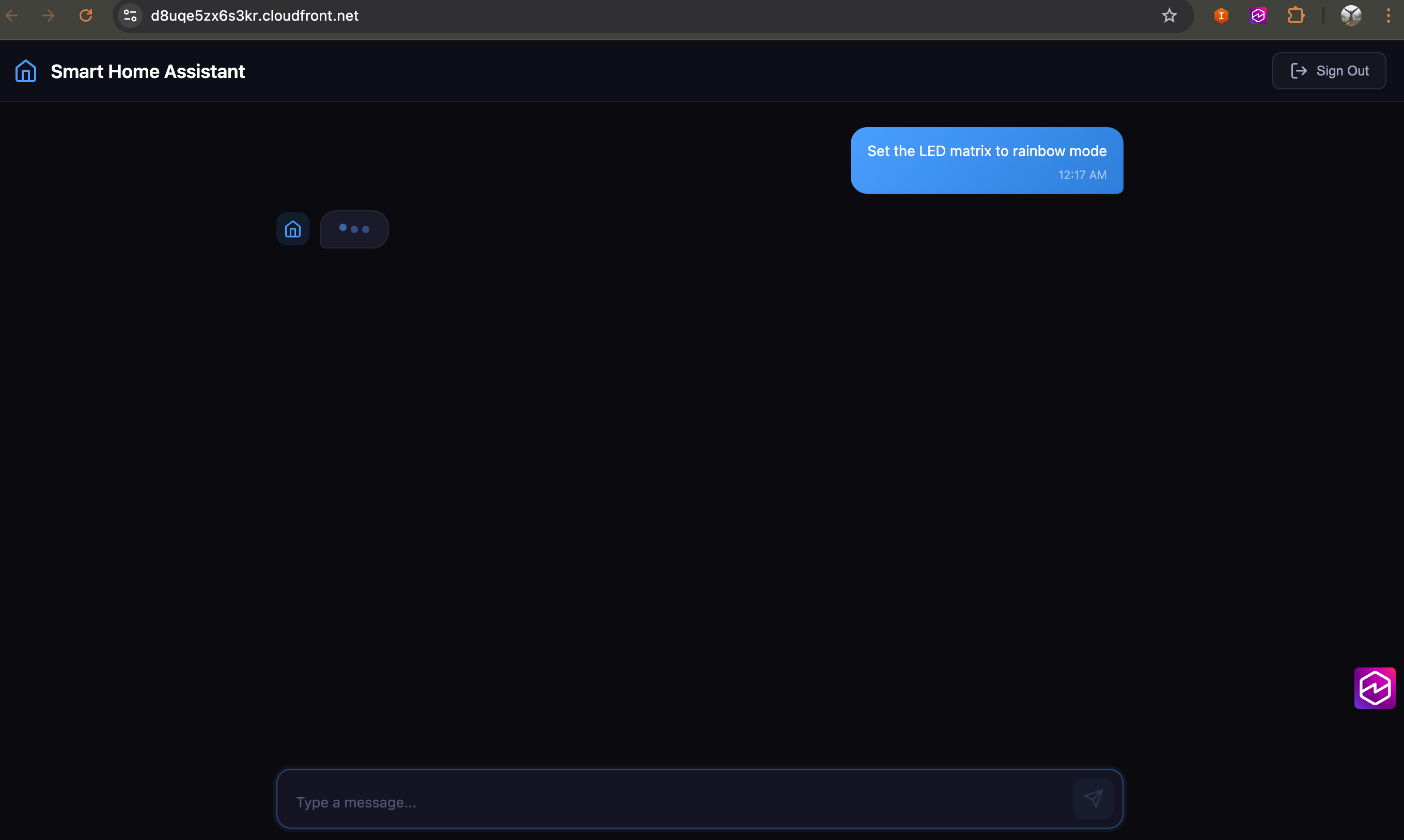
聊天机器人 —— 文字与语音双模式
- 打开部署输出里的聊天机器人 URL,注册/登录
- 输入框左侧 🎤 按钮切换语音 / 文字模式
- 文字模式:输入即发,Claude Sonnet 4.6(或管理员在 Build → Models 指定的模型)回复
- 语音模式:浏览器弹出麦克风授权 → 听到预渲染欢迎语"欢迎使用智能家居设备助手" → 开始语音对话,Nova Sonic 双向流式处理
- 语音模式下说"把风扇打开到中档"等指令,Agent 会通过 MCP 网关真实触发 IoT 设备命令
- 浏览器实时预览(右侧默认折叠的 rail,点击展开):问 Agent 任何需要查实时网页的问题("books.toscrape.com 上评分最高的那类书前三本是什么"、"去 csa-iot.org 看 Matter 最新版加了哪些设备类型"、"httpbin.org/headers 显示浏览器发了什么请求头"),无需手动说"use browse_web"—— skill 描述会让模型自行调用。右侧 DCV 实时流按 1280×800 渲染(窗口更小时自动出现滚动条),每步截图保存到 Agent 的
/mnt/workspace/<session>/browser/,"文件"标签页可下载。任务完成后 AgentCore 会话保持 15 分钟 不关,点 "接管控制" 就能自己继续浏览/验证码/点筛选,不需要重新触发一次工具。详见 架构文档 §9.11
演示网站要挑不做真人校验的。 AgentCore 浏览器带
enableWebBotAuth=true,但这只在参与 web-bot-auth 的站点上有用;Google、Amazon、淘宝都不参与,会直接弹验证码,演示当场卡死。示例库里现在用的是books.toscrape.com(专为抓取练习而建)、httpbin.org(回显请求)、csa-iot.org/en.wikipedia.org/news.ycombinator.com(正常对待爬虫)。换站点之前先自己跑一遍。
- 示例提示词库:输入框左侧图标打开右侧抽屉 —— 67 条示例、19 个能力分组、可按中英文搜索,覆盖八个专家 Agent 的全部 21 个 skill(灯效、场景联动、日出日落定时、能耗审计、安全公告核对、维护预测、文档问答、多域并发),并标注每组会调用到的专家/工具/技能。点一条只填入输入框、不自动发送。抽屉任何时候都能打开;欢迎屏的快捷 chips 依然保留,但那些只在还没说过话时显示。示例正文来自
shared/prompt-examples.json,模拟用户脚本读的是同一份文件,且有覆盖率测试断言每个已发布 skill 都被覆盖 —— 详见架构文档 §9.20.1 - 逐轮反馈:每条回复下有 👍/👎,点 👎 可补一句原因。投票携带该轮的委派 trace,写入
smarthome-feedback表,直接驱动 Overview 的「用户满意度」卡片
管理控制台 —— Agent Harness Control Center
使用部署输出中的管理员凭证登录。登录页也提供 自助注册 通道(邮箱即用户名,Cognito 发 6 位验证码验证邮箱)。
注册 ≠ 有管理员权限。 本控制台只对
admin组成员开放。新注册的账号能登录,但会看到"访问被拒绝",需要联系管理员把你加入admin组(Admin Console → Build → Identity 页的Make Admin,或aws cognito-idp admin-add-user-to-group)。在此之前可以直接使用聊天机器人 —— 所有终端用户功能(智能家居对话、设备控制、知识库问答)都不需要管理员权限。注册页和"访问被拒绝"页都给出了聊天机器人的直达链接。
左侧导航按 Agent 生命周期分成四段,共 18 个页面:
| 分段 | 页面 | 能做什么 |
|---|---|---|
| Discover | Overview | 产品说明 + 架构图(默认折叠)以及 Agent 运维统计大屏(见下节)。三个 Demo 入口已移至侧边栏「演示入口」分组 |
| Discover | Agents | 机队总览:1 主 + 8 子 + 1 语音 + 1 A/B 变体 + 1 Tool,含运行时名、状态、skill 数与实时指标。点进详情页可逐个 Agent 编辑 system prompt(保存后下一次请求即生效,不用重新部署容器)。列表由 Runtime ARN + Registry 记录推导,新部署的子 Agent 自动出现 |
| Discover | Integration Registry | 工具集成概览 + 从 AWS Agent Registry 读取记录:A2A Agent 子页读已批准记录(显示名称/端点/能力/发布者),Skills 子页读全部已注册技能(含 DRAFT / 待审批 / 已驳回,状态列区分) |
| Build | Models | 设置全局默认 LLM 模型;按用户覆盖文字模型与视觉模型。清单由 ListFoundationModels + ListInferenceProfiles 实时拉取(本部署 88 个),不再硬编码 |
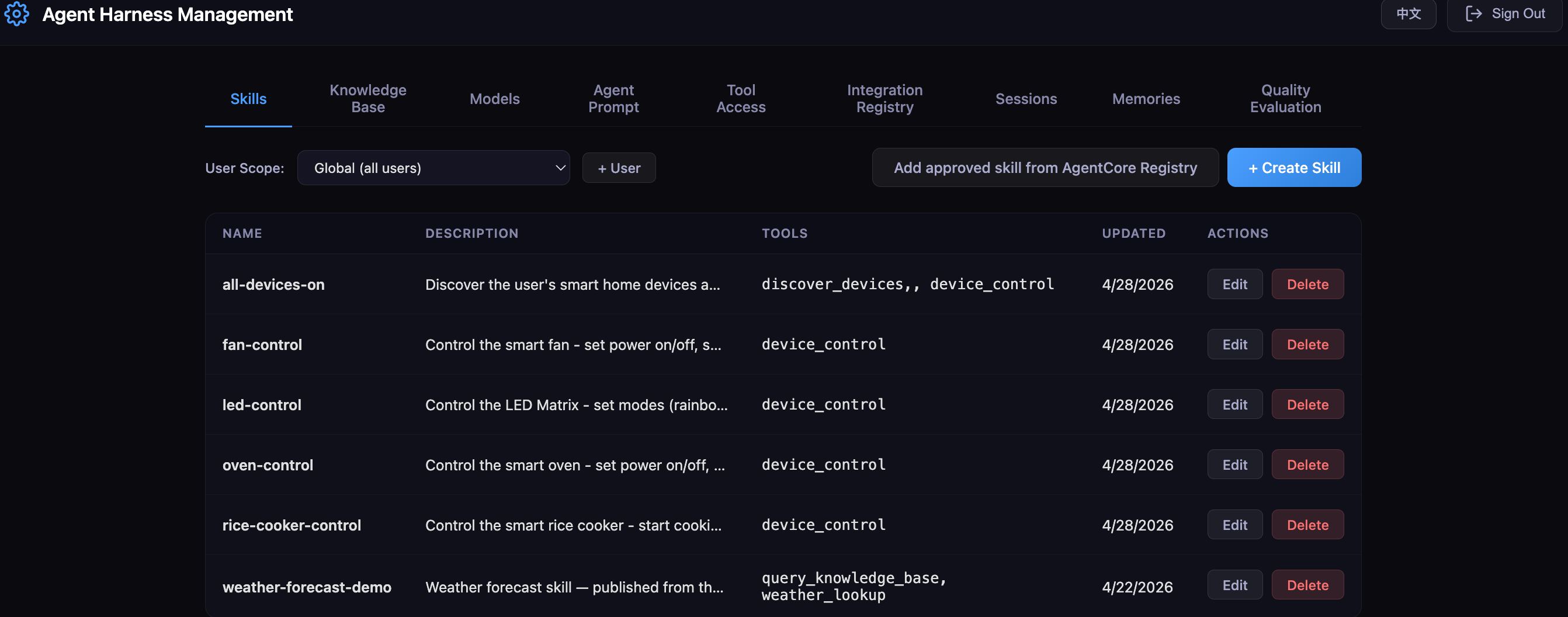
| Build | Skills | 编辑/删除技能(完整 Agent Skills 规范 字段);技能目录文件管理(S3 预签名 URL);全局 + 按用户覆盖。新技能只能从 AWS Agent Registry 导入已批准记录 —— 控制台不再本地创建技能,统一由 Registry 注册与审批 |
| Build | Prompt | 编辑文字/语音 agent 的 system prompt(全局默认 + 按用户追加),运行时叠加拼接 |
| Build | Tool Policy | 按用户配置可调用的工具(Cedar 策略);内置工具与 Gateway 工具并列并用 Badge 区分;ENFORCE / LOG_ONLY 切换。每个 Gateway 工具旁列出谁在用它 —— 撤掉 control_device 会同时停掉聊天指令、定时场景和两个子 Agent |
| Build | 子 Agent 策略(SubAgent Policy) | 按 skill 授权 A2A 专家 Agent(#/subAgentPolicy):范围选「全局默认(所有用户)」或某个用户,展开 agent 勾选 skill 后保存。授权落成 Cognito 组 / token claim,用户重新登录后生效;在用户范围下单独配置成空列表即可把全局授权从该用户身上收回 |
| Build | Memories | 查看每个用户的长期记忆(事实 + 偏好 + 情景,来自 AgentCore Memory 的四种内置策略) |
| Build | Knowledge Base | 上传文档到企业知识库(PDF、TXT、MD、DOCX、CSV 等);一键触发 Bedrock KB 向量化同步;按用户隔离 |
| Build | Identity | 已注册用户表,以及全部用户管理:新增用户、提权/降权、删除(原先在 Overview,已统一收敛到此处;不能对自己降权或删除) |
| Deploy | Instance Type | 计算实例类型(当前 MicroVM,EC2 规划中) |
| Deploy | Sessions | 每次登录的运行时会话列表(用户 / 类型 / 会话 ID / 最近活跃 / 近 7 天 Token,并标出 token 归属的 agent)、一键 Stop,以及 Remote Shell(在 Runtime 容器里执行 shell 命令,stdout/stderr 流式回传) |
| Assess | Agent Guardrails | 跳转 AgentCore Evaluator + Bedrock Guardrails 控制台 |
| Assess | Scenarios | 所有用户的自动化场景:触发条件、真实 cron + 时区、最近一次是否执行成功。「同步定时任务」按钮对账 EventBridge Scheduler;**「场景即代码」**导出/导入 JSON |
| Assess | Observability | 跳转 CloudWatch Gen-AI Observability |
| Assess | Evaluations | 跳转 AgentCore Evaluations 控制台 |
| Assess | Optimization | AgentCore Optimization:推荐、配置包、目标级 A/B 测试、按用户配置入口环境(entryEnvironment)。优化目标可选任意已部署的 Agent(下拉选项来自机队,不是硬编码) |
Agent 运维统计大屏(Overview 页内)
面向"统一入口 Super App"管理员的运维视图,按监控大屏布局:顶部一条六信号状态条,下面三行成对面板。架构图默认折叠,打开页面即见运维数据。顶部可切换时间范围(24h / 7d / 30d / 60d / 90d,作用于全部面板);成本归因维度(按用户 / 入口环境 / Agent 运行时)位于「Token 成本归因」面板内,因为它只影响该面板。每张图都配表格视图。
「按入口环境」不是按客户计费。 它聚合的是
tenant_env的三种模式(default/ab-bundles/ab-targets),也就是 A/B 分流组之间的成本对比 —— 本项目没有独立的租户实体。真正的按客户归因需要先引入 tenant 实体(如 Cognito 组或tenantId属性)。
| 指标组 | 数据来源 | 是否真实 |
|---|---|---|
| 实时健康(活跃会话、TTFT P95/P99、错误率、QPS) | AWS/Bedrock-AgentCore 指标 + span 日志组,跨全部已登记 Runtime 汇总并附每个 Runtime 的分解 | ✅ |
| Token 成本趋势与归因(输入/输出各一根柱子) | Strands chat span。自 2026-08-05 起写在每个 runtime 自己的 /aws/bedrock-agentcore/runtimes/{id}-DEFAULT 里;账号级 aws/spans 仍一并查询以保留切换前的历史 | ✅ Token;❌ 美元成本 |
| 成本预算消耗 | — | ❌ 模拟数据 |
| 评估通过率与漂移 | Bedrock-AgentCore/Evaluations | ✅ 单变体;❌ A/B 对比 |
| 活跃版本与发布状态 | Runtime Endpoint/Version + CloudTrail | ✅ 版本;⚠️ 灰度阶段为推导值 |
| 用户满意度(CSAT、赞踩比、逐日负评率、按被委派专家拆分) | smarthome-feedback 表,来自 Chatbot 每轮回复下的 👍/👎 | ✅ |
无真实数据来源的卡片会显示 演示数据 标记,点开有说明"要变成真实数据需要什么" —— 现在只剩「成本预算消耗」一张(Cost Explorer 只到账号级,无法按用户/Agent 拆分)。满意度卡片 2026-08-11 起是真实的:Chatbot 每轮回复下加了 👍/👎,投票携带该轮的委派 trace,所以「哪个专家招来的踩」第一次可回答;没有投票时显示「尚无反馈」而不是 CSAT 0 —— 把「没数据」画成「评分极低」和编造数据是同一类错误。几个口径要点:TTFT 不存在于 CloudWatch 指标中,只能从 span 属性取;美元成本无法按用户/Agent 拆分(Cost Explorer 只到账号级),所以只归因 Token 数量;灰度阶段没有原生字段,由 Gateway A/B test 与 tenant_env 推导而来;每个 Runtime 必须显式登记 —— span 与评估指标上的 service.name 是精确匹配,大屏聚合的是由 AGENT_RUNTIME_ARN + VOICE_AGENT_RUNTIME_ARN + DASHBOARD_EXTRA_RUNTIME_ARNS 构成的白名单(A2A 部署脚本会自动登记自己)。详见 docs/architecture-and-design.md §9.15。
大屏默认是空的 —— 需要真实流量才有数据。用下面的模拟用户脚本一条命令生成。
Skill ERP —— 用户自助发布技能
Skill ERP 是面向普通终端用户的技能发布站点(不要求 admin 组成员),每个登录用户只能看到和管理自己创建的技能。
- 打开部署输出里的 Skill ERP URL
- 用自己的 Cognito 账号注册/登录(与聊天机器人共用账户体系)
- 点击 "+ 创建技能",填写名称/描述/指令/允许的工具/许可证/兼容性/元数据(不支持文件上传 — AWS Agent Registry 的 agentSkills 描述符只承载 SKILL.md + 定义 JSON)
- 保存后,记录会自动以
agentSkillsdescriptorType 发布到 AWS Agent Registry(SmartHomeSkillsRegistry),并自动触发SubmitRegistryRecordForApproval - 状态栏会显示
PENDING / SUBMITTED / APPROVED / REJECTED,可以随时编辑或删除。被驳回时,审批人填的原因会直接显示在状态下方 —— 这是作者唯一能收到的反馈 - 管理员在 Admin Console → Skills → "Add approved skill from AWS Agent Registry" 的待审批队列里 Approve / Reject(驳回必须填原因),批准后同一个弹窗即可导入技能目录 —— 不再需要去 AWS 控制台
A2A 专家 Agent(可选,演示用)
a2a-agent-registry/ 下有 8 个独立部署的 A2A (Agent-to-Agent) 专家 agent,演示主 Agent 如何通过标准 A2A 协议委派给专家:
| Agent | Skill | 模型 | 触达设备? |
|---|---|---|---|
device-control-agent | 多设备编排、能力消歧 | Haiku 4.5 | ✅ 经 Gateway |
light-effect-agent | 心情/图片 → 灯效 | Haiku 4.5 | ✅ 经 Gateway |
knowledge-qa-agent | 文档问答、故障排查 | Nova Lite | ✅ 知识库 |
task-management-agent | 任务/自动化(触发器+动作) | Haiku 4.5 | ❌ 只规划,见下节 |
scene-sync-agent | 音乐/观影盛宴(实时驱动) | Haiku 4.5 | ✅ 经 Gateway |
home-security-agent | 风险评估、事件响应 | Haiku 4.5 | ❌ 纯建议 |
energy-optimization-agent | 节能测算、电价分析 | Nova Lite | ❌ 纯建议 |
appliance-maintenance-agent | 保养计划、故障诊断 | Nova Lite | ❌ 纯建议 |
这不是"多几个 agent"而已 —— 关键在于身份没有在委派时丢掉:
- 编排器把用户自己的 idToken 放在
Authorization头里发出,没有服务 token、也没有第二个 header。AgentCard 从 2026-08-15 起指向smarthome-a2a-gw网关。 - 授权就是 token 里签名过的
cognito:groupsclaim(Cognito 组a2a-<agent>/a2a-<agent>.<skill>):子 Agent Runtime 的 authorizer 在进容器之前就拒绝没有该 Agent 授权组的调用方,容器再从同一个 claim 推导 skill 子集(common/server.pyskills_from_claims),为空就拒绝。调用方无法自己放宽授权 —— 旧的客户端自报X-A2A-Allowed-Skillsheader 已经删除。 - 子 Agent 独立重新验签(JWKS / issuer / audience / 过期),再用同一个 token 开 Gateway —— 所以 Cedar 评估的是真实终端用户。子 Agent 自己没有任何设备权限。session id 不是凭证,走 A2A 消息的 metadata。
其他要点:
./deploy.sh不会部署它们 —— 保持基础系统精简。- 部署方式(依赖
./deploy.sh已跑通):cd a2a-agent-registry python deploy.py # 全量 python deploy.py --agent light-effect # 只部署一个 python smoke_test.py # 8 个 agent 的正向探测 + 负向鉴权用例 - Admin 在 Admin Console → Build → 子 Agent 策略(SubAgent Policy) 按 skill 授权(全局或按用户);用户重新登录拿到新 token 后,主 Agent 在下一次调用时加载。未授权的 skill 根本不会注册,模型看不见也就无法被 prompt injection 诱导去调用。
- 每个子 Agent 的 prompt 可以在 Admin Console → Agents → 详情页单独编辑,保存后下一次请求即生效,不需要重新部署容器。
- 委派一轮约 30 秒(直接回答约 15 秒)—— A2A 这一跳不走流式,所以主 Agent 在专家答完之前不会输出任何内容。这一点写在运维大屏的 TTFT 说明里,不是藏起来。
- 完整部署流程、测试提示词和逐步演示指南见
a2a-agent-registry/README.md。
场景联动与定时自动化
在 chatbot 里说「每天晚上 11 点关灯、风扇调到 1 档」,主 Agent 会委派给场景编排子 Agent,把它存成一个场景(触发器 + 设备动作),并由 EventBridge Scheduler 到点执行。
支持五种触发器:
| 类型 | 说明 |
|---|---|
| 时间 | 24 小时制 HH:MM,按用户自己的时区调度(Identity 页设置;没设过的按 UTC,行为与以前一致) |
| 日出/日落 | 按用户经纬度算出当天时刻,可带偏移(「日落前 30 分钟」)。每晚重算次日时间——太阳时刻每天都在动 |
| 设备状态 | 某个设备变成某个状态 |
| 传感器阈值 | 温度 / 湿度 / PM2.5 / CO₂,必须显式写 above 或 below —— 「高于 26」和「低于 26」是两个相反的场景 |
| 一键指令 | 不会自己触发,只在用户点名时执行(「执行观影模式」) |
日出场景需要用户的经纬度,没有就拒绝创建并说明去哪里设置 —— 猜一个位置会在错误的时间开灯,而且比拒绝更难被发现。
管理员在 Admin Console → Assess → 自动化任务 看所有用户的场景:触发条件、真实的 cron 表达式和时区、以及最近一次是否执行成功。定时场景在 07:30 触发时没有人盯着,所以「最近执行」这一列是区分「能用」和「从来没成功过」的唯一依据。
定时执行不是一条绕过管控的后门。 执行 Lambda 完全没有 IoT 权限:它以场景所属用户的身份过 Gateway → Cedar →
iot-control,和用户手打指令走的是同一条授权链。所以管理员在 Tool Policy 里撤销某用户的control_device之后,他的 07:30 自动化也会一起停。代价说清楚:以「不在线的用户」身份执行需要一份凭证。实测
GetWorkloadAccessTokenForUserId换出的 token 会被 Gateway 以 401 拒绝(它是 KMS 加密的不透明 token,不是带正确 audience 的 JWT),所以系统存的是 Cognito refresh token —— 一份 30 天有效的用户凭证落在了 Secrets Manager 里(专用 KMS 密钥 + 已开启轮换 + 一个用户一个 secret + 只有执行 Lambda 能读 + 绝不写日志)。没有存 token 的用户,其定时场景直接不执行。
设备模拟器里配了三样"道具"给场景用:虚拟时钟(最高 3600 倍速,只加速模拟器自身的时间和传感器曲线,不会改变 AWS 侧的真实触发时间)、屏幕同步(电视背光四个分区跟随程序化画面的四边取色)、音乐同步(合成节拍 + 蓝牙 idle → pairing → connected 三态)。
音乐盛宴与观影盛宴(实时驱动)
「保存下来以后再跑」和「现在就跑起来」是两件事,由两个子 Agent 分开做,这个拆分本身就是设计:
task-management-agent有自己的表、没有任何设备权限。scene-sync-agent有 Gateway 设备工具、没有表。
合成一个的话,能写场景的 Agent 就同时有了一条自己的设备通路 —— 而这正是 shared/scenarios.py 存在的目的(场景是数据,不是能力)。两边都做不了对方那一半,由主 Agent 串起来,并且存成一键指令之前会先问用户。
在 chatbot 里说「让客厅的灯跟着音乐跳起来」:电视背光进入 music 同步模式,其余灯具按节奏跑 chase。这里有一个天然会静默失败的环节 —— 音乐要走蓝牙音箱,链路没连上灯就不会动,而配对需要一两秒。所以 Agent 会轮询 bluetooth 状态直到它稳定,并且把「还在配对中」当成一个和成功/失败都不同的答案:
| 状态 | Agent 的回应 |
|---|---|
connected | 驱动灯具,报告盛宴已启动 |
pairing | 说链路还没起来,建议稍后再试 —— 不猜它会往哪边走 |
idle | 明确说没有配对的音箱,请用户去连 —— 绝不报成功 |
猜错的代价是不对称的:把 pairing 当失败,是让用户去重连一个两秒后就能用的音箱;把 idle 当成功,是让用户对着一屋子不动的灯发愣。
发现能力:示例提示词库
Chatbot 输入框左侧的图标打开右侧抽屉:67 条示例、19 个能力分组、中英文可搜,覆盖八个专家 Agent 的全部 21 个 skill、全部 7 个 Gateway 工具和全部 9 个内置技能。点一条只填入输入框、不自动发送 —— 演示时讲解者需要先说明这条要演什么。抽屉任何时候都能开;欢迎屏 chips 只在还没说过话时显示。
每个分组现在带徽章,标出这条提示词会调用到什么:蓝色是 A2A 专家、绿色是工具、灰色是内置技能。这些数据以前就在文件里、但一处都没渲染,于是讲解者只能凭记忆说「这条会走安全 Agent」—— 而演示当天要记的恰好就是这个。
这份清单只有一处来源(shared/prompt-examples.json):Chatbot 渲染它,模拟用户脚本也读它。此前两边各写一份(TS 的 i18n key 和 Python 的场景列表),而两份清单不一致不会报错 —— 症状是演示当天才发现没人演过安全 Agent。现在有覆盖率测试:21 个已发布 skill 每个都必须被某条示例覆盖,反向也断言示例没指向已删除的 skill。2026-08-12 起这个断言扩到了工具和技能:此前只查 A2A,而工具分组的 covers 全是空的 —— 也就是「示例覆盖了全部功能」这句话其实只对子 Agent 验证过。工具清单取自 cdk/lambda/admin-api/tool_consumers.py(它本身由各 agent 的声明生成),技能清单取自 agent/skills/ 的目录,所以两边都不用手写第二份。
面向开发者的四件事
客户产品在开发者社区有大量用户,所以有四个功能是给「宁愿写脚本、不想聊天」的人准备的。全部 opt-in,默认路径不变。
1. 委派进度提示。 委派一轮约 31s,以前这段时间只有一个不动的「思考中…」。请求带 {"stream": true} 时 runtime 返回 SSE,模型每调一个 tool 推一帧。实测一个三域请求在 12.0s 就报出第一个专家 Agent,而答案在 44.8s 才到 —— 用户提前 33 秒知道系统在干什么。
流式只推 tool 生命周期,不推正文 token,因为正文做不到更快:模型必须等它刚调的 tool 返回才能开始写答案(实测首个正文 token 在 +8.13s,而首个 token 是个 tool 调用,在 +1.88s)。
2. 「这个回答是怎么来的」。 每条回答下面折叠着这一轮实际调用的 tool 列表。它的价值在于:一个委派来的答案和一个编造的答案读起来一模一样 —— 这正是测路由必须读 span 而不是读回复文本的原因。数据来自上面那条进度流,所以零额外成本。
3. 结构化输出。 请求带 {"responseFormat": "json"},设备状态就变成 {"deviceId": "bedroom-light-1", "power": false, "brightness": 80} 而不是一段描述亮度的话。格式变、路由不变 —— JSON 请求该问专家 Agent 还是会问。
4. 场景即代码。 Admin Console → Scenarios → 「场景即代码」,把用户的场景导出成 JSON、改完再导入。校验走 Agent 用的同一份代码(scenarios.build_scenario),所以导入的场景不可能存下一个执行端随后会拒绝的动作。导入只存不排期,之后需要手动点一次「同步定时任务」—— 解析一份文档不应该顺带开始触发自动化。
另外:逐轮反馈。 每条回复下 👍/👎,点 👎 可补一句原因。投票带上该轮的委派 trace 存进 smarthome-feedback 表,所以「哪个专家招来的踩」可以直接查。这张卡在 2026-08-11 之前是假数据,原因很直接:Chatbot 根本没有反馈控件 —— 唯一的反馈路径是 user-feedback 技能往容器里写 JSON 文件,只能靠 Remote Shell 一个个看,无法聚合成数字。
自助发布 skill / A2A Agent 见 Skill ERP 站点(任何已确认的 Cognito 用户都能发,审批后进目录)。
性能与实测
所有性能结论都有量具。归档写到 docs/measurements/(已 gitignore —— 基线只在同一套部署内
可比,所以是测量者本地的东西;列的含义见
agent-design-principles-zh.md):
./venv/bin/python scripts/measure-baseline.py --repeats 3 --label baseline   # 10 条固定 prompt
./venv/bin/python scripts/ab-delegation-brief.py       # 单项 A/B:委派设备清单
./venv/bin/python scripts/ab-parallel-delegation.py    # 单项 A/B:并行委派
./venv/bin/python scripts/probe-routing.py             # 实际路由到哪(读 span)
./venv/bin/python scripts/check-registry-wiring.py     # 四处 REGISTRY_ID 是否一致、registry 是否可用
已完成的优化:
| 改动 | 实测 |
|---|---|
委派时带上相关设备清单(省掉子 Agent 开场那次 discover_devices) | -1.64s(-10%),四对 A/B 全胜 |
| 并行委派(event loop 移到自己的线程) | 三域请求 51.1s → 17.2s(-66%) |
| Prompt caching(编排器约 10.5k token 的固定前缀) | 计费 input token 29,644 → 9(线上 CloudWatch InputTokenCount,窗口合计);延迟 2%(噪声内) |
| 委派进度流 | 首个可见信号 31s → 12s |
报数字要分清哪部分不是你的。 24.3s 平均耗时里约 7.1s 花在 AgentCore 里、还没进容器:全新 session id 约 7s,复用约 0.4s。只报总耗时会把平台冷启动记在 harness 账上。
添加管理员用户
给自助注册的用户开通管理控制台权限。两种方式:
-
控制台:Admin Console → Build → Identity 页,找到该用户点
Make Admin。 -
命令行:
aws cognito-idp admin-add-user-to-group \
  --user-pool-id <USER_POOL_ID> \
  --username <EMAIL> \
  --group-name admin
用户重新登录后即可进入控制台(admin 组信息在 idToken 的 cognito:groups 声明里,需要重新签发令牌才会生效)。
注意:管理员在 Identity 页新建的用户不会自动获得工具权限 —— Cognito 的 PostConfirmation 触发器只在自助注册时触发。这类用户还需要去 Tool Policy 页手动授权,并按 管理员手册 §4.2 复核 Cedar 策略状态。
生成测试数据(模拟真实用户)
刚部署完,运维大屏和 AgentCore Evaluation 都是空的 —— 它们需要真实流量。这个脚本创建几个测试用户,让它们像真实用户一样和 Agent 对话,覆盖 Agent 的全部功能:
export SIM_USER_PASSWORD='SomeStrong#Pass1'   # 需满足 Cognito 密码策略

python3 scripts/simulate-users.py setup       # 创建并配置 9 个 persona(幂等)
python3 scripts/simulate-users.py run         # 轻量层,52 轮,约 3.5-5 分钟(含自动投票)
python3 scripts/simulate-users.py run --heavy # 追加 code-interpreter + browser-use
python3 scripts/simulate-users.py run --days-back 45   # 投票铺开到过去 45 天,供 60d/90d 视图
python3 scripts/simulate-users.py status      # 查看现有模拟用户及其配置
python3 scripts/simulate-users.py teardown --yes
9 个 persona 各带不同的模型、租户模式和场景侧重(含八个专家 Agent 的委派),走与聊天机器人完全相同的 SigV4 /invocations 路径,所以 span、Token、会话和评估分与真实流量无法区分;跑完还会投真实的赞/踩票(标 source="sim")。一切限定在 simuser+ 邮箱前缀内,teardown 不可能误删真实用户。跑完等两三分钟再看大屏(CloudWatch 摄取延迟 + 5 分钟缓存)。
persona 清单、参数、跑完该检查什么与排障见 管理员手册 §10.3;实现细节见 scripts/sim/README.md 与架构文档 §9.16。
本地开发
设备模拟器
cd device-simulator && npm install && npm start # http://localhost:3001创建 device-simulator/public/config.js(用 cdk-outputs.json 里的值):
window.__CONFIG__ = {
  iotEndpoint: "YOUR_IOT_ENDPOINT",
  region: "us-west-2",
  cognitoIdentityPoolId: "YOUR_IDENTITY_POOL_ID"
};
聊天机器人
cd chatbot && npm install && npm start # http://localhost:3000创建 chatbot/public/config.js:
window.__CONFIG__ = {
  cognitoUserPoolId: "YOUR_USER_POOL_ID",
  cognitoClientId: "YOUR_CLIENT_ID",
  cognitoDomain: "YOUR_DOMAIN",
  cognitoIdentityPoolId: "YOUR_IDENTITY_POOL_ID",  // SigV4 签名所需
  agentRuntimeArn: "YOUR_RUNTIME_ARN",
  region: "us-west-2"
};
管理控制台
cd admin-console && npm install && npm start # http://localhost:3002创建 admin-console/public/config.js:
window.__CONFIG__ = {
  cognitoUserPoolId: "YOUR_USER_POOL_ID",
  cognitoClientId: "YOUR_CLIENT_ID",
  adminApiUrl: "YOUR_ADMIN_API_URL",
  agentRuntimeArn: "YOUR_RUNTIME_ARN",
  region: "us-west-2"
};
Skill ERP
cd skill-erp && npm install && npm start # http://localhost:3003创建 skill-erp/public/config.js:
window.__CONFIG__ = {
  cognitoUserPoolId: "YOUR_USER_POOL_ID",
  cognitoClientId: "YOUR_CLIENT_ID",
  erpApiUrl: "YOUR_SKILL_ERP_API_URL",
  region: "us-west-2"
};
Strands Agent
source venv/bin/activate
export AWS_REGION=us-west-2
export MODEL_ID=us.anthropic.claude-sonnet-4-6   # 默认值,可省略
cd agent && python agent.py  # http://localhost:8080
本地 smoke test:
curl http://localhost:8080/ping
curl -X POST http://localhost:8080/invocations \
  -H "Content-Type: application/json" \
  -d '{"prompt": "Turn on the LED matrix to rainbow mode"}'
配置与自定义
- 更换 LLM:管理控制台 Models 页签按用户/全局覆盖,无需重新部署;或编辑
agent/agent.py/ 设置MODEL_ID环境变量修改默认值(默认us.anthropic.claude-sonnet-4-6) - 更换语音欢迎语:编辑
scripts/setup-agentcore.py中的 Polly 文案/Voice,重跑步骤 6 - 自定义域名:在
cdk/lib/smarthome-stack.ts中为 CloudFront 分发加domainNames+ ACM 证书
月度成本估算
本方案全部采用 AWS Serverless 托管服务,按实际用量付费。以下按日活用户(DAU)1 万、10 万、100 万三个量级估算月度成本(us-west-2,价格截至 2025 年)。
假设:每用户每天 10 次对话,每次含 1 次 LLM 调用 + 1.5 次工具调用 + 0.3 次 KB 查询;LLM 为 Kimi K2.5(输入 ~800 tokens,输出 ~200 tokens。这份成本估算是按 Kimi 单价算的,默认模型已改为 Claude Sonnet 4.6,单价更高——数字未重算,换算前不要直接引用);知识库 1000 个文档(~500MB),每月同步 4 次;语音模式对话中每 10 次文本调用搭配 2 次 Nova Sonic 语音对话。
| 模块 | 服务 | 1 万 DAU | 10 万 DAU | 100 万 DAU |
|---|---|---|---|---|
| AI Agent | AgentCore Runtime | ~$150 | ~$1,500 | ~$15,000 |
| 文字 LLM | Bedrock (Kimi K2.5) | ~$80 | ~$800 | ~$8,000 |
| 语音双向流 | Bedrock (Nova Sonic) | ~$50 | ~$500 | ~$5,000 |
| 工具路由 | AgentCore Gateway | ~$15 | ~$150 | ~$1,500 |
| 策略引擎 | AgentCore Policy Engine | ~$5 | ~$50 | ~$500 |
| 长期记忆 | AgentCore Memory | ~$20 | ~$200 | ~$2,000 |
| 知识库检索 | Bedrock KB (Retrieve) | ~$10 | ~$100 | ~$1,000 |
| 向量嵌入 | Bedrock (Cohere Embed) | ~$2 | ~$2 | ~$2 |
| 向量存储 | S3 Vectors | <$1 | ~$5 | ~$50 |
| 设备控制 / 管理 API / 其他 Lambda | Lambda + API Gateway | ~$5 | ~$40 | ~$400 |
| 用户认证 | Cognito(前 50K MAU 免费) | $0 | ~$250 | ~$4,500 |
| 前端托管 / 数据存储 | S3 + CloudFront + DynamoDB | ~$10 | ~$70 | ~$600 |
| 质量评估 | AgentCore Evaluator | ~$10 | ~$100 | ~$1,000 |
| 月度总计 | ~$358 | ~$3,767 | ~$39,552 | |
| 每用户每月 | ~$0.036 | ~$0.038 | ~$0.040 |
Serverless 成本优势:无运维、无空闲成本、线性扩展、规模经济递减。S3 Vectors 是按向量计费的纯 Serverless 服务,1 万 DAU 场景下每月不到 $1;之前的方案使用 OpenSearch Serverless 有 ~$350/月 的底价。
以上为估算值,实际成本取决于具体使用模式。建议使用 AWS Pricing Calculator 精确计算。
Voice Agent 启动延迟测试
Voice Agent 从点击按钮到听到首帧回应的延迟,是用一套 Playwright 测试方案(voice-latency-test/)测出来的。这套方案是本地开发用的测量工具,不包含在仓库里(voice-latency-test/ 和 vision-latency-test/ 都已 gitignore),这里只保留它的测试设计与结论。
两种测试模式:
| 模式 | 模拟场景 | 单轮 | 100 轮 |
|---|---|---|---|
run-session-cold.sh | 老用户回来点语音(测服务端 Python worker 冷启动) | ~18 s | ~30 min |
run-fresh-login.sh | 新用户登录后立即点语音(测端到端用户旅程 + 前端优化) | ~60 s | ~100 min |
两种模式的区别在于是否包含登录:session-cold 只测服务端 Python worker 冷启动,fresh-login 测端到端用户旅程(含前端优化)。详细协议、两种模式的完整对比、以及已实施的 16 项延迟优化清单记录在这套本地工具自带的文档里,未随仓库发布。
销毁资源
顺序很重要: AgentCore 资源必须在 CDK 堆栈之前销毁。
source venv/bin/activate

# 1. 先销毁 AgentCore(Gateway、Target、Runtime、Memory)
python3 scripts/teardown-agentcore.py

# 2. 再销毁 CDK 堆栈
cd cdk && npx cdk destroy --all --force
销毁脚本只删除 agentcore-state.json 中记录的资源。
故障排除
部署相关
agentcore CLI not found→npm install -g @aws/agentcore(不是 pip 包;详见前置条件)agentcore deploy fails: Target not found in aws-targets.json→ 部署脚本会自动生成,手动跑的话创建[{"name": "default", "region": "us-west-2", "account": "YOUR_ACCOUNT_ID"}]CDK synth fails: pyproject.toml not found→agent/pyproject.toml必须存在(仓库已含)Bedrock Model Access Denied→ Bedrock 控制台申请当前默认模型(Claude Sonnet 4.6)+ Nova Sonic 访问权限;换过模型的话申请那一个@aws-sdk/client-bedrockagentcorecontrol does not exist→ 正常,AgentCore 资源由agentcoreCLI 创建(步骤 6),不由 CDK 直接创建- 销毁失败
Gateway has targets associated→ 销毁脚本会按顺序处理;手动跑时aws cloudformation delete-stack --stack-name AgentCore-smarthome-default create_registry failed: ServiceQuotaExceededException ... maximum number of registries (5)→ 账号已经达到 AWS Agent Registry 的默认配额(5)。如果该账号已经有名为SmartHomeSkillsRegistry的 Registry,部署脚本会自动复用;否则需在 AWS Service Quotas 控制台申请提额,或删除不用的 Registry。boto3 ... is below the required 1.43.67→ venv 中的 boto3 过旧。1.43.67 是首个包含agent-registry/agent-registry-control两个 service 的版本(AWS Agent Registry 于 2026-08-06 GA 时迁到该命名空间)。重跑scripts/01-install-deps.sh(会自动升级),或pip install --upgrade boto3。- Skill ERP 新建技能后卡在 DRAFT 状态 → 表示
SubmitRegistryRecordForApproval在记录仍处于CREATING时被调用。最新 Lambda 会轮询GetRegistryRecord直到状态脱离CREATING再提交,更新 Lambda 代码即可(重跑scripts/04-cdk-deploy.sh或aws lambda update-function-code)。 - Build → 子 Agent 策略(SubAgent Policy)里没有可授权的 A2A Agent(或只有 3 个) → 跑
./venv/bin/python scripts/check-registry-wiring.py(比对四处REGISTRY_ID并确认 registry 为 READY 且有已批准记录)。最常见的原因是用了旧bedrock-agentcorenamespace 的 id —— 同一个 id 在另一个 namespace 里必然 404,所以单看GetRegistry报错不能断定 id 失效。修法是重跑scripts/setup-agentcore.py并强制冷启动;详见管理员手册 §11.11。 - ⚠️ 跑过
cdk deploy之后:Tool Policy 里一个 Gateway 工具都不显示 / Optimization 认不出子 Agent //optimization/*报 ConfigurationError → admin Lambda 里由setup-agentcore.py补写的环境变量被重置了(只有改了 CDK 声明的 environment 的那次部署才会触发,只改代码不会;REGISTRY_ID会变回PLACEHOLDER,所以要按名字和值核对,不能按个数)。修复:重跑python scripts/setup-agentcore.py,再cd a2a-agent-registry && python deploy.py --only patch-text-agent,最后scripts/check-registry-wiring.py要 exit 0。预防、核对命令和症状表见管理员手册 §11.8。
前端相关
- 设备模拟器 MQTT 失败 → 浏览器控制台检查 Cognito Identity Pool ID、IoT 端点、IAM 角色
- 聊天机器人 403 / AccessDenied → 确认
config.js的cognitoIdentityPoolId、agentRuntimeArn正确;Cognito 身份池已认证角色 必须有bedrock-agentcore:InvokeAgentRuntime*权限(scripts/setup-agentcore.py第 6 步会授权) - 语音模式立即断开 → 已认证角色缺少
bedrock-agentcore:InvokeAgentRuntimeWithWebSocketStream;或 Runtime 的authorizerConfiguration未清空 - 语音模式连上但听不到 Nova Sonic 回复 → DevTools → Network →
/ws行 → Messages,若能看到bidi_audio_stream说明服务端正常;通常是浏览器AudioContext需用户交互后才能播放,点击页面任意位置再试 - 语音欢迎语没播 → 多半是刚部署完有旧会话缓存了老代码;
scripts/setup-agentcore.py会自动停掉 DynamoDB 里记录的会话,但如果用户是在部署之前就已连接的,重新登录一次即可
管理控制台相关
Access Denied→ 登录用户必须在 Cognitoadmin组- 管理 API 403
Forbidden: admin group required→ JWTcognito:groupsclaim 必须含admin - 技能加载失败 / 会话显示 "default" → 检查 AgentCore Runtime 的
SKILLS_TABLE_NAME环境变量和 DynamoDB 权限;聊天机器人硬刷新(Ctrl+Shift+R)清缓存
演示注意事项(Demo 前必读)
下面每一块都有一个「看起来正常但其实没生效」的失败模式。每一条都是实测踩过的,不是理论风险。
一、模型清单(实时拉取)
默认模型 us.anthropic.claude-sonnet-4-6,走 bedrock-runtime 的 Converse。注意这是
跨区 inference profile id:裸的 anthropic.claude-sonnet-4-6 不支持按需调用,直接用会报
"on-demand throughput isn't supported"。
模型清单不再硬编码,由 ListFoundationModels + ListInferenceProfiles 实时合并
(本部署实测 88 个模型),所以 Bedrock 上新模型之后不用改代码。有 inference profile 的
模型只显示 profile id,裸 id 故意不给——给了就是给一个会在调用时失败的选项。
演示前检查:
| 检查 | 怎么看 | 出问题的样子 |
|---|---|---|
| 模型清单能拉到 | Build → Models 页顶部没有黄色告警 | 有告警说明两个 listing 之一失败了,下拉框会缺一批模型。这不等于账号里没开通模型,通常是 bedrock:ListInferenceProfiles 权限没到位 |
| 模型通路正常 | Runtime 日志 model path: ... endpoint=runtime caching=cache-point strategy=anthropic | strategy=unavailable 表示该模型不支持 cache point,只影响成本不影响功能;这一行是判断缓存有没有生效的唯一信号 |
Bedrock Mantle 目前没有集成。 GPT-5.x 系列只在 bedrock-mantle 上,双通路版本做完并在实环境
验证过之后按要求撤掉了。重新接入前请先读 agent/model_provider.py 里记下的实测结论,尤其是这几条
(都不是从文档能看出来的):
- listing 在
.../v1/models;文档(Gemma 4 blog、GPT-5.6 Luna model card)写的/openai/v1这条路 listing 会 404。 - Mantle 上两套 OpenAI 兼容 API 在不同路径,而且没有模型同时支持两套:
openai.gpt-5.6-luna、google.gemma-4-31b只支持 Responses(/openai/v1),minimax.minimax-m2.5只支持 Chat Completions(/v1)。用错的那套会返回400 The model '...' does not support the '...' API。 - 没有任何接口告诉你某个模型支持哪套 ——
/v1/models和/v1/models/{id}只返回状态和 数据保留策略。只能探测 + 缓存。 - 鉴权是短期 bearer token(
aws-bedrock-token-generator),不是 SigV4;IAM 另需bedrock-mantle:CreateInference|Get*|List*与CallWithBearerToken。
关于 prompt caching 的 98% 数字:那是 Anthropic 显式 cache point 的实测值,当前默认模型正好 走这条路,所以数字仍然成立。但它不描述 Mantle(自动前缀缓存,形状不同),将来接回去要重测。
二、SubAgent Policy(A2A 授权改成 Cognito 组)
授权模型已经换了。 以前是 DDB 里一行 grants + 客户端自报 X-A2A-Allowed-Skills;现在一个授权就是一个 Cognito 组 a2a-<agent>.<skill>,由每个 sub-agent Runtime 的 customJWTAuthorizer.customClaims 校验 cognito:groups——在我们的代码跑之前,由平台拒绝,调用方无法伪造或放宽。
为什么不用 AgentCore Policy(Cedar):实测证实 Cedar 表达不了这一层。A2A target 没有对应的 Cedar action,AWS 自己的 StartPolicyGeneration 对「允许某用户调用某 target」直接回 Non-translatable: cannot be expressed,而同一个生成器对「允许某用户调用 control_device 工具」能正常生成。细节见 docs/superpowers/specs/2026-08-12-*-design.md §2.4。
已完成切换(2026-08-12),8 个 sub-agent 全部在跑 claim 校验。切换过程踩到三个坑,都写进代码注释了,这里列出来是因为它们都不会报错、只会静默拒绝或静默放开:
| 坑 | 症状 | 结论 |
|---|---|---|
用了 allowedClients | 已授权用户被拒:Claim 'client_id' value mismatch | allowedClients 校验的是 access token 才有的 client_id;idToken 带的是 aud,所以要用 allowedAudience。判断依据:未授权用户拿到的是这条消息再加上 Authorization denied,两条对比才能看出组校验本身是通的 |
Authorization 不在 header 白名单 | 平台放行了,容器却回「X-A2A-Allowed-Skills is missing」 | Runtime edge 会吃掉 Authorization,不显式加白名单容器根本读不到 token,于是回退到旧的 header 路径(该路径现已删除) |
CreateGroup 写在 per-user 循环里 | 保存返回 200,但 39 个用户里 33 个一个组都没进 | 组是共享的,一次建好即可;Cognito 对 ~680 次并发 CreateGroup 直接 TooManyRequestsException |
验证结果:已授权用户拿到专家真实回复(带 ⟦A2A:home-security⟧ 标记),未授权用户被平台层拒绝(401,容器都没进),旧 m2m token 已彻底失效。smoke_test.py 的负向用例全通过。
演示时必须知道的三件事:
- 撤销权限会把用户踢下线。 组成员关系是签在 token 里的,不强制刷新的话撤销要等到 token 过期(1h)才生效。所以撤销时会调
AdminUserGlobalSignOut。改全局默认可能一次踢掉所有人——演示中途别改全局。 - 授权是即时的,但要重新登录才能看到。 加组之后用户当前的 token 里还没有那个组,需要重新登录(或等 token 刷新)才能拿到。演示脚本要把「授权 → 重新登录 → 提问」按这个顺序走,否则会看到「明明勾上了却说没有这个专家」。
- 首次全局授权会超时,但不是失败。 把 8 个 sub-agent 一次性授权给全部用户,是 40 用户 × 17 组 ≈ 680 次 Cognito 调用,超过 API Gateway 的 29s 上限。后台会继续跑完——页面会提示「仍在写入」并让你点「对账组成员」 确认,不要重复保存。稳定态下每次改动只涉及少数用户,不会触发这个。
- 两套存储要对账。 DDB 存的是意图(global + per-user,per-user 按 sub-agent 覆盖 global,不是并集),Cognito 组是物化后的运行时真相。保存时同步,但单向同步会漂移,所以页面上有对账动作。演示前跑一次对账,确认没有 out-of-sync 用户。
自动发现(需求里的「不需要改提示词」):路由表现在是每轮从已授权的 AgentCard 生成的,所以授权一个新 sub-agent 之后不用改 prompt、不用改代码、不用重新部署,主 agent 就会路由过去。代价是路由表质量取决于 sub-agent 作者在 card 里写的 skill description。
三、Integration Registry
两个子页都是从 AgentCore Registry 读记录:A2A Agents 只读 APPROVED;Skills 读全部状态(DRAFT / PENDING_APPROVAL / APPROVED / REJECTED),因为管理员来这个页面的问题通常正是「某个技能为什么还没上线」,只列已批准的会让「还没提交」和「从来没注册过」长得一模一样 —— 状态列负责区分。空列表和「查询失败」在页面上是两种不同的显示:查询失败会显示原因(warning),空就是空。看到空列表先确认是哪一种,再去 Bedrock 控制台找。
Skills 页少记录 ≠ 页面坏了。 内置技能由 scripts/seed-skills.py 直接写进 DynamoDB,
不会自动出现在 Registry 里 —— 2026-08-12 之前这个 registry 只有 1 条 SKILL 记录,而线上跑着 9 个技能。
两个存储回答的是不同问题:DynamoDB 是 agent 运行时加载的,Registry 是 策展人能看见并审批的。
现在 scripts/07-seed-skills.sh 会两件都做;单独补跑:
./venv/bin/python scripts/publish-builtin-skills.py --dry-run   # 先看会改什么
./venv/bin/python scripts/publish-builtin-skills.py # 幂等,按 dedup 名原地更新幂等很重要:recordId 是 importedFromRegistry 指向的东西,重建记录会把所有已导入关系变成孤儿。
四、Web Search(AgentCore Gateway 连接器)
这个工具在 us-east-1,其他所有东西在 us-west-2。 AWS 只在 us-east-1 提供托管的
web-search 连接器,所以它挂在单独的 smarthome-websearch-gw 上(复用同一个 IAM 角色和同一个
Cognito authorizer,discovery URL 跨区可用,已实测)。在 us-west-2 建这个 target 会报:
ValidationException: Connector integration web-search is not available for this account.
这条报错会把人带偏 —— 它看起来像账号权限问题,其实是区域问题;同样的调用在 us-east-1 直接成功。
演示前检查:
| 检查 | 怎么看 | 出问题的样子 |
|---|---|---|
| 工具出现在 Tool Policy | Build → Tool Policy,应看到 WebSearch(标注 region us-east-1) | 看不到 = 连接器没建成,或 WEBSEARCH_GATEWAY_ID 没进 admin Lambda |
| 已授权用户能用 | 勾上 WebSearch → 重新登录 → 问一个需要时事的问题 | 策略是按 sub 匹配的,勾了不重新登录看不到变化 |
| 主 runtime 拿到了 URL | 运行时环境变量里有 WEBSEARCH_GATEWAY_URL | 没有 = agent 不会搜网,而且没有任何报错 |
两个坑,都是实测:
principal.id是 Cognitosub,不是邮箱。 用邮箱写出来的策略状态是 ACTIVE、谁都匹配不上, 于是工具从tools/list里消失 —— 授权保存成功、实际全拒。控制台本来就是按user.sub存的,别改。- 没有策略 = 全放开。 tools gateway 在
ENFORCE模式下、策略数为 0,却照样给出全部 6 个工具; 只有某个工具存在 permit 之后,它才开始默认拒绝。所以保存权限时只重建真正变化的工具 (对称差),否则给一个人加一个新工具,会顺手给 6 个设备工具建出 permit,把没有权限行的 26 个用户全部挡掉 —— 而返回的是「保存成功」。
五、A2A 专家 Agent 的能力边界
三个原本「只有提示词」的专家(能耗/安全/家电维护)现在都有自己的工具链了,演示时有两点要知道:
- 服务日期类的演示需要设备模拟器开着。
service_forecast是按实测斜率推日期的, 模拟器关着就没有历史数据,agent 会诚实地说「过去一周没有读数」而不是编一个日期 —— 这是对的行为, 但演示效果取决于有没有数据。先跑scripts/simulate-users.py或把模拟器开一会儿。 - 新增的 3 个 skill 需要单独授权。
usage_audit/advisory_review/service_forecast是新发布的,重新部署不会自动授权。去 Build → SubAgent Policy 勾上(全局或按用户),然后重新登录。
部署顺序(A2A 相关改动)
历史:2026-08-12 曾做过一次 m2m → claim 的协调切换。旧的 m2m 双 token 模型和
--legacy-m2m-auth开关已从代码中删除,sub-agent 现在只接受终端用户自己的 idToken,不再有并存窗口。
# 1. CDK:admin Lambda 的 IAM 等基础设施
cd cdk && npx cdk deploy --require-approval never && cd ..

# 2. 给演示用户授权(没有授权的话委派会在门口被拒)
#    控制台 Build → SubAgent Policy 勾选,或直接调 PUT /users/{userId}/permissions?action=a2a

# 3. 八个 sub-agent
python a2a-agent-registry/deploy.py

# 4. 主 runtime:先同步代码再部署,否则发的是旧代码
python scripts/sync-agent-code.py
agentcore deploy
python scripts/restore-text-runtime-config.py  # deploy 会清掉 runtime env,这步不是可选的

# 5. 验证
python a2a-agent-registry/smoke_test.py        # 含负向授权用例
python scripts/measure-baseline.py             # 换模型后的延迟基线
smoke_test.py对没有授权的 agent 会报 SKIPPED 而不是 FAIL —— 对一个没授权的 agent 做正向探测 测不到任何东西(authorizer 本来就该拒),把它算成失败只会得到 6 条红线。要覆盖全部 8 个,先在 SubAgent Policy 里全部勾上并重新登录。
手动跑 agentcore deploy 的三条命令为什么缺一不可,见管理员手册 §2.5。
文档
| 文档 | 内容 |
|---|---|
| 本 README | 部署、使用、本地开发、成本估算、故障排除 |
docs/architecture-and-design.md | 架构图、组件设计、认证模型、语音模式实现细节、A2A 专家 Agent 的身份透传与 skill 强制、SubAgent Policy 与 Cognito 组授权(§9.5.1,含 Cedar 为何不可用的实测)、双 endpoint 模型通路与 Bedrock Mantle(§8.8)、场景编排与定时执行、Agents 机队页、AgentCore CLI 坑、运维大屏与测试数据设计、API 参考、MQTT 命令、技术选型 |
docs/admin_manual_管理员使用手册.md | 管理员运维手册:部署闭环、身份接入、权限管控(含授权复核与工具影响面)、质量评估、提示词优化、Skill 审批流水线、Agents 机队与逐个 Agent prompt、场景联动与定时自动化、Session 调试、运维大屏、cdk deploy 环境变量陷阱 |
docs/agent-design-principles-zh.md | Agent 设计理念(中文):Harness 设计、Context 工程、Prompt 设计三章。每条都配本仓 file:line 与实测数字;与预期相反的结论会写明预期本身 |
docs/agent-design-principles.md | 同上,英文版 |
scripts/sim/README.md | 模拟用户脚本:persona 配置、覆盖范围、安全边界与已知坑位 |
安全
详见 CONTRIBUTING。
许可证
本项目使用 MIT-0 许可证。详见 LICENSE 文件。
English Version
Agent Harness management platform, using a smart home scenario to demonstrate how to build a complete Agent operations and governance system on AWS AgentCore: skill orchestration, model selection, tool access control (per-user Cedar policies), enterprise knowledge base (on S3 Vectors), Integration Registry (A2A agents), session monitoring (with Remote Shell debug console), long-term memory viewing, and safety guardrails.
AI-powered smart home control system built on AWS AgentCore Runtime/Memory/Gateway. Users chat with the assistant via natural-language text or real-time voice conversation (Amazon Nova Sonic bi-directional streaming) to control simulated IoT devices (LED Matrix, Rice Cooker, Fan, Oven). The admin console organises 18 pages across four lifecycle stages — Discover / Build / Deploy / Assess — including an agent operations dashboard on Overview (live health, token cost attribution, evaluation drift, release state) and a Remote Shell per-session debug console. The Skill ERP site lets end users publish their own skills and A2A agents to AWS Agent Registry; admins can then one-click import approved records into the skills catalog or browse A2A agents in the Integration Registry. The enterprise knowledge base uses the S3 Vectors serverless store (pay-per-vector, no fixed cost).
Implementation details, architecture diagrams, protocol specs live in
docs/architecture-and-design.md. This README focuses on deployment and usage.
Design principles (read this first)
Nine agents — one orchestrator plus eight A2A specialists — each on its own
AgentCore Runtime. The topology is the least interesting part. What is worth reading
is which decisions were forced by a measurement or a production failure. The
full set is in docs/agent-design-principles.md,
each entry citing the code (file and symbol) and a number; here are the five most
counter-intuitive.
1. A tool that touches user data must be a factory, never a list. Building the
tool list once at startup pins whichever user arrived first onto every later
request — no error, no log line, and the agent keeps answering fluently. It is a
cross-user data leak that looks exactly like a working system.
common/server.py rebuilds per request (tools_factory(caller)), and user_id comes from a closure so
it appears in no model-facing signature: a parameter the model can fill is a
parameter a prompt injection can fill.
2. Most of our "performance work" pointed the wrong way. Of Spec 5's four latency phases only S2 (naming the devices in the delegation, -10%) held up as expected; every expectation below was overturned by its own measurement:
| Expected | Measured |
|---|---|
| Prompt caching cuts latency (AWS docs: up to 85%) | latency 2% (noise); tokens -98% |
| Parallel delegation needs building | Strands was already concurrent; the transport was broken (the 3rd delegation crashed) |
| Prewarming removes a cold start | 0.3s after 100 minutes idle — nothing to win, proposal dropped |
| Streaming drops TTFT from 30s to single digits | impossible: the model can't write prose before its tool returns |
Building the instrument first (scripts/measure-baseline.py) was not process
hygiene — three of those optimisations move the same number, and without a fixed
method none of them could have been attributed afterwards, only claimed.
3. Separate the latency you own from the latency you rent. Of a 24.3s mean turn, 7.1s is spent inside AgentCore before our container is entered — ~7s for a session id the runtime has never seen, ~0.4s for a reused one. So a "16s fast path" is about 8s of agent work behind 8s of platform session creation, and quoting wall alone credits the platform's cold start to the harness in both directions.
4. A tool's description outranks the system prompt about that tool. We added a
device list to each delegation and rewrote the prompts to say "stop calling
discover_devices". Two deploys later, nothing had changed — because
discover_devices' own docstring still opened with "Call this FIRST, every time",
and that text is attached to the very tool the model is deciding about. Nothing
was visible in any reply: the answers stayed correct and the optimisation simply
never happened.
5. Design against silent success, not against crashes. Nearly every bug in this
system's history reported success: a redeploy that "worked" while voiding every
user's A2A grants; a dashboard that read "no data" for six days as though the system
were idle; an agentcore deploy that succeeded while packaging stale code. The
response is always the same — assert the thing you want from outside the code that
claims to do it: read spans rather than reply text, validate against the botocore
service model rather than the docs, diff the deployed copy against the repo.
Prerequisites
| Requirement | Version | Purpose | How to install |
|---|---|---|---|
| Node.js | >= 18.x | Build React apps, run CDK | Installer or nvm |
| npm | >= 9.x | Package management | Ships with Node.js |
| Python 3 | >= 3.12 | AgentCore setup script, agent code | Installer or your system package manager |
| AWS CLI | >= 2.x | AWS credentials | Official install guide |
| agentcore CLI | >= 0.13.0 | Deploy AgentCore resources (Gateway / Runtime / Memory) | npm install -g @aws/agentcore · Starter Toolkit docs |
| boto3 | >= 1.43.67 | AgentCore / Agent Registry API calls in setup script | Via the pip install in Quick Start below (scripts/01-install-deps.sh upgrades it automatically) |
| AWS Account | — | With Bedrock AgentCore, Claude Sonnet 4.6 and Nova Sonic model access | See below |
The agentcore CLI comes from npm, not pip. Earlier revisions of this README said
pip install strands-agents-builder; that package provides astrandscommand (a sample Strands agent) and does not install theagentcorebinarydeploy.shneeds. Usenpm install -g @aws/agentcore.deploy.shchecks for >= 0.13.0 on startup (that release fixed a scaffold-test regression that brokeagentcore deploy). Upgrade withnpm install -g @aws/agentcore@latest.
Important: In Bedrock Console > Model Access, request access to:
- Claude Sonnet 4.6 (invoked as the cross-region profile id
us.anthropic.claude-sonnet-4-6) for text chat - Amazon Nova Sonic (
amazon.nova-2-sonic-v1:0) for voice conversation
Deployer IAM Permissions
The IAM user/role running deploy.sh needs permissions for (full list + minimal IAM policy JSON in docs/architecture-and-design.md §9.1):
| Service | Purpose |
|---|---|
| CloudFormation / CDK / S3 / CloudFront / Lambda / DynamoDB | Core infrastructure |
| Cognito / Cognito Identity | User auth, Identity Pool temporary credentials |
| IoT Core | Endpoint + Things |
| Bedrock / S3 Vectors | KB vectorization + retrieval; Nova Sonic bi-directional streaming |
| Bedrock AgentCore | Gateway, Runtime, Memory, Policy Engine |
| Polly | Pre-render voice welcome clip |
| IAM / STS / Logs / API Gateway | Roles, identity, logging, admin API |
Quick Start
# 1. Configure AWS credentials
aws configure

# 2. Install the agentcore CLI (global npm package; deploy.sh checks for >= 0.13.0)
npm install -g @aws/agentcore
agentcore --version

# 3. Set up Python environment
python3 -m venv venv
source venv/bin/activate
pip install strands-agents strands-agents-builder bedrock-agentcore boto3 mcp pyyaml

# 4. Deploy everything
./deploy.sh
After deployment, deploy.sh prints URLs for all four frontends (device simulator, chatbot, admin console, Skill ERP) and the default admin credentials.
Deployment Overview
deploy.sh is a thin wrapper that runs scripts/0[1-7]-*.sh in order. Each script prints the AWS resources it creates so you can debug or re-run a single step.
| Step | Script | Responsibility |
|---|---|---|
| 1 | 01-install-deps.sh | CDK npm deps + bundle latest boto3 into Lambda dirs |
| 2 | 02-build-frontends.sh | Build the 3 React frontends |
| 3 | 03-cdk-bootstrap.sh | cdk bootstrap (idempotent) |
| 4 | 04-cdk-deploy.sh | Deploy CDK stack: Cognito, IoT, Lambda, DynamoDB, KB, API Gateway, S3+CloudFront |
| 5 | 05-fix-cognito.sh | Enable self-signup + email verification |
| 6 | 06-deploy-agentcore.sh | Deploy AgentCore stack: Gateway, Targets, Runtime (with pre-rendered welcome audio), Memory; grant Cognito Identity Pool access to Runtime; stop old sessions so the fresh code takes effect immediately |
| 7 | 07-seed-skills.sh | Write agent/skills/*/SKILL.md into DynamoDB |
Partial re-runs: changed frontend only → rerun 2 + 4; changed agent code only → rerun 6; changed built-in skill files only → rerun 7.
Usage
Chatbot — Text and Voice Modes
- Open the chatbot URL from the deploy output, sign up / sign in
- 🎤 button left of the input box toggles voice / text mode
- Text mode: type and send, Claude Sonnet 4.6 (or the model an admin set in Build → Models) responds
- Voice mode: browser prompts for mic access → you hear the pre-rendered welcome clip "欢迎使用智能家居设备助手" → start talking, Nova Sonic does bi-directional streaming
- Voice-mode commands like "打开风扇到中档" trigger actual MQTT device commands via the MCP gateway
- Live browser preview (right-side rail, collapsed by default — click a label to expand): ask the agent any live-web question ("what does example.com say right now?", "find top 3 wireless earbuds under $100 on Amazon", "summarize the Python Wikipedia page") without saying
browse_web— the skill description auto-routes it to the tool. The right panel streams the real Chrome via DCV at 1280×800 (scrollbars appear when the panel is narrower); each step is screenshotted into the agent's/mnt/workspace/<session>/browser/which the Files tab can browse and download. After the tool returns, the AgentCore session stays alive for 15 minutes — click Take control to drive the browser manually (fill captchas, click filters, etc.) without a new tool call. See architecture §9.11. - Example prompt library: an icon beside the input opens a right-hand drawer — 67 examples in 19 capability groups, searchable in both languages, covering all 21 skills across the eight specialist agents (lighting moods, live scene sync, sunrise/sunset schedules, energy audit, advisory review, service forecasting, docs Q&A, concurrent delegation), with badges naming the specialists, tools and skills each group calls. Clicking one stages it in the input rather than sending it. The drawer opens at any point in a conversation; the welcome-screen chips remain but only show before the first message. The text comes from
shared/prompt-examples.json, which the simulated-users script reads too — and a coverage test asserts every published skill is covered. See architecture §9.20.1. - Per-turn feedback: 👍/👎 under every reply, with an optional reason after a 👎. Each vote carries that turn's delegation trace and lands in the
smarthome-feedbacktable, driving the Overview User satisfaction card directly.
Admin Console — Agent Harness Control Center
Log in with the admin credentials from deploy output. The login page also offers self-service registration (the email is the username; Cognito emails a 6-digit code to verify it).
Registering does not grant admin permission. This console is open only to members of the
admingroup. A newly registered account can sign in but lands on "Access Denied" until an administrator adds it to the group (Make Adminon Build → Identity, oraws cognito-idp admin-add-user-to-group). Until then, use the chatbot — every end-user capability (smart home conversation, device control, knowledge base) works without admin rights. Both the sign-up form and the Access Denied page link straight to it.
The side navigation groups 18 pages by agent lifecycle stage:
| Stage | Page | What you can do |
|---|---|---|
| Discover | Overview | Product intro + architecture diagram (collapsed by default) and the agent operations dashboard (see below). The three demo launchers moved to the side nav's Demos group |
| Discover | Agents | Fleet view: 1 orchestrator + 8 specialists + voice + an A/B variant + 1 tool, with runtime name, status, skill count and live metrics. The detail page edits that agent's system prompt — saved, and in effect on its next request, with no container redeploy. The list is derived from runtime ARNs + Registry records, so a newly deployed sub-agent appears with no frontend change |
| Discover | Integration Registry | Tool integration overview + A2A Agents sub-tab: approved A2A records from AWS Agent Registry with endpoint / auth / capabilities / publisher (details drawer shows the full agent card), and a Skills sub-tab listing every registered skill at any status (DRAFT / pending / approved / rejected), told apart by the Status column |
| Build | Models | Set the global default LLM; override text and vision models per user (Kimi, Claude 4.5/4.6, DeepSeek, Qwen, Llama 4, OpenAI GPT, ...) |
| Build | Skills | Edit/delete skills with full Agent Skills spec fields; manage skill directory files via S3 presigned URLs; global + per-user overrides. New skills arrive only by importing an approved record from AWS Agent Registry — the console no longer creates one locally, so registration and review stay in the Registry |
| Build | Prompt | Edit the text / voice agent system prompts (global default + per-user addendum); runtime concatenates additively |
| Build | Tool Policy | Configure per-user tool permissions (Cedar policies); built-in and gateway tools listed side-by-side with source badges; toggle ENFORCE / LOG_ONLY. Each gateway tool also names who calls it — revoking control_device stops chat commands, scheduled scenes and two specialists |
| Build | SubAgent Policy | Grant A2A specialist agents per skill (#/subAgentPolicy): pick the scope (global default or one user), expand an agent, tick skills, save. Grants become Cognito groups / token claims and take effect after the user signs in again; an explicit empty list in a user scope takes a global grant away from that one user |
| Build | Memories | View each user's long-term memory (facts + preferences + episodes, from AgentCore Memory's four built-in strategies) |
| Build | Knowledge Base | Upload documents to the enterprise KB (PDF, TXT, MD, DOCX, CSV, ...); one-click Bedrock KB vectorization sync; per-user isolation |
| Build | Identity | Registered-users table and all user management: create, promote/demote admin, delete. (These lived on Overview previously; consolidated here. Self-demotion and self-deletion stay disabled.) |
| Deploy | Instance Type | Compute class configuration (MicroVM today, EC2 planned) |
| Deploy | Sessions | Per-login runtime sessions (user / kind / session ID / last active / 7-day tokens, labelled with the owning agent); Stop with one click; Remote Shell streams shell commands inside the runtime container — admin-only SSH-style debug console |
| Assess | Agent Guardrails | Links to AgentCore Evaluator + Bedrock Guardrails consoles |
| Assess | Scenarios | Every user's automations: trigger, live cron + timezone, and whether the last run worked. Reconcile Schedules reconciles EventBridge Scheduler; Scenes as Code exports/imports them as JSON |
| Assess | Observability | Link to CloudWatch Gen-AI Observability |
| Assess | Evaluations | Link to the AgentCore Evaluations console |
| Assess | Optimization | AgentCore Optimization: recommendations, configuration bundles, target-based A/B tests, per-tenant entry environment. The target can be any deployed agent — the options come from the fleet, not a hardcoded list |
Agent operations dashboard (on Overview)
A monitoring-wall view for the administrator of a unified consumer entry point: a six-signal status strip on top, then three rows of paired panels. The architecture diagram is collapsed by default so the metrics are on screen when the page opens. Time range (24h / 7d / 30d / 60d / 90d) sits at the top and scopes every panel; the cost-attribution dimension (by user / entry environment / agent runtime) lives inside the Token cost attribution panel because it only affects that panel. Every chart has a table view.
"By entry environment" is not per-customer billing. It aggregates the three
tenant_envmodes (default/ab-bundles/ab-targets) — a cost comparison across A/B routing groups. This project has no separate tenant entity; real per-customer attribution would need one first (a Cognito group or atenantIdattribute).
| Metric group | Source | Real? |
|---|---|---|
| Live health (active sessions, TTFT P95/P99, error rate, QPS) | AWS/Bedrock-AgentCore metrics + the span log groups, summed across every registered runtime with a per-runtime breakdown | ✅ |
| Token cost trend + attribution (input and output get a bar each; per-agent on Sessions) | Strands chat spans. Since 2026-08-05 these land in each runtime's own /aws/bedrock-agentcore/runtimes/{id}-DEFAULT; the account-wide aws/spans is still queried alongside so pre-cutover history survives | ✅ tokens; ❌ dollar cost |
| Budget consumption | — | ❌ simulated |
| Evaluation scores & drift | Bedrock-AgentCore/Evaluations | ✅ single-variant; ❌ A/B |
| Active version & release state | Runtime Endpoint/Version + CloudTrail | ✅ versions; ⚠️ rollout stage derived |
| User satisfaction (CSAT, thumbs ratio, daily negative rate, per-specialist split) | smarthome-feedback, written by the chatbot's per-turn 👍/👎 | ✅ |
Cards without a real source carry a Demo data badge whose popover states what a real source would require — just one card now (budget: Cost Explorer resolves only to account level). Satisfaction became real on 2026-08-11: the chatbot grew a per-turn 👍/👎 and each vote carries that turn's delegation trace, so "which specialist draws the thumbs-down" is answerable for the first time. With no votes the card says "no feedback yet" rather than reporting a CSAT of 0 — drawing missing data as a bad score is the same class of mistake as inventing a good one. Four caveats worth knowing: TTFT is not a CloudWatch metric (it exists only as a span attribute); dollar cost cannot be split per user or agent (Cost Explorer resolves only to account level), so only token counts are attributed; rollout stage has no native field — it is derived from Gateway A/B tests plus tenant_env; and every runtime must be registered explicitly — service.name on spans and eval metrics is an exact match, so the dashboard aggregates over an allowlist built from AGENT_RUNTIME_ARN + VOICE_AGENT_RUNTIME_ARN + DASHBOARD_EXTRA_RUNTIME_ARNS (the A2A deploy script registers its own runtimes). Full detail in docs/architecture-and-design.md §9.15.
The dashboard starts empty — it needs real traffic. Generate some with the simulated-users script.
Skill ERP — end-user skill publishing
Skill ERP is a self-service skills site for regular end users (no admin group required). Each signed-in user sees and edits only the records they created.
- Open the Skill ERP URL from the deploy output
- Sign up / sign in with any Cognito account (the same user pool as the chatbot)
- Click "+ Create Skill" and fill in name / description / instructions / allowed tools / license / compatibility / metadata (no file upload — AWS Agent Registry's agentSkills descriptor only carries SKILL.md + definition JSON)
- On save, the record is published to AWS Agent Registry (
SmartHomeSkillsRegistry) withdescriptorType=agentSkillsand auto-submitted for approval (SubmitRegistryRecordForApproval) - Status column shows
PENDING / SUBMITTED / APPROVED / REJECTED— you can keep editing or delete at any time 5b. If rejected, the curator's reason appears right under the status — it is the only feedback the author receives - An admin approves or rejects in the pending-review queue inside Admin Console → Skills → "Add approved skill from AWS Agent Registry" (a reason is required to reject), then imports it from the same dialog — the AWS console is no longer involved
A2A Specialist Agents (optional, for demo)
a2a-agent-registry/ contains 8 independently deployable A2A (Agent-to-Agent) specialists the orchestrator delegates to over the standard A2A protocol:
| Agent | Skills | Model | Touches devices? |
|---|---|---|---|
device-control-agent | multi-device orchestration, capability disambiguation | Haiku 4.5 | ✅ via Gateway |
light-effect-agent | mood / image → lighting effect | Haiku 4.5 | ✅ via Gateway |
knowledge-qa-agent | documentation Q&A, troubleshooting | Nova Lite | ✅ knowledge base |
task-management-agent | saved tasks and automations | Haiku 4.5 | ❌ plans only — see below |
scene-sync-agent | music / video feasts, driven live | Haiku 4.5 | ✅ via Gateway |
home-security-agent | risk assessment, incident response | Haiku 4.5 | ❌ advisory |
energy-optimization-agent | savings estimates, tariff analysis | Nova Lite | ❌ advisory |
appliance-maintenance-agent | maintenance schedule, diagnosis | Nova Lite | ❌ advisory |
The point is not "more agents" — it is that identity is not lost at the hop:
- The orchestrator sends the user's own idToken in
Authorization— no service token, no second header. Since 2026-08-15 the AgentCards point at thesmarthome-a2a-gwgateway. - A grant is the signed
cognito:groupsclaim in that token (Cognito groupsa2a-<agent>/a2a-<agent>.<skill>): the sub-agent Runtime's authorizer refuses a caller with no group for that agent before the container is entered, and the container derives the skill subset from the same claim (common/server.pyskills_from_claims) and refuses an empty one. The caller cannot widen its own grant — the old client-setX-A2A-Allowed-Skillsheader is gone. - The sub-agent re-verifies the token independently (JWKS signature, issuer, audience, expiry) before opening the Gateway with it — so Cedar evaluates the real end user. The sub-agent runtimes hold no device permissions of their own. The session id is not a credential and travels in the A2A message metadata.
Other notes:
./deploy.shdoes NOT deploy them — the base system stays minimal.- Deploy (requires
./deploy.shalready done):cd a2a-agent-registry python deploy.py # all of them python deploy.py --agent light-effect # one only python smoke_test.py # positive probe per agent (8) + negative authorisation cases - Grant access per skill (globally or per user) in Admin Console → Build → SubAgent Policy; the orchestrator picks it up once the user signs in again and gets a token carrying the new group. An ungranted skill is never registered, so the model cannot be talked into calling a tool it cannot see.
- Each specialist's prompt is editable at Admin Console → Agents → detail page; saved, and in effect on the next request, with no container redeploy.
- A delegated turn takes ~30s against ~15s direct — the A2A hop is non-streaming, so the orchestrator emits nothing until the specialist finishes. That is stated in the dashboard's TTFT hint rather than hidden.
- Full deploy flow, test prompts, and step-by-step demo walkthrough:
a2a-agent-registry/README.md.
Scenes and scheduled automations
Say "every night at 11pm turn the lights off and set the fan to low" in the chatbot: the orchestrator delegates to the task-management specialist, which stores it as a scene (a trigger plus device actions), and EventBridge Scheduler runs it on time.
Five trigger kinds:
| Kind | Notes |
|---|---|
| time | 24-hour HH:MM, scheduled in the owner's timezone (set on Identity; unset means UTC, exactly as before) |
| solar | sunrise or sunset computed from the owner's coordinates, with an offset ("30 minutes before sunset"). Recomputed nightly, because the sun moves every day |
| device state | a device entering a state |
| sensor threshold | temperature / humidity / PM2.5 / CO₂ — you must say above or below, because "above 26" and "below 26" build opposite scenes |
| manual | never fires by itself; runs when the user names it ("run movie mode") |
A solar scene needs the owner's coordinates, and without them it is refused with a message saying where to set them — a guessed location turns the lights on at the wrong time, which is harder to notice than a refusal.
Admin Console → Assess → Scenarios shows every user's automations: the trigger, the live cron expression and its timezone, and whether the last run worked. A scene that fires at 07:30 has nobody watching, so that last column is the only way to tell "works" from "has never worked".
Scheduled execution is not a way around governance. The runner Lambda holds no IoT permission at all: it authenticates as the scene's owner and goes Gateway → Cedar →
iot-control, the same authorisation chain a hand-typed command uses. So revoking a user'scontrol_devicein Tool Policy also stops their 07:30 automation.The cost, stated plainly: acting as an absent user needs a credential.
GetWorkloadAccessTokenForUserIdwas measured and its token is rejected by the Gateway with 401 (it is an opaque KMS-encrypted token, not a JWT with the right audience), so what gets stored is a Cognito refresh token — a 30-day user credential at rest in Secrets Manager, under a dedicated KMS key with rotation, one secret per user, readable only by the runner, never logged. A user with no stored token simply has no scheduled scenes execute.
The device simulator carries three props for scenes to sync to: a virtual clock (up to 3600x — it accelerates the simulator's own time and sensor curve, and deliberately does not move the real AWS trigger time), screen sync (the TV backlight's four segments follow the four edges of a procedural picture), and music sync (a synthesised beat plus a bluetooth idle → pairing → connected state machine).
Music and video feasts, driven live
"Save it for later" and "make it happen now" are different jobs, and two sub-agents do them. The split is the design:
task-management-agentowns a table and holds no device permissions.scene-sync-agentholds Gateway device tools and no table.
Merging them would give the agent that writes scenes a device path of its own — which is the single thing shared/scenarios.py exists to prevent (a scene is data, not a capability). Neither can do the other's half; the orchestrator strings them together, and asks before saving a feast as a one-tap command.
Say "make the living room lights dance to the music": the TV backlight goes into music sync mode and the other fixtures run a chase on the beat. There is a step in there that fails silently by nature — music goes through a Bluetooth speaker, the lights do nothing until that link is up, and pairing takes a second or two. So the agent polls bluetooth until it settles, and treats "still pairing" as an answer distinct from either outcome:
| State | What the agent says |
|---|---|
connected | drives the lights and reports the feast is running |
pairing | says the link has not come up yet, suggest retrying — does not guess which way it went |
idle | says plainly that no speaker is paired and asks the user to connect one — never reports success |
The cost of guessing is asymmetric: reading pairing as failure tells the user to reconnect a speaker that was two seconds from working, and reading idle as success leaves them staring at a room of motionless lights.
bluetooth is a readonly capability: the catalog declares no action that writes it, and validate_command drops any parameter an action does not declare, so a command — including one a prompt injection talked a model into phrasing — cannot assert a link state the device alone may report.
Discovery: the example prompt library
An icon beside the chatbot's input opens a right-hand drawer: 67 examples in 19 capability groups, searchable in both languages, covering all 21 skills across the eight specialist agents, all 7 Gateway tools and all 9 built-in skills. Clicking one stages it in the input rather than sending it — a presenter needs a beat to say what the example is about to demonstrate. The drawer opens at any point in a conversation; the welcome-screen chips only show before the first message.
Each group now carries badges naming what a prompt will actually call: blue for A2A specialists, green for tools, grey for built-in skills. The data was already in the file and rendered nowhere, so a presenter had to know from memory which prompt hits which specialist — and that is exactly what nobody remembers during a demo.
The list has exactly one source (shared/prompt-examples.json): the chatbot renders it and the simulated-users script reads it. The two used to be maintained separately — TypeScript i18n keys and Python scenario lists — and two copies of one list do not fail loudly. The symptom is discovering mid-demo that nothing ever exercised the security agent. A coverage test now asserts every one of the 21 published skills is covered, and that no example points at a skill that no longer exists. Since 2026-08-12 that assertion extends to tools and skills too: it previously checked only A2A, and the tool groups carried an empty covers, so "the examples cover every feature" had only ever been verified for the sub-agents. The tool list comes from cdk/lambda/admin-api/tool_consumers.py (itself generated from the agents' declarations) and the skill list from the directories under agent/skills/, so neither is hand-maintained twice.
Four things for developers
The customer's product has a large developer audience, so four features exist for users who would rather script the agent than converse with it. All four are opt-in; the default path is unchanged.
1. Delegation progress. A delegated turn takes ~31s, and the chatbot used to show a motionless "thinking…" for all of it. With {"stream": true} the runtime returns SSE, one frame per tool the model calls. Measured on a three-domain request: the first specialist is named at 12.0s, the answer lands at 44.8s — the user learns what the system is doing 33 seconds earlier.
The stream carries tool lifecycle, not prose tokens, because prose cannot be faster: the model must wait for the tool it just called to return. Measured, the first text delta is at +8.13s while the first token — a tool call — is at +1.88s.
2. "How this was answered." Each reply has a collapsed list of the tools that turn actually used. It matters because a delegated answer and an invented one read identically — precisely why measuring routing means reading spans rather than reply text. It is built from the progress stream above, so it costs nothing.
3. Structured output. {"responseFormat": "json"} turns a device state into {"deviceId": "bedroom-light-1", "power": false, "brightness": 80} instead of a sentence about brightness. Format changes, routing does not — a JSON request still consults the specialist that covers it.
4. Scenes as code. Admin Console → Scenarios → Scenes as Code exports a user's scenes as JSON and imports them back. Validation runs through the same code the agent uses (scenarios.build_scenario), so an imported scene cannot store an action the execution path would then refuse. Import stores but does not schedule — run Reconcile afterwards, since parsing a document should not start firing automations.
Also: per-turn feedback. 👍/👎 under every reply, with an optional reason after a 👎. Each vote carries that turn's delegation trace into the smarthome-feedback table, so "which specialist draws the thumbs-down" is directly queryable. This card was mock data until 2026-08-11 for a simple reason: the chatbot had no feedback control at all — the only path was the user-feedback skill writing JSON files into the container, readable one at a time through Remote Shell and never aggregatable into a figure.
Self-service skill / A2A publishing is the Skill ERP site: any confirmed Cognito user can publish, and a curator approves before it reaches the catalog.
Performance, measured
Every performance claim in this repo has an instrument. Runs are written to
docs/measurements/, which is gitignored — a baseline is only comparable against
another from the same deployment, so the archive is local to whoever measured. The
columns are explained in
agent-design-principles.md:
./venv/bin/python scripts/measure-baseline.py --repeats 3 --label baseline   # 10 fixed prompts
./venv/bin/python scripts/ab-delegation-brief.py       # A/B: the delegation device brief
./venv/bin/python scripts/ab-parallel-delegation.py    # A/B: parallel delegation
./venv/bin/python scripts/probe-routing.py             # where requests actually routed (spans)
./venv/bin/python scripts/check-registry-wiring.py     # all four REGISTRY_ID consumers agree, registry usable
What has been done:
| Change | Measured |
|---|---|
Name the relevant devices in the delegation (so the specialist skips its opening discover_devices) | -1.64s (-10%), winning 4/4 A/B pairs |
| Parallel delegation (event loop moved to its own thread) | three-domain request 51.1s → 17.2s (-66%) |
| Prompt caching on the orchestrator's ~10.5k-token prefix | billed input tokens 29,644 → 9 (live CloudWatch InputTokenCount, window total); latency 2% (noise) |
| Delegation progress stream | first visible signal 31s → 12s |
Quote numbers that separate what you own from what you rent. Of a 24.3s mean turn, about 7.1s is spent inside AgentCore before the container is entered — ~7s for a session id the runtime has never seen, ~0.4s for a reused one. Reporting total wall time alone credits the platform's cold start to the harness.
Add Admin Users
Grant a self-registered user access to this console, either way:
-
Console: Admin Console → Build → Identity, find the user and click
Make Admin. -
CLI:
aws cognito-idp admin-add-user-to-group \
  --user-pool-id <USER_POOL_ID> \
  --username <EMAIL> \
  --group-name admin
The user must sign in again for it to take effect — group membership arrives in the idToken's cognito:groups claim, so a fresh token is required.
Note: users an administrator creates from the Identity page do not get tool permissions automatically — Cognito's PostConfirmation trigger only fires for self-signup. Those users still need an explicit grant on Tool Policy, verified per the admin manual §4.2.
Generate test data (simulated users)
Right after deploy the ops dashboard and AgentCore Evaluations are empty — they need real traffic. This script creates a few test users and has them converse with the agent like real users, covering the agent's full feature surface:
export SIM_USER_PASSWORD='SomeStrong#Pass1'   # must satisfy the Cognito password policy

python3 scripts/simulate-users.py setup       # create + configure 9 personas (idempotent)
python3 scripts/simulate-users.py run         # light tier, 52 turns, ~3.5-5 min (votes included)
python3 scripts/simulate-users.py run --heavy # adds code-interpreter + browser-use
python3 scripts/simulate-users.py run --days-back 45   # spread votes for the 60d/90d views
python3 scripts/simulate-users.py status      # who exists, with what config
python3 scripts/simulate-users.py teardown --yes
The nine personas differ in model, tenant mode and scenario mix (including delegation to all eight specialists). They sign in through Cognito and use the same SigV4 /invocations path as the chatbot, so their spans, tokens, sessions and evaluation scores are indistinguishable from real usage, and each files real votes afterwards (tagged source="sim"). Everything is scoped to the simuser+ email prefix, so teardown cannot delete real users. Wait two or three minutes before checking the dashboard (CloudWatch ingestion lag + 5-minute cache).
Persona list, flags, what to verify afterwards and troubleshooting: see admin manual §10.3; implementation detail in scripts/sim/README.md and architecture §9.16.
Local Development
Device Simulator
cd device-simulator && npm install && npm start # http://localhost:3001Create device-simulator/public/config.js with deployed values (from cdk-outputs.json):
window.__CONFIG__ = {
  iotEndpoint: "YOUR_IOT_ENDPOINT",
  region: "us-west-2",
  cognitoIdentityPoolId: "YOUR_IDENTITY_POOL_ID"
};
Chatbot
cd chatbot && npm install && npm start # http://localhost:3000Create chatbot/public/config.js:
window.__CONFIG__ = {
  cognitoUserPoolId: "YOUR_USER_POOL_ID",
  cognitoClientId: "YOUR_CLIENT_ID",
  cognitoDomain: "YOUR_DOMAIN",
  cognitoIdentityPoolId: "YOUR_IDENTITY_POOL_ID",  // required for SigV4 signing
  agentRuntimeArn: "YOUR_RUNTIME_ARN",
  region: "us-west-2"
};
Admin Console
cd admin-console && npm install && npm start # http://localhost:3002Create admin-console/public/config.js:
window.__CONFIG__ = {
  cognitoUserPoolId: "YOUR_USER_POOL_ID",
  cognitoClientId: "YOUR_CLIENT_ID",
  adminApiUrl: "YOUR_ADMIN_API_URL",
  agentRuntimeArn: "YOUR_RUNTIME_ARN",
  region: "us-west-2"
};
Skill ERP
cd skill-erp && npm install && npm start # http://localhost:3003Create skill-erp/public/config.js:
window.__CONFIG__ = {
  cognitoUserPoolId: "YOUR_USER_POOL_ID",
  cognitoClientId: "YOUR_CLIENT_ID",
  erpApiUrl: "YOUR_SKILL_ERP_API_URL",
  region: "us-west-2"
};
Strands Agent
source venv/bin/activate
export AWS_REGION=us-west-2
export MODEL_ID=us.anthropic.claude-sonnet-4-6   # the default; optional
cd agent && python agent.py  # starts on http://localhost:8080
Local smoke test:
curl http://localhost:8080/ping
curl -X POST http://localhost:8080/invocations \
  -H "Content-Type: application/json" \
  -d '{"prompt": "Turn on the LED matrix to rainbow mode"}'
Configuration & Customization
- Change the LLM: use Models tab in the admin console for per-user/global override (no redeploy); or edit
agent/agent.py/ setMODEL_IDenv var for the default (defaults tous.anthropic.claude-sonnet-4-6) - Change the voice welcome clip: edit the Polly text/voice in
scripts/setup-agentcore.py, re-run step 6 - Custom domain: add
domainNames+ ACM certificate to the CloudFront distributions incdk/lib/smarthome-stack.ts
Monthly Cost Estimation
Fully AWS Serverless, pay-per-use. Estimates below are for 10K / 100K / 1M Daily Active Users (us-west-2, 2025 pricing).
Assumptions: each user averages 10 conversations/day with 1 LLM call + 1.5 tool calls + 0.3 KB queries; LLM is Kimi K2.5 (~800 input tokens, ~200 output. This estimate is priced on Kimi; the default model is now Claude Sonnet 4.6, which costs more — these figures have not been recomputed, so do not quote them without converting); KB has 1,000 docs (~500MB), synced 4x/month; roughly 2 of every 10 conversations use Nova Sonic voice mode.
| Module | Service | 10K DAU | 100K DAU | 1M DAU |
|---|---|---|---|---|
| AI Agent | AgentCore Runtime | ~$150 | ~$1,500 | ~$15,000 |
| Text LLM | Bedrock (Kimi K2.5) | ~$80 | ~$800 | ~$8,000 |
| Voice bi-di stream | Bedrock (Nova Sonic) | ~$50 | ~$500 | ~$5,000 |
| Tool Routing | AgentCore Gateway | ~$15 | ~$150 | ~$1,500 |
| Policy Engine | AgentCore Policy Engine | ~$5 | ~$50 | ~$500 |
| Long-term Memory | AgentCore Memory | ~$20 | ~$200 | ~$2,000 |
| KB Retrieval | Bedrock KB (Retrieve) | ~$10 | ~$100 | ~$1,000 |
| Vector Embedding | Bedrock (Cohere Embed) | ~$2 | ~$2 | ~$2 |
| Vector Store | S3 Vectors | <$1 | ~$5 | ~$50 |
| Device control / Admin API / other Lambda | Lambda + API Gateway | ~$5 | ~$40 | ~$400 |
| Authentication | Cognito (first 50K MAU free) | $0 | ~$250 | ~$4,500 |
| Frontend hosting / Data storage | S3 + CloudFront + DynamoDB | ~$10 | ~$70 | ~$600 |
| Quality Evaluation | AgentCore Evaluator | ~$10 | ~$100 | ~$1,000 |
| Monthly Total | ~$358 | ~$3,767 | ~$39,552 | |
| Per User / Month | ~$0.036 | ~$0.038 | ~$0.040 |
Serverless advantages: zero ops, zero idle cost, linear scaling, decreasing per-user cost at scale. S3 Vectors is fully pay-per-vector with no floor; at 10K DAU the vector store costs under $1/month. The previous setup used OpenSearch Serverless (~$350/month minimum).
These are estimates. Use the AWS Pricing Calculator for precise numbers.
Teardown
Order matters: AgentCore resources must be destroyed before the CDK stack.
source venv/bin/activate

# 1. Tear down AgentCore first (Gateway, Target, Runtime, Memory)
python3 scripts/teardown-agentcore.py

# 2. Then destroy CDK stack
cd cdk && npx cdk destroy --all --force
The teardown script only deletes resources tracked in agentcore-state.json.
Troubleshooting
Deployment
agentcore CLI not found→npm install -g @aws/agentcore(not a pip package; see Prerequisites)agentcore deploy fails: Target not found in aws-targets.json→ setup script seeds this; if running manually, create[{"name": "default", "region": "us-west-2", "account": "YOUR_ACCOUNT_ID"}]CDK synth fails: pyproject.toml not found→agent/pyproject.tomlmust exist (included in repo)Bedrock Model Access Denied→ request access to the current default model (Claude Sonnet 4.6) + Nova Sonic in the Bedrock console; if you changed models, request that one@aws-sdk/client-bedrockagentcorecontrol does not exist→ expected; AgentCore resources are created by theagentcoreCLI (step 6), not by CDK directly- Teardown fails
Gateway has targets associated→ the teardown script handles order; manually:aws cloudformation delete-stack --stack-name AgentCore-smarthome-default create_registry failed: ServiceQuotaExceededException ... maximum number of registries (5)→ the account is at the AWS Agent Registry default quota (5). If a registry namedSmartHomeSkillsRegistryalready exists the deploy script reuses it automatically; otherwise request a quota increase in AWS Service Quotas or delete an unused registry.boto3 ... is below the required 1.43.67→ venv boto3 is too old. 1.43.67 is the first release carrying theagent-registryandagent-registry-controlservices that AWS Agent Registry moved to when it went GA on 2026-08-06. Re-runscripts/01-install-deps.sh(which upgrades boto3) orpip install --upgrade boto3.- No A2A agents to grant in Build → SubAgent Policy (or only 3) → run
./venv/bin/python scripts/check-registry-wiring.py(compares the fourREGISTRY_IDconsumers and confirms the registry is READY with approved records). The usual cause is an id from the legacybedrock-agentcorenamespace — the same id 404s in the other namespace, so aGetRegistryfailure alone does not prove the id is dead. Fix by re-runningscripts/setup-agentcore.pyand forcing a cold start; details in Admin Manual §11.11. - Skill ERP records stuck in
DRAFT→SubmitRegistryRecordForApprovalwas called while the record was stillCREATING. The current Lambda pollsGetRegistryRecorduntil the record leavesCREATINGbefore submitting — just push the latest code (re-runscripts/04-cdk-deploy.shoraws lambda update-function-code). - ⚠️ After a
cdk deploy: no gateway tools in Tool Policy / Optimization rejects a sub-agent //optimization/*returns ConfigurationError → the env varssetup-agentcore.pypatches into the admin Lambda were reset (only a deploy that changes the CDK-declared environment triggers it, code-only deploys do not;REGISTRY_IDcomes back asPLACEHOLDER, so verify by name and value, never by count). Fix: re-runpython scripts/setup-agentcore.py, thencd a2a-agent-registry && python deploy.py --only patch-text-agent, andscripts/check-registry-wiring.pymust exit 0. Prevention, verification commands and the symptom table: Admin Manual §11.8.
Frontend
- Device simulator MQTT fails → browser console: check Cognito Identity Pool ID, IoT endpoint, IAM role
- Chatbot 403 / AccessDenied → verify
cognitoIdentityPoolId+agentRuntimeArninconfig.js; the Cognito authenticated role must havebedrock-agentcore:InvokeAgentRuntime*(granted byscripts/setup-agentcore.pystep 6) - Voice mode closes right after connect → authenticated role is missing
bedrock-agentcore:InvokeAgentRuntimeWithWebSocketStream, or the Runtime'sauthorizerConfigurationis not cleared - Voice session connects but no audio from Nova Sonic → DevTools → Network →
/wsrow → Messages. Ifbidi_audio_streamframes are arriving the server is fine; usually the browserAudioContextis still locked — click anywhere on the page (browser autoplay policy) and retry - Welcome clip silent → typically leftover warm containers with stale code after a redeploy;
scripts/setup-agentcore.pyauto-stops DynamoDB-tracked sessions, but users connected before the deploy should simply log in again
Admin Console
Access Denied→ logged-in user must belong to theadminCognito group- Admin API returns 403
Forbidden: admin group required→ same — JWTcognito:groupsclaim must containadmin - Skills not loading / Sessions show user = "default" → check
SKILLS_TABLE_NAMEenv var on the AgentCore Runtime + DynamoDB permissions; hard-refresh the chatbot (Ctrl+Shift+R) to drop stale bundle
Documentation
| Document | Covers |
|---|---|
| This README | Deployment, usage, local dev, cost estimation, troubleshooting |
docs/architecture-and-design.md | Architecture diagrams, component design, authentication model, voice-mode implementation details, A2A identity forwarding and server-side skill enforcement, scene orchestration and scheduled execution, the Agents fleet page, AgentCore CLI quirks, ops-dashboard and test-data design, API reference, MQTT schemas, technology choices |
docs/admin_manual_管理员使用手册.md | Administrator runbook (Chinese): deploy loop, identity, permission management incl. grant verification and tool blast radius, quality evaluation, prompt optimization, skill approval pipeline, the Agents fleet and per-agent prompts, scenes and scheduled automations, session debugging, ops dashboard, the cdk deploy env-var trap |
docs/agent-design-principles.md | Agent design principles — Harness design, context engineering, prompt design. Every entry cites the code (file:line) and the number or bug that produced it; where a measurement contradicted the expectation, the expectation is named |
scripts/sim/README.md | Simulated-users script: persona configuration, coverage, safety boundary, known gotchas |
Security
See CONTRIBUTING for more information.
License
This library is licensed under the MIT-0 License. See the LICENSE file.