Drama Series Agent



English · 中文
From a one-line idea to a chained vertical short-drama episode —
develop → write → cast → Ref2VA render — in one series-scoped agent.
https://github.com/user-attachments/assets/52c170e2-bc91-41d2-8b3d-3f2de95c023c
In one series chat you can walk through series settings → episode script → cast portraits → video render, all under the same series_id, then continue into the next episode.
Why this project?
| Pain | What we ship |
|---|---|
| Ideas die in notes | skills/ for develop, write, and H3 wiring |
| Scripts that cannot be shot | Auto-built shot tables for ComfyUI (with cast / voice refs) |
| One-off clips, no shot continuity | Prev-shot tail → next first frame — auto chain, no manual editing |
| Too many separate tools | One web workbench (+ optional CLI): chat and render progress together |
Features
-
What Hermes does (vs ComfyUI)
ComfyUI + MiniMax H3 turn one shot into video. Hermes covers the path from a sentence to something you can render, resume, and revise:- You say “develop / write EP1” → Hermes writes series settings (plan, world, characters, art style, episode map) and the episode script
- Cast portraits are ready → Hermes binds “who appears in which shot” into the shot task table
- You say “render EP1” → it builds render files and queues your local ComfyUI
- If it stops → resume that episode from the breakpoint on the Jobs page; dislike one shot → re-render only that shot and re-concat
- If you change settings or rewrite a script → only the steps that must re-run are marked dirty, not a blind full-episode redo by default
In short: you should not hand-copy files or manually sync status between chat and ComfyUI.
-
Layered memory (what each layer keeps)
- Chat log
memory/chat.jsonl— what you asked the agent to do - Project summary
memory/PROJECT.md— series-level facts so later turns still “know which show this is” - Series settings
dramas/{series}/— plan, world, characters, art style, episode map (used when writing scripts) - Progress state
series_runtime.json— how far each episode is (script / cast / render), resume shot, chosen workflow - Action trace
memory/traces.jsonl— which tools ran (e.g. catch “rewrite script” wrongly starting a render)
Changing settings or regenerating a script only invalidates the downstream steps that need redo.
- Chat log
-
Where LLMs come from — presets: ModelScope (friendly free tier), Qwen (DashScope), OpenAI, Claude, DeepSeek, Moonshot, local Ollama; any OpenAI-compatible API works
-
Skill packs — develop / write / H3 prompt skills under
skills/, editor-agnostic -
Local render — MiniMax H3 workflows in
workflows/selfhost/; you bring ComfyUI + models -
Cast library —
data/cast/{series}/portraits, optional voice refs -
Web UI / CLI — chat and jobs in the browser; or
drama-series-renderfor a headless episode
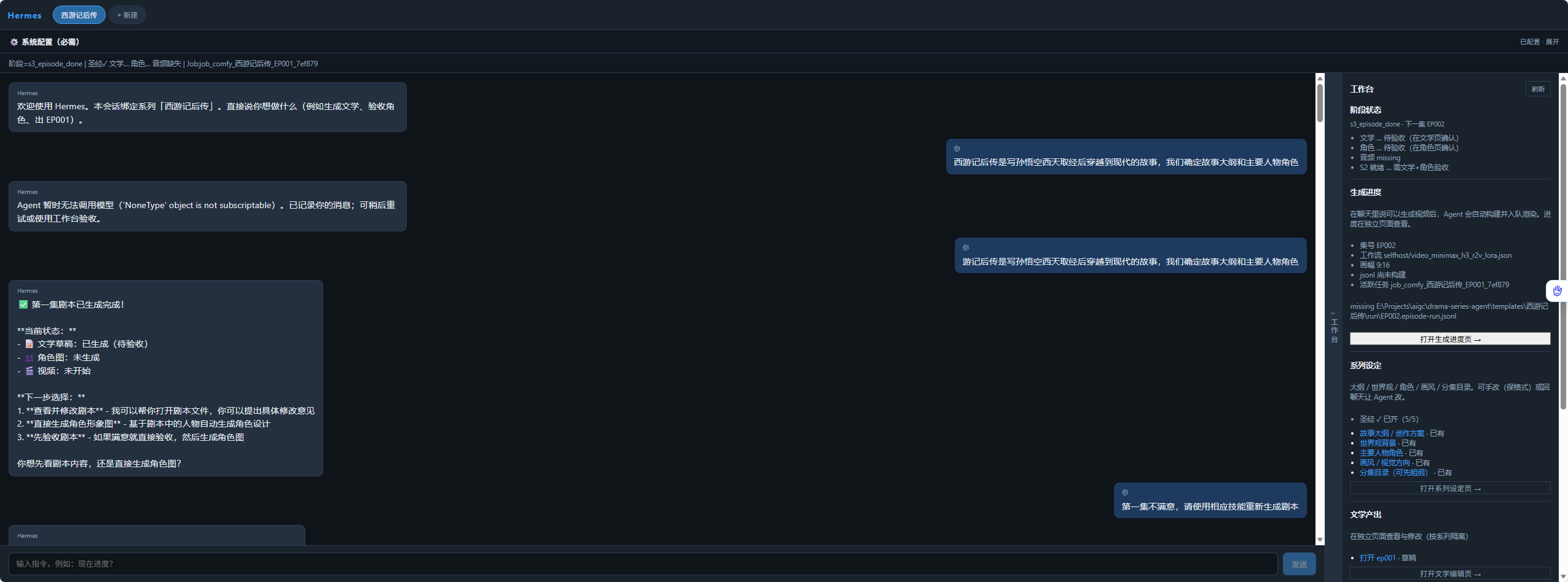
Workbench: chat on the left, per-episode progress and render jobs on the right
Quick start
Requirements
- Python 3.10+
- ffmpeg (see Install ffmpeg below)
- Optional: Node 18+ for the React workbench
- Optional: OpenAI-compatible LLM for the agent chat (e.g. ModelScope)
ComfyUI (required for video render — install yourself)
This repo does not bundle ComfyUI or MiniMax H3 weights. You must:
- Install ComfyUI yourself and keep it running (default
http://127.0.0.1:8188). - Install the MiniMax H3 Ref2VA custom nodes your graphs need (e.g.
MiniMaxH3ReferenceToVideoand related loaders / optional SageAttention · BlockCache nodes used by the*_fast/*_turbotiers). - Download every model file referenced by the workflow JSON into the matching ComfyUI folders (
models/diffusion_models,models/text_encoders,models/vae,models/loras, … — follow ComfyUI’s usual layout). Typical names fromworkflows/selfhost/:
| File (examples) | Used by |
|---|---|
minimax_h3_ref2va_pruned_int8_convrot.safetensors | UNET / Ref2VA (fast · lora · turbo) |
minimax_h3_fl2va_pruned_int8_convrot.safetensors | Quality tier video_minimax_h3_r2v.json |
qwen3vl_32b_minimax_h3_nvfp4_awq.safetensors | Text encoder / CLIP |
minimax_h3_video_vae_fp16.safetensors | Video VAE |
minimax_h3_audio_vae_fp32.safetensors | Audio VAE |
minimax_h3_ref2v_turbo_4step_v0.1_comfyui_bf16.safetensors | Lightning LoRA (*_lora / *_turbo) |
- Open the chosen workflow once in the ComfyUI UI and confirm no red/missing nodes or models, then point this agent at the same server (
COMFYUI_URL/ system config).
Without a ready ComfyUI + models, you can still develop settings, write scripts, and manage cast in the workbench — video jobs will fail until the above is done.
Install ffmpeg
ffmpeg is required after each shot to extract the tail frame (chain continuity) and to concat shots into master.mp4.
Resolution order in code: FFMPEG_PATH → PATH → bundled imageio-ffmpeg (pulled in by pip install).
Recommended: install a system binary (clearer for debugging):
Windows
# Option A — winget
winget install --id Gyan.FFmpeg -e

# Option B — scoop
scoop install ffmpeg

# Option C — chocolatey
choco install ffmpeg
Or download a build from gyan.dev ffmpeg builds / BtbN, unzip, and either:
- Add
...\ffmpeg\binto User PATH, or - Set in
.env:
FFMPEG_PATH=C:\ffmpeg\bin\ffmpeg.exeVerify in a new terminal:
ffmpeg -versionmacOS
brew install ffmpeg
ffmpeg -version
Linux (Debian/Ubuntu)
sudo apt update
sudo apt install -y ffmpeg
ffmpeg -version
Fallback (no system ffmpeg): pip install -e . already depends on imageio-ffmpeg, which downloads a static binary into the venv. That is enough for Quick Start; set FFMPEG_PATH only if you want to force a specific build.
Install the project
git clone https://github.com/binwu1/drama-series-agent.git
cd drama-series-agent

python -m venv .venv
# Windows:
.venv\Scripts\activate
# macOS/Linux:
source .venv/bin/activate

python -m pip install -U pip
pip install -e ".[render,dev]"
copy .env.example .env          # Windows
# cp .env.example .env          # macOS/Linux
# edit .env → COMFYUI_URL / LLM_* / optional FFMPEG_PATH
Verify install
python scripts/doctor.pyYou should see [OK] for ffmpeg, skills, comfykit, API router, and CLI entry points.
If ffmpeg fails: install a system binary (above) or confirm imageio-ffmpeg is in the active venv.
Launch API (+ web workbench)
# Windows — API + Vite UI
.\start.ps1 -WithWeb

# macOS / Linux
./start.sh --with-web| Surface | URL | Notes |
|---|---|---|
| Web workbench | http://localhost:5173/ | Default Vite port (web/). Chat, series settings, scripts, cast, jobs, system config. |
| API (OpenAPI) | http://127.0.0.1:8000/docs | Backend the UI calls |
| API base used by UI | http://127.0.0.1:8000/api/series | Override with web/.env: VITE_HERMES_API_BASE=... |
Open http://localhost:5173/ after both processes are up. If the page loads but chat/settings fail, the API is not running on port 8000 (start it first, or point VITE_HERMES_API_BASE at your API).
Without the helper scripts:
# terminal 1 — API
python scripts/run_api.py --host 127.0.0.1 --port 8000

# terminal 2 — workbench (http://localhost:5173/)
cd web
npm install
npm run dev
Render one episode (CLI)
- Cast:
data/cast/{series}/{character}.png(+ optionalvoices/{character}.wav) - Run files:
templates/{series}/run/EP001.episode-run.jsonl+EP001.episode-meta.json - ComfyUI at
COMFYUI_URL(defaulthttp://127.0.0.1:8188)
drama-series-render \
  --project templates/<series> \
  --episode EP001 \
  --cast-series <series> \
  --context-ir off \
  --comfyui-url http://127.0.0.1:8188
Output: templates/{series}/output/{EP}/master.mp4 (shots concat with a short head trim).
Workflows
API graphs live under workflows/selfhost/. Import / align them in your ComfyUI, and download any model the JSON names (see ComfyUI requirements).
| Workflow | Role |
|---|---|
selfhost/video_minimax_h3_r2v_fast.json | Default speed tier (20 step + accel nodes) |
selfhost/video_minimax_h3_r2v_lora.json | Lightning LoRA 4-step path |
selfhost/video_minimax_h3_r2v_turbo.json | Turbo / experimental speed |
selfhost/video_minimax_h3_r2v.json | Quality / fl2va tier |
Pick the video workflow in the system config panel or config.json → comfyui.video.default_workflow.
Repository layout
skills/                         # canonical agent skills (open-source layout)
src/drama_series_agent/
  agent/  drama/  intake/  api/ # orchestration
  adapters/r2v/                 # H3 episode runner
workflows/selfhost/             # ComfyUI API graphs
data/cast/{series}/             # character anchors + voices/
projects/{series}/              # series_runtime, memory, jobs
templates/{series}/             # run/ + output/
web/                            # React workbench
docs/                           # architecture, contracts, assets
Cursor users who want project-skill auto-discovery can run scripts/link_cursor_skills.ps1 / .sh (links are gitignored). Edit skills only under skills/.
Documentation
Contributing
Issues and PRs are welcome. Keep changes focused; prefer small PRs with a clear why.
- Fork & branch from
main pip install -e ".[render,dev]"- Open a PR with a short summary and test notes
License
Literary skill content under skills/0xsline-short-drama/ retains its upstream license notice where present.