LightTouch
LightTouch runs classic iPhone OS and iOS in an emulator on Android, Linux, Windows and macOS. It is a fork of Light Touch for Mac, built around a shared qemu-ios engine.
One desktop app runs on Linux, Windows and macOS; Android has its own touch UI. Every version sets up a device for you from Apple's IPSW: pick a device and iOS version, and LightTouch downloads and prepares it. Each device keeps its own storage.
Download the latest release. LightTouch is still early and things can change between versions. Android has had the most testing.
Demo videos
Both recorded on a Pixel 10. Click to watch on YouTube.
| iPod touch 4G, iOS 6.1.6 | iPod touch 2G, iOS 3.1.3 |
|---|---|
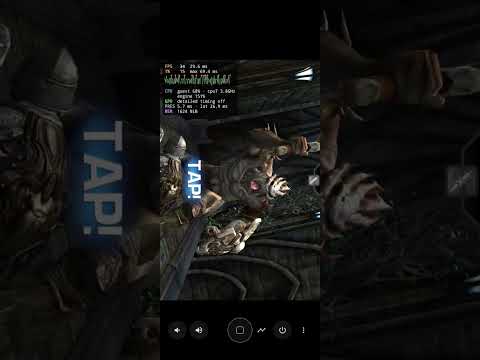 | 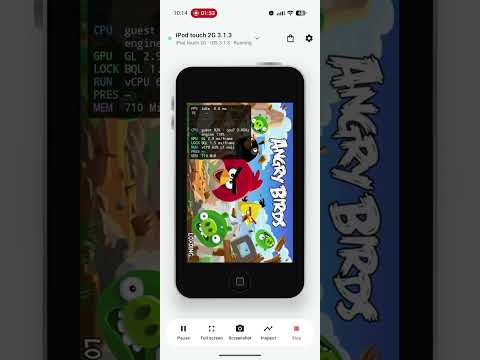 |
Current platforms
| Platform | Build | Status |
|---|---|---|
| Android | APK, ARM64 (Android 10+) | The main test platform, on a Poco F3 and a Pixel 10. First launch walks you through preparing a device from an IPSW on the phone. Graphics, audio, touch, tilt, internet inside iOS and IPA installs work, and the Legacy Store can be browsed like the website, with several installs queued in the background. |
| Linux | x86_64 AppImage | The desktop app. Prepares devices from an IPSW; accelerated graphics, audio, internet inside iOS, the Legacy Store and IPA installs work. Needs glibc 2.31 or later (Debian 11, Ubuntu 20.04 and newer). |
| Windows | x86_64 ZIP | The same app as on Linux. Preparing devices, graphics, audio, Legacy Store installs and internet confirmed on Windows 10 and 11. |
| macOS | Apple Silicon app ZIP | The same app as on Linux. Preparing devices, running them and Legacy Store installs checked on an M-series Mac; internet not yet. Needs macOS 26. The app isn't notarized: the first time, allow it in System Settings › Privacy & Security. |
Devices
| Device | iOS | Status |
|---|---|---|
| iPod touch 2G | 3.1.3 | Tested: the main target, fastest. Games such as Flight Control and Jetpack Joyride run at or near 60 fps on recent phones. |
| iPod touch 2G | 4.2.1 | Tested |
| iPod touch 3G | 4.2.1 | Tested |
| iPod touch 4G | 6.1.6 | Tested: on a Pixel 10, Infinity Blade and Infinity Blade II run at full speed and Epic Citadel at 60 fps. Most other games, such as Jetpack Joyride, Doodle Jump and Real Racing, run at or near 60 fps on recent phones. |
| iPhone 3GS | 5.1.1 | Tested. Its microphone isn't supported yet (it records silence). |
| iPhone 4 | 4.2.1, 4.3.5, 6.1.3 | Tested |
| iPad | 5.1.1 | Tested |
| iPod touch 1G, original iPhone | iPhone OS 1 | Doesn't start yet: they stop at a white screen after they are set up. |
| Others in the firmware catalog | up to iOS 7 | Can be prepared and tried; not yet checked on LightTouch. docs/COMPATIBILITY.md records what has been run. |
Getting started
Install the APK on Android, or unpack the build for your computer, and choose Get started. Pick a device and iOS version, and LightTouch downloads iOS and prepares it (the iPod touch 2G on iOS 3.1.3 takes about a minute). You don't need any files of your own; if you already have the IPSW, you can choose it instead of downloading. The iPod touch 1G and 2G and the original iPhone also need a boot file, which LightTouch downloads for you. docs/ASSETS.md says where everything comes from.
Then start the device. Use the on-screen Home, Sleep/Wake and volume buttons, and Stop to shut iOS down cleanly. Each device keeps its own storage, and the prepared system is never changed.
On a computer the mouse is your finger: click to tap and drag to swipe. Hold Alt (Option on a Mac) while dragging to pinch or rotate with two fingers, and add Shift to move two fingers together. H is Home, P is Sleep/Wake, + and − set the volume, and the arrow keys tilt the device for games you steer by tilting. The ? button beside Settings lists them all. The device list on the left holds every device you've set up, the bag button opens the Legacy Store, and full screen, rotation for landscape apps, screenshots and a performance overlay are a click away.
Settings › Network gives iOS internet access, on Android and on computers: your own connection, or the Internet Archive's Wayback Machine at a date you choose, so websites look as they did when that iOS was current. It's off until you turn it on, and changes apply while the device runs.
Performance
Guests run through QEMU's TCG dynamic translation; there is no hardware virtualization of the guest CPU. Much of this fork's engine work is speed: cross-page chaining, indirect-branch caches, fewer big-lock waits, and a faster OpenGL ES path. The history and measurements are in docs/PERFORMANCE.md. On Android the vCPU is kept on the phone's fast cores. The performance overlay shows host-side engine load and memory, not CPU use inside iOS.
Building and contributing
The desktop app and firmwarekit (the preparer every platform uses) are one Rust workspace: cargo build (docs/DESKTOP.md). scripts/build.sh builds the engines, the Android APK and (on a Mac, over ssh) the guest tools; scripts/build-release.sh builds a release for all four platforms. docs/BUILDING.md covers the inputs, and CONTRIBUTING.md the repository layout, firmware preparation, tests and style. Development happens on dev/* branches of this repository and the engine; releases come from main.
License and credits
LightTouch is free software under GPL version 2 or, at your option, any later version; see LICENSE. Upstream authorship and licenses are retained.
It builds on LightTouchMac, qemu-ios, QEMU, devos50's qemu-ios, libimobiledevice, libusbmuxd, libplist, libtatsu, the upstream usbmuxd fork, iBoot32Patcher, FFmpeg, GLib, libslirp, PCRE2, pixman, OpenSSL, egui and the Rust crates listed on each app's licence page. Preserve each package's bundled license and source notices.
iPhone, iPod touch and iPad are trademarks of Apple Inc. LightTouch is not affiliated with Apple.