React Compiler Marker
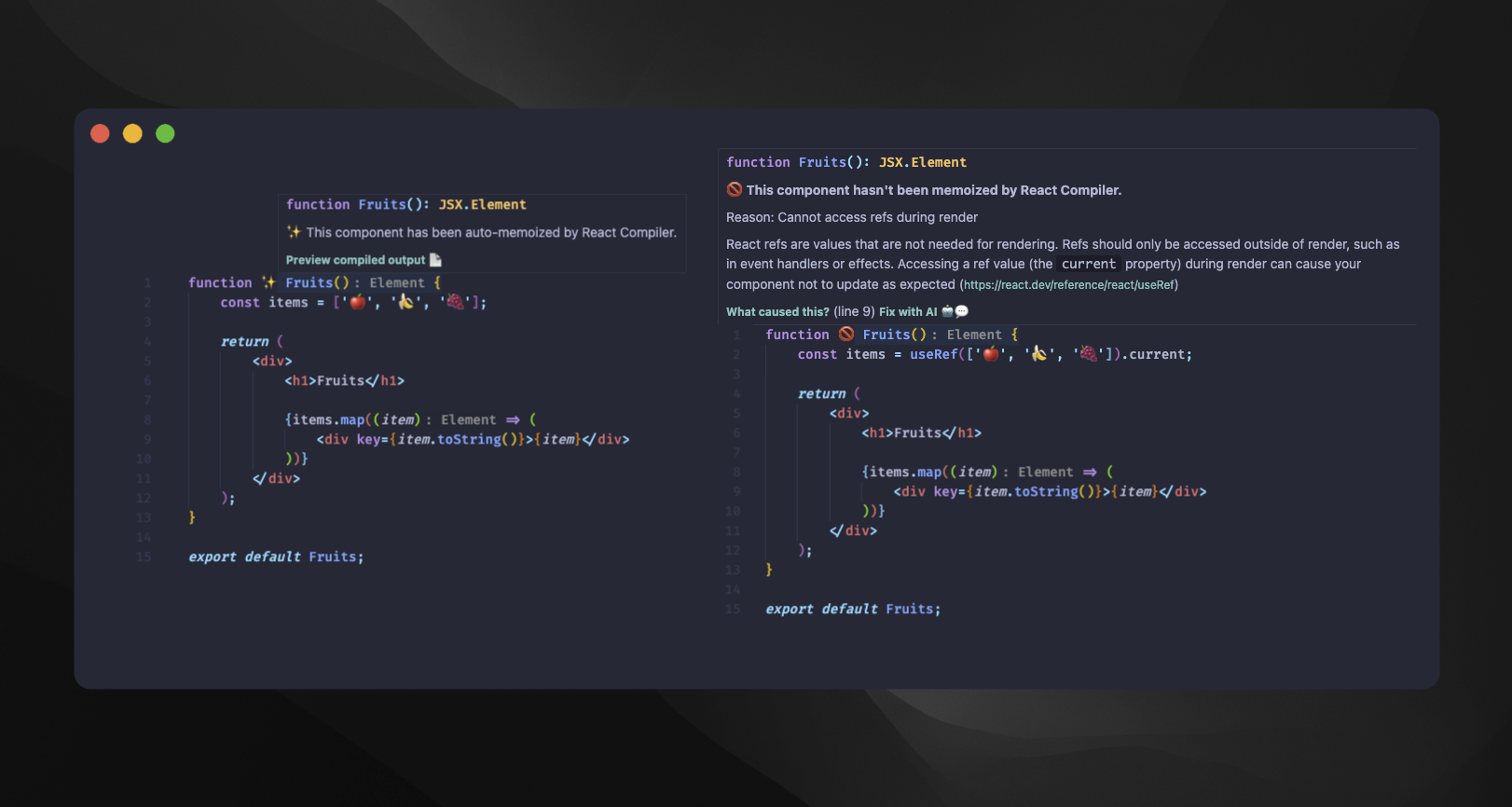
Universal IDE extension that shows which React components are optimized by the React Compiler. See at a glance which components get automatically memoized ✨ and which ones have issues preventing optimization 🚫
Features
- Visual emoji markers next to React components (customizable)
- Hover tooltips with optimization details and error messages
- Preview compiled output to see what the React Compiler generates
- Generate reports for a full-project compilation snapshot
- Commands to activate/deactivate markers or check individual files
- Configurable babel plugin path for custom setups
Supported IDEs
| IDE | Installation |
|---|---|
| VS Code / Cursor / Antigravity | VS Code Marketplace | Open VSX |
| WebStorm / IntelliJ IDEA | IntelliJ marketplace |
| Neovim | Setup instructions |
| Zed (alpha) | Setup instructions |
Project Structure
This is a monorepo containing:
packages/
  cli/              # CLI for generating reports
  server/           # LSP server (shared by all clients)
  vscode-client/    # VS Code extension
  intellij-client/  # WebStorm/IntelliJ plugin
  nvim-client/      # Neovim plugin
  zed-client/       # Zed extension
Each client has its own version and release cycle. See individual READMEs for client-specific documentation:
Quick Start
CLI
npx react-compiler-marker
Generate a full-project report from the command line. Supports text, HTML, and JSON output formats.
# Text summary (default)
npx react-compiler-marker .

# Interactive HTML report
npx react-compiler-marker --format html .

# JSON for CI pipelines
npx react-compiler-marker --format json . > report.json
See the CLI README for all options.
VS Code / Cursor / Antigravity
- Install from VS Code Marketplace or search "React Compiler Marker" in Extensions
- Open a React component file - markers appear automatically
WebStorm / IntelliJ IDEA
- Build the plugin:
cd packages/intellij-client && ./gradlew buildPlugin - Install from disk: Settings > Plugins > Install Plugin from Disk
- Select
build/distributions/react-compiler-marker-*.zip
Neovim
Using lazy.nvim:
{
  'blazejkustra/react-compiler-marker',
  ft = { 'javascript', 'javascriptreact', 'typescript', 'typescriptreact' },
  build = './scripts/build-nvim.sh',
  opts = {},
}
Open a React component file - markers appear automatically.
Requirements: Neovim 0.9+ (0.10+ recommended for native inlay hints), Node.js, babel-plugin-react-compiler in your project.
See the Neovim Client README for configuration options and other package managers.
Zed
Note: The Zed extension is not yet available in the Zed extension registry. For now, you need to download and install it manually.
See the Zed Client README for installation and configuration options.
Links
- GitHub Repository
- VS Code Marketplace
- Open VSX Registry
- Jetbrains Marketplace
- React Compiler Documentation
Contributing
See CONTRIBUTING.md for development setup and guidelines.
License
MIT