Claude Cowork - Head of Content
Your AI-powered content research coworker. Stop guessing what content works—let Claude research, analyze, and surface winning patterns across X/Twitter, Instagram, YouTube, and TikTok.
Check out this YouTube video where we walk through setting up and using Head of Content.
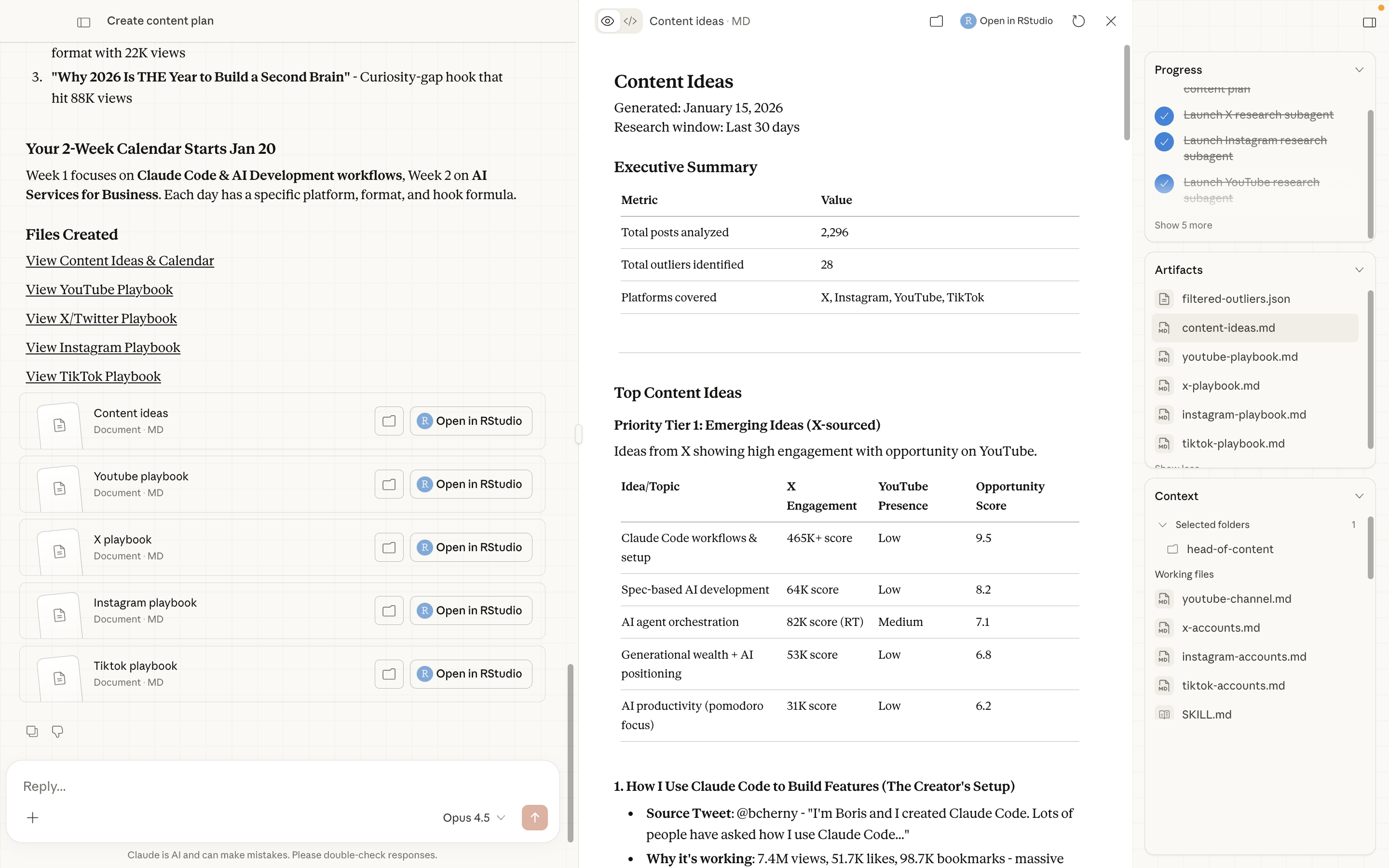
A Claude Cowork skill set that automates social media content research—identifying high-performing content, analyzing viral patterns with AI, and generating actionable content strategies.
Get Your API Keys
| Service | What It Powers | Sign Up |
|---|---|---|
| Apify | X/Twitter, Instagram, TikTok scraping | Sign up for Apify |
| TubeLab | YouTube outlier detection | Sign up for TubeLab |
What This Does
- Research high-performing content across 4 major platforms
- Identify statistical outliers using engagement scoring algorithms
- Analyze videos with AI to extract hooks, structure, and replicable patterns
- Generate content plans with cross-platform opportunity scoring
- Create platform playbooks with specific recommendations
Prerequisites
- macOS (required for Claude CoWork)
- Claude Max Plan (required for custom skills)
- Claude Desktop installed
- Python 3.8+ with pip
Quick Start
1. Clone the Repository
git clone https://github.com/bradautomates/head-of-content.git
cd head-of-content
2. Set Up Your Environment
Copy the example environment file and add your API keys (see API Keys Setup below):
cp .env.example .envThen edit .env with your API keys.
3. Open in Claude Desktop
- Open Claude Desktop
- Click the Claude Coworker tab the in sidebar
- At the bottom of the panel, click Work in a folder
- Select your
head-of-contentfolder
4. Install the Skills
The repository includes 6 .skill files that need to be added to Claude Desktop:
- In Claude Desktop, go to Settings (gear icon)
- Click Capabilities
- Click Skills
- Click Add Skill
- Upload each
.skillfile from yourhead-of-contentfolder:x-research.skillinstagram-research.skillyoutube-research.skilltiktok-research.skillvideo-content-analyzer.skillcontent-planner.skill
Repeat the "Add Skill" process for each file.
API Keys Setup
This repository requires 3 API keys.
Apify (X/Twitter, Instagram, TikTok)
Apify powers the social media scraping for X, Instagram, and TikTok.
Actors used:
- Tweet Scraper V2 - X/Twitter posts and profiles
- Instagram Scraper - Instagram posts and reels
- TikTok Scraper - TikTok videos and profiles
Setup:
- Go to console.apify.com
- Click Sign Up (A paid subscription is required for the X scraper to function as expected)
- After signing in, go to Settings > Integrations
- Copy your Personal API Token
Cost: Free tier includes $5/month. Research runs typically cost $0.10-$0.50 depending on volume.
TubeLab (YouTube)
TubeLab provides YouTube outlier detection and video intelligence.
APIs used:
- Outliers API - Find viral videos in any niche
- Transcripts API - Get video transcripts
Setup:
- Go to tubelab.net
- Click Sign Up and create an account
- Go to Settings > API (or visit tubelab.net/settings/api)
- Generate and copy your API Key
Cost: Free tier available. Paid plans start at ~$29/month for higher limits.
Google Gemini (Video Analysis)
Gemini AI analyzes video content to extract hooks, patterns, and structure.
- Go to aistudio.google.com
- Sign in with your Google account
- Click Get API Key (or visit aistudio.google.com/apikey)
- Click Create API Key and copy it
Cost: Free tier includes 60 requests/minute. More than enough for research.
Environment Setup
Create Your .env File
Copy the example environment file:
cp .env.example .envOpen .env in your editor and add your API keys:
# YouTube Research - TubeLab API
TUBELAB_API_KEY=your-tubelab-api-key-here

# X/Twitter, Instagram, TikTok Research - Apify API
APIFY_TOKEN=your-apify-token-here

# Video Analysis - Gemini API
GEMINI_API_KEY=your-gemini-api-key-here
Verify Setup
Test that your environment is configured correctly:
# Load environment variables
export $(cat .env | grep -v '^#' | xargs)

# Verify they're set
echo "Apify: ${APIFY_TOKEN:0:10}..."
echo "TubeLab: ${TUBELAB_API_KEY:0:10}..."
echo "Gemini: ${GEMINI_API_KEY:0:10}..."
Configure Your Research Targets
Before running research, configure which accounts to track in .claude/context/:
X/Twitter Accounts
Edit .claude/context/x-accounts.md:
# X/Twitter Accounts to Track

| Username | Niche | Notes |
|----------|-------|-------|
| @levelsio | indie hacking | bootstrapped founder, viral tweets |
| @naval | philosophy/startups | high engagement threads |
| @sahaborhani | AI/tech | technical content |
Instagram Accounts
Edit .claude/context/instagram-accounts.md:
# Instagram Accounts to Track

| Username | Niche | Notes |
|----------|-------|-------|
| @garyvee | marketing | high volume, reels focus |
| @hormozi | business | educational content |
TikTok Accounts
Edit .claude/context/tiktok-accounts.md:
# TikTok Accounts to Track

| Username | Niche | Notes |
|----------|-------|-------|
| @garyvee | marketing | cross-platform content |
| @tiktokcreators | meta/tips | platform trends |
YouTube Channel (Your Channel)
Edit .claude/context/youtube-channel.md with your channel info:
# YouTube Channel Context

## Channel Information
- **Channel Name:** Your Channel Name
- **Channel Handle:** @yourhandle
- **Channel ID:** UCxxxxxxxxxxxxxxxxxx

## Niche & Positioning
- **Primary Niche:** Your niche
- **Content Style:** Your style
- **Target Audience:** Your audience

## Content Strategy
- **Typical Video Length:** 10-20mins
- **Upload Frequency:** Weekly
- **Best Performing Topics:** Your best topics

## Goals
- **Growth Targets:** Your subscriber goal
- **Content Goals:** Your content goals
Available Skills
Once connected, these skills are available in Claude Desktop:
| Command | Description |
|---|---|
/x-research | Research X/Twitter content |
/instagram-research | Research Instagram reels and posts |
/youtube-research | Find YouTube outliers in your niche |
/tiktok-research | Research TikTok videos |
/content-planner | Run all research + create content plan |
Type / in the chat to see all available skills.
Usage
Run Individual Platform Research
In Claude Desktop, simply invoke the skill:
Run x-research
This will:
- Fetch recent content from your tracked accounts
- Calculate engagement scores and identify outliers
- Analyze top videos with AI (if applicable)
- Generate a report in
x-research/YYYY-MM-DD_HHMMSS/
Run Full Content Planning
For comprehensive cross-platform research:
Run content-planner
This will:
- Run all 4 platform research skills in parallel
- Aggregate findings across platforms
- Identify cross-platform content opportunities
- Generate platform-specific playbooks
- Output everything to
content-plans/YYYY-MM-DD_HHMMSS/
Natural Language
You can also just ask Claude:
- "Research what's performing on X right now"
- "Find trending content in my Instagram niche"
- "Create a content plan for next week"
- "What videos are going viral on TikTok?"
Output Structure
Platform Research Output
Each research run creates a timestamped folder:
x-research/2024-01-15_143022/
├── raw.json            # Raw API data
├── outliers.json       # Identified outliers with metrics
├── video-analysis.json # AI-extracted patterns (if videos)
└── report.md           # Human-readable summary
Content Plan Output
content-plans/2024-01-15_143022/
├── content-ideas.md       # Cross-platform content opportunities
├── x-playbook.md          # X/Twitter specific intelligence
├── instagram-playbook.md  # Instagram specific intelligence
├── youtube-playbook.md    # YouTube specific intelligence
└── tiktok-playbook.md     # TikTok specific intelligence
Engagement Scoring
Each platform uses optimized engagement weights:
X/Twitter
| Signal | Weight | Why |
|---|---|---|
| Bookmarks | 4x | Strongest intent signal |
| Replies | 3x | Conversation starter |
| Retweets | 2x | Amplification |
| Quotes | 2x | Commentary |
| Likes | 1x | Passive approval |
engagement = likes + (3 × comments) + (0.1 × views)
TikTok
engagement = likes + (3 × comments) + (2 × shares) + (2 × saves) + (0.05 × views)
YouTube
score = zScore × recency_boost (5% daily decay)
Outlier threshold: Content scoring above mean + (2.0 × std_dev) is flagged as an outlier.
Troubleshooting
"API key not found" errors
# Make sure .env exists and has your keys
cat .env

# Load environment variables before running
export $(cat .env | grep -v '^#' | xargs)
"No accounts configured" warnings
Make sure you've added accounts to track in .claude/context/:
x-accounts.mdinstagram-accounts.mdtiktok-accounts.md
Cowork not showing in Claude Desktop
- Verify you're on the Claude Max plan
- Update and restart Claude Desktop
Apify rate limits
The free Apify tier has usage limits. If you hit them:
- Reduce the number of accounts tracked
- Increase time between research runs
- Consider upgrading your Apify plan
License
MIT License - Feel free to modify and distribute.
Contributing
Contributions welcome! To add new skills or improve existing ones:
- Fork the repository
- Use
/skill-creatorto scaffold new skills - Follow the patterns in existing skills
- Submit a pull request
Implement AI in Your Business
Practical AI implementation for real business results
Learn how to implement AI tools and workflows that actually move the needle for your business on my YouTube channel.
Follow @corpcowboy_ on X