



Free model router CLI - discover, ping, and configure free AI models for OpenCode / OpenClaw.
Install
npx @bytonylee/free-router
# or
npm i -g @bytonylee/free-router
# or
bunx @bytonylee/free-router
# or
bun install -g @bytonylee/free-router
Run
free-router
On first run, a setup wizard prompts for API keys (ESC to skip any provider).
If you accept the in-app update prompt (Y), free-router now updates globally and
restarts automatically, so you can continue without running free-router again.
Ways to use free-router
- First-run onboarding wizard
Launch
free-router, open provider websites in-browser from the wizard, paste keys, and start. - Interactive model search + target config
Use
/to filter models, thenEnterto configure OpenCode, OpenClaw, or Hermes Agent. - Quick API key rescue from main screen
Press
A(orRfor expired/missing provider) to jump into key editing with auto browser opening for missing keys. - Full settings workflow
Press
Pto edit keys, toggle providers, run live key tests, and onboard missing keys provider-by-provider. - Non-interactive best-model selection
Run
free-router --bestto print the best responding model ID for scripts.
Providers
| Provider | Free key |
|---|---|
| NVIDIA NIM | build.nvidia.com - prefix nvapi- |
| OpenRouter | openrouter.ai/settings/keys - prefix sk-or- |
API key priority: environment variable → ~/.free-router.json → keyless ping (latency still shown).
NVIDIA_API_KEY=nvapi-xxx free-router
OPENROUTER_API_KEY=sk-or-xxx free-router

# Optional: pause auto re-sorting while you scroll (milliseconds)
FREE_ROUTER_SCROLL_SORT_PAUSE_MS=2500 free-router

# Optional: disable rolling metrics cache and force legacy recompute path
FREE_ROUTER_METRICS_CACHE=0 free-router
TUI
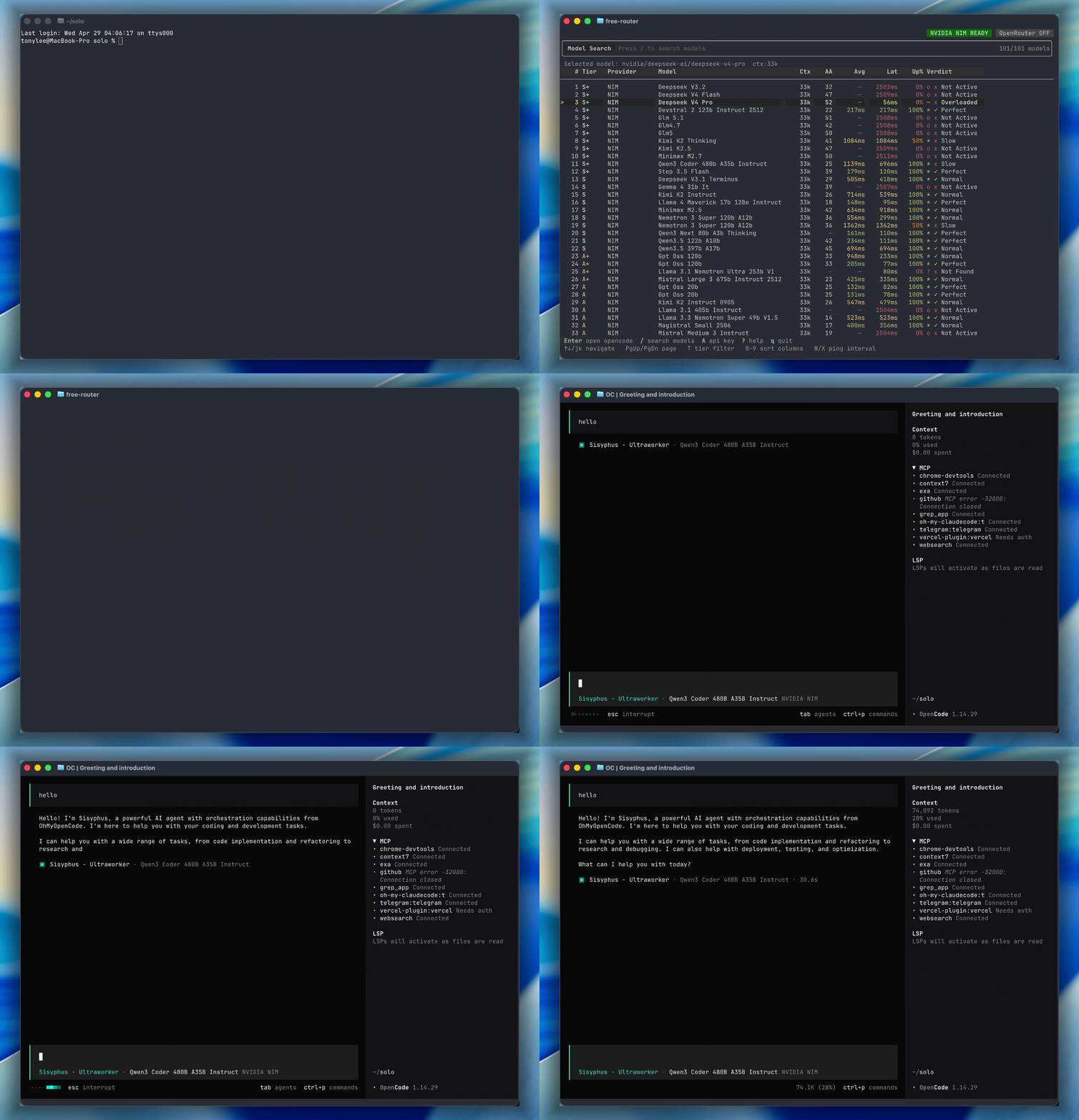
The interactive TUI pings all models in parallel every 2 seconds and shows live latency, uptime, and verdict. The selected row uses a stable marker, and redraws are deferred while the terminal is unfocused to avoid background-tab blinking.
Columns
| Column | Description |
|---|---|
# | Rank |
Tier | Capability tier derived from SWE-bench score (S+ → C) |
Provider | NIM or OpenRouter |
Model | Display name |
Ctx | Context window size |
AA | Arena Elo / intelligence score |
Avg | Rolling average latency (HTTP 200 only) |
Lat | Latest measured ping latency |
Up% | Uptime percentage this session |
Verdict | Condition summary (✓ Perfect / ✓ Normal / x Overloaded / …) |
Default ranking: availability first, then higher tier first (S+ → S → A+ …), then lower latency.
Search bar provider badges:
Name:✓key exists and looks healthyName:✗provider appears expired/no-authName:○key missing
The ? help overlay and A API-key editor use the same terminal header/footer
chrome as the main list. Their mode tags stay left-aligned, and help body text
uses the same foreground color as the table rows.
Keyboard shortcuts
Navigation
| Key | Action |
|---|---|
↑ / k | Move up |
↓ / j | Move down |
PgUp / PgDn | Page up / down |
g | Jump to top |
G | Jump to bottom |
Actions
| Key | Action |
|---|---|
Enter | Configure current model for OpenCode / OpenClaw / Hermes |
/ | Search / filter models (Enter in search = configure target) |
A | Quick API key add/change (opens key editor in Settings) |
R | Edit API key for likely expired/missing provider |
T | Cycle tier filter: All → S+ → S → A+ → … |
P | Settings screen (edit keys, toggle providers, test) |
W / X | Faster / slower ping interval |
? | Help overlay |
q / Ctrl+C | Quit |
Sort (press to sort, press again to reverse)
| Key | Column |
|---|---|
0 | Priority (default) |
1 | Tier |
2 | Provider |
3 | Model name |
4 | Avg latency |
5 | Latest ping |
6 | Uptime % |
7 | Context window |
8 | Verdict |
9 | AA Intelligence |
Target handoff
Pressing Enter on a model opens a target picker:
- OpenCode →
~/.config/opencode/opencode.jsonwith optional Save + Launch. - OpenClaw →
~/.openclaw/openclaw.jsonusingagents.defaults.model.primaryandagents.defaults.models. - Hermes Agent →
~/.hermes/config.yamlusing the documentedmodel.providerandmodel.defaultfields.
If OpenCode fallback remaps the provider (for example NIM Stepfun → OpenRouter)
and the effective provider key is missing, free-router asks:
Add API key now? (Y/n, default: Y).
If model metadata says the selected model is unsupported by the known target
support list, free-router falls back to NVIDIA NIM deepseek-ai/deepseek-v4-pro
as the default high-performance model.
Existing target configs are backed up before writing.
OpenClaw and Hermes Agent use their built-in openrouter / nvidia provider
names. If FREE_ROUTER_EXPORT_PLAINTEXT_KEYS=1 is set, free-router also writes
the selected provider key into OpenClaw env or Hermes ~/.hermes/.env;
otherwise those tools should read provider keys from your shell environment.
When free-router launches OpenCode, it now sets OPENCODE_CLI_RUN_MODE=true
by default (unless you already set it) to reduce startup log noise from
plugin auto-update checks in the OpenCode TUI.
If you want OpenCode's default startup hook behavior instead, launch free-router with:
OPENCODE_CLI_RUN_MODE=false free-router
Settings screen (P)
Tip: press A from the main list to jump directly into API key editing.
Tip: if a selected provider has no key, free-router auto-opens that provider key page
in browser (once per provider per settings session), including when you move selection.
| Key | Action |
|---|---|
↑ / ↓ / j / k | Navigate providers |
Enter | Edit API key inline |
Space | Toggle provider enabled / disabled |
T | Fire a live test ping |
D | Delete key for this provider |
ESC | Back to main list |
Flags
| Flag | Behavior |
|---|---|
| (none) | Interactive TUI |
--best | Non-interactive: ping 4 rounds, print best model ID to stdout |
--help / -h | Show help |
--best scripted usage
# Print best model ID after ~10 s analysis
free-router --best

# Capture in a variable
MODEL=$(free-router --best)
echo "Best model: $MODEL"
Requires at least one API key to be configured. Selection tri-key sort: status=up → lowest avg latency → highest uptime.
Config
Stored at ~/.free-router.json (permissions 0600).
{
  "apiKeys": {
    "nvidia": "nvapi-xxx",
    "openrouter": "sk-or-xxx"
  },
  "providers": {
    "nvidia": { "enabled": true },
    "openrouter": { "enabled": true }
  },
  "ui": {
    "scrollSortPauseMs": 1500
  }
}
ui.scrollSortPauseMs sets how long (ms) auto re-sorting stays paused after navigation input.
FREE_ROUTER_SCROLL_SORT_PAUSE_MS overrides config. Set to 0 to disable pause.
Tier scale (SWE-bench Verified)
| Tier | Score | Description |
|---|---|---|
| S+ | ≥ 70% | Elite frontier |
| S | 60–70% | Excellent |
| A+ | 50–60% | Great |
| A | 40–50% | Good |
| A- | 35–40% | Decent |
| B+ | 30–35% | Average |
| B | 20–30% | Below average |
| C | < 20% | Lightweight / edge |
Verdict legend
| Verdict | Trigger |
|---|---|
| x Overloaded | Last HTTP code = 429 |
| x Unstable | Was up, now failing |
| x Not Active | Never responded |
| - Pending | Waiting for first success |
| ✓ Perfect | Avg < 400 ms |
| ✓ Normal | Avg < 1000 ms |
| x Slow | Avg < 3000 ms |
| x Very Slow | Avg < 5000 ms |
| x Unusable | Avg ≥ 5000 ms |
Development notes
- TypeScript source of truth:
src/ - ESLint config is TypeScript:
eslint.config.ts - Runtime JS output is generated only in
dist/vianpm run build
License
Apache License 2.0. See LICENSE.