React Native AI
A collection of on-device AI primitives for React Native with first-class Vercel AI SDK support. Run AI models directly on users' devices for privacy-preserving, low-latency inference without server costs.
Features
- 🚀 Instant AI - Use built-in system models immediately without downloads
- 🔒 Privacy-first - Inference runs on-device, so data stays local. Cloud models are opt-in
- 🎯 Vercel AI SDK compatible - Use
generateText,streamText,embedand other AI SDK functions with local models - 🎨 Beyond text - Embeddings, transcription, speech synthesis, image and video generation, and vision models
AI SDK Compatibility
| React Native AI | AI SDK |
|---|---|
| 0.11 and below | v5 |
| 0.12 | v6 |
| 0.13 and above | v7 |
DevTools
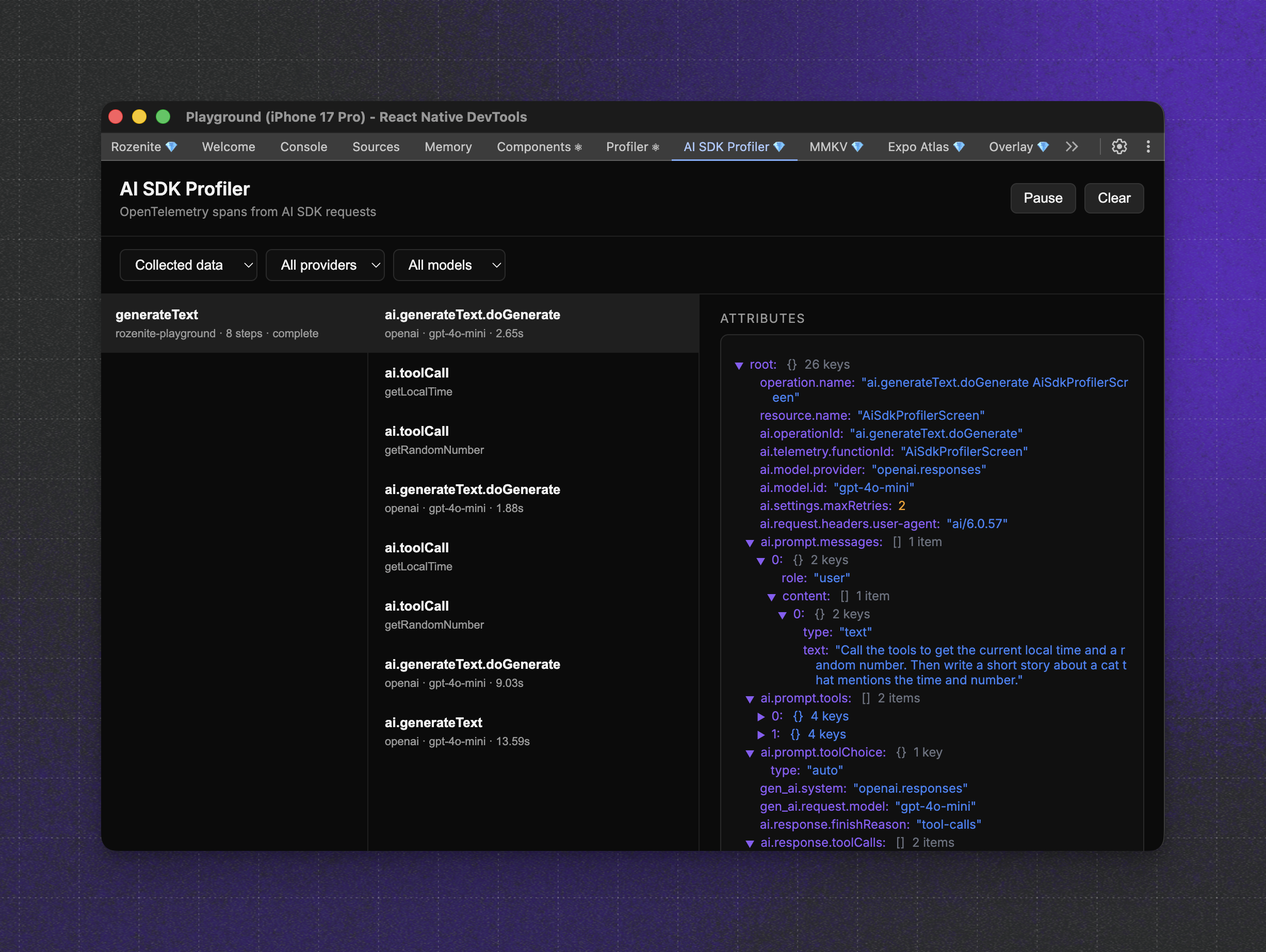
The AI SDK Profiler plugin captures OpenTelemetry spans from Vercel AI SDK requests and surfaces them in Rozenite DevTools. DevTools are runtime agnostic, so they work with on-device and remote runtimes.
npm install @react-native-ai/dev-toolsRozenite must be installed and enabled in your app. See the Rozenite getting started guide.
If the AI SDK Profiler panel stays empty after you send a message, close the
React Native DevTools window and open a new one. A stale debugger session can
keep the panel mounted without receiving telemetry.
Available Providers
| Provider | Built-in | Platforms | Runtime | Description |
|---|---|---|---|---|
| Apple | ✅ Yes | iOS | Apple | Apple Foundation Models, embeddings, transcription, speech |
| ADK | ✅ Yes | Android | Google ADK | On-device Gemini Nano, with optional cloud Gemini |
| Core AI | ❌ No | iOS | Core AI | Text, image, video, speech, embedding and vision models |
| Llama | ❌ No | iOS, Android | llama.rn | Run GGUF models via llama.rn |
Apple
Native integration with Apple's on-device AI capabilities. Built-in - no model downloads required, uses system models.
- Text Generation - Apple Foundation Models for chat and completion
- Embeddings - NLContextualEmbedding for 512-dimensional semantic vectors
- Transcription - SpeechAnalyzer for fast, accurate speech-to-text
- Speech Synthesis - AVSpeechSynthesizer for natural text-to-speech with system voices
Installation
npm install @react-native-ai/appleNo additional linking needed, works immediately on iOS devices (autolinked).
Usage
import { apple } from '@react-native-ai/apple'
import {
  generateText,
  embed,
  transcribe,
  generateSpeech as speech,
} from 'ai'

// Text generation with Apple Intelligence
const { text } = await generateText({
  model: apple(),
  prompt: 'Explain quantum computing',
})

// Generate embeddings
const { embedding } = await embed({
  model: apple.embeddingModel(),
  value: 'Hello world',
})

// Transcribe audio
const { text: transcript } = await transcribe({
  model: apple.transcriptionModel(),
  audio: audioBuffer,
})

// Text-to-speech
const { audio } = await speech({
  model: apple.speechModel(),
  text: 'Hello from Apple!',
})
Availability
| Feature | iOS Version | Additional Requirements |
|---|---|---|
| Text Generation | iOS 26+ | Apple Intelligence device |
| Embeddings | iOS 17+ | - |
| Transcription | iOS 26+ | - |
| Speech Synthesis | iOS 13+ | iOS 17+ for Personal Voice |
See the Apple documentation for detailed setup and usage guides.
Google ADK
Run Gemini Nano on-device on Android through Google's Agent Development Kit. Built-in - Gemini Nano is provisioned by the system via AICore, so there are no model files to bundle and no API key. Cloud Gemini is available as an option.
- Text Generation -
generateTextandstreamTextwith on-device Gemini Nano - Tool Calling - Native ADK agent loop with JavaScript tool executors
- Cloud Gemini - Optional cloud inference via ADK
LlmAgentwhen you need a larger model
Installation
npm install @react-native-ai/adk[!IMPORTANT] Requires Android
minSdkVersion26 and a physical device with AICore support (Android 14+) for Gemini Nano. Your app also needs packaging excludes for duplicateMETA-INFfiles, see the getting started guide.
Usage
import { adk } from '@react-native-ai/adk'
import { generateText } from 'ai'

if (!(await adk.isAvailable())) {
  throw new Error('Gemini Nano is not available on this device')
}

await adk.prepareNano()

const { text } = await generateText({
  model: adk(),
  prompt: 'Explain quantum computing',
})
See the ADK documentation for device checks, cloud Gemini, and tool calling.
Core AI
Run models exported with Apple's coreai-models on Apple's Core AI runtime, on iOS 27 devices. Your app downloads or bundles the models, and every task has a hosted export to start from, except raw function calls, which run your own .aimodel.
- Text Generation - Qwen3 and other LLM exports, with structured output, tool calling and reasoning
- Image Prompts - Qwen3-VL answers questions about an image
- Image and Video Generation - FLUX.2 diffusion pipelines, and Wan 2.1 video on macOS (it does not fit in iPhone memory yet)
- Transcription - Parakeet TDT, for files and live audio
- Embeddings - CLIP text and image embeddings in one space
- Vision - Object detection, segmentation, video tracking, super-resolution, classification and depth
- Any
.aimodel- Raw function calls with tensors and images
Installation
npm install @react-native-ai/core-ai @react-native-ai/apple ai[!IMPORTANT] Requires Xcode 27, an iOS 27 deployment target and a physical device: the iOS Simulator has no Core AI framework. With Expo, add the
@react-native-ai/core-aiconfig plugin.
Usage
import { coreAI } from '@react-native-ai/core-ai'
import { generateImage, streamText, transcribe } from 'ai'

// Text generation with an exported Qwen3
const result = streamText({
  model: coreAI.languageModel({
    id: 'qwen3-0.6b',
    source: qwen3,
  }),
  prompt: 'Explain Core AI in one sentence.',
})

for await (const delta of result.textStream) {
  console.log(delta)
}

// Image generation with FLUX.2 klein
const { image } = await generateImage({
  model: coreAI.imageModel({
    id: 'flux2-klein-4b',
    source: flux,
  }),
  prompt: 'a red apple on a wooden table',
})

// Transcription with Parakeet TDT
const { text } = await transcribe({
  model: coreAI.transcriptionModel({
    id: 'parakeet',
    source: parakeet,
  }),
  audio: recording,
})
See the Core AI documentation for native setup, every task and the hosted models.
Llama
Run any GGUF model on-device using llama.rn. Requires download - models are downloaded from HuggingFace.
Supported Features
| Feature | Method | Description |
|---|---|---|
| Text Generation | llama.languageModel() | Chat, completion, streaming, reasoning models |
| Embeddings | llama.embeddingModel() | Text embeddings for RAG and similarity search |
| Speech | llama.speechModel() | Text-to-speech with vocoder models |
Installation
npm install @react-native-ai/llama llama.rn react-native-blob-utilUsage
import { downloadModel, llama } from '@react-native-ai/llama'
import { generateText } from 'ai'

// Download from HuggingFace (Model ID format: "owner/repo/filename.gguf")
const modelPath = await downloadModel(
  'bartowski/Qwen_Qwen3.5-2B-GGUF/Qwen_Qwen3.5-2B-Q4_K_M.gguf',
  (progress) => console.log(`Downloading: ${progress.percentage}%`)
)

// Create model instance
const model = llama.languageModel(modelPath)

// Initialize model (loads into memory)
await model.prepare()

// Generate text
const { text } = await generateText({
  model,
  messages: [
    { role: 'system', content: 'You are a helpful assistant.' },
    { role: 'user', content: 'Write a haiku about coding.' },
  ],
})

// Cleanup when done
await model.unload()
Model Compatibility
Any GGUF model from HuggingFace can be used. Use the format owner/repo/filename.gguf as the model ID. Popular choices include:
bartowski/Qwen_Qwen3.5-2B-GGUF/Qwen_Qwen3.5-2B-Q4_K_M.ggufbartowski/Llama-3.2-3B-Instruct-GGUF/Llama-3.2-3B-Instruct-Q4_K_M.ggufQwen/Qwen2.5-1.5B-Instruct-GGUF/qwen2.5-1.5b-instruct-q4_k_m.gguf
📚 View full Llama documentation →
JSON UI
@react-native-ai/json-ui lets a tool-calling model build React Native UI. The model calls tools that add, update, and delete nodes in a JSON spec, and GenerativeUIView renders it. It's designed for small on-device models with limited context.
npm install @react-native-ai/json-uiSee the JSON UI documentation.
Documentation
Guides and API reference are available at react-native-ai.dev.
Contributing
Read the contribution guidelines before contributing.
Agent skills
This repository provides agent skills to help you integrate and use the packages. You can easily install them with:
npx skills add https://github.com/callstackincubator/react-native-ai --skill react-native-ai-skills
or manually by copying the skills/ directory into your agent's skills directory (for example .cursor/skills/).
Made with ❤️ at Callstack
react-native-ai is an open source project and will always remain free to use. If you think it's cool, please star it 🌟.
Callstack is a group of React and React Native geeks, contact us at hello@callstack.com if you need any help with these or just want to say hi!
Made with create-react-native-library