kAirPods


Native AirPods® integration for KDE Plasma 6 powered by a modern, low-latency Rust backend.
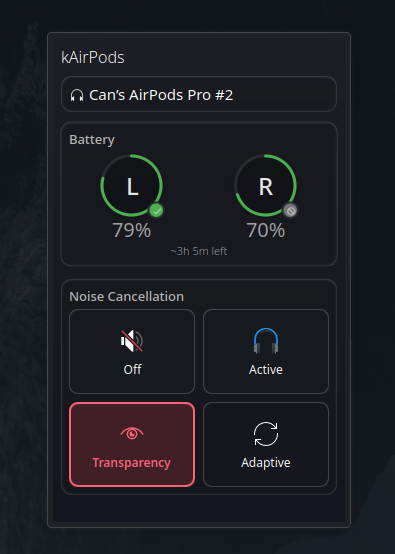
✨ Features
- 🔋 Real-time battery monitoring for AirPods, AirPods Max, case, and individual earbuds
- 🔇 Noise control switching between ANC, Transparency, and Off modes
- 👂 Ear detection status and control
- ⏯️ Auto play/pause - Automatically pauses media when AirPods are removed and resumes when reinserted
- 🪫 System battery reporting - exports the AirPods level to BlueZ, so UPower and desktop battery indicators show it (disable with
export_bluez_battery = falsein~/.config/kairpods/config.toml) - 🎨 Native Plasma integration with theme-aware panel widget
- 🌍 Translated into German, Spanish, French, Italian, Japanese, Dutch, Polish, Brazilian Portuguese, Russian, Turkish and Simplified Chinese
- ⚡ Zero-lag Bluetooth L2CAP communication for instant updates
- 🔧 System-wide D-Bus service architecture (no root required)
🚀 Quick Install
One-liner install (recommended)
curl -fsSL https://raw.githubusercontent.com/can1357/kAirPods/master/scripts/get.sh | bash

# With options:
curl -fsSL https://raw.githubusercontent.com/can1357/kAirPods/master/scripts/get.sh | bash -s -- --verbose --debug
Manual install
# Clone the repository
git clone https://github.com/can1357/kAirPods.git
cd kAirPods

# Run the automated installer
./scripts/install.sh
The installer will:
- ✅ Check all prerequisites and dependencies
- ✅ Add you to the
bluetoothgroup (if it exists) - ✅ Build the Rust service in release mode
- ✅ Install all components system-wide
- ✅ Start the service via systemd
- ✅ Guide you through adding the widget
📋 Prerequisites
| Component | Minimum Version | Notes |
|---|---|---|
| KDE Plasma | 6.0 | Required for widget support |
| Rust toolchain | 1.88+ | Install Rust |
| BlueZ | 5.50+ | Bluetooth stack (package: bluez or bluez-libs) |
| Linux Kernel | 5.10+ | L2CAP socket support |
| systemd | 247+ | User services support |
| D-Bus | 1.12+ | IPC communication |
📦 Development Packages
Debian/Ubuntu
sudo apt install build-essential pkg-config libdbus-1-dev libbluetooth-devFedora
sudo dnf install gcc pkg-config dbus-devel bluez-libs-develArch Linux
sudo pacman -S base-devel pkgconf dbus bluez-libs🎯 Getting Started
1️⃣ Pair Your AirPods
First, pair your AirPods through KDE System Settings → Bluetooth
2️⃣ Install kAirPods
./scripts/install.sh3️⃣ Add the Widget
- Right-click on your Plasma panel
- Select "Add Widgets"
- Search for "kAirPods"
- Drag to panel
4️⃣ Enjoy!
Click the widget to see battery levels and control your AirPods
The case battery appears alongside the earbuds when it is reported. If it is missing, put at least one earbud in the case, open the lid, and wait for an update. The case level may disappear again when neither earbud is in the case.
🛠️ Troubleshooting
Service won't start / No devices detected
-
Check bluetooth group (installer handles this automatically):
groups | grep bluetooth -
Check service logs:
systemctl --user status kairpodsd journalctl --user -u kairpodsd -f -
Ensure AirPods are paired via KDE Bluetooth settings first
Permission denied errors
- The installer automatically adds you to the bluetooth group
- If you still have issues, try:
sudo setcap 'cap_net_raw,cap_net_admin+eip' $(command -v kairpodsd)
Widget not showing up
- Restart plasmashell:
systemctl --user restart plasma-plasmashell - Or simply log out and back in
Battery not showing / Debug logging
If your AirPods connect but battery information is missing, enable debug logging to help diagnose the issue:
Method 1: Running manually with debug output
-
Stop the service:
systemctl --user stop kairpodsd.service -
Start in debug mode:
# Shows general debug info and all Bluetooth packets RUST_LOG=kairpodsd=debug,kairpodsd::bluetooth::l2cap=trace kairpodsd # Or use the full path if needed RUST_LOG=kairpodsd=debug,kairpodsd::bluetooth::l2cap=trace /usr/bin/kairpodsd -
Reproduce the issue:
- Put your AirPods in your ears (or just open the case)
- Wait about 30 seconds for the handshake and first battery message
- Copy the terminal output (you can redact MAC addresses like AA:BB:CC:DD:EE:FF)
Method 2: Using systemd with debug config
-
Create config file:
mkdir -p ~/.config/kairpods echo 'log_filter = "debug"' > ~/.config/kairpods/config.toml -
Restart the service:
systemctl --user restart kairpodsd.service -
View logs:
journalctl --user -u kairpodsd.service -b --no-pager
The debug output will show:
- Connection handshake details
- All Bluetooth packet exchanges
- Battery update messages (or lack thereof)
- Any parsing errors or protocol issues
Common causes for missing battery info:
- BlueZ experimental features not enabled (installer handles this automatically)
- Enhanced Retransmission Mode (ERTM) disabled
- Outdated BlueZ version (need ≥ 5.50)
🏗️ Architecture
                             ┌─────────────────────────┐
                             │      Plasma Widget      │
                             │  (Kirigami / QML UI)    │
                             └───────────▲─────────────┘
                                         │  D-Bus IPC
                                         │
┌───────────────────────┐   manages   ┌──▼────────────────┐
│   plasmashell (GUI)   │◀────────────│   kairpodsd       │
│  + panel & widgets    │  systemd-u  │  (Rust service)   │
└───────────────────────┘             └──┬────────────────┘
                                         │  Bluetooth L2CAP
                                         │
                                   ┌─────▼───────┐
                                   │  AirPods    │
                                   └─────────────┘
- Backend: High-performance Rust service (
kairpodsd) with direct L2CAP access - Frontend: QML Plasmoid with Kirigami components
- IPC: D-Bus interface at
org.kairpods.manager
🔌 D-Bus API
For developers and power users:
# List connected devices
busctl --user call org.kairpods /org/kairpods/manager \
    org.kairpods.manager GetDevices

# Control noise mode
busctl --user call org.kairpods /org/kairpods/manager \
    org.kairpods.manager SendCommand ssa{sv} "AA:BB:CC:DD:EE:FF" "set_noise_mode" 1 "value" s "anc"
Full API Reference
Methods
GetDevices() → s- Returns JSON array of all connected AirPodsGetDevice(address: s) → s- Returns JSON state of specific deviceSendCommand(address: s, action: s, params: a{sv}) → b- Send commandsConnectDevice(address: s) → b- Connect to AirPodsDisconnectDevice(address: s) → b- Disconnect from AirPods
Signals
BatteryUpdated(address: s, battery: s)- Battery level changesNoiseControlChanged(address: s, mode: s)- Noise control changesDeviceConnected(address: s)- Connection eventsDeviceDisconnected(address: s)- Disconnection events
🗑️ Uninstalling
./scripts/install.sh --uninstallOr with curl:
curl -fsSL https://raw.githubusercontent.com/can1357/kAirPods/master/scripts/get.sh | bash -s -- --uninstall📄 License
This project is licensed under the GNU General Public License v3.0 or later.
See the LICENSE file for details.
🤝 Contributing
Contributions are welcome! Please feel free to submit a Pull Request. Translators: see Translating the widget.
For more details on manual installation, advanced configuration, or packaging for distributions, see INSTALL.md.