English | 简体中文翻译
iDrive7/8 SSH root
Enable the root SSH service on BMW MGU head units (iDrive 7 / MGU ID7,
ID8-BDC3 and ID8-BCP) entirely over the car's ENET diagnostic interface -
just an ENET cable and a laptop. It flashes the debug image, enrolls the SSH
identity and keeps SSH running with debug mode off (no B7F8E5 DTC).
Optionally (advanced, off by default) it can give a car its own unique SSH key.
Run it once. SSH then stays on.
You run this tool one time per head unit. After that first run succeeds, root SSH keeps working permanently - on every boot, with debug mode off, with no
B7F8E5DTC - and you just connect withssh.Do not run it again "to be safe." There is nothing to re-enable, and re-flashing rewrites the unit and wipes its coding / CAFD definitions (and its Digital Key pairings) for no benefit. Re-flash only if you changed the head unit's software. If SSH simply stopped answering, use Enable (repair, no flashing) - never a re-flash.
The tool is what you need before the car is usable over SSH. After the first run it is the car's own persistent SSH service doing the work, not the tool - the tool is not involved in using SSH afterwards. (To connect you still plug in the ENET cable, because the unit is reached on its link-local
169.254.x.xaddress - but nothing has to be flashed or enrolled again.)
Disclaimer - for use on your own vehicle, at your own risk. Flashing a head unit will wipe its coding, delete its BMW Digital Key pairings and, in the worst case, brick the module. Read Back up your coding before flashing (below) first. The authors take no responsibility for any damage.
Requirements
- Python 3.9+ - only if you run from source. The prebuilt
.exeneeds no Python (see GUI app). - A system OpenSSH client (
sshon yourPATH). It ships with Windows 10/11 (Settings → Apps → Optional features → "OpenSSH Client") and is standard on WSL/macOS/Linux. Check withssh -V. - Windows: run your terminal / the app as Administrator so Windows uses
the
169.254.x.xlink-local address on the ENET adapter. - An ENET cable, ignition on / car awake. Wired only - a wired Ethernet (ENET) connection is required both to flash and to connect over SSH later; Wi-Fi adapters cannot carry it.
Install (source)
pip install -r requirements.txt # one dependency: cryptography
⚠️ Back up your coding before flashing ⚠️
flash reprograms the head unit and will wipe its coding / CAFD definitions.
You will lose your saved settings.
Before the first flash on a car, make a full backup of the head unit's coding
so you can put it back afterwards. This happened on a real car during
development, and restoring from a backup fixed it.
- Before flashing - read and save the head unit's coding with a coding tool. BimmerCode worked here: connect, select the head unit (HU / MGU), and export/save its coding (BimmerCode keeps a backup of each module it writes; some tools also let you "read FA/coding" and save it). BMW dealer tools (ISTA/E-Sys) can also save a full backup.
- Flash + enable SSH once with this tool and grab the SSH key it saves for you. This is the one and only run - it also makes SSH permanent.
- After flashing - if any functions misbehave or coding looks reset, restore the saved coding for the head unit with the same tool. In BimmerCode this is its restore/undo of the module you backed up.
If settings are still reset after the BimmerCode restore - recode the MGU with E-Sys. BimmerCode's restore does not always put back the full coding on some cars, and it does not report a clear error when it fails - the restore can look successful while the head unit is still only partly recoded. The symptom is settings that were reset and stay reset after the restore - typically only some of them, so the car looks mostly fine while individual features are still off (a language that drops back to English, missing or wrong HMI tiles, an empty original app list, no reverse-camera display, no driving-mode pop-up). If the restore did not bring all of them back, it did not fully recode the unit. Recode
HU_MGUwith E-Sys from your saved NCD (CAFD_..._...._....ncd); re-flash or VO coding is not needed for this. If E-Sys reports no CAFD installed (CAFD readsFFFFFFFF), inject the saved CAFD first, then restore the NCD. Do not re-flash the unit to fix missing coding - a flash is what cleared it.
Only the flashing commands (flash, fix-key) carry this risk - enable,
persist, close, disable and status do not reprogram the unit. Since the
one-time run is all you need, you should never repeat a flash just because
something looks off - restore the coding instead.
Would rather not do any of this yourself? The whole process - the coding tool, the flash, getting the coding back and setting the apps up - takes some practice. If that's not for you, the idriveApps service does the lot remotely as a one-stop job: it backs up your coding, roots the unit, restores the backup and installs the apps - so on your end it's just the ENET cable plugged in. It's a paid service and entirely optional; everything in this README can be done by hand with the steps above.
BMW Digital Key (issue #13)
Yes - flashing deletes the car's Digital Key pairings. Reported on a real
car (issue #13,
G26 2023, iPhone): after the flash the phone's digital key was gone and had
to be set up again as new. The coding backup above does not cover the
digital keys, so plan on re-pairing every key after any flash (flash and
fix-key alike). If flashing loses something else on your car, please open an
issue so it can be documented here.
Quick start - the GUI (recommended)
python gui.py
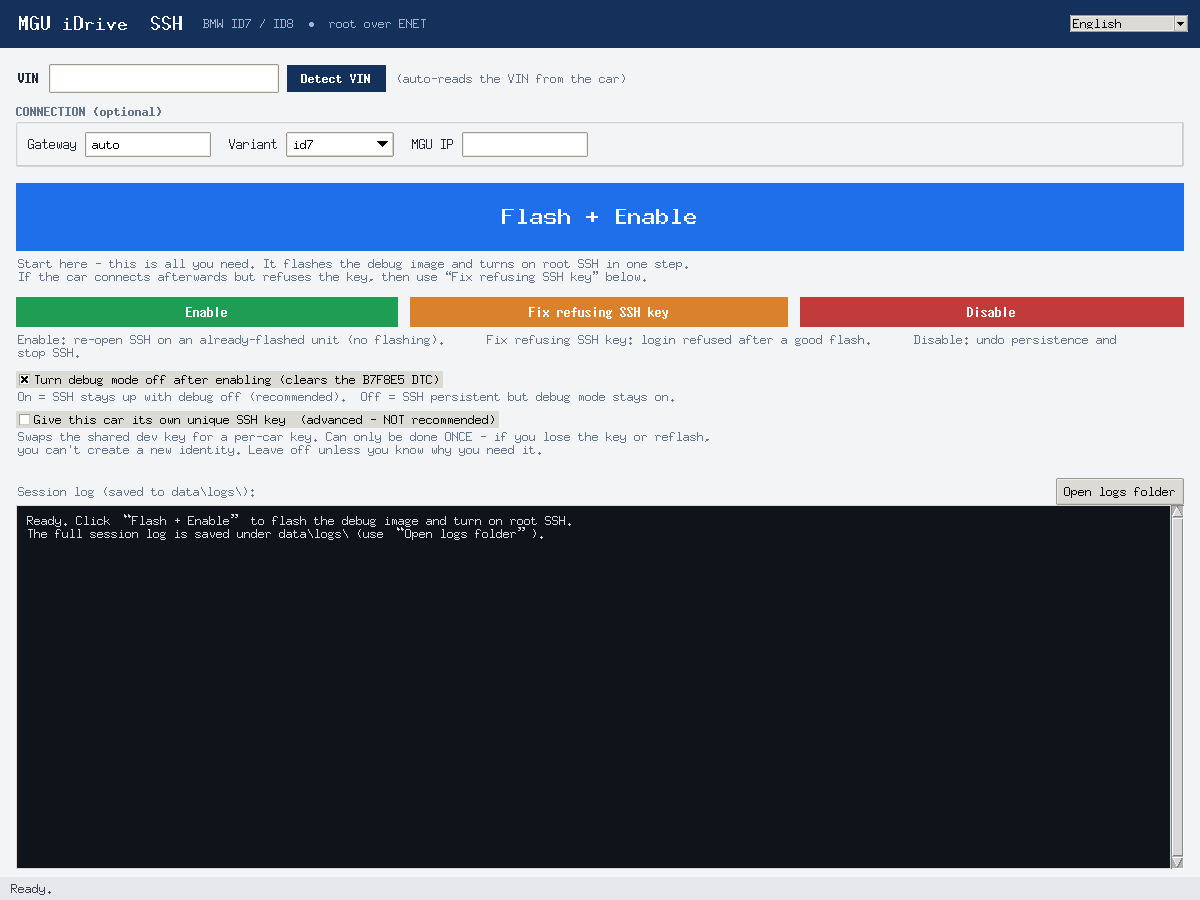
The window (above) has a VIN field + Detect VIN (auto-reads it from the car over ENET) and these buttons:
- Flash + Enable - the only button you normally press. One run: flashes
the debug image, enrolls, makes SSH persistent and turns debug mode off. After
it succeeds, root SSH is on permanently - on every boot, debug off, no
B7F8E5DTC - and you never need to press it again. - Enable - repair only. Re-opens SSH on a unit that is already flashed but
whose SSH has stopped answering (no flashing). If SSH already logs in, do
not press this: it re-activates debug mode and brings the
B7F8E5DTC back. - Disable - revert persistence and stop debug/SSH.
- Fix refusing SSH key - repair for units that flash + enroll fine and open
port 22 but still refuse root login (
Permission denied (publickey)), because their stockauthorized_keys.rootholds a different key. Re-flashes the debug image carrying our key in the one unsigned region - see Login still refused?.
Two tick-boxes: Turn debug mode off after enabling (on by default; keeps SSH
up with no B7F8E5 DTC) and Give this car its own unique SSH key (off by
default, not recommended - see below).
Keys and a ready-to-run ssh command are written for you and their location is
printed in the log. No Python? Build / download the .exe - see
GUI app.
Command line (alternative)
python ssh_enable.py status     # read the current debug/SSH state (read-only)
python ssh_enable.py flash --vin WBS1234ABCDX12345 --persist   # ONCE per unit:
                                 # flash + enroll + make SSH permanent
python ssh_enable.py enable     # repair only: re-open SSH on an already-flashed
                                 # unit whose SSH stopped answering (no flashing)
python ssh_enable.py fix-key --vin WBS1234ABCDX12345  # re-flash carrying our key
                                 # (repair for units that refuse login - issue #2)
python ssh_enable.py persist    # make SSH survive debug mode being OFF
python ssh_enable.py close      # turn the SSH service off again
python ssh_enable.py disable    # revert persistence + stop debug/SSH
Login still refused? (Fix refusing SSH key)
On some software levels (seen on BTLD 030.016.006 / SWFL 030.016.002) the
flash and enrollment both succeed and port 22 opens, but root login is still
refused with Permission denied (publickey). That is because the key sshd
trusts lives in the signed Application SWFL 000056E5
(/usr/share/sshd/authorized_keys.root), and on those units it is a different
key from the one the tool hands you - nothing in a normal flash overwrites it.
Fix refusing SSH key (fix-key) repairs this. It re-runs the exact same
proven debug flash, but the one unsigned region the flash already carries (the
part not covered by the BMW signature) now installs our key at
/usr/share/sshd/authorized_keys.root instead of the stock debug cert. Only that
region's bytes change; every other frame - security access, the signed blob, the
finalize routines, the reset - is identical to a normal flash, so the realistic
worst case is simply that the key does not take, not a brick.
python ssh_enable.py fix-key --vin <YOUR_VIN> --verbose
or click Fix refusing SSH key in the GUI. Like any flash it writes the VIN,
reboots the unit, and clears CAFD coding - restore it from your backup
afterwards. Keep the --verbose log of the first run; it records exactly what
the unit did with the region.
First tried an older build that failed on Windows with
REMOTE HOST IDENTIFICATION HAS CHANGED/Offending ED25519 key in nul? That was a separate known-hosts bug (the login was aborted before the key was even offered) and is already fixed - make sure you are on the current build.
What it does
- flash (run once per head unit) - writes the small debug package that the SSH service needs (a dev CA certificate plus the debug-mode binaries, ~131 KB, VIN-bound) and then enrolls the SSH identity. The head unit reboots itself; the tool waits and re-checks the unit automatically. It also writes the root SSH key out in every format (see The SSH key).
- enable - re-activates the SSH service on an already-flashed unit
without flashing anything. Enrolls the unit identity
(
31 01 A6 71challenge, generated certificate,31 01 A0 FDinstall,22 17 2Areadback) five times back to back - the SSH daemon comes up a few seconds after that. - close - stops the SSH service again (
31 02 A0 FD). - status - reads the software version (SVK), the head unit IP, the
debug-state DTC (
B7F8E5) and probes port 22.
Everything runs against the gateway at 169.254.254.36:6801 by default;
the gateway is found automatically via UDP broadcast, so normally no
settings are needed.
Check the connection
With the ENET cable in and the car awake, confirm the tool can reach the unit (read-only, changes nothing):
python ssh_enable.py status
Everyday use - just connect
After the one-time run there is nothing to set up each time. SSH is already
on and starts itself on every boot; you do not run flash, enable or
persist again and you do not need this tool. Plug in the ENET cable, open a
terminal and connect.
Connect with this car's own key (written out during the one-time run), e.g. from WSL:
ssh -i data/enrollments/<VIN>/id_rsa root@169.254.36.47
(The IP is the one the tool printed during the setup run; it can change with the
DHCP-less link-local setup, so re-run status if the connection is refused.
With PuTTY or WinSCP use data\enrollments\<VIN>\id_rsa.ppk.) See The SSH key.
Only if SSH stopped answering
Then enable re-opens it without flashing:
python ssh_enable.py enable
You should see the enrollment cycles, MGU SSH port 22 is open, and then
SSH OK as root: uid=0(root)... as final confirmation. Re-run persist (or
enable --persist) afterwards if you want it to survive debug mode being off
again.
To switch SSH off deliberately, use close (stop the service now) or disable
(undo persistence and go back to stock). Neither is a step in daily use.
Options
--gateway 169.254.254.36   ENET gateway address ("auto" = UDP discovery)
--mgu-ip 169.254.36.47     head unit IP override for the SSH probe
--vin                     17-char VIN (required for "flash"; it is written
                           to the head unit, so it must match the car)
--arch                    id7 (default), id8-bdc3 or id8-bcp
--yes                     skip confirmation prompts
--verbose                 print every diagnostic frame on the wire
The SSH key (and connect info)
Root SSH on the MGU is authorised against one fixed key that is baked into the
flashed debug image - shipped as data/assets/05_SSH_ROOT_KEY.pem. Enrollment
is a separate step: it installs a certificate built from the enrollment key
(data/assets/01_PRIVATE_KEY.pem) and signed by the PMO CA, which is only the
access gate the unit checks during the A6 71 / A0 FD handshake - that key is
not a login key. The unit accepts the baked root key (asset 05) and only that
key for SSH. A per-car unique key is therefore not possible at enrollment
time - the unit will reject any key it doesn't already trust (confirmed against a
real head unit, a captured session of the official tool, and the working
OpenSSH/FileZilla login key, which matches asset 05).
So on flash / enable the tool enrolls with asset 01 and then writes out the
asset-05 login key -
in every format you might need to connect - under data/enrollments/<VIN>/,
together with a connect.txt (the MGU IP + a ready-to-run ssh command):
id_rsa             OpenSSH private key   -> ssh -i id_rsa root@<ip>
id_rsa.pkcs1.pem   PKCS#1 PEM            (-----BEGIN RSA PRIVATE KEY-----)
id_rsa.pkcs8.pem   PKCS#8 PEM            (-----BEGIN PRIVATE KEY-----)
id_rsa.ppk         PuTTY v2             (PuTTY / WinSCP)
id_rsa.pub         OpenSSH public       (authorized_keys line)
id_rsa.pub.pem     SubjectPublicKeyInfo PEM
fingerprints.txt   SHA256 + MD5 fingerprints
connect.txt        MGU IP + ssh command
metadata.json      VIN, arch, mgu_ip, challenge, timestamp, fingerprints
Private keys are chmod 600, and data/enrollments/ is git-ignored.
A key that's unique to the car (optional, not recommended)
Off by default. The key swap can only be done once. If you reflash the unit, run the tool again, or lose the per-car key, you cannot create a new identity and may lose SSH access. Only turn this on if you know exactly why you need it and will keep the key safe.
Since enrollment can't change which key the unit trusts, the only way to a
per-car key is to log in with the baked key and edit the unit's real
AuthorizedKeysFile over SSH. On this hardware sshd reads keys from
/usr/share/sshd/authorized_keys.root (per sshd_config), not
~/.ssh/authorized_keys, and the rootfs is mounted read-only - so the tool
resolves the actual AuthorizedKeysFile, remounts / read-write just while it
edits, writes the key, and remounts read-only again. The tool does this only
when you pass --unique-key (or tick the GUI box), as a replace. By default
the shared baked key is kept.
python ssh_enable.py enable                 # keep the shared dev key (default)
python ssh_enable.py enable --unique-key    # swap in a per-car key (one-time, advanced)
- enroll + log in with the baked key (as usual);
- generate a key unique to this car and add it to the real
AuthorizedKeysFile(remounting the ro rootfs rw just for the write), so the unit now trusts both; - verify login with the new key over a fresh connection;
- only then remove the baked key line, so the car accepts only its own key.
If the new key doesn't connect right away, force-restart the head unit: press and hold the volume / power knob for ~20-30 s until the screen goes dark and the unit reboots. It comes back up loaded with the new key. (This was needed on a real car after the key swap.)
The per-car key (all formats) + connect.txt replace the dev-key bundle in
data/enrollments/<VIN>/. Safety: if step 3 can't be verified, the dev key is
left in place so you never lose access; and if authorized_keys sits on a
read-only image, the removal may not stick (the tool says so) - the unique key
still works, with the dev key as fallback. Re-running enable always restores
access via the dev key.
Persistent SSH (no more B7F8E5 DTC)
Stock behaviour ties sshd.socket to debug.target, so SSH only runs while
debug mode is active - and active debug mode sets the B7F8E5 ("debugging
active") DTC. persist fixes that permanently, in one shot, which is why
the one-time run is enough and SSH keeps working afterwards.
The GUI already does this for you - its Flash + Enable passes --persist
automatically and the "turn debug mode off" box is ticked by default, so one
click is the whole job. On the command line you have to ask for it:
python ssh_enable.py flash --vin ... --persist   # ONCE: flash + enroll + persist
python ssh_enable.py persist                     # persistence on a unit that has SSH, but not yet permanent
python ssh_enable.py enable --persist            # re-open SSH, then persist
It logs in over SSH with this car's key, confirms root, uploads and runs
sshd-always-on.sh install on the head unit, then turns debug mode off
(31 02 A0 FD). Stock SSH dies without debug mode because of three separate
gates, all handled by the script (nothing in /lib or /usr is changed - it
only adds files under /etc, which remove deletes):
- Start -
sshd.socketisWantedBy=debug.targetonly, and the boot target isearly.target, so the/etcoverride is also wanted byearly.target,sockets.targetandmulti-user.target. - Stop -
sshd.sockethasPartOf=debug.target; the override drops it so leaving debug mode no longer stops the socket. - Firewall - port 22 is only accepted by a rule
firewalldZadds while debug mode is on; without it the nft input chain drops SSH. A small keeper service (sshd-always-on-fw.service) keeps atcp dport 22 acceptrule at the top of the ip/ip6 input chains, re-checked every 15 s.
The result: SSH keeps starting on every boot and stays reachable with debug
mode off, and the B7F8E5 DTC clears. Turning debug off is automatic - you
do not need a separate step. Because the firewall keeper only re-checks every
~15 s, persist waits and re-probes port 22 for a few seconds after disabling
debug before reporting. If making SSH persistent fails, the tool deliberately
leaves debug mode ON so you do not lose access.
Want SSH persistent but debug mode left on? Add --keep-debug:
python ssh_enable.py enable --persist --keep-debug # persistent SSH, DTC stays
To go back to stock entirely, use disable (reverts the override and stops
debug), or run sh sshd-always-on.sh remove on the unit by hand.
GUI app
Run it from source with python gui.py (see Quick start),
or use the standalone Windows .exe - no Python needed. It runs the exact
same code as the command line and streams the log into the window. Connection
details (gateway / variant / MGU IP) live in a small optional row.
Prebuilt: download MGU-SSH-windows.zip from the
Releases page,
unzip anywhere, and run MGU-SSH\MGU-SSH.exe. Keep the whole folder
together. (Built with PyInstaller from these sources; rebuild it
yourself any time with build_exe.bat.)
Build the Windows .exe
From a normal Command Prompt in the project root, with Python on PATH:
build_exe.bat
That installs PyInstaller, builds dist\MGU-SSH\MGU-SSH.exe (one-folder app via
MGU-SSH.spec), and copies data\assets and sshd-always-on.sh next to the
exe. Keep the whole dist\MGU-SSH\ folder together - SSH keys / connect info
are written to dist\MGU-SSH\data\enrollments\. Run it as Administrator so
Windows uses the 169.254.x.x link-local address on the ENET adapter.
Folder contents
ssh_enable.py               the command-line tool
gui.py                      Tkinter GUI (VIN auto-detect, one-click)
sshd-always-on.sh           runs on the head unit to make SSH persistent
mgu7/                       diagnostic + flashing library
mgu7/sshcli.py              talks to the unit with the system OpenSSH client
mgu7/identity.py            SSH key all-format export (OpenSSH/PEM/PPK) + PPK writer
data/assets/                update material + PMO CA used by the tool
data/enrollments/<VIN>/     SSH key (all formats) + connect.txt per car (git-ignored)
docs/screenshot.png         the GUI screenshot used in this README
requirements.txt            cryptography (the SSH steps use the system ssh client)
MGU-SSH.spec, build_exe.bat PyInstaller build of the Windows .exe
Keep data/ next to ssh_enable.py; the private keys are what get you into
the unit - treat them like passwords.
FAQ - compatibility
- Is my iDrive supported? Yes - every version of iDrive 7 and iDrive 8.
The tool works on all MGU head units (iDrive 7 / MGU ID7, ID8-BDC3 and
ID8-BCP), whatever software level the unit is on. It gates on the head unit
type (BTLD
00003F36), not on a particular I-Step, so a newer or older software level does not put your car out of scope. - Should I update the I-Step first? Yes - updating the I-Step (ISTA/E-Sys, or the dealer) before you start is recommended. It is not required - the tool works on the stock software of any version - but a current I-Step gives you the known-good software level, fewer surprises with the flash and enrollment, and the fixes BMW shipped for the head unit. If your car is already on a recent I-Step, there is nothing to do.
- What is not supported? NBT/EVO head units (iDrive 6 and older). The tool refuses them up front rather than writing anything.
License
Released into the public domain under The Unlicense - do whatever you want with it, no attribution required.