robot_retargeter
English | 中文
A toolkit for retargeting human motion (SMPL-X) or source-robot motion to target humanoid robots, with support for side-by-side multi-robot visualization.
Overview
This project provides a complete motion-retargeting pipeline with three main stages:
- Replay / keypoint extraction: Extract skeletal keypoints from SMPL-X motion (
.npz) or source-robot motion (.csv). - Retargeting: Map keypoints to a target robot model via inverse kinematics (mink + MuJoCo) and generate robot motion.
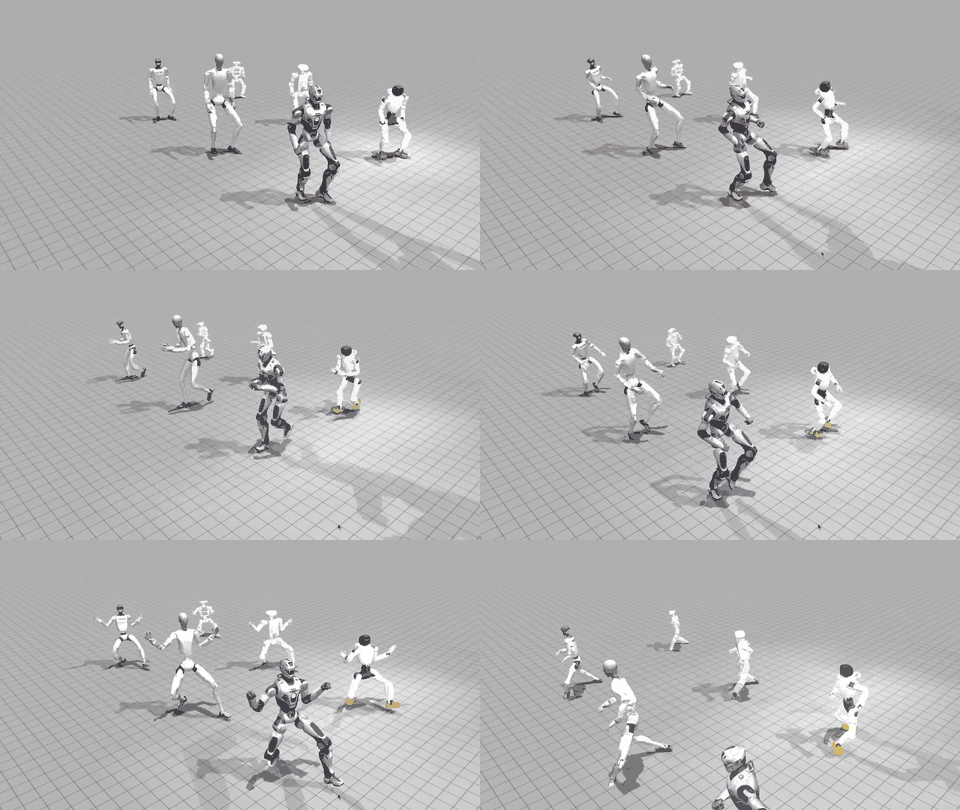
- Visualization: Play one or more retargeted target robots side by side.
Directory layout:
| Directory | Contents |
|---|---|
asset/ | Robot models (URDF/MJCF/mesh), SMPL-X models, skeleton |
config/ | Retargeting configs for robots and skeleton (YAML) |
dataset/ | Input motion data (SMPL-X .npz / LAFAN1 .csv, etc.) |
output_data/ | Output keypoints and robot motion |
scripts/ | Python pipeline scripts |
bash/ | One-command pipeline scripts |
Installation
Clone the repository
# Clone with regular Git
git clone https://github.com/ccrpRepo/robot_retargeter.git
cd robot_retargeter
Python environment
Python >= 3.10 is required (developed on Python 3.11). A virtual environment (conda / venv) is recommended.
# 1) Create and activate an environment (conda as an example)
conda create -n robot_retargeter python=3.11 -y
conda activate robot_retargeter

# 2) Install dependencies
pip install -e .
# or
pip install -r requirements.txt
SMPL-X models (downloaded separately)
SMPL-X model files are not included in this repository (subject to their own license terms). To use the SMPL-X pipeline (retarget_from_smplx.sh), download them manually:
-
Register and download from the official site: smplx model download (download "SMPL-X" models in
.npzformat). -
Place files under
asset/smplx/as follows:asset/smplx/ SMPLX_NEUTRAL.npz SMPLX_MALE.npz SMPLX_FEMALE.npz
Motion dataset (AMASS)
dataset/ACCAD/ contains a small set of open-source sample motions from the ACCAD subset of AMASS (SMPL-X .npz) for quick trial. For more motion data, download from AMASS:
- AMASS website (register to download): https://amass.is.tue.mpg.de/
After downloading, extract and place .npz files under any directory in dataset/ (for example dataset/ACCAD/), then point SMPL_MOTION_FILE to the desired file.
Usage
The bash/ directory provides two one-command scripts that run all three stages automatically: keypoint generation -> retargeting -> visualization. By default, scripts use python from the currently activated environment. You can also override with PYTHON_BIN.
1) Retarget from SMPL-X motion
./bash/retarget_from_smplx.shYou can customize parameters through environment variables:
| Variable | Default | Description |
|---|---|---|
SMPL_MOTION_FILE | dataset/ACCAD/Form_1_stageii.npz | Input SMPL-X motion file |
VIS_ROBOTS | g1 h2 t800 r1 | Target robot list (space-separated, multiple allowed) |
KEYPOINTS_NAME | Derived from motion file name | Keypoints / output motion name |
SOURCE_FPS | 120 | Source motion frame rate |
RENDER_FPS | 30 | Visualization render frame rate |
PYTHON_BIN | Auto-detected | Python interpreter to use |
Example (custom robots and motion file):
VIS_ROBOTS="g1 jaka_pi h2 t800" \
SMPL_MOTION_FILE="dataset/ACCAD/Form_1_stageii.npz" \
./bash/retarget_from_smplx.sh
2) Retarget from source-robot motion
./bash/retarget_from_robot.sh| Variable | Default | Description |
|---|---|---|
ROBOT_MOTION_FILE | dataset/lafan1_g1/dance1_subject2.csv | Source robot motion file |
ORIGIN_ROBOT | g1 | Source robot name (provides skeleton config) |
VIS_ROBOTS | h2 r1 | Target robot list (space-separated, multiple allowed) |
SOURCE_FPS | 30 | Source motion frame rate |
RENDER_FPS | 30 | Visualization render frame rate |
PYTHON_BIN | Auto-detected | Python interpreter to use |
Example:
VIS_ROBOTS="jaka_pi h2 t800 pnd_adam" \
ROBOT_MOTION_FILE="dataset/bones_g1/grab_walk_ff_180_001__A550_M.csv" \
ORIGIN_ROBOT="g1" \
SOURCE_FPS=120 \
RENDER_FPS=30 \
./bash/retarget_from_robot.sh
After running, retargeted robot motions are saved under output_data/robot_motion/.
Using the Bones Seed G1 dataset
Bones Studio provides a Seed motion dataset recorded on G1. Its raw format (root in Euler angles / centimeters, joints in degrees) differs from the LAFAN1 format required by this project (root in quaternion / meters, joints in radians), so conversion with scripts/convert_bones_to_lafan1.py is required first.
Download data
# Download the G1 Seed dataset from Hugging Face
wget https://huggingface.co/datasets/bones-studio/seed/blob/main/g1.tar.gz -O g1.tar.gz
tar -xzf g1.tar.gz -C dataset/bones_g1_origin/
Format conversion
convert_bones_to_lafan1.py converts raw G1 CSV files into LAFAN1-compatible format:
| Argument | Default | Description |
|---|---|---|
--input-root | dataset/bones_g1_origin | Directory of raw CSV files (batch mode) |
--output-root | dataset/bones_g1 | Output directory for converted CSV files |
--input-csv | None | Convert a single CSV file only |
--root-scale | 0.01 | Root translation scale factor (cm -> m) |
# Batch-convert all CSV files under dataset/bones_g1_origin/
python scripts/convert_bones_to_lafan1.py

# Convert one file only
python scripts/convert_bones_to_lafan1.py \
    --input-csv dataset/bones_g1_origin/grab_walk_ff_180_001__A550_M.csv

# Custom input / output directories
python scripts/convert_bones_to_lafan1.py \
    --input-root dataset/bones_g1_origin \
    --output-root dataset/bones_g1
After conversion, pass generated CSV directly into the retargeting pipeline:
VIS_ROBOTS="jaka_pi h2 t800 pnd_adam" \
ROBOT_MOTION_FILE="dataset/bones_g1/grab_walk_ff_180_001__A550_M.csv" \
ORIGIN_ROBOT="g1" \
SOURCE_FPS=120 \
RENDER_FPS=30 \
./bash/retarget_from_robot.sh
Core Mechanisms
1) Skeleton matching
source: smplx model ---> agibot_x2 model
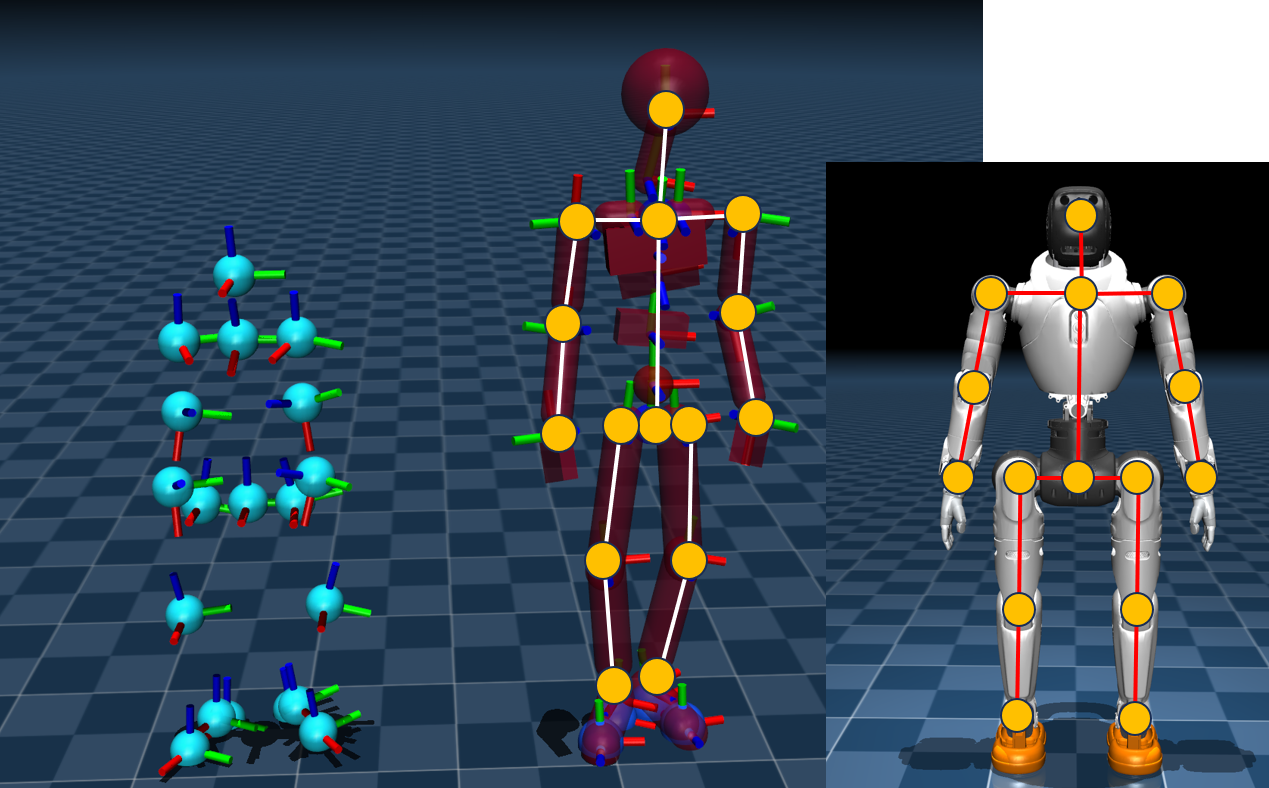
Because source skeleton (SMPL-X) and target robot have different limb lengths, the source keypoints are scaled link by link using per-link length ratios, so dimensions match the target robot while preserving each link direction.
Skeleton scaling pseudocode (corresponding to compute_robot_link_lengths / compute_link_geometry_from_positions / compute_link_scale_factors / apply_link_scales_to_positions in scripts/smpl_replay.py):
# Inputs:
#   robot_mjcf            target robot MJCF model
#   robot_links           link definitions {link_name: (parent_body, child_body)}
#   skeleton_positions    source skeleton keypoint sequence, shape [T, K, 3]
#   skeleton_links        source skeleton link definitions {link_name: (parent_body, child_body)}

# Step 1: compute target-robot link lengths (distance between endpoints in world coordinates at zero pose)
mj_forward(robot_mjcf)                      # forward kinematics for body world positions
for link_name, (parent, child) in robot_links:
    robot_len[link_name] = || xpos[child] - xpos[parent] ||

# Step 2: compute source-skeleton link vectors and lengths (per frame)
for link_name, (parent, child) in skeleton_links:
    link_vec[link_name]     = skeleton_positions[:, child] - skeleton_positions[:, parent]   # [T, 3]
    skeleton_len[link_name] = norm(link_vec[link_name], axis=-1)                             # [T]

# Step 3: compute per-link scale factor (per frame, target length / source length)
for link_name in skeleton_links:
    scale[link_name] = robot_len[link_name] / skeleton_len[link_name]   # [T]

# Step 4: rebuild keypoint positions from parent to child along topology
#         preserve source direction, only scale length
scaled_pos = copy(skeleton_positions)
for link_name, (parent, child) in skeleton_links:    # traverse parent -> child
    scaled_pos[:, child] = scaled_pos[:, parent] + scale[link_name][:, None] * link_vec[link_name]

# Output: scaled_pos -- keypoints matched to target robot dimensions
In mathematical form, for link $i$ (parent keypoint $p$, child keypoint $c$) at frame $t$:
$$ s_i^{(t)} = \frac{L_i^{\text{robot}}}{\lVert \mathbf{x}_c^{(t)} - \mathbf{x}_p^{(t)} \rVert}, \qquad \hat{\mathbf{x}}_c^{(t)} = \hat{\mathbf{x}}_p^{(t)} + s_i^{(t)} \left( \mathbf{x}_c^{(t)} - \mathbf{x}_p^{(t)} \right) $$
Here, $L_i^{\text{robot}}$ is the fixed robot link length, $\mathbf{x}$ is the original keypoint, and $\hat{\mathbf{x}}$ is the scaled keypoint.
Notes:
- Scaling is applied segment by segment from parent to child. Child position is parent + (original direction vector x scale factor), so only length changes while direction is preserved.
- Scale factors are computed per frame (
link_scale_is_static = False), adapting to subtle pose-dependent source-length changes.- In addition, root translation is scaled by leg-length ratio (
compute_leg_displacement_scale/scale_keypoint_frame_displacements) to better match stride scale.
Root scaling
To keep motion amplitude consistent between source/target bodies (especially when leg-length difference is large), a displacement scale is computed from target leg length / source leg length, then applied uniformly to root frame-to-frame displacement in $x,y,z$.
- Leg length definition: thigh length + calf length (averaged over left/right legs).
- Purpose: adjust global stride and displacement scale so motion appears more natural on target robots.
Adaptation note (tilted-hip configurations)
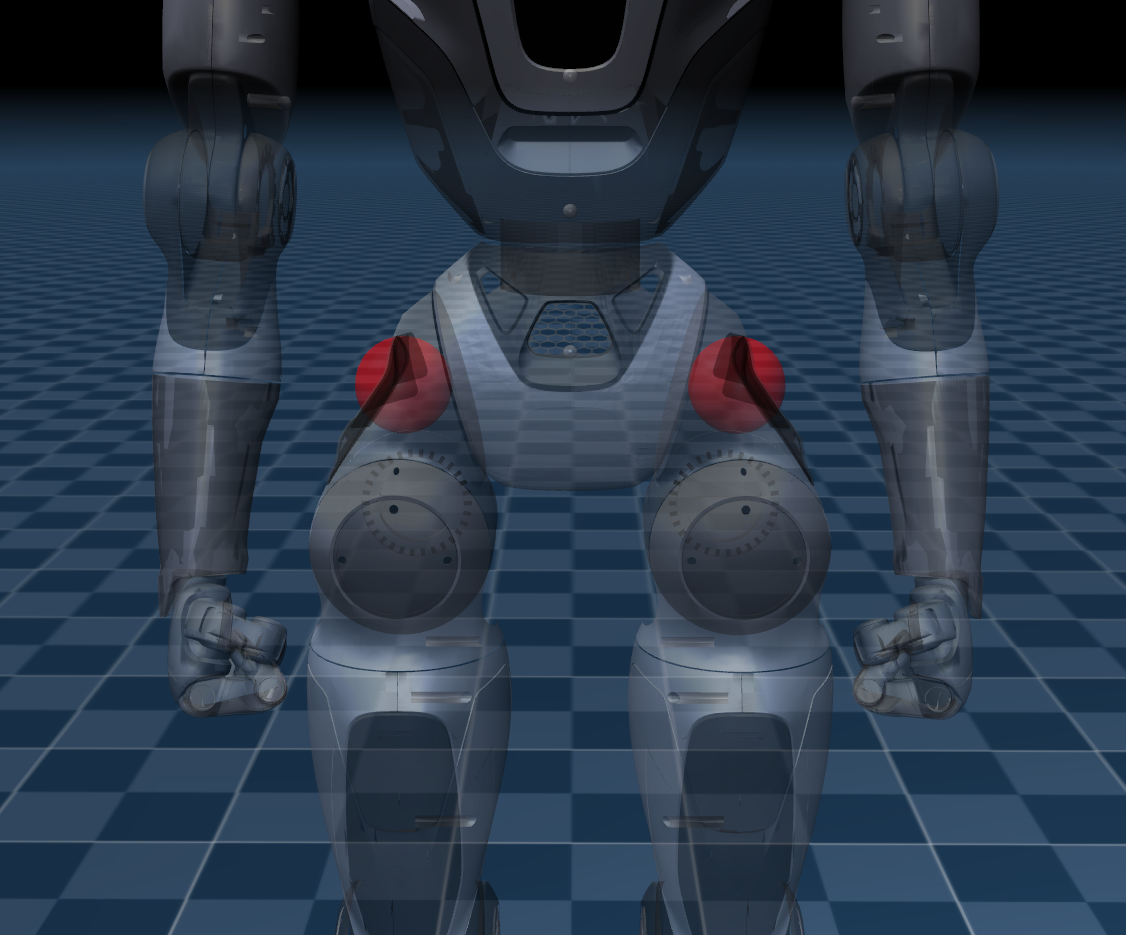
In the current skeleton definition, left_shoulder - neck - right_shoulder and left_hip - hips_mean - right_hip are approximately collinear (horizontal) by default.
For tilted-hip robots such as Unitree t800, it is recommended to add two extra mapping points on left/right hip sides and connect them as fixed offsets to corresponding hip_roll_link, to better represent pelvic tilt and left-right hip asymmetry.
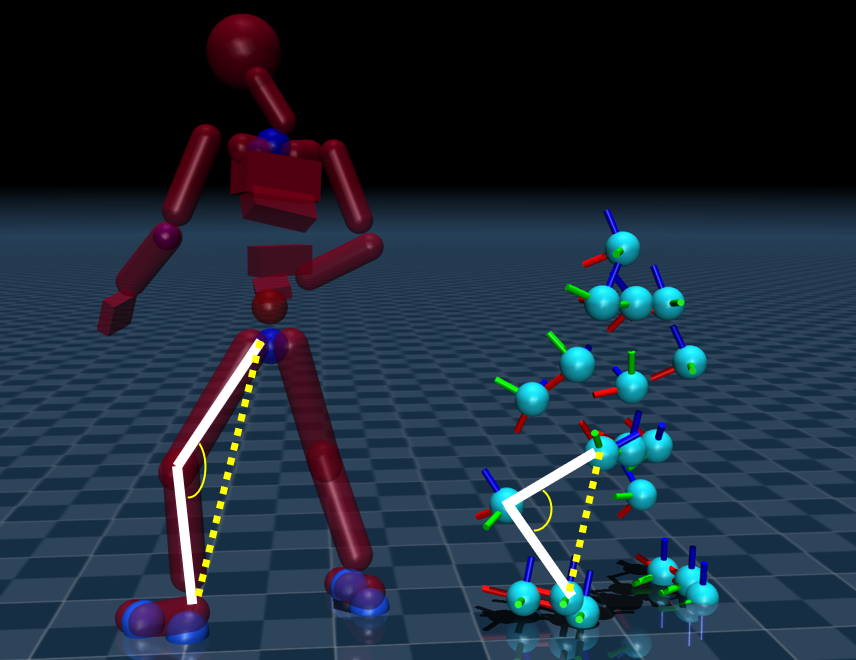
2) Knee bending
To improve lower-limb reachability and mechanical behavior, the pipeline performs two-bone (hip-knee-foot) geometric reconstruction for knees.
Bending strength is controlled by knee_angle_offset_degrees:
- The document figure uses
60.0degrees for visualization only. - Typical practical value is
15.0degrees. - In
smpl_replay.py, this offset is enabled by default. - In
robot_replay.py, it takes effect only whenenable_knee_angle_offset_degrees: trueis explicitly set.
The core uses two-bone IK and the law of cosines. Let:
- $a$: thigh length (hip->knee)
- $b$: calf length (knee->foot)
- $d$: target hip-ankle distance (hip->target_foot)
Then projection length along hip-ankle direction and perpendicular lift are:
$$ x = \frac{a^2 - b^2 + d^2}{2d}, \qquad h = \sqrt{\max(a^2 - x^2,, 0)} $$
Reconstructed knee position is:
$$ \mathbf{p}{knee} = \mathbf{p}{hip} + x,\mathbf{u} + h,\mathbf{v} $$
where $\mathbf{u}$ is the unit direction from hip to target ankle, and $\mathbf{v}$ is bend direction in the bend plane. Important note: in knee-bending step, the hip-to-ankle vector direction (the $\mathbf{u}$ direction) is kept unchanged; only its length (target hip-ankle distance $d$) is adjusted, then knee position is reconstructed accordingly. Implementation also keeps bend direction consistent with original knee-fold preference to avoid knee inversion.
3) Contact detection
Contact detection usually covers both hands and feet; for each foot, two contact probes (front and rear) are used to more robustly identify support and lift-off states.
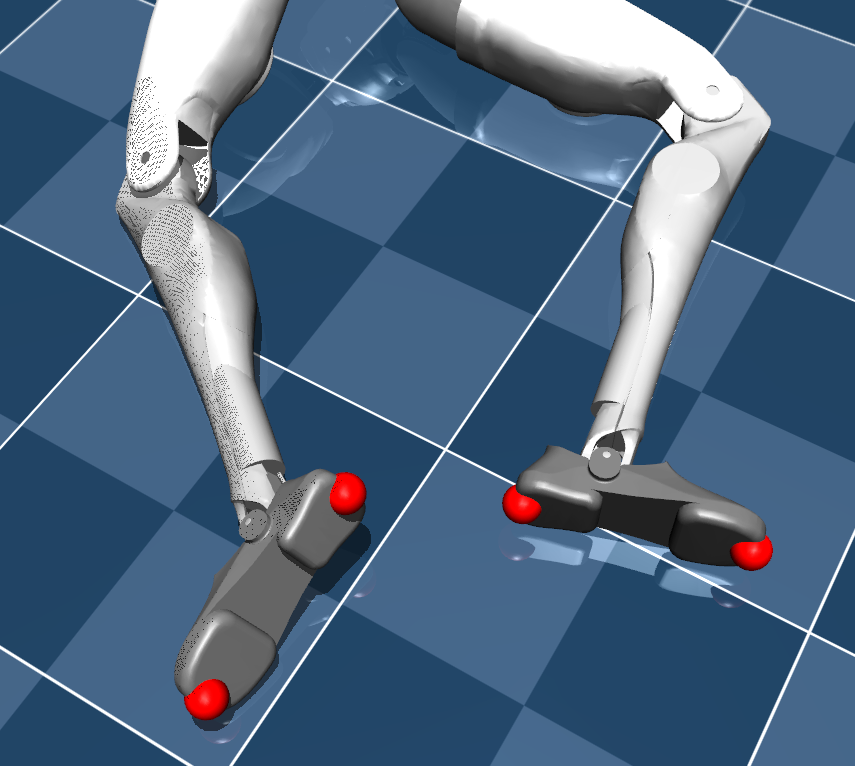
Contact state is determined by dual conditions: low speed + low height (see compute_contact_sequence / compute_robot_contact_sequence):
$$ \text{contact}(t,c)=\big(v_{t,c}\le v_{th}\big);\land;\big(z_{t,c}\le h_{th}\big) $$
where:
- $v_{t,c}$: windowed speed of contact point $c$ at frame $t$ (computed via
contact_vel_calculate_window) - $z_{t,c}$: contact-point height
- $v_{th}$:
contact_vel_threshold - $h_{th}$:
contact_height_threshold
This design suppresses both false positives from low-height fast passing and high-height slow swinging.
4) Adaptive height
After contact is detected, the system estimates per-frame ground-height offset and shifts the whole keypoint sequence downward (z only), so support feet remain more stably grounded.
- At each frame, use the minimum height among currently active contacts as reference height.
- If no contact is active at that frame, reuse previous frame's height.
- Apply first-order low-pass filter to height sequence (
contact_height_lpf_alpha):
$$ y_t = \alpha x_t + (1-\alpha)y_{t-1}, \qquad 0<\alpha\le1 $$
- Apply z-translation to all keypoints:
$$ z'{t,k} = z{t,k} - y_t $$
Smaller $\alpha$ gives smoother but more delayed ground-following behavior.
5) Foot-contact sliding suppression
In robot_retarget.py, for contact-active feet (or configured contact bodies), a contact-locked target is introduced:
- Take mean source-keypoint position over each continuous contact interval as the fixed target of that interval.
- When contact is true, IK uses that fixed target; when contact is false, target follows the original trajectory.
- This constraint is added as an extra
FrameTaskin optimization, weighted bycontact_pos_fixed_factor.
This significantly reduces foot sliding during support phase while preserving motion freedom during swing phase.