Velair
Climate automation that adapts to your life.
Explore Velair on the project website







Velair brings local-first scheduling to the climate.* entities you already use in Home Assistant. Plan heating and cooling from its sidebar panel, and add the optional Lovelace card if you want to check on a room or control it from your dashboard.
Velair works with your existing thermostat integration rather than replacing it. Its scheduler runs in Home Assistant; whether the device itself needs a cloud connection depends on that integration.
Why Velair Exists
I started Velair because the scheduling features I used in a vendor app were becoming harder to use as subscriptions and rate limits changed. I wanted to keep my climate schedules in Home Assistant and make that option useful to people with other compatible thermostats too. It's a community contribution, not a criticism of any brand.
When plans change
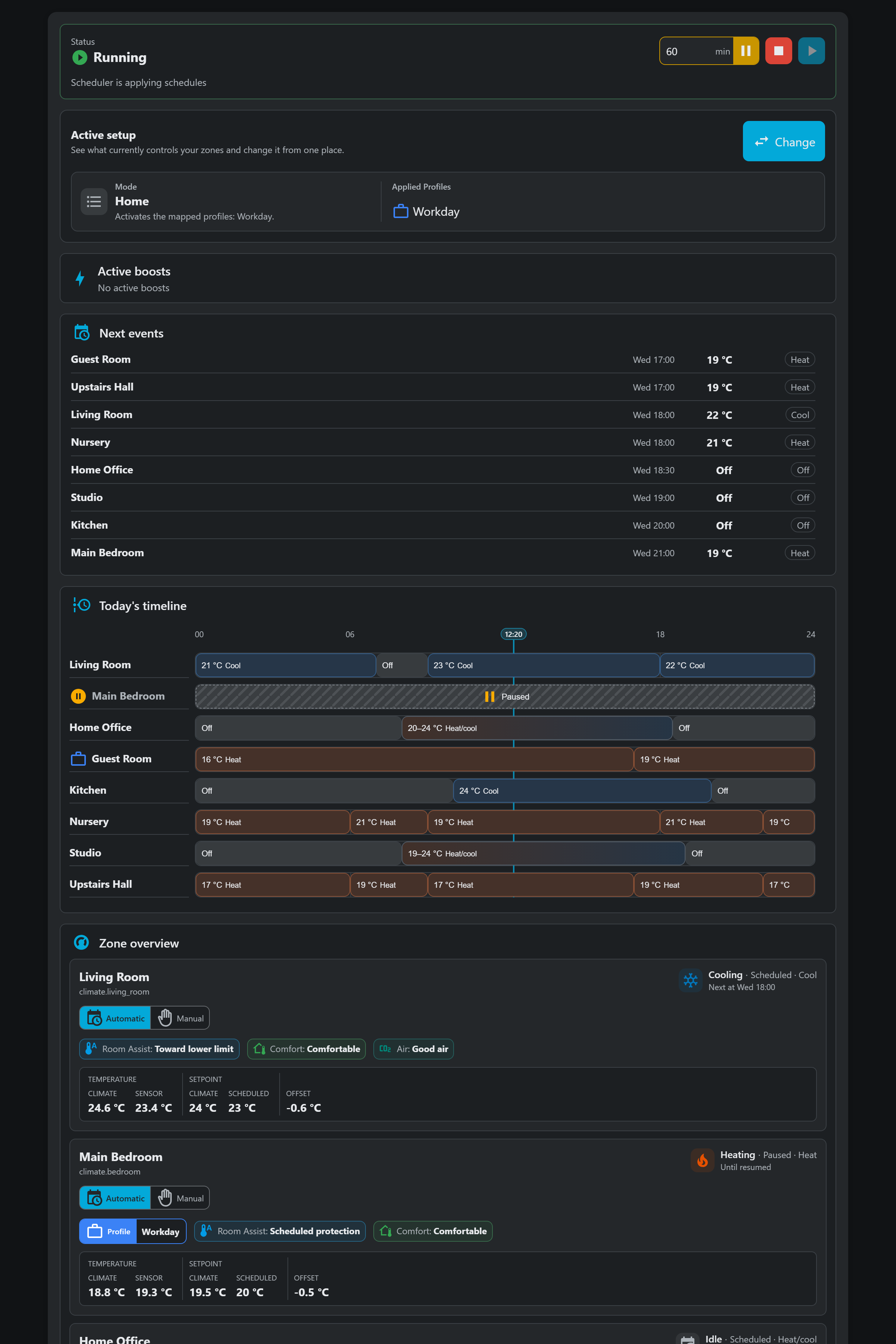
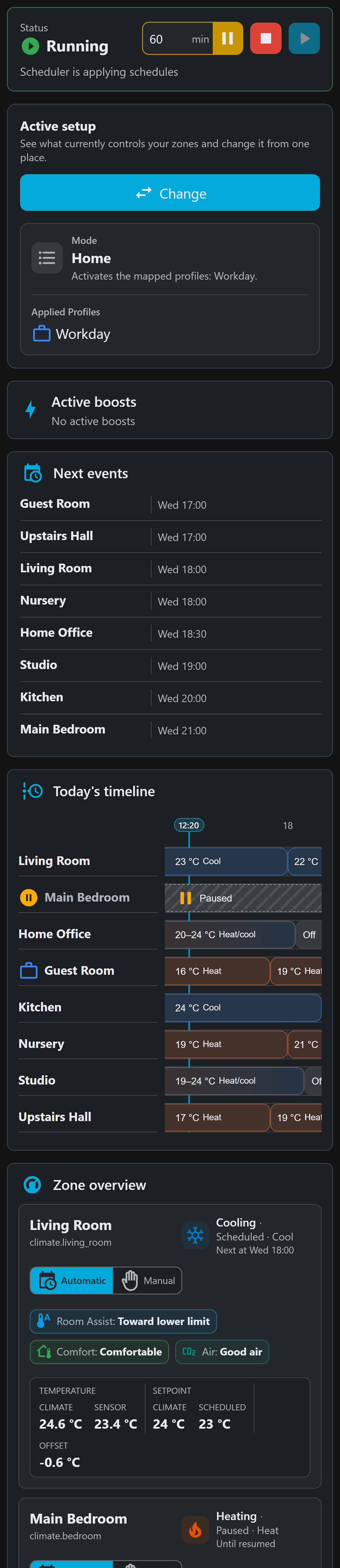
Set up your normal week once. When plans change, switch to another Mode, boost one room, or pause a schedule without rebuilding it. Velair shows what's active and what's coming next for each climate.
Features
- A weekly schedule editor for each climate, with reusable templates and Profiles.
- Schedule blocks that can set a temperature or range, change only the HVAC mode, send supported options such as a preset without a temperature, or turn the climate off.
- Manual adjustment when you want to take direct control of a climate.
- Optional Adaptive Preconditioning and Room Assist for earlier starts and separate room-temperature sensors.
- Optional Planned Return: confirm whole-home absence and prepare for weekly or one-off arrivals, with current control context in Overview and Diagnostics.
- Environmental Comfort and air-quality readings, with optional outdoor comparisons and ventilation guidance. These are observations; Velair does not open windows or adjust the climate based on them.
- See what Velair is doing in Overview, investigate problems in Diagnostics, or add a card for one climate to your dashboard.
- Home Assistant entities, services, events, and blueprints for automations. Compatible external controllers can also receive published schedules.
Velair's interface is available in English, Spanish, German, French, Italian, Dutch, Polish, Russian, and Portuguese for Brazil and Portugal.
Screenshots
These screenshots use example data and Home Assistant's dark theme. See more screenshots for desktop, tablet, and mobile views.
| Desktop | Mobile |
|---|---|
 |  |
Installation
Velair is available in the default HACS store and can also be installed manually.
- In HACS, search for Velair under integrations and select Download.
- Restart Home Assistant.
- Add Velair from Settings > Devices & services and select the
climate.*entities it may manage.

Manual installation
Download `velair-custom-component-.zip` from the latest GitHub release and extract it so Home Assistant has:
<home_assistant_config>/custom_components/velairRestart Home Assistant and add Velair from Settings > Devices & services.
See the installation guide for repository-checkout and development-build instructions.
Basic Usage
- Open Velair from the Home Assistant sidebar.
- Choose one of your managed climates and a day of the week.
- Add schedule blocks and save the day.
Clone days or create templates when useful. The usage guide covers the full workflow. Velair follows Home Assistant's temperature unit; if you are upgrading older data or importing a backup from another unit, read Temperature Units and Migration first.
Every panel tab and the Default/Profiles and Templates/Climate presets subsections have a direct URL. Refreshing keeps the current section, and browser Back/Forward follows your navigation. See Panel navigation and direct links for the route table and a dashboard-button example.
Optional Lovelace Card
The sidebar panel is the main Velair experience. To add the optional card, first install and configure the integration. In Settings > Dashboards, open the three-dot menu and select Resources. Add this resource as a JavaScript module, then reload the browser or Home Assistant companion app:
url: /velair_frontend/velair-card.js
type: module
In an editable dashboard, add a manual card for one Velair-managed climate:
type: custom:velair-card
view: climate
selected_entity: climate.living_room
Replace climate.living_room with your managed climate. The
card usage guide covers the
visual editor, other views, actions, and display options. If Home Assistant shows a
custom element error, see troubleshooting.
For household presence and One-off return controls, add a card with
type: custom:velair-card and view: planned-return. Configure the household
in the sidebar first. Occupancy sources are optional for an explicit one-off
return, which applies Away immediately without them; weekly automation requires
sources. See the Planned Return card.
Documentation
Start with the documentation index, or go directly to the usage guide, Environmental Comfort, sensor reference, or troubleshooting.
For reusable schedules, see the preset and linked-template examples: shared heating routines, Winter/Summer Profiles, independent copies, and shared-edit troubleshooting. For automated changes to shared targets and device settings, see preset automation examples. The development guide covers the repository and contribution workflow.
Contributing
I'm Cristian Gonzalez Fernandez, and I maintain Velair in my free time. Reports from different climate integrations, mobile and tablet feedback, documentation improvements, and pull requests are all welcome. Please read the development guide before contributing. I may not always reply quickly, but I appreciate the feedback. For help, check troubleshooting or ask in the Home Assistant community thread. To report a reproducible bug, open an issue.
Donations
Velair is a community project maintained in free time. If Velair helps simplify your Home Assistant climate setup and you want to support future development, donations are welcome:
Donations are optional and do not change the best-effort support model, but they are always appreciated.
License
MIT. See LICENSE.