Public
Star 历史趋势
数据来源: GitHub API · 生成自 Stargazers.cn
README.md


LazyWorktree
 LazyWorktree is a terminal UI for managing Git worktrees with a keyboard-first workflow.
Work across multiple Git worktrees from one interface. Create, switch, remove, and run operations without changing directories.
Built with Bubble Tea, it shows worktree state and integrates with development tools, including tmux, zellij, and OCI runtimes such as Docker or Podman.
Custom commands can be bound to keys or made available only from the command palette. To hide a command from key binding, prefix its config key with _.
Screenshot
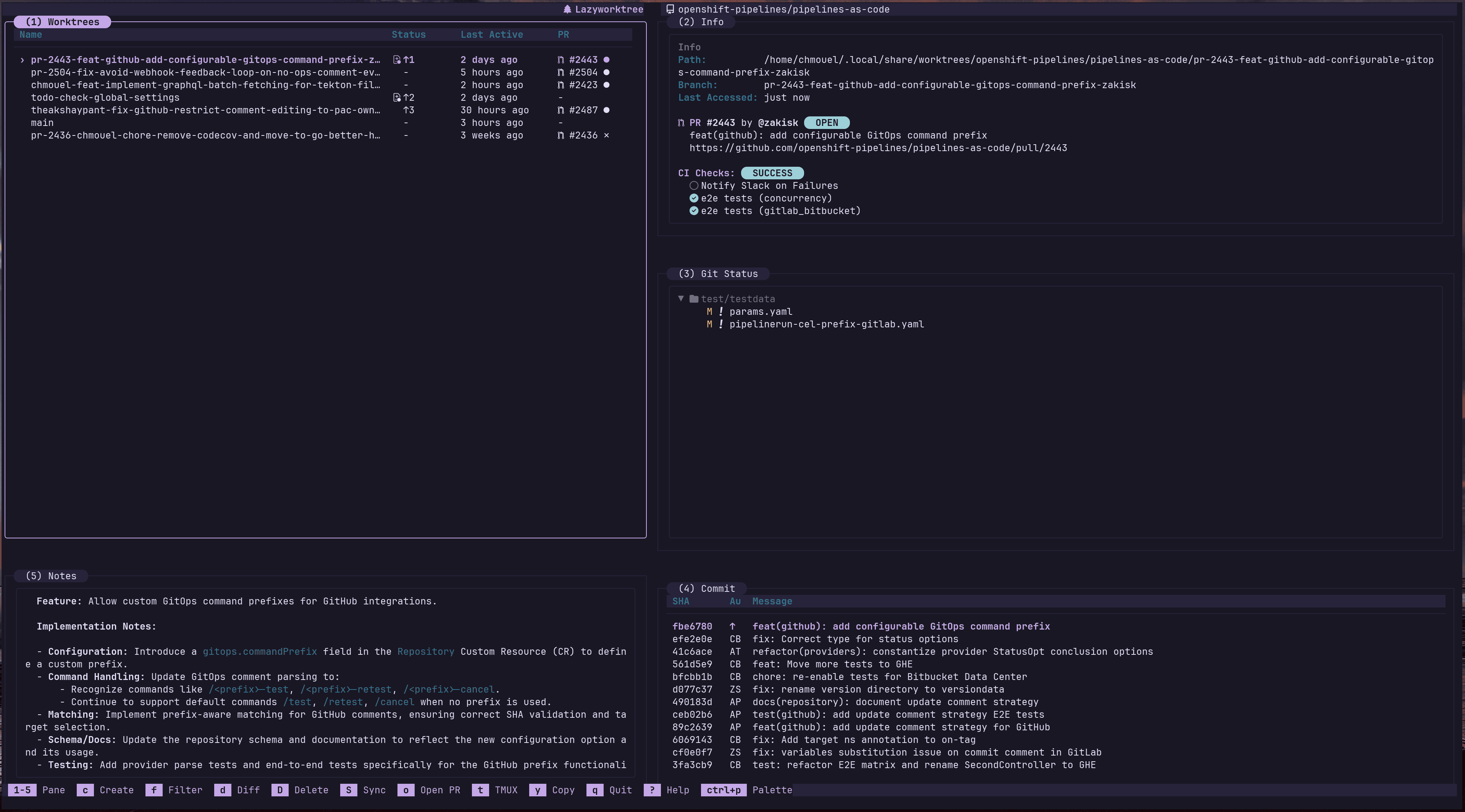
You can see more screenshots here
Main Features
- Worktree management - Create worktrees from branches, PRs/MRs, or issues; delete, list, and switch between them
- CI & PR/MR status - See GitHub Actions and GitLab CI results, check PR/MR details, view logs
- Agent sessions pane - See confirmed active Claude and pi sessions attached to the selected worktree by default, with a toggle for recent and historical sessions
- Command palette - Quick access to all actions and custom commands with
?. - Tmux and Zellij support - Automatically open worktrees in new tmux windows/panes or zellij tabs
- Docker/Podman support - Run commands in Docker or Podman containers tied to the worktree
- Custom commands - Set up custom shell commands in config, bind them to keys, show them in the palette.
- Notes - Markdown notes per worktree to track work in progress
- Hooks -
.wtfiles per worktree to automate setup and cleanup tasks - Customise worktree metadata - Press
ein the worktree pane to edit the description, colour, notes, icon, and tags for the selected worktree. - Shell helpers -
cd "$(lazyworktree)"shortcut and shell completion for bash, zsh, and fish (making it easy to jump to worktrees from the terminal) - LLM-friendly CLI - Use
doctor,describe,worktrees ..., andnotes getfor stable JSON automation without launching the TUI
Documentation
Primary documentation lives on the docs site:
Useful entry points:
- Introduction: https://chmouel.github.io/lazyworktree/docs/
- Getting started: https://chmouel.github.io/lazyworktree/docs/getting-started/
- Core workflows: https://chmouel.github.io/lazyworktree/docs/core/worktree-operations/
- Navigation and keybindings: https://chmouel.github.io/lazyworktree/docs/core/navigation-and-keybindings/
- Configuration overview: https://chmouel.github.io/lazyworktree/docs/configuration/overview/
- Configuration reference: https://chmouel.github.io/lazyworktree/docs/configuration/reference/
- Full configuration example:
config.example.yaml - CLI overview: https://chmouel.github.io/lazyworktree/docs/cli/overview/
- CLI flags reference: https://chmouel.github.io/lazyworktree/docs/cli/flags/
- CLI commands reference: https://chmouel.github.io/lazyworktree/docs/cli/commands/
- Troubleshooting: https://chmouel.github.io/lazyworktree/docs/troubleshooting/diagnostic-guide/
Installation
Homebrew (macOS)
brew tap chmouel/lazyworktree https://github.com/chmouel/lazyworktree
brew install lazyworktree --cask
Arch Linux
yay -S lazyworktree-bin
From source
go install github.com/chmouel/lazyworktree/cmd/lazyworktree@latest
Quick Start
cd /path/to/your/repository
lazyworktree
Shell Integration
To jump to the selected worktree from your shell:
cd "$(lazyworktree)"
For shell integration helpers, see:
Requirements
- Git 2.31+
- Forge CLI (
ghorglab) for PR/MR status
Optional tools are documented here:
Licence
关于 About
Easy Git worktree management CLI and TUI for the terminal.
bubbleteacharmbraceletgitgit-worktreegolanglazylazygitterminaltmuxtuivibecodingworktree-managerworktreeszellij
语言 Languages
Go95.2%
Roff2.2%
Shell1.0%
HTML0.8%
CSS0.6%
JavaScript0.2%
Makefile0.0%
Ruby0.0%
提交活跃度 Commit Activity
代码提交热力图
过去 52 周的开发活跃度976
Total Commits峰值: 269次/周
LessMore