Workflow Escrow Refund Protocol
Automate escrow-backed freelance agreements with AI-powered work validation using USDC on Arc testnet. This sample application uses Next.js, Supabase, Circle Developer Controlled Wallets, and OpenAI to demonstrate an end-to-end escrow workflow — from contract creation and deposit, through AI-validated deliverable submission, to fund release or refund.
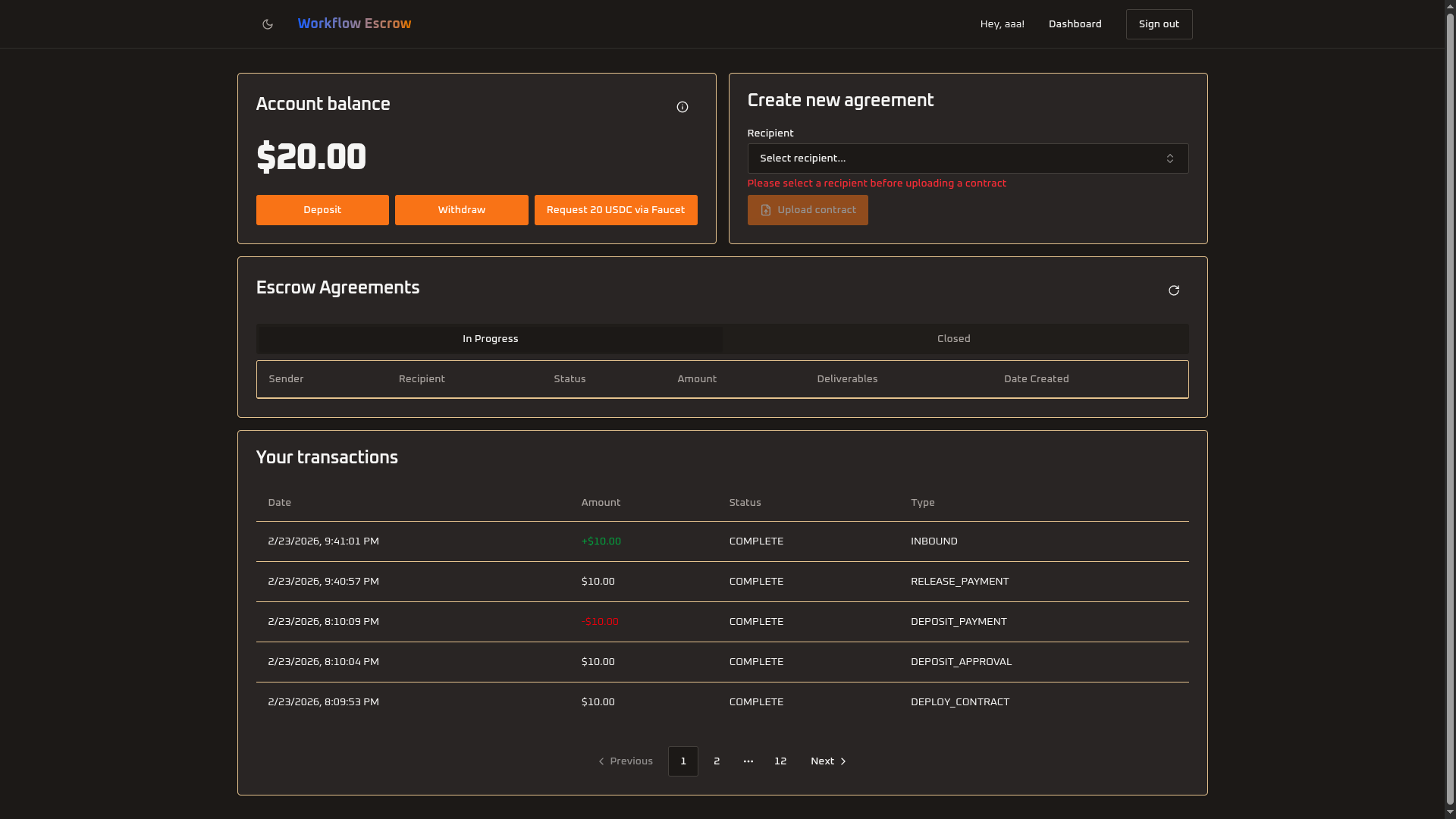
Table of Contents
Prerequisites
- Node.js v22+ — Install via nvm
- Supabase CLI — Install via
npm install -g supabaseor see Supabase CLI docs - Docker Desktop (only if using the local Supabase path) — Install Docker Desktop
- ngrok — For local webhook testing
- Circle Developer Controlled Wallets API key and Entity Secret
- OpenAI API key — Used for AI-powered work validation
Getting Started
-
Clone the repository and install dependencies:
git clone git@github.com:akelani-circle/workflow-escrow-refund-protocol.git cd workflow-escrow-refund-protocol npm install -
Set up environment variables:
cp .env.example .env.localThen edit
.env.localand fill in all required values (see Environment Variables section below). LeaveNEXT_PUBLIC_AGENT_WALLET_ID,NEXT_PUBLIC_AGENT_WALLET_ADDRESS, andCIRCLE_BLOCKCHAINblank — they will be auto-generated in the next step. -
Generate the agent wallet:
npm run generate-walletThis creates a Circle developer-controlled wallet and writes the wallet ID, address, and blockchain values into your
.env.local. -
Set up the database — Choose one of the two paths below:
Path 1: Local Supabase (Docker)
Requires Docker Desktop installed and running.
npx supabase start
npx supabase migration up
The output of
npx supabase startwill display the Supabase URL and API keys needed for your.env.local.Path 2: Remote Supabase (Cloud)
Requires a Supabase account and project.
npx supabase link --project-ref <your-project-ref>
npx supabase db push
Retrieve your project URL and API keys from the Supabase dashboard under Settings → API.
-
Start the development server:
npm run devThe app will be available at
http://localhost:3000. -
Set up Circle Webhooks (for local development):
In a separate terminal, expose your local server:
ngrok http 3000Copy the HTTPS URL from ngrok and configure a webhook in the Circle Console:
- Navigate to Circle Console → Webhooks
- Add a new webhook endpoint:
https://your-ngrok-url.ngrok.io/api/webhooks/circle - Keep ngrok running while developing to receive webhook events
How It Works
- Built with Next.js and Supabase
- Uses Circle Developer Controlled Wallets for USDC escrow transactions on Arc testnet
- Smart contracts (EIP-712 Refund Protocol) deployed and managed via
@circle-fin/smart-contract-platform - OpenAI validates submitted work deliverables against agreement criteria using vision models
- Webhook signature verification ensures secure transaction notifications
- Agent wallet automatically initialized via the
generate-walletscript - Real-time UI updates powered by Supabase Realtime subscriptions
Environment Variables
Copy .env.example to .env.local and fill in the required values:
# Deployment URL
VERCEL_URL=http://localhost:3000
NEXT_PUBLIC_VERCEL_URL=http://localhost:3000

# Supabase
NEXT_PUBLIC_SUPABASE_URL=
NEXT_PUBLIC_SUPABASE_ANON_KEY=

# USDC Smart Contract
NEXT_PUBLIC_USDC_CONTRACT_ADDRESS=

# Agent Wallet (auto-generated by npm run generate-wallet)
NEXT_PUBLIC_AGENT_WALLET_ID=
NEXT_PUBLIC_AGENT_WALLET_ADDRESS=

# Circle
CIRCLE_API_KEY=
CIRCLE_ENTITY_SECRET=
CIRCLE_BLOCKCHAIN=

# OpenAI
OPENAI_API_KEY=| Variable | Scope | Purpose |
|---|---|---|
VERCEL_URL | Server-side | Base URL of the deployment (e.g., http://localhost:3000). |
NEXT_PUBLIC_VERCEL_URL | Public | Public-facing base URL for client-side usage. |
NEXT_PUBLIC_SUPABASE_URL | Public | Supabase project URL. |
NEXT_PUBLIC_SUPABASE_ANON_KEY | Public | Supabase anonymous/public key. |
NEXT_PUBLIC_USDC_CONTRACT_ADDRESS | Public | USDC token contract address on the target blockchain. |
NEXT_PUBLIC_AGENT_WALLET_ID | Public | Circle wallet ID for the escrow agent. Auto-generated. |
NEXT_PUBLIC_AGENT_WALLET_ADDRESS | Public | Wallet address for the escrow agent. Auto-generated. |
CIRCLE_API_KEY | Server-side | Circle API key for wallet and contract operations. |
CIRCLE_ENTITY_SECRET | Server-side | Circle entity secret for signing transactions. |
CIRCLE_BLOCKCHAIN | Server-side | Blockchain network identifier (e.g., ARC-TESTNET). Auto-generated. |
OPENAI_API_KEY | Server-side | OpenAI API key for AI-powered work validation. |
User Accounts
Default Account
On first visit, sign up with any email and password. The first user created can act as both a depositor (client) and a beneficiary (freelancer) across different agreements.
Signup Rate Limits
Supabase limits email signups to 2 per hour by default (unless custom SMTP is configured). If you hit an "email rate limit exceeded" error during testing:
- Local Supabase (Docker): Email verification is handled by the built-in Inbucket mail server — check it to confirm signups. The rate limit can be adjusted in
supabase/config.tomlunder[auth.rate_limit]. - Remote Supabase (Cloud): Use real email addresses (disposable emails may fail verification). If you hit the limit, you can manually add users via the Supabase dashboard under Authentication → Users.
Security & Usage Model
This sample application:
- Assumes testnet usage only
- Handles secrets via environment variables
- Verifies webhook signatures for security
- Is not intended for production use without modification