CodeGraph
Already installed? Run codegraph upgrade
Follow @getcodegraph on X for updates.
Supercharge Claude Code, Cursor, Codex, OpenCode, Hermes Agent, Gemini, Antigravity, Kiro, and GitHub Copilot with Semantic Code Intelligence
The fastest complete code graph · surgical context · built for how agents actually work · 100% local

Documentation & Website →

















The CodeGraph platform is coming — for every PR, know exactly what to test, what could break, which flows are affected, and whether business logic is compromised.

Get early beta access to the hosted product · getcodegraph.com
Contents
- Get Started
- Language Support
- Why CodeGraph?
- Key Features
- Read your graph in the browser
- Framework-aware Routes
- Mixed iOS / React Native / Expo bridging
- Quick Start
- How It Works
- CLI Reference
- MCP Tools
- Library Usage
- Configuration
- Telemetry
- Verified releases
- Supported Platforms
- Supported Agents
- Supported Languages
- Measured cross-file coverage
- Troubleshooting
- License
Get Started
1. Install the CLI
No Node.js required — one command grabs the right build for your OS:
# macOS / Linux
curl -fsSL https://raw.githubusercontent.com/colbymchenry/codegraph/main/install.sh | sh

# Windows (PowerShell)
irm https://raw.githubusercontent.com/colbymchenry/codegraph/main/install.ps1 | iex
Already have Node? Use npm instead (works on any version)
npm i -g @colbymchenry/codegraphCodeGraph bundles its own runtime — nothing to compile, no native build, works the same everywhere. The installer puts codegraph on your PATH but doesn't change your current shell — open a new terminal before the next step so the command resolves.
Upgrade any time with codegraph upgrade — it detects how you installed (bundle, npm, or npx) and updates in place. Add --check to see if an update is available, or codegraph upgrade <version> to pin one.
2. Wire up your agent(s)
In a new terminal, run the installer to connect CodeGraph to the agents you use:
codegraph installDetects and auto-configures Claude Code, Cursor, Codex CLI, opencode, Hermes Agent, Gemini CLI, Antigravity IDE, Kiro, and GitHub Copilot (VS Code, Copilot CLI, JetBrains IDEs) — wiring the CodeGraph MCP server into each. This is the step that connects CodeGraph to your agent; installing the CLI in step 1 does not do it on its own. It only wires up your agent — it does not index any code; building each project's graph is the separate codegraph init in step 3. (Shortcut: npx @colbymchenry/codegraph downloads and runs this in one go.)
3. Initialize each project
cd your-project
codegraph init
codegraph init creates the local .codegraph/ directory and builds the full graph in the same step — one command, done.
4. No more syncing!
Auto-sync is enabled by default. CodeGraph watches the project and updates the graph on every file change — while your agent edits code, or you add, modify, or delete files. The index is never stale, and there is nothing to re-run.
5. See what your agent sees
codegraph uiOpens the graph in your browser at http://127.0.0.1:4747 — callers on the left, the symbol's
source in the middle, what it calls on the right. See
Read your graph in the browser.
Uninstall
Changed your mind? One command removes CodeGraph from every agent it configured and the CLI itself — every install it finds (standalone bundle, npm global package, launcher link), shown to you before anything is deleted:
codegraph uninstallPass --keep-cli to remove only the agent configurations and keep the CLI installed.
Reverses the installer — strips CodeGraph's MCP server config, instructions, and permissions from each configured agent. Your project indexes (.codegraph/) are left untouched; remove those per-project with codegraph uninit. Use --target to remove from specific agents, or --yes to run non-interactively.
Language Support
Every language below gets the same treatment — full structural extraction and cross-file resolution into one graph, no per-language setup:


Per-language details — extensions, frameworks, and what exactly gets extracted — in Supported Languages.
Why CodeGraph?
When an AI agent needs to understand code — to answer a question or make a change — it discovers structure the slow way: grep, glob, and Read, one file at a time, rebuilding call paths and dependencies by hand. That's a pile of tool calls and round-trips before it even starts the real work.
CodeGraph hands the agent the exact code it needs in one call. It's a pre-built knowledge graph of every symbol, call edge, and dependency in your codebase — so instead of crawling files, the agent asks one question and gets back the relevant source, the call paths between those symbols (including dynamic-dispatch hops grep can't follow), and the blast radius of a change. Surgical context, not a file-by-file search — which means fewer tool calls and faster answers on every codebase, large or small.
A note on cost: CodeGraph's win on every codebase is precision — the agent stops crawling files and answers from the graph. On current models that precision is also a large direct saving: the 2026-08 re-measurement, on a harness that blocks the CLI in both arms, put it at 44% lower cost and 62% fewer tokens on average across the seven benchmark repos, because a strong model without the graph burns its budget re-deriving structure. Cost tracks how much discovery a question demands more than raw repo size: 57–78% on questions the file-reading agent needed 28–43 tool calls to answer, near-even where it got there in 7.
A note on context: the numbers above measure throughput — tokens processed, tools called, dollars spent to reach one answer. They don't measure what is still sitting in your context window afterward, and on that axis CodeGraph costs more, not less. Across the same seven repos in multi-turn sessions, CodeGraph's responses leave about 80% more retrieval context resident at the end of a session than a file-reading agent's do — on VS Code, 67k tokens against 18k. The mechanism is the same one that makes it fast: CodeGraph returns one dense, verbatim payload that answers the question and then stays in the window, where a grep-and-read agent churns through many small results that get evicted. Fewer tokens processed and a larger persistent footprint are both real at once. If you run long sessions in a small window, budget for it. Measured per-repo:
docs/benchmarks/residual-context-occupancy.md.
Benchmark Results
Tested across 7 real-world open-source codebases spanning 7 languages, comparing an agent (Claude Code, headless) answering one architecture question with and without CodeGraph, at the median of 4 runs per arm. Re-measured 2026-08-05 on Claude Opus 4.8 against the current build, on a harness that blocks the codegraph CLI in both arms — contamination row: 0 of 28 without-arm runs.
The universal win — every repo, every size: 88% fewer tool calls · 53% faster · 62% fewer tokens · 44% cheaper · file reads cut to zero on all seven repos.
With the index available, the agent answers from one to four codegraph_explore calls and stops. Without it, the agent burns its budget on discovery — up to 43 tool calls and 19 file reads re-deriving what the graph already knew. Every repo was faster with CodeGraph in this measurement — by 35% on the narrowest question, by 3.6× on the widest.
| Codebase | Language | Tool calls | Time | File reads | Tokens | Cost |
|---|---|---|---|---|---|---|
| VS Code | TypeScript · ~11k files | 2 vs 28 | 2.2× faster (58s vs 2m 10s) | 0 vs 12 | 77% fewer | 71% cheaper |
| Excalidraw | TypeScript · ~640 | 2 vs 43 | 3.6× faster (45s vs 2m 42s) | 0 vs 18 | 84% fewer | 78% cheaper |
| Django | Python · ~3k | 3 vs 14 | 35% faster (54s vs 1m 23s) | 0 vs 8.5 | 41% fewer | 13% cheaper¹ |
| Tokio | Rust · ~790 | 3 vs 29 | 2.6× faster (1m 3s vs 2m 43s) | 0 vs 19 | 65% fewer | 64% cheaper |
| OkHttp | Java · ~645 | 1 vs 6 | 43% faster (33s vs 58s) | 0 vs 2 | 54% fewer | 21% cheaper |
| Gin | Go · ~110 | 1 vs 7 | 39% faster (28s vs 46s) | 0 vs 4 | 52% fewer | ~even¹ |
| Alamofire | Swift · ~110 | 4 vs 33 | 2.6× faster (54s vs 2m 22s) | 0 vs 16.5 | 59% fewer | 57% cheaper |
¹ Cost tracks how much discovery the question demanded, which is why it varies far more than the other columns: 57–78% on repos where the file-reading arm needed 28–43 tool calls, but only 13% on Django and even on Gin, where it got there in 14 and 7. The with-arm still answered in 3 and 1 calls with zero file reads. File reads = median files opened — the surgical-context win in one column: the agent never reads a file on any of the seven repos when CodeGraph is present.
Per-repo breakdown — WITH vs WITHOUT (median of 4)
| Codebase | Metric | WITH cg | WITHOUT cg |
|---|---|---|---|
| VS Code | Time / Tools / Tokens / Cost | 58s / 2 / 155k / $0.53 | 2m 10s / 28 / 670k / $1.80 |
| Excalidraw | Time / Tools / Tokens / Cost | 45s / 2 / 156k / $0.54 | 2m 42s / 43 / 991k / $2.43 |
| Django | Time / Tools / Tokens / Cost | 54s / 3 / 183k / $0.55 | 1m 23s / 14 / 309k / $0.63 |
| Tokio | Time / Tools / Tokens / Cost | 1m 3s / 3 / 201k / $0.66 | 2m 43s / 29 / 573k / $1.83 |
| OkHttp | Time / Tools / Tokens / Cost | 33s / 1 / 107k / $0.39 | 58s / 6 / 230k / $0.50 |
| Gin | Time / Tools / Tokens / Cost | 28s / 1 / 87k / $0.31 | 46s / 7 / 180k / $0.31 |
| Alamofire | Time / Tools / Tokens / Cost | 54s / 4 / 209k / $0.54 | 2m 22s / 33 / 505k / $1.27 |
Full benchmark details
Methodology. Each arm is claude -p (Claude Opus 4.8, claude-opus-4-8) run headlessly against the repo with --strict-mcp-config: WITH = CodeGraph's MCP server enabled, WITHOUT = an empty MCP config. Built-in Read/Grep/Bash stay available to both. Same question per repo, 4 runs per arm, median reported. Cost = the run's total_cost_usd; Tokens = total tokens processed, summed per assistant turn (input incl. cache reads + cache creation + output); Time = wall-clock; Tool calls = every tool invocation, including those inside any sub-agents the model spawns. Repos cloned at --depth 1 and indexed by the same CodeGraph build that served them. Re-measured 2026-08-05 on the current build.
The codegraph CLI is blocked in both arms. A sanitized PATH plus a PreToolUse hook denies any Bash invocation of the CLI, in the WITHOUT arm as well as the WITH arm. This matters: without that block the control arm is not a control. On an unblocked harness we measured the WITHOUT agent finding the CLI on PATH and reaching CodeGraph through Bash in 26 of 28 runs — which distorts the comparison in both directions, since a CLI call is not counted as a tool call and its output still enters the window. Earlier published figures were produced without this block. In the run reported above, all 28 WITHOUT runs attempted the CLI and all 28 were blocked — 0 contaminated.
Queries:
| Codebase | Query |
|---|---|
| VS Code | "How does the extension host communicate with the main process?" |
| Excalidraw | "How does Excalidraw render and update canvas elements?" |
| Django | "How does Django's ORM build and execute a query from a QuerySet?" |
| Tokio | "How does tokio schedule and run async tasks on its runtime?" |
| OkHttp | "How does OkHttp process a request through its interceptor chain?" |
| Gin | "How does gin route requests through its middleware chain?" |
| Alamofire | "How does Alamofire build, send, and validate a request?" |
Why CodeGraph wins: with the index available, the agent answers directly — usually one codegraph_explore returns the relevant source — and stops, with zero file reads on every benchmark repo. Without it, the agent spends most of its budget on discovery (find/ls/grep) before reading the right code. CodeGraph only helps when queried directly, so its instructions steer agents to answer directly rather than delegate exploration to file-reading sub-agents — otherwise a sub-agent reads files regardless and CodeGraph becomes overhead.
Built for speed — the Rust kernel
CodeGraph's parsing engine is a native Rust kernel: 20 languages — TypeScript, JavaScript, Java, Python, Go, C, C++, Rust, C#, Ruby, PHP, Swift, Kotlin, Scala, Dart, R, Lua, Luau (Metal and CUDA ride the C++ path) — parse in compiled code with one boundary crossing per file. Every language shipped only after its graphs proved byte-for-byte identical to the reference engine on real repositories, from small libraries up to the Linux kernel; platforms without a prebuilt binary and files with syntax errors fall back per-file automatically, same graph either way.
And it scales itself to the machine it's on. Worker pools, parallel resolution, and analysis caches are sized from what the system actually has — real core counts (container/cgroup-aware, so a VPS that grants 2 cores gets sized for 2, not the host's 64), honestly-measured available RAM on macOS and Linux, and the measured cost of your project's resolution work:
- On a workstation: the full parallel pipeline — native parse workers, a multi-worker resolver pool that engages the moment it pays for itself, memory-gated analysis caches. The Swift compiler repository (27k files of Swift and C++) fresh-indexes in about 100 seconds; a one-file edit re-syncs in ~4.
- On a 2-core / 6GB VPS: the same graph, from a pipeline tuned to finish — the Linux kernel (70k files, 2M symbols, 6.4M relationships) indexes to completion in under 12 minutes where RAM-first designs run out of memory before reaching 1%.
- Every day after day one: saving a file updates the graph in well under a second — the watcher fires 300ms after a lone save and syncs exactly what changed (~0.3s of work on a 4,400-file project, ~0.4s on the 27,000-file Swift compiler repo), never re-scanning the tree. Measured against the fastest competing indexer's re-index-on-change: 2–7× faster on medium and larger repos across a 31-repo, 30-language benchmark — and the gap widens with repo size, because their cost grows with the repository and ours grows with the change.
Key Features
| Native Rust Kernel | Parsing and extraction run in a compiled Rust engine for 20 languages — with graphs verified byte-for-byte identical to the reference engine, and automatic per-file fallback so nothing ever breaks |
| Adapts to Your Machine | Sizes its worker pools and caches from what the system actually has — real core counts (container-aware), honest available RAM, measured per-project cost. A workstation gets the full parallel pipeline; a 2-core VPS gets one tuned to finish reliably |
| Surgical Context | One tool call returns entry points, related symbols, and code snippets — no slow file-by-file exploration |
| Full-Text Search | Find code by name instantly across your entire codebase, powered by FTS5 |
| Impact Analysis | Trace callers, callees, and the full impact radius of any symbol before making changes |
| Always Fresh | File watcher uses native OS events (FSEvents/inotify/ReadDirectoryChangesW) with debounced auto-sync — the graph stays current as you code, zero config |
| 20+ Languages | TypeScript, JavaScript, ArkTS, Python, Go, Rust, Java, C#, VB.NET, PHP, Ruby, C, C++, CUDA, Objective-C, Metal, Swift, Kotlin, Scala, Dart, Lua, Luau, R, Nix, Erlang, CFML, COBOL, Solidity, Terraform/OpenTofu, Svelte, Vue, Astro, Liquid, Pascal/Delphi |
| Framework-aware Routes | Recognizes web-framework routing files and links URL patterns to their handlers across 17 frameworks |
| Mixed iOS / React Native / Expo | Closes cross-language flows that static parsing misses: Swift ↔ ObjC bridging, React Native legacy bridge + TurboModules + Fabric view components, native → JS event emitters, Expo Modules |
| 100% Local | No data leaves your machine. No API keys. No external services. SQLite database only |
How auto-syncing works — and why you don't need to run codegraph sync manually
When your agent (Claude Code, Cursor, Codex, opencode) launches codegraph serve --mcp, three layers keep the index in step with your code — and make sure the agent never gets a silent wrong answer in the brief window between an edit and the next sync:
-
File watcher with debounced auto-sync. A native FSEvents / inotify / ReadDirectoryChangesW watcher captures every source-file create / modify / delete and triggers a re-index after a debounce window (default
2000ms, tunable viaCODEGRAPH_WATCH_DEBOUNCE_MS, clamped to[100ms, 60s]). Bursts of edits collapse into a single sync. -
Per-file staleness banner. During the brief debounce window, MCP tool responses that would reference a still-pending file prepend a
⚠️banner naming it and telling the agent toReadit directly. Pending files NOT referenced by the response surface as a small footer instead. Either way, the agent gets an explicit signal — validated with Claude Code, where the agent literally says "Reading the file directly for the live content" before opening it. -
Connect-time catch-up. When the MCP server (re)connects, codegraph runs a fast
(size, mtime)+ content-hash reconciliation against the working tree before answering the first query — so edits made while no MCP server was running (agit pullfrom the terminal, edits from another editor, a previous agent session that exited) get absorbed on the next session's first tool call.
agent writes src/Widget.ts
  → watcher fires (<100ms)
  → debounce (default 2s)
  → sync; Widget.ts is in the index
  → next agent query sees it
Verify any time with codegraph status (CLI). If anything is pending, you'll see a ### Pending sync: section naming the files and their edit age.
The handful of cases where manual codegraph sync makes sense: the watcher is disabled (sandboxed environments, or CODEGRAPH_NO_DAEMON=1), or you're scripting against the index outside an agent session and want a pre-flight sync at the start of your script.
→ Full deep-dive in Guides → Indexing a Project.
Read your graph in the browser
codegraph ui opens a viewer for a project you have already indexed. It is the same graph
your agent reads, on screen: pick a symbol and you see who calls it on the left, its
verbatim source in the middle, and what it calls on the right — each one drawn level
with the line that calls it.
codegraph init          # once per project, if you haven't already
codegraph ui            # opens http://127.0.0.1:4747 in your browser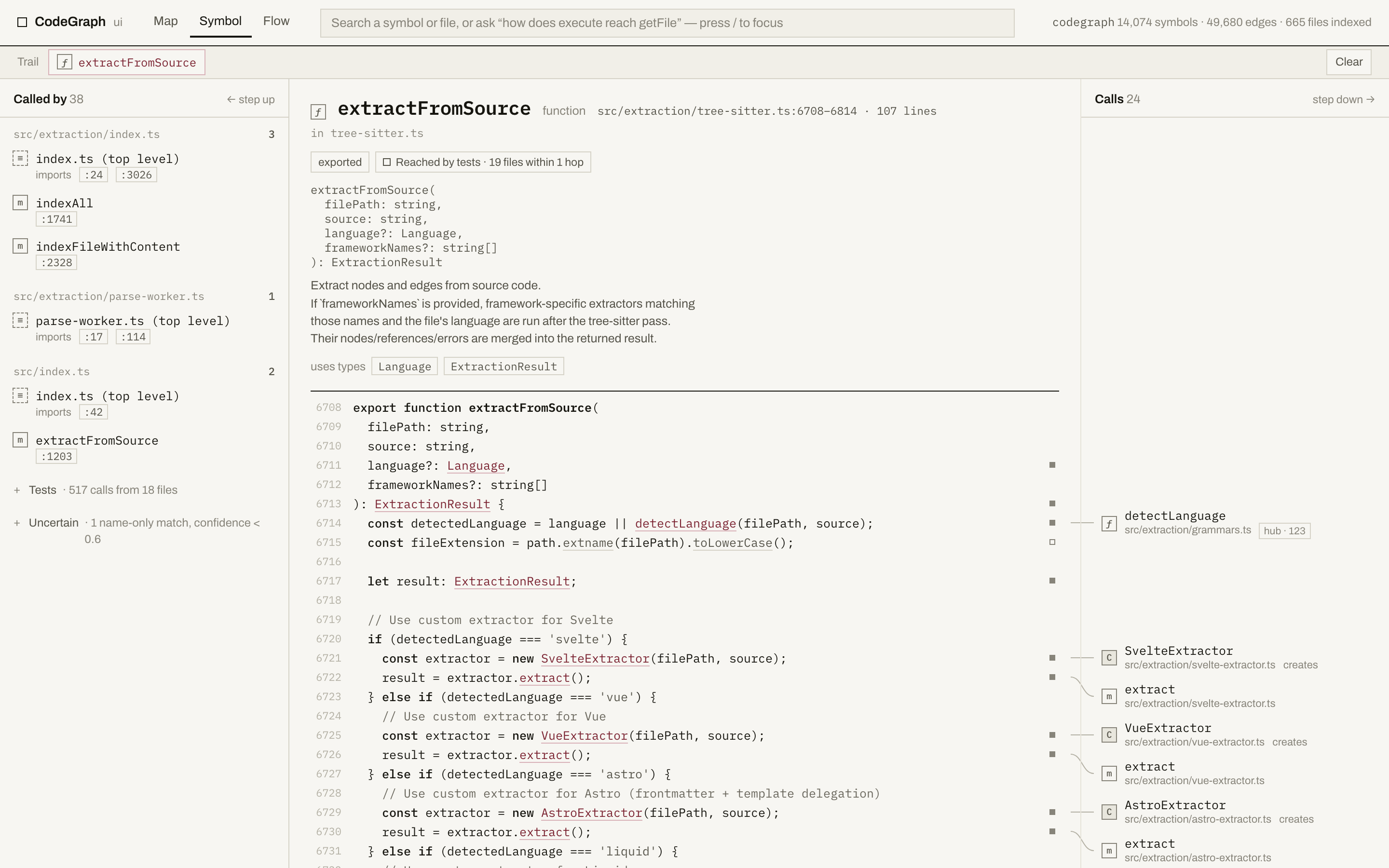
What you get on that screen:
- Callers, grouped by file, each with the exact line it calls from — click one to jump there. Test callers fold into a single line so real callers stay in view.
- The real source, syntax-highlighted, with a marker in the gutter on every line that calls something.
- Callees on the right, positioned at the line that calls them, joined by a hairline. Hover either end and both light up.
- Blast radius — direct dependents, everything within three hops, and how many files and test files that touches.
- Honest edges. A guess CodeGraph isn't sure about is folded away as "uncertain" rather than shown as fact, and a symbol no test reaches within three hops says so.
- Search (
/or ⌘K) over every symbol and file, and a trail of the path you walked that lives in the URL, so you can send someone the exact route you took. Typing a name also surfaces matching entry points under their own heading, so a URL comes back with the symbol that serves it rather than on its own. - Entry points — the first screen on a codebase you have never opened, and the answer to "where does anything start". Every route with its handler and the line it is registered on, grouped by router file and named with the framework it was detected from; the files that run something at import time (a CLI, a worker entry, a script); the tests, ranked by how much of the project each one exercises; and the symbols the most code depends on. Nothing is guessed from a filename — it is all read out of the graph, and a project with no routes says so instead of drawing an empty list. Any row that names a symbol can start a flow: pick a second symbol and you get the path between them, so "how does
POST /v1/payroll/cycles/{cycleID}/runreach the database" is two clicks. - Click any file path to open the file view: everything that file depends on, its outline in source order, and everything that depends on it. Its Source tab shows the whole file with the same gutter markers, plus an arc in the left margin for every call that stays inside the file — the one place a file's internal call structure is legible, because source order does the layout. A 6,800-line file scrolls at full speed.
- Ask for a path. Type "how does execute reach getFile" (or
execute -> getFile) and you get the flow: one card per hop, each opened at the line that makes the next call. Hops that no static edge records — a callback, an interface dispatch, a React re-render — are drawn dashed and name where the handler was wired. "Read as flow" turns a walk you did by hand into the same strip. - And when the path runs out, it says where. A flow that doesn't get there ends in "Where the graph stops": the kind of dispatch that ended it (a computed member call, a
getattr, a reflective invoke, a message bus), its line, the key when the source spells one out, and a shortlist of what could be on the other side — plus the name-only matches CodeGraph refused to follow, with their confidence. Nothing is guessed, and a flow that does connect never shows it. - What happens from here. On an app with screens, the Screens tab draws one box per screen and an arrow for every way of getting from one to another, each labelled with the condition under which it happens. The Steps tab does the same for what happens on a screen: pick one (or any symbol) and you get its handlers, the calls that cross into native code, the native events that come back, the store actions it writes and the requests that leave the app, as typed steps with the plumbing between them folded into the arrows — the whole capture-to-upload flow of a React Native app on one picture, with every step a click from the next anchor or a Flow strip.
- The map: the whole project at module granularity, laid out from the graph with dependencies pointing down — never drawn by hand, and the same picture every time. Cycles are listed rather than straightened away.
- Take the picture with you. A flow strip or a map can be copied as an image straight into a pull-request comment, or saved as an SVG for a README — always in the light theme, whichever one you are reading in, with a caption saying what the picture is. The SVG is real text, so it stays sharp at any size and the names in it are selectable.
- Keep a walk. Press Save trail on the trail bar, name it, and the path is kept — listed on the empty screen and on Entry points, above the suggestions, and reopened at the symbol you left with the whole walk restored. Steps are remembered by what they are, not where they sat, so a saved trail survives editing the code it describes; when something does move it says which step moved, which was renamed away, and how much of the walk still opens. Trails are plain JSON under
.codegraph/ui/trails/(git already ignores it), and Export hands you the file if you would rather commit one. - It keeps up. Save a file and a banner appears within about a third of a second saying the index hasn't caught up yet — and the screen switches to the file's current source rather than a body sliced at lines it no longer has. When something re-indexes, whatever is on screen refetches itself and says "Index updated · reloaded". A symbol that moved because you added a line above it is followed, not lost. Nothing polls: the viewer watches, and if it loses touch with the server it retries a few times and then says so instead of hammering it.
Options: --port <n> to pin a port (without it the viewer takes 4747, or the next free one),
--no-open to just print the URL for a headless box or an SSH session, and
CODEGRAPH_BROWSER=<command> to choose the browser (CODEGRAPH_BROWSER=none never opens one).
codegraph web is an alias for the same command.
Privacy: the viewer listens on 127.0.0.1 only, so nothing on your network can reach it,
and requests claiming to come from any other host are refused. It opens an index that already
exists, never creates one, and never changes your graph or a line of your code. The one thing
it writes is a trail you asked it to save, into .codegraph/ui/trails/; codegraph ui --read-only refuses even that. It sends nothing anywhere: no code, no paths, no analytics.
There is no account and no cloud in this feature at all.
The viewer reads an index that already exists — it never creates one — so codegraph init has
to have run first. codegraph ui /path/to/project points it at a project you indexed elsewhere.
Framework-aware Routes
CodeGraph detects web-framework routing files and emits route nodes linked by references edges to their handler classes or functions. Querying callers of a view/controller now surfaces the URL pattern that binds it.
| Framework | Shapes recognized |
|---|---|
| Django | path(), re_path(), url(), include() in urls.py (CBV .as_view(), dotted paths) |
| Flask | @app.route('/path', methods=[...]), blueprint routes |
| FastAPI | @app.get(...), @router.post(...), all standard methods |
| Express | app.get(...), router.post(...) with middleware chains |
| NestJS | @Controller + @Get/@Post/..., GraphQL @Resolver + @Query/@Mutation, @MessagePattern/@EventPattern, @SubscribeMessage |
| Laravel | Route::get(), Route::resource(), Controller@action, tuple syntax |
| Drupal | *.routing.yml routes (_controller, _form, entity handlers); hook_* implementations in .module/.theme/.install/.inc |
| Rails | get '/x', to: 'users#index', hash-rocket => syntax |
| Spring | @GetMapping, @PostMapping, @RequestMapping on methods |
| Play | GET/POST/… verb routes in conf/routes → Controller.method actions (Scala + Java) |
| Gin / chi / gorilla / mux | r.GET(...), router.HandleFunc(...) |
| Axum / actix / Rocket | .route("/x", get(handler)) |
| ASP.NET | [HttpGet("/x")] attributes on action methods |
| Vapor | app.get("x", use: handler) |
| Astro | src/pages/ file-based routes (.astro pages + .ts endpoints, [param]/[...rest] syntax) |
Routers — routes and the navigation between them
These frameworks additionally emit navigates edges: the function that sends a user somewhere is linked to the screen it names, so "where does tapping this go" is one hop in the graph rather than a search. Each reads a literal destination — a computed one, or a path no route serves, is left unresolved rather than guessed — and a link written in markup is marked as inferred.
| Router | Routes from | Navigation from |
|---|---|---|
| Expo Router | Every screen file under app/ (app/item/[id].tsx → /item/[id], groups stripped), bound to its default-export component | router.push / replace / navigate, template hrefs, { pathname } objects, and a helper's returned href |
| Next.js | App Router app/**/page.tsx and Pages Router pages ((group) stripped, [slug] → :slug); app/api/**/route.ts exports and pages/api/* are endpoints, not screens | router.push / replace / prefetch, redirect() / permanentRedirect() in a server action or page, NextResponse.redirect(new URL(…)) in middleware, <Link href> and internal <a href> |
| React Router | <Route path component/element> (v5 and v6) and createBrowserRouter([{ path, element }]) | history.push / replace, useNavigate's navigate, a loader's redirect, <Link to> / <NavLink to> / <Navigate to> / react-router-bootstrap's <LinkContainer to> |
| TanStack Router | createFileRoute('/posts/$postId') (file-based) and createRoute({ path, getParentRoute }) composed up its parent chain (code-based); _pathless segments, (group) folders, __root and <Outlet/> layouts are not addresses | navigate({ to }), a thrown redirect({ to }), <Link to> / <Navigate to> — where to is the route PATTERN and the values ride beside it in params |
| Vue Router / Nuxt | createRouter({ routes: [...] }) with the view each entry names, plus Nuxt pages/ file-based routes, server/api/ endpoints and route middleware | router.push / replace, $router.push, Nuxt's navigateTo, <router-link> / <RouterLink> / <NuxtLink> — by route name (push({ name: 'profile' })) as well as by path |
| SvelteKit | src/routes/**/+page.svelte ([slug] → :slug, [[opt]] → :opt?), joined to the +page.server.js beside it so a loader's guard belongs to its page | goto('/x'), redirect(status, '/x') from a load or form action, and the plain <a href> that is a link in a SvelteKit app |
In a repository holding several apps, each app's routes are matched only against navigation written inside that app.
Mixed iOS / React Native / Expo bridging
Real iOS and React Native codebases live across multiple languages — a Swift caller invokes an Objective-C selector that's been auto-bridged, a JS file calls into a native module via the React Native bridge, a JSX component delegates to a native view manager. Static tree-sitter extraction stops at each language boundary. CodeGraph bridges them so codegraph_explore connects the flow end-to-end across the gap — call paths and blast radius cross the boundary instead of stopping at it.
| Boundary | JS / Swift side | Native side | How |
|---|---|---|---|
| Swift → ObjC | Swift obj.foo(bar:) | ObjC selector -fooWithBar: | @objc auto-bridging rules (including init/property/protocol forms) + Cocoa preposition prefixes (With/For/By/In/On/At/…) |
| ObjC → Swift | ObjC [obj fooWithBar:] | Swift @objc func foo(bar:) | Reverse-bridge name candidates; verifies @objc exposure from source |
| React Native legacy bridge | JS NativeModules.X.fn(...) | ObjC RCT_EXPORT_METHOD / RCT_REMAP_METHOD · Java/Kotlin @ReactMethod | Parses macro/annotation declarations to build a JS-name → native-method map |
| React Native TurboModules | JS import M from './NativeM'; M.fn(...) | Native impl matching the Codegen spec | Treats the Native<X>.ts spec interface as ground truth |
| RN native → JS events | JS new NativeEventEmitter(...).addListener('e', cb) | ObjC [self sendEventWithName:@"e" body:...] · Swift sendEvent(withName: "e", ...) · Java/Kotlin .emit("e", ...) | Synthesized cross-language event channel keyed by literal event name |
| Expo Modules | JS requireNativeModule('X').fn(...) | Swift / Kotlin Module { Name("X"); AsyncFunction("fn") { ... } } | Parses the Expo DSL literals; synthetic method nodes resolve via existing name-match |
| Fabric view components | JSX <MyView prop={v}/> | TS Codegen spec + native impl class | Spec → component node; convention-based name+suffix lookup (View/ComponentView/Manager/ViewManager) bridges to native |
| Legacy Paper view managers | JSX <MyView prop={v}/> | ObjC RCT_EXPORT_VIEW_PROPERTY · Java/Kotlin @ReactProp | Same as Fabric — Paper-era declarations also produce component + property nodes |
Validated on real codebases (small + medium + large for each bridge):
| Bridge | Small | Medium | Large |
|---|---|---|---|
| Swift ↔ ObjC | Charts | realm-swift | Wikipedia-iOS |
| RN legacy bridge | AsyncStorage | react-native-svg | react-native-firebase |
| RN native → JS events | RNGeolocation | — | react-native-firebase |
| Expo Modules | expo-haptics | expo-camera | expo SDK sweep (7 packages) |
| Fabric / Paper views | react-native-segmented-control | react-native-screens | react-native-skia |
Each bridge emits edges tagged provenance:'heuristic' with metadata.synthesizedBy: set to a stable channel name (e.g. swift-objc-bridge, rn-event-channel, fabric-native-impl, expo-module-extract), so the agent can tell at a glance how a hop got into the graph.
Quick Start
1. Run the Installer
npx @colbymchenry/codegraphThe installer will:
- Ask which agent(s) to configure — auto-detects installed ones from: Claude Code, Cursor, Codex CLI, opencode, Hermes Agent, Gemini CLI, Antigravity IDE, Kiro, GitHub Copilot (VS Code, Copilot CLI, JetBrains IDEs)
- Prompt to install
codegraphon your PATH (so agents can launch the MCP server) - Ask whether configs apply to all your projects or just this one
- Write each chosen agent's MCP server config, plus a small marker-fenced CodeGraph section in the agent's instructions file (
CLAUDE.md/AGENTS.md/GEMINI.md) — that's how subagents and non-MCP agents learn thecodegraph explorecommand, since the MCP server's own guidance only reaches the main agent. Removed cleanly bycodegraph uninstall. - Set up auto-allow permissions when Claude Code is one of the targets
The installer wires up your agents only — it does not index your code. After it finishes, build each project's graph yourself with codegraph init (step 3). One global codegraph install covers every project; you run codegraph init once per project.
Non-interactive (scripting / CI):
codegraph install --yes                              # auto-detect agents, install global
codegraph install --yes --init                       # same, then build the current project's index (one-shot bootstrap)
codegraph install --target=cursor,claude --yes       # explicit target list
codegraph install --target=auto --location=local     # detected agents, project-local
codegraph install --target=copilot-vscode,copilot-cli,copilot-jetbrains --yes  # GitHub Copilot everywhere
codegraph install --print-config codex               # print snippet, no file writes
codegraph install --print-config copilot-vscode # same, for Copilot in VS Code| Flag | Values | Default |
|---|---|---|
--target | auto, all, none, or csv (claude,cursor,...) | prompt |
--location | global, local | prompt |
--yes | (boolean) | prompt every step |
--init | (boolean) run codegraph init in the current directory after wiring agents | — |
--no-permissions | (boolean) skip Claude auto-allow list | permissions on |
--print-config <id> | dump snippet for one agent and exit | — |
2. Restart Your Agent
Restart your agent (Claude Code / Cursor / Codex CLI / opencode / Hermes Agent / Gemini CLI / Antigravity IDE / Kiro / VS Code, the Copilot CLI, or your JetBrains IDE for GitHub Copilot) for the MCP server to load.
3. Initialize Projects
cd your-project
codegraph init
Builds the per-project knowledge graph index, which then auto-syncs on every file change. A single global codegraph install works in every project you open — no need to re-run the installer per project. Add --yes to skip every prompt (scripts / CI / container bootstraps).
That's it — your agent will use CodeGraph tools automatically when a .codegraph/ directory exists.
Manual Setup (Alternative)
Install globally:
npm install -g @colbymchenry/codegraphAdd to ~/.claude.json:
{
  "mcpServers": {
    "codegraph": {
      "type": "stdio",
      "command": "codegraph",
      "args": ["serve", "--mcp"],
      "alwaysLoad": true
    }
  }
}
alwaysLoad keeps codegraph_explore loaded from the first prompt. Claude Code otherwise defers every MCP tool behind a tool-search step, so a fresh session sees only the tool's name until the model searches for it.
Add to ~/.claude/settings.json (optional, for auto-allow):
{
  "permissions": {
    "allow": [
      "mcp__codegraph__*"
    ]
  }
}
One wildcard auto-approves every CodeGraph tool — codegraph_explore is the only one listed by default, but if you re-enable others via CODEGRAPH_MCP_TOOLS they're already permitted, no prompt.
Agent Tool Guidance
CodeGraph's MCP server delivers its usage guidance to your agent automatically, in the MCP initialize response. In short, it tells the agent to:
- Answer structural questions directly with CodeGraph — it is the pre-built index, so a grep/read loop just repeats work it already did. Treat the returned source as already read.
- Reach for
codegraph_explorefor almost anything — "how does X work", a flow/"how does X reach Y", or surveying an area. One call returns the relevant symbols' verbatim source grouped by file, the call paths between them (dynamic-dispatch hops included), and a blast-radius summary. Name a file or symbol in the query to read its current line-numbered source. - Trust the results — don't re-verify with grep, and check the staleness banner after edits.
- Works per project: query any project that has a
.codegraph/index by passingprojectPath— so a monorepo where only some services are indexed, or a second repo, works in one session. A path with no index returns clean guidance to use built-in tools; indexing stays your decision.
The exact text is src/mcp/server-instructions.ts — the single source of truth for the main agent. Because subagents and non-MCP harnesses never see the MCP guidance, the installer also writes a short marker-fenced section into the agent's instructions file pointing at the codegraph explore CLI equivalent.
How It Works
┌───────────────────────────────────────────────────────────────────┐
│                            Claude Code                            │
│                                                                   │
│   "How does a request reach the database?"                        │
│       calls CodeGraph tools directly — no Explore sub-agent       │
│                                 │                                 │
└─────────────────────────────────┬─────────────────────────────────┘
                                  │
                                  ▼
┌───────────────────────────────────────────────────────────────────┐
│                        CodeGraph MCP Server                       │
│                                                                   │
│ explore  ·  one call → verbatim source + call flow + blast radius │
│                                 │                                 │
│                                 ▼                                 │
│                       SQLite knowledge graph                      │
│          symbols · edges · files · FTS5 full-text search          │
└───────────────────────────────────────────────────────────────────┘
-
Extraction — a native Rust kernel parses source with tree-sitter grammars compiled into it, extracting nodes (functions, classes, methods) and edges (calls, imports, extends, implements) for 20 languages; remaining languages and per-file fallbacks use the same extraction logic on the portable engine, producing identical graphs.
-
Storage — Everything goes into a local SQLite database (
.codegraph/codegraph.db) with FTS5 full-text search. -
Resolution — After extraction, references are resolved: function calls → definitions, imports → source files, class inheritance, and framework-specific patterns.
-
Auto-Sync — The MCP server watches your project using native OS file events. Changes are debounced (2-second quiet window), filtered to source files only, and incrementally synced. The graph stays fresh as you code — no configuration needed.
CLI Reference
codegraph                         # Run interactive installer
codegraph install                 # Run installer (explicit)
codegraph uninstall               # Remove CodeGraph from your agents AND the CLI (--keep-cli for configs only)
codegraph init [path]             # Initialize a project + build its graph (one step)
codegraph uninit [path]           # Remove CodeGraph from a project (--force to skip prompt)
codegraph index [path]            # Full index (--force to re-index, --quiet for less output)
codegraph sync [path]             # Incremental update
codegraph status [path]           # Show statistics
codegraph ui [path]               # Open the browser viewer for an indexed project (alias: web; --port, --no-open, --read-only)
codegraph unlock [path]           # Remove a stale lock file that's blocking indexing
codegraph query <search>          # Search symbols (--kind, --limit, --json)
codegraph explore <query>         # Relevant symbols' source + call paths in one shot (same output as the codegraph_explore MCP tool)
codegraph node <symbol|file>      # One symbol's source + callers, or read a file with line numbers (same output as codegraph_node)
codegraph files [path]            # Show file structure (--format, --filter, --max-depth, --json)
codegraph callers <symbol>        # Find what calls a function/method (--limit, --json)
codegraph callees <symbol>        # Find what a function/method calls (--limit, --json)
codegraph impact <symbol>         # Analyze what code is affected by changing a symbol (--depth, --json)
codegraph affected [files...]     # Find test files affected by changes (see below)
codegraph daemon                  # Manage background daemons — pick one to stop (alias: daemons)
codegraph telemetry [on|off]      # Show or change anonymous usage telemetry
codegraph upgrade [version]       # Update to the latest release (--check, --force)
codegraph version                 # Print the installed version (also -v, --version)
codegraph help [command]          # Show help, optionally for one command
codegraph affected
Traces import dependencies transitively to find which test files are affected by changed source files.
codegraph affected src/utils.ts src/api.ts         # Pass files as arguments
git diff --name-only | codegraph affected --stdin   # Pipe from git diff
codegraph affected src/auth.ts --filter "e2e/*" # Custom test file pattern| Option | Description | Default |
|---|---|---|
--stdin | Read file list from stdin | false |
-d, --depth <n> | Max dependency traversal depth | 5 |
-f, --filter <glob> | Custom glob to identify test files | auto-detect |
-j, --json | Output as JSON | false |
-q, --quiet | Output file paths only | false |
CI/hook example:
#!/usr/bin/env bash
AFFECTED=$(git diff --name-only HEAD | codegraph affected --stdin --quiet)
if [ -n "$AFFECTED" ]; then
  npx vitest run $AFFECTED
fi
MCP Tools
When running as an MCP server, CodeGraph exposes a single tool — codegraph_explore. Measured agent behavior showed that one strong tool steers agents better than a menu of narrower ones — fewer mis-picks, and it saves context every session:
| Tool | Purpose |
|---|---|
codegraph_explore | Answer almost any question in one call — "how does X work", a flow ("how does X reach Y"), or surveying an area — returning the relevant symbols' verbatim source grouped by file, plus the call paths between them and a blast-radius summary. Surfaces dynamic-dispatch hops (callbacks, React re-render, interface→impl) grep can't follow. Name a file or symbol in the query to read its current line-numbered source, the same shape the Read tool gives you. |
The other tools (codegraph_node, codegraph_search, codegraph_callers, codegraph_callees, codegraph_impact, codegraph_files, codegraph_status) stay fully functional but unlisted by default — everything they return already arrives inline on codegraph_explore (its blast-radius section, the relationship map, a symbol's body as its callee list). Re-enable any of them for the MCP surface with the CODEGRAPH_MCP_TOOLS environment variable (e.g. CODEGRAPH_MCP_TOOLS=explore,node,search,callers), or use their CLI equivalents (codegraph node / query / callers / callees / impact / files / status).
Even when the server's own root has no .codegraph/ index, the tools stay available: pass projectPath to query any indexed project — a sub-service in a monorepo, or a second repo — in the same session. A path that has no index returns clean guidance to use built-in tools instead, so nothing fails loudly, and indexing stays your decision.
Library Usage
CodeGraph can be embedded directly. The npm package re-exports its programmatic
API, so both import and require resolve the CodeGraph class in your own
process — handy for embedding it in an app (e.g. an Electron main process).
import CodeGraph from '@colbymchenry/codegraph';
// CommonJS works too:
//   const { CodeGraph } = require('@colbymchenry/codegraph');

const cg = await CodeGraph.init('/path/to/project');
// Or: const cg = await CodeGraph.open('/path/to/project');

await cg.indexAll({
  onProgress: (p) => console.log(`${p.phase}: ${p.current}/${p.total}`)
});

const results = cg.searchNodes('UserService');
const callers = cg.getCallers(results[0].node.id);
const context = await cg.buildContext('fix login bug', { maxNodes: 20, includeCode: true, format: 'markdown' });
const impact = cg.getImpactRadius(results[0].node.id, 2);

cg.watch();   // auto-sync on file changes
cg.unwatch(); // stop watching
cg.close();
Lower-level building blocks are exported from the same entry point for callers
that drive the graph directly: DatabaseConnection, QueryBuilder,
getDatabasePath, initGrammars / loadGrammarsForLanguages, and FileLock.
Embedding requirements
- Install from npm (
npm i @colbymchenry/codegraph) so the matching per-platform package — which carries the compiled library and its dependencies — is fetched alongside the shim. - The API runs on your runtime, so it needs Node 22.5+ for the built-in
node:sqlite(Electron qualifies when its bundled Node is 22.5+). The CLI and MCP server are unaffected — they run on the self-contained bundled runtime. - TypeScript types ship with the package. As with any Node-targeting library,
keep
@types/nodeavailable andskipLibCheck: true(the common default).
Configuration
Next to none — CodeGraph is zero-config by default, with nothing to write or keep in sync to get started. Language support is automatic from the file extension; there's nothing to wire up per language. The one optional file is for mapping custom file extensions.
What it skips out of the box:
- Dependency, build, and cache directories —
node_modules,vendor,dist,build,target,.venv,Pods,.next, and the like across every supported stack — so the graph is your code, not third-party noise. This holds even with no.gitignore. - Anything in your
.gitignore— honored in git repos via git, and in non-git projects by reading.gitignoredirectly (root and nested). - Files larger than 1 MB — generated bundles, minified JS, vendored blobs.
To keep something else out, add it to .gitignore. To pull a default-excluded
directory back in (say you really do want a vendored dependency indexed),
add a negation — !vendor/. The defaults apply uniformly, so committing a
dependency or build directory doesn't force it into the graph; the .gitignore
negation is the explicit opt-in.
.gitignore can't drop a directory you've committed, though. For a vendored
theme or SDK that's checked into the repo (e.g. a Metronic theme under
static/), list it under exclude in codegraph.json — gitignore-style
patterns, matched against repo-root-relative paths, honored on index, sync, and
watch:
{
  "exclude": ["static/", "**/vendor/**"]
}
Conversely, when real source is gitignored on purpose — a project under a second
VCS (SVN, Perforce) that .gitignores its own source so it stays out of Git —
force it back in with include (the opposite of exclude; includeIgnored
only revives embedded git repos, not plain source):
{
  "include": ["Tools/", "Local/typescript/"]
}
CodeGraph discovers those files off disk, overriding .gitignore, on index,
sync, and watch. An explicit exclude still wins, and built-in skips
(node_modules, dist, .git) are never re-included.
Sometimes a directory shouldn't leave the index — you still want to find things
in it — it just shouldn't outrank your real code. A scripts/ or
optional-skills/ tree whose helpers use generic names (usage, status,
run) can win on an exact name match and crowd out the product code that
actually answers the query. Name those trees under deprioritize:
{
  "deprioritize": ["optional-skills/", "scripts/"]
}
This is the ranking counterpart to exclude: those paths stay indexed and
findable — searching for them directly still works — they just stop winning
against first-party code. It applies to query / search and to explore's
ranking. It is not a filter: unlike the built-in example/, sample/,
fixture/, benchmark/ and demo/ handling — which also drops those files
from some result sets outright — deprioritize only ever changes rank. Reach
for exclude when you want something gone.
Custom file extensions
If your project uses a non-standard extension for a supported
language — say .dota_lua for Lua, or .tpl for PHP —
those files are skipped by default, because the extension isn't one CodeGraph
recognizes. Map them with an optional codegraph.json at your project root:
{
  "extensions": {
    ".dota_lua": "lua",
    ".tpl": "php"
  }
}
Each value is a supported language id. The mappings merge on top of the built-in
defaults and win on conflict, so you can also re-point a built-in (e.g.
".h": "cpp"). Commit the file to share the mapping with your team. A typo'd
language or a malformed file is warned about and skipped — it never breaks
indexing — and a project with no codegraph.json behaves exactly as before.
Re-index (codegraph index) after adding or changing mappings.
Telemetry
CodeGraph collects anonymous usage statistics — which tools and commands get used, which languages get indexed — to guide where language and agent support work goes. Never any code, paths, file or symbol names, queries, or IP addresses; usage is aggregated locally into daily totals before anything is sent, and the ingest endpoint is public code in this repo that enforces the documented field list. The installer asks up front; turn it off any time:
codegraph telemetry off # or: CODEGRAPH_TELEMETRY=0, or DO_NOT_TRACK=1TELEMETRY.md lists every field, with the off-switches and the
full data-handling story.
Verified releases
Every artifact is built and published by the public Release workflow — never from a laptop — and carries cryptographic proof of it:
-
npm packages are published via trusted publishing (OIDC — no long-lived npm tokens exist that could be stolen) with provenance attestations linking every version to the exact commit and workflow run that built it. Verify what's installed:
npm audit signatures -
GitHub Release bundles (and
SHA256SUMS) carry signed build attestations (SLSA v1.0 Build Level 2). Verify any downloaded bundle:gh attestation verify codegraph-darwin-arm64.tar.gz -R colbymchenry/codegraph
Releases published before July 2026 predate this pipeline and don't carry attestations.
Supported Platforms
Every release ships a self-contained build (bundled Node runtime — nothing to compile) for all three desktop OSes, on both Intel/AMD (x64) and ARM (arm64):
| Platform | Architectures | Install |
|---|---|---|
| Windows | x64, arm64 | PowerShell installer or npm |
| macOS | x64, arm64 | shell installer or npm |
| Linux | x64, arm64 | shell installer or npm |
See Get Started for the one-line install commands.
Supported Agents
The interactive installer auto-detects and configures each of these — wiring up the MCP server (which delivers its own usage guidance, so no instructions file is written):
- Claude Code
- Cursor
- Codex CLI
- opencode — MCP entry is OpenCode 2's
mcp.servers.codegraphwithcodemode: false(keepscodegraph_exploreon the native tool list;codegraph installmigrates the oldermcp.codegraphshape) - Hermes Agent
- Gemini CLI
- Antigravity IDE
- Kiro
- GitHub Copilot — Copilot Chat in VS Code (
copilot-vscode), the Copilot CLI (copilot-cli), and the Copilot plugin in JetBrains IDEs (copilot-jetbrains)
Supported Languages
| Language | Extension | Status |
|---|---|---|
| TypeScript | .ts, .tsx | Full support |
| JavaScript | .js, .jsx, .mjs | Full support |
| ArkTS (HarmonyOS) | .ets | Full support (everything TypeScript has, plus @Component/@ComponentV2 structs with their ArkUI decorators (@State/@Prop/@Link/@Local/@Builder/…), build() view trees — parent→child component edges, chained-attribute links to @Extend/@Styles functions, .onClick(this.handler) event bindings — dynamic-dispatch bridges for state→build() re-renders, @ohos.events.emitter emit→subscriber pairs (static event keys only), and router.pushUrl literal urls → the target page struct; ohpm workspace modules resolve bare import { X } from "data" through oh-package.json5 file: dependencies, honoring each module's main entry) |
| Python | .py | Full support |
| Go | .go | Full support |
| Rust | .rs | Full support |
| Java | .java | Full support |
| C# | .cs | Full support |
| PHP | .php | Full support |
| Ruby | .rb | Full support |
| C | .c, .h | Full support |
| C++ | .cpp, .hpp, .cc | Full support |
| Objective-C | .m, .mm, .h | Partial support (classes, protocols, methods, @property, #import, message sends; .mm ObjC++ may parse incompletely) |
| Metal | .metal | Full support (vertex/fragment/kernel functions, structs, type aliases, call edges — MSL parses as C++, with [[attribute]] annotations handled) |
| CUDA | .cu, .cuh | Full support (kernels and device/host functions, structs, classes, host→kernel call edges through <<<grid, block>>> launch syntax — templated launches, function-pointer launches (auto kernel = &fn<...>), dim3{...} configs, and macro-defined kernels included; __global__/__device__/__launch_bounds__ specifiers handled; CUDA in plain .h/.hpp headers recognized by content) |
| Swift | .swift | Full support |
| Kotlin | .kt, .kts | Full support |
| Scala | .scala, .sc | Full support (classes, traits, methods, type aliases, Scala 3 enums) |
| Dart | .dart | Full support |
| Svelte | .svelte | Full support (script extraction, Svelte 5 runes, SvelteKit routes) |
| Vue | .vue | Full support (script + script-setup extraction, Nuxt page/API/middleware routes) |
| Astro | .astro | Full support (frontmatter + script extraction, template component/call references, src/pages/ routes) |
| Liquid | .liquid | Full support |
| Pascal / Delphi | .pas, .dpr, .dpk, .lpr | Full support (classes, records, interfaces, enums, DFM/FMX form files) |
| Lua | .lua | Full support (functions, methods with receivers, local variables, require imports, call edges) |
| R | .R .r | Full support (functions in every assignment form, S4/R5/R6 classes with methods, library/require imports, source() file references, call edges) |
| Luau | .luau | Full support (everything in Lua, plus type/export type aliases, typed signatures, and Roblox instance-path require) |
| CFML | .cfc, .cfm, .cfs | Full support (tag-based <cfcomponent>/<cffunction> and bare-script component { ... } styles, extends/implements, embedded <cfscript> delegation, call edges) |
| COBOL | .cbl, .cob, .cpy | Full support (programs, sections/paragraphs with PERFORM/GO TO call edges, CALL 'literal' cross-program calls, COPY copybook imports — including standalone .cpy files — DATA DIVISION records/fields/88-levels, EXEC CICS LINK/XCTL and EXEC SQL INCLUDE targets; fixed and free format) |
| Visual Basic .NET | .vb | Full support (classes, Modules, interfaces, structures, enums, properties, events, Declare P/Invoke, Handles/WithEvents, Inherits/Implements edges, call edges through VB's call/index paren ambiguity, As New instantiation, interpolated strings, LINQ, Unicode identifiers) |
| Erlang | .erl, .hrl, .escript, .app.src, .app | Full support (functions with multi-clause/multi-arity grouping, -spec signatures, records with fields, -type/-opaque aliases, -define macros, -include/-include_lib/-import edges, local and mod:fn remote call edges, fun name/arity references, spawn/apply/proc_lib/timer/rpc MFA-argument call edges, gen_server:call/cast(?MODULE) → own handle_call/handle_cast links, -behaviour links, -export-based visibility) |
| Solidity | .sol | Full support (contracts, libraries, interfaces, structs, enums, modifiers, events, errors, state variables, import/using directives, emit/revert calls) |
| Terraform / OpenTofu | .tf, .tfvars, .tofu | Full support (resources, data sources, modules, variables, outputs, providers incl. aliases, locals; var./local./module./resource references with Terraform's per-directory scoping enforced; module calls bridged across the boundary — inputs to the child module's variables, module.M.out to the child's output, source to the module's files; cloudposse/atmos remote-state cross-component wiring when the component is statically named; provider = aws.east selections resolved up the module tree; moved/import/removed/check block references; .tfvars assignments linked to the variables they set) |
| Nix | .nix | Full support (functions with simple/destructured/curried params, let/attrset bindings, inherit, import ./path file edges — ./dir resolving through default.nix — plus NixOS module imports = [ ./x.nix ] lists and callPackage ./pkg.nix file edges; call edges; module-system option wiring — a config write like launchd.user.agents.x = { ... } links to the module declaring options.launchd.user.agents, so option flows trace across modules) |
Measured cross-file coverage
Impact and blast-radius queries are only as good as the dependency graph behind them, so coverage is measured rather than asserted. Fair coverage = the share of symbol-bearing source files that have at least one resolved cross-file dependent — something that imports, calls, references, or (through a framework convention) routes to them — on a real-world benchmark repo per language. The residual is always a genuine static-analysis frontier (runtime dynamic dispatch, reflection / DI containers, framework-convention entry points, vendored third-party code), never hidden by gaming the denominator.
| Language | Benchmark repo | Coverage |
|---|---|---|
| TypeScript / JavaScript | this repo | 95.8% |
| Python | psf/requests | 100% |
| Go | gin-gonic/gin | 96.6% |
| Rust | BurntSushi/ripgrep | 86.7% |
| Java | google/gson | 93.3% |
| C# | jbogard/MediatR | 85.2% |
| PHP | guzzle/guzzle | 100% |
| Ruby | sidekiq/sidekiq | 100% |
| C | redis/redis | 92.2% |
| C++ | google/leveldb | 94.8% |
| Objective-C | SDWebImage | 91.6% |
| Swift | Alamofire | 95.3% |
| Kotlin | square/okhttp | 96.2% |
| Scala | gatling/gatling | 91.2% |
| Dart | flutter/packages | 92.4% |
| Svelte / SvelteKit | sveltejs/realworld | 100% |
| Vue / Nuxt | nuxt/movies | 93.5% |
| Astro | xingwangzhe/stalux | 93.0% |
| Lua | nvim-telescope/telescope.nvim | 84.2% |
| Luau | dphfox/Fusion | 92.2% |
| Liquid | Shopify/dawn | 73.8% |
| Pascal / Delphi | PascalCoin | 77.4% |
Framework routing is validated the same way, on a canonical app per framework: Express 100%, FastAPI 98%, Flask 100%, NestJS 96.8%, Gin 96.5%, Axum 100%, Rocket 93.8%, Vapor 100%, Laravel 92%, Rails 89.6%, React Router 100% — and the convention/reflection-heavy ones at their honest static-analysis ceiling: ASP.NET 83.9%, Spring 83.3%, Drupal 78.9%, Play 76.3%, Django 74.1%. SvelteKit, Vue/Nuxt, and Astro use file-based routing, so their page/endpoint coverage is the Svelte/SvelteKit (100%), Vue/Nuxt (93.5%), and Astro (93.0% — every src/pages/ file maps to a route node on the two validation repos) figures in the table above.
Troubleshooting
"CodeGraph not initialized" — Run codegraph init in your project directory first.
Indexing is slow — Check that node_modules and other large directories are excluded. Use --quiet to reduce output overhead.
MCP hits database is locked — current builds shouldn't: CodeGraph bundles its own Node runtime and uses Node's built-in node:sqlite in WAL mode, where concurrent reads never block on a writer. If you still see it:
- You're on an old (pre-0.9) install. Reinstall to get the bundled runtime —
curl -fsSL https://raw.githubusercontent.com/colbymchenry/codegraph/main/install.sh | sh(macOS/Linux),irm https://raw.githubusercontent.com/colbymchenry/codegraph/main/install.ps1 | iex(Windows), ornpm i -g @colbymchenry/codegraph@latest. codegraph statusshowsJournal:other thanwal— WAL couldn't be enabled on this filesystem (common on network shares and WSL2/mnt), so reads can block on writes. Move the project (with its.codegraph/folder) onto a local disk.
MCP server not connecting — Your agent starts the server itself, so you don't launch it by hand. Make sure the project is initialized and indexed (codegraph status) and that the path in your MCP config is correct. If it still won't connect, re-run codegraph install to rewrite the config.
Two codegraph serve --mcp on one project fight over the index / auto-sync stops — CodeGraph allows one live MCP writer per project (the shared background daemon, or a single direct-mode process). Extra clients should proxy to that daemon. If you set CODEGRAPH_NO_DAEMON=1, run only one serve --mcp for that project; a second instance exits with a clear writer-lock error (see writer.pid under .codegraph/). Prefer leaving the daemon enabled so multiple MCP hosts share one watcher.
MCP tool calls fail with Transport closed while codegraph status/sync are healthy — almost always WSL2 with the project on a Windows drive (a /mnt/c or /mnt/d path), where the local socket CodeGraph uses to share one background server across sessions is unreliable. CodeGraph now falls back to serving the session in-process instead of dropping the connection, but if you still hit it, set CODEGRAPH_NO_DAEMON=1 in your MCP server's environment to skip the shared server entirely (each session runs in its own process). Moving the project onto the Linux-native filesystem (e.g. under ~/ instead of /mnt/) restores the shared server.
Missing symbols — The MCP server auto-syncs on save (wait a couple seconds). Run codegraph sync manually if needed. Check that the file's language is supported and isn't inside a .gitignored or default-excluded directory (e.g. node_modules, dist).
Sharing one checkout between Windows and WSL — Don't point both at the same .codegraph/: the background-server lock and the SQLite index are tied to the OS that wrote them, and SQLite locking across the WSL2/Windows filesystem boundary is unreliable. Give each side its own index in the same tree by setting CODEGRAPH_DIR to a distinct name on one of them — e.g. CODEGRAPH_DIR=.codegraph-win on Windows, leaving WSL on the default .codegraph. CodeGraph skips any sibling .codegraph-* directory when indexing and watching, so the two never trip over each other.
Very large repositories (hundreds of thousands of files), or a large .codegraph/codegraph.db-wal file — The -wal file is SQLite's write-ahead log: writes waiting to be folded into codegraph.db. While a big index is being built, CodeGraph lets it grow in proportion to the index (soft threshold = the larger of 256 MB and a quarter of the index size, up to 2 GB) before folding it back, because folding too often is what made large indexes slow on ordinary disks. At rest it is trimmed to 64 MB, and a leftover from a killed session is folded and trimmed the next time the project opens — the index itself has no size limit. Two environment variables tune this: CODEGRAPH_WAL_VALVE_MB (the soft threshold during indexing) and CODEGRAPH_WAL_HEAL_MB (the resting size and the trim threshold). CODEGRAPH_WAL_VALVE_DEBUG=1 prints every decision to stderr.
License
MIT
Made for AI coding agents — Claude Code, Cursor, Codex CLI, opencode, Hermes Agent, Gemini CLI, Antigravity IDE, Kiro, and GitHub Copilot