












☕ Sponsor this project

📱 Vietnam MoMo · VietQR · napas247 |

💰 Binance Pay Crypto / cross-border |
🌍 International (card):

(yes — I moved this up here on purpose. Was afraid nobody scrolls past the badges 😅)
A local-only, single-user infinite-canvas workspace for AI media workflows.
Compose characters, products, scenes, and videos as a directed graph. Drive generation through a Chrome extension that proxies requests to Google Flow (Veo 3.1 / GEM_PIX_2).
Every node is reusable, every edge is a real data-dependency, every variant is independently regenerable.
⚠ Hard requirements — read this before cloning:
Google Flow plan:
ProorUltraonly. Veo 3.1 i2v + GEM_PIX_2 are gated to paid tiers. The free tier and trial accounts cannot drive video generation, so Flowboard cannot work on them. Confirm your plan at labs.google/fx before installing.Chrome extension is mandatory. All generation requests are proxied through
extension/(Chrome MV3) so the agent can ride your authenticated Flow session + reCAPTCHA token. Without the extension loaded and connected tolabs.google/fx/tools/flow, the▶ Generatebutton does nothing.One LLM CLI on
PATHfor auto-prompt / vision / planner. Flowboard ships a swappable provider layer — pick one inSettings → AI Providers:
- Claude Code (default, recommended) —
@anthropic-ai/claude-code· OAuth via your Claude subscription · fully tested in production.- Gemini CLI —
@google/gemini-cli· OAuth via Google AI · tested live; ~15 s slower per call than Claude due to subprocess cold-start.- OpenAI Codex —
@openai/codex· OAuth via ChatGPT Plus/Pro · provider class implemented + auto-detected but not yet smoke-tested end-to-end; treat as beta.Flowboard does not call any cloud LLM API directly — every auto-prompt / vision / planner round-trip shells out to the CLI you've connected, so the cost lives on your existing AI subscription.
Why · Showcase · How it works · Architecture · Quickstart · Features
Demo
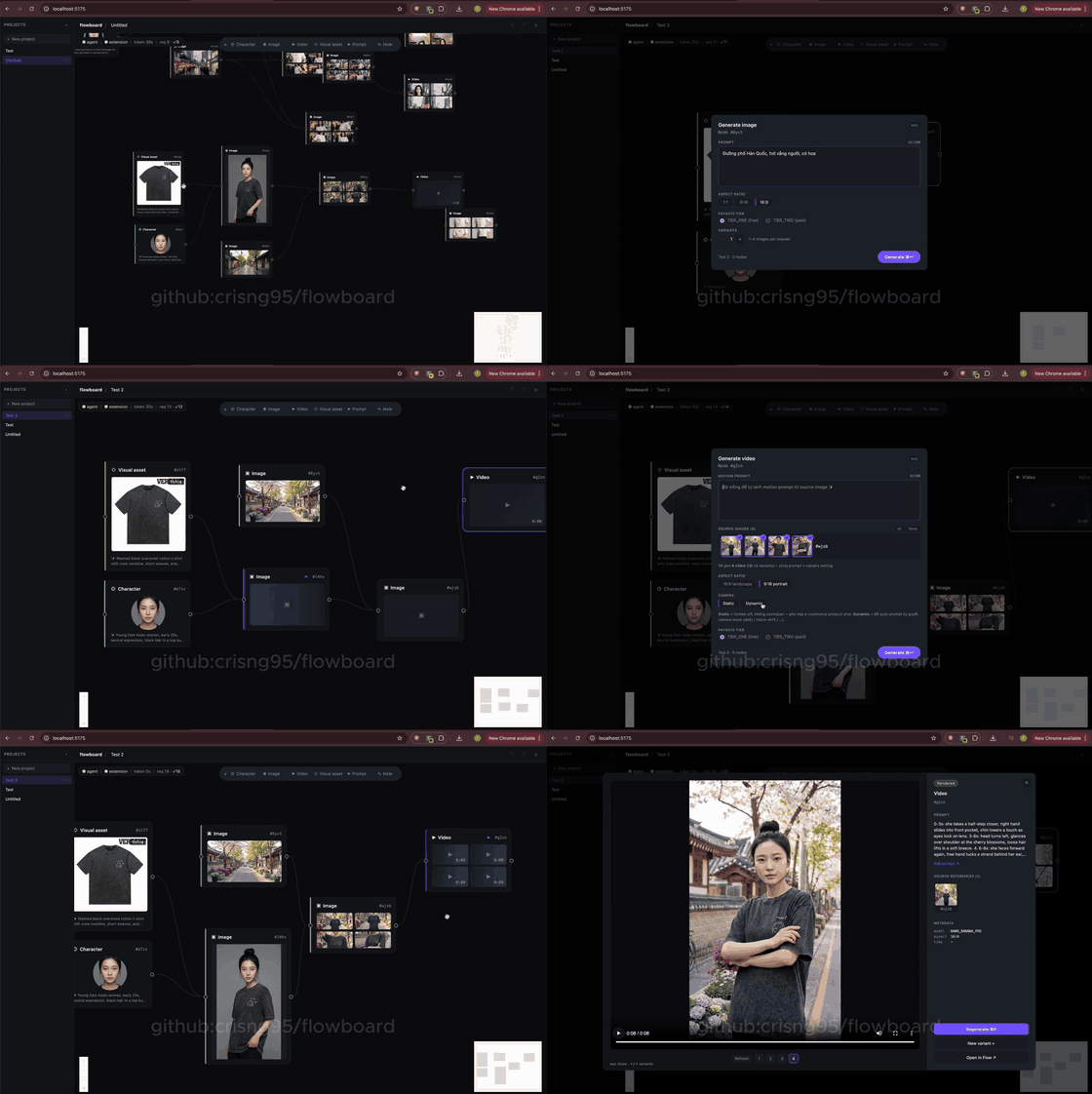
End-to-end walkthrough — refs → composed image → multi-source i2v. Click for full-quality MP4.
Why
E-commerce video creative is repetitive: same model, same product, many scenes, many short clips. Building it by hand in a generic Veo / Imagen UI means re-uploading the same character ref every time, re-typing the same "young Korean woman in the cream cropped tee" prompt every time, and losing track of which 4-variant generation came from which source still.
Flowboard treats the workflow as a graph:
- Refs are nodes — upload a character once, upload a product once.
- Composed shots are nodes —
(Character) + (Product) → Image. - Videos are nodes —
(Image) → Videovia i2v, with multi-source batch so a 4-variant image spawns 4 videos in one click. - Prompts are auto-synthesised from upstream context (the configured
LLM CLI's vision pass describes each ref → a downstream generator
gets the brief spliced into a fashion-editorial prompt). Switch
provider in
Settings → AI Providers; defaults to Claude Code.
The result: one source-of-truth canvas for an entire campaign.
Showcase
The graph below is a real export from a board in this project — two ref
nodes (#op4v product, #0p1u model) feeding three scene compositions
and three downstream videos. Every image and clip below was rendered by
the pipeline in this repo.
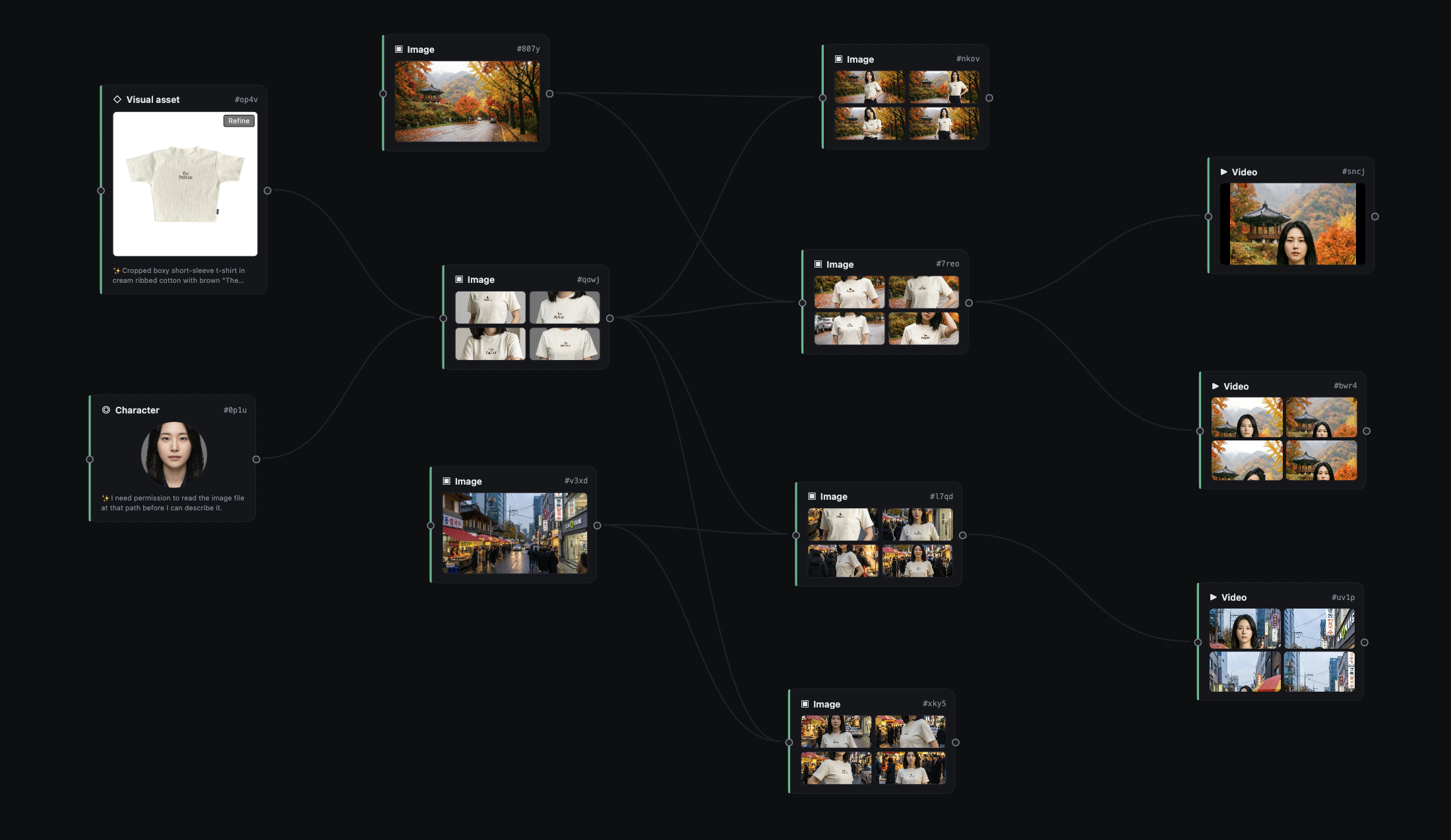
The actual canvas in the app: 2 refs (left) → studio composition #qowj (centre) → scene-variant images (autumn / Seoul / Myeongdong) → 3 video nodes with 4-up i2v variant grids (right).
graph LR
    A[#op4v Visual asset<br/>cream The Famous tee]:::ref
    B[#0p1u Character<br/>Korean female model]:::ref
    C[#qowj Image<br/>studio composition]
    D[#nkov Image<br/>autumn road · 4 variants]
    E[#l7qd Image<br/>Seoul street · 4 variants]
    F[#xky5 Image<br/>Myeongdong dusk · 4 variants]
    G[#sncj Video<br/>studio motion]:::video
    H[#bwr4 Video<br/>autumn motion · 4 variants]:::video
    I[#uv1p Video<br/>Seoul motion · 4 variants]:::video

    A --> C
    B --> C
    C --> D
    C --> E
    C --> F
    D --> H
    E --> I
    C --> G

    classDef ref fill:#1d4d2e,stroke:#5db97a,color:#fff;
    classDef video fill:#2b1d4d,stroke:#7c5cff,color:#fff;
Layer 0 — references (one-time setup)
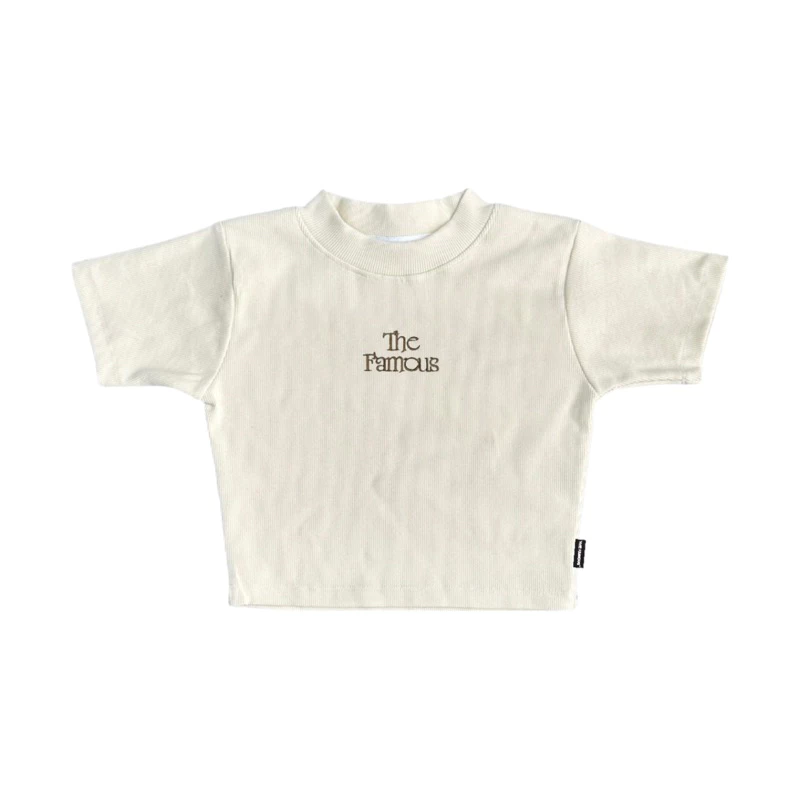 #op4v · Visual asset Cropped boxy short-sleeve tee in cream ribbed cotton with brown "The Famous" centre-chest embroidery. |
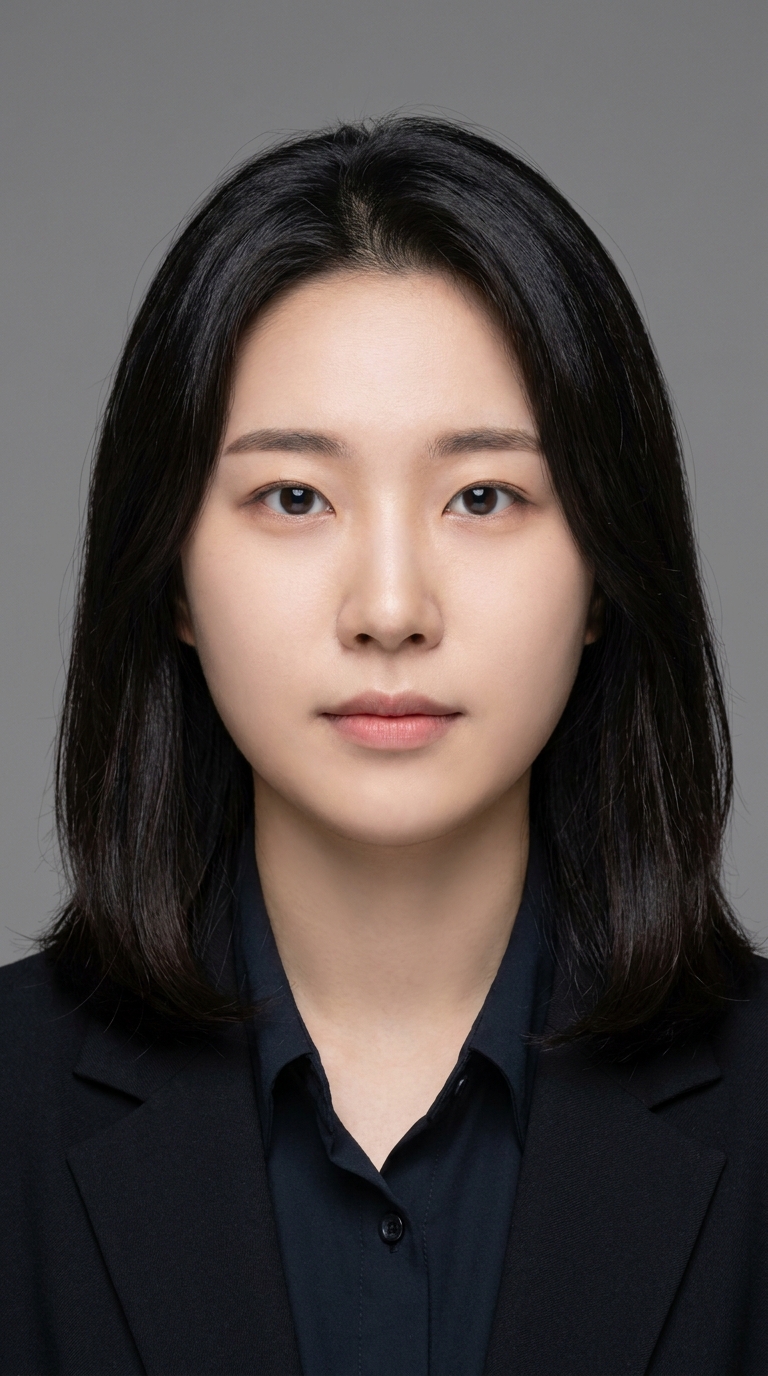 #0p1u · Character Studio portrait headshot, neutral closed-mouth expression — generated from gender + nationality presets, anchored for downstream identity consistency. |
Layer 1 — composed studio shot
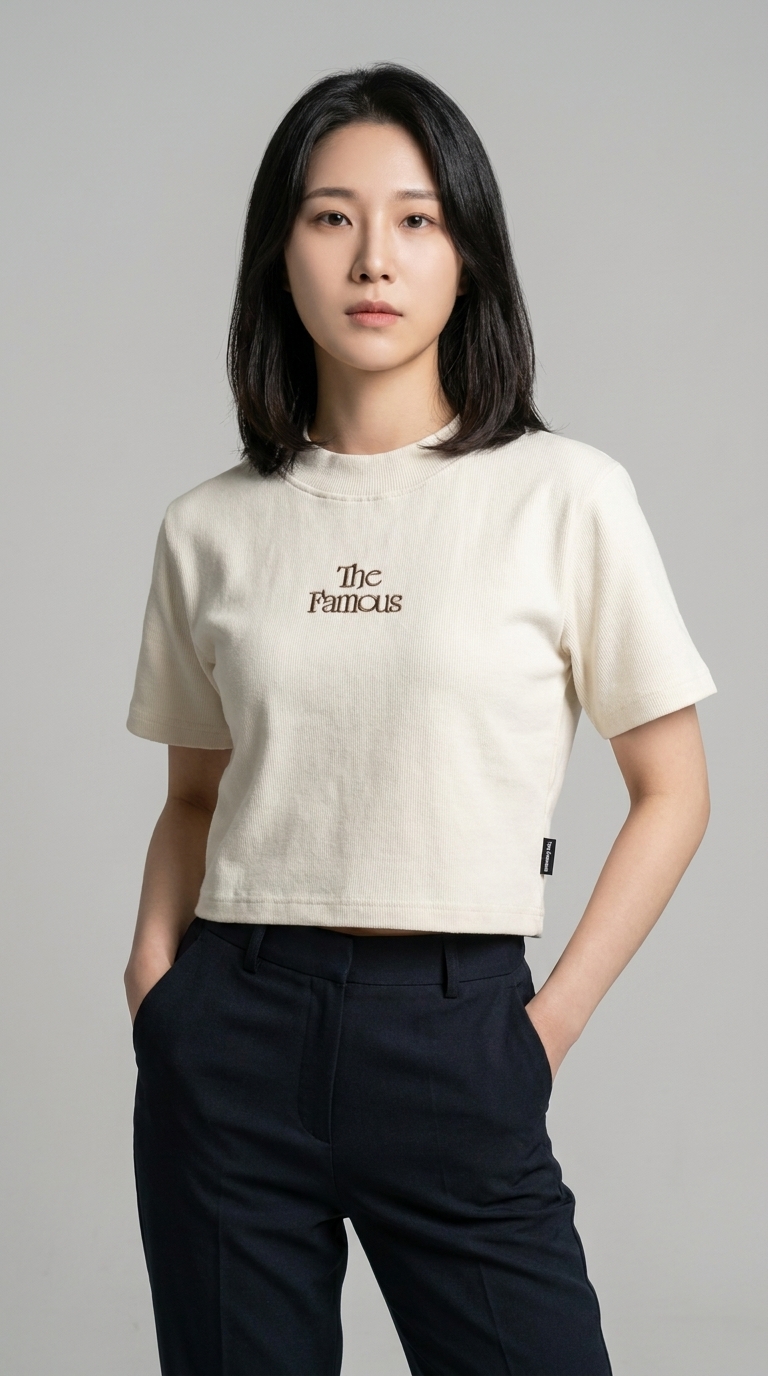
#qowj · Image — auto-prompt from upstream briefs: "Editorial photo, model engaging the camera with direct eye contact, both hands tucked in pockets, knees-up framing, neutral studio backdrop." 4 pose-distinct variants generated in one batch.
Layer 2 — environment-aware variants
The synth detects scene context from each new image's brief and switches motion vocabulary (street / studio / café / outdoor). Same character + same product, three different worlds:
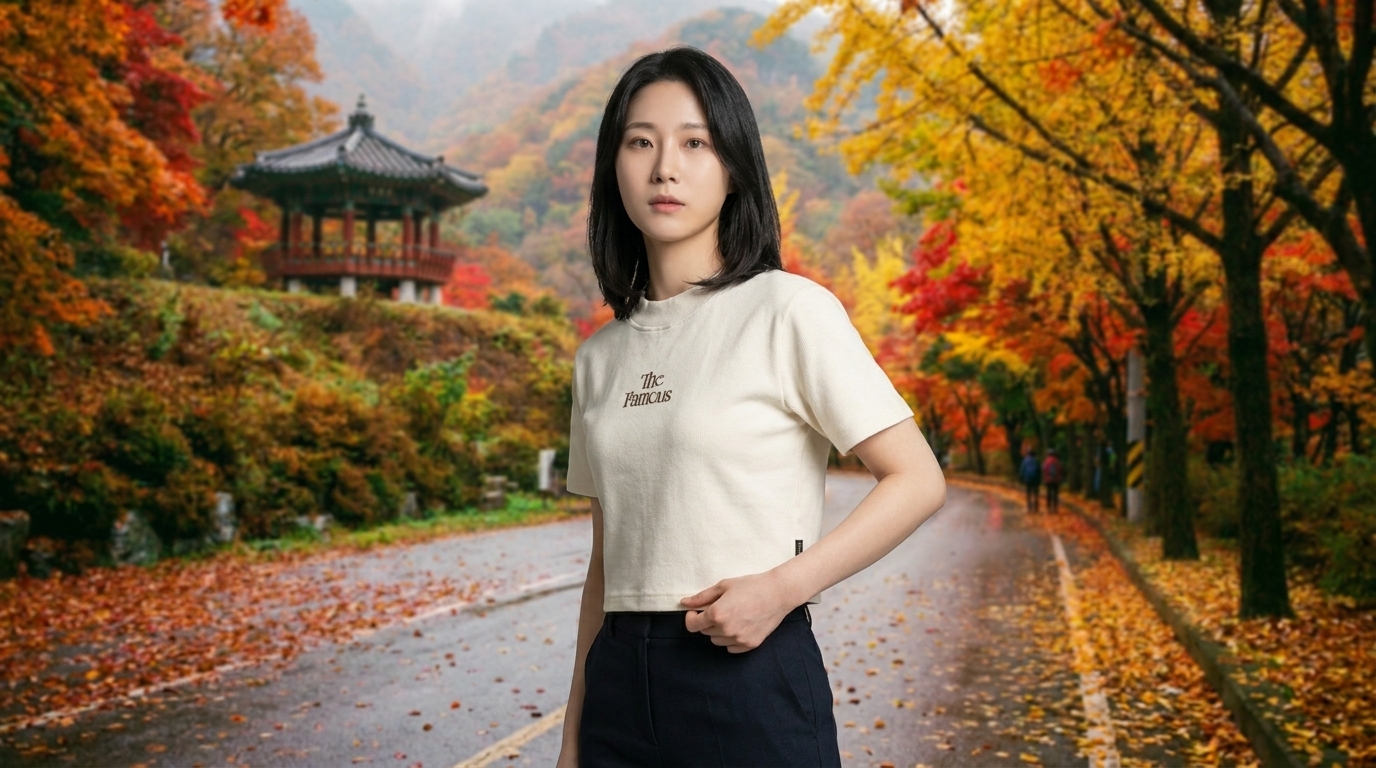 #nkov · autumn mountain road, traditional Korean pavilion, red maple foliage |
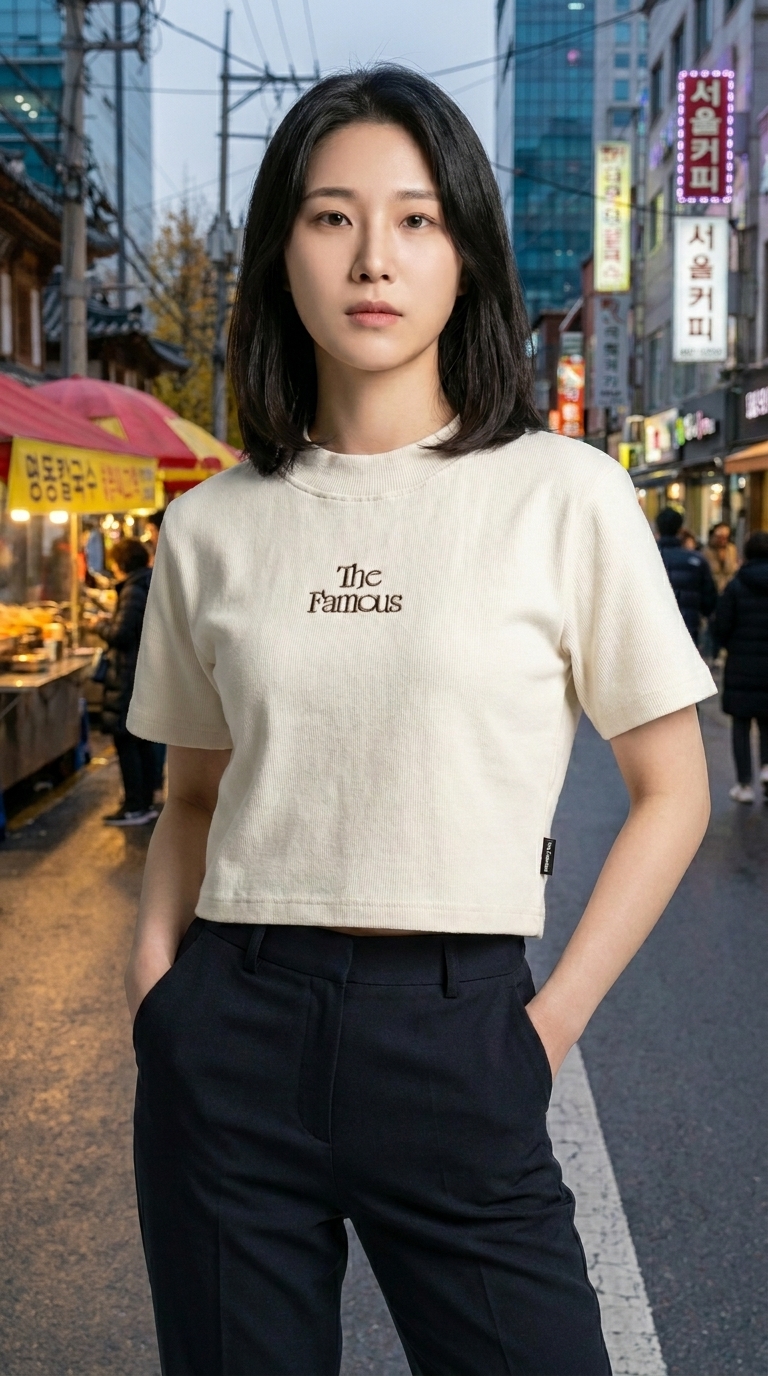 #l7qd · Seoul street, food stalls, Korean signage |
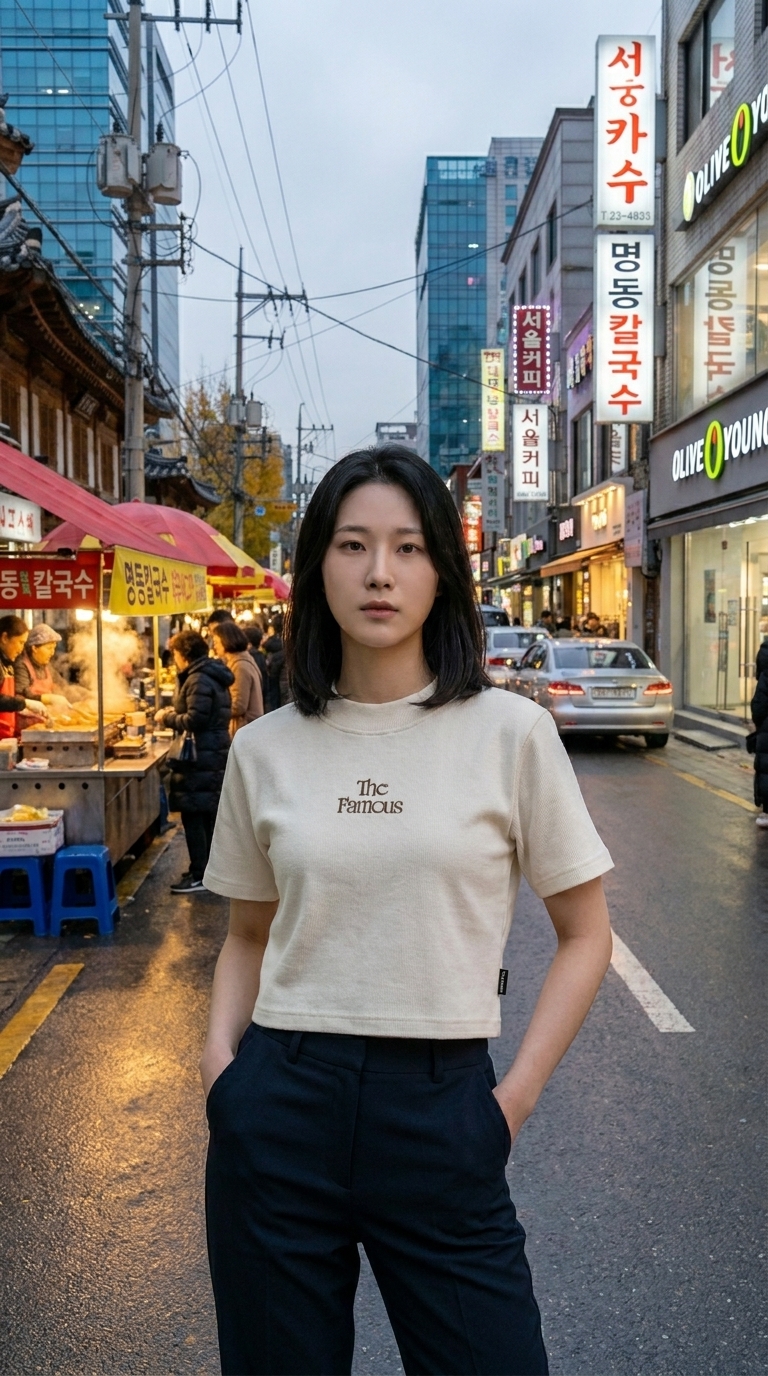 #xky5 · Myeongdong dusk, red-canopied stalls, Olive Young signage |
Layer 3 — image-to-video (Veo 3.1 i2v)
Camera is locked-off (e-commerce default — keeps the product fully framed
the whole clip); the model performs a time-coded 2–3 beat editorial
pose-shift within the 8 seconds. (GitHub renders MP4 inline only when
hosted on its CDN, so we ship looping GIFs in the README — full-quality
MP4s live in docs/assets/.)
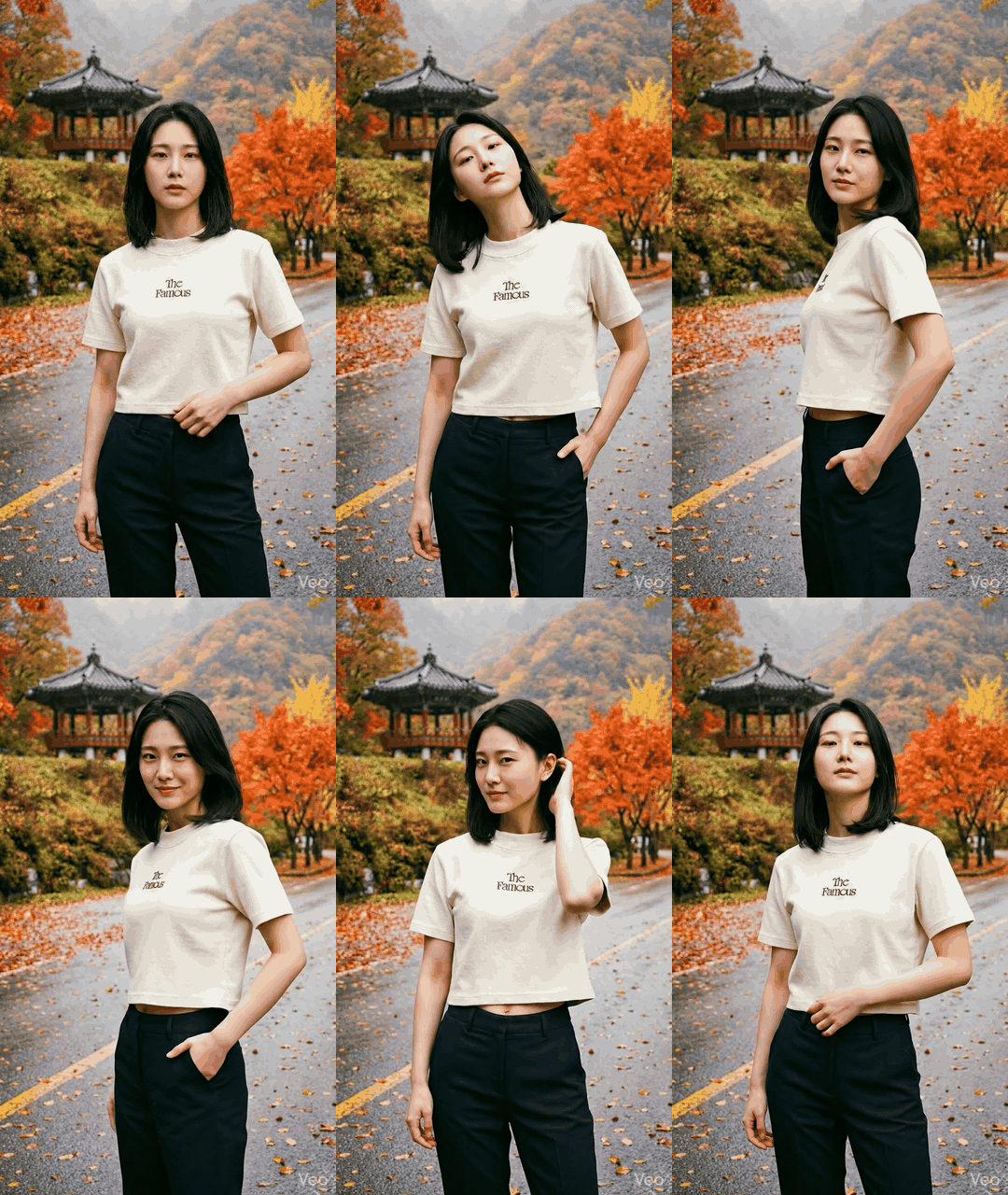 #sncj · studio motion · half-step → glance → hair-tuck ▶ MP4 |
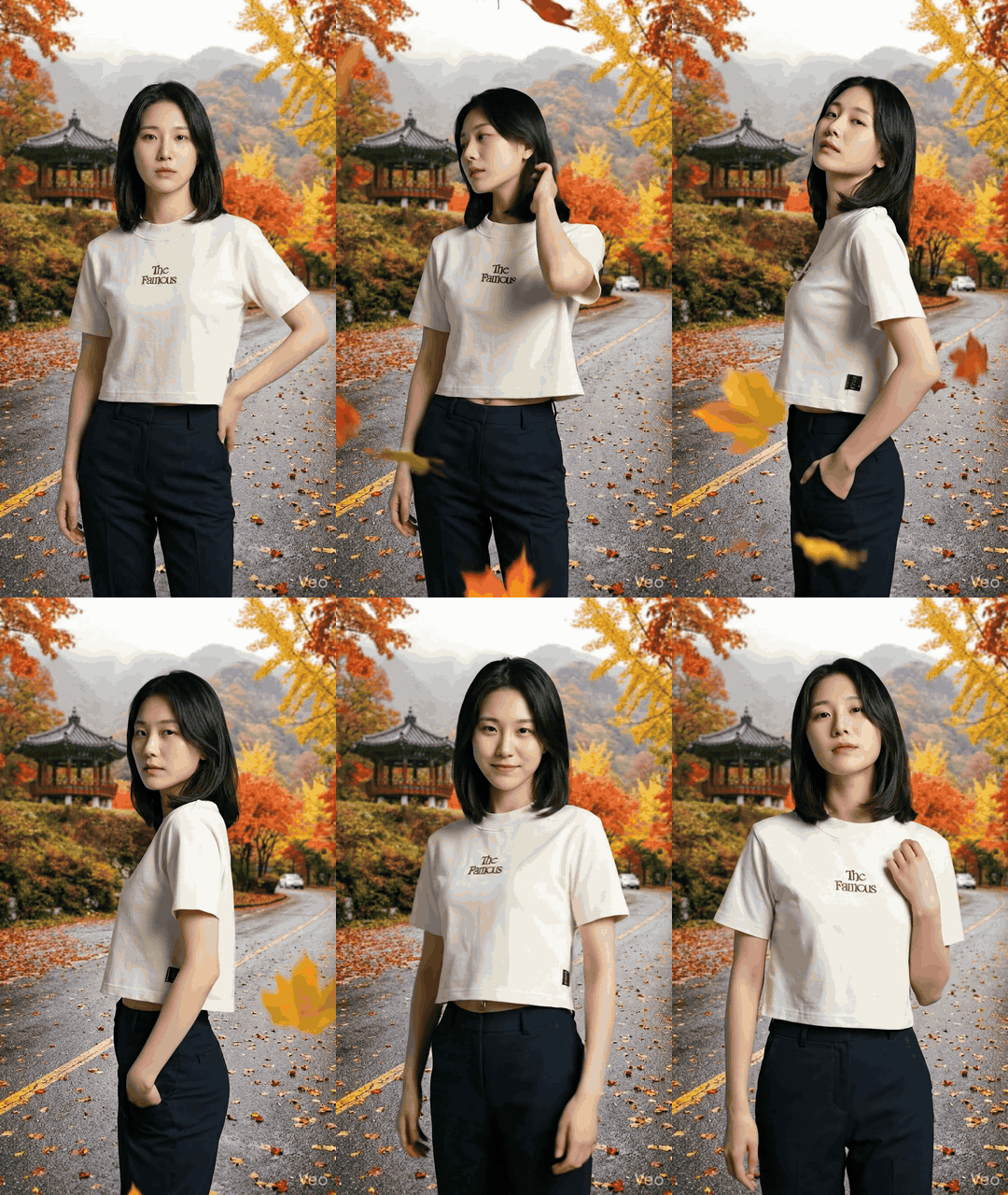 #bwr4 · autumn road · pivot → pocket → camera smirk ▶ MP4 |
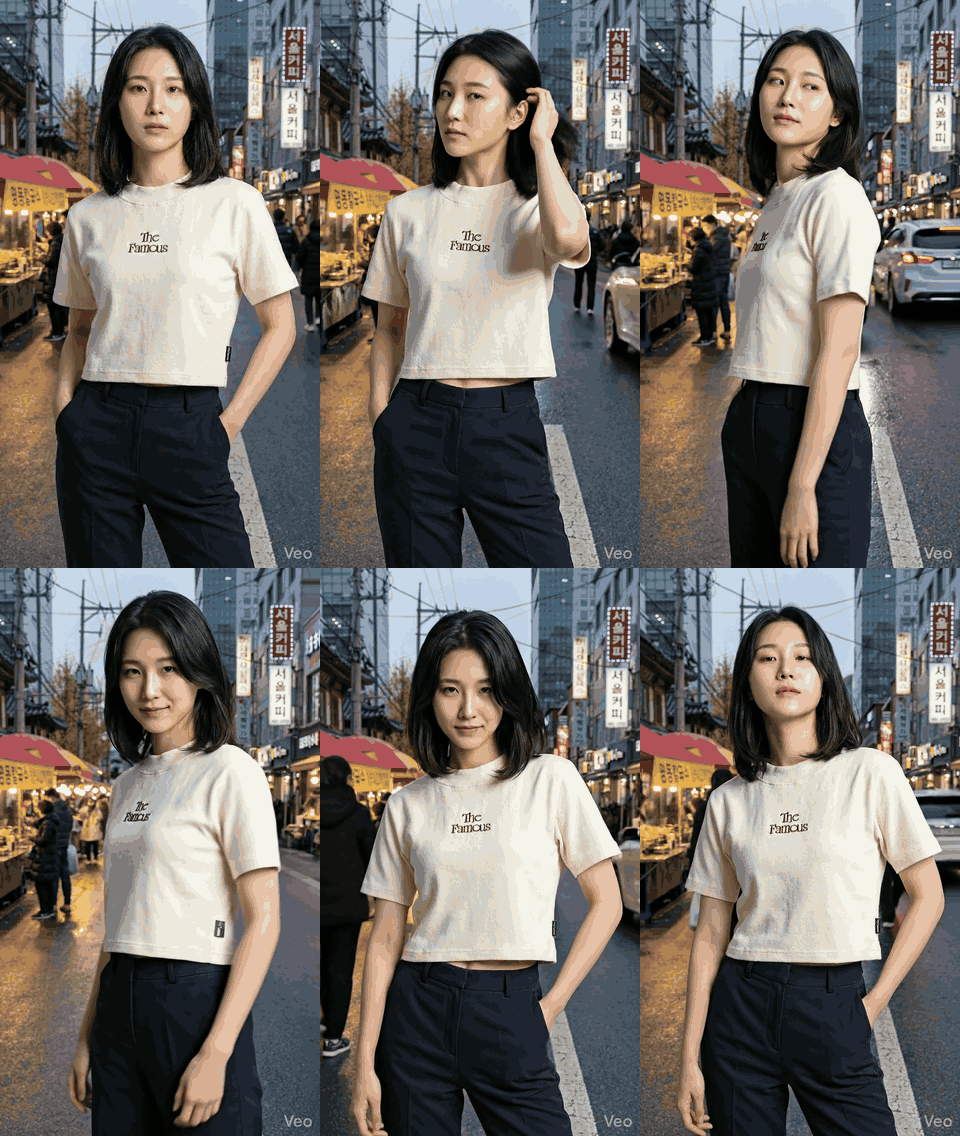 #uv1p · Seoul daylight · half-step → over-shoulder glance → hand in pocket ▶ MP4 |
All three videos were synthesised from a single click each: the auto-prompt reads the upstream image's
aiBrief, picks scene-matched motion vocab, and locks the camera to keep the cropped tee in frame for the full clip.
How it works
The mental model — read this once and the rest of the UI is obvious.
1. Refs are nodes you set up once
Two node types act as anchors for the rest of the graph:
| Node | Purpose | How to populate |
|---|---|---|
| Character | A person whose identity you want to keep stable across many shots. | Generate from gender + nationality presets (Nam / Nữ × VN / JP / KR / CN / TH / US / FR), or upload your own portrait. The synth hard-anchors it to a frontal, closed-mouth, neutral-expression studio headshot — Veo i2v can't keep identity stable from a smiling-with-teeth source. |
| Visual asset | A product / garment / object that needs to appear in scenes. | Upload (file or URL) or generate from a prompt. Inline Refine button uses Flow's edit_image to iterate without losing the original. |
Each ref node gets an aiBrief automatically (the configured Vision
provider describes the image once, persists the description on the
node). Downstream auto-prompt walks upstream and pulls these briefs as
context. Toggle off in Settings → AI Providers if you'd rather
synthesise from typed prompts.
2. Composition is just connecting nodes
To build a composed image, drop an Image node and wire upstream refs
into it. Click Generate (or just press Enter with the prompt empty):
[Character #ujr1]  ───►
                        \
[Visual asset #sqpi] ───► [Image #target]
                        /
[Image #other-ref] ───►
All upstream mediaIds are fed to Flow as IMAGE_INPUT_TYPE_REFERENCE
inputs. The auto-prompt synth (/api/prompt/auto-batch) asks the
configured LLM to compose N pose-distinct prompts in a single
call when you ask for multiple variants — so 4 variants don't all
collapse to the same "hand-on-hip" stance. The prompt template is fashion-editorial style:
direct gaze, neutral closed-mouth, three-quarter angle, hand gesturing
toward the garment, knees-up framing.
3. Image → Video via Veo i2v
A Video node takes a single upstream Image. Connect it, click
Generate, pick:
- Camera =
Static(default, e-commerce-safe — locked-off frame, no zoom or pan, product never crops out) orDynamic(synth picks subtle dolly / pan based on scene). - Source variants = checkbox per upstream variant +
All / Nonebulk action. If the upstream image has 4 variants and you tick all 4, the dispatcher batches one i2v op per variant in a single Flow call — 4 source stills → 4 distinct videos.
The motion synth uses time-coded beats (0–3s: …, 3–6s: …, 6–8s: …)
so the model performs an editorial pose-shift sequence inside the 8 s
clip — never a frozen statue, never an open-mouth smile.
4. Auto-prompt is environment-aware
The synth reads the source still's aiBrief and switches motion
vocabulary based on detected scene:
| Scene type | Motion vocab |
|---|---|
| Studio / plain backdrop | hand-on-hip, brush sleeve, head tilt, engage camera |
| Street / city / sidewalk | half-step forward, hair tuck, glance over shoulder, hand in pocket, smirk |
| Café / interior | sip from cup, lean back, glance toward window |
| Beach / nature / outdoor | hair flutter in breeze, slow exhale, look toward horizon |
A studio shot gets editorial poses; a NYC-street shot gets walk-and-glance motion. No code branches — the LLM detects the keyword and picks the matching vocab from the system prompt.
Architecture
┌──────────────────────┐    ┌────────────────────┐    ┌──────────────────────┐
│  Chrome MV3 ext      │◄───┤  FastAPI agent     ├───►│  SQLite (storage/)   │
│  - content script    │ WS │  127.0.0.1:8101    │    │  Board, Node, Edge,  │
│  - injected MAIN     │ ws │  + worker queue    │    │  Request, Asset,     │
│  - CDN URL allow     │9223│  + WS server :9223 │    │  Plan, ChatMessage,  │
│  - Captcha bridge    │    │  + LLM CLI bridge  │    │  BoardFlowProject    │
└──────────────────────┘    └─────────┬──────────┘    └──────────────────────┘
        ▲                             │
        │                             ▼
        │                   ┌────────────────────┐
        └───── Google Flow  │  React + Vite      │
              labs.google   │  ReactFlow canvas  │
              (i2v / image) │  Zustand store     │
                            │  127.0.0.1:5173    │
                            └────────────────────┘
- Frontend — Vite + React 18 + ReactFlow 12 + Zustand 5 + TypeScript strict. Renders the infinite canvas, dialogs, sidebars. No direct calls to Google Flow.
- Agent — FastAPI + SQLModel + SQLite. Owns the board state, runs an in-process worker queue that proxies all generation requests through the extension, and shells out to the configured LLM CLI (Claude / Gemini / Codex — see AI Providers below) for vision + auto-prompt + planner synthesis.
- Extension — Chrome MV3. Lives on
labs.google/fx/tools/flow, intercepts Flow's API calls (multimodal-fetch in MAIN world for the reCAPTCHA token), proxies them over a localhost WebSocket so the agent never has to touch the browser cookie jar directly. - Storage — local-only. SQLite for graph + history, a
storage/media/folder for cached image / video bytes (lazy-fetched from Flow's signed CDN URLs and re-served from the agent so they outlive the 1-hour signed URL TTL).
Quickstart
Requirements
| Dependency | Why |
|---|---|
| Python 3.11 | Agent runtime (FastAPI + SQLModel) |
| Node 20+ | Frontend dev server (Vite) |
| Chrome / Chromium | Mandatory — hosts the MV3 extension that proxies every Google Flow API call. The agent has zero direct path to Flow without it. |
One LLM CLI on PATH | Vision describe + auto-prompt + planner. Pick one — defaults to Claude Code (@anthropic-ai/claude-code); also supports Gemini CLI (@google/gemini-cli) and OpenAI Codex (@openai/codex, provider implemented but not yet smoke-tested). All use OAuth against your existing AI subscription — no API key needed. |
Google Flow Pro or Ultra plan at labs.google/fx/tools/flow | Free tier and trial accounts will not work. Veo 3.1 i2v + GEM_PIX_2 image gen are gated to paid plans. |
Windows: Use WSL2. All commands assume a Unix shell.
One-line setup (optional)
If you have make installed, the repo ships shortcut targets that wrap
Steps 2 + 3:
make install        # agent venv + frontend deps (uses uv if available, else pip)
make install-dev    # same, but adds ruff + pytest extras
make update         # upgrade agent + frontend deps in place
make agent          # run FastAPI on :8101
make frontend       # run Vite on :5173
uv is auto-detected (~10× faster installs). Install it once with
curl -LsSf https://astral.sh/uv/install.sh | sh, or skip it and the
Makefile falls back to stdlib venv + pip. Step 1 (loading the Chrome
extension) still has to be done manually.
Step 1 — load the Chrome extension
git clone https://github.com/<your-fork>/flowboard.git
cd flowboard- Open
chrome://extensions/→ enable Developer mode (top-right). - Click Load unpacked → pick the
extension/folder in this repo. - Open a tab to https://labs.google/fx/tools/flow and sign in.
- The extension's icon should turn coloured once it captures a fresh Flow auth token (~5 s).
Step 2 — start the agent
cd agent
python3.11 -m venv .venv
.venv/bin/pip install -r requirements.txt

# `--timeout-graceful-shutdown 2` keeps `--reload` snappy when you save
# a Python file — without it, uvicorn waits forever for the WS to drain.
.venv/bin/uvicorn flowboard.main:app --reload --port 8101 \
  --timeout-graceful-shutdown 2
Smoke-test:
curl http://127.0.0.1:8101/api/health
# {"ok":true,"extension_connected":true,"ws_stats":{"connected":true,"flow_key_present":true,...}}
Step 3 — start the frontend
cd frontend
npm install
npm run dev
# → http://localhost:5173
Open the URL. The first board ("Untitled") auto-creates if the DB is empty. Add a Character node, generate it, drop a Visual asset, drop an Image, wire them up, click ▶ Generate — the full demo above is about 15 minutes of clicking.
Run tests
# Agent
cd agent && .venv/bin/python -m pytest -q
# 333 passed

# Frontend
cd frontend && npx tsc -p . --noEmit && npx vite build
Features
Ref-style nodes
- Character — generate via gender + nationality preset chips, or upload your own headshot. Hard-anchored to a frontal, closed-mouth, neutral-expression portrait so Veo i2v keeps identity stable across every downstream clip.
- Visual asset — upload (file / URL) or generate. Refine in-place
with a different prompt (Flow
edit_image, BASE_IMAGE preserved, optional reference list).
Composition nodes
- Image — multi-ref aware. Connect any number of upstream
characters, visual assets, or other images; all of them flow in as
Flow's
IMAGE_INPUT_TYPE_REFERENCEinputs.- 1–4 variants per gen, each with its own pose-distinct prompt (the LLM rotates through an 8-stance pool per variant — never two "hand-on-hip" variants in the same gen).
- Default aspect ratio inherits from upstream node; mismatched upstream aspects fall back to 9:16.
- Storyboard — sequenced 1–8 narrative shots in one node. The
planner LLM emits per-beat prompts AND a continuity tree: each beat
declares whether it's a fresh root (
gen_image) or continues from an earlier beat (edit_imagefrom that beat's mediaId). Roots dispatch in parallel batches of 4; continuations BFS through the tree, siblings parallel. Refs from upstream edges apply to every shot. Failed shots staypartialand can be retried per-tile — blocked descendants surface a 🔒 until their parent is retried. Useful for unbox → try-on → going-out arcs, scene chains, and e-commerce shot lists. - Video — image-to-video via Veo. Multi-source i2v: a 4-variant
upstream image dispatches a single batch with one item per variant →
one video per source. Or pick a subset (toggleable thumbnails +
All / None bulk action).
- Camera =
Static(locked-off, e-commerce default) orDynamic(synth picks dolly / pan / micro-shift to fit the scene). - Motion synth uses time-coded beats so the model performs an editorial 2–3 pose-shift sequence inside the 8s clip — never a frozen statue.
- Camera =
Auto-prompt synthesis
- Vision describes each new asset (configured CLI's multimodal
attachment path —
@<path>for Claude / Gemini,--imagefor Codex when available) → saved asaiBriefon the node. - Downstream gen with empty prompt →
/api/prompt/autowalks upstream edges, gathers briefs, asks the configured LLM to compose a prompt that matches the scene + showcases the product. - For multi-variant gens,
/api/prompt/auto-batchreturns N pose-distinct prompts in a single LLM call. - Vision toggle in
Settings → AI Providers: when OFF, the synthesiser falls back to each upstream node's typedpromptinstead of a vision-derived brief. Manual upload paths still run vision automatically (the user explicitly added bytes) — only the gen-completion auto-brief is gated.
AI Providers (multi-LLM)
A 🤖 Provider chip in the top-right toolbar opens a dialog where you switch which LLM powers Flowboard. One provider serves all three features (Auto-Prompt / Vision / Planner) — switching is one decision, not three. Per-feature test buttons run a small ping per feature and gate the Apply changes button until all three pass green, so you never apply a switch that's silently broken.
| Provider | Auth | Status |
|---|---|---|
| Claude Code | OAuth via claude CLI · Anthropic browser sign-in | ✅ Default · production-tested |
| Gemini CLI | OAuth via gemini CLI · Google AI Ultra plan | ✅ Tested · ~15 s slower than Claude |
| OpenAI Codex | OAuth via codex CLI · ChatGPT Plus/Pro | ⚠ Provider implemented but not yet smoke-tested |
Backend keeps a Grok REST provider class for power users who edit
~/.flowboard/secrets.json directly, but the UI doesn't surface it
because xAI hasn't shipped an end-user CLI.
Activity feed
A 🔔 bell sits in the toolbar next to the AI Provider chip. Click it to see every backend operation in DESC order: gen image / gen video / edit image / auto-prompt / vision / planner — each with its status pill (✓ done · ⟳ running · ✗ failed) and how long it ran. Click a row to open a detail modal with the full input params, output result, and error JSON (with copy buttons), so you can diagnose a failed gen without tailing agent logs.
The bell badge counts running + recently-failed-unread items, with a red tint when any failure is unread. Polling is 5 s while the dropdown is open, 30 s while closed, and pauses when the tab is backgrounded.
Workflow ergonomics
- Drop-add popover — drag an edge into empty canvas, popover at the
drop point with
Image/Videoquick-add → new node + auto-wired edge. - Easy edge editing — click an edge to select (accent ring + glow), Backspace / Delete to remove. 24 px transparent hit-slop so edges are forgiving to grab.
- Clone variant —
New variant +in the result viewer creates a sibling node with identical upstream connections, prefills the prompt, opens the gen dialog. - Project sidebar — multiple boards on the same agent, each with its own Flow project mapping. Rename / delete with cascade (clears all child rows: nodes, edges, requests, assets, plans, runs).
Repo layout
agent/                  FastAPI service (Python 3.11)
  flowboard/
    routes/             HTTP endpoints (boards, nodes, edges, requests,
                        upload, vision, prompt, plans, llm, activity, …)
    services/           Flow SDK, prompt synth, vision describe,
                        pipeline executor, activity logger
      llm/              Multi-LLM provider layer (registry, secrets,
                        Claude / Gemini / OpenAI Codex / Grok)
      claude_cli.py     Subprocess detail behind ClaudeProvider
    worker/             In-process queue (gen_image, gen_video,
                        edit_image, upload_image)
    db/                 SQLModel definitions
  tests/                333+ pytest tests

frontend/               Vite + React + ReactFlow
  src/
    canvas/             Board.tsx, NodeCard.tsx, AddNodePalette.tsx
    components/
      activity/         ActivityBell + dropdown + detail modal
      settings/         AiProvidersSection + ProviderCard + setup modal
      AiProviderBadge.tsx · AiProviderDialog.tsx · GenerationDialog · ResultViewer · ProjectSidebar · ChatSidebar · Toolbar · Toaster
    store/              Zustand: board, generation, pipeline, settings
    api/                client.ts, autoBrief.ts

extension/              Chrome MV3 (content script + injected MAIN)
docs/                   Static assets (this README, screenshots, demo media)
storage/                Local cache + SQLite (gitignored)
Status
Personal local-only tool. 333 / 333 tests passing (agent), tsc clean (frontend). Caveats:
- ⚠ Google Flow plan must be
ProorUltra. Free tier and trial accounts have no access to Veo 3.1 i2v / GEM_PIX_2 — every generation call will fail. - ⚠ Chrome extension must be loaded and connected. The agent does
not talk to Flow directly — all i2v / image / edit requests are
proxied through
extension/over a localhost WebSocket. No extension → no generation. - ⚠ HMAC-secured WS (
X-Callback-Secretper agent boot) — single loopback only, not multi-user. - ⚠ Google Flow rate limits still apply within your paid tier.
- ⚠ Veo / Imagen content filters
(
PUBLIC_ERROR_PROMINENT_PEOPLE_FILTER_FAILED,PUBLIC_ERROR_AUDIO_FILTERED) — surfaced verbatim in the activity feed + failed-request error so the user can diagnose / iterate. - ⚠ Auto-prompt + vision + planner require one LLM CLI on
PATH(Claude Code recommended; Gemini CLI tested; OpenAI Codex provider implemented but not yet smoke-tested). Without any CLI, theGeneratebutton still works if you type your own prompt — only the auto-prompt-from-empty path is unavailable.
Related
crisng95/flowkit— the same Chrome-extension-bridge approach to Google Flow, but for YouTube story videos (multi-scene, narration, thumbnails). Flowboard borrows the bridge architecture.
License
MIT (proposed — license file pending).
Credits
Generated media in this README was produced through the pipeline using
Google Flow. Auto-prompt + vision synthesis
defaults to Claude via the local CLI; multi-LLM
support adds Google's Gemini CLI
and OpenAI's Codex CLI as alternative
providers — pick one in Settings → AI Providers.
Community & Support

Share anything crazy and useful created with Vibe Code. Drop in to:
- Post the shots and clips you've generated
- Share node-graph patterns, vibe presets, and prompt recipes that work for you
- Ask for help when an output isn't matching what you imagined
- Request features and report bugs you've hit in the wild
- Trade tips on Google Flow plan limits, Veo i2v behaviour, and LLM CLI setup (Claude / Gemini / Codex)