Fastpotify
Spotify, native and fast. Fastpotify is a Spotify client written in Rust with egui. It plays music through librespot. It typically uses 100–250 MB of RAM, while Spotify's desktop app often uses 600 MB to over 1 GB. It runs on Linux, macOS, and Windows, starts in well under a second, and has no browser engine.
Playback needs Spotify Premium. Free accounts can browse and search, but cannot play music through Fastpotify on this computer or another device.
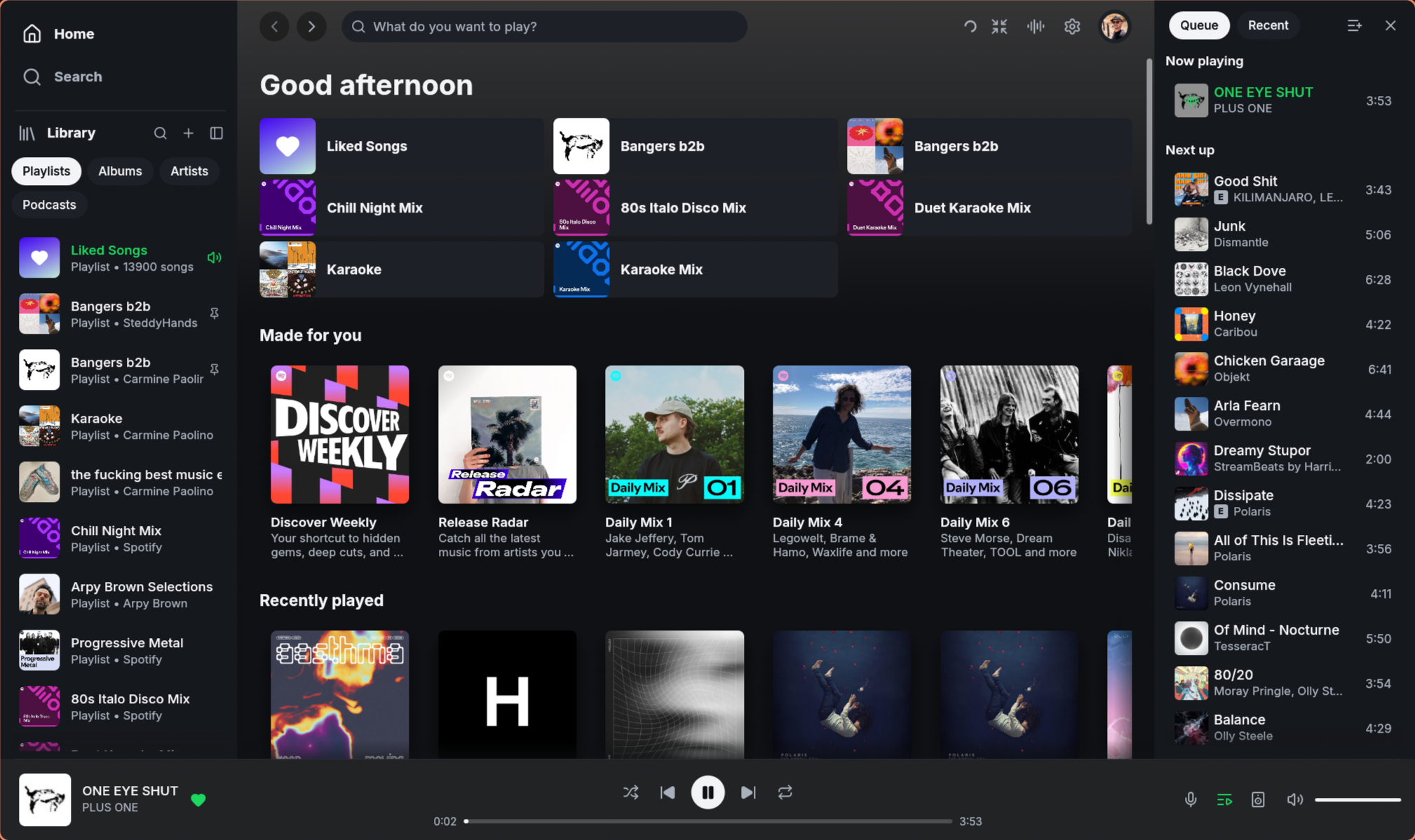
See fastpotify.rocks for installation, setup, everyday use, and connection details.
What it does
-
Plays music on this computer. Fastpotify appears as a Spotify Connect device. Select it from your phone or play music in the app. Playback is gapless and supports up to 320 kbps, with optional volume normalisation and an on-disk audio cache. Stalled Spotify connections time out after five seconds per attempt so playback can try another endpoint.
-
Controls other devices. Move playback to a speaker, a phone, or another computer from the device picker, and keep controlling it: play, pause, skip, seek, shuffle, repeat, volume. Long device lists scroll.
-
Finds speakers on your network. Fastpotify finds librespot, spotifyd, and supported hardware receivers over mDNS. Once connected, they appear as Spotify Connect devices. The picker uses responding receivers' names and combines entries with the same device ID.
-
Library. Browse playlists, Liked Songs, saved albums, followed artists, podcasts, and saved episodes. Filter, pin, and reorder sidebar items. Liked Songs reopens from an account-specific metadata cache. Older rows refresh in the background while Like and Unlike take effect immediately. Right-click album, artist, and podcast cards for their actions (on
main, after 0.7.1). -
Search across songs, artists, albums, playlists, podcasts, and episodes, with a top result and per-type views. Right-click results and cards for their actions.
-
Home with Made for you, Recently played, your top artists and songs, and recommendations. Right-click playlist shortcuts and shelf cards for their actions.
-
Artist pages with popular songs, a filterable discography, and related artists. Album, playlist, and podcast pages support playback from any row. Discography and related-artist cards also have right-click menus (on
main, after 0.7.1). Artist names in the player bar open their pages, including during local playback before Web API metadata arrives (onmain, after 0.7.1). -
Edit your playlists. Create, rename, describe, reorder, and delete them. On
main, after 0.7.1, hold a dragged song near the playlist's top or bottom edge to scroll to rows beyond the screen. The Library sidebar scrolls while dragging toward offscreen playlists too. Add songs from a row menu, or drag a row or the currently playing song to a playlist in the sidebar. A playlist a friend shared with you takes songs too, as Spotify's own apps allow. Filter the Add to playlist menu by name to find the destination quickly. -
Opens Spotify links. Fastpotify registers for
spotify:links, so a song, album, artist, playlist, or podcast shared from another app opens in it, whether it is running or not.open.spotify.comaddresses go through the browser, which hands them to the same handler. -
Queue as a side panel or a page; it names what is playing from, and anything can be added to it from a row menu. Add to queue places songs after those already queued and before the context continues.
-
Resumes the last session. On startup, the last song is paused where it stopped. Play resumes it, and the other playback controls work before it starts.
-
Album-art colour. Pages and the player bar take a tint from the cover of what you are looking at or listening to. Turn it off in Settings.
-
Light and dark, or follow the system.
-
Winamp mini player.
Ctrl+Mopens a small player for classic.wszskins, drawn at 1x to 4x scale. It includes a spectrum analyser, playlist, and equalizer. It keeps its shade mode and, where the desktop permits, its own position when switching views. Drop a skin from the Winamp Skin Museum on either window to add it.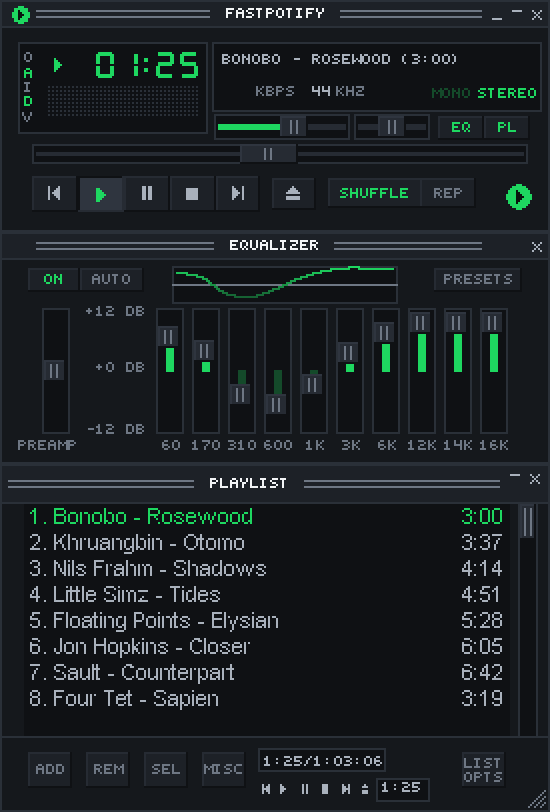
-
Equalizer. Winamp's ten bands and presets over the music played on this computer, in Settings and in the skin.
-
MilkDrop. The visualiser, powered by projectM, runs in its own window and process. It supports fullscreen and automatically downloads more than 10,000
.milkpresets on first use (about 26 MB).https://github.com/user-attachments/assets/12b31312-0e0c-4b34-9383-e8c66aabc58d
-
Keyboard-first. Every common action has a shortcut (
Ctrl+/or?lists them). -
Keeps playing when you close the window. Fastpotify stays in the system tray. Use the tray icon or media controls to reopen it, and quit from the tray menu or with
Ctrl+Q. You can make the close button quit in Settings. On macOS, the Dock icon also reopens the window. -
Visible network activity. Pages show a spinner while loading. The top bar also shows slow or rate-limited Spotify requests.
-
One instance. Launching it again brings the existing window forward instead of starting a second copy, on every platform.
-
Desktop integration. MPRIS on Linux, so media keys, the shell, and
playerctlsee Fastpotify like any other player. On macOS and Windows,fastpotify nextand its siblings drive the running app from a terminal, a launcher, or a hotkey.
Install
On Arch Linux, Fastpotify is in the AUR:
yay -S fastpotify-bin      # the released build, ready made
yay -S fastpotify          # the release, built from source
yay -S fastpotify-git      # built from the latest commit
On macOS, with Homebrew:
brew install --cask crmne/tap/fastpotifyEverywhere else, build the single binary with Rust 1.95 or newer:
cargo install --path . --lockedMilkDrop uses libprojectM, which is built from source. This needs CMake, a C++
compiler, and libclang. To build without MilkDrop or those tools, run
cargo install --path . --locked --no-default-features. On Linux, you also need the
development packages for ALSA, PulseAudio or PipeWire, and the windowing
libraries. On Arch:
sudo pacman -S --needed alsa-lib libpulse libxkbcommon wayland cmake clangand on Debian or Ubuntu:
sudo apt install libasound2-dev libpulse-dev libxkbcommon-dev libwayland-dev \
  cmake clang libclang-dev
and on Fedora:
sudo dnf install alsa-lib-devel pulseaudio-libs-devel libxkbcommon-devel \
  wayland-devel cmake clang libclang-devel
On Windows, libprojectM is built with Visual Studio 2022, CMake, LLVM, and
vcpkg (vcpkg install glew:x64-windows-static, with
VCPKG_INSTALLATION_ROOT pointing at the vcpkg folder).
With Nix, nix develop provides all of it, along with
the exact toolchain rust-toolchain.toml pins.
On macOS, the flake also exposes packages.<system>.fastpotify-app, an
ad-hoc signed Fastpotify.app bundle for the Dock, Launch Services, and
spotify: links. With nix-darwin, add it to environment.systemPackages
and link "/Applications" through environment.pathsToLink; with Home
Manager, home.packages is enough, as its darwin support links the bundle
into ~/Applications.
Fastpotify uses system fonts for scripts not covered by its interface font,
including Chinese, Japanese, Korean, Arabic, Hebrew, Thai, and Indic scripts.
On macOS it draws each of them with the face the system itself uses, in the
language order set in System Settings, so Chinese titles follow the
Traditional or Simplified preference set there. Windows includes common
fonts. On Linux, install noto-fonts and noto-fonts-cjk (Arch) or
fonts-noto and fonts-noto-cjk (Debian or Ubuntu) if titles appear as
empty boxes.
A desktop entry is provided in packaging/applications/fastpotify.desktop.
It registers Fastpotify for spotify: links; xdg-mime default fastpotify.desktop x-scheme-handler/spotify makes it the one the desktop
uses when another Spotify client is installed too.
Sign in
Press Sign in with Spotify. Your browser opens Spotify's consent page (Authorization Code with PKCE), so Fastpotify never sees your password. The app keeps its grants in the system credential store: Secret Service on Linux, Keychain on macOS, and Credential Manager on Windows. You usually sign in once per machine. If the store is unavailable or locked, a new sign-in works for this session and Fastpotify explains that it could not save it.
Playing music on this computer needs a second, one-time browser approval. Spotify handles streaming separately from library access. Start it from the device menu (Set up playback here) or Settings. It needs Spotify Premium. Its reusable credential uses the same protected storage, independently of the two Web API grants.
Existing token files migrate after the protected write has been read back
successfully. A failed migration keeps the original for recovery and reports
an error. Sign-out removes shared, personal, and playback grants, including
legacy files and pending writes. Non-secret revocation markers prevent a
failed keychain deletion from silently restoring a signed-out session.
See credential storage and file locations.
On main, after 0.7.1, Flatpak also preserves its fallback state directory
across full quits, including on older Flatpak versions.
Playback approval requests Spotify's streaming permission separately. A verified personal app can complete sign-in while the shared app is busy.
The Web API uses a shared app by default. You can add a personal Spotify
Development Mode app in Settings → Account for a separate quota. Fastpotify
still uses the shared app for requests that personal apps do not support.
On main, after 0.7.1, Premium listeners using shared access see a one-time
prompt explaining the personal app option, with a button that opens setup.
Dismissal is remembered across restarts.
Account safety
We are not aware of a Spotify account being suspended for using Fastpotify or another librespot player with Premium. Sign-in happens on Spotify's own pages, audio uses the quality included with Premium, DRM stays intact, and Fastpotify does not rip tracks or block ads.
Reported suspensions usually involve modded apps that remove ads from free accounts, track ripping, or stream manipulation. Fastpotify does none of those things, and CONTRIBUTING.md prohibits them.
Keyboard shortcuts
Hold Shift while turning the mouse wheel to scroll horizontal shelves,
including Made for you and Recently played on Home.
The main window exposes named playback controls, library and song rows,
menus, sliders, and settings switches to screen readers. Use Tab and
Shift+Tab to move focus, then Enter or Space to activate a control or
play a focused song. Left and right arrows adjust a focused volume or seek
slider. Windows testing with NVDA and accessibility for Winamp skins are
still in progress.
| Shortcut | What it does |
|---|---|
Space | Play or pause |
Ctrl+← / Ctrl+→ | Previous or next |
Shift+← / Shift+→ | Seek 10 seconds |
Ctrl+↑ / Ctrl+↓ | Volume |
M | Mute |
B | Like or unlike the playing song |
S / R | Shuffle / cycle repeat |
Q | Queue panel |
Ctrl+F or / | Search |
Ctrl+B | Show or hide the sidebar |
Alt+← / Alt+→ | Back or forward |
Ctrl+H / Ctrl+L | Home / Liked Songs |
Ctrl+Shift+A / Ctrl+Shift+B | Playing artist / album |
Ctrl+M | Winamp mini player |
Ctrl+Shift+K | MilkDrop |
Ctrl+, | Settings |
Ctrl+/ or ? | All shortcuts |
Ctrl+Q | Quit |
On macOS, Cmd replaces Ctrl.
Controlling it from outside
On Linux, Fastpotify is an MPRIS player, so playerctl --player=fastpotify play-pause already works.
macOS and Windows have no such bus, so the same verbs are subcommands. They talk to the instance already running and print nothing on success:
fastpotify play-pause          fastpotify volume 40
fastpotify play                fastpotify volume-up [percent]
fastpotify pause               fastpotify volume-down [percent]
fastpotify next                fastpotify mute
fastpotify previous            fastpotify shuffle [on|off]
fastpotify seek 15             fastpotify repeat [off|context|track]
fastpotify seek -- -15         fastpotify like
fastpotify seek-to 90          fastpotify play-uri spotify:playlist:37i9…
fastpotify show                fastpotify transfer <device-id>
fastpotify now-playing [--raw] fastpotify devices [--raw]
shuffle and repeat toggle when used without an argument. Pass a state to
set it directly. like adds or removes the playing track from your library.
now-playing prints one readable line. --raw prints tab-separated fields:
state, title, artists, album, position_ms, duration_ms, volume, shuffle,
repeat, art_url, saved, and device. saved is yes, no, or unknown while
loading. New fields are appended to keep older scripts working.
devices lists Spotify Connect devices with the ID first and the active one
marked with *. --raw prints JSON. The command refreshes the device list,
so the first call after startup may be empty. Run it again if needed.
A verb exits non-zero when Fastpotify is not running.
On every platform, fastpotify <link> opens a Spotify link, a spotify:
URI or an open.spotify.com address, in the running app, or starts the
app on it. This is what the desktop runs when a link is clicked.
Launchers such as Raycast or Alfred can use these commands. The Stream Deck plugin uses the same interface.
Settings
Settings live in one readable JSON file (~/.config/fastpotify/settings.json
on Linux). They include the Connect device name, bitrate, normalisation,
autoplay, gapless playback, the audio backend (PulseAudio/PipeWire or ALSA on
Linux), audio cache size, theme, sidebar state, whether pages take colour
from artwork, and the mini player's skin and size.
Playback settings apply when you press Apply and restart playback.
You can also check for a new release from Settings. On macOS, the same command
is in the application menu.
Caches (audio, artwork) live under the cache directory and can be deleted at any time without signing you out.
How it is built
src/player.rs: librespot playback, mixing, and Spotify Connect state.src/api/: shared and personal Web API sessions, routing, concurrency, and rate limits.src/backend.rs: the tokio runtime and channels used by the interface.src/images.rs: album art loading, caching, and accent-colour extraction.src/app.rs,src/model.rs,src/ui/: state, navigation, and views.src/mpris.rs: Linux media controls.
Fastpotify pins its Rust toolchain in rust-toolchain.toml; cargo test
covers the API models, dual-session routing, PKCE, the player state machine,
and a headless render of every page, panel, and dialog.
To look at the interface without a Spotify account, build with the demo
feature and start it with sample data:
cargo run --features demo -- --demo --demo-page playlist:pl1 --demo-show queueDemo mode never writes settings. --demo-shot <PATH> writes the window to a
PNG and exits, which is useful for reproducible interface screenshots.
--demo-size WIDTHxHEIGHT sets the window size for that shot.
Contributing
Read CONTRIBUTING.md before opening an issue or pull request. It covers project scope and required checks.
Translations use standard gettext .po files in assets/i18n/, with an English
.pot template. The current pilot translates navigation and Library labels in
12 languages, including Portuguese and Chinese variants, in demo mode; the
production interface remains English. See
Translating Fastpotify for editing with existing
translation tools, previewing, and reporting translation problems.
Issues and discussions receive automated triage, including reassessment after new or edited comments. A rocket on the report or comment means its assessment completed successfully; it does not promise a reply or a fix. See automated triage for details.
Acknowledgements
Fastpotify uses librespot, egui, the Inter typeface (OFL), and Lucide icons (ISC).
Fastpotify is an independent project and is not affiliated with Spotify. Spotify is a trademark of Spotify AB.
Licensed under the MIT License.