
Crossview - Crossplane Dashboard
A modern React-based dashboard for managing and monitoring Crossplane resources in Kubernetes. Visualize, search, and manage your infrastructure-as-code with ease.




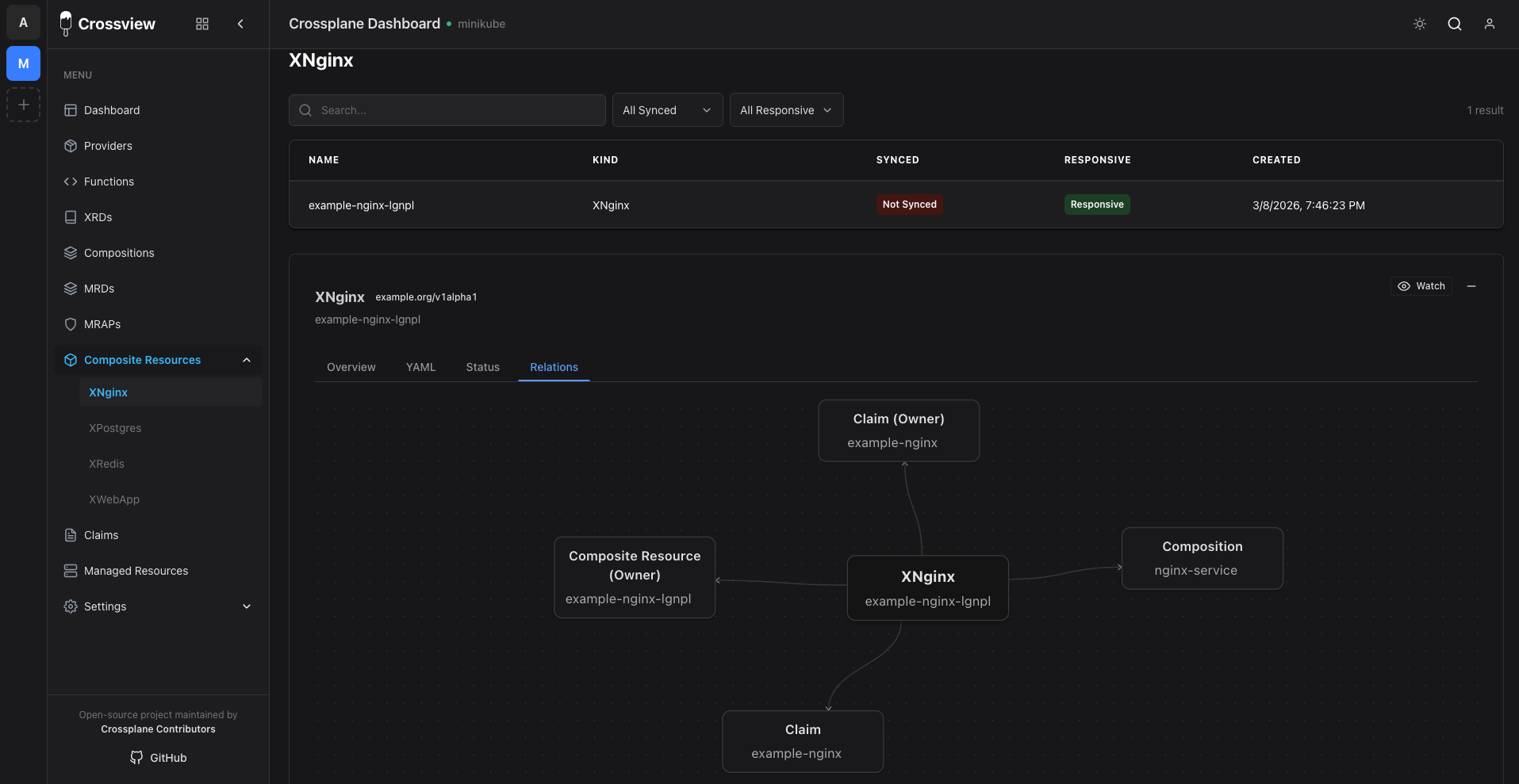
Demo Video
Table of Contents
- Features
- Getting Started
- Backend API
- Helm Chart
- Docker
- Documentation
- Tech Stack
- Contributing
- License
Features
- Real-Time Resource Watching: Monitor any Kubernetes resource in real-time with event-driven updates using Kubernetes Informers
- Multi-Cluster Support: Manage and switch between multiple Kubernetes contexts seamlessly
- Resource Visualization: Browse and visualize Crossplane resources (providers, XRDs, compositions, claims, etc.)
- Resource Details: View comprehensive resource information including status conditions, metadata, events, and relationships
- Modern UI: Built with React and Chakra UI with dark mode support
- High Performance: Backend built with Go and Gin framework for optimal performance
- WebSocket Support: Real-time updates via WebSocket connections
- SSO Integration: Support for OIDC and SAML authentication
Getting Started
Prerequisites
- Node.js 20+ (for frontend development)
- Go 1.24+ (for backend server)
- PostgreSQL database (port 8920 by default, or set via
DB_PORTenv var) - Kubernetes config file at
~/.kube/config(or setKUBECONFIGenv var)
Install Dependencies
npm install
Configuration
Copy the example config file and update with your settings:
cp config/config.yaml.example config/config.yaml
Edit config/config.yaml with your database credentials:
- Database port:
8920(or your port) - Database password:
password(or your password)
Alternatively, use environment variables (they take precedence):
export DB_HOST=localhost
export DB_PORT=8920
export DB_NAME=crossview
export DB_USER=postgres
export DB_PASSWORD=password
Development
Run Frontend and Backend separately:
Terminal 1 - Frontend:
npm install
npm run dev
Terminal 2 - Backend (Go server):
cd crossview-go-server
go run main.go app:serve
The app will be available at http://localhost:5173 (frontend proxies /api requests to backend at http://localhost:3001)
Build
Build for production:
npm run build
This creates a dist/ folder with the compiled frontend.
Production Mode
To run in production mode:
- Build the frontend:
npm run build
- Run the Go server (it will serve the frontend from the
dist/folder):
cd crossview-go-server
go run main.go app:serve
The app will be available at http://localhost:3001 (both frontend and API)
Backend API
The backend API is built with Go using the Gin framework and runs on port 3001. It provides the following endpoints:
GET /api/health- Health check and connection statusGET /api/contexts- List available Kubernetes contextsGET /api/contexts/current- Get current Kubernetes contextPOST /api/contexts/current- Set Kubernetes contextGET /api/resources?apiVersion=&kind=&namespace=&context=- List resourcesGET /api/resource?apiVersion=&kind=&name=&namespace=&context=- Get single resourceGET /api/events?kind=&name=&namespace=&context=- Get resource eventsGET /api/managed?context=- List managed resourcesGET /api/watch- WebSocket endpoint for real-time resource watchingPOST /api/auth/login- User loginPOST /api/auth/logout- User logoutGET /api/auth/check- Check authentication status
The backend uses the Go Kubernetes client with Informers for efficient, event-driven resource monitoring:
When running in a Kubernetes pod:
- Automatically uses service account token (no config file needed)
- Accesses the same cluster the pod is running in
- Uses
/var/run/secrets/kubernetes.io/serviceaccount/
When running locally:
~/.kube/config(default)KUBECONFIGenvironment variable
See Kubernetes Deployment Guide for deployment examples.
Helm Chart
Crossview can be deployed using Helm, which simplifies Kubernetes deployment and management.
Add the Helm Repository
helm repo add crossview https://crossplane-contrib.github.io/crossview
helm repo update
Install with Helm
helm install crossview crossview/crossview \
  --namespace crossview \
  --create-namespace \
  --set secrets.dbPassword=your-db-password \
  --set secrets.sessionSecret=$(openssl rand -base64 32)
For more details, see:
- Helm Deployment Guide - Complete Helm deployment guide
- Helm Chart Reference - All available chart options
Docker
Build the Docker Image
docker build -t ghcr.io/crossplane-contrib/crossview:latest .
Images are published to GHCR (ghcr.io/crossplane-contrib/crossview) on each release.
Run with Environment Variables (Recommended)
Environment variables take precedence over config files:
docker run -p 3001:3001 \
  -e DB_HOST=host.docker.internal \
  -e DB_PORT=8920 \
  -e DB_NAME=crossview \
  -e DB_USER=postgres \
  -e DB_PASSWORD=password \
  -e KUBECONFIG=/app/.kube/config \
  -e SESSION_SECRET=your-secret-key-here \
  -v ~/.kube/config:/app/.kube/config:ro \
  ghcr.io/crossplane-contrib/crossview:latest
Run with Config File
Mount your config file as a volume:
docker run -p 3001:3001 \
  -v $(pwd)/config/config.yaml:/app/config/config.yaml:ro \
  -e KUBECONFIG=/app/.kube/config \
  -v ~/.kube/config:/app/.kube/config:ro \
  ghcr.io/crossplane-contrib/crossview:latest
Run with Docker Compose
Create a docker-compose.yml:
services:
  crossview:
    build: .
    ports:
      - "3001:3001"
    environment:
      - DB_HOST=postgres
      - DB_PORT=5432
      - DB_NAME=crossview
      - DB_USER=postgres
      - DB_PASSWORD=password
      - KUBECONFIG=/app/.kube/config
      - SESSION_SECRET=your-secret-key-here
    volumes:
      - ./config/config.yaml:/app/config/config.yaml:ro
      - ~/.kube/config:/app/.kube/config:ro
    depends_on:
      - postgres

  postgres:
    image: postgres:latest
    environment:
      - POSTGRES_DB=crossview
      - POSTGRES_USER=postgres
      - POSTGRES_PASSWORD=password
    ports:
      - "8920:5432"
    volumes:
      - postgres_data:/var/lib/postgresql

volumes:
  postgres_data:
Then run:
docker-compose up
Configuration Priority
The application loads configuration in this order (highest to lowest priority):
- Environment variables (e.g.,
DB_HOST,DB_PORT,DB_PASSWORD) - Config file (
config/config.yaml- mounted or included in image) - Default values (fallback)
Required Environment Variables for Docker
DB_HOST- Database host (usehost.docker.internalfor local DB, or service name in Docker Compose)DB_PORT- Database port (default: 5432)DB_NAME- Database nameDB_USER- Database userDB_PASSWORD- Database passwordKUBECONFIGorKUBE_CONFIG_PATH- Path to Kubernetes config file inside containerSESSION_SECRET- Secret for session encryption (optional, has default)
Documentation
Getting Started
- Getting Started Guide - Quick start and first steps
- Features & Capabilities - What Crossview can do
Deployment
- Helm Deployment - Deploy using Helm (recommended)
- Kubernetes Deployment - Deploy using Kubernetes manifests
- Helm Chart Reference - Complete Helm chart options
Configuration
- Configuration Guide - Configure Crossview for your environment
- SSO Setup - Configure Single Sign-On (OIDC/SAML)
- SSO Protocols - Understanding OIDC and SAML
Support
- Troubleshooting - Common issues and solutions
- Kubernetes Manifests - Reference for Kubernetes manifests
- Keycloak Setup - Keycloak integration guide
Community
- Contributing Guide - How to contribute code, report issues, and open PRs
- Maintainers - Who maintains the project and how to reach them
- Security Policy - How to report vulnerabilities
- Code of Conduct - Community standards and reporting
- Roadmap - Planned direction and how to influence it
Tech Stack
Frontend
- React - UI library
- Vite - Build tool and dev server
- Chakra UI - Component library
- React Router - Routing
- WebSocket - Real-time updates
Backend
- Go - Programming language
- Gin - Web framework
- Kubernetes client-go - Kubernetes API client
- Kubernetes Informers - Event-driven resource watching
- PostgreSQL - Database (via GORM)
Contributing
Contributions are welcome. Please read the Contributing Guide for development setup, PR guidelines, and how to report issues. By participating, you agree to our Code of Conduct. To see where the project is headed, check the Roadmap.
License
This project is open source and available under the Apache License 2.0.