Omni Extract Bench
This repository contains a way to run our benchmark using our dataset on HuggingFace or your own dataset. It also
provides lower-level primitives (score and predict) to run in your own pipelines however you like. The README is split up into the following table of contents.
- Install — the scorer on its own, or with the vendor adapters.
- Run our benchmark with one line — rerun vendors on the benchmark dataset.
- Score — score predictions against ground-truth in your code or from the cli.
- What the metric does — explains how the scoring works.
- Predict — predict on one document and its schema in your code or from the cli.
- Licence — Apache 2.0
And take a look at docs/API.md for more in-depth documentation of public functionality.
Install
uv pip install omni-extract-bench                 # the scorer: score(), scipy and nothing else
uv pip install 'omni-extract-bench[harness]'      # + vendor adapters, to produce predictions
uv pip install 'omni-extract-bench[benchmark]'    # + packages to orchestrate and run benchmark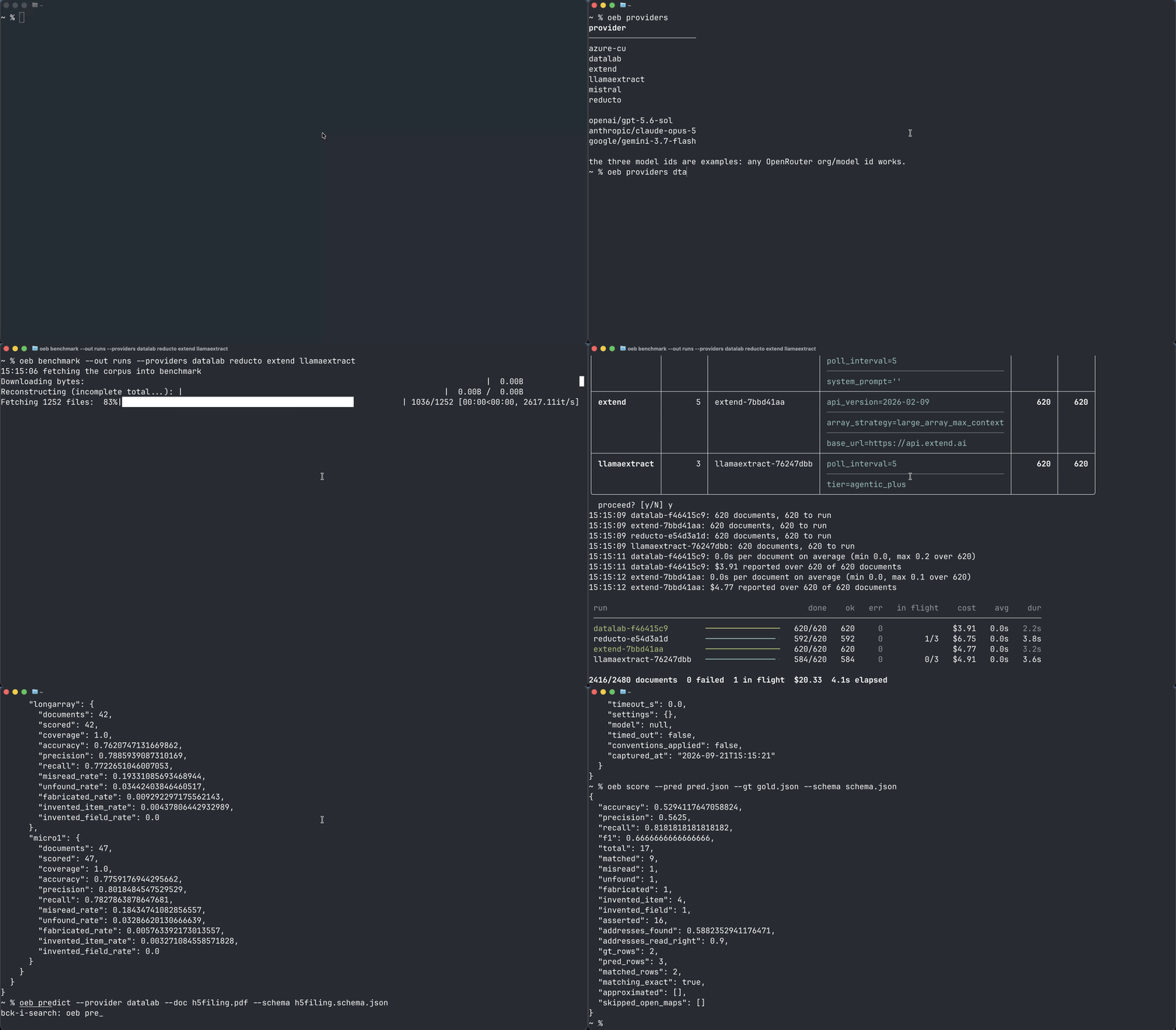
Run our benchmark with one line
We provide orchestration to run our benchmark around our core primitives: predict and score. Run the benchmark (limit to 1 document here). It's resumable so you can stop and reinvoke to resume at any point.
!!NOTE!!: this will cost money and you will need your API keys set.
oeb benchmark --out runs/ --limit 1 \
    --providers datalab reducto extend llamaextract
You can also specify settings per provider. For example:
oeb benchmark \
  --providers datalab reducto \
  --limit 1 \
  --options '{"datalab":  [{"mode": "balanced"}, {"mode": "accurate"}],
              "reducto": [{"agentic_table_mode": "max"},
                          {"agentic_table_mode": "default"}]}' \
  --out runs/
This will execute 4 different runs -- one for each pair (provider, settings).
It shows the plan and asks before calling any vendor; with no terminal to ask (a pipe, a notebook, CI) it goes ahead without asking, so a script runs as written.
--dataset picks the dataset (a folder on disk, or a HuggingFace dataset; ours by default), and --manifest picks which of its documents to run. For example, a 40-document subset of ours:
oeb benchmark --providers datalab --out runs/ \
  --manifest manifests/sample40-predictive-across-vendors-2026-09-22.parquet
See docs/API.md for more details on what oeb benchmark writes and how you can run on your own benchmark dataset.
Score
Use in your own code.
from omni_extract_bench import score

schema = {
  "type": "object",
  "properties": {
    "invoice_id": {
      "type": "string",
      "description": "The invoice number as printed on the document."
    },
    "invoice_date": {
      "type": "string",
      "description": "Date of issue, ISO 8601 (YYYY-MM-DD)."
    },
    "total_due": {
      "type": "number",
      "description": "Total amount payable, in the invoice currency."
    },
    "purchase_order": {
      "type": "string",
      "description": "Buyer's purchase order number, where the invoice cites one."
    },
    "line_items": {
      "type": "array",
      "description": "One entry per billed line.",
      "items": {
        "type": "object",
        "properties": {
          "sku": {"type": "string", "description": "Stock code for the item."},
          "description": {"type": "string", "description": "Item description as printed."},
          "qty": {"type": "integer", "description": "Units billed."},
          "unit_price": {"type": "number", "description": "Price per unit."}
        }
      }
    }
  }
}

prediction = {
  "invoice_id": "INV-4417",
  "invoice_date": "03/31/2024",
  "total_due": "1,240.00",
  "purchase_order": "PO-88231",
  "currency": "USD",
  "line_items": [
    {"sku": "BX-2201", "description": "Washer, 8mm", "qty": 100, "unit_price": 9.4},
    {"sku": "AX-9910", "qty": 24, "unit_price": 12.05},
    {"sku": "ZZ-0000", "description": "Freight surcharge", "qty": 1, "unit_price": 45.0}
  ]
}

ground_truth = {
  "invoice_id": "INV-4417",
  "invoice_date": "2024-03-31",
  "total_due": 1240.0,
  "line_items": [
    {"sku": "AX-9910", "description": "Hex bolt, M8", "qty": 24, "unit_price": 12.5},
    {"sku": "BX-2201", "description": "Washer, 8mm", "qty": 100, "unit_price": 9.4}
  ]
}

result = score(prediction, ground_truth, schema)
result["accuracy"]    # 0.5294 -- matched addresses / addresses either document used
result["precision"]   # 0.5625
result["recall"]      # 0.8182
or from the command line.
oeb score --pred pred.json --gold gold.json --schema schema.json{
"accuracy": 0.5294117647058824,
"precision": 0.5625,
"recall": 0.8181818181818182,
"f1": 0.6666666666666666,
"total": 17,
"matched": 9,
"misread": 1,
"unfound": 1,
"fabricated": 1,
"invented_item": 4,
"invented_field": 1,
"asserted": 16,
"addresses_found": 0.5882352941176471,
"addresses_read_right": 0.9,
"gt_rows": 2,
"pred_rows": 3,
"matched_rows": 2,
"matching_exact": true,
"approximated": [],
"skipped_open_maps": []
}Return with verdicts to dive deeper into exact places where the model failed.
result = score(prediction, ground_truth, schema, verdicts=True)
print(result["verdicts"][0]) # print the first verdict
# Verdict(address=(('k', 'currency'),), gold_raw=None, pred_raw='USD', gold_canon=None,
#         pred_canon='usd', result='invented_field')
From the cli.
oeb score --pred pred.json --gold gold.json --schema schema.json --verdictsOn the example above, printing one line each:
{
  "accuracy": 0.5294117647058824,
  "precision": 0.5625,
  "recall": 0.8181818181818182,
  "f1": 0.6666666666666666,
  ...
  "verdicts": [
    {
      "address": [
        [
          "k",
          "currency"
        ]
      ],
      "gold_raw": null,
      "pred_raw": "USD",
      "gold_canon": null,
      "pred_canon": "usd",
      "result": "invented_field"
    },
    ...truncated for display
What the metric does
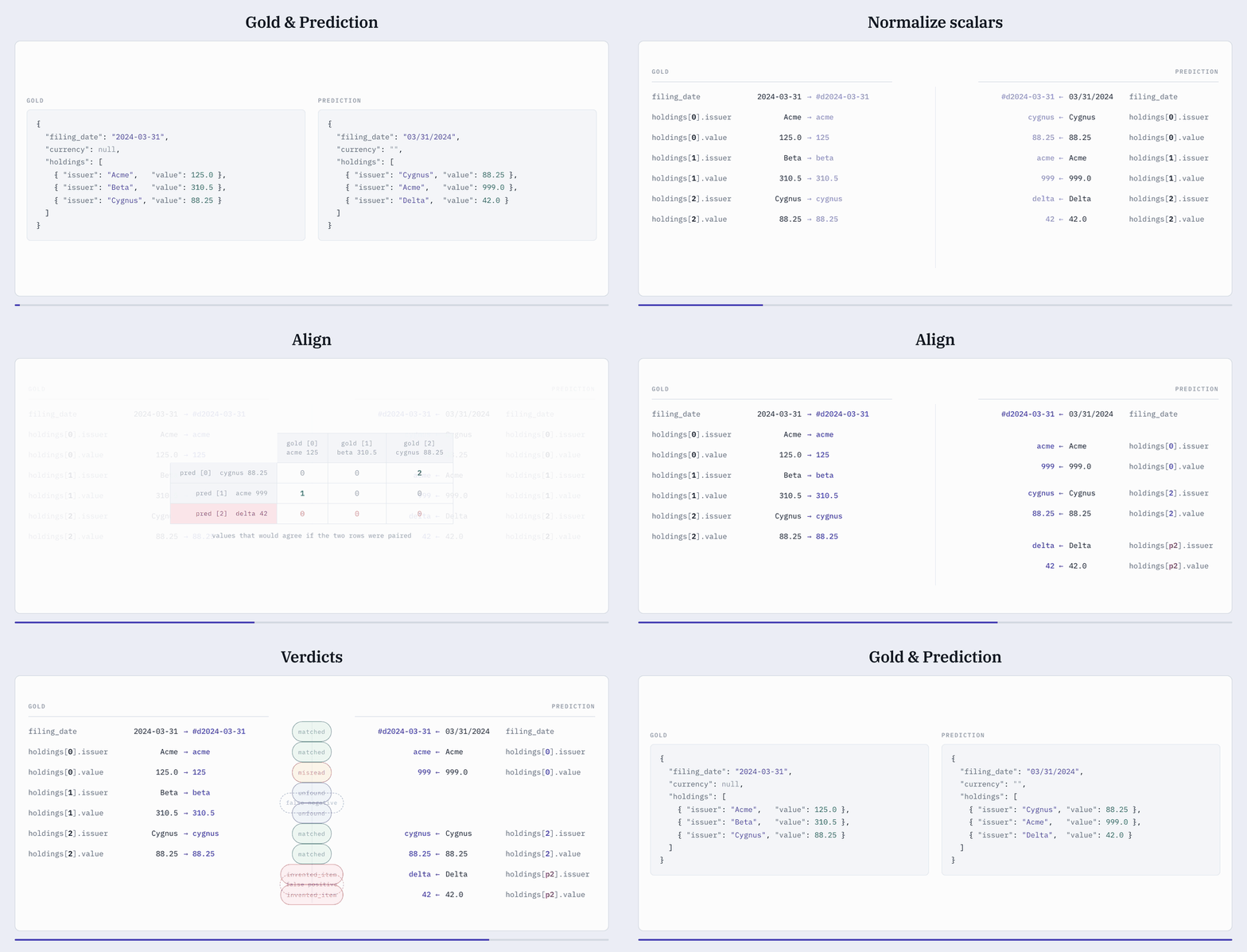
- Normalize document;
- Flatten prediction and gold JSON dictionary to addresses mapped to their scalar values;
- Normalize scalar values of the flattened addresses; and
- For each array that appears, Hungarian match (recursively for nested arrays) based on array element content to align ambiguous predicted and gold addresses (there may unmatched predicted addresses — false positives, and unmatched gold addresses — false negatives).
Full specification: METRIC_SPEC.md.
Predict
Predict using our provider harnesses.
uv pip install 'omni-extract-bench[harness]'from omni_extract_bench.harness import predict
record = predict("datalab", "invoice.pdf", schema)
record["result"]
record["raw"]
record["cost"]Score directly from the predictions.
from omni_extract_bench import score
score(record["result"], gold, schema)
You can also use the cli:
oeb predict --provider datalab --doc invoice.pdf --schema schema.jsonLicence
Apache 2.0 — see LICENSE. All code here is Datalab's own.