Try an idea, measure it, keep what works, discard what doesn't, repeat forever.
An extension for pi — an AI coding agent that runs in your terminal. pi-autoresearch gives pi the tools and workflow to run autonomous optimization loops: try an idea, benchmark it, keep improvements, revert regressions, repeat.
Inspired by karpathy/autoresearch. Works for any optimization target: test speed, bundle size, LLM training, build times, Lighthouse scores.
Quick start
pi install https://github.com/davebcn87/pi-autoresearch
What's included
| Extension | Tools + live widget + /autoresearch dashboard |
| Skill | Gathers what to optimize, writes session files, starts the loop |
Extension tools
| Tool | Description |
|---|---|
init_experiment | One-time session config — name, metric, unit, direction |
run_experiment | Runs any command, times wall-clock duration, captures output |
log_experiment | Records result, auto-commits, updates widget and dashboard |
/autoresearch command
| Subcommand | Description |
|---|---|
/autoresearch <text> | Enter autoresearch mode. If autoresearch.md exists, resumes the loop with <text> as context. Otherwise, sets up a new session. |
/autoresearch off | Leave autoresearch mode. Stops auto-resume and clears runtime state but keeps autoresearch.jsonl intact. |
/autoresearch clear | Delete autoresearch.jsonl, reset all state, and turn autoresearch mode off. Use this for a clean start. |
/autoresearch export | Open a live dashboard in your browser. Auto-updates as experiments run. |
Examples:
/autoresearch optimize unit test runtime, monitor correctness
/autoresearch model training, run 5 minutes of train.py and note the loss ratio as optimization target
/autoresearch export
/autoresearch off
/autoresearch clear
Keyboard shortcuts
| Shortcut | Description |
|---|---|
Ctrl+X | Toggle dashboard expand/collapse (inline widget ↔ full results table above the editor) |
Ctrl+Shift+X | Open fullscreen scrollable dashboard overlay. Navigate with ↑/↓/j/k, PageUp/PageDown/u/d, g/G for top/bottom, Escape or q to close. |
UI
- Status widget — always visible above the editor:
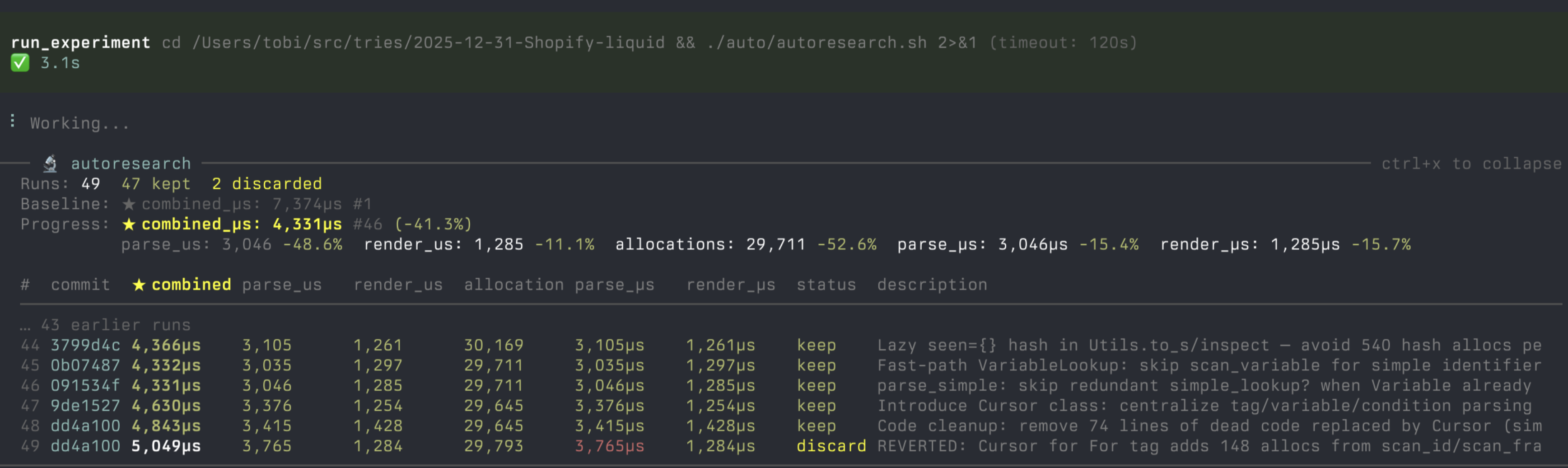
🔬 autoresearch 12 runs 8 kept │ ★ total_µs: 15,200 (-12.3%) │ conf: 2.1× - Confidence score — after 3+ runs, shows how the best improvement compares to the session noise floor. ≥2.0× (green) = likely real, 1.0–2.0× (yellow) = above noise but marginal, <1.0× (red) = within noise.
- Expanded dashboard —
Ctrl+Xexpands the widget into a full results table with columns for commit, metric, status, and description. - Fullscreen overlay —
Ctrl+Shift+Xopens a scrollable full-terminal dashboard. Shows a live spinner with elapsed time for running experiments.
Skills
autoresearch-create asks a few questions (or infers from context) about your goal, command, metric, and files in scope — then writes two files and starts the loop immediately:
autoresearch-finalize turns a noisy autoresearch branch into clean, independent branches — one per logical change, each starting from the merge-base. Groups must not share files, so each branch can be reviewed and merged independently.
| File | Purpose |
|---|---|
autoresearch.md | Session document — objective, metrics, files in scope, what's been tried. A fresh agent can resume from this alone. |
autoresearch.sh | Benchmark script — pre-checks, runs the workload, outputs METRIC name=number lines. |
autoresearch.checks.sh | (optional) Backpressure checks — tests, types, lint. Runs after each passing benchmark. Failures block keep. |
Install
pi install https://github.com/davebcn87/pi-autoresearch
Manual install
cp -r extensions/pi-autoresearch ~/.pi/agent/extensions/
cp -r skills/autoresearch-create ~/.pi/agent/skills/
Then /reload in pi.
Usage
1. Start autoresearch
/skill:autoresearch-create
The agent asks about your goal, command, metric, and files in scope — or infers them from context. It then creates a branch, writes autoresearch.md and autoresearch.sh, runs the baseline, and starts looping immediately.
2. The loop
The agent runs autonomously: edit → commit → run_experiment → log_experiment → keep or revert → repeat. It never stops unless interrupted.
Every result is appended to autoresearch.jsonl in your project — one line per run. This means:
- Survives restarts — the agent can resume a session by reading the file
- Survives context resets —
autoresearch.mdcaptures what's been tried so a fresh agent has full context - Human readable — open it anytime to see the full history
- Branch-aware — each branch has its own session
3. Finalize into reviewable branches
/skill:autoresearch-finalize
The agent reads autoresearch.jsonl, groups kept experiments into logical changesets, proposes the grouping for your approval, then creates independent branches from the merge-base. Each commit includes metric improvements in the message. Groups must not share files, so branches can be reviewed and merged independently.
4. Monitor progress
- Widget — always visible above the editor
Ctrl+X— expand/collapse the full results table inlineCtrl+Shift+X— fullscreen scrollable dashboard overlay/autoresearch export— open a live browser dashboard with chart and share cardEscape— interrupt anytime and ask for a summary
Example domains
| Domain | Metric | Command |
|---|---|---|
| Test speed | seconds ↓ | pnpm test |
| Bundle size | KB ↓ | pnpm build && du -sb dist |
| LLM training | val_bpb ↓ | uv run train.py |
| Build speed | seconds ↓ | pnpm build |
| Lighthouse | perf score ↑ | lighthouse http://localhost:3000 --output=json |
How it works
The extension is domain-agnostic infrastructure. The skill encodes domain knowledge. This separation means one extension serves unlimited domains.
┌──────────────────────┐     ┌──────────────────────────┐
│  Extension (global)  │     │  Skill (per-domain)       │
│                      │     │                           │
│  run_experiment      │◄────│  command: pnpm test       │
│  log_experiment      │     │  metric: seconds (lower)  │
│  widget + dashboard  │     │  scope: vitest configs    │
│                      │     │  ideas: pool, parallel…   │
└──────────────────────┘     └──────────────────────────┘
Two files keep the session alive across restarts and context resets:
autoresearch.jsonl   — append-only log of every run (metric, status, commit, description)
autoresearch.md      — living document: objective, what's been tried, dead ends, key wins
A fresh agent with no memory can read these two files and continue exactly where the previous session left off.
Configuration (optional)
Create autoresearch.config.json in your pi session directory to customize behavior:
{
  "workingDir": "/path/to/project",
  "maxIterations": 50
}
| Field | Type | Description |
|---|---|---|
workingDir | string | Override the directory for all autoresearch operations — file I/O, command execution, and git. Supports absolute or relative paths (resolved against the pi session cwd). The config file itself always stays in the session cwd. Fails if the directory doesn't exist. |
maxIterations | number | Maximum experiments before auto-stopping. The agent is told to stop and won't run more experiments until a new segment is initialized. |
Confidence scoring
After 3+ experiments in a session, pi-autoresearch computes a confidence score — how the best improvement compares to the session's noise floor. This helps distinguish real gains from benchmark jitter, especially on noisy signals like ML training, Lighthouse scores, or flaky benchmarks.
How it works:
- Uses Median Absolute Deviation (MAD) of all metric values in the current segment as a robust noise estimator.
- Confidence =
|best_improvement| / MAD. A score of 2.0× means the best improvement is twice the noise floor. - Shown in the widget, expanded dashboard, and
log_experimentoutput. - Persisted to
autoresearch.jsonlon each result for post-hoc analysis. - Advisory only — never auto-discards. The agent is guided to re-run experiments when confidence is low, but the final keep/discard decision stays with the agent.
| Confidence | Color | Meaning |
|---|---|---|
| ≥ 2.0× | 🟢 green | Improvement is likely real |
| 1.0–2.0× | 🟡 yellow | Above noise but marginal |
| < 1.0× | 🔴 red | Within noise — consider re-running to confirm |
Backpressure checks (optional)
Create autoresearch.checks.sh to run correctness checks (tests, types, lint) after every passing benchmark. This ensures optimizations don't break things.
#!/bin/bash
set -euo pipefail
pnpm test --run
pnpm typecheck
How it works:
- If the file doesn't exist, everything behaves exactly as before — no changes to the loop.
- If it exists, it runs automatically after every benchmark that exits 0.
- Checks execution time does not affect the primary metric.
- If checks fail, the experiment is logged as
checks_failed(same behavior as a crash — no commit, revert changes). - The
checks_failedstatus is shown separately in the dashboard so you can distinguish correctness failures from benchmark crashes. - Checks have a separate timeout (default 300s, configurable via
checks_timeout_secondsinrun_experiment).
Prerequisites
- Install pi — follow the instructions at pi.dev
- An API key for your preferred LLM provider (configured in pi)
Controlling costs
Autoresearch loops run autonomously and can burn through tokens. Two ways to cap spend:
- API key limits — most providers let you set per-key or monthly budgets. Check your provider's dashboard.
maxIterations— cap experiments per session inautoresearch.config.json:{ "maxIterations": 30 }
License
MIT