Dragon Ball Z: Budokai Tenkaichi 3, running natively on Android.
An Android port of Tenkaichi3Decomp, the native PC port built on the BT3 decompilation.






[!IMPORTANT] Status (0.9.0): the whole game runs natively on Android arm64: menus, story mode and full battles at the game's 30 fps on Snapdragon and on Mali, Xclipse and PowerVR GPUs. The launcher now detects your GPU and offers settings made to keep fights at a steady 30 fps; online play (PC and Android in the same rooms), HD texture packs, a new in-game menu made for touch, the new Dragon on-screen controller and driver downloads for Adreno are in. 0.7.0 brings the PC port's release 0.1.37 (online works again), an online status banner in the launcher, a touch-made Dragon Net Battle page, ASTC texture packs (experimental). 0.9.0 brings the PC port's 0.1.38.7 (faster at 2x and above, most on Mali), Budokai Tenkaichi 4 drawn by ARMSX2's renderer by default, and the online that waits when its free servers reach their daily limit. English, Portuguese and Spanish. See Roadmap.
This repository contains no game data. You need your own copy of the USA release (SLUS-21678) as an
.iso. The app reads it on your device; nothing is downloaded or uploaded.
What it is
The PC port is not an emulator: it is the game's own code, decompiled and compiled for PC, with a new renderer, sound and input layer underneath. Dragon Rage brings that to Android in two parts:
| Part | Where | State |
|---|---|---|
| Launcher app (Kotlin, Jetpack Compose, Material 3; English, Portuguese and Spanish) | android/ | ✅ Done |
Game engine (the port's C code, built for arm64 as libbt3.so) | src/, include/, port/ | ✅ Runs on Snapdragon, Mali, Xclipse and PowerVR; tuned per GPU tier |
The app
| Home | Pick your ISO. The app checks it is the USA release (the same SHA-1 checks as the PC setup; a translated or modded image installs too, with a warning) and copies the game data in the layout the engine expects. The Play button, a Play shortcut for the home screen, how online works (and what to do when it does not connect), and links to YouTube, Discord, Ko-fi and GitHub. |
| Textures | Import a texture pack as a .zip, download one from inside the app (a list kept in android/texture-packs.json, or any direct link to a .zip), or copy its folder into textures/. Packs made for PCSX2 (.dds / .png) work as they are: .dds files are unpacked for phones' GPUs, which cannot read DXT. |
| Mods | File-replacement mods as .zip (with a priority order), extra stages (.unk) and extra songs (.adx, or .mp3: converted by the game), with the name shown in the game's menus editable. |
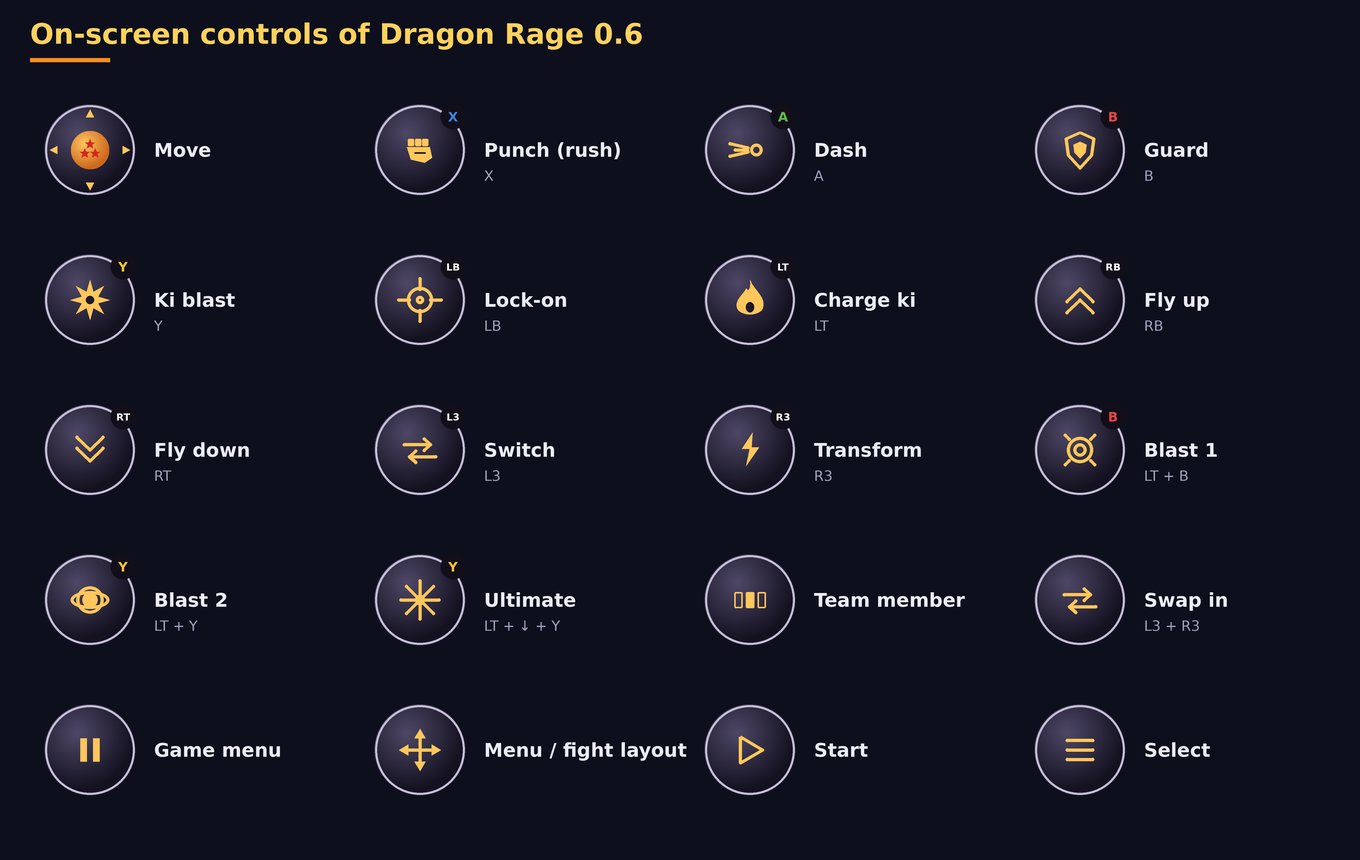
| Controls | The on-screen controller: the Dragon look (new default: dark round buttons with gold icons, Xbox-coloured letters, a three-star Dragon Ball for the stick), the Glass look of 0.5, or the classic console pad; a layout made for this game that switches by itself between menus and fights (story mode included), PlayStation, Xbox or Nintendo letters, layout editor, macros, opacity, size, vibration, floating stick, one button in clashes. |
| Cheats | Unlock everything: every character, stage, song and item, and max Zeni (the debug function the developers left in the game). |
| Drivers | Custom Vulkan drivers for Adreno (Snapdragon) GPUs through AdrenoTools: the latest releases of Mr. Purple, StevenMXZ and K11MCH1 downloaded and installed in one tap, a .zip from your files, choose, remove. |
| Debug | Your device and GPU with its tier, the recommended settings for it, the performance log of the last run (speed in fights and menus, pictures a second; on by default, no cost you can feel) and Export log for bug reports. |
| Settings | Renderer (Vulkan, or OpenGL ES for drivers whose Vulkan fails), internal resolution 1x–8x in fine steps, screen filter (bilinear, sharp, FXAA, AMD FSR 1, Snapdragon GSR), picture shape, screen orientation (landscape, portrait, automatic), precise depth, skip pictures instead of slowing down, smooth motion (60 / 120), present mode, the PS2 effects, volumes, language, theme, Material You. |
| In game | A new menu made for fingers and controllers, in the launcher's look and in your language: Video, Performance, Effects, Audio, Interface (fonts, HUD, side bars), Controls, Online (how it works, what to do when it fails), Cheats, Quit to launcher. Back button, START + SELECT or the on-screen MENU button. |
Your GPU, at 30 fps
On its first start with a known GPU the app says which one it found and offers that tier's settings (you see the list and say yes or not now; everything stays changeable):
| Tier | GPUs (examples) | Settings offered |
|---|---|---|
| Entry level | Mali-G31/G51/G52/G57, Mali-T, Adreno 3xx–5xx and 610/612, PowerVR GE/GM | 1x, smooth motion off, precise depth off, skip pictures, both blurs off |
| Weak | Mali-G68/G71/G72, Adreno 613–620 and 702–712, Xclipse 530/540, PowerVR BXM | 1x, smooth motion off, precise depth off, skip pictures, movement blur off |
| Mid-range | Mali-G76/G77/G78/G610/G615, Adreno 630–644 and 720s, Maleoon | 1.5x, smooth motion off, precise depth off |
| Strong | Mali-G710/G715/G720/G725, Adreno 650–699 and 730s, Xclipse 920 | 2x |
| Flagship | Adreno 740 and newer (8 Gen 2, 8 Gen 3, 8 Elite), Immortalis, Mali-G925, Xclipse 940+ | 2x, smooth motion 60 |
Install
Download DragonRage-<version>.apk from the latest release and install it. A newer
version installs over the older one and keeps your game data, settings and saves. The app checks GitHub when it opens
and offers new versions with their changelog.
To report a problem: Debug → Export log, then send the DragonRage-log-….txt file (on Discord, for example).
Build it yourself:
sh port/tools/android_toolchain.sh   # LLVM 21, the NDK's sysroot, SDL3 (once)
python3 port/tools/android.py        # the engine -> android/app/src/main/jniLibs (and its fonts and pictures -> assets)
cd android && ./gradlew assembleRelease   # needs JDK 17+ and the Android SDK (compileSdk 35)
Where files go
Everything lives in Android/data/com.dfdx047.dragonrage/files/, in the same layout the PC port uses next to
its program:
gamedata/            the disc's files (disc/SLUS_216.78, disc/BIN/, disc/DATA/ with the AFS archives, .installed)
gamedata/mods/       replaced files (rebuilt by the app from modlib/)
textures/            active texture packs (any depth)      textures_off/   packs switched off
stages/  songs/      extra stages and songs (maps.txt / songs.txt hold the menu names)
saves/               memory card
fonts/  tbo/ui/      the menu fonts and the online screens' pictures (copied from the app)
bt3_settings.txt     engine settings (name=number lines)
bt3_log.txt          the game's log of its last run
modlib/              the app's mod library
Android keys in bt3_settings.txt: dr_unlock_all, dr_renderer (0 automatic, 1 Vulkan, 2 OpenGL ES), dr_orient
(0 landscape, 1 portrait, 2 automatic), dr_lang (the in-game menu's language), dr_gpu_tier (the tier whose settings
were offered), perf_log, frag_depth. The on-screen controller is in touch_controls.json. An optional
match_url.txt (one line, https://...) names another matchmaking service.
Roadmap
Done
- Launcher: install from ISO with checksums, texture packs, mods, extra stages and songs, cheats, every engine setting, English / Portuguese / Spanish
- Engine for arm64, loaded anywhere in the low 4 GB; the whole game at its full speed on Snapdragon and recent Mali
- Touch: a controller made for this game with an automatic menu / fight layout, layout editor, macros, three looks (0.3–0.6)
- Mali and weak GPUs: Vulkan without the optional features Mali lacks, shaders without
discard, small render targets; OpenGL ES 3.2 renderer with a ring of uniform buffers (0.5–0.6) - Online play with room codes and rollback, PC and Android together (0.4)
- HD texture packs (
.ddsunpacked on the CPU), a memory budget for the cache (0.5) - 0.6.0: the PC port's latest (Tenkaichi Budokai Online screens, menu and battle fonts, fighter side panels, precise depth, flat shadows with a stencil, MP3 songs, Fight Again in story mode), a new in-game menu for touch, GPU tiers with recommended settings, driver downloads, Debug page, orientation, Spanish, the Dragon controller, the story mode's automatic layout fixed
- 0.7.0: the PC port's 0.1.36 (online accepted again), online status banner in the launcher, Dragon Net Battle page for touch, texture packs kept as ASTC (off by default since 0.7.2), checks for modified or incomplete ISO imports and a dialog explaining why the game closed
- 0.7.1: framebuffer fetch off again (black blocks and a frozen GPU on Mali-G52 with OpenGL ES), a warning when OpenGL ES is chosen on a Mali
- 0.7.2: ASTC texture packs off by default (experimental): fights run 0.6.0's engine code again
- 0.7.3: the PC port's 0.1.37 (online accepted again, match start messages, Solar Flare blending, text catalogs)
- 0.8.0: Dragon Net: online with the Nintendo Switch port (DBT-NX) on a service of our own (rooms, quick match,
Ranked with Elo, general chat, players online), apart from the PC port's releases; a new Dragon Net Battle
screen; online against PC kept as an option (
port/dragonnet,docs/DRAGON_NET.md) - 0.8.1: Dragon Net on three servers (a backup one, Ranked on its own), fewer requests to them
- 0.9.0: the PC port's 0.1.38.7; Budokai Tenkaichi 4 with ARMSX2's renderer by default (its shaders compiled
in advance), 60 fps fights (experimental, back to 30 where the device cannot hold them); the online pauses on
HTTP 429 and says the server is busy; the classic touch pad fits square screens; measured on an RG Cube and a
Retroid Pocket 5 (
docs/release-0.9.0.md)
Next
- More GPUs measured for the tiers (send your log!)
- Picture: anisotropic filtering, SMAA, more post-processing
- Pause the game while the app is in the background
Repository layout
| Path | Contents |
|---|---|
android/ | Dragon Rage, the Android app (Gradle project) |
src/, include/ | The game's code, from the decompilation; PC changes are inside #ifdef PORT |
port/ | The PC port: platform layer, renderer, sound, input, build tools |
docs/ | Notes on the game and on the PC port |
Credits
- Tenkaichi3Decomp by z3xox and contributors: the native PC port this is built on, and the decompilation under it.
- Dragon Rage (Android app and port): dfdx047 · YouTube · Discord · Ko-fi
- GPU drivers by Mr. Purple, StevenMXZ and K11MCH1, loaded with libadrenotools (BSD-2-Clause).
- AMD FidelityFX Super Resolution 1 (MIT),
Snapdragon Game Super Resolution (BSD-3-Clause), SDL3 (zlib), Apache Commons Compress (Apache-2.0),
Dear ImGui (MIT), the fonts in
port/third_party/fonts(their own licences). - Made with the help of AI.
Licence
The PC port's own code (port/ except port/third_party/) is under the GNU Affero General Public License,
version 3 from the PC port's commit 06e4671 (2026-10-14) on; the code before it stays available under the
MIT licence. Dragon Rage builds on that code, so the app as a whole is passed on under the AGPL-3.0 with
its full source here; the Android app's own files (android/) are also offered under MIT. The libraries in
port/third_party/ and the FSR / GSR shaders keep their own licences (the files next to them). The game's code in
src/ and include/ comes from the decompilation and belongs to the game's rights holders.
Legal
This project is not affiliated with or endorsed by the game's developers, publishers or rights holders. It exists for preservation, study and interoperability, and distributes none of the game's assets. Dragon Ball and all related names belong to their owners. You need your own legally obtained copy of the game.