
OmniCloud








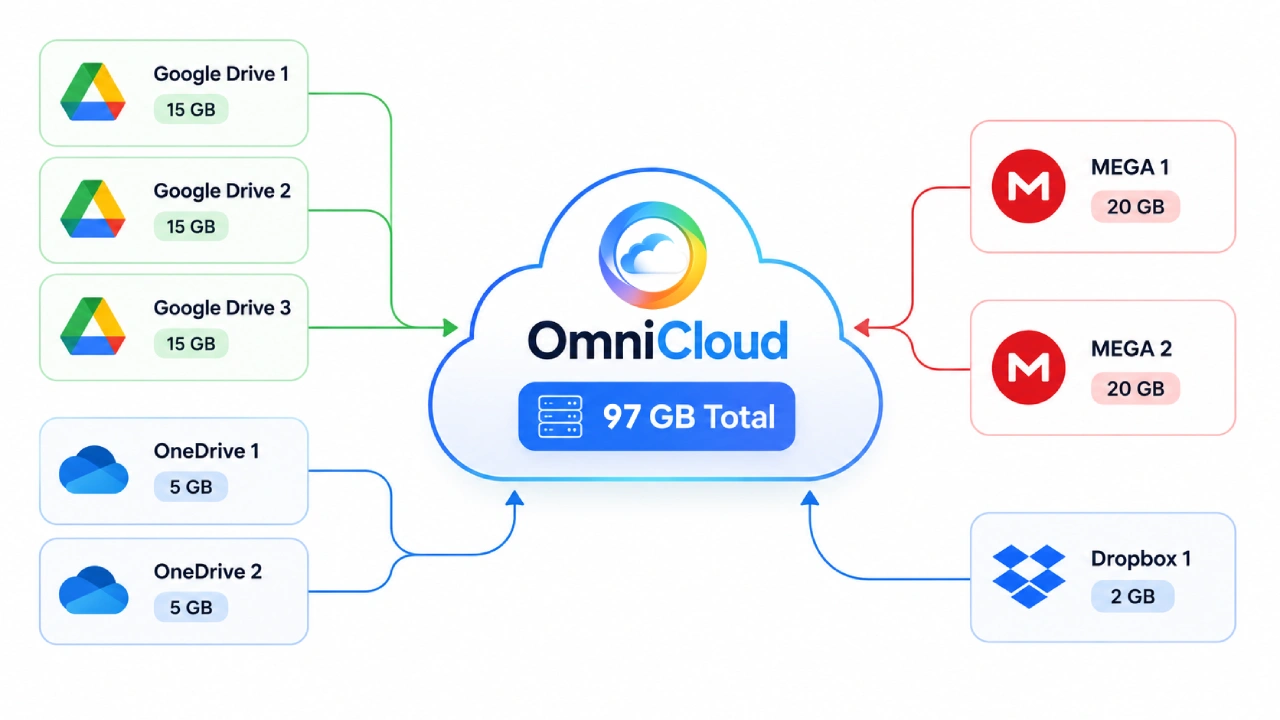
OmniCloud is a full-stack cloud drive aggregation platform that presents multiple storage providers through a single, consistent workspace. The application combines a Vue-based client with an Express API and provider adapter layer, enabling users to browse, upload, download, and manage files across connected cloud accounts from one interface.
✨ Key features
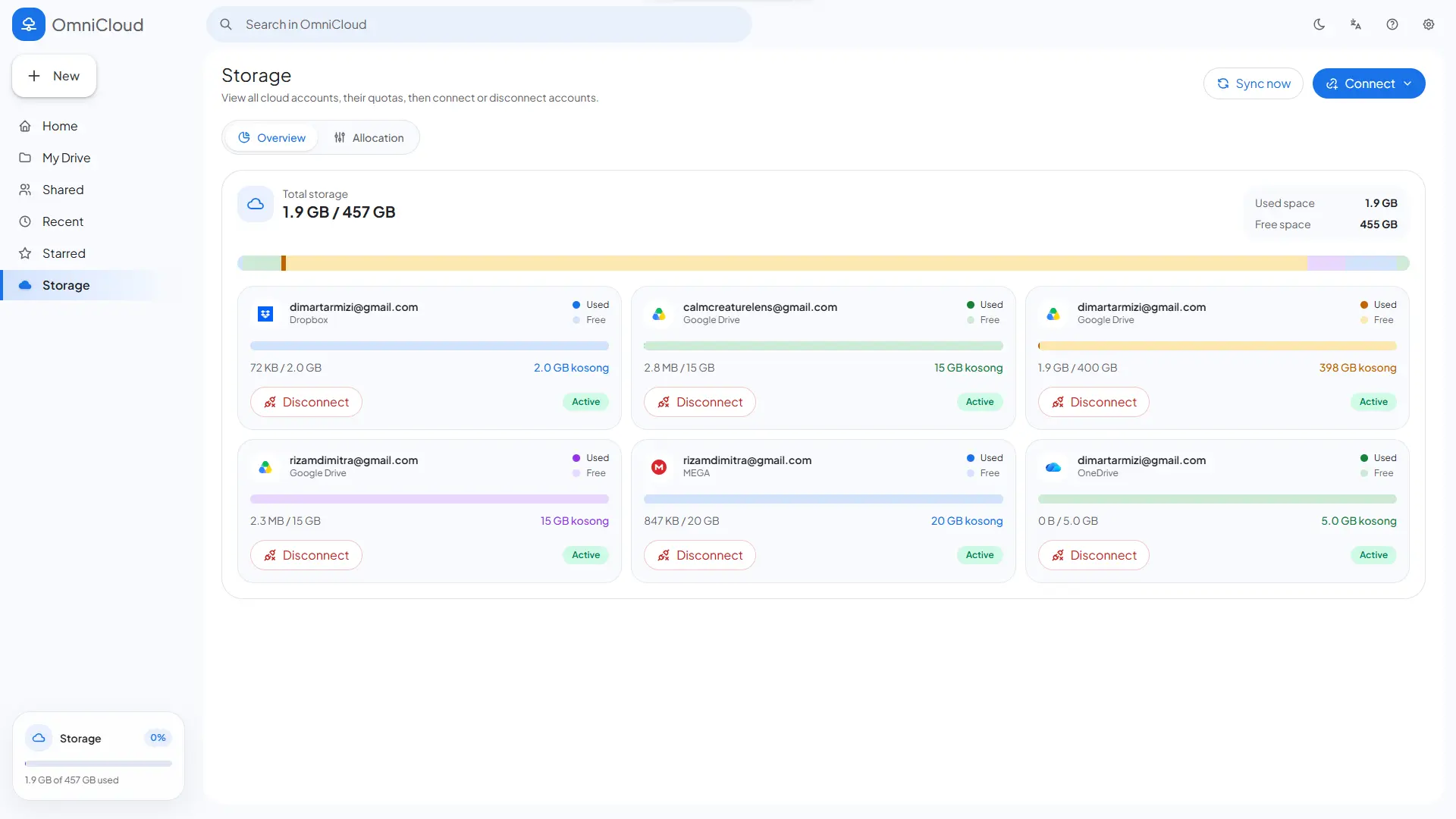
☁️ Multi-provider cloud aggregation
- Connect multiple cloud storage accounts in one application
- All providers are normalized through a consistent adapter layer
- Active provider support includes OAuth, account-based login, and access-key-based connections
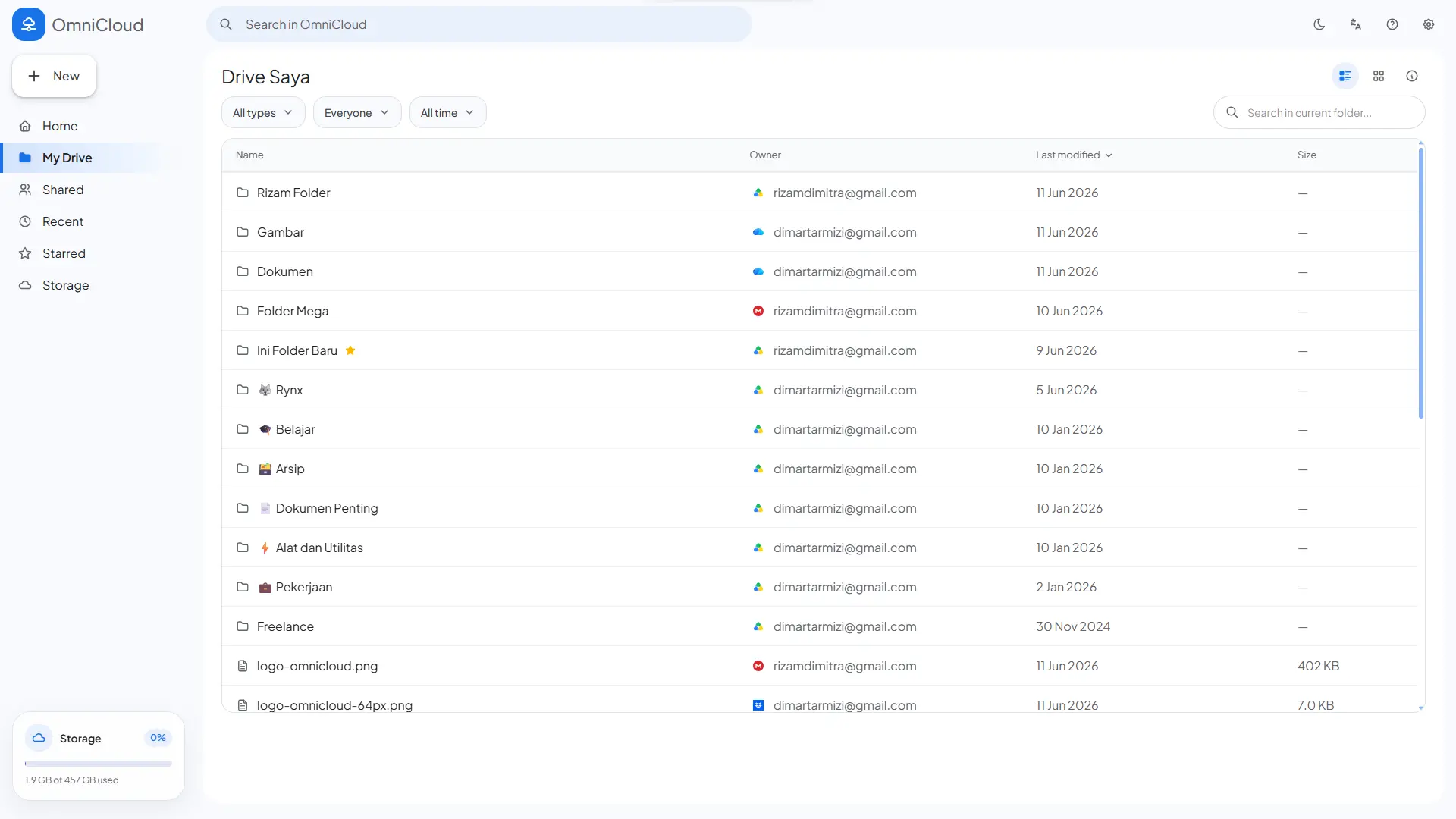
🗂️ Unified file workspace
Home,My Drive,Recent,Starred,Shared with Me, andQuotaviews- Virtual-path-based file navigation across providers
- File metadata is presented consistently across different provider sources
📁 File management
- Browse files and folders from connected accounts
- Create folders
- Rename files and folders
- Delete files and folders, including bulk delete
- Download provider files
- View file details and previews for supported file types
- Star / unstar files on providers that support it
⬆️ Upload system
- Browser-based file uploads
- Folder upload support
- Drag-and-drop uploads
- Upload session initiation through the API
- Real-time upload progress over WebSocket
- Automatic upload account allocation based on storage selection strategy
🔄 Sync and metadata mirror
- File metadata is stored in SQLite for fast navigation
- Account synchronization runs on a schedule using
node-cron - The API exposes a manual sync trigger
- Delta sync reports are available through the health/sync layer
👤 Auth and app modes
localmode for personal or simple self-hosted usagehostedmode for multi-user deployments with session-cookie-based register/login/logout- Account data, file mirrors, allocation config, and settings are scoped per user
⚙️ User settings and storage allocation
- User settings such as language and theme
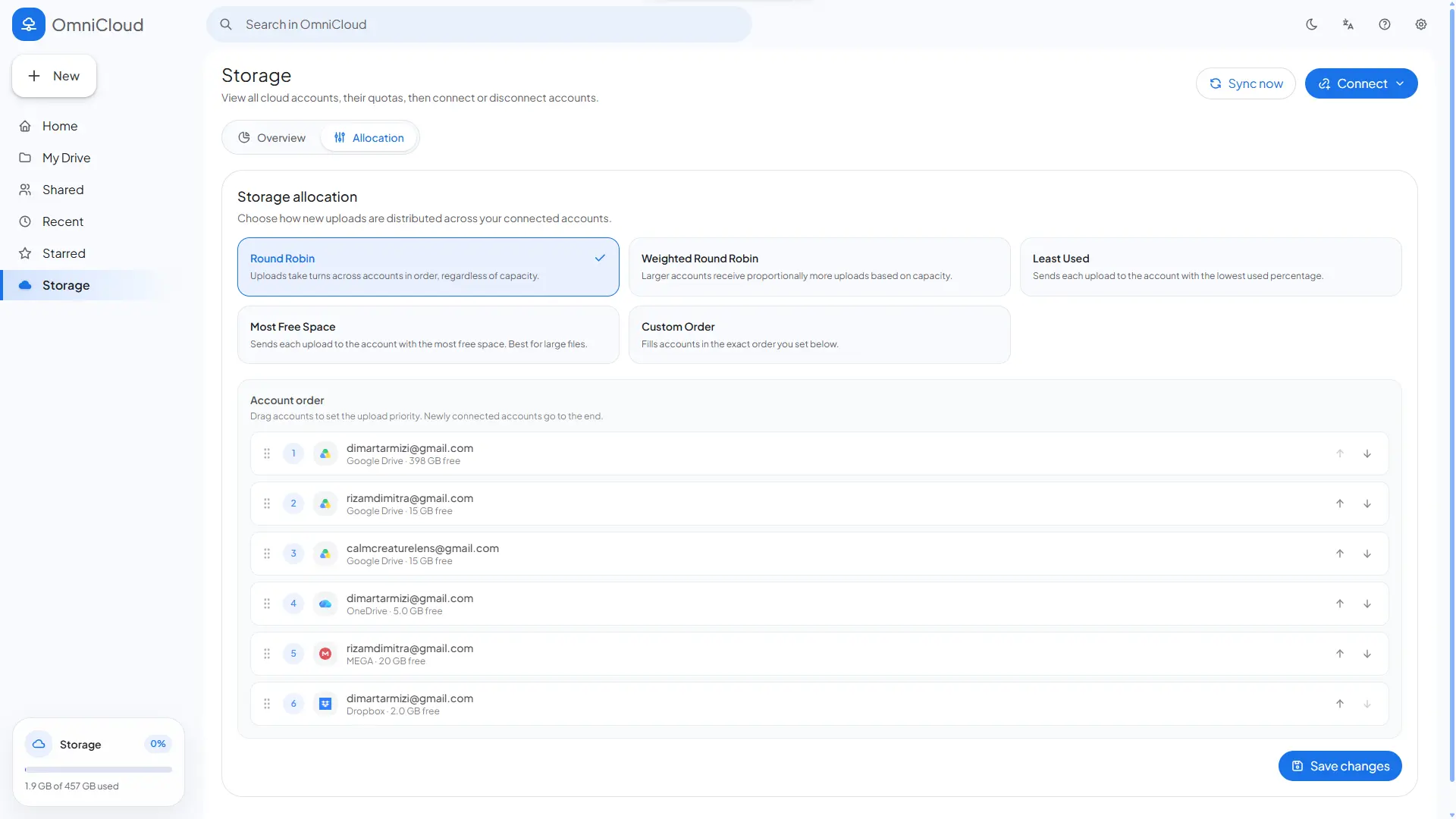
- Storage allocation strategies:
round_robinweighted_round_robinleast_usedmost_freemanual
- Account priority order can be configured for the manual strategy
Preview
☁️ Supported providers
| Provider | Status | Integration model |
|---|---|---|
| Google Drive | Active | OAuth + Google Drive API |
| OneDrive | Active | OAuth + Microsoft Graph |
| Dropbox | Active | OAuth + Dropbox API |
| Yandex Disk | Active | OAuth + Yandex Disk API |
| MEGA | Active | Email/password account connection |
| pCloud | Active | Email/password account connection |
| S3-compatible storage | Active | Access key / secret key / endpoint based |
Detailed provider credential setup is available in
docs/provider-setup.md.
🏗️ Project structure
OmniCloud/
├─ frontend/         # Vue 3 app (Vite, Pinia, Vue Router, i18n)
├─ backend/          # Express API, adapters, sync engine, SQLite
├─ docs/             # Provider setup documentation
├─ package.json      # Root workspace scripts
├─ LICENSE
└─ README.md
🔄 How OmniCloud works
flowchart TD
    U[User] --> F[Frontend<br/>Vue 3 + Vite]
    F -->|REST API requests| B[Backend API<br/>Express.js]

    subgraph Frontend Features
        F1[Auth]
        F2[Accounts]
        F3[File Explorer]
        F4[Uploads]
        F5[Settings]
        F6[Allocation]
    end

    F --> F1
    F --> F2
    F --> F3
    F --> F4
    F --> F5
    F --> F6

    B --> A[Adapter Registry]
    A --> G[Google Drive Adapter]
    A --> O[OneDrive Adapter]
    A --> D[Dropbox Adapter]
    A --> M[MEGA Adapter]
    A --> P[pCloud Adapter]
    A --> Y[Yandex Adapter]
    A --> S[S3 Adapter]

    G --> CP[Cloud Providers]
    O --> CP
    D --> CP
    M --> CP
    P --> CP
    Y --> CP
    S --> CP

    B --> N[Normalized OmniCloud Data Model]
    CP --> N

    N --> DB[SQLite Metadata Mirror]
    B --> DB

    B -->|Upload progress| WS[WebSocket Hub]
    WS --> F

    B --> SY[Sync Service]
    SY --> CRON[node-cron Scheduler]
    SY --> CP
    SY --> DB

    B --> AL[Allocation Service]
    AL --> ACC[Target Account Selection<br/>round_robin / weighted / least_used / most_free / manual]
    ACC --> CP

    B --> AU[Auth & Session Layer]
    AU --> DB
At a high level:
- The frontend calls the REST API for auth, accounts, files, uploads, settings, and allocation
- The backend selects the appropriate provider adapter (
google_drive,onedrive,dropbox,mega,pcloud,yandex,s3) - Provider responses are normalized into the OmniCloud data model
- File metadata is mirrored into SQLite for fast access
- Upload progress is pushed to the client over WebSocket
- The sync service keeps local metadata aligned with provider state
🧩 Current application views
The frontend currently includes these main views:
/→ Home dashboard/my-drive→ main file explorer/shared-with-me→ shared files from supported providers/recent→ recent files/starred→ starred files/quota→ quota overview, account management, allocation settings/loginand/register→ used in hosted mode
📋 Requirements
Before running the project, make sure you have:
- Node.js 20+
- npm
- Provider credentials for the cloud services you want to use
Using a current compatible Node.js LTS release is recommended.
🛠️ Local setup
1. Install dependencies
From the project root:
npm install
2. Create the backend environment file
Copy the env template:
copy backend/.env.example backend/.env
Or create it manually based on backend/.env.example.
3. Fill in the environment variables
Example environment values for the current project:
PORT=8787

# local = single-user, hosted = multi-user with login/register
APP_MODE=local

CORS_ORIGIN=http://localhost:5173
FRONTEND_URL=http://localhost:5173

SYNC_INTERVAL_MINUTES=5
OMNICLOUD_SECRET_HALF=replace-this-with-random-half-key

AUTH_COOKIE_NAME=omnicloud_session
AUTH_SESSION_TTL_HOURS=336
AUTH_SECRET=replace-this-with-a-strong-random-secret

GOOGLE_CLIENT_ID=
GOOGLE_CLIENT_SECRET=
GOOGLE_REDIRECT_URI=http://localhost:8787/api/accounts/google/callback

ONEDRIVE_CLIENT_ID=
ONEDRIVE_CLIENT_SECRET=
ONEDRIVE_TENANT_ID=common
ONEDRIVE_REDIRECT_URI=http://localhost:8787/api/accounts/onedrive/callback

DROPBOX_CLIENT_ID=
DROPBOX_CLIENT_SECRET=
DROPBOX_REDIRECT_URI=http://localhost:8787/api/accounts/dropbox/callback

YANDEX_CLIENT_ID=
YANDEX_CLIENT_SECRET=
YANDEX_REDIRECT_URI=http://localhost:8787/api/accounts/yandex/callback
Notes:
- MEGA and pCloud do not use
.envcredentials; they are connected from the UI using email/password - S3-compatible storage is configured from the UI using endpoint/bucket/access key/secret key
APP_MODE=hostedenables the register/login/logout flow using session cookies
4. Configure provider credentials
Follow the detailed guide in:
💻 Development
Run the frontend and backend together from the root:
npm run dev
Default local endpoints:
- Frontend:
http://localhost:5173 - API:
http://localhost:8787
🐳 Docker setup
The project includes Docker integration for running the API and production frontend behind Nginx.
1. Create the backend environment file
copy backend/.env.example backend/.env
Then fill in the provider credentials and secrets in backend/.env.
For the default Docker Compose setup, the app is exposed at http://localhost:8080, so OAuth redirect URLs should use the proxied API URLs:
GOOGLE_REDIRECT_URI=http://localhost:8080/api/accounts/google/callback
ONEDRIVE_REDIRECT_URI=http://localhost:8080/api/accounts/onedrive/callback
DROPBOX_REDIRECT_URI=http://localhost:8080/api/accounts/dropbox/callback
YANDEX_REDIRECT_URI=http://localhost:8080/api/accounts/yandex/callback
These values are also set in docker-compose.yml so they override the local-development defaults from backend/.env when running with Compose.
2. Build and start the containers
docker compose up --build
Open the app at:
- Frontend:
http://localhost:8080 - API through Nginx proxy:
http://localhost:8080/api
3. Stop the containers
docker compose down
SQLite data is persisted in the Docker volume omnicloud_api_data. To remove containers and the persisted Docker database volume:
docker compose down -v
📌 Available scripts
Root scripts
| Script | Description |
|---|---|
npm run dev | Run frontend and backend in parallel |
npm run build | Build the production frontend |
npm run build:web | Build only the frontend |
npm run dev:web | Run the Vite dev server |
npm run dev:api | Run the backend with node --watch |
npm start | Start the backend without watch mode |
Frontend scripts
| Script | Description |
|---|---|
npm --prefix frontend run dev | Start the Vite dev server |
npm --prefix frontend run build | Build the frontend |
npm --prefix frontend run preview | Preview the built frontend |
Backend scripts
| Script | Description |
|---|---|
npm --prefix backend run dev | Run the API with file watch |
npm --prefix backend start | Run the API normally |
🔌 API overview
These are the main API surfaces currently present in the project.
Health and sync
GET /api/healthPOST /api/sync/run
Authentication
GET /api/auth/mePOST /api/auth/registerPOST /api/auth/loginPOST /api/auth/logout
Accounts
GET /api/accountsDELETE /api/accounts/:idGET /api/accounts/google/statusGET /api/accounts/onedrive/statusGET /api/accounts/dropbox/statusGET /api/accounts/yandex/statusGET /api/accounts/mega/statusGET /api/accounts/google/connectGET /api/accounts/onedrive/connectGET /api/accounts/dropbox/connectGET /api/accounts/yandex/connectPOST /api/accounts/mega/connectPOST /api/accounts/pcloud/connectPOST /api/accounts/s3/connect- OAuth callback routes under
/api/accounts/*/callback
Files
GET /api/filesGET /api/files?path=/GET /api/files?recent=1GET /api/files?starred=1GET /api/files?shared=1GET /api/files/:id/shared-childrenPATCH /api/files/:id/starPOST /api/files/bulk/delete
The project also includes additional file routes for file explorer operations such as details, download, rename, create folder, and per-item delete in the file service / adapter workflow.
Uploads
POST /api/uploads/initiatePOST /api/uploads/:uploadId/streamWS /ws/uploads?uploadId=...
Settings and allocation
GET /api/settingsPATCH /api/settingsGET /api/allocationPATCH /api/allocation
🧠 Storage allocation behavior
When an upload starts, the backend selects the target account based on the user's allocation configuration. This allows file distribution across providers to be automatic or manually prioritized depending on the user's preference.
Example use cases:
- Distribute uploads across multiple accounts in rotation
- Prioritize the account with the most free space
- Enforce a specific manual ordering
🗄️ Data persistence
Important data stored locally includes:
- Mirrored file metadata in SQLite (
backend/omnicloud.db) - Linked account metadata
- Encrypted provider credentials / token material
- User settings
- Allocation config and rotation state
- Auth session data for hosted mode
🔒 Security notes
- Do not commit
backend/.env - Do not commit local production or personal testing database files
- OAuth client secrets, refresh tokens, session secrets, access keys, and provider passwords must be treated as sensitive
OMNICLOUD_SECRET_HALFis used as part of local encryption key material- For
APP_MODE=hosted, use a strongAUTH_SECRETand the correct frontend origin
📄 License
This project is licensed under the MIT License.