Univer Workspace
An open-source Office workspace where people and AI agents create, collaborate, and review together.
Univer Docs · Office SDK · CLI guide · Workspace Agent · Issues



English | 简体中文
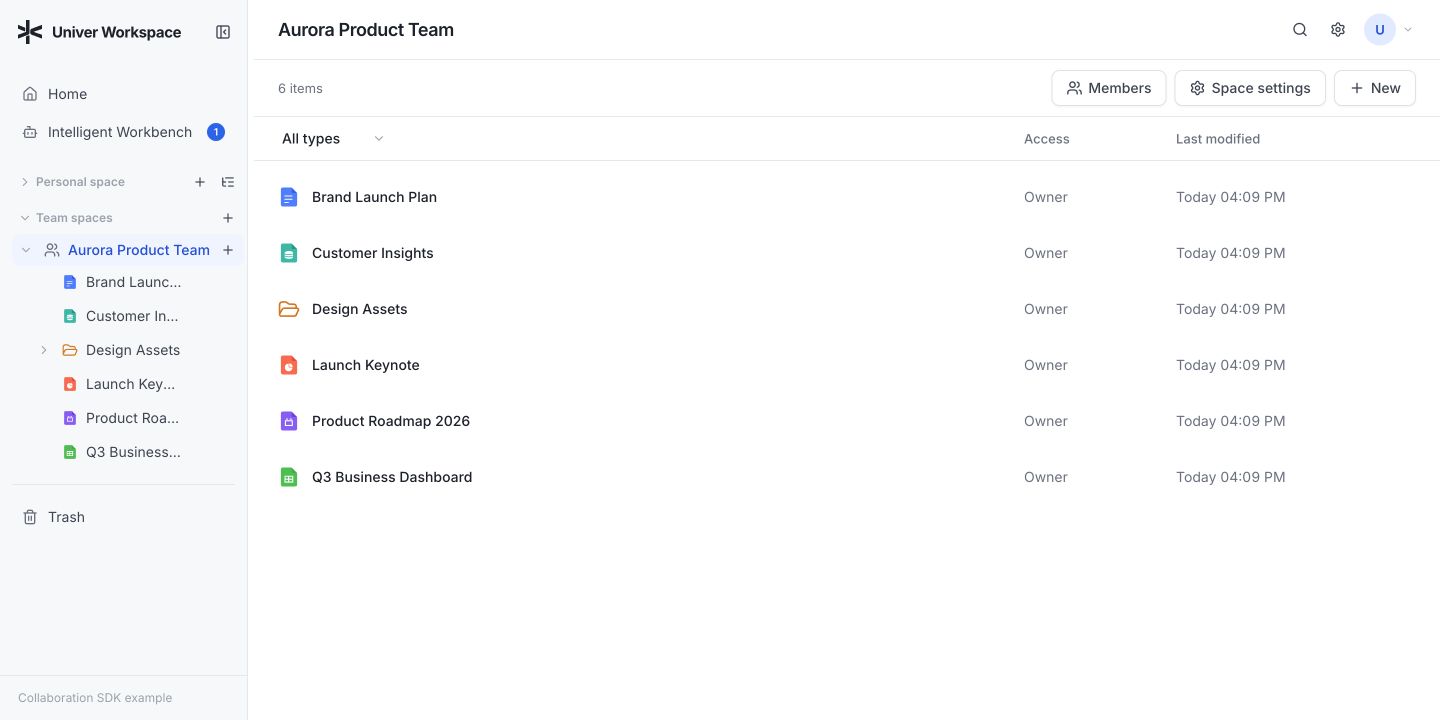
Univer Workspace is a deployable knowledge and collaboration workspace built on the Univer Office SDK. It brings Sheets, Docs, Slides, relational tables, canvases, and more into one shared runtime, with data and references staying connected across artifacts as the workspace changes.
Choose the Workspace Browser for direct editing, Workspace Agent for document conversations and change review, or the CLI for automation. All three connect to the Workspace Server, which owns document storage and permissions. Agents work in isolated Worktrees, verify their changes, and hand the result to a person for review. Humans can continue editing and stay in control of what gets merged.
Why Univer Workspace
| For people | For agents | For operators |
|---|---|---|
| Organize content in Personal and Team Spaces | Create and edit rich Office content through the Univer Facade API | Deploy one Browser and Server application |
| Co-edit Sheets, Docs, Slides, Bases, and Boards | Inspect data, render screenshots/PDFs, and run layout checks | Keep product, collaboration, and Blob data under application control |
| Share content with role- and node-aware access control, including anonymous viewing | Discover version-matched Skills and APIs offline | Integrate password, GitHub, Discord, or application OAuth login |
| Use Recent, Trash, file import/export, and review views | Work through multiple rounds without changing trunk | Operate a documented HTTP API with explicit recovery boundaries |
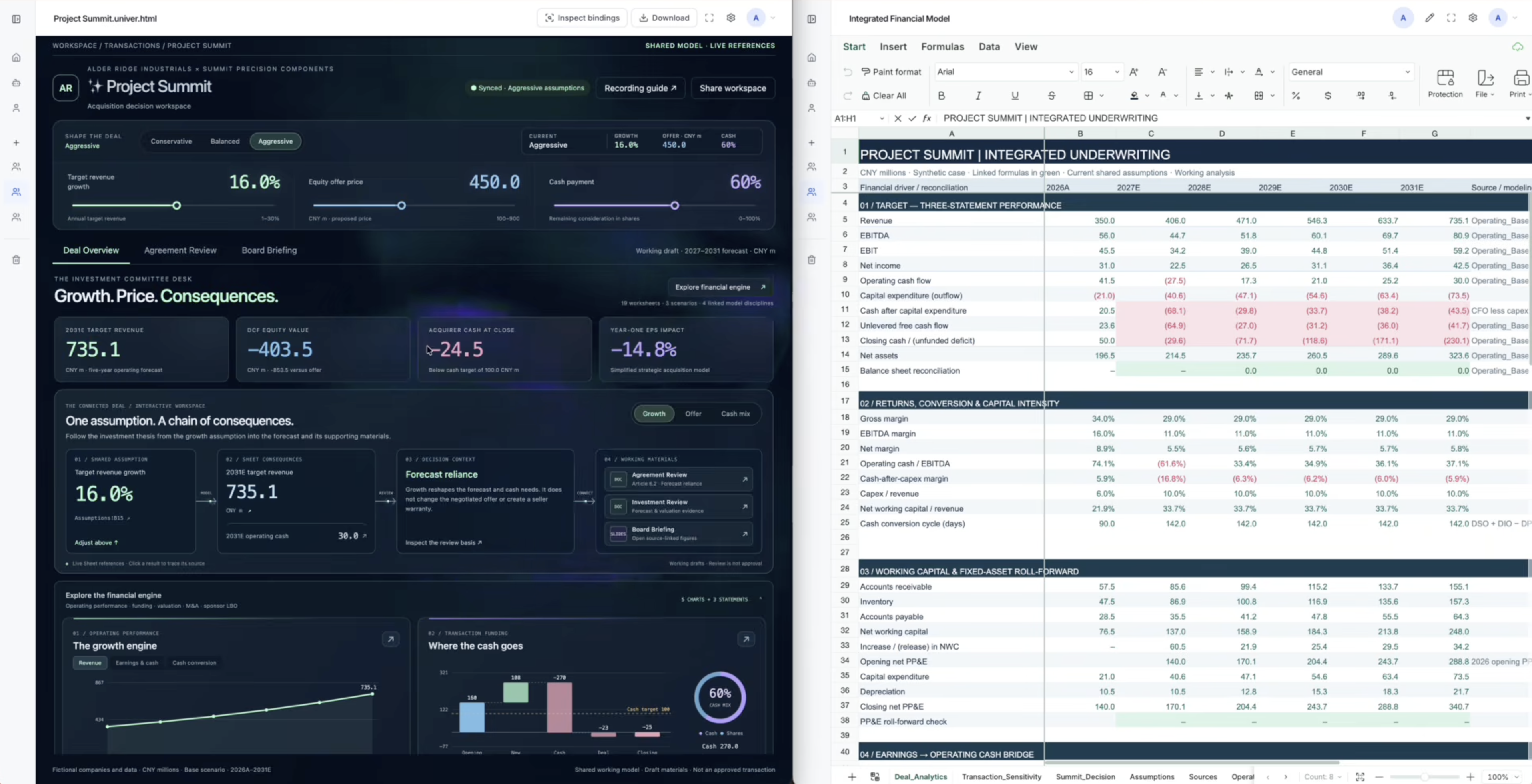
Spreadsheet-based mini-apps · Watch the demo
- Agents can generate spreadsheet-based mini-apps, such as decision-making dashboards, interactive reports, and business dashboards.
- Metrics, charts, and controls on the web page are bound to cells, supporting data reads, writes, and collaborative updates.
Choose your entry point
| Entry point | Use it for | Get started |
|---|---|---|
| Workspace Browser | Edit documents directly, collaborate, organize Spaces, and review changes | Start Workspace |
| Workspace Agent | Chat with an agent beside your documents, reference local or remote files and folders, and review Worktree changes | Install and use Agent |
| Workspace CLI | Automate document tasks from a terminal, scripts, or an existing agent environment | CLI installation and usage |
Workspace Agent is a local web application built on DSH (DeepSeek Harness). Its local file references point to the machine running Agent; Workspace documents remain on the connected service. Both Agent and CLI can connect to your existing Workspace deployment or one you start locally.
How it works
flowchart LR
    Human([Human]) --> Browser[Workspace Browser]
    Agent([AI agent]) --> CLI[Workspace CLI]
    Human --> AgentApp[Workspace Agent: local conversation and review]
    AgentApp --> Server
    Browser --> Server[Workspace Server]
    CLI --> Server
    Server --> Product[(Product data)]
    Server --> Collaboration[(Collaboration data)]
    Server --> Blobs[(Blob and asset bytes)]
The Browser is the direct editing and collaboration surface. Workspace Agent combines a conversation with document previews and Worktree review. The CLI gives agents a structured way to load, understand, edit, validate, and render the same content. The Server resolves authoritative identity and permissions, owns Workspace product workflows, and composes the Univer Collaboration SDK.
Worktree turns agent editing into an explicit review workflow:
create Worktree
→ agent edits and verifies an isolated draft
→ Ready
→ human reviews in the Browser or Workspace Agent
→ Merge or Reopen
→ trunk
Intermediate changes remain isolated from shared content until a person accepts them. See the CLI guide for the complete product workflow.
Quick start
These commands start the Workspace service and Browser. To add the conversation interface, follow the Workspace Agent guide.
Requirements
- Node.js 24 or newer
- pnpm 11
Install dependencies and prepare the application configuration:
pnpm install
cp apps/workspace/.env.example apps/workspace/.env
Start the Server:
pnpm workspace:dev:serverIn another terminal, start the Browser development server:
pnpm workspace:dev:webOpen http://127.0.0.1:5173. Vite provides hot module replacement and proxies API and WebSocket traffic to the Server at http://127.0.0.1:3020.
The Server can also serve the latest built Browser from port 3020 when
apps/workspace/dist/public exists. Its product API is available at
http://127.0.0.1:3020/api-docs and
http://127.0.0.1:3020/openapi.yaml.
Configuration, authentication, storage, Docker, and database migration details live in the Workspace application guide.
Use Workspace Agent
Install Agent to discuss documents, use @ references, and review changes beside
the conversation. The Agent guide
includes a prompt you can give a coding agent before cloning the repository, as
well as manual setup and usage instructions. It walks through choosing or starting
your own Workspace service, registering the OAuth callback, configuring model
credentials, and opening the complete token URL printed by the local launcher.
Desktop Agent packaging and manual CI are described in the desktop guide. Downloads use GitHub Releases; Agent release tags never trigger automatic publication.
Use the Workspace CLI
Install the agent-facing CLI:
npm install --global univer-workspace-cli@latestPoint the CLI at your own Workspace deployment, then begin browser-approved login:
univer-workspace-cli config set workspace.origin <origin>
univer-workspace-cli login
After the user approves the displayed URL and verification code, complete the one-time exchange:
univer-workspace-cli login --completeThe installed package includes version-matched Skills, structured JSON output, Facade API discovery, content inspection, PNG/PDF rendering, Office exchange, and Worktree workflows. See the CLI guide for the complete usage and login contract.
Repository layout
apps/workspace                 Workspace Browser, Server, HTTP contract, and deployment app
apps/cli                       Agent-ready remote Workspace automation application
apps/agent                     Workspace Agent application for document conversations and review
packages/client-core           Private Node-hosted Workspace Agent Client capabilities
packages/reference-provider   Private Browser-only referenced-Unit policy
packages/workspace-html-viewer Private shared HTML View sandbox and binding host
packages/dsh-univer-workspace-plugin        Workspace Agent Workspace capabilities and browser UI
packages/dsh-univer-workspace-skin-plugin   Workspace Agent Workspace visual skin
scripts                       SDK version and local CLI release tooling
This repository is the product composition root, not a replacement for the upstream SDKs. Univer Runtime owns the Unit model, rendering, Facade APIs, and Office content capabilities. Univer Collaboration SDK owns snapshots, revisions, OT, realtime collaboration, and Worktree protocol contracts. Univer CLI SDK owns the reusable headless runtime, execution, inspection, and rendering capabilities.
Workspace owns product identity, Spaces, hierarchy, ACLs, sharing, Trash, Recent, Blob storage policy, remote workflows, and deployment. Client Core shares storage-neutral authentication, Workspace workflows, local Node-hosted Blob/Asset transfer, and the worker-backed content runtime between repository applications, including Node-hosted Office exchange, Typst compile/materialize/apply, render Unit assembly, screenshots, PNG/PDF output, Slide layout lint, the render-page source, and the SVG compile/measure/apply workflow; the reference-provider package remains Browser-only. Both are private implementation modules, not additional public applications or SDKs.
Architecture principles
- One authoritative Server. Client-provided users, roles, Resources, Units, Worktrees, and revisions are never trusted as authority.
- Separate storage boundaries. Product data, collaboration state, and Blob bytes have distinct owners and are coordinated through durable, idempotent operations.
- Published SDK contracts only. The repository consumes public package exports and never depends on adjacent source checkouts.
- One exact SDK baseline. Version-coupled
@univer-cli/*,@univerjs/*, and@univerjs-pro/*packages always move together. - Contract-first HTTP. OpenAPI source, generated types, Server routes, Browser, and CLI must describe the same behavior.
Read the technical architecture, application design, and data model before changing these boundaries.
Development and verification
Run the smallest relevant check while iterating, then use the repository-level suite before claiming a complete change:
pnpm typecheck
pnpm test
pnpm build
pnpm --filter @univerjs/univer-workspace test:production-import
pnpm package:workspace-cli
HTTP contract changes also require:
pnpm --filter @univerjs/univer-workspace api:verifyUpdate every version-coupled Univer dependency and the lockfile with the repository script rather than editing individual manifests:
pnpm update:univer-sdk --sdk_version <exact-sdk-version>Delivery model
The CLI and Workspace deployment are delivered independently from the same source:
- Manually dispatch the CLI release workflow on a stable
vX.Y.Ztag contained inmainand explicitly setdry_run=falseto publishuniver-workspace-cli@X.Y.Z. Creating or pushing tags never triggers CI or publication. - Workspace deployment is a separate manual workflow. It builds either an existing
stable tag or an exact commit as
sha-<commit>. Pushing a release tag does not deploy the Server.
Stable CLI releases validate the repository-wide SDK baseline and test the actual package artifact before publication.
Documentation
| Resource | Scope |
|---|---|
| Univer Runtime documentation | Browser Runtime, presets, plugins, Facade API, and editor capabilities |
| Univer Office SDK documentation | Office SDK stack: Runtime, Collaboration, CLI, and Worktree |
| Workspace application guide | Configuration, authentication, storage, Docker, and upgrades |
| Workspace CLI guide | Installation, login, agent workflows, and package contract |
| Workspace Agent guide | Local profile, browser OAuth, sessions, files, Worktree, and identity switching |
| Client Core package | Private Node-hosted client capability boundary |
| Technical architecture | Browser, Server, storage, OpenAPI, and module boundaries |
| HTTP contract | Product API source and generation workflow |
| Reference-provider package | Private Browser referenced-Unit policy |
Contributing
Issues and pull requests are welcome. Before changing code, read AGENTS.md and the README or design document closest to the target. Preserve unrelated changes, do not edit generated files by hand, and include the verification required by the affected boundary.
Runtime development license
The Browser and CLI contain synchronized copies of the approved runtime development
credential for local use. It rotates every 90 days and is not the repository software
license. Set VITE_UNIVER_LICENSE for Browser builds or UNIVER_LICENSE for the CLI
to override it.
License
Univer Workspace is licensed under Apache-2.0.