Imagination Studio by keys+Wasserman, powered by TensorFold
A local film studio: plan a film, generate pictures, video, voices and music, then edit and export it. Use Windows (natively, no WSL), an Apple-silicon Mac, or a supported NVIDIA Linux machine. Available models and settings depend on the machine, installed components and runtime memory.
Start here: Windows · Mac · NVIDIA Linux · Using Studio · Documentation
Windows
Studio runs natively on Windows; there is no WSL version. The native GPU setup targets Windows 11 on Arm with an NVIDIA RTX Spark, with 128 GB configurations intended for the full feature set. Smaller machines can use features that fit their GPU/runtime memory requirements and pass local validation. Planning, imports, settings and media browsing do not require large model downloads.
Run the Windows installer in an administrator PowerShell:
Invoke-WebRequest https://raw.githubusercontent.com/drowzeys/Imagination-Studio-by-keys-Wasserman/main/oneshot-setup-rtx-spark-n1x.ps1 -OutFile "$env:TEMP\studio-setup.ps1"
powershell -ExecutionPolicy Bypass -File "$env:TEMP\studio-setup.ps1"
The installer clones Studio, sets up the selected components, and registers Desktop/Start shortcuts and a notification-area tray icon. Review the model licences, download sizes and runtime-fit plan before proceeding. It is a component/model installation, not just a download-free UI launcher.
Open Imagination Studio from Desktop or Start, then use http://127.0.0.1:7870. The tray starts Studio and stops it after an idle, confirmed stop. Component selection, UI-only setup and tray details.
Already have a local checkout? Register its tray and shortcuts without installing models:
powershell -ExecutionPolicy Bypass -File scripts\setup-windows-desktop.ps1 -Backend nativeAdd models from Settings → Models & weights: see download sizes, measured memory usage and setup commands. Below 128 GiB RAM, setup helps avoid huge downloads unlikely to run; an explicit flag lets you proceed anyway. See Windows setup for the details.
Verify features in Machine → Feature checks. Checks are opt-in renders on this machine, not background startup tests. Each passed recipe enables its tested settings; groups run recipes sequentially and retain individual passes. Failed larger checks do not remove smaller passes.
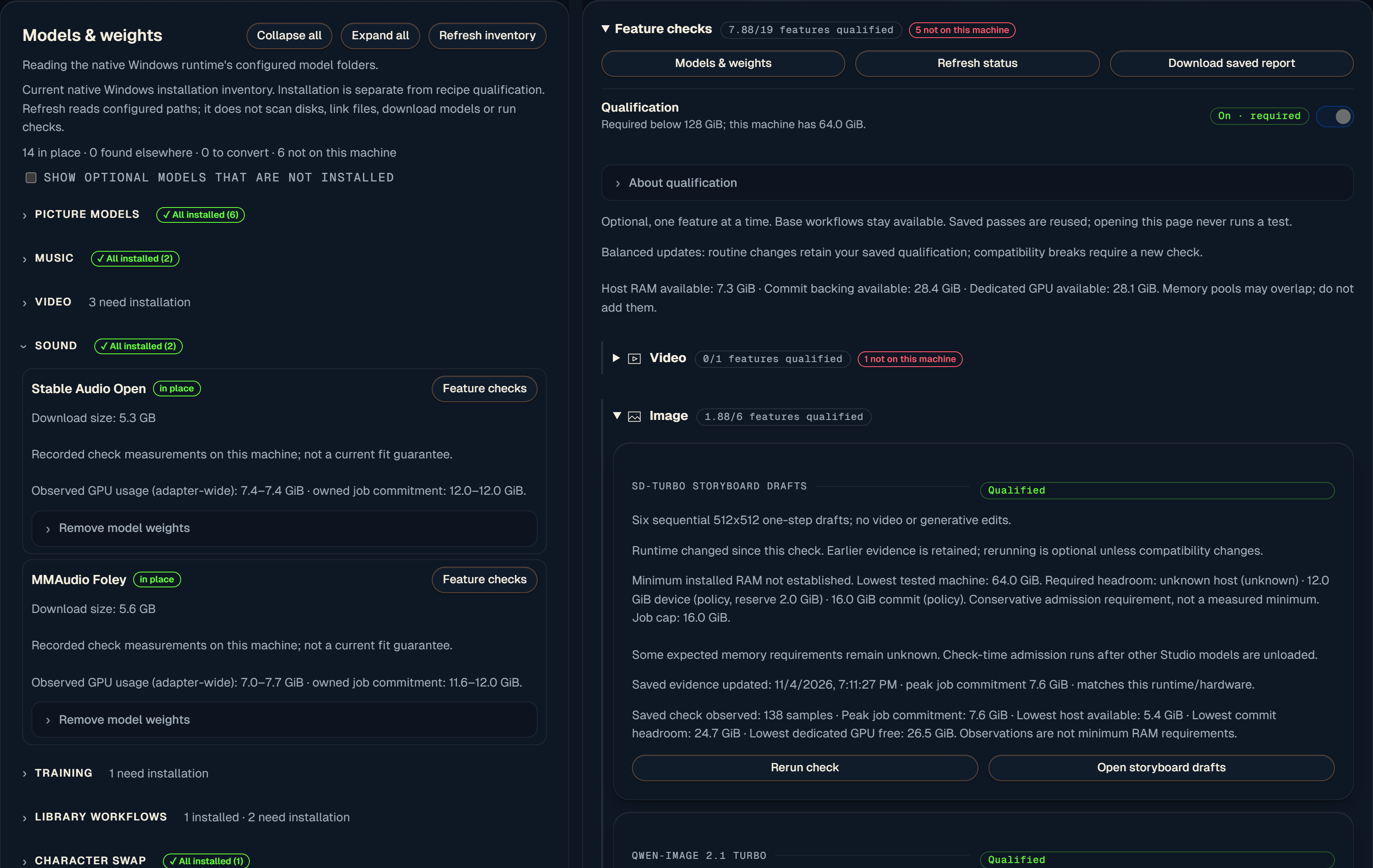
Actual Windows UI: installation, successful checks and failed/unchecked recipes are shown separately.
| Installed physical RAM | Qualification gating and badges |
|---|---|
| Below 128 GiB, or capacity unknown | Required; unverified recipes stay gated |
| 128 GiB or more | Off by default and optional; no qualification run is required just to use an installed feature |
At 128 GiB+, you can turn qualification on if wanted. Diagnostics and individual checks remain available either way. Prerequisites, supported settings, backend policy and live memory guards always apply. The threshold is a verification-policy default, not a guarantee that every model fits.
GPU memory, Windows commit backing and available system RAM are separate limits; download size is not a RAM requirement. Adaptive setup currently uses known admission policies, not a complete predictive model for every recipe. For example, a 64 GB RTX Spark's GPU carve-out may not meet Voice's current requirement even though other image and sound recipes work. On a 128 GB RTX Spark the firmware gives the GPU about 98 GB and Windows about 30 GB; the models load straight into the GPU's share (how).
Native setup, components and qualification · Measured Windows results and troubleshooting · RTX Spark hardware, memory pools and measurements
Mac
Use Apple silicon and macOS 26+; the fast native video path needs an M5-family chip. The installer requires 48 GB for pictures only, 96 GB for the standard video install, and 128 GB for Turbo/Ref2VA. Allow about 185 GB free disk for the standard setup; optional models need more. Requirements derive from measurements on an M5 Ultra; smaller Macs and M1–M4 video paths are not equivalent hardware measurements and may be much slower.
brew install python@3.11 uv ffmpeg
git clone https://github.com/drowzeys/Imagination-Studio-by-keys-Wasserman.git
cd Imagination-Studio-by-keys-Wasserman
bash oneshot-setup.sh --app
Open Wasserman Slate AI Studio in Applications. The app is a local launcher around this clone; rebuild it
if you move the clone. Use --image-only for pictures without the video installation.
Mac installation and hardware details · Install flags
NVIDIA Linux
DGX Spark: GB10, 128 GB unified memory, DGX OS and Docker for the prebuilt engines. Allow about 125 GB free disk for the core install, or about 400 GB with the optional models.
git clone https://github.com/drowzeys/Imagination-Studio-by-keys-Wasserman.git
cd Imagination-Studio-by-keys-Wasserman
sudo apt install -y git ffmpeg
bash oneshot-setup.sh
bash scripts/app.sh
The app opens at http://127.0.0.1:7870. Review the installer checklist; --all requests the optional models.
Without Docker, building the CUDA engines requires the supported toolkit and compiler setup.
For other GPUs, use the machine-specific instructions rather than assuming Spark's unified-memory budget:
Linux setup, memory guard and upgrades
Using Studio
- Story & Production: import scripts, plan shots, maintain a film bible and build storyboards.
- Image & Video: choose a model, make candidates, edit pictures and generate clips with sound.
- Sound: Fish Audio Drama 3 voices, MiniMax-Music3/YuE2 songs, effects and Foley where supported.
- Edit & Finish: organize takes, grade, mix, create motion graphics and export to an editor.
- Machine & Settings: see runtime memory, model installation, qualifications and connected tools.
On Windows, start with the on-page controls and their PowerShell setup commands. Mac/Linux shell recipes live in the command-line guide; they are not native Windows commands.
Projects, renders and uploads are kept under ~/ImaginationStudio, or STUDIO_HOME.
Native Windows environments and models normally live under %LOCALAPPDATA%\ImaginationStudio.
Back up projects and media before changing installations; model files and Python environments are separate.
Agents, renders and memory
Every render and processing task runs through Imagination Studio: its page, its job API or its MCP tools
(mcp/README.md), never the render scripts or a separate ComfyUI started beside it. Only the Studio's
queue checks a job's measured memory peak, unloads its own idle modules (voice, songs, ComfyUI's cached models, the
Bolt brain) to make room, waits and then refuses, naming them, when other programs hold the memory, and keeps a floor
under the render. Agents (Claude Code, Codex, Hermes...) read STUDIO-AGENT.md: check
GET /api/memory before starting a model server of their own, ask POST /api/memory/release for room, and never run
a big model beside a render. Machine → The memory guard shows the same and has Release idle modules.
The one-shot setups also install a per-user machine memory guard (scripts/memguard.py: systemd user unit, launchd
agent or a Windows logon task) that has the Studio give memory back before the OOM killer or a hang, and cancels a
render only as the last resort. It never stops your own programs unless you opt in (--memguard-stop-foreign,
-MemoryGuardStopForeign on Windows). --no-memguard (-NoMemoryGuard) leaves it out;
python3 scripts/memguard.py uninstall removes it. More
Updates
Save work and stop through the tray/app launcher before updating. In a clean Git clone, pull the branch you
follow. Mac/Linux installs can then run bash oneshot-setup.sh --upgrade; restart afterward.
Native Windows components use their PowerShell setup/verification scripts—do not run the Linux upgrade command
there. The supported Mac/Linux launcher also offers in-app source updates;
source updates and model/runtime installation are separate operations.
The access key
Studio binds to localhost by default; this computer does not need a browser access key. Other devices require the Studio access key. Use Settings → Access key for the QR code and remote-device sign-in. Never post keys, tokens or private addresses in issues, logs or screenshots.
Documentation
| Guide | Contents |
|---|---|
| Windows | Native setup, components, qualification and tray |
| Mac & Linux installation | Hardware, install flags, upgrades, memory guards and workers |
| Moving an install | Reusing models and compiled Python packages, similar-machine copies and cross-platform limits |
| User guide | Screenshots, phone access, image/video tools, Slate and the Library |
| Voice, music and brains | Audio backends, song engines, references and local brains |
| Production workflows | Beat edits, Finish, motion graphics and Motion Previs |
| LoRAs | Hub, licences, essential adapters and training |
| Command-line recipes | Mac/Linux image, video and reference commands |
| Engine notes | Rendering architecture, native engines and audio processing |
| Performance evidence | Dated measurements and picture-model comparisons |
| Updating model measurements | Changed-only/forced qualification sweeps and shared JSON |
| Release history | Earlier release notes, retained as historical context |
Tutorial · Licences and attribution · Brand guide
Licence, credits and support
Studio code is Apache-2.0: LICENSE, NOTICE, citation. Models and bundled tools retain their own licences. Qwen-Image-2.1 and MMAudio weights are non-commercial; MiniMax H3 has territory limits; Fish Audio hosted services need separate licensing. Check each model's terms before commercial use. Weights are not redistributed by this repository.
Keys (drowzeys) built Studio and its engine integrations with Sam Wasserman and Wasserman Productions, who shaped the filmmaking workflow and Wasserman's Filmmaker Suite. Powered by TensorFold; built with Qwen, Fish Audio and MiniMax-Music3, with contributions from the makers of all the models and tools. Retain the required attribution in forks and redistributions.
Full credits and notices: CREDITS.md, THIRD_PARTY_NOTICES.md, and licensing details. Named at the request of the TensorFold project: this is an app built on TensorFold, not a TensorFold product.
Use GitHub Issues for bugs/install trouble and Discussions for questions and ideas. Report vulnerabilities privately through GitHub: SECURITY.md.