
TurboFieldfare
Gemma 4 26B-A4B inference in about 2 GB of RAM
A custom Swift + Metal runtime for any Apple Silicon Mac, even the 8 GB ones.



Quick start · Local server · Benchmarks · Contribute results · How it works · Experiments · References
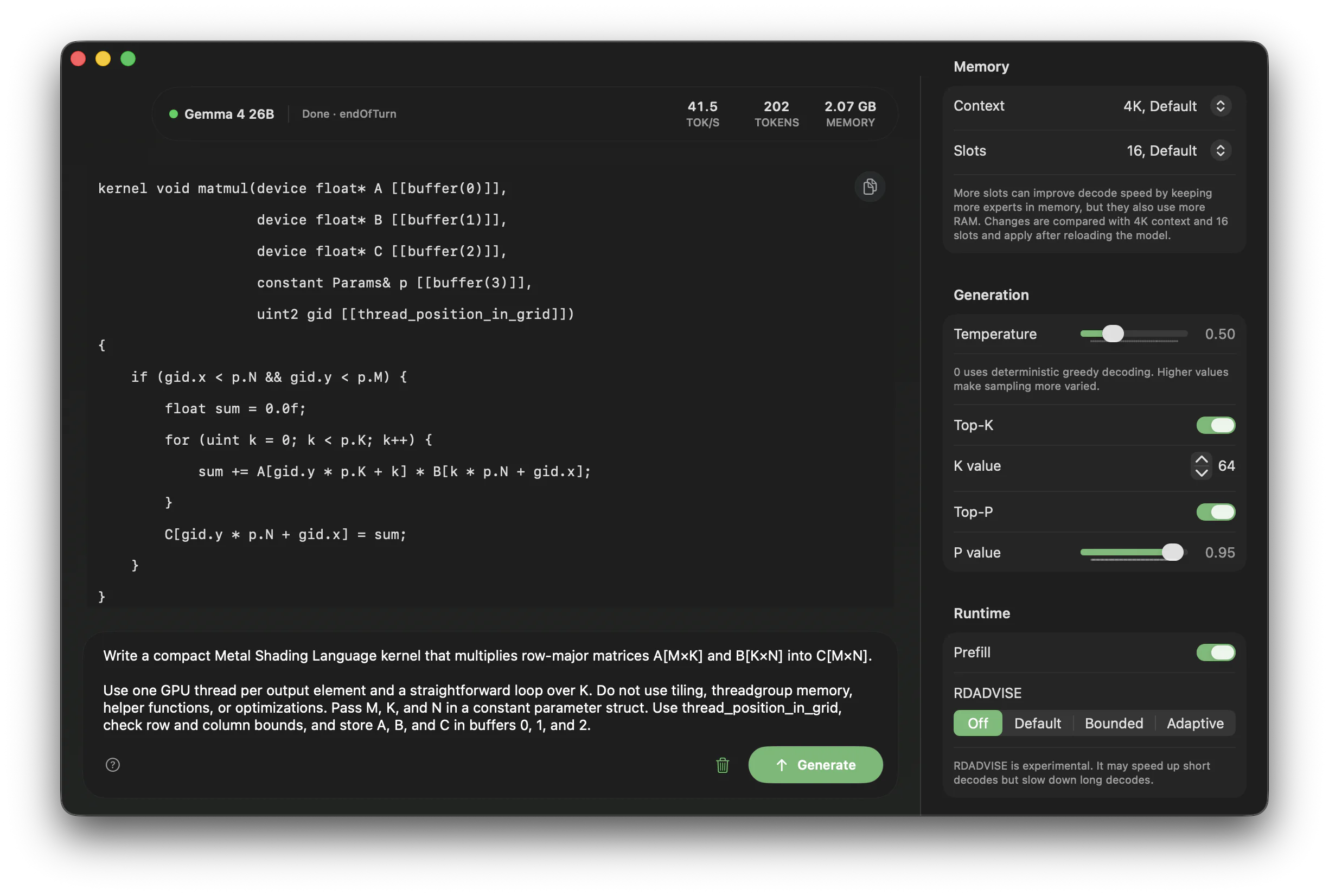
Memory got expensive. So I gave a 26-billion-parameter model a ~2 GB budget.
TurboFieldfare runs the instruction-tuned Gemma 4 26B-A4B without loading the entire 14.3 GB model into memory. It keeps the shared 1.35 GB core and FP16 KV cache in memory, then streams only the experts needed for each token from SSD. This is what lets the model run on Macs with 8 GB of RAM.
The runtime, streaming installer, CLI, and native Mac app are written in Swift and Metal. TurboFieldfare is model-specific rather than a wrapper around MLX or llama.cpp. The curated experiment record summarizes 103 measured results across kernels, caching, I/O, prefill, and decode.
Try it
git clone https://github.com/drumih/turbo-fieldfare.git
cd turbo-fieldfare
swift build -c release
.build/release/TurboFieldfareMac
On the first run, Swift Package Manager downloads and builds the Swift packages required by the tokenizer. The complete release build includes the foreground Mac app and its sibling decode-service executable.
When the app opens, choose Download Model and let TurboFieldfare fetch and repack the pinned model (about 15 GB). Once it is ready, choose Load Model, type your prompt, and press Generate.
At a glance
| Metric | Value |
|---|---|
| Model | Gemma 4 26B-A4B IT, 26B total parameters, about 3.88B active per token |
| Weights | MLX affine 4-bit, group 64; 8-bit router; 4-bit shared and routed experts |
| Memory | ~2 GB of weights and 4K KV cache |
| Storage | About 14.3 GB for the text model, plus about 1.1 GB for the optional image pack |
| Hardware | Apple Silicon Mac; 8 GB of RAM |
| Platform | macOS 26, Metal 4, Swift 6.2 |
| M2 measured decode | 5.1-6.3 tok/s on an 8 GB M2 MacBook Air |
| M5 measured decode | 31-35 tok/s on a 24 GB M5 Pro |
| Community Reports | Here |
The measured result is a reference point, not a performance ceiling. Prompt length, generated length, page-cache state, and hardware all affect throughput. See community benchmark results from other Macs, or follow the community benchmark guide to add your own.
Using TurboFieldfare
TurboFieldfare provides a native Mac app, a command-line interface, and an
experimental loopback OpenAI-compatible server. They use the same .gturbo
model directory, but only one model-owning product should run at a time.
The Swift package exposes six products:
| Product | Purpose |
|---|---|
TurboFieldfare | Swift library containing the runtime and Metal kernels |
TurboFieldfareMac | Native Mac app for installation and generation |
TurboFieldfareDecodeService | One-shot local model and Metal owner used by the Mac app |
TurboFieldfareCLI | Command-line instruction chat and raw completion |
TurboFieldfareServer | Loopback OpenAI-compatible Chat Completions server |
TurboFieldfareRepack | Streaming model installer and install verifier |
Requirements
- An Apple Silicon Mac; the validated target is an 8 GB M2 MacBook Air
- macOS 26 with Metal 4
- Apple Command Line Tools or Xcode with Swift 6.2+ and the macOS 26 SDK or newer
- Enough free storage for the ~14.3 GB model installation
- An internet connection for the first model install
The package is arm64-only. Older macOS and Metal versions are not supported.
Prompting the model
The Mac app treats what you type as an instruction and handles Gemma's chat formatting automatically. Just describe the task and include any context the model needs.
Generation defaults to temperature 0.2, Top-K 64, and Top-P 0.95. Set
temperature to 0 for deterministic greedy output. The model can still repeat
itself or give incorrect answers, so check important results.
The app and CLI support user and model messages plus optional system guidance; they do not expose or execute tools. The loopback server accepts function-tool declarations and returns model-produced tool calls for the client to authorize and execute. Audio and video are not supported.
Images
Images are supported through a vision tower, which installs as a companion pack beside the text model. Install it once and the app, CLI, and server all accept images. Without it they tell you image support is unavailable, and the text runtime is untouched. The image tower requires an M2 or newer Apple Silicon Mac; text-only inference remains available on M1.
System design covers how the tower runs and what it costs on an 8 GB machine.
Mac app
Clone the repository, then run the app from its root:
swift build -c release
.build/release/TurboFieldfareMac
Build the complete package so the app and its sibling decode service are both
available. New installs from this checkout default to scratch/gemma4.gturbo;
the app remembers a location you choose.
Build a Mac app
From the repository root, run:
Scripts/build_app.shThis creates dist/TurboFieldfare.app, which you can double-click or move to
Applications. Add --install to also copy it to ~/Applications.
The bundle includes the decode service and resources; model weights stay in
their selected folder. The script uses ad-hoc signing, so no Apple developer
account is required.
Install the model
Choose Download Model to install, or Change… to pick a destination.
To reuse a model, choose Use Existing Model… and select its .gturbo
folder or parent folder. If several models are found, pick one.
Keep the optional image pack beside its text model: gemma4.gturbo and
gemma4.vision.gturbo.
The installer never materializes the full source checkpoint. It streams the
required byte ranges from the pinned Hugging Face revision and repacks them
directly into the .gturbo layout as they arrive. This avoids a second full
checkpoint on disk and keeps scratch memory bounded.
The first installation transfers about 15 GB through bounded Hugging Face
range requests. Network speed and Hugging Face response times vary, so it can
take a while. The completed .gturbo installation occupies about 14.3 GB and
is accepted only after its manifest and file hashes have been validated.
Installation does not load the model into memory.
Load and generate
After installation:
- Choose Load Model.
- Enter a prompt in the composer.
- Choose Generate, or press Command+Return. Use Settings > Send Message With to choose Return or Command-Return.
- Send another message to continue the conversation, or choose New Chat to start over.
- Use the stop button or Escape to end generation early.
The status bar shows generation progress, decode speed, and memory use. Use the right pane to configure sampling, context length, expert-cache slots, and runtime options. See Runtime controls for details and defaults.
Use Settings → Text Size to enlarge conversation and message-editor text from 100% to 200%. Changes apply immediately and are remembered across launches.
Conversation history
The app saves chats locally so you can browse and continue them from the sidebar. Every launch opens an empty chat. Only one conversation's model context (KV cache) stays in memory. Browsing other chats keeps that cache intact; continuing another chat replaces it. New Chat starts fresh.
Settings and chats live in ~/Library/Application Support/TurboFieldfare/
(mac-app-settings.json and conversations/). A standalone app also uses
this folder for new model downloads by default. Moving the app does not move
these files or change a saved model location.
Command-line interface
The CLI uses an existing .gturbo installation. For a model installed through
the Mac app, pass its location with --model. To install from the command line:
swift run -c release TurboFieldfareRepack \
  --output scratch/gemma4.gturbo \
  --overwrite
Continue a cancelled or interrupted download:
swift run -c release TurboFieldfareRepack \
  --output scratch/gemma4.gturbo \
  --overwrite \
  --resume
Remove saved download state:
swift run -c release TurboFieldfareRepack \
  --discard-partial \
  --output scratch/gemma4.gturbo
The runtime accepts only a completed .gturbo directory with a final
manifest.json.
Verify an existing installation without loading the model:
swift run -c release TurboFieldfareRepack \
  --verify-install \
  --input-gturbo scratch/gemma4.gturbo
Install image support
The companion pack installs beside the text model:
swift run -c release TurboFieldfareRepack \
  --vision-output scratch/gemma4.vision.gturbo \
  --text-model scratch/gemma4.gturbo
The pack adds about 1.1 GB. Verify it with --verify-vision-install, remove an
installed one with --remove-vision-install, and drop a cancelled download with
--discard-partial --vision-output <dir>. A cancelled transfer can also be
continued with --resume. The Mac app installs the same pack from its
Image Support section.
Send an image
swift run -c release TurboFieldfareCLI \
  --model scratch/gemma4.gturbo \
  --chat-prompt "What is in this picture?" \
  --image photo.jpg
--image is repeatable and requires --chat-prompt; it cannot be combined
with --prompt or --messages-file. Without the companion pack the run stops
and says image support is unavailable.
A multi-turn conversation carries its images inside the messages file instead,
as image_file parts in any user message; --image covers the single-turn
case only. Either route needs at least 16 expert-cache slots, because an image
prompt always prefills chunked.
Instruction chat
Put chat messages in a JSON array and pass it with --messages-file:
[
  {"role": "user", "content": "Explain why chunked prefill reduces time to first token while keeping memory bounded."}
]
swift run -c release TurboFieldfareCLI \
--model scratch/gemma4.gturbo \
--messages-file messages.jsonThis formats messages in the same way as the Mac app. The CLI response limit
is set with --max-new, which defaults to 1,024 tokens. The Mac app can
generate until the selected context window is full.
Common generation options include --max-context, --temperature, --top-k,
--top-p, --repetition-penalty, --seed, and repeatable --stop strings.
Runtime options include --expert-cache-slots, --expert-cache-policy,
--prefill, --prefill-chunk-tokens, and --rdadvise; omitted options use
the production defaults. Run the following command
for the complete option list:
swift run -c release TurboFieldfareCLI --helpGenerated text goes to standard output. Timing statistics go to standard error;
add --quiet to suppress that footer in scripts.
Local OpenAI-compatible server
Build the server and point it at an installed model:
swift build -c release --product TurboFieldfareServer
.build/release/TurboFieldfareServer \
  --model scratch/gemma4.gturbo
It listens on http://127.0.0.1:8080/v1 and supports Chat Completions,
streaming, function tools, and single-prefix prompt reuse. The client must
authorize and run every tool call. Keep the server on loopback; it has no
remote authentication or TLS.
See Local server for a test request, Python and OpenCode setup, prompt reuse, tool handling, and the supported API subset.
Test and contribute
Run the public test suite serially:
Scripts/test.shBefore starting a model run, close memory-heavy apps and check
memory_pressure -Q. If it reports little free memory, postpone the run. Run
only one TurboFieldfare app, decode service, CLI, server, test, or other
local-model process at a time.
To contribute a comparable performance result, follow the community benchmark guide.
How the inference engine works
At each transformer layer, Metal computes attention and the router from
resident weights. The CPU uses the router's top-8 expert IDs to plan against
the layer's 16-slot LFU cache, then fills misses with bounded parallel pread
calls into Metal-visible buffers. Metal computes the resident shared-expert
branch while those reads run, then combines the shared and routed outputs.
Prompt prefill uses chunks of up to 128 tokens so one fetched expert can serve
multiple rows. Generation repeats the routed layer loop one token at a time.
The installer applies the same bounded-memory rule: it repacks remote ranges
directly into .gturbo without staging a full shard or tensor.
For a video overview of TurboFieldfare, see Better Stack's Local AI On Apple Silicon uses 7X Less RAM.
For a visual introduction to the model architecture, see Maarten Grootendorst's A Visual Guide to Gemma 4.
System design explains the .gturbo layout, memory
ownership, prefill, router handoff, cb1/io/cb2 phases, Metal kernels, and
correctness invariants.
Status and scope
TurboFieldfare currently includes:
- Remote streaming repack into the
.gturbomodel format - Instruction-tuned Gemma 4 26B-A4B with verified chat formatting
- 4-bit MLX affine embedding, attention, shared-expert, and routed-expert weights, with an 8-bit router
- Custom Metal kernels for quantized GEMV, attention, MoE, normalization, RoPE, sampling, and production fusions
- SSD-backed routed-expert streaming with a bounded expert cache
- Chunked prefill for one-shot prompts and new conversational turns, followed by token-by-token generation
- FP16 KV storage with bounded circular storage for 25 sliding-window layers and linear storage for 5 full-attention layers
- Exact split-K/V decode attention with distinct normalized K and V paths
- A Swift library, streaming installer, command-line interface, loopback OpenAI-compatible server, and native SwiftUI/AppKit Mac app with a sibling local decode service
- Optional image input from a separately installed companion pack: the vision tower runs on bounded scratch, image rows attend in both directions inside the sliding-window layers, and routed experts are released while the tower runs
Current scope is text input from the pinned Gemma 4 26B-A4B instruction checkpoint on Apple Silicon Macs with at least 8 GB of RAM, plus image input on M2 or newer Macs. Audio and video are out of scope.
Future work
- Build iPhone and iPad apps, then measure inference speed and memory use on mobile hardware.
- Benchmark more Apple Silicon Macs, especially the base 16 GB M4 Mac mini and other 8 GB models.
Experiments and technical documentation
The experiments that shaped TurboFieldfare explain the largest wins, the plausible ideas that failed, and the early results that reversed under stronger validation. The detailed experiment record keeps all 103 audited entries as optional evidence.
Useful entry points:
- Local OpenAI-compatible server
- System design
- Benchmarks
- The experiments that shaped TurboFieldfare
- Experiment inventory and summaries
- Implementation references
License and model terms
TurboFieldfare's source and documentation are licensed under the Apache License 2.0.
Model weights are not included. The installer downloads them separately from the pinned Hugging Face checkpoint, and the weights remain governed by their source terms. See THIRD_PARTY_NOTICES.md for the model and Swift package license review.
TurboFieldfare is an independent research project. It is not affiliated with, sponsored by, or endorsed by Google.
Afterword and the project name
Thanks for checking out this project!
My name is Andrey Mikhaylov. You can find me on LinkedIn. I am the author of TurboFieldfare and an iOS and Metal engineer. Most of my work is with images, video, and on-device AI.
I dedicate this project to my wife, Sasha, the most supportive person I know. She stands by me even through the hardest times. She loves wildlife, goes birdwatching, and volunteers with our local birding community. Because of her, I have also grown closer to birds and nature.
TurboFieldfare is named after the fieldfare, a member of the thrush family and my favourite bird. It is not the most noticeable or brightly coloured bird, but it definitely has a character and unique features of its own. I think the same is true of this project: it may not be the most practical, but I built it with my favourite tools, especially Metal, in my favourite field, on-device ML inference. It definitely has its own character and unique features.
Next time you are outside, touch the grass and listen to the birds. Sometimes it is the most beautiful thing you can do. And if you can, support your local wildlife community. They do important work.
Thank you!