




 Русский |
 English
[!CAUTION] THIS REPOSITORY IS AN EDUCATIONAL EXAMPLE FOR LEARNING NGINX, REVERSE PROXY, AND NETWORK SECURITY BASICS. THIS SCRIPT DEMONSTRATES NGINX SETUP AS A REVERSE PROXY. NOT FOR PRODUCTION AND NOT FOR PRODUCTION USE! IF YOU DON'T UNDERSTAND HOW THE CONTROL PANEL WORKS - THAT'S YOUR PROBLEM, NOT THE SCRIPT AUTHOR'S. USE AT YOUR OWN RISK!
Overview
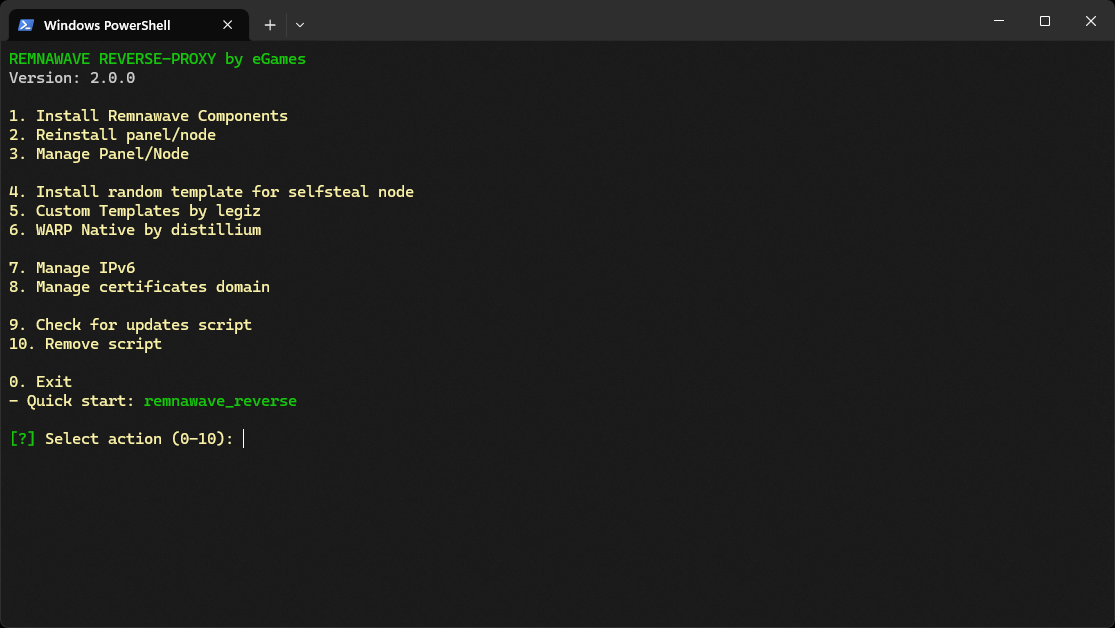
This script installs the Remnawave control panel, Xray nodes and the subscription page, and after installation it stays on the server as a management menu: a dozen and a half modules, from subscription rules to backups.
The reverse proxy runs on NGINX or Caddy. The architecture is built for speed: Xray takes port 443 and passes traffic to the web server through a Unix socket, with no extra network hops in between.
| Version | Systems | Web server | Privileges |
|---|---|---|---|
| 3.8.3 | Debian, Ubuntu | NGINX or Caddy | root |
[!IMPORTANT] The script was tested in a KVM virtualization environment. For proper operation, you will need your own domain. It is recommended to run with root privileges on a freshly installed system.
Deployment Modes
1. Single Server Mode
- Control panel and Xray node installed on one machine
- Suitable for compact installations with moderate traffic
2. Distributed Mode
- Panel Server: Management center without an Xray node
- Node Server: Hosts the Xray node with a SelfSteal stub for VLESS REALITY
Available installation options: panel with node, panel with subscription page, panel only, node only, subscription page only, plus connecting another node to a running panel.
Domain Requirements
Prepare three domains or subdomains before installation:
- Control Panel: Access to the management interface
- Subscription Page: Client configuration distribution
- SelfSteal Stub: Camouflage website hosted on the node server
Documentation
[!TIP] All documentation lives in the wiki in two languages: step-by-step installation with sample output, module configuration pages, and troubleshooting.
Full wiki · Introduction · Installation · Troubleshooting
Quick Start
Execute the following command to begin installation:
bash <(curl -Ls https://raw.githubusercontent.com/eGamesAPI/remnawave-reverse-proxy/refs/heads/main/install_remnawave.sh)If GitHub is unreachable, use the jsDelivr mirror:
bash <(curl -Ls https://cdn.jsdelivr.net/gh/eGamesAPI/remnawave-reverse-proxy@main/install_remnawave.sh)
Modules
Installation and maintenance
| Module | What it does |
|---|---|
| Install components | Five installation modes plus connecting a new node to a running panel |
| Panel management | Service status, start and stop, updates, logs, Remnawave CLI, panel access |
| Backup and restore | PostgreSQL database and panel configuration backup, restore on the same or a new server, delivery to Telegram, Google Drive and S3, scheduled copies |
| Script updates | Update check and installation, runs as the short rr command |
Node extensions
| Module | What it does |
|---|---|
| SelfSteal template | Disguises the node as a regular website, with a set of templates to choose from |
| Node Plugins | Node plugins through the panel, for example Torrent Blocker |
| Xray core | A fresh Xray core instead of the stock one |
| SSH access to remote machines | A list of saved servers and running commands on them |
| Server routing | Selected domains go through the exit server, the rest of the traffic goes directly |
| Client balancer | One subscription entry instead of a host list, the client switches to a working host automatically |
Subscriptions
| Module | What it does |
|---|---|
| Subscription and response rules | Panel rule presets: which clients receive which configs, the device limit, JSON and extra paths |
| Subscription page | The Orion template instead of the stock page, and switching back |
Networking and certificates
| Module | What it does |
|---|---|
| WARP Native | A WARP connection on the selected node |
| NetBird | A WireGuard overlay for panel-to-node traffic, with one-off setup keys and a public fallback path |
| IPv6 management | Enable and disable IPv6 on the server |
| Certificate management | Reissue domain certificates and switch the issuing method |
Monitoring
| Module | What it does |
|---|---|
| Xray Checker | Proxy availability checks, a results dashboard and Telegram notifications |
Domain Setup
Certificates are issued in one of the following ways:
- DNS API: Cloudflare, Gcore or Bunny.net. Wildcard certificate, DNS records are created automatically via an API key
- ACME HTTP-01: No API key, one domain per certificate
- Own certificates: Already issued on your server, renewed manually
DNS configuration examples
Single Server Installation (panel + node together)
| Record Type | Name | Value | Proxy Status |
|---|---|---|---|
| A | example.com | your_server_ip | DNS only |
| CNAME | panel.example.com | example.com | DNS only |
| CNAME | sub.example.com | example.com | DNS only |
| CNAME | node.example.com | example.com | DNS only |
[!TIP] The
node.example.comrecord is optional for SelfSteal functionality. You can use the root domainexample.cominstead.
Distributed Installation (panel and node on different servers)
| Record Type | Name | Value | Proxy Status |
|---|---|---|---|
| A | example.com | panel_server_ip | DNS only |
| CNAME | panel.example.com | example.com | DNS only |
| CNAME | sub.example.com | example.com | DNS only |
| A | node.example.com | node_server_ip | DNS only |
Installation Guide
Along the way the script asks for the interface language, the web server (NGINX or Caddy), the certificate issuing method, the panel protection option and the domain details.
Single server deployment
- Run the installation script
- Select "Install Remnawave Components"
- Select "Install panel and node on one server"
- Wait for completion
- The script will automatically restart services and display login credentials
Distributed deployment (panel and node on different servers)
Step 1: Panel Server Setup
- Run the installation script on the first server
- Select "Install Remnawave Components"
- Select "Install panel only"
- Save the provided credentials
Step 2: Node Key Export
- Log in to the control panel
- Navigate to Nodes → Management
- Select the target node
- Find the "Secret Key (SECRET_KEY)" field
- Copy the value using the copy icon
Step 3: Node Server Setup
- Run the installation script on the second server
- Select "Install Remnawave Components"
- Select "Install node only"
- Paste the key when prompted
- Confirm the successful node connection message
Security
Panel Access Protection
With NGINX the panel is guarded by a secret cookie link (default) or a TinyAuth login page. With Caddy there is a third option: a login page with multi-factor authentication.
The secret link looks like this:
https://panel.example.com/auth/login?<SECRET_KEY>=<SECRET_KEY>
How it works:
- Opening the link with the correct parameter sets a cookie in the browser: its name and value both equal
<SECRET_KEY> - The panel opens only when the correct cookie is present
- Without the parameter and the cookie, a scanner sees a blank page or a 404 error
This scheme hides the panel from host scanning, path brute-force and login attempts.
Server level
- Firewall: UFW opens only the required ports
- TCP: BBR congestion control
- Camouflage: SelfSteal stub with a random website template
- Panel-to-node network: traffic inside the NetBird overlay never touches the public internet
[!CAUTION] This repository is intended solely for educational purposes and for studying the principles of reverse proxy servers and network security. The script demonstrates proxy server configuration using NGINX for reverse proxy, traffic management, and attack protection.
We strongly remind you that using this tool to bypass network blocks or censorship is illegal in a number of countries where laws exist regulating the use of technologies to circumvent internet restrictions.
This project is not intended for use in ways that violate information protection laws or interfere with censorship mechanisms. We are not responsible for any legal consequences associated with using this script.
Use this tool/script solely for demonstration purposes, as an example of reverse proxy operation and data protection. We strongly recommend deleting the script after familiarization. Further use is at your own risk.
If you are unsure whether using this tool or its components violates the laws of your country - refrain from any interaction with this tool.
Community
Join our Telegram community for support and discussions:
Telegram chat: https://t.me/remnawave_reverse
Donations
If you like this project and want to support its further development, please consider making a donation. Your contribution helps fund future updates and improvements!
Donation Methods:
- TON USDT:
UQAxyZDwKUPQ5Bp09JOFcaDVakjYQT46rf3iP3lnl_qc9xVS