
Antirion
The fastest open-source AI gateway.
One Rust binary, with the admin console built in, between your apps and every model provider.



Performance · Getting started · Deploy · Features · Architecture · Docs
[!TIP] Faster than Bifrost and LiteLLM. On the same dedicated machine, Antirion adds a fraction of Bifrost's overhead with a fraction of its CPU and memory, and keeps serving at rates where LiteLLM fails. See the benchmark.
Why Antirion
- The fastest gateway we have measured. Sub-millisecond overhead at thousands of requests per second on 4 vCPUs, and several times the throughput of the next fastest gateway on the same machine (Performance). Rust, no garbage collector, no interpreter, one data thread per CPU.
- One binary, console included. The gateway, the Admin API and the web console ship as a single Rust binary (or a distroless image). No sidecars, no separate UI deployment, no runtime to install.
- Every major provider behind one API. OpenAI, Azure OpenAI, Anthropic, Amazon Bedrock, Google Vertex AI, Gemini, Mistral, Cohere, Groq, Together, Fireworks, DeepSeek, xAI, Cerebras, DeepInfra, Perplexity, and any OpenAI- or Anthropic-compatible server such as vLLM. Clients speak OpenAI, Anthropic, Gemini or Bedrock; Antirion translates between them.
- Routing that keeps you up. Fallback chains, weighted splits, least cost, least latency, least busy, tiers, content classifiers, retries, hedging and circuit breakers, decided per request and recorded in the request log.
- Spend under control. Rate limits and budgets in dollars or tokens on the organization, team, project and key, with prices per Model, a cost ledger and alerts before a budget runs out.
- Safety at the edge. Guardrails for PII, secrets, keywords, regexes, JSON schemas, tool permissions, topics, moderation, model-based judges and partner services that catch prompt injection, on requests, responses and streams, with redaction that keeps the format.
- Ready for production. Exact and semantic caching, MCP and agent gateways, SSO with OIDC, SAML and SCIM, an audit log with change requests, and a standalone node or a cluster on PostgreSQL and Valkey.
Performance
Antirion, Bifrost 2.2.4 and LiteLLM 1.103.1 ran on the same dedicated AWS c7i machines, interleaved repetition by repetition, each with the same minimal setup: one key checked on every request, no request logging, no cache. Every figure is the median of the repetitions.
Simple chat at 5,000 requests per second, gateway on one c7i.xlarge (4 vCPUs)
| Antirion | Bifrost 2.2.4 | LiteLLM 1.103.1 | |
|---|---|---|---|
| Overhead p50 | 0.53 ms | 19.7 ms | — |
| Overhead p99 | 0.95 ms | 95.2 ms | — |
| Errors | 0% | 0% | 100% |
| CPU per request | 247 µs | 717 µs | — |
| Peak memory | 215 MiB | 1,389 MiB | 1,851 MiB |
| Idle memory | 41 MiB | 498 MiB | 1,653 MiB |
More scenarios, same machine
| Scenario | Antirion | Bifrost 2.2.4 | LiteLLM 1.103.1 |
|---|---|---|---|
| Throughput over 64 concurrent connections | 21,512 req/s | 6,568 req/s | 424 req/s |
| Highest rate sustained on 4 vCPUs (saturation) | 14,000 RPS | 3,500 RPS | under 500 RPS |
| Simple chat at 10,000 RPS, overhead p50 / p99 | 0.61 ms / 1.50 ms | 12.1 s / 19.1 s | 100% errors |
| Invalid key rejected at 20,000 RPS, p50 / p99 | 0.30 ms / 0.75 ms | 1.86 s / 2.49 s | 100% errors |
| Unknown model rejected at 20,000 RPS, p50 / p99 | 0.57 ms / 1.27 ms | 17.7 s / 27.4 s | 100% errors |
How it is measured. The load generator and the upstream each run on their own c7i.4xlarge in
the same cluster placement group, so only the gateway is under test. Load is open loop: every
request leaves at its scheduled time and latency counts from that time, so queueing in front of a
slow gateway shows. The upstream answers at once, so the overhead is the gateway's own time.
docs/benchmarks.md has the method, the configurations of all three gateways
and the validity rules. Reproduce it: the harness is in bench/, and
docs/benchmarks.md has the steps to run the same
benchmark on your own AWS account.
Getting started
You need Docker and an API key from OpenAI or Anthropic.
1. Start the gateway.
docker run -p 8080:8080 -p 8081:8081 -v antirion-data:/var/lib/antirion eliasbiondo/antirionNo config file is needed. The first start prints the console's address and an admin token, shown that once:
  Console      http://localhost:8081/ui/
  Admin token  ak-antirion-…
               Shown on this first start only; it is kept in
               /var/lib/antirion/data/bootstrap-token
  Data plane   http://localhost:8080/v1
The data plane (the /v1 API your apps call) is on port 8080, the admin plane (the Admin API and
the console) on 8081. The gateway keeps its data in the antirion-data volume, so a new container
finds the same providers, keys and history. docker run --rm eliasbiondo/antirion serve --help
lists the ports, the data directory and the other settings.
2. Sign in. Open http://localhost:8081/ui/ and paste the admin token into Admin token.
Lost it? It is kept in the volume:
docker cp <container>:/var/lib/antirion/data/bootstrap-token - | tar -xO. From the console you
can invite your team, so everyone signs in with their own account.
3. Add a provider. Providers → Add provider, choose OpenAI or Anthropic and paste its API key. Test the connection: the gateway asks the provider for its models, and the provider is saved only once the test passes, so a wrong key shows here. Then Add provider.
4. Add a Model. Models → Add model, pick the provider, then a model from the list the
provider returned, such as gpt-4.1-mini or claude-haiku-4-5. The list shows each model's list
price, which applies when you leave the price fields blank. Name it chat, the name your apps will
send, and Add model.
5. Create a key and send a request. API keys → Create key, name it my-app (the project
default is already chosen), then Copy: the key is shown once.
export ANTIRION_API_KEY=sk-antirion-…   # the key you copied
curl -s http://localhost:8080/v1/chat/completions \
  -H "Authorization: Bearer $ANTIRION_API_KEY" -H 'Content-Type: application/json' \
  -d '{"model": "chat", "messages": [{"role": "user", "content": "Hello"}]}'
Any OpenAI SDK works the same way: point its base URL at http://localhost:8080/v1. Anthropic
SDKs point at http://localhost:8080.
6. See it in the Request log. Request log lists the request with its status, Model, key, tokens, latency and cost; select it for the details, from the route taken to the cost ledger. The Playground sends requests from the console.
For a gateway with email, run it with Docker Compose: invitations, password resets and email alerts go to Mailpit at http://localhost:8025, so nothing leaves your machine until you configure a real SMTP server.
No API key yet? docs/getting-started.md shows a way to try Antirion without one, and covers other ports and host names, real email, the cluster, Kubernetes and running from source.
Deploy
Antirion runs as a single standalone node with an embedded store, or as a cluster of nodes that share PostgreSQL and Valkey. Pick the way you run things.
Docker
The image is distroless, runs as UID 65532 and keeps its data in the volume /var/lib/antirion.
Release images are published to Docker Hub as eliasbiondo/antirion and to
ghcr.io/eliasbiondo/antirion for every vX.Y.Z tag; to build your own, run
docker build -f docker/Dockerfile -t antirion . in the repository.
Without a config file, the image runs a standalone node with the embedded store in the volume and
generates a bootstrap token and an encryption key there; the first start prints the token in the
log. The console's origin is http://localhost:8081: set ANTIRION_PUBLIC_ORIGIN when you open it
at another address, and ANTIRION_BOOTSTRAP_TOKEN and ANTIRION_ENCRYPTION_KEY to bring your own.
docker run -d --name antirion -p 8080:8080 -p 8081:8081 -v antirion-data:/var/lib/antirion eliasbiondo/antirion
docker logs antirion    # the console's address and, on the first start, the admin token
To run from a config file, mount it and pass serve --config:
cat > antirion.yaml <<'YAML'
version: 1
server: { listen: "0.0.0.0:8080" }
admin: { listen: "0.0.0.0:8081" }
store: { backend: embedded, embedded: { path: /var/lib/antirion/data } }
auth: { admin: { bootstrap_token: "${env:ANTIRION_BOOTSTRAP_TOKEN}" } }
security: { secrets: { encryption_keys: ["${env:ANTIRION_ENCRYPTION_KEY}"] } }
YAML
export ANTIRION_BOOTSTRAP_TOKEN=$(openssl rand -hex 24) ANTIRION_ENCRYPTION_KEY=$(openssl rand -base64 32)
docker run -d --name antirion --read-only -p 8080:8080 -p 8081:8081 \
  -e ANTIRION_BOOTSTRAP_TOKEN -e ANTIRION_ENCRYPTION_KEY \
  -v "$PWD/antirion.yaml:/etc/antirion/antirion.yaml:ro" -v antirion-data:/var/lib/antirion \
  eliasbiondo/antirion serve --config /etc/antirion/antirion.yaml
Keep both values: the token signs you in at http://localhost:8081/ui/, and the key seals the provider keys you store.
Docker Compose
cp .env.example .env    # then set ANTIRION_BOOTSTRAP_TOKEN and ANTIRION_ENCRYPTION_KEY
docker compose up -d                          # one node, embedded store, Mailpit for email
docker compose -f compose.cluster.yaml up -d  # two nodes on PostgreSQL and Valkey behind a proxy
The cluster needs both values in .env, with a bootstrap token of at least 32 characters, and
publishes the same ports, so stop the standalone node first (docker compose down).
Kubernetes
The Helm chart is deploy/helm/antirion. It pulls the release image matching its version from
ghcr.io/eliasbiondo/antirion (image.repository, image.tag), and generates the bootstrap token
and the encryption key into the Secret <release>-keys once, keeping them across upgrades
(secrets.existingSecret names your own).
# Standalone: one replica, the embedded store on a persistent volume.
helm install antirion deploy/helm/antirion \
  --set persistence.size=8Gi \
  --set console.publicOrigin=https://antirion.example.com

# Cluster: several replicas on your PostgreSQL and Valkey.
kubectl create secret generic antirion-postgres --from-literal=url='postgres://user:password@host:5432/antirion'
kubectl create secret generic antirion-valkey --from-literal=url='redis://host:6379/0'
helm install antirion deploy/helm/antirion \
  --set mode=cluster --set replicaCount=3 \
  --set postgresql.bundled.enabled=false --set postgresql.external.existingSecret=antirion-postgres \
  --set valkey.bundled.enabled=false --set valkey.external.existingSecret=antirion-valkey \
  --set console.publicOrigin=https://antirion.example.com

kubectl get secret antirion-keys -o jsonpath='{.data.bootstrap-token}' | base64 -d; echo   # the token
--set mode=cluster on its own bundles PostgreSQL and Valkey, for trying it out.
autoscaling.enabled, serviceMonitor.enabled and the rest are documented in
deploy/helm/antirion/values.yaml.
Binaries
Every release has the binary for Linux (glibc 2.36 or later) on amd64 and arm64, at
https://github.com/eliasbiondo/antirion/releases, as antirion-<tag>-linux-<arch>.tar.gz with
antirion-<tag>-sha256sums.txt, signed and with provenance. Unpack it anywhere on your PATH and
run antirion. On macOS and Windows, run the container image or build it from source.
From source
(cd console && pnpm install --frozen-lockfile && pnpm build)   # the console: Node 22+ and pnpm
cargo build --release -p antirion                              # the toolchain is pinned in rust-toolchain.toml
export ANTIRION_BOOTSTRAP_TOKEN=$(openssl rand -hex 24)
./target/release/antirion serve --config ci/standalone.yaml    # data on :18080, admin and console on :18081
ci/standalone.yaml keeps its embedded store in ./dev-data; ./target/release/antirion with no
arguments runs the same zero-config gateway as the container, with its data in ~/.antirion. The
binary also validates a configuration offline (antirion validate -f <file>), prints its schema
(antirion schema) and checks a node's health (antirion healthcheck).
Features
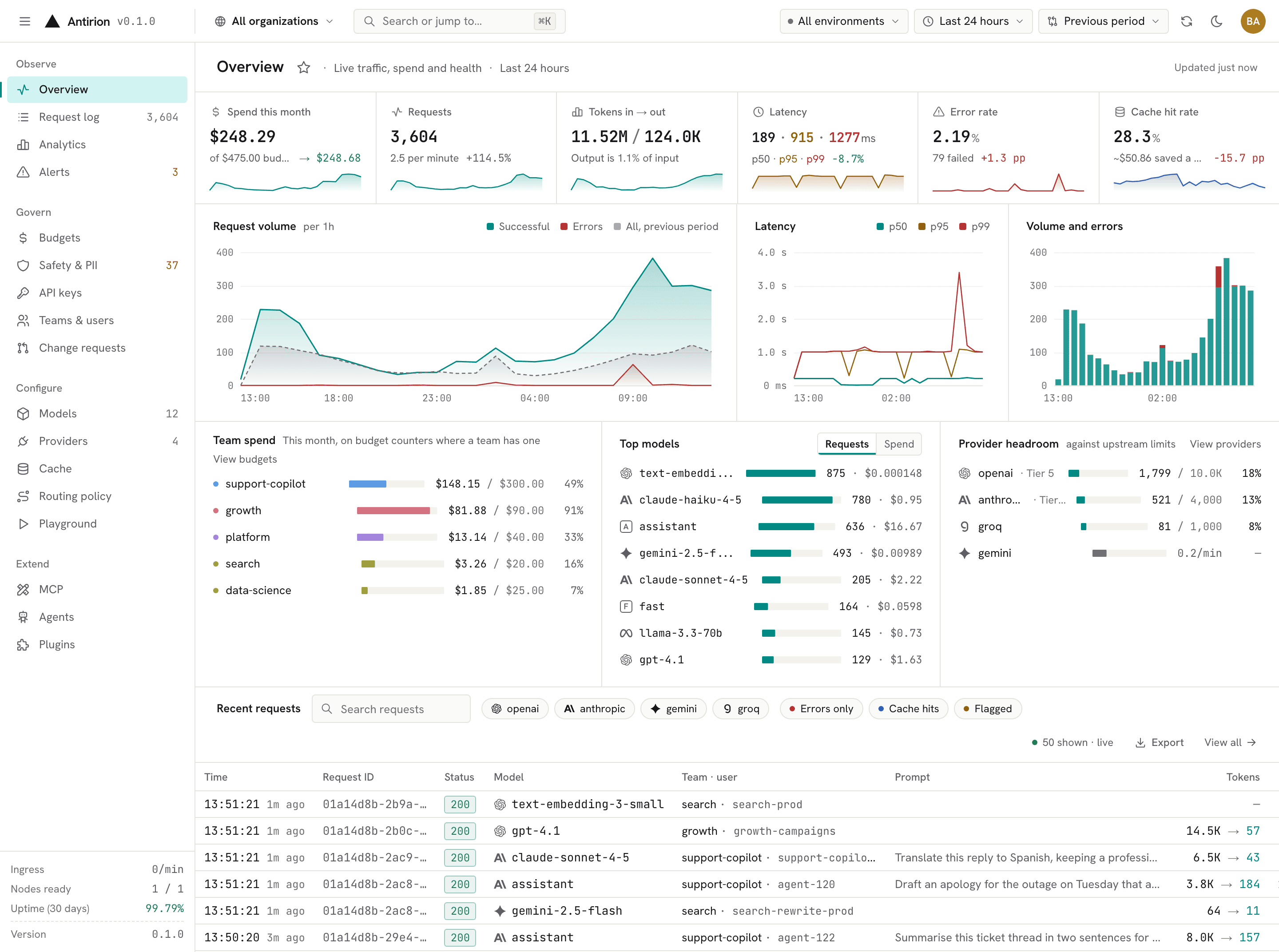
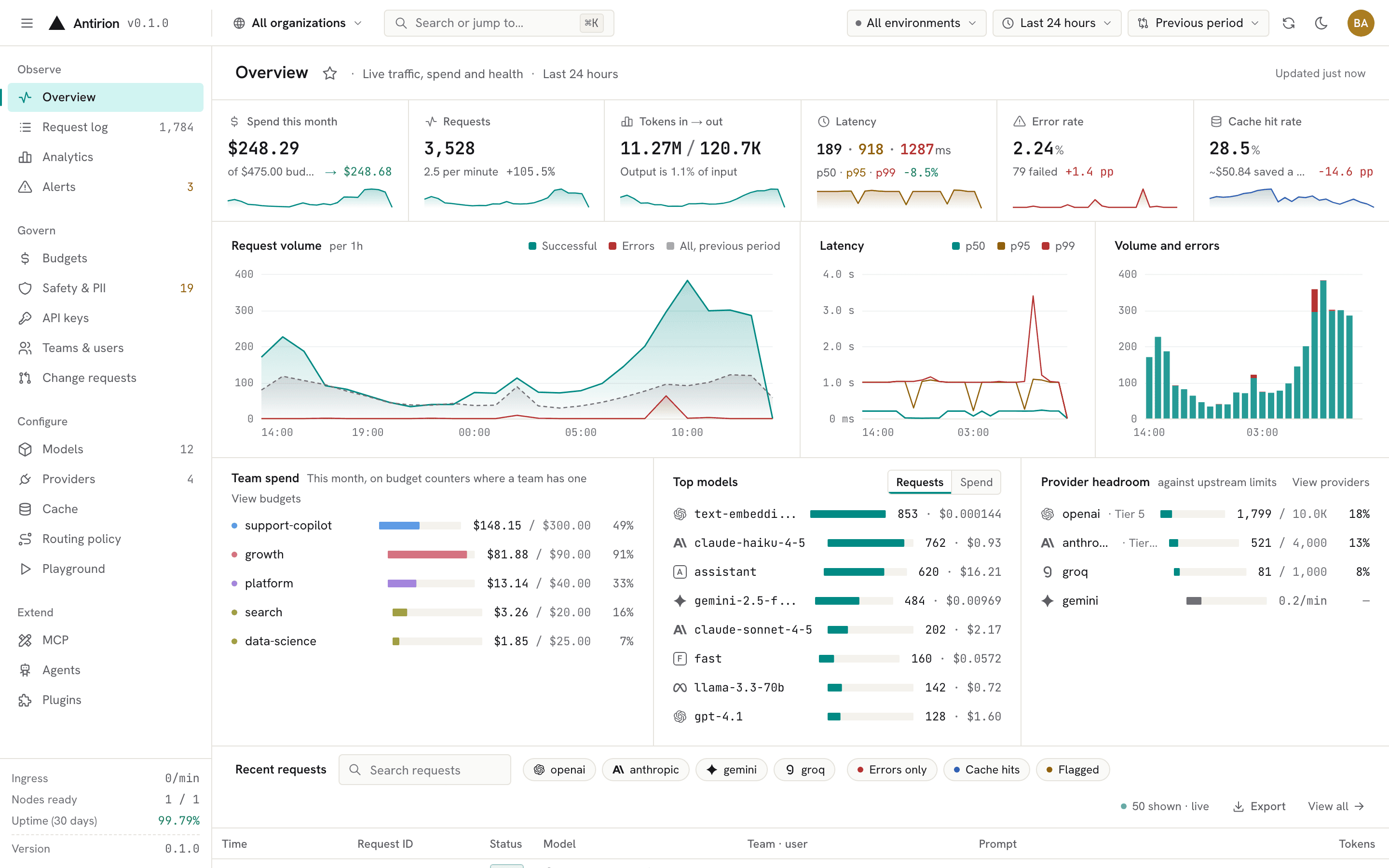 Overview. Spend, volume, latency, errors and cache hits at a glance, against the previous period. |
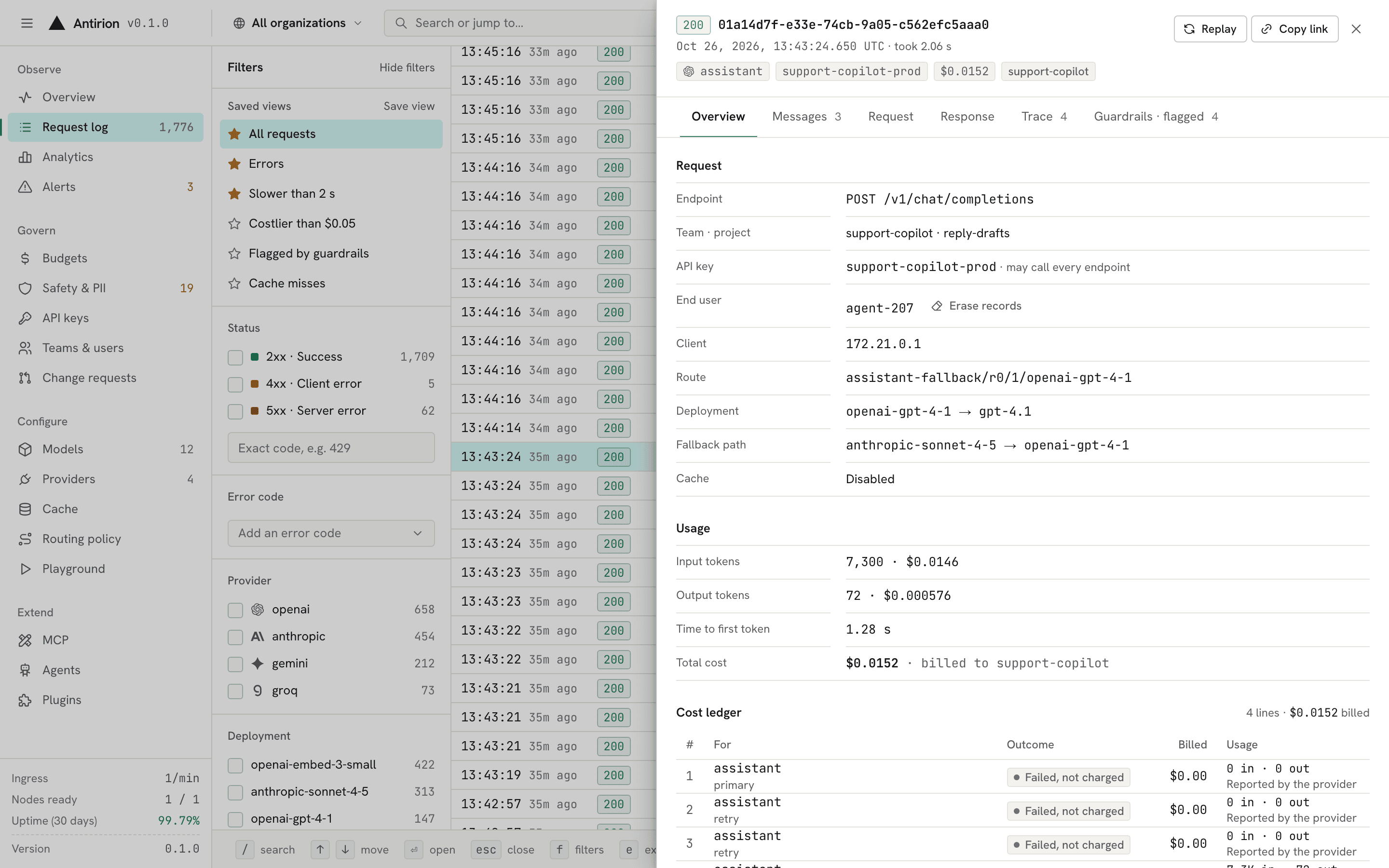 Request log. Every request with its route, attempts, tokens, cost, guardrails and, when you turn it on, its content. |
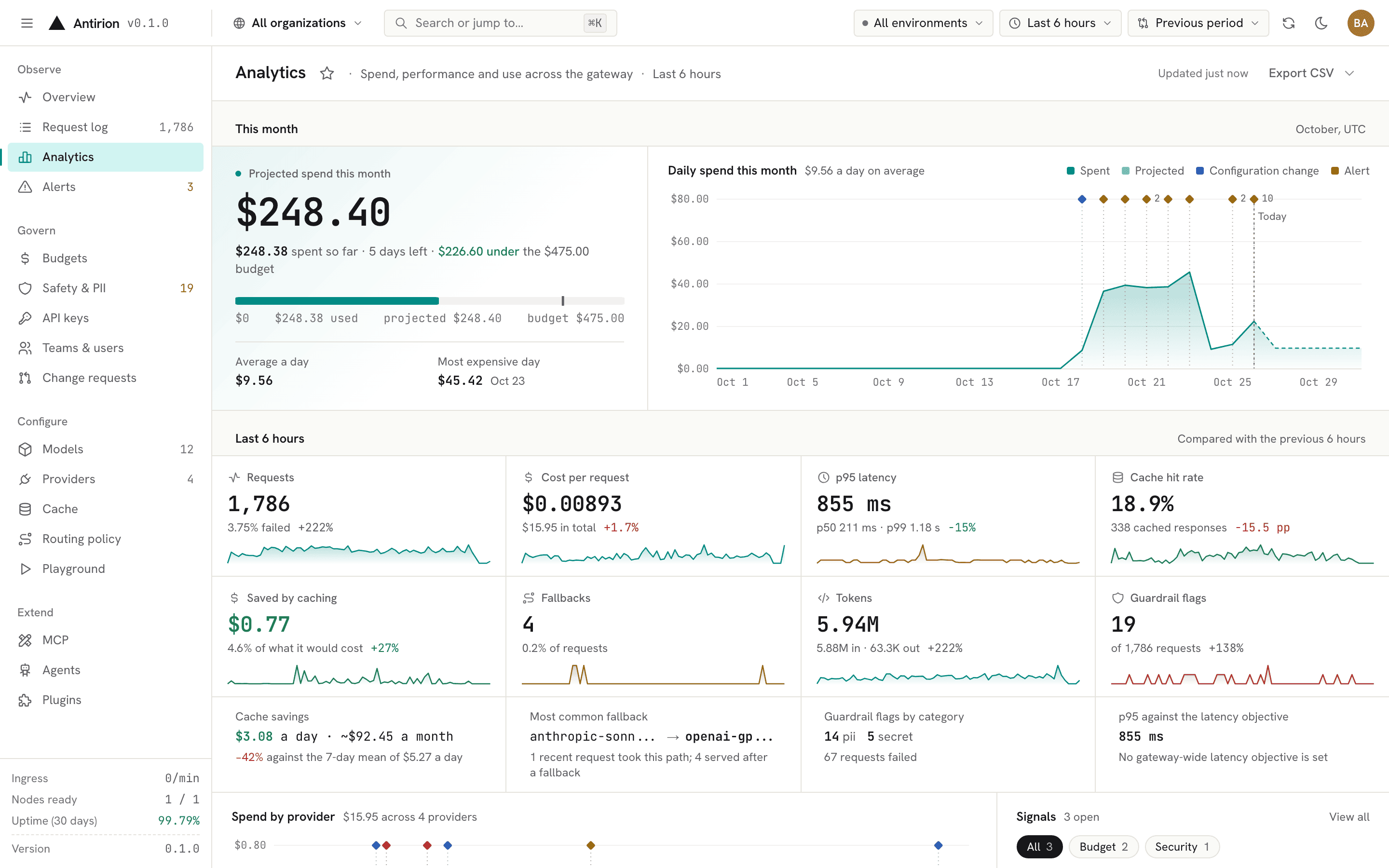 Analytics. Spend for the month and its projection, and every metric against the previous period, by Model, provider, team, key and person. |
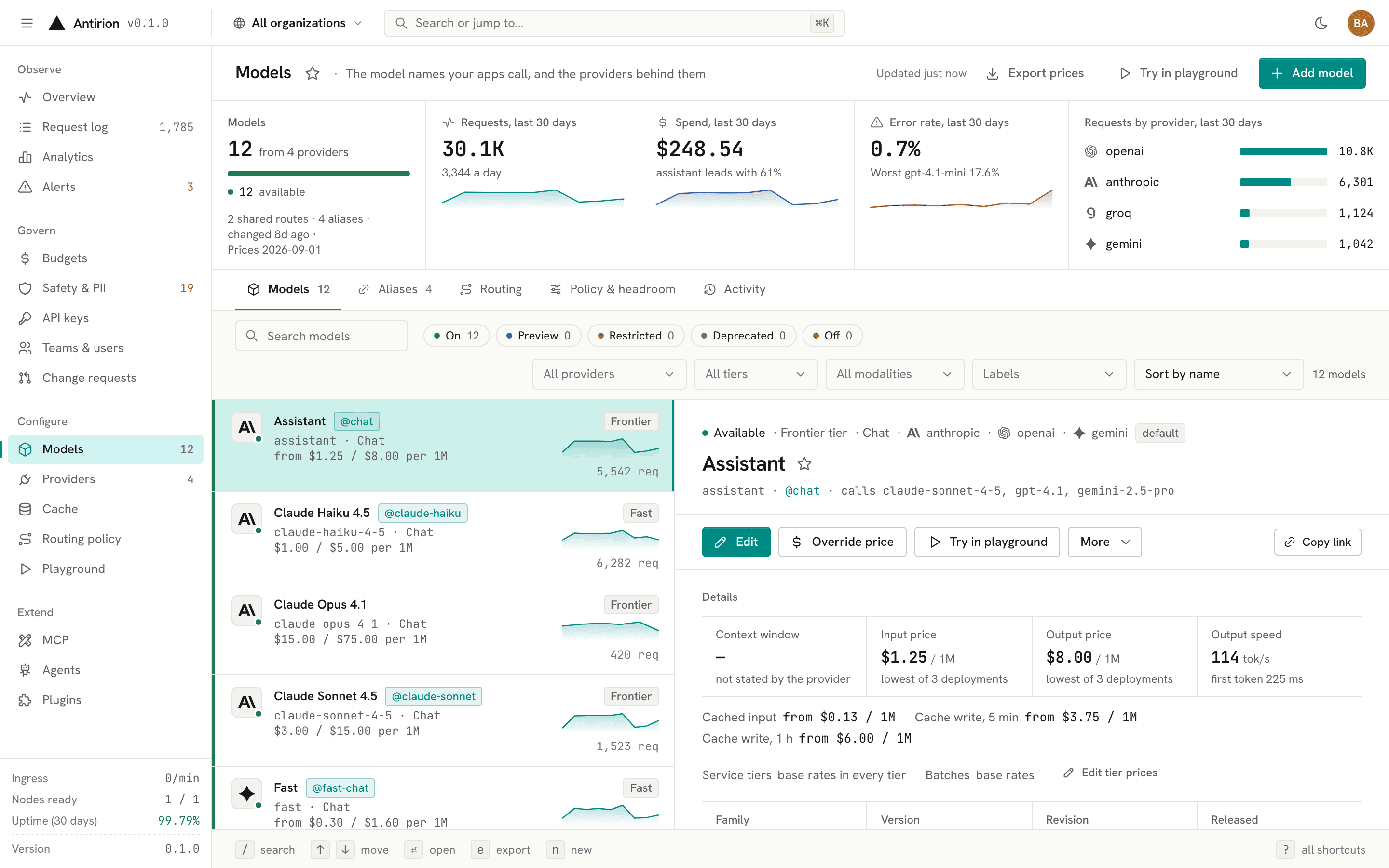 Models. The names your apps call, with tiers, aliases, prices and the deployments behind them. |
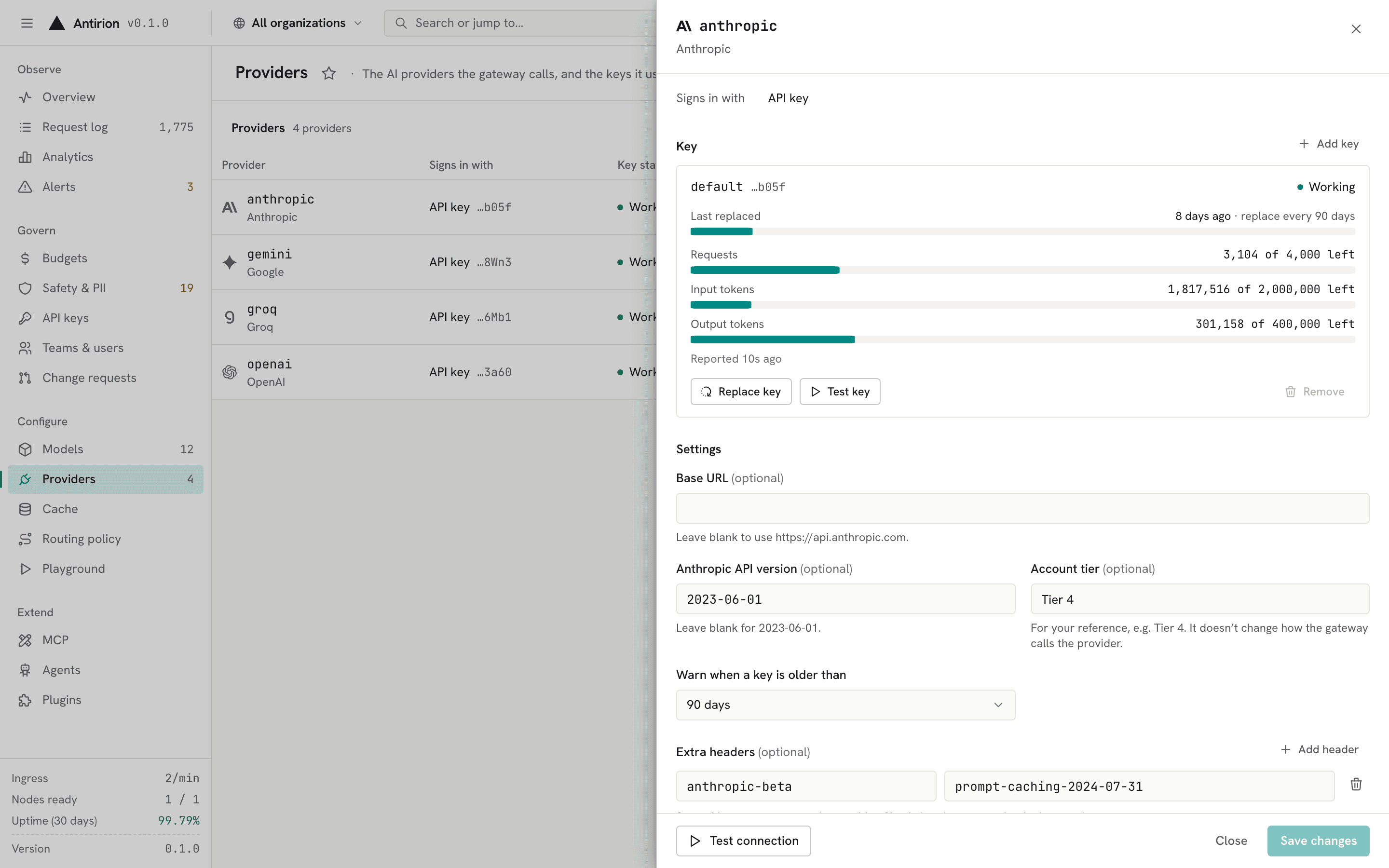 Providers. Each provider's keys with their rate-limit headroom, connection tests and settings. |
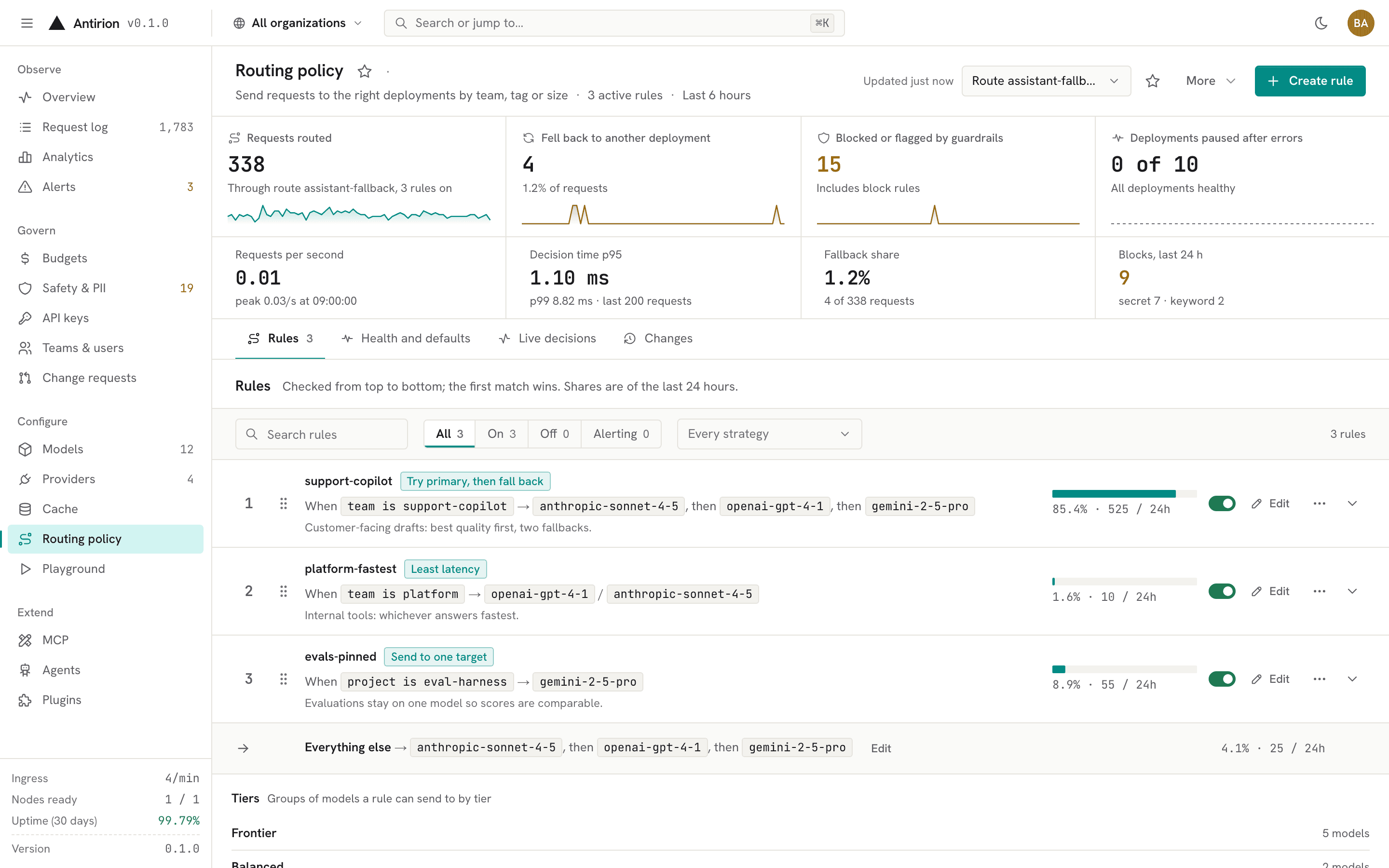 Routing policy. Rules by team, project or tag, each with its strategy and share of traffic, ahead of a default fallback. |
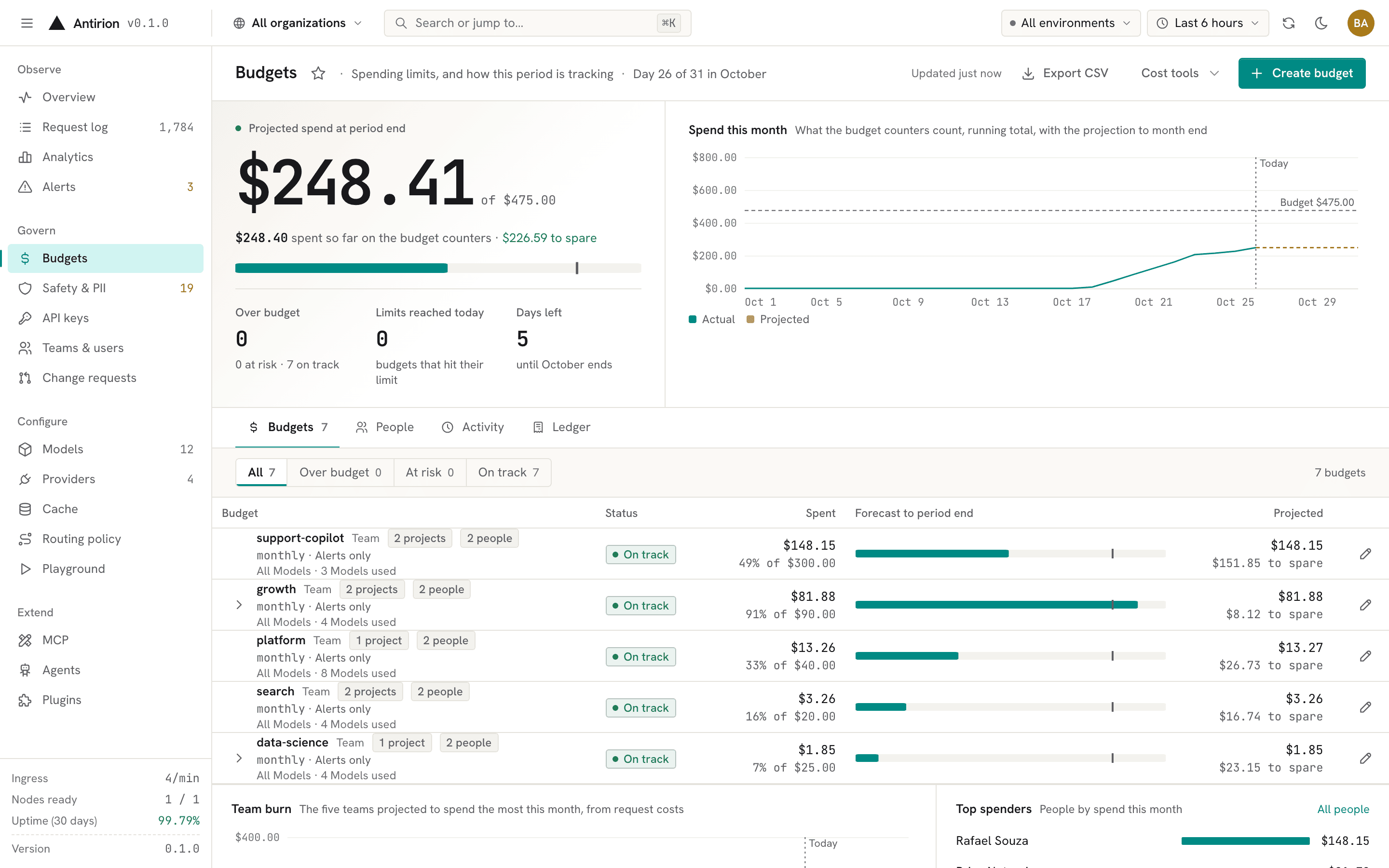 Budgets. Limits per organization, team, project and key, with projections and the ledger behind every number. |
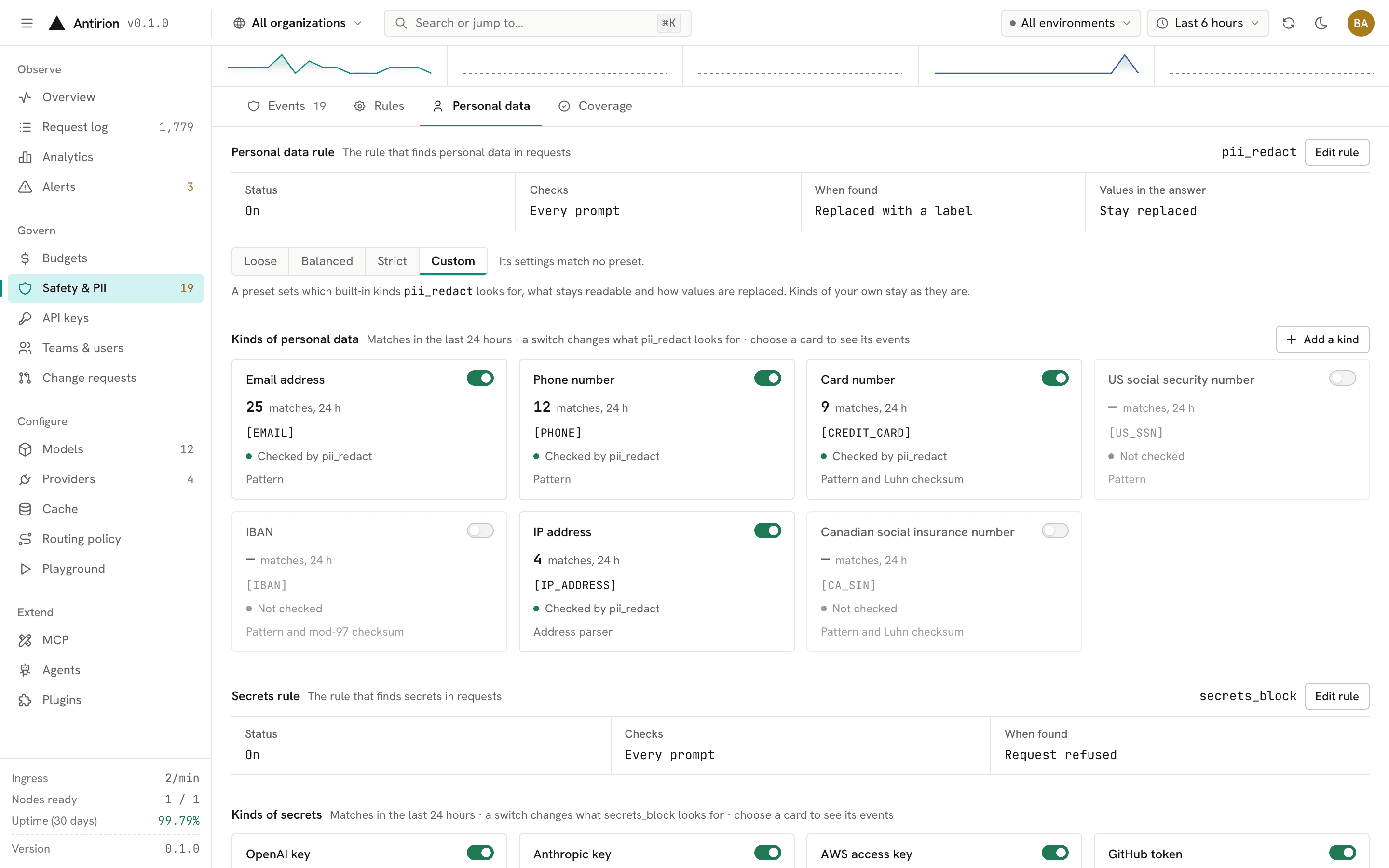 Safety & PII. Which kinds of personal data and secrets each rule checks, what replaces them, and what it caught. |
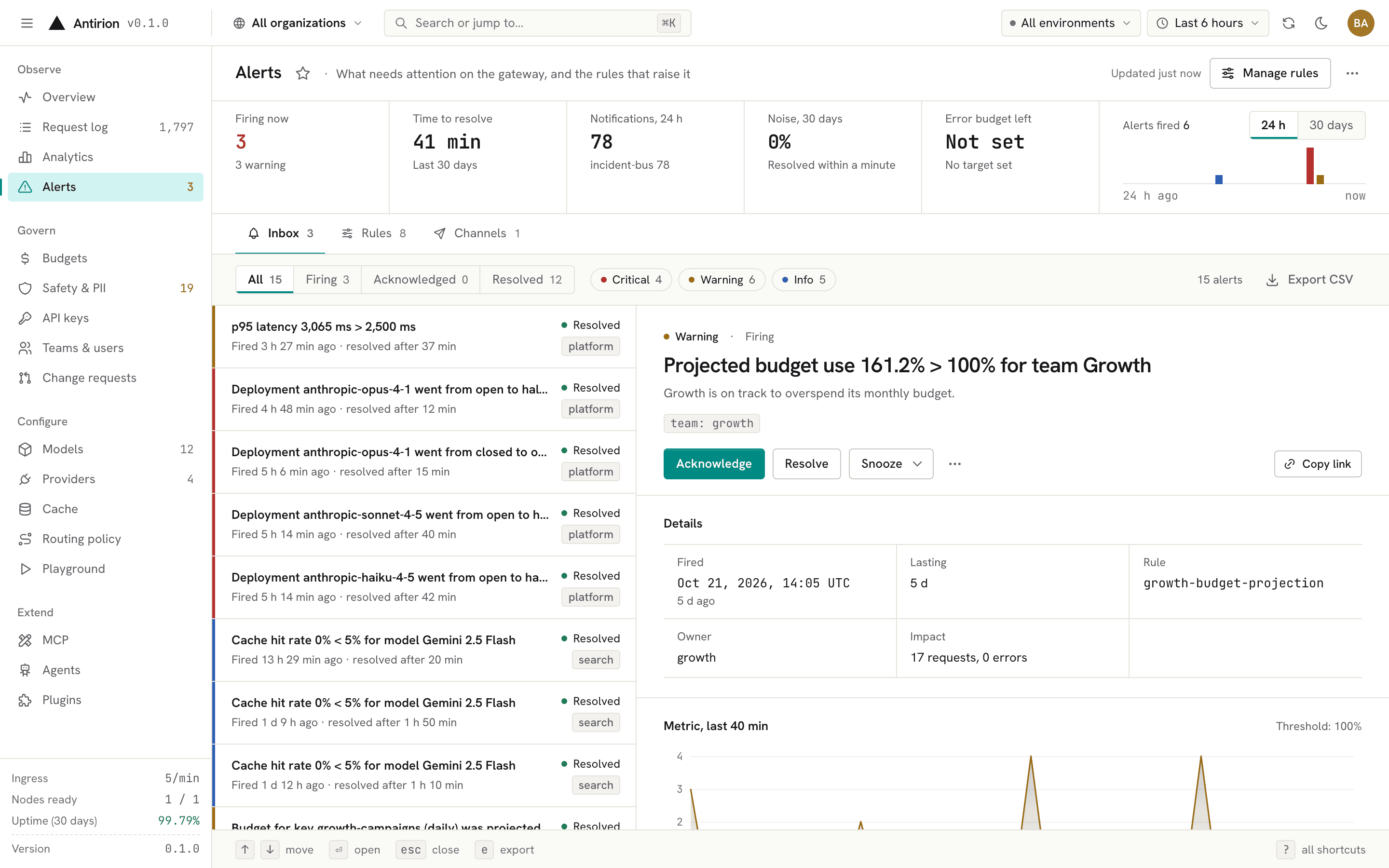 Alerts. Metric and event rules, notification channels, timelines and objectives. |
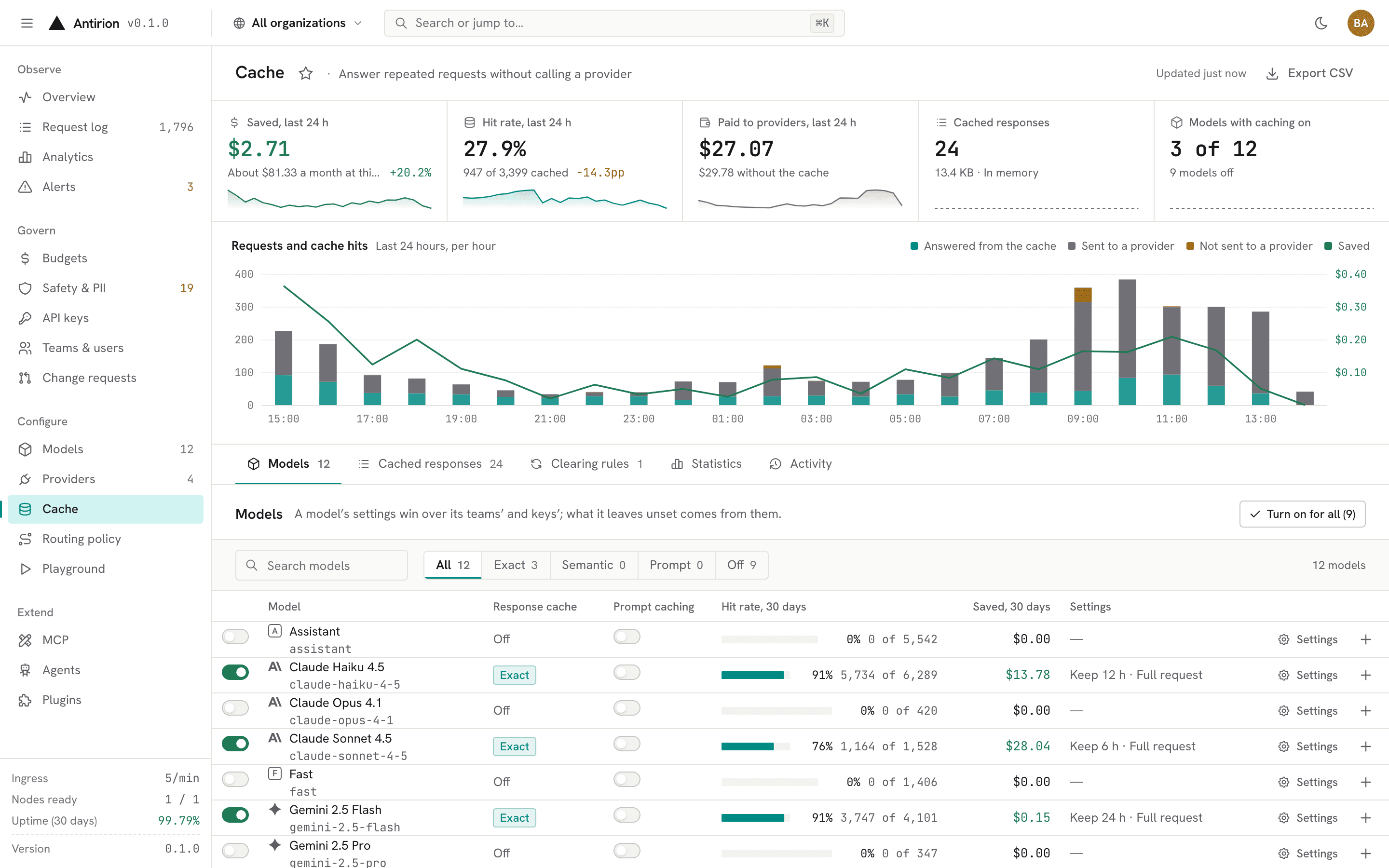 Cache. Exact and semantic caching per Model, team or key, with hit rates, savings and clearing rules. |
Routing and resilience
- Route trees built from
fallback,weighted(smooth weighted round robin, random or Thompson sampling for experiments),least_cost,least_latency,least_busy,conditional,classifierandcost_qualitynodes, plus model tiers (frontier,balanced,fast,specialized) that pick among the Models of a tier. - Retries with backoff, a cross-request retry budget, request hedging, circuit breakers with half-open probes, cooldowns per key and deployment, and response predicates that reject a bad 2xx answer.
- Session and prompt-prefix affinity, shadow traffic to a mirror, and pool scheduling for self-hosted servers that reads their load and prefix and LoRA adapter state.
- Translation between dialects: an OpenAI Chat client can call a Claude deployment, an Anthropic Messages client can call GPT, and streams are translated event by event.
POST /routes/{name}:simulateand the console's simulator show which deployment a request would reach, and why.
Cost control
- Rate limits on requests, tokens or concurrency (GCRA or sliding window) and budgets in dollars or tokens, daily to yearly, calendar or rolling, soft, hard or held for approval, at the gateway, organization, team, project, key and Model levels.
- Prices per deployment with input, output, cached, reasoning, audio and image rates, tiered and batch prices, and a bundled catalog of list prices for the models you add.
- A spend ledger with one line per charge, re-costing of a past window under new prices, and overage requests that an admin approves or denies.
- Budget projections, run-out dates and cost alerts, plus cache hits that can be served even when a budget is spent.
Safety and data protection
- Guardrails:
pii(email, phone, credit card, SSN, IBAN, IP address and more),secrets(provider keys, cloud credentials, tokens, private keys),keywords,regex,json_schema,tool_permission,length,moderation,llm_judge,classifier,topic,templateandwebhookchecks, plus partner safety services for content and prompt-injection detection. - Actions
block,redact(with format-preserving masks),flagordivert, on the input, the output and streams, blocking, asynchronous or in parallel with the call. - A safety event for every hit, reviewable in the console, with statistics by category, guardrail, key and team.
- Request content is logged only when a policy turns it on, with PII masked, hashed or dropped, and a zero-data-retention mode per level.
Observability
- A request log with the route taken, every attempt and why it failed, tokens, cost, cache status, guardrail verdicts and timing, searchable with facets and saved views.
- Analytics by Model, provider, deployment, team, key and person, with comparisons against a previous period.
- Prometheus and OpenMetrics metrics on the admin listener, OTLP traces, logs and metrics, and HTTP log sinks.
- Alert rules on latency, error and fallback rates, utilization, spend, budget projections, guardrail events and cache hit rate, or on events, sent to Slack, PagerDuty, email, webhooks or browser push; service-level objectives with daily availability.
Identity and access
- Virtual keys per project with allowed Models, providers, endpoints, IP ranges and expiry; JWT keys checked against your issuers; bring-your-own provider keys.
- Organizations, teams, projects and users with built-in and custom roles bound per scope.
- Console sign-in with local accounts (TOTP and WebAuthn second factors), OIDC, SAML and GitHub single sign-on, and SCIM provisioning of users and groups.
- An audit log of every change, streamed to HTTP audit sinks, and change control: a change request, or a second person's approval, for the changes you choose.
Operations
- The whole configuration is one document: a YAML file, the Admin API or the console, validated against a published JSON Schema, with numbered generations, diffs and rollback.
- Standalone with an embedded store, or a cluster of nodes on PostgreSQL and Valkey that share counters, budgets, cache and health.
- Graceful drain, readiness and liveness probes, and secrets read from the environment, files, HashiCorp Vault, AWS Secrets Manager, Google Secret Manager or Azure Key Vault, sealed at rest.
- A distroless image that runs as a non-root user on a read-only root filesystem, release binaries with an SBOM, Sigstore signatures and SLSA provenance, and a Helm chart.
Extensibility
- An MCP gateway: remote servers over Streamable HTTP or HTTP+SSE, local
stdioservers and OpenAPI documents served as tools, behind one endpoint with namespacing, grants, tool approval, limits and guardrails. - An A2A proxy for agents, with their cards, behind the same keys, limits and request log as model traffic.
- Plugins: hooks at each stage of a request, as signed webhooks or WebAssembly components, with JSON Patch edits.
- The Admin API is described by an OpenAPI document (
openapi/admin-api.yaml); everything the console does goes through it.
Architecture
flowchart TB
    apps["Apps and agents<br/>OpenAI, Anthropic, Gemini and Bedrock SDKs · MCP and A2A clients"]
    operators["Operators<br/>browser · scripts · CI"]

    subgraph antirion["Antirion · one binary"]
        direction LR
        subgraph data["Data plane :8080"]
            direction TB
            auth["Authenticate<br/>virtual keys · JWT · BYOK"]
            admit["Admit<br/>rate limits · budgets"]
            guard_in["Input guardrails<br/>PII · secrets · policies"]
            cache["Cache<br/>exact · semantic"]
            route["Route<br/>fallback · cost · latency · tiers"]
            attempt["Attempt<br/>retries · hedging · breakers · translation"]
            guard_out["Output guardrails<br/>record · cost ledger"]
            auth --> admit --> guard_in --> cache --> route --> attempt --> guard_out
        end
        subgraph admin["Admin plane :8081"]
            direction TB
            console["Web console /ui"]
            api["Admin API"]
            config["Configuration generations<br/>audit · change control"]
            console --> api --> config
        end
    end

    providers["Model providers<br/>OpenAI · Azure · Anthropic · Bedrock · Vertex · Gemini<br/>Mistral · Cohere · vLLM and more"]
    store[("Store<br/>embedded, or PostgreSQL + Valkey")]
    telemetry["Prometheus · OTLP · alerts · audit sinks"]

    apps --> auth
    operators --> console
    operators --> api
    attempt --> providers
    data --> store
    config --> store
antirion --> telemetry- The data plane serves the model APIs (
/v1/chat/completions,/v1/responses,/v1/messages,/v1/embeddings, Gemini and Bedrock paths, Files, Batches, Realtime, MCP and A2A). Each request is authenticated, admitted against its limits and budgets, checked by the input guardrails, looked up in the cache, routed, sent with retries and checked again on the way out. Its record (route, attempts, tokens, cost, verdicts) is written once it settles. - The admin plane serves the Admin API and the console. Configuration changes are validated, committed as a new generation and applied to every node without a restart.
- The store keeps configuration, keys, the request log, the spend ledger and the audit log. A standalone node embeds it; a cluster shares PostgreSQL for state and Valkey for counters, budgets and the cache.
The code is a Rust workspace of layered crates, from parsing and the wire formats up to the pipeline, the Admin API and the binary; docs/development.md has the map.
Documentation
- Getting started:
docker run, Compose, the first request, ports and host names, test mode, email, the Compose cluster, Kubernetes with Helm and running from source. - Development guide: the crate map, a request's path through the data plane, where each concern lives and the conventions of the code.
- Console: the console's commands, layout and screens.
- Admin API: the OpenAPI document of every admin operation, also
served by the gateway at
/admin/v1/openapi.jsonand linked from the console's account menu. - Configuration schema: the JSON Schema of the configuration
document (
antirion schemaprints it).
Contributing
Contributions are welcome. CONTRIBUTING.md covers the development setup (the pinned Rust toolchain, pnpm, the gateway and the console in dev), the checks every pull request must pass, Conventional Commits and the pull request flow. docs/development.md is the place to start reading the code.
Security
Please report vulnerabilities privately, as described in SECURITY.md, not in public issues.
License
Copyright 2026 Elias Biondo. Antirion is licensed under the Apache License, Version 2.0; see NOTICE for attributions.