Wind Waker Recomp
Source fork of BlueWake, based on upstream commit
31b8a722fee3.
The app and build scripts retain the BlueWake name and bundle identifier. Upstream license and
credits are preserved below and in RIGHTS_AND_LICENSES.md.
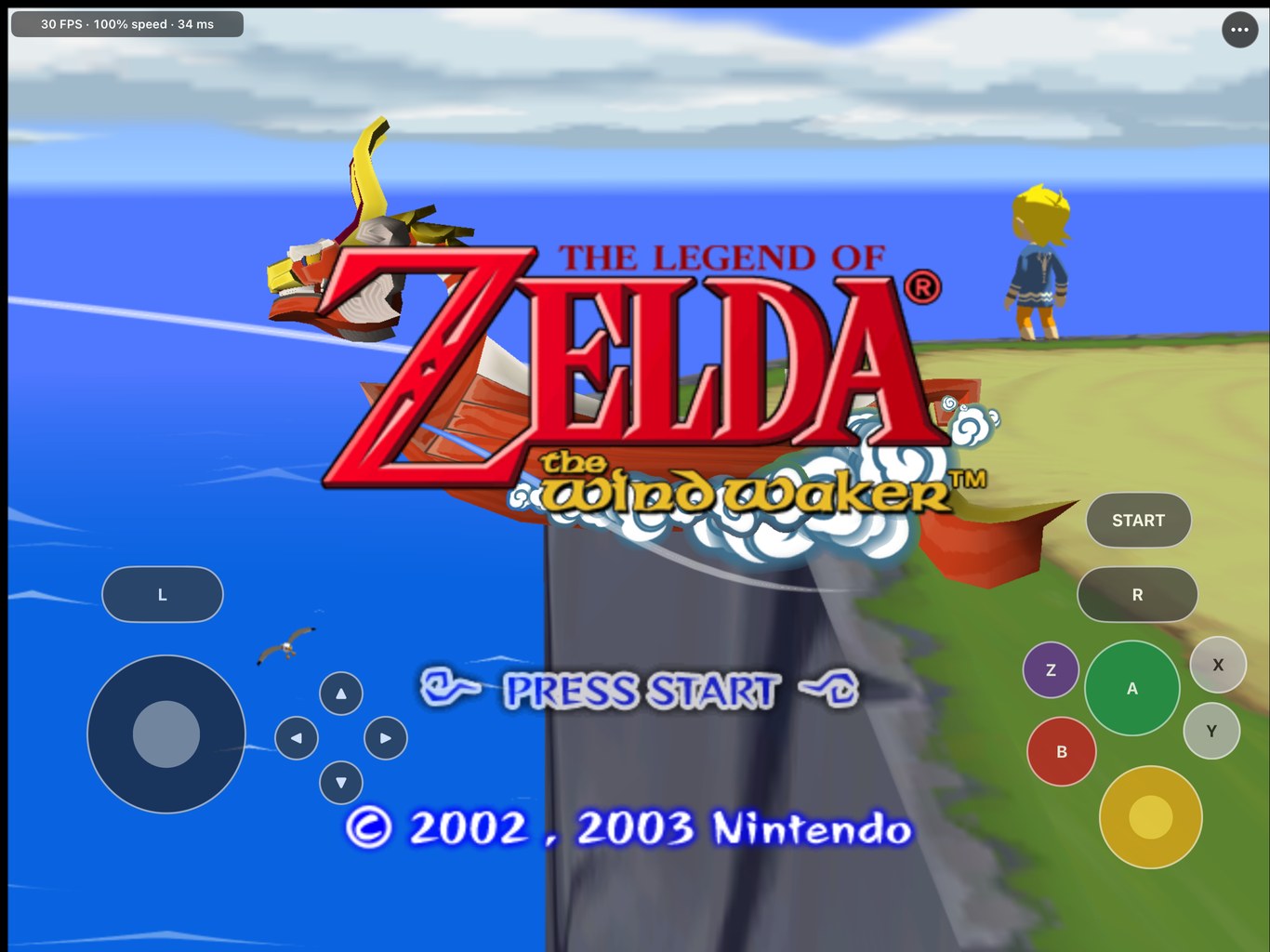
The Legend of Zelda: The Wind Waker, running natively on Windows, Mac, iPhone and iPad.
A static recompilation of the GameCube original, with Direct3D 12 and Metal rendering, Smooth Motion
at 60 or 120 FPS, widescreen, save states, wall climbing, controllers, mouse and keyboard, touch
controls and mods.









[!IMPORTANT] Bring your own disc. Wind Waker Recomp needs your own legally obtained copy of The Wind Waker for GameCube, USA version (
GZLE01, revision 0). No disc image, game files, textures, audio or saves are included anywhere: the app asks for your disc image and checks it.Windows and Mac: download and play. Ready-made apps for Windows 10 and 11 (x64) and Apple Silicon Macs (macOS 15 or later) are on the Releases page. They contain the recompiled game code; at the first launch you choose your disc image (
.iso,.gcmor a Dolphin.rvz) and play. See Windows and Mac.iPhone and iPad: build your own. No prebuilt IPA is provided. You build it on a Mac from your disc and install it on your own device; see iPhone and iPad.
AI disclosure: Wind Waker Recomp is developed with substantial AI assistance for code, testing, documentation and debugging. The status log records what has actually been checked, and on what.
Questions or bugs? Join the Discord or open an issue.
Features · Controls · Windows · Mac · iPhone and iPad · Performance · Mods · Known issues · FAQ
What is it?
Wind Waker Recomp translates the game's PowerPC code, the main executable and all 415 of its modules, into native code ahead of time: x86-64 for Windows, arm64 for Mac, iPhone and iPad. The app runs that code with a compatibility runtime for the GameCube's hardware: memory and timing, disc and memory card, controllers, DSP audio, and graphics through Direct3D 12 on Windows and Metal on Apple devices. Nothing is compiled while you play, so it needs no JIT; the few rare instructions the translator does not handle fall back to an interpreter.
The runtime is derived from Dolphin and keeps an interpreter fallback, so this is a static recompilation with a hardware compatibility layer, not an "emulation-free" rewrite.
Features
What Wind Waker Recomp adds to the game. Most of it is an option in the settings (F1), so you can play with as much or as little of it as you like.
New in 0.2.0: save states and climbing any wall on Windows and Mac, and a faster graphics thread for slower CPUs on both.
Picture and frame rate
| Feature | What it adds |
|---|---|
| Smooth Motion (Windows, Mac) | The game runs at its own 30 frames a second, and the renderer draws in-between frames blended from the game's own: 60 FPS by default, or 120 FPS on a display of 100 Hz or more. It follows the camera and what the game moves itself. On by default; F10 turns it off and on (Windows) |
| 60 Hz gameplay (Windows, experimental) | The game itself runs 60 times a second instead, on a fast CPU. Movement, cutscenes and some timers are still being converted (docs/SIMULATION_60HZ.md) |
| Widescreen | 16:9 or 16:10, with the camera, culling and HUD widened; or the game's own 4:3 |
| Resolution and filtering | Render at up to 4× the GameCube's 480 lines, or at the window's own pixels, with texture filtering up to 16× anisotropic |
| HD texture packs | Dolphin-format packs for GZLE01, such as Hypatia's HD pack (you add the pack yourself) |
| Fullscreen and windows | Fullscreen, black bars or a stretched picture, and a window that remembers its place and size |
Gameplay
| Feature | What it adds |
|---|---|
| Save states (Windows, Mac) | Saves the whole running game, like an emulator's save state, to come back to that exact moment: F5 saves, and F8 (Windows) or F9 (Mac) loads the latest. Also in the settings |
| Climb any wall (Windows, Mac; off by default) | Link climbs plain walls the way he climbs ivy, as in Breath of the Wild, on a stamina wheel drawn beside him (12 seconds by default, 4 to 30). When it runs out he lets go, and he can climb again once it has refilled on the ground |
| Better Wind Waker | Wind Waker HD's quality-of-life changes, each on or off: Swift Sail, instant text, faster climbing and more (Better Wind Waker) |
| Quick doors | Link goes through a door without the walk-in, and it does not close behind him |
| Fast scene changes | Short fades, and the black between areas runs as fast as the computer can |
| Jump and sprint buttons (Windows, Mac) | A dedicated jump (Space, or a controller's left bumper) and sprint (Shift, or a click of the left stick) |
Controls
| Feature | What it adds |
|---|---|
| Controllers | Xbox, PlayStation, Switch Pro and other controllers work as a GameCube pad, next to the keyboard and mouse |
| Fast right-stick camera (Windows, Mac) | The right stick turns the view directly, like a mouse, instead of the game's eased C-stick camera, and aims in first person and with items; its click is first person. The left stick zooms the telescope and the Picto Box. The game's own camera is an option |
| Mouse camera (Windows, Mac) | Click the game and move the mouse to turn the camera; left click is A, the wheel zooms |
| Camera that stays out of the ground | By stick or mouse, the camera stays out of the ground and the water |
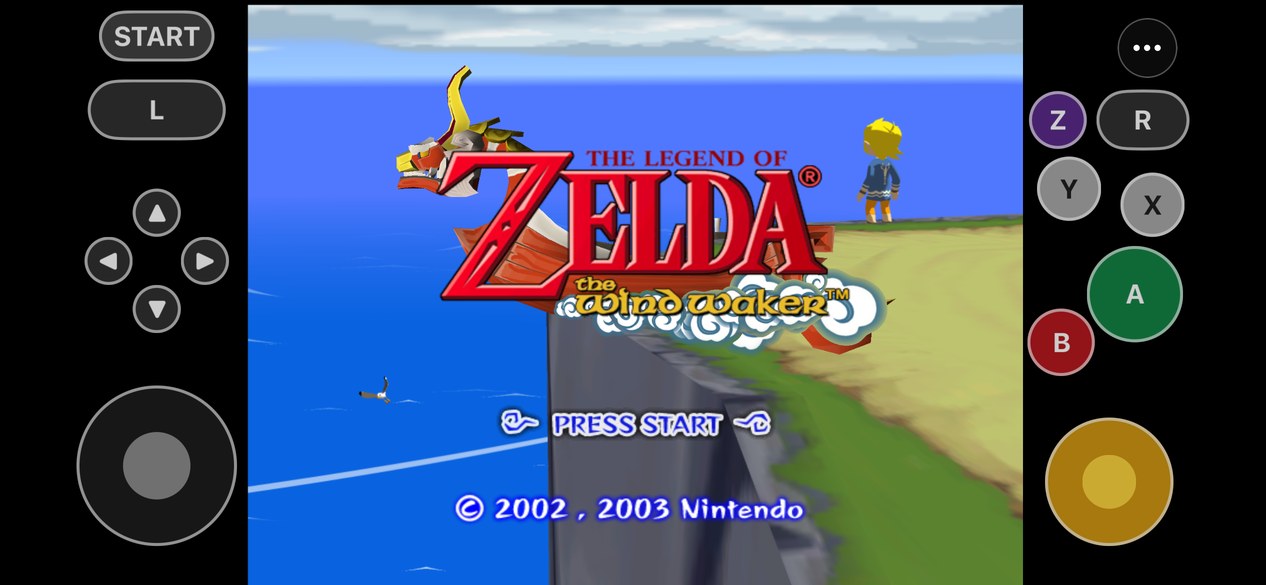
| Touch controls (iPhone, iPad) | On-screen controls with a layout editor, plus controllers and keyboards |
Saves and files
| Feature | What it adds |
|---|---|
| Saves kept apart from the app | The game's own memory card lives in your data folder, so updating or replacing the app never touches it |
| Dolphin saves (iPhone, iPad) | Import a Dolphin .gci save, and back saves up and restore them |
| Session logs | A log per session to attach to a bug report. On Windows it names the CPU and GPU and, each second, which part of the PC held the game back |
Tested areas: the opening and prologue, Outset Island, sailing the Great Sea, Windfall, a late-game Hyrule save, menus, and saving and reloading. Later dungeons and boss fights are still largely untested; if you find a problem there, please report it.
Controls
The keyboard and mouse are the same on Windows and Mac:
| Action | Keyboard and mouse | Controller |
|---|---|---|
| Control stick | W A S D | Left stick |
| C-stick | T F G H | Right stick (the fast camera) |
| A, B, X, Y | J, K, U, I | Face buttons |
| L, R, Z | E, R, Q | Left and right triggers, right bumper |
| START | Return | Start |
| D-pad | Arrow keys | D-pad |
| Jump | Space | Left bumper |
| Sprint | Shift | Click the left stick |
| Camera | Click the game, then move the mouse (Esc gives it back); the wheel zooms | Right stick |
| Settings | F1, or Esc when the mouse is free | Back (Mac) |
| Save state | F5 | |
| Load the latest state | F8 on Windows, F9 on Mac (hold fn on a MacBook) | |
| Fullscreen | F11 or Alt+Enter (Windows); the settings on both | |
| Smooth Motion on or off | F10 (Windows) | |
| Frame rate | F9 (Windows) |
On iPhone and iPad, the touch controls, controllers and keyboards that iOS supports work; camera inversion and button remapping are under ⋯ › Controller, and the game's rumble reaches the controller.
Windows
Download: WindWakerRecomp-<version>-windows-x64.zip from the
Releases page.
- Unpack the whole folder anywhere and run
BlueWake.exe. It is not signed, so Windows may say it protected your PC: choose More info, then Run anyway. - The first time, it asks for your disc image. It checks that it is the USA disc, prepares it once (a few
seconds; an
.rvzis first unpacked to an ISO) and remembers it. Later launches start the game straight away.
Needs Windows 10 or 11 (64-bit), a Direct3D 12 GPU and a CPU with AVX2 (Intel Haswell, AMD Zen or newer).
The settings (F1) have four tabs: Display (fullscreen, Smooth Motion off/60/120, 60 Hz gameplay,
resolution, filtering), Controls (mouse and stick cameras), Mods (aspect ratio, Better Wind Waker,
quick doors, climbing, HD textures) and Sound and files, with Save state and Load latest state
at the bottom. Saves, settings, save states (states), the prepared disc and session logs are in
%APPDATA%\BlueWake.
Building it yourself from your disc (Visual Studio's clang, Python, CMake and Ninja): see
docs/WINDOWS.md
on the windows-release branch, where the Windows port lives.
Mac
Download: WindWakerRecomp-<version>-macos-arm64.zip from the
Releases page.
- Unzip it, drag Wind Waker Recomp.app to Applications and open it. The app is ad hoc signed, not notarized: if macOS blocks it, use System Settings → Privacy & Security → Open Anyway.
- Choose your disc image when asked (
.iso,.gcm,.rvz,.gcz,.wiaor.ciso).
Needs an Apple Silicon Mac (M1 or newer) on macOS 15 or later. Esc (with the mouse free), F1 or a
controller's Back button opens the options: Display, Gameplay (climbing and its stamina, Better
Wind Waker, quick doors) and Controls, with Save state and Load latest state. Saves, settings,
save states (states/) and the shader caches are in ~/Library/Application Support/Wind Waker Recomp.
The full guide: docs/MACOS_RELEASE.md.
iPhone and iPad
You need:
- a Mac with Apple silicon, Xcode, CMake and Ninja, and at least 12 GB of free disk space (25 GB recommended)
- your
GZLE01revision 0 disc image - an A13 or newer iPhone or iPad on iOS/iPadOS 17 or later, with Developer Mode on
- an Apple ID for signing (a free one works; its apps expire after seven days)
One command builds your own app from a fresh checkout:
scripts/builder/build.sh "/path/to/The Legend Of Zelda The Wind Waker.iso" --ipa build/BlueWake.ipaIt fetches the pinned runtime and translator, checks your disc, translates the game from it, tunes it
on your Mac, compiles it for iOS and writes an unsigned IPA. Install that with Sideloadly, AltStore,
SideStore or Xcode, then copy the same disc image to your device (Finder › your device › Files ›
BlueWake); BlueWake imports it on first launch. Expect a first build of well over an hour on a fast Mac,
longer on smaller ones; the terminal shows each stage and its elapsed time, and completed work is reused
if you stop and rerun the same command. Run it with --source-only first to check your tools and disc in
a few minutes. The IPA you build contains code translated from your disc: keep it for your own devices.
Step by step, with updating and troubleshooting: Build your own BlueWake. Signing with your own identity and other options: docs/status/DEVICE_BUILD.md.
On iPhone and iPad, ⋯ › Mods has widescreen, HD texture packs and Better Wind Waker (patch your disc on a Mac, then Install Better Wind Waker…); saves are in On My iPad › BlueWake › BlueWake › GZLE01.card, and ⋯ › Game Data & Saves backs them up, restores them and imports Dolphin saves.
Performance
| Device | Result |
|---|---|
| Windows PC (Core i9-13900KF, RTX 5090) | Smooth Motion: 60 FPS shown with the game at its full 30, Link running on Outset (lowest second 58.7). 60 Hz gameplay: 59-60 game frames a second on the same route |
| Windows, a slower CPU (12 of the i9's efficiency cores, standing in) | Full speed (60 shown, the game at 30) at Outset's busiest view, standing and running, since 0.1.1; 0.1.0 managed 23-26 game frames a second there |
| Mac (Apple Silicon) | Smooth Motion at 60 or 120; the busiest scenes can dip below 120 at 120 Hz, 60 is steadier |
| iPad Pro 12.9" (M2) | Steady 30 FPS at full speed; a 44-minute session had 14 seconds below 29 FPS, all brief dips at area loads |
| iPhone 14 (A15) | 30 FPS in most play; dips to about 25-27 FPS in the busiest scenes and the title-screen flyover |
| Older devices | An A13 or newer is required on iOS, an AVX2 CPU on Windows; other slower machines have not been measured |
Builds are compiled with an optimization profile: a record of which parts of
the game's code run most, made by running the game, which the compiler uses to arrange that code for
speed. Without it (--no-train when building), the game runs at about 27.5 FPS instead of 30 at the
Outset Island pier on the iPad Pro (M2). In the measured slow scenes the CPU is the main limit, so
lowering the render resolution alone has not recovered full speed.
Mods
Code mods cannot be applied to a statically recompiled game at runtime, so they are translated and built into the app; the downloads include them, turned on and off in the options.
| Mod | What it does |
|---|---|
| Widescreen 16:9 and 16:10 | A wider view with the HUD placed for the wider picture |
| Better Wind Waker | Wind Waker HD's quality-of-life changes, each on or off: Swift Sail, instant text and more |
| HD texture packs | Dolphin-format packs for GZLE01, for example Hypatia's HD pack (you add the pack yourself) |
Climbing, save states, quick doors and the cameras are part of the app itself rather than mods of the game's code. Details are in docs/MODS.md.
Known issues
- First minutes of a new install: rendering pipelines compile as new scenes appear, so the first visits hitch briefly; later launches reuse them.
- Loading hitches. Changing areas can briefly stall.
- Save states belong to the version of the app that made them: a later version may refuse one. The memory card is not part of a state, so keep saving in the game as well.
- Older Windows versions: before 0.2.2, switching to fullscreen could crash on some PCs, mostly with slower or integrated graphics. Before 0.2.1, closing the game showed "BlueWake stopped with an error (status 1)" (harmless: it closed normally), and Restart now in the settings could crash. Update to the latest release.
- Laptops with integrated graphics (such as Intel UHD) can run slowly. Turn Smooth Motion off (F10) and set Render resolution to 1x: Smooth Motion draws each frame a second time to show 60 FPS.
- Mac: lava in Dragon Roost Cavern's areas renders as flat orange instead of its bright pattern.
- 120 FPS needs a display of 100 Hz or more (on a 60 Hz display Windows shows 60 instead), and the busiest scenes can dip below 120.
- 60 Hz gameplay is experimental: dialogue, cutscenes and transitions keep their original timing.
- Busy scenes on iPhone drop below 30 FPS on chips older than the M-series iPads.
Getting help
- Discord: discord.gg/xwHfUD2bxW for questions, testing and updates
- Bug reports: open an issue. Say which
computer or device, where in the game it happened and what you saw, and attach the session log
(Windows:
%APPDATA%\BlueWake\logs; Mac:~/Library/Application Support/Wind Waker Recomp/logs; iOS: ⋯ › Help & Feedback › Share Session Log). Please do not attach game files or disc images.
Frequently asked questions
Can I download it?
Yes, for Windows and Mac: the Releases page has ready-made apps. They contain the recompiled game code and no game data; you supply your own disc image at the first launch. For iPhone and iPad you build your own on a Mac.
Why does it need my disc?
The game's graphics, sound and world data, and the executable and modules the recompiled code works with, are read from your disc. None of it is included.
Which version of the game works?
Only the GameCube USA release, GZLE01 revision 0. The app checks the disc and refuses others. The
Wii U Wind Waker HD is a different game and is not supported.
Is this an emulator?
Not in the usual sense. The game's code is translated to native x86-64 or arm64 ahead of time and there is no JIT; only a few rare instructions fall back to an interpreter. The hardware around the CPU (graphics, audio, memory card, timing) comes from a Dolphin-derived runtime.
Why 30 FPS, and how does it show 60 or 120?
30 is the game's own frame rate on the GameCube, and the game runs at that rate at full speed. Smooth Motion draws in-between frames, blended from the game's own, to show 60 or 120 without changing how the game plays. The experimental 60 Hz gameplay on Windows runs the game itself at 60 instead.
What are save states for, and do they replace saving?
A save state puts you back at the exact moment you made it: before a hard jump, a boss or anything you
want to try again. It does not replace the game's own save: states belong to one version of the app,
and the memory card with your saves is not part of them. Each is about 20 MB; delete the ones you no
longer need from the states folder.
Do controllers work?
Yes. On Windows and Mac, controllers work as a GameCube pad (Xbox, PlayStation, Switch Pro and others), next to the keyboard and mouse. The right stick turns the camera directly and aims, its click goes into first person and back out, and the left bumper jumps; the game's own eased right-stick camera is an option under Controls. On iPhone and iPad, controllers that iOS supports work, with camera inversion and button remapping under ⋯ › Controller, and the game's rumble is passed to the controller.
Will updates keep my saves?
Yes. Saves live outside the app on every platform, so replacing the app keeps them. On iPhone and iPad, install over the existing app and never delete it to update; use Back Up Saves… first.
Can I use my Dolphin saves?
On iPhone and iPad, yes: export the save from Dolphin (Tools, Memory Card Manager, or the .gci file in
its GC folder), copy it to your device, then open ⋯ › Game Data & Saves › Import Dolphin Save…. USA
saves only.
Documentation
- Current status: the engineering log, newest first
- Mac release and Windows: installing, playing and building
- Performance optimizations: every speed-up, what it measured, and how to turn it off
- Build your own BlueWake: the iPhone and iPad guide
- The Builder: how the build works, and reusing it for other ports
- Device build: signing, installing and build options
- Mods: the mods and how code mods are built
- History: the project's earlier README, from macOS prototype to iPad
- Porting history and legal and provenance
Credits
- Dolphin: the compatibility runtime, DSP audio and texture-pack format come from it, and its GZLE01 game settings supply the widescreen code
- RecompCore and DolRecomp, forked for BlueWake, with the Aurora renderer and Dawn
- nod by Luke Street, which unpacks Dolphin's compressed disc images
- zeldaret/tww, the Wind Waker decompilation, for research
- Better Wind Waker by WideBoner
- HD texture pack authors, including Hypatia
- SunPad, whose touch control overlay BlueWake adapts
License and legal
Wind Waker Recomp is licensed under the GNU GPL, version 3 or later, the license its Dolphin-derived runtime and SunPad-derived touch controls allow together. The downloads carry the licenses of the libraries they include. See RIGHTS_AND_LICENSES.md for the details and for game content.
Wind Waker Recomp is an independent fan project, not affiliated with or endorsed by Nintendo. The Legend of Zelda, The Wind Waker and GameCube are trademarks of Nintendo. You need your own legally obtained disc and are responsible for following the laws that apply to it.