

Booking Microservices
A practical flight-booking system built as microservices with .NET 10, using Vertical Slice Architecture, DDD, CQRS, Event Sourcing, gRPC, RabbitMQ, Wolverine, PostgreSQL, MongoDB and .NET Aspire.
Developed by Evangelos Vlachos.
Table of Contents
- Overview
- Architecture
- Services
- Technology Stack
- Project Structure
- Getting Started
- API Documentation
- Development Tooling
- Contributing
Overview
This repository demonstrates how to design and run a production-style microservices system end to end: independent services with their own databases, asynchronous messaging with durable inbox/outbox, synchronous gRPC calls between services, an API gateway, centralized identity, observability and container/Kubernetes deployment.
Key goals:
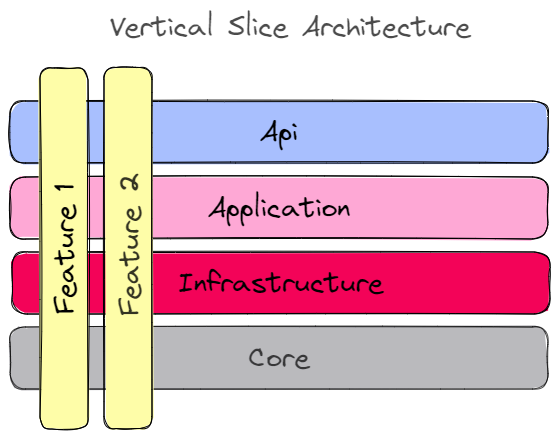
- Vertical Slice Architecture with feature folders. Each request is one self-contained slice.
- Domain Driven Design for all business logic.
- CQRS with MediatR, plus validation and logging pipeline behaviours.
- Event Sourcing (EventStoreDB) for the write side of the Booking service.
- Event Driven Architecture with RabbitMQ on top of Wolverine, using durable inbox (idempotent, exactly-once processing) and outbox (at-least-once delivery) patterns.
- gRPC for internal service-to-service communication.
- PostgreSQL for write models, MongoDB for read models.
- Unit, integration, end-to-end and contract tests (NSubstitute, Testcontainers, PactNet).
- Observability with OpenTelemetry, Jaeger, Prometheus, Grafana and Serilog/Kibana.
- IdentityServer (OpenID Connect / OAuth2) for authentication and authorization.
- YARP as the API gateway.
- Docker Compose, Kubernetes (Nginx Ingress, cert-manager) and .NET Aspire for orchestration.
Architecture
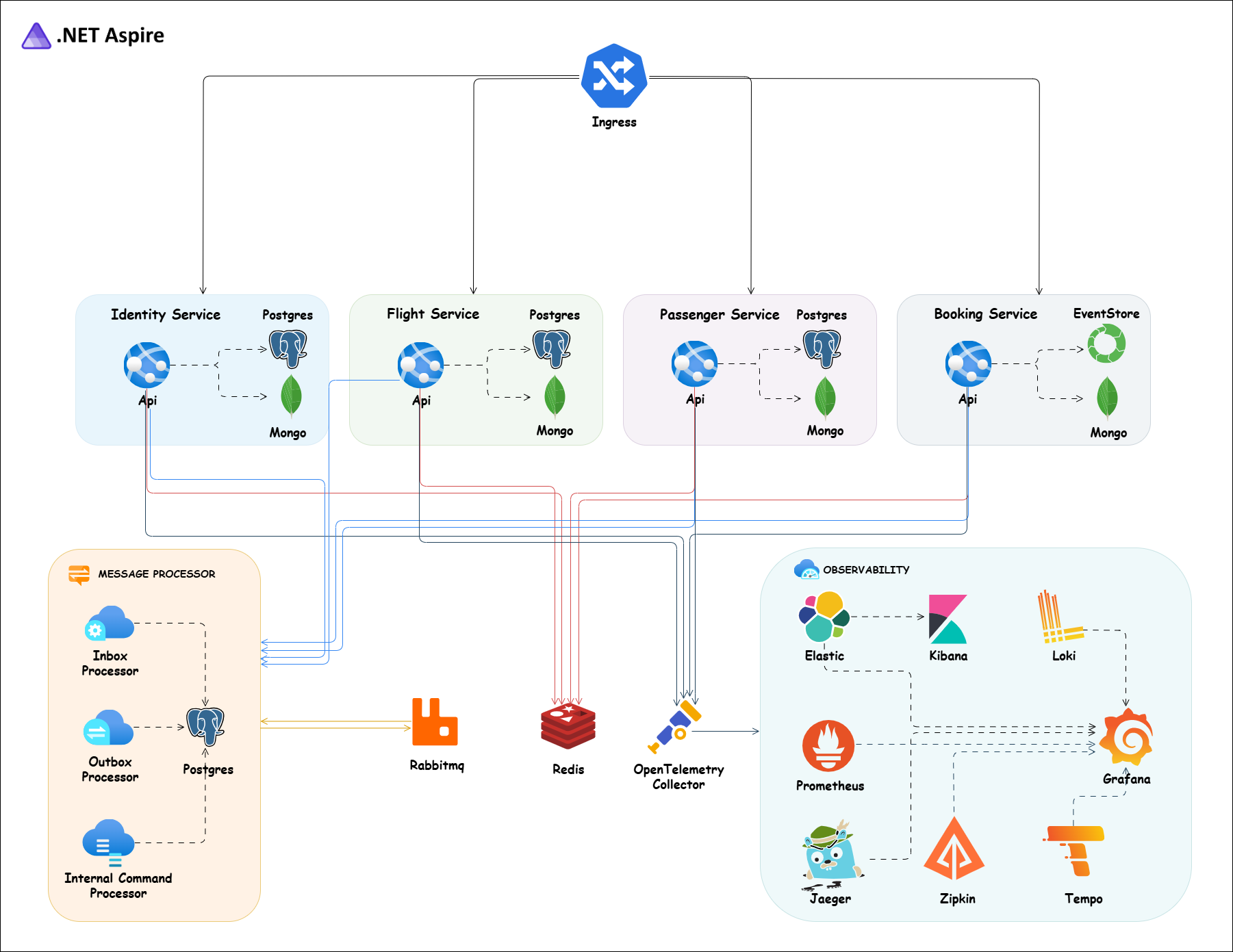
Each service owns its data and exposes a small REST surface through minimal APIs. Commands mutate the write store (PostgreSQL or EventStoreDB) and publish integration events through Wolverine's durable outbox to RabbitMQ. Consumers process those events through the durable inbox and project them into MongoDB read models. Queries read from MongoDB only. Cross-service reads that must be synchronous (for example Booking validating a flight or passenger) go over gRPC.
Services
| Service | Responsibility | Write store | Read store |
|---|---|---|---|
| Identity | Users, roles, tokens (IdentityServer) | PostgreSQL | - |
| Flight | Flights, airports, aircraft, seats | PostgreSQL | MongoDB |
| Passenger | Passenger profiles | PostgreSQL | MongoDB |
| Booking | Booking a seat on a flight for a passenger | EventStoreDB | MongoDB |
| ApiGateway | Single public entry point (YARP) | - | - |
| Aspire AppHost | Local orchestration and dashboard | - | - |
Technology Stack
- .NET 10, Minimal APIs, API Versioning
- MediatR, FluentValidation, Mapster
- Wolverine + RabbitMQ for messaging, MassTransit contracts
- gRPC with Grpc.AspNetCore
- Entity Framework Core + PostgreSQL
- MongoDB, EventStoreDB, Redis
- Duende IdentityServer (OpenID Connect / OAuth2)
- YARP reverse proxy
- OpenTelemetry, Jaeger, Prometheus, Grafana, Serilog + Kibana
- Polly resilience, ASP.NET Core Health Checks
- Scalar and Swagger for OpenAPI docs
- xUnit, NSubstitute, Testcontainers, PactNet, Bogus
- .NET Aspire, Docker, Kubernetes, Nginx Ingress, cert-manager
Project Structure
.
├── src
│   ├── ApiGateway/            # YARP gateway
│   ├── Aspire/                # Aspire AppHost and service defaults
│   ├── BuildingBlocks/        # Shared cross-cutting code (Core, EFCore, Mongo, Wolverine, Jwt, Logging, OpenTelemetry, Polly, TestBase, ...)
│   └── Services
│       ├── Booking/           # src/Booking, src/Booking.Api, tests/
│       ├── Flight/
│       ├── Identity/
│       └── Passenger/
├── deployments
│   ├── configs/               # otel-collector, prometheus, grafana configs
│   ├── docker-compose/        # infrastructure and full-stack compose files
│   └── kubernetes/            # manifests + cert-manager
├── assets/                    # diagrams and logo
├── booking.rest               # REST Client requests for manual API testing
└── booking-microservices.sln
Inside every service, code is grouped by feature (for example Flights/Features/CreatingFlight/V1/) rather than by technical layer. Each feature folder holds its endpoint, command/query, handler, validator and any events it raises, so a change to one use case touches only that folder.
Getting Started
Prerequisites
- .NET 10 SDK
- Docker Desktop
- Node.js (for Husky commit hooks)
- Optional: .NET Aspire CLI,
kubectl
Dev Certificate
Create and trust a development HTTPS certificate so the containers can serve TLS.
Windows (PowerShell):
dotnet dev-certs https -ep $env:USERPROFILE\.aspnet\https\aspnetapp.pfx -p password
dotnet dev-certs https --trust
macOS / Linux:
dotnet dev-certs https -ep ${HOME}/.aspnet/https/aspnetapp.pfx -p password
dotnet dev-certs https --trust
Run with Aspire
The fastest way to get everything up locally, with a dashboard for logs, traces and metrics:
aspire runThe Aspire dashboard is available at http://localhost:18888.
Run with Docker Compose
Infrastructure only (RabbitMQ, PostgreSQL, EventStoreDB, MongoDB, Redis, Jaeger, Zipkin, OTel Collector, Prometheus, Grafana):
docker-compose -f ./deployments/docker-compose/docker-compose.infrastructure.yaml up -dFull stack including the services:
docker-compose -f ./deployments/docker-compose/docker-compose.yaml up -dRun with Kubernetes
Install cert-manager first, then apply the TLS issuer and the application manifests:
kubectl apply -f ./deployments/kubernetes/booking-cert-manager.yml
kubectl apply -f ./deployments/kubernetes/booking-microservices.yml
The manifests reference images under the
evangelosvlachos96/Docker Hub namespace. Build and push the service images there (or change the image names) before deploying.
Build, Run and Test manually
Build the whole solution from the repository root:
dotnet buildRun a single service from its *.Api project folder (for example src/Services/Flight/src/Flight.Api):
dotnet runRun all tests (integration and end-to-end tests start their dependencies with Testcontainers, so Docker must be running):
dotnet testAPI Documentation
Every service exposes OpenAPI documentation at /swagger (Swagger UI) and /scalar/v1 (Scalar).
For quick manual testing, open booking.rest with the VS Code REST Client extension. Seeded users are van1 / Admin@123456 (admin) and van2 / User@123456 (user).
Development Tooling
.NET tools (CSharpier formatter, dotnet-outdated) are declared in .config/dotnet-tools.json:
dotnet tool restoreHusky + commitlint enforce Conventional Commits and run the formatter before each commit:
npm installUpgrade NuGet packages across the solution:
dotnet outdated -u