Zurp



Meta bug bounty research tools, in Burp Suite and in your coding agent.
Researching a Meta endpoint normally means a different tool, a different login and a different token for every question you have about it. Zurp is where those meet: it annotates the traffic already flowing through your proxy, and exposes the same capabilities to an AI agent over the same APIs and the same token.
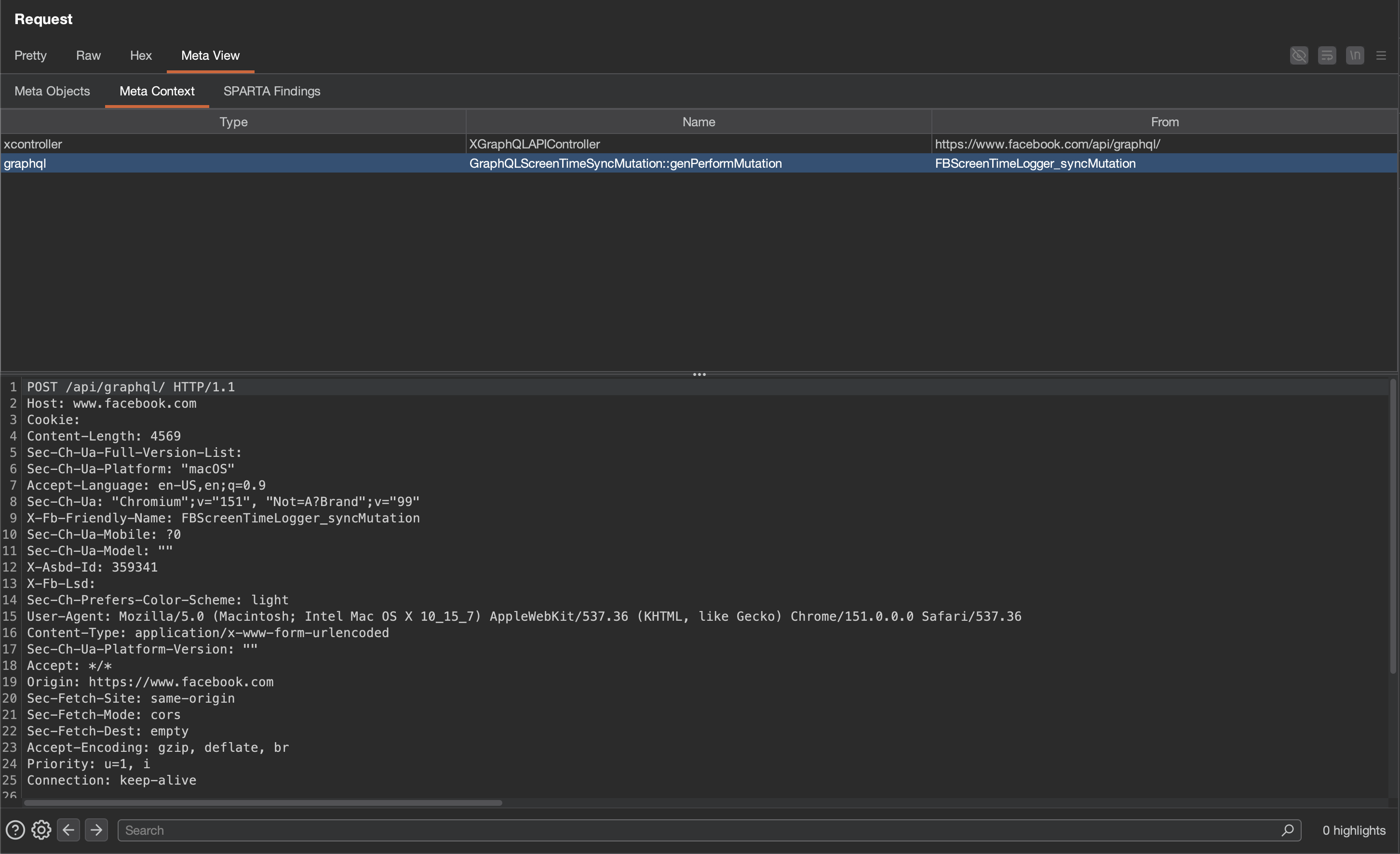
Every Meta request and response gets a Meta View tab, showing what the identifiers in it actually name:
| Tool | What it answers | In Burp | For an agent |
|---|---|---|---|
| Meta Context | what is this id, URL, doc_id or operation? | Meta View tab on every Meta request | meta-context server |
| FBDL | where do I get accounts I am allowed to attack? | FBDL tab, {{fbdl.*}} placeholders | fbdl server |
| CSRF / sprinkle | why won't this captured request replay? | automatic on the request path | n/a |
| SPARTA | what are the leads to find potentially interesting issues? | SPARTA tab, PoCs queued into Organizer | sparta server |
Use one or use all four. Nothing here depends on anything else here, and each works only against your own account's data.
Quick start
Download zurp.jar from the latest release, then in Burp: Extensions → Installed → Add → Extension type Java → zurp.jar.
Open the Zurp tab, paste your researcher token into Settings → Access Token, and browse. That is the whole setup. Everything else has a working default.
Prefer to build it yourself? See building from source. For the agent side, see installing the MCP servers.
Getting access
Every tool here is gated on the same allowlist as FBDL. If you can use FBDL, your existing token works for all of this. If you cannot, every endpoint answers 403. The criteria are at https://www.facebook.com/whitehat/fbdl/.
Mint a token at https://www.facebook.com/whitehat/fbdl/generate_api_token. Tokens last 60 days, and one drives everything: the extension and all three MCP servers.
Mint it while logged in as your enrolled researcher account. A token carries whichever account your browser happens to be logged into, and nothing afterwards tells you which one that was. Mint from the wrong account and every call returns
403complaining about enrollment, without naming the account it rejected. This is the most common setup problem by a wide margin.
Requirements
- Burp Suite
2024.7or newer. The extension parses JSON throughburp.api.montoya.utilities.json, which landed in that release. - Java 17 to build from source. Burp supplies its own JVM to run the extension.
- Node 22.19.0 or newer, for the MCP servers only.
- An MCP client for the agent side: Muse Code, Claude Code, or anything speaking MCP over stdio.
macOS and Linux are what the docs assume. The extension is a jar and the servers are Node, so Windows works too. Only the paths differ.
Examples
Replay a captured request without hunting for a token. Paste into Repeater, swap the token for a placeholder, send:
POST /api/graphql/ HTTP/2
Host: www.facebook.com
Content-Type: application/x-www-form-urlencoded

fb_dtsg={{fb_dtsg}}&jazoest=0&doc_id=9876543210987654&variables={}
Zurp scrapes fb_dtsg and friends out of the responses you browse and substitutes {{fb_dtsg}}, {{lsd}} and {{csrf}} on the way out, keeping the parameters that depend on them consistent, so the request replays instead of being rejected. The store is keyed per host and per logged-in account, which is what makes a two-actor test work: victim cookies in one tab and attacker cookies in another each get their own token instead of overwriting each other's.
This is the one tool with no agent-side equivalent, because it is a property of sitting on the request path rather than something a tool call can do. It is also what lets an agent park a candidate in a named Repeater tab and have it still replay when you come back to verify it, rather than carrying a token that expired twenty minutes ago.
Point a saved request at a test environment you built. After Pin FBDL run… in the editor's context menu, labels from that run resolve on send:
variables={"pageID":"{{fbdl.1234567890123456.PageOne}}","actorID":"{{fbdl.1234567890123456.UserTwo.uid}}"}Re-run the script when the assets expire, re-pin, and the same saved request works against fresh ids.
Ask your agent instead. Hand a raw capture to Muse Code or Claude Code and let it pull the identifiers out:
Extracted 3 candidates (1 doc_id, 1 url, 1 fbid). 1 named something, 2 matched nothing.

doc_id=9876543210987654  [doc_id]
  graphql  CometGroupsMallQuery
Ten worked FBDL scripts, up to an IDOR boundary setup, are in bug-bounty-research/examples/.
Building from source
The release jar is the easier path. Building it yourself needs a JDK 17 or newer and Gradle:
git clone https://github.com/facebookincubator/Zurp
cd Zurp
gradle jar          # -> build/libs/zurp.jar
gradle test         # optional; touches no network
The Montoya API jar is the only thing on the compile classpath, and deliberately is not bundled: Burp installs the implementation at load time, so a copy inside our jar would shadow Burp's and break the interfaces we implement. Zurp has no other dependencies.
To pick up a rebuild in a running Burp, untick and retick Loaded next to the extension.
The build pins Montoya to the oldest supported release rather than the newest, so the compiler enforces the version floor in Requirements instead of a researcher discovering it as a missing method at runtime.
The MCP servers, from source
cd bug-bounty-research
npm install
npm run build      # tsc -> dist/
npm test
The MCP servers
bug-bounty-research/ is a standalone Node package sharing no code with the Java here, so it installs on its own if you do not run Burp. Each tool is a separate stdio server: dist/meta-context/index.js, dist/sparta/index.js, dist/fbdl/index.js.
Register the ones you want by absolute path. Full per-client instructions, including the several ways a Muse Code config fails silently, are in bug-bounty-research/README.md.
The agent skills in bug-bounty-research/skills/ teach an agent which tool to reach for and which errors are worth retrying.
Documentation
- docs/CONFIGURATION.md: every setting, environment and JVM seeding, log levels, and the
SSLProtocolExceptionfix. - docs/ARCHITECTURE.md: how the pieces fit, the data model, your request budget, and known gaps.
- bug-bounty-research/README.md: the three servers, their tool surface, and per-client setup.
- FBDL access criteria: who can use these tools and how to qualify.
- Montoya API documentation: the extension API the Burp side is written against.
- Meta Bug Bounty program terms: what is in scope, and the rules all of this assumes you are working under.
Contributing
Issues and pull requests are welcome. Development process, how to propose a fix, and how to test a change are in CONTRIBUTING.md.
Found a security bug in Meta's products while using this? That goes through the bounty program, not a GitHub issue.
Code of Conduct
Meta has adopted a Code of Conduct we expect project participants to adhere to. Please read the full text so you understand what will and will not be tolerated.
License
Zurp is MIT licensed.
The FBDL server in bug-bounty-research/ is ported from fbdl-mcp by Ads Dawson, ISC licensed.