🥊 Boxer: Robust Lifting of Open-World 2D Bounding Boxes to 3D
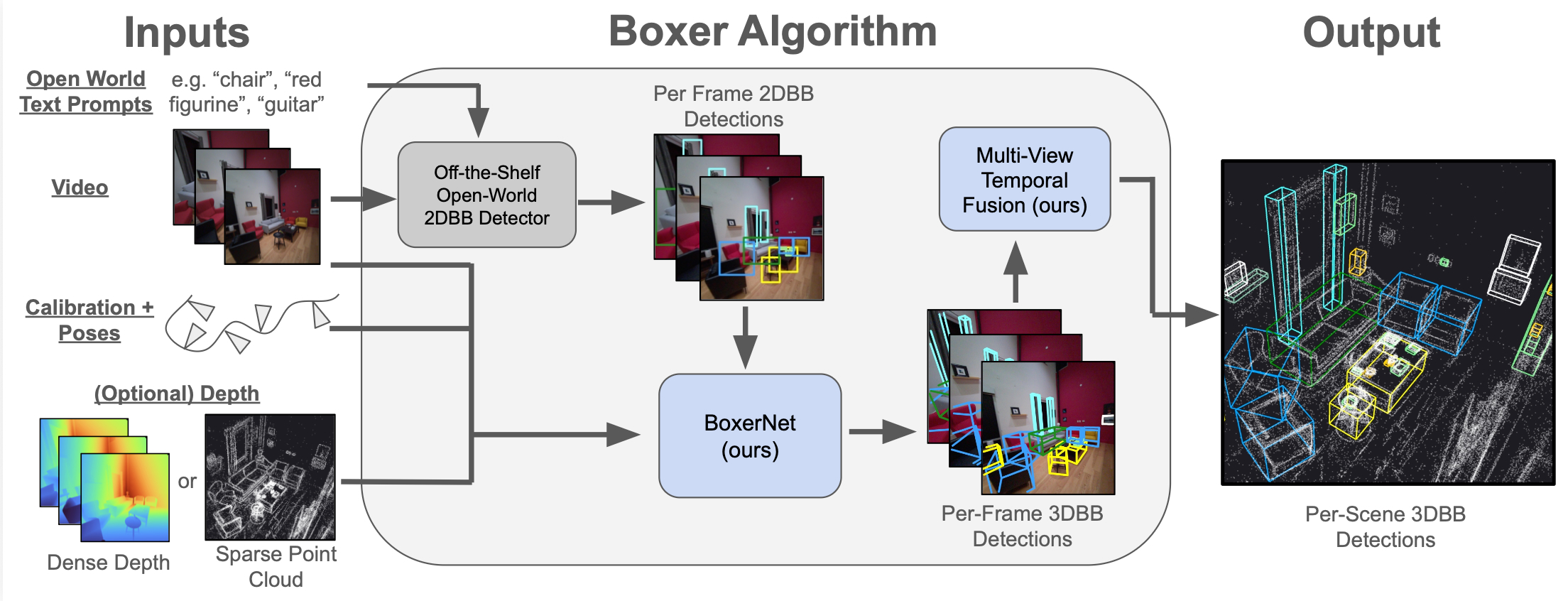
Boxer lifts 2D object detections into static, global, fused 3D oriented bounding boxes (OBBs) from posed images and semi-dense point clouds, focused on indoor object detection. This repo contains the code and pre-trained model (no training code) needed to run Boxer on a variety of input data sources (inference only code).
Project Page | ArXiv | Video | HF-Model | HF-Data | GitHub Code
Installation
We tested on MacOS (with mps acceleration) and Fedora (with CUDA acceleration).
# Install uv (https://docs.astral.sh/uv/)
curl -LsSf https://astral.sh/uv/install.sh | sh

# Create virtual environment with uv
uv venv boxer --python 3.12
source boxer/bin/activate

# Core dependencies for running Boxer
uv pip install 'torch>=2.0' numpy opencv-python tqdm dill

# To support Project Aria loading
uv pip install projectaria-tools

# 3D interactive viewer for view_*.py scripts
uv pip install moderngl moderngl-window imgui-bundle
Download Model Checkpoints
We host model checkpoints for BoxerNet, DinoV3 and OWLv2 on HuggingFace. Download them to the ckpts/ directory:
bash scripts/download_ckpts.sh
Download Sample Project Aria Data
In this repo, we provide sample code for running on the following data sources:
- Project Aria Gen 1 & 2
- CA-1M
- SUN-RGBD
- ScanNet (manual download needed)
Let's first start with Aria data. We host three sample Project Aria sequences (hohen_gen1, nym10_gen1, cook0_gen2) on HuggingFace. Download them to the sample_data/ directory:
bash scripts/download_aria_data.sh
Demo #1: Hello World / Run BoxerNet in headless mode
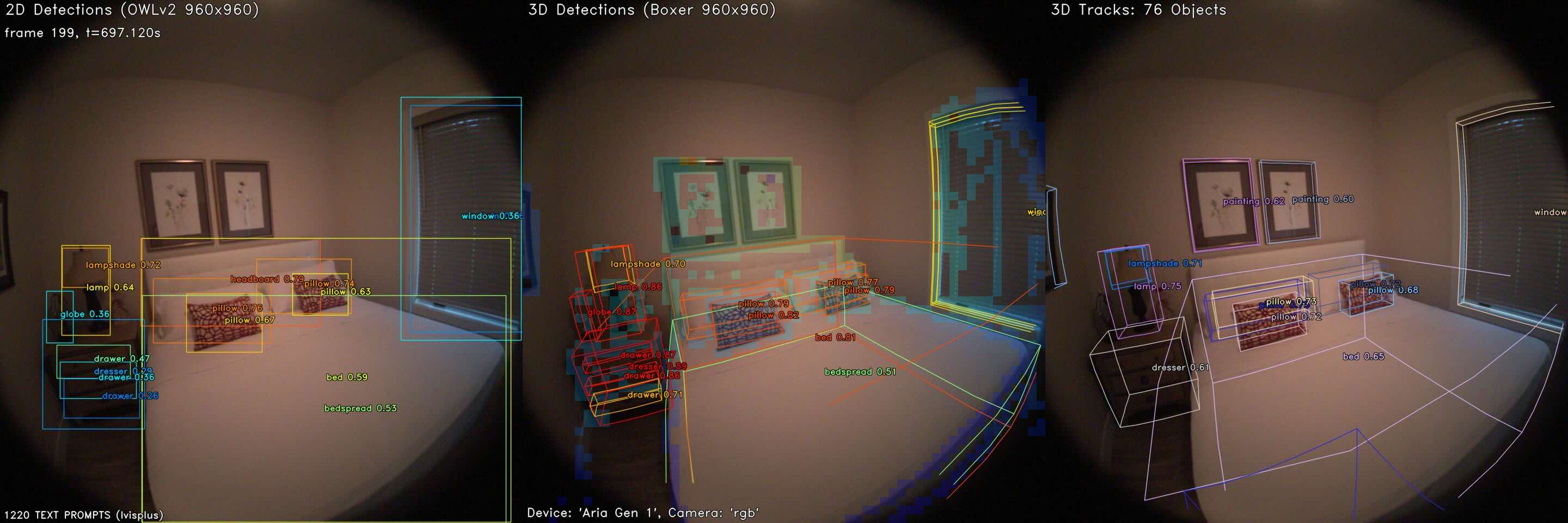
For this first demo, you do not need to have a display, so it will work if you are SSH'ed into a server. This will run BoxerNet on the first 90 images of a sequence from the test set of the NymeriaPlus dataset. This will confirm we can load up the data and run a forward passes with the model alongside the online tracker.
Expected to take ~2 mins on mac MPS, <15 secs on CUDA.
python run_boxer.py --input nym10_gen1 --max_n=90 --track
This will dump out static images and a video to outputs/nym10_gen1/, e.g. something like this in outputs/nym10_gen1/boxer_viz_current.png
Demo #2: BoxerNet Interactive Demo on Aria Data
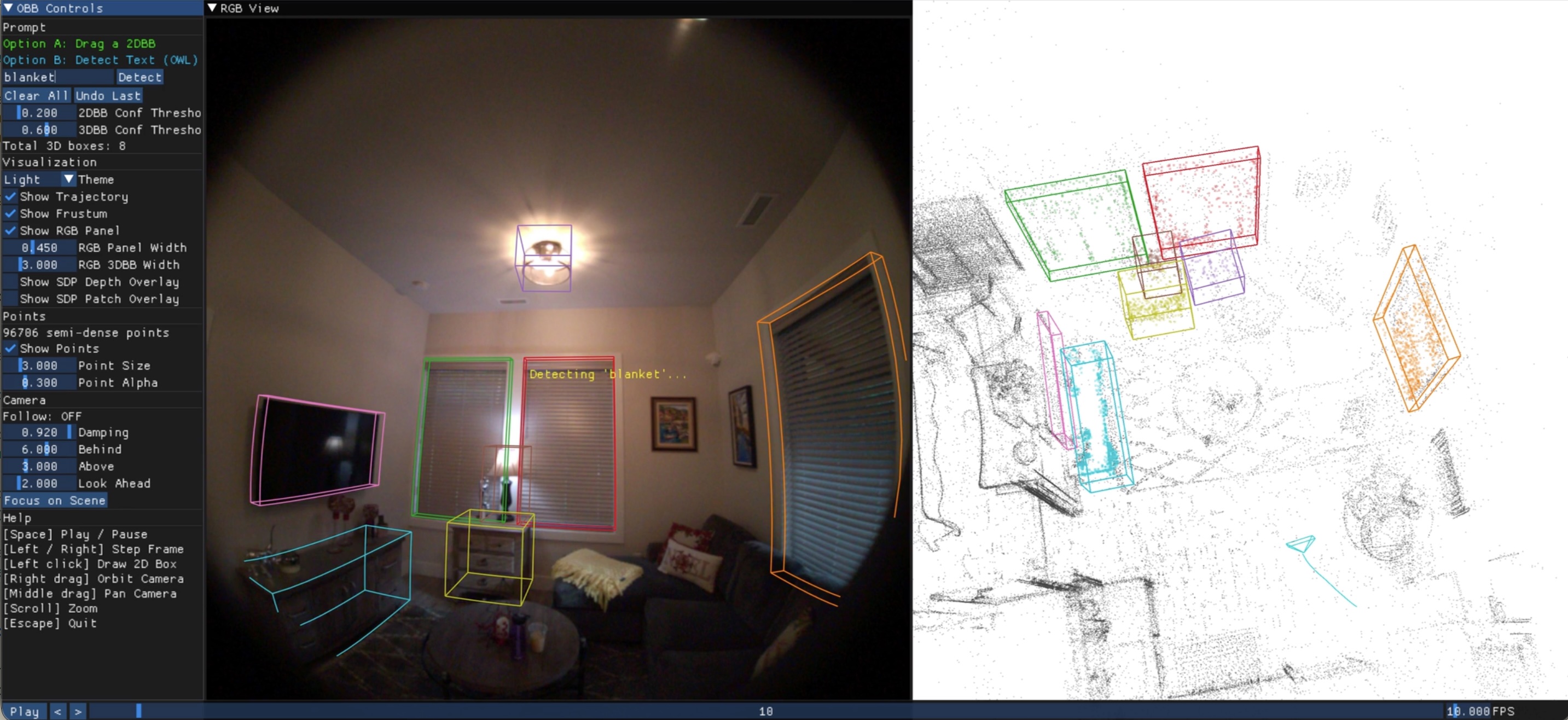
For this demo, you need to have a valid display to have the GUI work. This demo allows you to create 2DBB prompts and enter text to prompt OWL to detect objects. Run it like:
python view_prompt.py --input nym10_gen1
You should see a window that looks like this:
You can also run it on the other Project Aria sequences:
- python view_prompt.py --input hohen_gen1
- python view_prompt.py --input cook0_gen2
Demo #3: Visualize Offline Fusion
Make sure to run Demo #1 first. This generates 2DBB and 3DBB csv files, for example:
- output/nym10_gen1/boxer_3dbbs.csv
- output/nym10_gen1/owl_2dbbs.csv
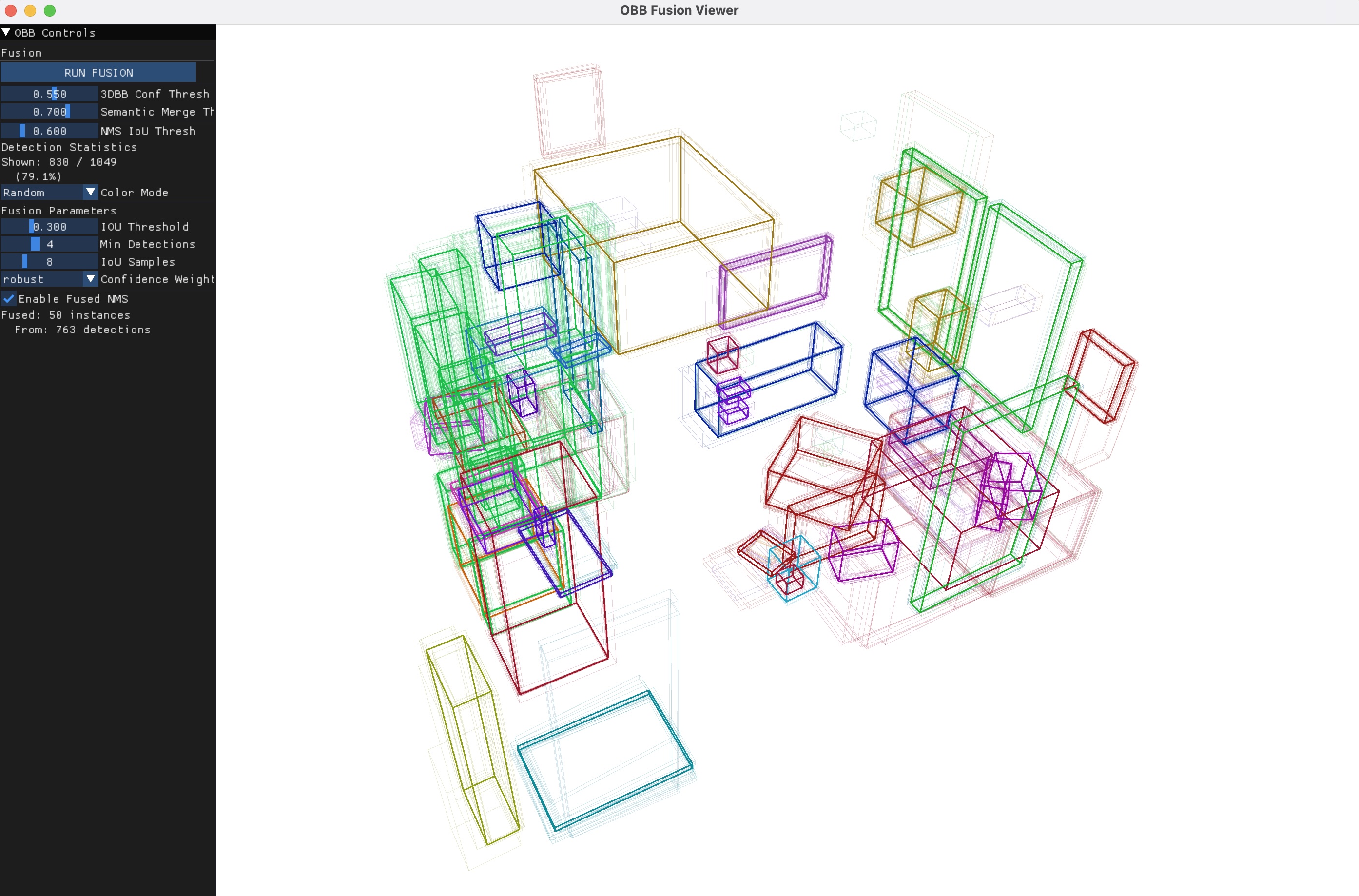
Then, run the fusion script, which will by default search the above paths, to load and fuse the 3DBBs from above.
python view_fusion.py --input nym10_gen1
You should see a window like this:
Demo #4: Online Tracker (requires Demo #1)
Make sure to run Demo #1 above first to generate the 2DBB and 3DBB CSVs. Run the online tracker, which will estimate 3DBBs on the fly as new images are observed:
python view_tracker.py --input nym10_gen1 --autoplay
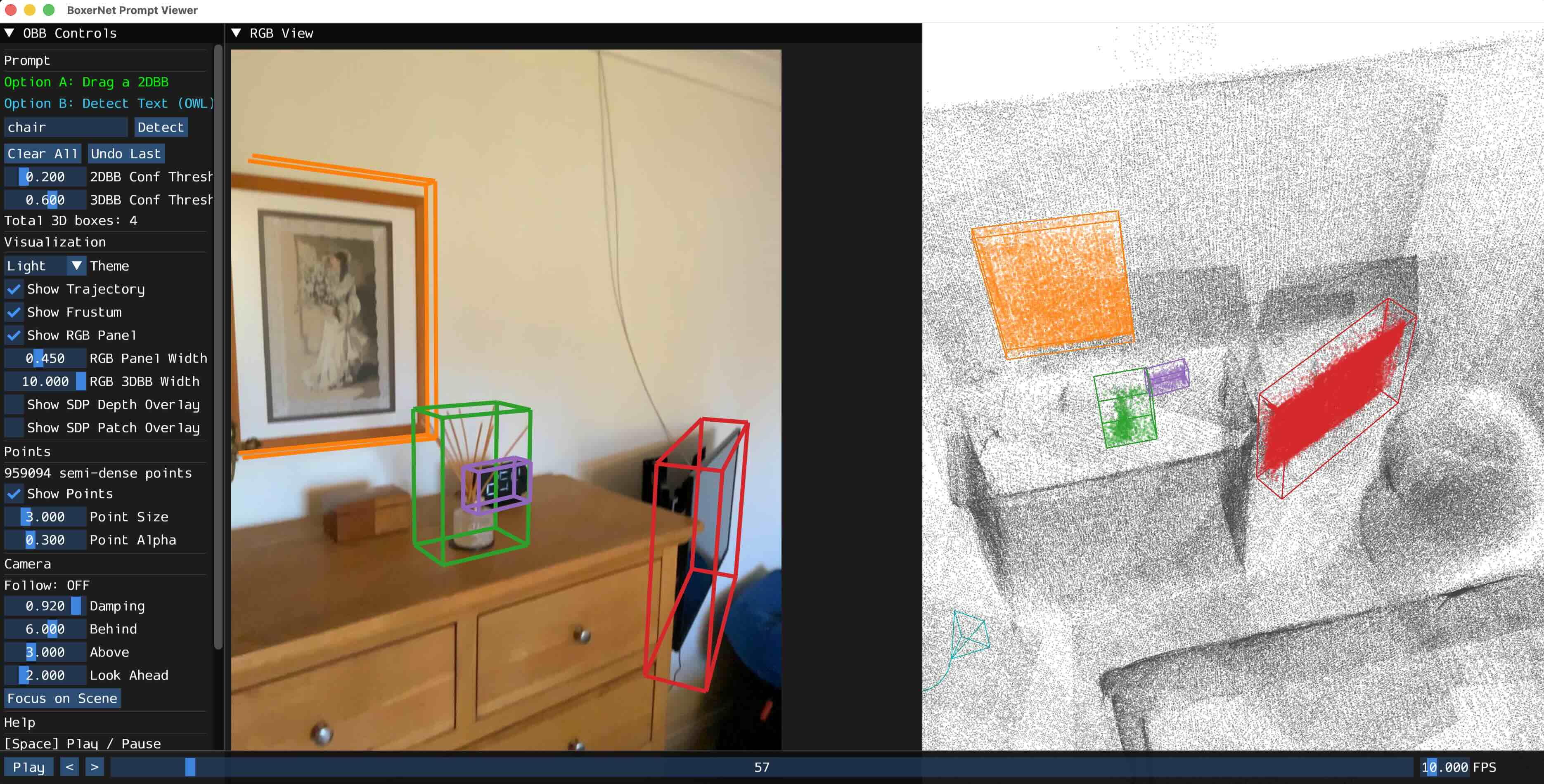
Demo #5: Running on CA-1M data
Extract a sample validation sequence (ca1m-val-42898570) to sample_data/
python scripts/download_ca1m_sample.py
Run the view_prompt.py script on it:
python view_prompt.py --input ca1m-val-42898570
You should see a window like this:
Demo #6: Running on SUN-RGBD data
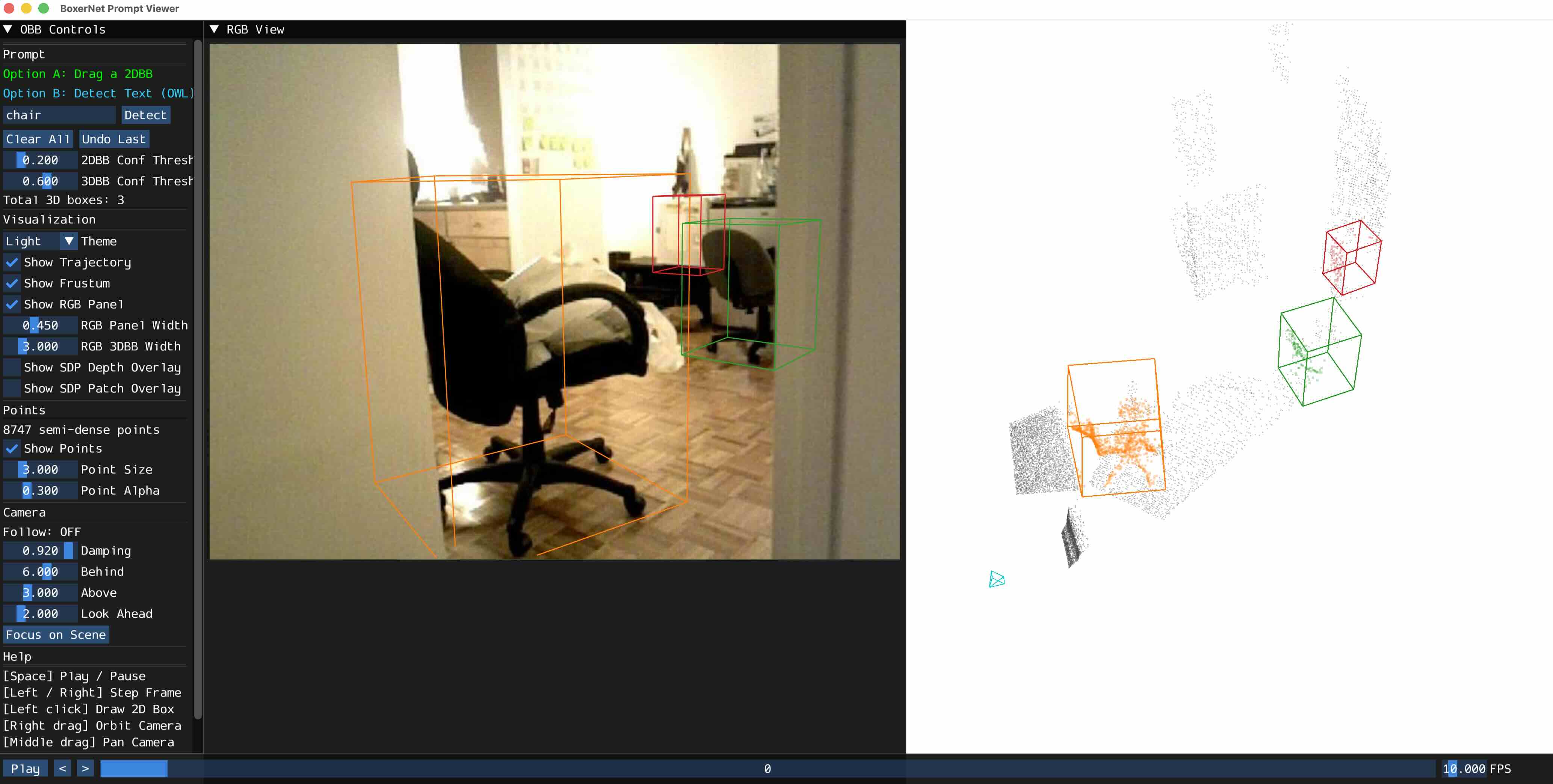
Download a subset of Omni3D SUN-RGBD: extract 20 sample images to sample_data/
python scripts/download_omni3d_sample.py
Run the view_prompt.py script on it:
python view_prompt.py --input SUNRGBD
You should see a window like this:
Demo #7: Running on ScanNet data
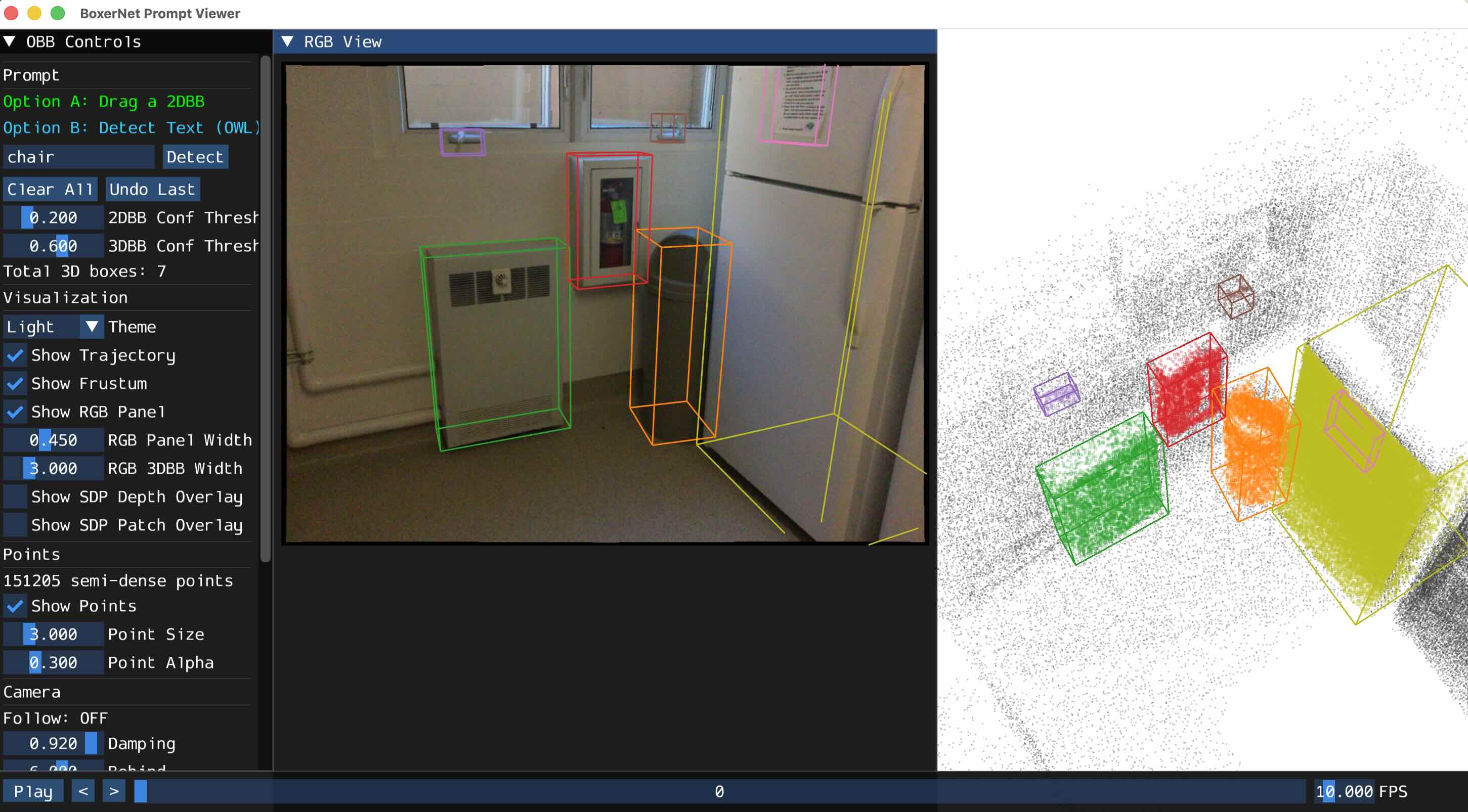
ScanNet must be manually downloaded from https://github.com/scannet/scannet. Once you do that, place the scene directory in sample_data/, e.g. sample_data/scene0707_00
Run just like the above examples:
python view_prompt.py --input scene0707_00
run_boxer.py Usage Details
The pipeline supports optional online 3D tracking (--track) for temporal consistency and offline 3D fusion (--fuse) for merging detections across frames after all detections have been made.
# Run on a sample Aria sequence
python run_boxer.py --input hohen_gen1

# Disable visualization (faster, just writes CSV)
python run_boxer.py --input hohen_gen1 --skip_viz

# Custom text prompts
python run_boxer.py --input hohen_gen1 --labels=chair,table,lamp

# Run with online 3D tracking
python run_boxer.py --input hohen_gen1 --track

# Run with post-hoc 3D box fusion
python run_boxer.py --input hohen_gen1 --fuse

# ScanNet sequence
python run_boxer.py --input scene0084_02

# CA-1M sequence
python run_boxer.py --input ca1m-val-42898570

# Omni3D dataset
python run_boxer.py --input SUNRGBD

# Adjust thresholds
python run_boxer.py --input hohen_gen1 --thresh2d 0.3 --thresh3d 0.6

# Force a specific precision (auto-detects bfloat16 on supported CUDA GPUs)
python run_boxer.py --input hohen_gen1 --force_precision float32
Outputs
Results are written to output/<sequence_name>/:
boxer_3dbbs.csv— per-frame 3D bounding boxesowl_2dbbs.csv— per-frame 2D detectionsboxer_3dbbs_tracked.csv— tracked 3D boxes (with--track)boxer_viz_final.mp4— visualization video
CLI Reference
| Flag | Default | Description |
|---|---|---|
--input | Path to input sequence | |
--detector | owl | 2D detector (owl) |
--labels | lvisplus | Comma-separated text prompts, or a taxonomy name |
--thresh2d | 0.2 | 2D detection confidence threshold |
--thresh3d | 0.5 | 3D box confidence threshold |
--track | off | Enable online 3D box tracking |
--fuse | off | Run post-hoc 3D box fusion |
--skip_viz | off | Disable visualization (on by default) |
--force_precision | auto | Override inference precision (float32 or bfloat16). Auto-detects bfloat16 on supported CUDA GPUs |
--camera | rgb | Aria camera stream (rgb, slaml, slamr) |
--pinhole | off | Rectify fisheye to pinhole |
--detector_hw | 960 | Resize for 2D detector |
--ckpt | see code | Path to BoxerNet checkpoint |
--output_dir | output/ | Output directory |
--gt2d | off | Use ground-truth 2D boxes as input |
--no_sdp | off | Disable semi-dense point input |
--force_cpu | off | Force CPU inference |
Project Structure
boxer/
├── run_boxer.py              # Main entry point (headless detection + lifting)
├── view_prompt.py            # Interactive demo (2D prompts + OWL text detection)
├── view_fusion.py            # View pre-computed 3D bounding boxes
├── boxernet/
│   ├── boxernet.py           # BoxerNet model (encode → cross-attend → predict)
│   └── dinov3_wrapper.py     # DINOv3 backbone wrapper
├── owl/
│   ├── owl_wrapper.py        # OWLv2 open-vocabulary detector
│   └── clip_tokenizer.py     # CLIP BPE tokenizer + text embedder
├── loaders/
│   ├── base_loader.py        # Base loader interface
│   ├── aria_loader.py        # Project Aria data loader
│   ├── ca_loader.py          # CA-1M dataset loader
│   ├── omni_loader.py        # Omni3D dataset loader
│   └── scannet_loader.py     # ScanNet dataset loader
├── scripts/
│   ├── download_ckpts.sh     # Download model checkpoints
│   ├── download_aria_data.sh # Download sample Aria sequences
│   ├── download_ca1m_sample.py      # Extract CA-1M sample data
│   ├── download_omni3d_sample.py    # Extract Omni3D SUN-RGBD sample
├── tests/                    # Unit tests (see tests/README.md)
└── utils/
    ├── viewer_3d.py          # Interactive 3D visualization + viewer classes
    ├── tw/                   # TensorWrapper types (see utils/tw/README.md)
    │   ├── tensor_wrapper.py # TensorWrapper base class
    │   ├── camera.py         # CameraTW: camera intrinsics + projection
    │   ├── obb.py            # ObbTW tensor wrapper + IoU computation
    │   └── pose.py           # PoseTW: SE(3) poses + quaternion math
    ├── fuse_3d_boxes.py      # 3D box fusion + Hungarian algorithm
    ├── track_3d_boxes.py     # Online 3D bounding box tracker
    ├── file_io.py            # CSV I/O for OBBs and calibration
    ├── image.py              # Image utilities + 3D/2D box rendering
    ├── gravity.py            # Gravity alignment utilities
    ├── taxonomy.py           # Label taxonomy definitions
    ├── demo_utils.py         # Demo helpers, paths, timing
    └── video.py              # Video I/O utilities
Adding Additional Datasets
For the minimal single image lifting with BoxerNet, we require:
- image
- intrinsics calibration (we tested with both Pinhole and Fisheye624 camera models)
- the 3D gravity direction
- Depth is optional but improves performance significantly
For lifting a video sequence we need the same as above plus:
- full 6 DoF pose for each image
FAQ
Q: Can I run it on an arbitrary image without any other info? A: Theoretically yes, but you would need to estimate the intrinsics and gravity direction. We didn't test that.
Q: Do you plan to release the training or evaluation code? A: No, we do not, because that would require more long-term maintenance from the authors. You can email the first author or leave a GitHub issue if you have any questions about re-implementing the training/evaluation pipeline, but our response may be slow.
Q: Does it work on a Windows machine? A: We did not test it, but running the core model should work.
Linting
We use ruff for linting and formatting:
uv pip install ruff

# Check for lint errors
ruff check .

# Auto-fix lint errors
ruff check --fix .

# Format code
ruff format .
Testing
uv pip install pytest pytest-cov

# Run all tests
bash tests/run_tests.sh

# Run a single test file
bash tests/run_tests.sh test_gravity

# Run without opening the coverage report
bash tests/run_tests.sh --no-open
Citation
If you find Boxer useful in your research, please consider citing:
@article{boxer2026,
      title={Boxer: Robust Lifting of Open-World 2D Bounding Boxes to 3D},
      author={Daniel DeTone and Tianwei Shen and Fan Zhang and Lingni Ma and Julian Straub and Richard Newcombe and Jakob Engel},
      year={2026},
}
License
The majority of Boxer is licensed under CC-BY-NC. See the LICENSE file for details. However portions of the project are available under separate license terms: see NOTICE.