🌍 JEPA-WMs
What Drives Success in Physical Planning with
Joint-Embedding Predictive World Models?




Basile Terver, Tsung-Yen Yang, Jean Ponce, Adrien Bardes, Yann LeCun
PyTorch implementation, data and pretrained models for JEPA-WMs.
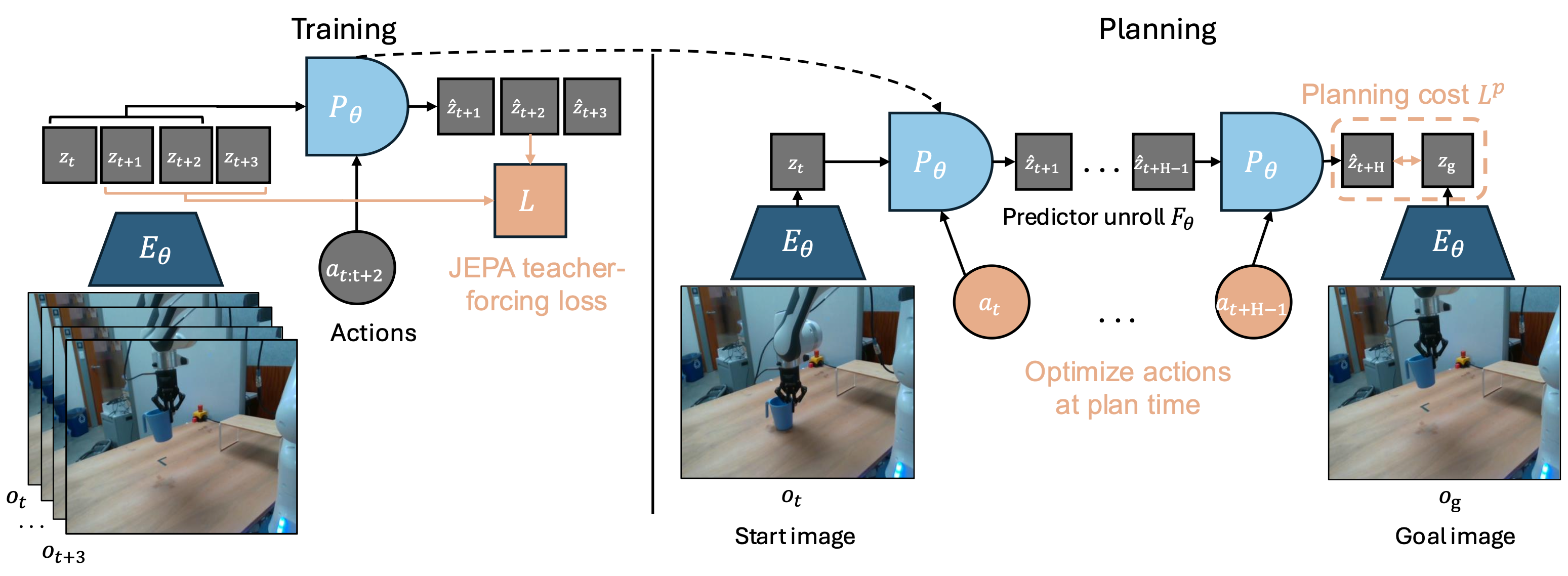
🎯 Pretrained Models
We provide pretrained JEPA-WMs, as well as DINO-WM and V-JEPA-2-AC(fixed) baseline models for various environments.
Download options: Models are available on 🤗 Hugging Face Hub (recommended) or via direct download from fbaipublicfiles.
JEPA-WM Models
| Environment | Resolution | Encoder | Pred. Depth | Weights |
|---|---|---|---|---|
| DROID & RoboCasa | 256×256 | DINOv3 ViT-L/16 | 12 | 🤗 HF / direct |
| Metaworld | 224×224 | DINOv2 ViT-S/14 | 6 | 🤗 HF / direct |
| Push-T | 224×224 | DINOv2 ViT-S/14 | 6 | 🤗 HF / direct |
| PointMaze | 224×224 | DINOv2 ViT-S/14 | 6 | 🤗 HF / direct |
| Wall | 224×224 | DINOv2 ViT-S/14 | 6 | 🤗 HF / direct |
DINO-WM Baseline Models
| Environment | Resolution | Encoder | Pred. Depth | Weights |
|---|---|---|---|---|
| DROID & RoboCasa | 224×224 | DINOv2 ViT-S/14 | 6 | 🤗 HF / direct |
| Metaworld | 224×224 | DINOv2 ViT-S/14 | 6 | 🤗 HF / direct |
| Push-T | 224×224 | DINOv2 ViT-S/14 | 6 | 🤗 HF / direct |
| PointMaze | 224×224 | DINOv2 ViT-S/14 | 6 | 🤗 HF / direct |
| Wall | 224×224 | DINOv2 ViT-S/14 | 6 | 🤗 HF / direct |
V-JEPA-2-AC(fixed) Baseline Model
| Environment | Resolution | Encoder | Pred. Depth | Weights |
|---|---|---|---|---|
| DROID & RoboCasa | 256×256 | V-JEPA-2 ViT-G/16 | 24 | 🤗 HF / direct |
VM2M Decoder Heads (optional)
Decoder heads enable visualization and rollout decoding. They are not required for training world models or running planning evaluations.
| Decoder | Encoder | Resolution | Weights |
|---|---|---|---|
| dinov2_vits_224 (05norm) | DINOv2 ViT-S/14 | 224×224 | 🤗 HF / direct |
| dinov2_vits_224_INet | DINOv2 ViT-S/14 | 224×224 | 🤗 HF / direct |
| dinov3_vitl_256_INet | DINOv3 ViT-L/16 | 256×256 | 🤗 HF / direct |
| vjepa2_vitg_256_INet | V-JEPA-2 ViT-G/16 | 256×256 | 🤗 HF / direct |
Decoder assignment: DINO-WM uses
dinov2_vits_224(05norm), JEPA-WM uses INet variants (dinov2_vits_224_INetfor sim envs,dinov3_vitl_256_INetfor real-robot), VJ2AC usesvjepa2_vitg_256_INet.
🔌 Loading Models with PyTorch Hub
import torch

# Load our best pretrained JEPA-WMs
model, preprocessor = torch.hub.load('facebookresearch/jepa-wms', 'jepa_wm_droid')
model, preprocessor = torch.hub.load('facebookresearch/jepa-wms', 'jepa_wm_metaworld')
model, preprocessor = torch.hub.load('facebookresearch/jepa-wms', 'jepa_wm_pusht')
model, preprocessor = torch.hub.load('facebookresearch/jepa-wms', 'jepa_wm_pointmaze')
model, preprocessor = torch.hub.load('facebookresearch/jepa-wms', 'jepa_wm_wall')

# Load reproduced DINO-WM baseline models
model, preprocessor = torch.hub.load('facebookresearch/jepa-wms', 'dino_wm_droid')
model, preprocessor = torch.hub.load('facebookresearch/jepa-wms', 'dino_wm_metaworld')
model, preprocessor = torch.hub.load('facebookresearch/jepa-wms', 'dino_wm_pusht')
model, preprocessor = torch.hub.load('facebookresearch/jepa-wms', 'dino_wm_pointmaze')
model, preprocessor = torch.hub.load('facebookresearch/jepa-wms', 'dino_wm_wall')

# Load fixed V-JEPA-2-AC baseline model
model, preprocessor = torch.hub.load('facebookresearch/jepa-wms', 'vjepa2_ac_droid')
# Load V-JEPA-2-AC official ckpt from https://github.com/facebookresearch/vjepa2
model, preprocessor = torch.hub.load('facebookresearch/jepa-wms', 'vjepa2_ac_oss')
🤗 Loading Models with Hugging Face Hub
from huggingface_hub import hf_hub_download
import torch

# Download a specific checkpoint
checkpoint_path = hf_hub_download(
    repo_id="facebook/jepa-wms",
    filename="jepa_wm_droid.pth.tar"
)

# Load the checkpoint
checkpoint = torch.load(checkpoint_path, map_location="cpu")

# Or use directly with torch.hub (automatically tries HF Hub first)
model, preprocessor = torch.hub.load('facebookresearch/jepa-wms', 'jepa_wm_droid')
Available model files on HF Hub:
jepa_wm_droid.pth.tar,jepa_wm_metaworld.pth.tar,jepa_wm_pusht.pth.tar,jepa_wm_pointmaze.pth.tar,jepa_wm_wall.pth.tardino_wm_droid.pth.tar,dino_wm_metaworld.pth.tar,dino_wm_pusht.pth.tar,dino_wm_pointmaze.pth.tar,dino_wm_wall.pth.tarvjepa2_ac_droid.pth.tar,vjepa2_ac_oss.pth.tar- Decoder heads:
dinov2_vits_224.pth.tar,dinov2_vits_224_INet.pth.tar,dinov3_vitl_256_INet.pth.tar,vjepa2_vitg_256_INet.pth.tar
🚀 Getting Started
Installation
We use conda for system dependencies (FFmpeg) and uv for fast Python package management.
# 1. Install uv (if not already installed)
curl -LsSf https://astral.sh/uv/install.sh | sh

# 2. Create conda environment with FFmpeg
conda create -n jepa-wms python=3.10 ffmpeg=7 -c conda-forge -y
conda activate jepa-wms

# 3. Clone and install
git clone git@github.com:facebookresearch/jepa-wms.git
cd jepa-wms
uv pip install -e .
# Optional: Install dev dependencies
uv pip install -e ".[dev]"

# 4. Verify installation
python -c "import torchcodec; print('✓ torchcodec works')"
⚙️ Configuration
Set these environment variables in your ~/.bashrc or ~/.zshrc:
export JEPAWM_DSET=/path/to/your/datasets
export JEPAWM_LOGS=/desired_path/to/your/train_logs_and_planning_eval_logs
export JEPAWM_HOME=/path/to/your/workspace # dir where you cloned this repo
export JEPAWM_CKPT=/desired_path/to/your/saved_checkpoints # Optional
export JEPAWM_OSSCKPT=/path/to/your/pretrained_opensource_encoders  # Optional
Note on config paths: In training configs (
configs/vjepa_wm/), thefolderfield (using${JEPAWM_LOGS}) stores train / validation logs and planning eval outputs, whilecheckpoint_folder(using${JEPAWM_CKPT}) stores saved model checkpoints. Ifcheckpoint_folderis omitted, it defaults tofolder.
Then run:
source ~/.bashrc && cd $JEPAWM_HOME/jepa-wms && python setup_macros.py && conda activate jepa-wms📁 Repository structure under JEPAWM_HOME
$JEPAWM_HOME/
├── jepa-wms/          # This repository
├── dinov3/            # DINOv3 repository (optional)
├── robocasa/          # RoboCasa repository (optional)
└── robosuite/         # RoboSuite repository (optional)
🧠 Pretrained Encoders
DINOv2 is automatically downloaded via TorchHub when first used. Other encoders require manual setup.
| Encoder | TorchHub | Manual Download Required |
|---|---|---|
| DINOv2 | ✅ facebookresearch/dinov2 | No |
| DINOv3 | ❌ Requires local repo | Yes |
| V-JEPA v2 | ⚠️ Manual preferred | Yes (recommended) |
| V-JEPA v1 | ❌ Not available | Yes |
Why manual download for V-JEPA v2? We centralize all model architectures around our own
src/models/for clarity. TorchHub loading can cause import conflicts since both repos share similar file structures.
Organize checkpoints in $JEPAWM_OSSCKPT:
$JEPAWM_OSSCKPT/
├── vjepa1_opensource/     # V-JEPA v1 checkpoints
│   └── vitl16.pth.tar
├── vjepa2_opensource/     # V-JEPA v2 checkpoints
│   ├── vjepa2_vit_large.pth
│   └── vjepa2_vit_giant.pth
└── dinov3/                # DINOv3 checkpoints
    ├── dinov3_vits16_pretrain_lvd1689m.pth
    └── dinov3_vitl16_pretrain_lvd1689m-<hashkey>.pth
Download from:
- V-JEPA v1: facebookresearch/jepa → ViT-L/16
- V-JEPA v2: facebookresearch/vjepa2 → ViT-L/16 or ViT-G/16
- DINOv3: facebookresearch/dinov3 → Download weights and clone repo to
$JEPAWM_HOME/dinov3/
🤖 MuJoCo 2.1 for PointMaze
Only required for PointMaze (uses d4rl → mujoco-py). Other environments use the modern mujoco package.
# Download MuJoCo 2.1.0
mkdir -p ~/.mujoco && cd ~/.mujoco
wget https://mujoco.org/download/mujoco210-linux-x86_64.tar.gz
tar -xzvf mujoco210-linux-x86_64.tar.gz

# Add to ~/.bashrc
export LD_LIBRARY_PATH=$LD_LIBRARY_PATH:$HOME/.mujoco/mujoco210/bin
source ~/.bashrc  # or ~/.zshrc

# Verify installation
python -c "import mujoco_py; print('mujoco-py works!')"
🏠 RoboCasa install (optional)
Required for RoboCasa/RoboSuite environments:
# Install RoboSuite
git clone https://github.com/Basile-Terv/robosuite.git && cd robosuite
uv pip install -e . && cd ..

# Install RoboCasa
git clone https://github.com/Basile-Terv/robocasa.git && cd robocasa
uv pip install -e .
python robocasa/scripts/download_kitchen_assets.py   # Caution: Assets to be downloaded are around 20GB.
python robocasa/scripts/setup_macros.py && cd ..
📦 Downloading Data
All datasets are available on 🤗 HuggingFace: facebook/jepa-wms
# Download all datasets
python src/scripts/download_data.py

# Download specific dataset(s)
python src/scripts/download_data.py --dataset pusht pointmaze wall

# List available datasets
python src/scripts/download_data.py --list| Dataset | Description |
|---|---|
pusht | Push-T environment trajectories* |
pointmaze | PointMaze navigation trajectories* |
wall | Wall environment trajectories* |
metaworld | 42 Metaworld tasks (100 episodes each) |
robocasa | RoboCasa kitchen manipulation |
franka | Franka robot trajectories |
* The
pusht,pointmaze, andwalldatasets are sourced from the DINO-WM project without modification. We re-host them on our HuggingFace repository for convenience.
🤖 DROID dataset (optional)
DROID requires separate download via gsutil:
Download the DROID dataset following the instructions. This requires uv pip install gsutil.
We only use the left camera and not the SVO cam files hence you can run the second of the two below commands to obtain the raw dataset of full-HD resolution (720 x 1280) MP4 files.
# Raw DROID dataset in stereo HD, stored as MP4 videos (8.7TB)
gsutil -m cp -r gs://gresearch/robotics/droid_raw <path_to_your_target_dir>
# Raw DROID dataset, non-stereo HD video only (5.6TB, excluding stereo video & raw SVO cam files)
gsutil -m rsync -r -x ".*SVO.*|.*stereo.*\.mp4$" "gs://gresearch/robotics/droid_raw" <path_to_your_target_dir>
After downloading, generate the paths CSV file required by the dataloader:
python src/scripts/generate_droid_paths.py \
    --droid_root <path_to_your_target_dir>/droid_raw/1.0.1 \
    --output_path $JEPAWM_DSET/DROID/droid_paths.csv \
    --num_workers 16 \
This script scans the dataset directory structure in parallel and creates a CSV file listing all valid episode paths.
📂 Dataset directory structure
$JEPAWM_DSET/
├── pusht_noise/           # Push-T dataset
├── point_maze/            # PointMaze dataset
├── wall_single/           # Wall dataset
├── Metaworld/             # Metaworld dataset
│   └── data/
│       └── train-00000-of-00001.parquet
├── robocasa/              # RoboCasa dataset
│   └── combine_all_im256.hdf5
├── franka_custom/         # Franka custom dataset
│   └── data/
│       ├── folding/
│       ├── pick/
│       └── push/
│           ├── brownboxpush_v0/
│           │   └── run_0001/
│           │       ├── episode.h5
│           │       └── trajectory.hdf5
│           └── push_various_objects/
├── DROID/                 # DROID dataset
│   └── droid_paths.csv
├── kinetics400/           # Kinetics-400 dataset (optional)
│   ├── k400_train_paths.csv
│   └── k400_val_paths.csv
├── kinetics710/           # Kinetics-710 dataset (optional)
│   ├── k710_train_paths.csv
│   └── k710_val_paths.csv
├── ssv2/                  # Something-Something-v2 dataset (optional)
│   ├── ssv2_train_paths.csv
│   └── ssv2_val_paths.csv
└── howto100m/             # HowTo100M dataset (optional)
    └── howto100m_paths.csv
💡 Common Concepts
🐛 The --debug Flag
Use --debug with app.main or evals.main to run in single-process mode on the current node:
python -m app.main --fname <config.yaml> --debugThis is useful for:
- Interactive debugging with
pdbbreakpoints - Single-GPU runs without distributed overhead
⚠️ Don't confuse with
meta.quick_debugin config files, which reduces dataset size and iterations for quick sanity checks.
🔄 Automatic Evaluation During Training
The training script automatically launches planning evaluations every meta.eval_freq epochs:
- Config generation: Merges your training settings with eval templates from
configs/online_plan_evals/ - Job submission: Launches eval jobs for each generated config
The evals.separate option controls how evals are executed:
| Value | Behavior |
|---|---|
true (default) | Submit as separate SLURM jobs via sbatch |
false | Run evals on rank 0 of the training job |
🏋️ Training
Quick Start
Distributed training (from login node):
python -m app.main_distributed --fname configs/vjepa_wm/<env>_sweep/<model>.yaml --account <account> --qos <qos> --time <time>Single-GPU training (interactive session):
python -m app.main --fname configs/vjepa_wm/<env>_sweep/<model>.yaml --debug📋 Paper Configs
| Model | Environment | Config Path |
|---|---|---|
| JEPA-WM | Metaworld | mw_final_sweep/mw_4f_fsk5_ask1_r224_pred_AdaLN_ftprop_depth6_repro_2roll_save.yaml |
| JEPA-WM | PointMaze | mz_sweep/mz_4f_fsk5_ask1_r224_vjtranoaug_predAdaLN_ftprop_depth6_repro_2roll_save_2n.yaml |
| JEPA-WM | Push-T | pt_sweep/pt_4f_fsk5_ask1_r224_vjtranoaug_predAdaLN_ftprop_depth6_repro_2roll_save.yaml |
| JEPA-WM | Wall | wall_sweep/wall_4f_fsk5_ask1_r224_vjtranoaug_predAdaLN_ftprop_depth6_repro_2roll_save_2n.yaml |
| JEPA-WM | RoboCasa | droid_final_sweep/droid_4fpcs_fps4_r256_dv3vitl_asp1_pred_AdaLN_depth12_noprop_repro_2roll_4n.yaml |
| JEPA-WM | DROID (offline) | droid_final_sweep/droid_4fpcs_fps4_r256_dv3vitl_asp1_pred_AdaLN_depth12_noprop_repro_2roll_4n.yaml |
| DINO-WM | Any | <env>_sweep/<env>_4f_fsk5_ask1_r224_pred_dino_wm_depth6_repro_1roll_save |
All configs under configs/vjepa_wm/.
🎨 Training Decoder Heads (optional)
Decoder heads enable visualization and light evals (rollout decoding via val_rollout() in the training loop). See VM2M Decoder Heads for pretrained weights.
Note: Decoder heads are not required for training world models or running planning evaluations. The training configs in
configs/vjepa_wm/*_sweep/haveheads_cfg: nullby default.
Two training strategies:
- Cross-environment (recommended if datasets available): Train one decoder on VideoMix2M (HowTo100M + SSv2 + K400) — works across all environments. See configs in
configs/vjepa_wm/vm2m/open_source_decs/. - In-domain: Train one decoder per encoder per environment on environment-specific data
# Cross-environment decoder (recommended)
python -m app.main --fname configs/vjepa_wm/vm2m/open_source_decs/step2_lpips_vm2m_<enc>_<params>.yaml --debug

# State head (environment-specific)
python -m app.main --fname configs/vjepa_wm/<env>/step2_<env>_state_head_<enc>_<params>.yaml --debug

# Image decoder head (environment-specific)
python -m app.main --fname configs/vjepa_wm/<env>/step2_lpips_<env>_<enc>_<params>.yaml --debug
📊 Evaluation
⚙️ Manual Eval Config Generation
Eval configs are auto-generated during training. You can also manually generate or write eval configs to run evaluations independently:
- Set
meta.plan_only_eval_mode: truein your training config - Set
evals.dump_eval_configs: truein your training config - Run:
python -m app.main --fname <config.yaml> --debug
The dump directory is automatically derived from evals.eval_cfg_paths (e.g., configs/online_plan_evals/mz/... → configs/dump_online_evals/mz/).
▶️ Running Evaluations
Once you have a valid eval config, run evaluations using:
# Single GPU
python -m evals.main --fname <config.yaml> --debug

# Distributed
python -m evals.main_distributed --fname <config.yaml> --account <account> --qos lowest --time 120

# Grid evaluation (sweep over hyperparameters or epoch checkpoints)
python -m evals.simu_env_planning.run_eval_grid --env <env> --config <config.yaml>
📓 Visualization:
app/plan_common/notebooks/logs_planning_joint.ipynb
Full documentation:
evals/simu_env_planning/README.md
📈 Reproducing Paper Design Choice Plots
To reproduce the design choice comparison plots from the paper (e.g., encoder comparison, predictor architecture, rollout steps), train models using the configs in configs/vjepa_wm/*_sweep/ and then run the plotting commands in app/plan_common/plot/logs_plan_joint_per_design_choice.py.
Example commands:
# Encoder comparison
python app/plan_common/plot/logs_plan_joint_per_design_choice.py \
    --design_choices_file app/plan_common/plot/local/design_choice_yamls/enc.yaml \
    --output enc_comparison --verbose

# Predictor architecture comparison
python app/plan_common/plot/logs_plan_joint_per_design_choice.py \
    --design_choices_file app/plan_common/plot/local/design_choice_yamls/pred_arch.yaml \
    --output pred_arch_comparison --verbose

# Rollout steps comparison
python app/plan_common/plot/logs_plan_joint_per_design_choice.py \
    --design_choices_file app/plan_common/plot/local/design_choice_yamls/rollout_steps.yaml \
    --output rollout_steps_comparison --plot_line --verbose

# Final baseline comparison (LaTeX table)
python app/plan_common/plot/logs_plan_joint_per_design_choice.py \
    --design_choices_file app/plan_common/plot/local/design_choice_yamls/final_baseline_comp.yaml \
    --output final_baseline_comp --generate_latex --verbose
See the main() docstring in the script for the full list of commands used to generate paper figures.
🔮 Unroll Decode Evaluation
Counterfactual decoding evaluation that generates predictions with hardcoded custom actions. This is useful for visualizing how the world model responds to specific action scenarios (e.g., "open gripper + move up" vs "close gripper + move up").
Note: This evaluation is designed to work only with DROID or franka_custom data.
To run unroll decode evaluation, set meta.unroll_decode_eval_only_mode: true in your training config and configure unroll_decode_evals:
meta:
  unroll_decode_eval_only_mode: true
unroll_decode_evals:
  specific_video: true  # Use a specific video file
  specific_video_path: /path/to/video.npz  # Optional: path to npz file
  play_in_reverse: false
  repeat_hardcode_act: 5  # Number of times to repeat hardcoded actions
  wrapper_kwargs:  # Same structure as evals.wrapper_kwargs
    ctxt_window: 2
The hardcoded actions can be customized by modifying the create_counterfactual_actions() function in evals/unroll_decode/eval.py.
📁 Code Structure
.
├── app                              # training loops
│   ├── vjepa_wm                     #   train world model / heads
│   ├── plan_common                  #   shared planning components
│   │   ├── datasets                 #   environment-specific datasets
│   │   ├── models                   #   world model architectures
│   │   └── plot                     #   plotting utilities
│   ├── main_distributed.py          #   entrypoint for sbatch on slurm
│   └── main.py                      #   entrypoint for local run
├── configs                          # config files
│   ├── dump_online_evals            #   generated eval cfgs from train loop
│   ├── evals                        #   pre-generated full eval cfgs
│   ├── online_plan_evals            #   eval cfg templates to fill with train cfg
│   ├── vjepa_wm                     #   train configs
├── evals                            # evaluations
│   ├── simu_env_planning            #   planning evaluation
│   ├── main_distributed.py          #   entrypoint for distributed evals
│   └── main.py                      #   entrypoint for local evals
├── src                              # the package
│   ├── datasets                     #   VM2M datasets, loaders (optional)
│   ├── models                       #   V-JEPA1/2 model definitions
│   ├── masks                        #   masking utilities (optional)
│   └── utils                        #   shared utilities
├── tests                            # unit tests for some modules
🔧 Troubleshooting
🖥️ SLURM Configuration (HPC Users)
The SLURM job submission is configured in src/utils/cluster.py. This file may need to be modified depending on your cluster's setup:
-
Account/Partition/QoS: The function
slurm_account_partition_and_qos()reads SLURM environment variables from the current job. Some clusters don't use all these concepts (account, partition, QoS) — the function handlesNonevalues gracefully. -
Low-priority QoS: For evaluation jobs, set the
SLURM_QOS_LOW_PRIORITYenvironment variable to your cluster's low-priority QoS name (e.g.,export SLURM_QOS_LOW_PRIORITY="lowest").
🖥️ MuJoCo Rendering
If you encounter MuJoCo rendering errors during evaluation (especially on headless servers or clusters), you may need to configure the rendering backend by setting these environment variables before running your scripts:
# For systems with EGL support (e.g., NVIDIA GPUs with recent drivers)
export MUJOCO_GL=egl
export PYOPENGL_PLATFORM=egl

# For systems without EGL (e.g., CPU-only rendering)
export MUJOCO_GL=osmesa
export PYOPENGL_PLATFORM=osmesa
When to use each backend:
- EGL: Preferred for GPU-accelerated rendering on headless servers with NVIDIA GPUs and recent drivers. Provides better performance.
- OSMesa: Fallback option for CPU-based rendering when EGL is not available. Slower but more compatible.
Common error messages:
"ERROR: GLEW initialization error: Missing GL version"→ Try usingosmesabackend"Cannot initialize EGL"→ Try usingosmesabackend or check GPU drivers- Rendering appears blank or corrupted → Verify the correct backend for your system
🚀 Distributed jobs
You cannot launch a main_distributed.py job from a GPU node if you do not clear the env variables, as is done with with submitit.helpers.clean_env(): in app/vjepa_wm/train.py.
🔄 Updating uv.lock
If you encounter errors when loading checkpoints from torchhub such as urllib.error.HTTPError: HTTP Error 503: Service Unavailable, you should rm uv.lock, then recreate your uv venv with uv sync, activate this new env and rerun your command.
🐍 numba/numpy issues
if running into issues with numba/numpy because of the numba dependency of robocasa, run:
conda install -c numba numba=0.56.4 -y
📄 License
This project is licensed under CC-BY-NC 4.0. See THIRD-PARTY-LICENSES.md for third-party components.
📚 Citing JEPA-WMs
If you find this repository useful, please consider giving a ⭐ and citing:
@misc{terver2025drivessuccessphysicalplanning,
      title={What Drives Success in Physical Planning with Joint-Embedding Predictive World Models?},
      author={Basile Terver and Tsung-Yen Yang and Jean Ponce and Adrien Bardes and Yann LeCun},
      year={2025},
      eprint={2512.24497},
      archivePrefix={arXiv},
      primaryClass={cs.AI},
      url={https://arxiv.org/abs/2512.24497},
}