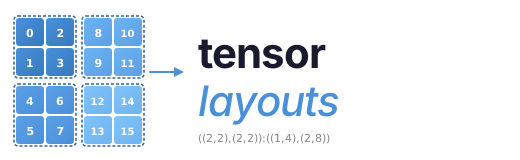


A pure-Python implementation of the NVIDIA CuTe layout algebra. No GPU required.
Note that tensor-layouts is now maintained out of https://github.com/jduprat/tensor-layouts.git
CuTe layouts describe how logical coordinates map to memory offsets on GPUs.
This library lets you construct, compose, and visualize those layouts using
plain Python — useful for understanding tensor core access patterns, debugging
swizzled shared memory, and prototyping tiled GPU kernels without compiling any
CUDA. The code in src/tensor_layouts/layouts.py is intentionally written to
be readable and pedagogical for people learning layout algebra.
The visualization layer is also designed to be pedagogical: for example,
hierarchical layout views can explicitly show nested row/column coordinates and
the resulting offset for each displayed cell.
Project Status
The core implementation is already in very good shape: the layout algebra, tensor semantics, analysis helpers, and visualization surface are correct, usable, and mature. Most of the remaining work is in documentation, examples, packaging, and repository polish rather than in redesigning the underlying model.
Installation
pip install tensor-layoutsFor visualization support:
pip install tensor-layouts[viz]Quick Start
from tensor_layouts import Layout, compose, complement, logical_divide

# A 4x8 column-major layout: offset(i,j) = i + j*4
layout = Layout((4, 8), (1, 4))
print(layout)       # (4, 8) : (1, 4)
print(layout(2, 3)) # 14

# Compose two layouts
a = Layout((4, 2), (1, 4))
b = Layout((2, 4), (4, 1))
print(compose(a, b))

# Tile a layout into 2x4 blocks
tiler = Layout((2, 4))
print(logical_divide(layout, tiler))
Core Concepts
A Layout is a function from logical coordinates to memory offsets, defined by
(shape, stride):
| Layout | Description |
|---|---|
Layout((4, 8), (8, 1)) | 4x8 row-major |
Layout((4, 8), (1, 4)) | 4x8 column-major |
Layout(((2,4), 8), ((1,16), 2)) | Hierarchical (tiled) |
The algebra provides four key operations:
compose(A, B)— Function composition: apply B's indexing to A's codomaincomplement(L)— The "missing half" of a layout's codomainlogical_divide(L, T)— Factor a layout into tiles of shape Tlogical_product(A, B)— Replicate A's pattern across B's domain
Plus Swizzle(B, M, S) for XOR-based bank conflict avoidance patterns.
MMA Atoms
The library includes matrix-multiply atom definitions for NVIDIA, AMD, Intel Xe, and Intel AMX targets. The Intel mappings were derived from public Intel ISA documentation; the Xe DPAS layouts were derived primarily from Intel's public DPAS/VISA instruction documentation and cross-checked against the CUTLASS experimental Xe backend.
NVIDIA Atoms
from tensor_layouts.atoms_nv import *

atom = SM90_64x64x16_F16F16F16_SS
print(atom.name)        # SM90_64x64x16_F16F16F16_SS
print(atom.shape_mnk)   # (64, 64, 16)
print(atom.c_layout)    # Thread-value layout for C accumulator
Supported architectures: SM70 (Volta), SM75 (Turing), SM80 (Ampere), SM89 (Ada Lovelace), SM90 (Hopper GMMA), SM100 (Blackwell UMMA), SM120 (Blackwell B200).
AMD Atoms
from tensor_layouts.atoms_amd import *

atom = CDNA3_32x32x16_F32F8F8_MFMA
print(atom.name)        # CDNA3_32x32x16_F32F8F8_MFMA
print(atom.shape_mnk)   # (32, 32, 16)
print(atom.c_layout)    # Thread-value layout for C accumulator
Supported architectures: CDNA1 (gfx908 / MI100), CDNA2 (gfx90a / MI200), CDNA3 (gfx942 / MI300), CDNA3+ (gfx950).
Intel Xe DPAS Atoms
from tensor_layouts.atoms_xe import *

atom = XeHPC_8x8x8_F32F16F16_DPAS
print(atom.name)        # XeHPC_8x8x8_F32F16F16_DPAS
print(atom.shape_mnk)   # (8, 8, 8)
print(atom.c_layout)    # Thread-value layout for C accumulator
Supported targets: Xe-HPC (Ponte Vecchio / Data Center Max) and Xe-HPG (Arc / DG2) subgroup DPAS instructions.
Intel AMX Atoms
from tensor_layouts.atoms_amx import *

atom = AMX_16x16x32_F32BF16BF16F32
print(atom.name)        # AMX_16x16x32_F32BF16BF16F32
print(atom.shape_mnk)   # (16, 16, 32)
print(atom.c_layout)    # Thread-value layout for C accumulator
Supported targets: Intel AMX tile matrix-multiply instructions
(tdpbf16ps, tdpfp16ps, tdpbssd, tdpbsud, tdpbusd, tdpbuud).
Visualization
With pip install tensor-layouts[viz]:
from tensor_layouts import Layout, Swizzle
from tensor_layouts.viz import draw_layout, draw_swizzle

draw_layout(Layout((8, 8), (8, 1)), title="Row-Major 8x8", colorize=True)
draw_swizzle(Layout((8, 8), (8, 1)), Swizzle(3, 0, 3), colorize=True)
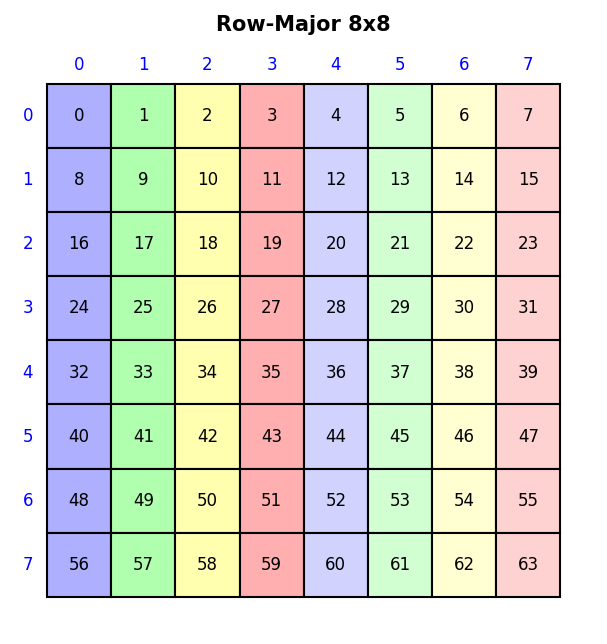
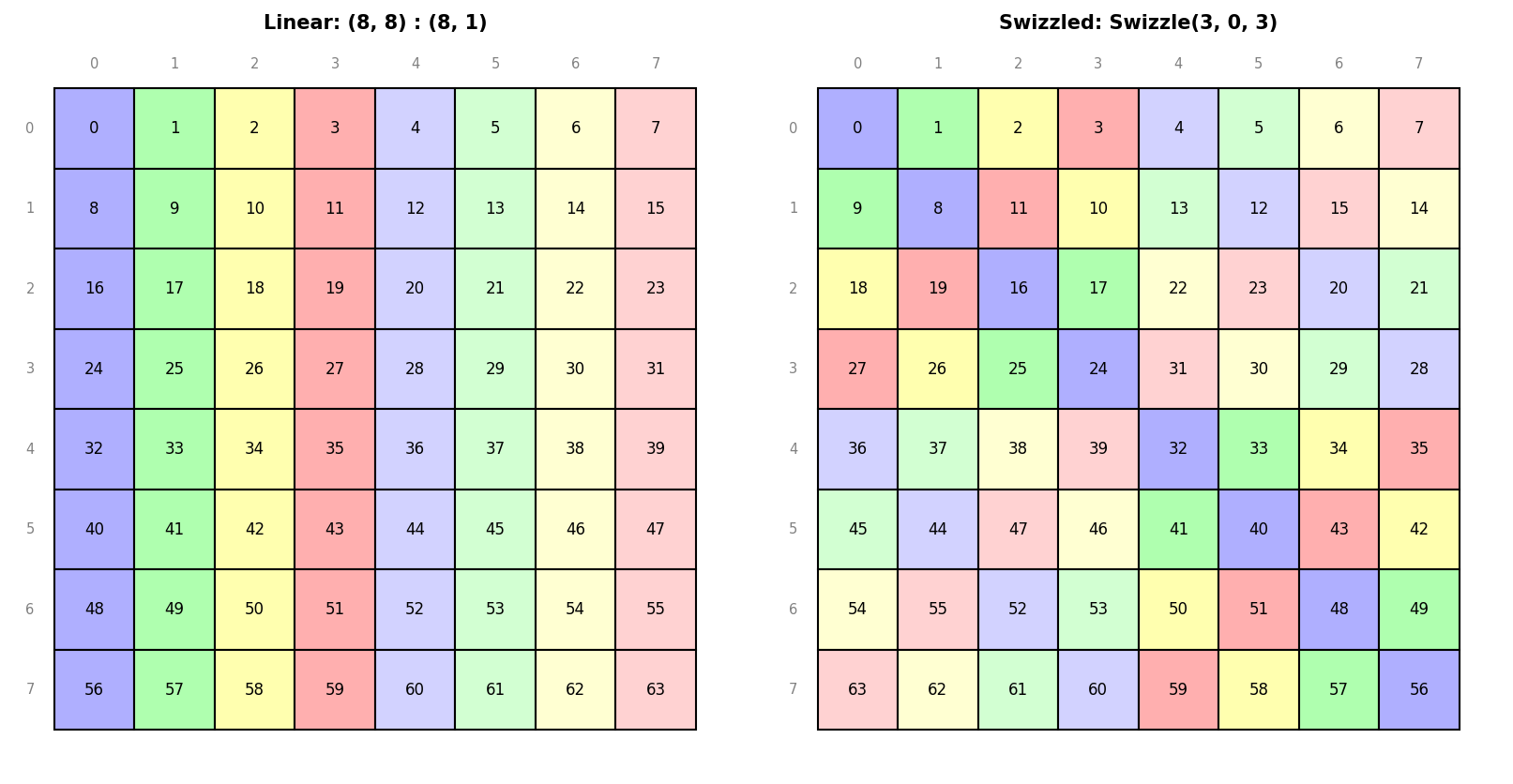
See examples/viz.ipynb for a full
gallery of layout, swizzle, MMA atom, and tiled MMA visualizations, and the
Notebook gallery below for the full set.
Documentation
- Example scripts assume
tensor-layoutsis installed. From a repo checkout, runpip install -e .first, orpip install -e ".[viz]"for visualization examples. - Layout Algebra API — construction, querying, compose, complement, divide, product
- Visualization API — draw_layout, draw_swizzle, draw_mma_layout, and more
- Layout Examples — runnable script covering the full algebra (
python3 examples/layouts.py) - Visualization Examples — runnable script generating all visualization types (
python3 examples/viz.py)
Notebook gallery
- Visualization Notebook —
viz.ipynb: layout, swizzle, MMA atom, and tiled MMA visualizations - Algorithms Notebook —
algorithms.ipynb: derivations of compose, complement, divide, product - Applications Notebook —
applications.ipynb: applied examples (paper-style) - GEMM Notebook —
gemm.ipynb: a fully explained NVIDIA GEMM kernel built up using layout algebra
Testing
pip install -e ".[test]"
pytest tests/
For local linting, install the dev extras and run Ruff on the Python sources:
pip install -e ".[dev]"
ruff check src/ tests/ examples/
The default Ruff configuration excludes *.ipynb; notebooks are treated as
worked material rather than part of the Python lint surface.
Oracle tests cross-validate against vendor reference implementations and are skipped automatically if the corresponding tool is unavailable:
# NVIDIA pycute oracle
pip install -e ".[test,oracle-nv]"
pytest tests/oracle_nv.py

# Direct CuTe C++ oracle
# Requires a C++ compiler plus CUTLASS/CUDA headers in the active environment.
pytest tests/oracle_cute_cpp.py

# AMD (cross-validation against amd_matrix_instruction_calculator)
# AMD's tool is not on PyPI; clone it from GitHub and put it on PYTHONPATH:
#   git clone https://github.com/ROCm/amd_matrix_instruction_calculator
#   export PYTHONPATH="$PWD/amd_matrix_instruction_calculator:$PYTHONPATH"
pip install -e ".[test]"
pytest tests/oracle_amd.py
References
- CuTe Layout Representation and Algebra — Cris Cecka
- Categorical Foundations for CuTe Layouts — Jack Carlisle, Jay Shah, Reuben Stern, Paul VanKoughnett
- CuTe Documentation
- NVIDIA PTX ISA
- NVIDIA Cutlass
- Cutlass MMA Atoms
- AMD Matrix Instruction Calculator
- AMD Matrix Cores Lab Notes
- Intel DPAS / VISA instruction specification
- Intel Architecture Instruction Set Extensions Programming Reference (AMX)
- Intel 64 and IA-32 Architectures Software Developer's Manual, Volume 2A
License
MIT License. See LICENSE for details.
Repo
tensor-layouts is maintained out of https://github.com/jduprat/tensor-layouts.git