BatteryHub v1.7.6
An ultra-lightweight Rust implementation of BatteryHub for Windows.
Battery levels of your wireless mouse, headset, keyboard and controller, right on the taskbar,
in about 0.2 MB of RAM.






[!IMPORTANT] This is a recode of krisgfx9/Wireless-Device-Battery-Monitor (the C++ BatteryHub by krisgfx9), not a fork and not the original. It rewrites the original in Rust. The idea, the look of the taskbar strip and the device protocols all come from the original project, and the credit for them goes to its authors.
The original is currently unavailable on GitHub. On 22 November 2026 the krisgfx9 account was suspended by GitHub, which took the original repository offline with it. According to the original author, no reason was given; they have appealed, so the original may come back. Until then, the original author shares downloads through the project's Discord.
This recode is still not the original, but it is supported and will stay supported: it keeps being developed and updated, with new devices added from device requests.
Developed by @ferloom with the help of Claude (AI).
Contents
Download · Support the project · Problem with a new version? · Features · Using it · Your own language · Setup · Resource usage vs. the original · Taskbar compatibility · Supported devices · Unsupported devices · Testing · Building · Contributors · License
Download
Get BatteryHub-Taskbar-Setup-v1.7.6.exe from the latest release, run it and click Install.
- No administrator rights needed (per-user install).
- Already installed? Use Check for updates... in the right-click menu, or run the new setup and click Update.
- It does not interfere with the original C++ BatteryHub if you have that installed too.
- Windows may show a SmartScreen warning because the file is not code-signed: More info → Run anyway.
Support the project
BatteryHub is free and stays free. It is made by one person in their spare time, and every new device, fix and update takes hours of reading protocols and testing.
If BatteryHub is useful to you, a small tip helps a lot: it lets me spend more time on it, so new devices and updates come faster, and it supports me directly. Any amount is appreciated, thank you!
Sends a tip through Revolut: revolut.me/p2ps

Not able to tip? Reporting a device, testing a new version or sharing BatteryHub helps just as much.
Problem with a new version? Downgrade and report it
If something breaks after an update, you can always go back to an older version:
- From v1.6 on: right-click BatteryHub → Install another version... (or Other versions... in the setup window) lists every release from GitHub; pick one and click Go back to .... It is downloaded and checked against its SHA-256 checksum like an update.
- By hand: open Releases, download the setup of an earlier version (e.g.
BatteryHub-Taskbar-Setup-v1.5.exe) and run it. It finds the newer version you have installed and offers to reinstall with its own (older) version.
Your warning levels, device names, options and battery history are kept either way.
Check for updates never offers an older version, so the downgrade stays in place until you update again. Versions before v1.1 do not have Check for updates; to come back later, run the newer setup.
Please also report the problem in Issues so it can be fixed in the next version. It helps to include:
- the version that has the problem and the one that works (both are shown at the top of the setup window);
- Windows version and taskbar (Windows 11, Windows 10, ExplorerPatcher: normal or small taskbar);
- your devices (e.g. "Logitech PRO 2 LIGHTSPEED on its receiver", "AirPods over Bluetooth");
- what happened and what you expected, ideally with a screenshot of the taskbar.
Features
- On the taskbar, next to the clock: one icon and percentage per device (
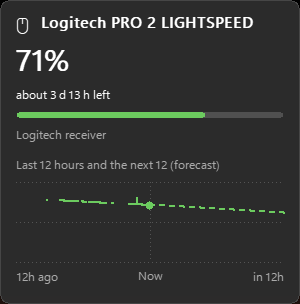
🎧 27% 🖱 96%), in the original's look (Segoe Fluent Icons, Segoe UI Variable, ClearType), following light / dark mode and DPI. - Hover a device for a card with its name, level, estimated time left (or time to full while charging), connection and a chart of the last 12 hours with now in the middle and a forecast of the next 12 (dashed; charging in blue), fading in and cross-fading between devices like the taskbar's window previews; the widget lights up like the taskbar's own buttons.
- Move the mouse onto the card and it stays open: along the chart it shows each hour's level and its change from the hour before, measured in the past and forecast ahead. The estimate is made from what has been measured so far, from the first 1% drop on, and gets more exact over time; once there is an hour of data with a 5% drop, the average of all measured stretches on battery is used.
- Earbuds (AirPods, SteelSeries GameBuds): their own icon, with the bud that does not report (in its case, or off) greyed out; the taskbar shows the weaker bud; the card shows each bud's level next to the name (
L 80% R 75%) and a chart per bud (left over right), and so does the dashboard. AirPods are re-read every 10 s, so a bud taken out of the case shows within seconds. - Device dashboard (right-click a device → Dashboard...): a bar of all devices at the top to switch between them, level and state, a 24 h / 3-day / 7-day chart with charging marked, the charge and discharge sessions, and statistics (typical battery life, time left, charge and discharge rates per hour). Where there is too little data it says so instead of guessing.
- 7-day battery history: one point per change (at least every 10 minutes), kept 7 days, in
%LOCALAPPDATA%\BatteryHub\Taskbar\History.bin. Times when BatteryHub was not running stay empty: nothing is filled in. Times are stored in UTC and shown in the time zone Windows is set to, so moving to another country or a daylight-saving switch does not shift the history. - Rename a device (shown everywhere in BatteryHub only; the device itself is not changed) and Warn at 5%: one notification when a device on battery drops to 5% or less, again only after it was charged.
- Charging at a glance: green ⚡ while charging, blue ⚡ at 100%, red percentage at or below the device's warning level (earbuds: each bud on its own).
- Per-device warning level: 50 / 40 / 30 / 20 / 15 / 10 / 5%.
- Reacts at once when a receiver, cable or Bluetooth device connects or disconnects, and within ~10 s when a headset on a 2.4 GHz dongle is switched on or off.
- Refresh interval of 1 / 5 / 10 / 30 minutes or 1 hour.
- More monitors: show the widget on all monitors, the main one only, or only one other monitor; on every taskbar it sits right next to that taskbar's clock and appears at the same moment.
- Notification-area icons instead (optional): one icon per device that Windows itself places, so it can be dragged between other tray icons and never overlaps other taskbar widgets.
- Next to other taskbar widgets: when another program places its own widget in the taskbar (network or CPU meters...), BatteryHub sits left of it instead of on top of it.
- Position and background: move the widget further from the clock or up / down (presets, or in 10 px steps), and an optional plate behind it for transparent taskbars.
- Start with Windows and automatic update check switched on or off right from the menu.
- Check for updates from the menu, with a SHA-256-verified download.
- 21 languages (English, Polski, Deutsch, Français, Español, Português (Brasil), Italiano, Nederlands, Čeština, Magyar, Svenska, Русский, Українська, Türkçe, 日本語, 한국어, 简体中文, 繁體中文, Tiếng Việt, Bahasa Indonesia, ไทย), following the Windows display language or chosen in the menu, and your own: Language → Create your own language... writes a file with every text to translate (see Your own language).
- Hide a device from the taskbar (per device, from its menu): it is still read, listed in the menu, and kept in the history and the 5% warning.
- Your order: drag a device along the widget to another place (the others slide aside), or use Move left / Move right in its menu; every device keeps its place, and a device seen for the first time starts on the far left.
- Gone devices are forgotten: a device not connected for 7 days loses its history, place, name and settings, so a device plugged in once does not stay around.
- Reset measurements of a device (its menu, or the dashboard): after a warning, its history and statistics are deleted and measuring starts again.
- Windows 11 style menu: the right-click menu is drawn like Windows 11's own context menus, dark or light like the taskbar.
- Request support for a device from the menu: pick a device that is not shown, and a GitHub issue opens filled in with what is needed to add it.
- Tiny: about 0.1–0.2 MB of RAM when idle (Task Manager "Memory"), about 0.1 s of CPU per minute.
- One copy only: starting BatteryHub again while it runs does nothing.
- Left or right taskbar (Windows 11): the widget becomes a column above the notification area, and the hover card opens beside the taskbar.
- Safe fallback to notification-area icons on an unknown Explorer layout.
Using it
| On the strip | Meaning |
|---|---|
| Red percentage | At or below the device's warning level (default 15%) |
| Green ⚡ | Plugged in and charging |
| Blue ⚡ | Plugged in and charged to 100% |
| Dimmed | Asleep (receiver still plugged in), showing the last known value |
Left click does nothing (on purpose: the strip stays out of the way). Right click opens the menu:
| Menu item | What it does |
|---|---|
| Device name (level, state; earbuds: L: / R:) ▸ | Dashboard..., Battery history, Statistics (the dashboard on that tab), Rename device..., Red warning at or below 50 / 40 / 30 / 20 / 15 / 10 / 5%, Warn at 5% (notification) (on by default), Red icon at the warning level (off by default; earbuds: each bud on its own), Icon colour (the taskbar's, the brand's, e.g. Razer green or Logitech blue, six ready-made colours or your own), and Show on the taskbar (on by default; turned off, the device leaves the strip, its tooltip and the hover card but stays in this menu, still read, with its history and the 5% warning), Move left / Move right (its place on the strip; dragging it there works too) and Reset measurements... (asks first, then deletes the device's history and statistics) |
| Refresh devices | Full rescan; devices that are gone disappear |
| Refresh battery levels | Reads the levels again |
| Refresh battery every ▸ | 1 minute / 5 / 10 / 30 minutes / 1 hour |
| Refresh when a device connects or disconnects | On by default; see below |
| Show as notification-area icons (Windows arranges them) | Off by default. Instead of the strip, one notification-area icon per device with its level drawn in it. Windows places these icons like any other: drag them to reorder or in and out of the hidden icons. New icons start hidden behind ^ (Windows 11 does that for every app): drag them onto the taskbar or turn them on in Settings → Personalization → Taskbar → Other system tray icons once; Windows remembers it per device |
| Background behind taskbar text (for translucent taskbars) | Off by default. A rounded plate in the taskbar's colour behind the widget, so it stays readable on a transparent taskbar (TranslucentTB, Windhawk Taskbar Styler...) |
| Position on the taskbar ▸ | Next to the notification area or 20 to 200 px to the left of it (in 20 px steps), e.g. to make room for another taskbar widget (iCUE, network meters...). Move 10 px left / right at the bottom moves it in 10 px steps to any place (shown as Custom). Also applies on other monitors |
| Height on the taskbar ▸ | 5 / 10 / 15 px up, Centred, or 5 / 10 / 15 px down; Move 10 px up / down at the bottom moves it in 10 px steps (up to 40 px, shown as Custom). Also applies on other monitors |
| Show widget on ▸ | Only with more than one monitor: All monitors / Main monitor only / Display 2 (left) only... The monitor is remembered by its identity, not its number; while it is unplugged the widget is on the main taskbar. Other monitors need Show my taskbar on all displays in Windows (taskbars of other programs, e.g. DisplayFusion, are not supported) |
| Language ▸ | Windows language (...) (the default, with the language it resolves to in brackets: the Windows display language, or English when BatteryHub has no translation for it), or one of the languages listed. The region and format setting (date, number format) does not count: with an English Windows and Polish formats, BatteryHub is in English until you pick Polski. Create your own language... and Open the languages folder: see Your own language |
| Automatically start with Windows | Adds or removes BatteryHub's autostart entry (HKCU\Software\Microsoft\Windows\CurrentVersion\Run\BatteryHub Taskbar) |
| Automatically check for updates | Off by default. When on, BatteryHub checks GitHub once, about 2 s after it starts (not while it runs; if the network is not up yet it tries again every 15 s, up to 8 times); if there is a new version you get the same question as with Check for updates... |
| Install updates silently | Off by default; needs the automatic check. When the check finds a new version, BatteryHub downloads it, verifies its SHA-256 checksum and installs it in the background: no question, no setup window, no "Update finished" message. Settings and autostart are kept. |
| Request support for a device... | Lists every device BatteryHub can see (HID, USB and Bluetooth; vendor-specific and audio devices first). Pick yours, check the name and type, add notes, and Send opens a new GitHub issue in your browser, filled in with exactly what the window shows: name, type, your name (optional, the issue is public), notes, vendor / product id, HID and USB interface summary, Windows build. You submit it there (a GitHub account is needed); nothing is sent from the app. Copy full report copies the same plus the list of all devices. Also available as batteryhub-taskbar.exe --report |
| Install another version... | Opens the setup's list of all releases on GitHub, to go back to an older one (or install a newer one) |
| Check for updates... | "No new updates", or "A new update is available: v1.1 → v1.x - update now?". Yes downloads the setup, checks it against the release's SHA-256 checksum and starts it; it updates and restarts BatteryHub, keeping your settings and autostart |
| Exit | Closes BatteryHub |
The hover card and the menu follow the taskbar theme (dark or light); the Request support window follows the Windows app theme.
When a device comes or goes (with Refresh when a device connects or disconnects on):
| Event | Shown after |
|---|---|
| USB receiver / cable plugged in or removed | ~1–3 s (Windows device notifications; every read also checks whether the set of HID devices changed) |
| Bluetooth device (AirPods, headphones, controllers) connects or disconnects | a few seconds (connections are checked every 3 s); AirPods only while connected to this PC |
| Headset on a 2.4 GHz dongle switched on or off | ~10 s (headset dongles are checked every 10 s) |
| Mouse / keyboard asleep, receiver still plugged in | stays, dimmed, with its last level |
| PC wakes up | a few seconds |
Translations: create your own language
BatteryHub comes in 21 languages (the files are in lang/). If yours is missing, or a translation is wrong, you can write your own in a few minutes, with no programming:
-
Right-click BatteryHub → Language → Create your own language.... A file
my-language.txtis written to%LOCALAPPDATA%\BatteryHub\Languagesand opens in Notepad. It lists every text of BatteryHub, one per line:@code = custom @name = My language @decimal = . Battery history = Battery history Charging = Charging {name}: battery at {level}% = {name}: battery at {level}% -
Set
@codeto the language's code (e.g.eo,ro,pt-PT),@nameto its own name (e.g.Română), as it should appear in the menu, and@decimalto its decimal separator:.(3.9 %/h) or,(3,9 %/h). -
Translate the text after each
=; leave the English text before it as it is. Keep{placeholders}such as{name}or{level}and\n(a line break) unchanged. A line left empty, or removed, shows the English text. -
Save the file (UTF-8, Notepad's default), right-click BatteryHub → Language and pick your language. To see a change, pick it again.
Fixing a built-in translation: give the file the code of that language (e.g. @code = pl) and keep only the lines you want to change; they replace the built-in ones, everything else stays.
Open the languages folder in the same menu shows the folder with your files. They stay there across updates.
Share your language
A finished or improved language can become part of BatteryHub for everyone:
- As an issue (no Git needed): open a new issue titled e.g. Language: Română, attach your
.txtfile (drag it into the text box) and write which language it is, so it can be added in a next version. - As a pull request: add the file to
lang/as<code>.txt(e.g.lang/ro.txt) and add it to the list of built-in languages insrc/i18n.rs.cargo testchecks that the file contains every text and keeps all placeholders.
Setup: Install / Update / Uninstall
Since v1.6 the setup is a Windows 11 style window. It first checks what is on this PC (the installed version and where, whether it is running, the original C++ BatteryHub, which it never touches) and offers the one action that fits:
| Button | When | What it does |
|---|---|---|
| Install | not installed | Installs, with a Start menu shortcut, and the choices Desktop shortcut, Start automatically when I sign in to Windows and Start BatteryHub when setup is done |
| Update to ... | an older version is installed | Replaces the program and keeps your settings, history and autostart; restarts it if it was running |
| Reinstall | the same version is installed | Writes the program again (repairs a damaged install) |
| Go back to ... | a newer version is installed | Installs this setup's older version, keeping your settings |
| Other versions... | always | Lists every release on GitHub; the chosen one is downloaded, checked against its SHA-256 checksum and installed |
| Uninstall... | installed | Closes BatteryHub, removes it from every autostart location, the shortcuts, files and the Settings → Apps entry. Your settings and battery history stay unless you tick Also remove my settings and battery history |
The new program file is written next to the old one, read back and checked (SHA-256) before it replaces it, so a failed write never leaves a broken install. Only BatteryHub processes started from the install folder are closed. Show details shows the log, also saved to %TEMP%\BatteryHub-Setup.log.
BatteryHub also appears in Settings → Apps → Installed apps (name, version, publisher, size), where Uninstall opens the same window.
Command line for scripts: /install, /update, /uninstall, /S (silent), /autostart=yes|no, /desktop=yes|no, /nolaunch, /nonotify (no "Update finished" message afterwards), /purge (uninstall: also remove settings and history), /versions (open the version list).
| Where the files go | |
|---|---|
| Program | %LOCALAPPDATA%\Programs\BatteryHub\Taskbar\batteryhub-taskbar.exe, plus BatteryHub-Setup.exe (a copy of the setup that Uninstall in Settings runs) |
| Settings → Apps entry | HKCU\Software\Microsoft\Windows\CurrentVersion\Uninstall\BatteryHub Taskbar |
| Shortcuts | Desktop and Start Menu\Programs\BatteryHub\BatteryHub Taskbar.lnk |
| Settings | HKCU\Software\BatteryHub\Taskbar: Thresholds (per device), RefreshMinutes, RefreshOnDeviceChange, TaskbarOffset (DWORD, gap from the clock in pixels), TaskbarOffsetY (DWORD, up / down shift in pixels, + = down), WidgetMonitor (all, main or a monitor id), WidgetBackground, AutoCheckUpdates, SilentUpdates, NotificationIcons, History (binary, last 24 hours of levels) |
| Autostart | HKCU\...\Run → BatteryHub Taskbar (if you chose it) |
The original C++ BatteryHub uses different names (Program Files\BatteryHub, HKCU\Software\WirelessBattery, autostart WirelessBattery) and is never touched.
Resource usage vs. the original
Both programs running side by side on the same PC (Windows 11 build 26300, x64, two monitors), the same devices connected (Logitech PRO 2 LIGHTSPEED mouse, SteelSeries 2.4 GHz headset dongle, Bluetooth), default settings (refresh every minute). The original was given 75 s to start, then both were sampled every 2 s for 3 minutes on 25 November 2026. Method, raw samples and older runs: bench/RESULTS.md.
| BatteryHub (Rust) v1.7.3 | BatteryHub (C++) 1.1.1 | ||
|---|---|---|---|
| RAM in Task Manager ("Memory" column), median | 0.09 MB | 2.88 MB | 32× less |
| RAM in Task Manager, average / max | 0.20 / 1.82 MB | 2.84 / 3.73 MB | |
| Working set incl. shared system DLLs | 0.58 MB | 10.51 MB | 18× less |
| Private bytes (commit) | 5.3 MB | 6.8 MB | |
| CPU time per minute | 0.23 s | 1.52 s | 6.6× less |
| Threads | 10 | 17 | |
| Handles | 379 | 427 | |
| Program file | 1,598 KB | 2,630 KB | 1.6× smaller |
The short peaks (max 1.8 MB) come while the devices are read; the memory goes back to Windows right after. Since v1.1 the program grew from about 500 KB to 1.6 MB with about 60 device drivers, 21 languages, the hover card with its forecast, the dashboard and the animations, and it still uses less memory than then (median 0.20 MB in v1.1).
What keeps it small: memory needed only for a moment (a read, a Bluetooth check) is handed back to Windows right after; settings are cached; Bluetooth LE is listened to only while reading; the device list is cached and rescanned only when it changes; only Bluetooth device nodes are enumerated; the Xbox input APIs and WinHTTP are loaded only when needed.
To be fair: the original has brand colours and options this version doesn't have. Part of the difference is less code doing less work, not only the language.
Taskbar compatibility
The strip is a small layered window placed inside the taskbar, left of the notification area, the same technique the original uses. It depends on Explorer's window layout, so BatteryHub checks it every second and falls back safely:
| Situation | What BatteryHub does |
|---|---|
| Windows 11, Windows 10, ExplorerPatcher (also the small Windows 10 taskbar) | Strip next to the clock; on the Windows 10 layout the task buttons are narrowed so they never slide under it |
| Explorer restarts | Recreates exactly one strip on the new taskbar (stray strip windows are removed every second) |
| Taskbar height, DPI or theme changes (e.g. after leaving full screen) | Re-renders the strip |
| Vertical taskbar (left or right, Windows 11) | Strip as a column above the notification area; the hover card opens beside the taskbar |
| Unknown Explorer layout, or the strip cannot be placed for 3 s | One notification-area icon per device (level drawn in the icon, a short tooltip and the same menu), back to the strip when possible |
Supported devices
| Family | Notes |
|---|---|
| Logitech | HID++ 1.0 / 2.0 over Unifying, Bolt, LIGHTSPEED, Bluetooth and USB, plus G headsets (voltage curves) |
| SteelSeries | Arctis 1 / 7 / 9 / Pro, Arctis Nova (3P, 5, 7, 7+, Pro, Pro Omni, Elite; with the dock battery on Pro Wireless, Pro Omni and Elite; Pro Omni and Scimitar below contributed by Simdrom in #189), GameBuds, GameBuds X, Aerox, Prime, Rival |
| Razer | Mice, keyboards and receivers (90-byte feature report protocol); BlackShark V3 headset over its HyperSpeed dongle 1532:057A or USB cable 1532:0579 (protocol from OpenRazer PR #2794 and Joule); BlackShark V2 Pro (2023) and the BlackShark V2 Pro for Xbox (1532:0A49, same read, as BatteryTray uses it on that receiver) over its HyperSpeed dongle 1532:0555 (protocol from OpenRazer PR #2862 and blackshark-battery, MIT); Barracuda X Chroma over its 2.4 GHz dongle 1532:0574 (protocol from batterywatch, GPL-3.0); Nari over its 2.4 GHz dongle 1532:051C (request and answer from RazerNariBatteryLevel's Synapse capture, field layout from HaloBattery, MIT, and BrimDeck, Apache-2.0; level in coarse steps, none while charging) |
| Razer Barracuda X (2022) | Over its 2.4 GHz dongle 1532:0550 or 1532:0552 (protocol from barracuda-x-battery and razer-barracuda-x-battery, both MIT) |
| RAWM | Leviathan V4 and other mice on the RAWM HS Receiver 1915:2346 (protocol from USB captures of RAWM's software, #188) |
| ASUS ROG Pelta | Headset over its 2.4 GHz dongle 0B05:1B84 or USB cable 0B05:1B82 (protocol from pelta-control, MIT, from captures of Armoury Crate, as used by the original C++ BatteryHub) |
| Redragon (Areson) | M913 Impact Elite, M915RGB-WL and other devices on the "2.4G Wireless Receiver" 25A7:FA07 / FA08; level in 10 % steps (protocol as documented by the original C++ BatteryHub from a capture of Redragon's software, m913-ctl and redragon-m913-battery-tray) |
| Corsair | Void family headsets incl. HS70 Pro Wireless 1B1C:0A4F over the 2.4 GHz receiver (protocol from HeadsetControl and the Linux hid-corsair-void driver) |
| Endgame Gear 4K | OP1w 4k (v1 / v2) and XM2w 4k (v1 / v2) on the 4K dongle 3367:1970 (read-only feature report A1, battery command B4; protocol from vole, MIT, and Endgame_Gear_Web_Configurator, GPL-3.0; no charging indication) |
| MCHOSE keyboards (3033 receiver) | G75 V2, G87 V2, K99 V3 on the common receiver 3837:3033 ("GLW" func-config read from MCHOSE's M HUB, as documented by the original C++ BatteryHub; asked at most every 10 minutes; the K87S on the same receiver uses another protocol and is not read) |
| SinoWealth receiver | Redragon M602-KS, M690 Pro and other mice on SinoWealth's stock receiver 258A:002F (contributed by NeroHole, #111; protocol as documented by BatteryTray, MIT, and OpenMouse's M690 Pro notes; no charging indication) |
| Corsair (Bragi) | Virtuoso XT on its receiver 1B1C:0A64, HS80 MAX Wireless on 1B1C:0A97, Void Wireless v2 on 1B1C:2A08, HS80 RGB Wireless on 1B1C:0A6B, and the headsets on the Bragi receivers 0A62 / 0A3E / 0A3D (read-only Bragi GET of the battery and charge properties, as documented by the original C++ BatteryHub; untested here); Scimitar Elite Wireless SE mouse 1B1C:2B22 and other mice (e.g. M65 RGB Ultra Wireless, #202) on the Slipstream receivers 2B00 / 1BDC / 1BA6 (verified on 2B00 in #189; cable untested) |
| ATK headsets (serial) | ATK N9 Pro (dongle 373B:11CB, cable 11CA) and first-generation N9 Ultra (1204 / 1203), read over the dongle's USB serial port as ATK HUB does (protocol facts from myfinder-device-battery and the original C++ BatteryHub; not while ATK's app holds the port) |
| AULA / MCHOSE | AULA F75 / F87 Pro / F99 (Pro) and MCHOSE keyboards on the "BY" receiver 3554:FA09 / 3554:FB40 / 41E4:2001 (protocol from Device-Battery-Info, womier-l65-linux and MCHOSE's M HUB, as collected in the original project); MCHOSE mice (K7, L7, M7, A7) on VID 5253 and on the receivers 3837:1001 (K7 Ultra) / 100A / 100B / 100C / 1012 (protocol from mchose-linux; the 3837 ids from the original project); MCHOSE V9 Pro headset 291D:385D (protocol from HaloBattery, MIT) |
| ATK Mercury | Mercury I / M1 headset on its 2.4 GHz receiver 373B:107C, headset firmware 0007 (protocol from Joule PR #79, validated on hardware there, and TaskbarVitals; no charging state) |
| ATK / VXE | Mice on the NK mouse NANO dongle 373B:1216 (e.g. ATK A9 PLUS 2.0, VXE R1 NK; protocol from HaloBattery and mouse-battery) |
| Darmoshark | M3 and M3S on their Telink 2.4 GHz receivers 248A:FF30 / 248A:FF31 (protocol from darmoshark-m3-configurator, MIT; M3S ids from the original project) |
| VGN / VXE / ATK keyboards (Evision) | VGN S99, V98 PRO, V98pro V2, N75 PRO, VXE75 (V2), VXE V87, ATK V75X and "Wireless Gaming Keyboard" (e.g. Feker Alice80) on the 2.4 GHz receiver 320F:5088 or USB cable 320F:5055 (protocol from HaloBattery, MIT, and VGN HUB, as collected in the original project) |
| Pulsar / Kysona / VXE / LAMZU (CompX) | Pulsar X2 V2 / X2H / X2A / Xlite V3 (3554:F507 / F508 / F509), Kysona M600 (F57C / F57D / F5D5), VXE R1 SE+ (373B:1085, 3554:F58F), VXE Dragonfly R1 Pro (Max) (3554:F58A receiver, F58C cable), LAMZU Atlantis / Thorn generation on the LAMZU 4K Receiver (3554:F510, cable F50F), Attack Shark R11 Ultra (3554:FB44 receiver, FB43 cable, verified on both by AS-R11Ultra-Battery-Tray) (protocol from the Linux hid-pulsar driver, vxe-r1-pro-max-battery and HaloBattery, MIT) |
| Pulsar XS-1 TenZ | 8K Dongle Gen.2 (3710:5406) or USB cable (3710:3415); one logical device across both modes, with battery and charging status (CompX report 8; protocol details cross-checked against the original C++ BatteryHub, GPL-3.0); contributed by fevegit in #174 |
| Scyrox / ATK 8K (CompX) | Scyrox V6 / V8 on the SCYROX 8K Dongle 3554:F5F7 or USB cable 3554:F5F6; ATK mice (e.g. Fire X 8K) on the ATK Mouse 8K Dongle 373B:101B, ATK A9 Ultimate / F1 V2 on the "8k dongle-L" 373B:11D9; Gravastar Mercury X 3554:F575, LAMZU 1K Champion Receiver 3554:F50D, IO Aurora 3554:FB08, Red Square Kiro 1K 3554:FB5A, VGN DragonFly F2 Ultra+ 3554:FB49, Ardor Gaming Phantom Pro 3554:F5C4 and Phantom Pro V2 3554:F52D (CompX report 8; ids and protocol from HaloBattery and MouseDock, both MIT, and BrimDeck, Apache-2.0) |
| AULA mice | X9 Ultra, V9 / V9 Max+ and other AULA mice on the AULA-8K Dongle 320F:22A0 (protocol from HaloBattery, MIT, and the original C++ BatteryHub) |
| MCHOSE (newer mice) | K7 V2 Ultra+, A7 V3 Ultra+ and the other mice on MCHOSE's newer receivers 3837:1014 / 1018 / 1016 / 102C / 102D, K7 V2 Ultra+ cable 3837:4028 (M HUB's device-info read, as documented by MchoseBatteryTray, MIT, and the original C++ BatteryHub) |
| MCHOSE G3 V2 | G3 V2 (Pro) on its receiver 3837:4245 or USB cable 3837:418C (battery read from MCHOSE-Monitor, MIT, verified on a G3 V2, as used by the original C++ BatteryHub) |
| AJAZZ AJ139 V2 MC; Smailwolf RS6; VGN Dragonfly 3 Pro | AJAZZ on its 2.4 GHz receiver A8A5:2255 or USB cable A8A4:2255 (protocol from ajazz-aj139-macos, MIT); Smailwolf RS6 on A8A5:2255, using the 64/64 F0 30 battery query (verified on RS6 hardware); VGN Dragonfly 3 Pro on its receiver 391D:1A03 (the same read, tested on the mouse by PromiseTzZ, #272) |
| Jabra | Headsets behind a Jabra Link 390 dongle 0B0E:2E50 / 2E51 / 2E56 / 2E57 (GN Protocol as documented by HeadsetControl, GPL-3.0, and the original C++ BatteryHub) |
| Rongyuan receivers | Mice and keyboards on the Rongyuan 2.4 GHz receivers of Attack Shark's web driver (88 ids, e.g. Attack Shark R3 3151:402D, EWEADN GS01 3151:5031, AJAZZ, Akko Air 01) (protocol from BatteryTray, MIT) |
| SONiX keyboards | AULA F108 Pro, AJAZZ AK820 MAX and AJAZZ AK35I Pro V3 on the 05AC:024F dongle, AJAZZ AK980 V2 / AK820 Pro on 0C45:FEFE / 0C45:FDFD, 2.4G mode only (protocol from sonix-keyboard-studio, ak820-rs and ak820-studio) |
| WLMOUSE | Beast X, Beast X Mini, Mini Pro and Max over their receivers (protocol from HaloBattery, MIT) |
DriverCore mice (VID 373E) | Mice on the shared 373E vendor id with its 65-byte status feature report, e.g. "R6 Mouse 2.4G" 373E:0022, LAMZU and Arbiter Studio receivers (the WLMOUSE status query, as documented by the original C++ BatteryHub from the LAMZU / Arbiter web drivers, GPL-3.0) |
| Flydigi | Apex 6 / Apex 6 Pro 37D7:2502 on the 2.4 GHz dongle or cable (protocol from SDL's SDL_hidapi_flydigi.c, zlib) |
| GameSir | G7 Pro 8K PC (Aimlabs), XInput mode: exact percentage and charging flag from the vendor HID report. Hardware tested with the 2.4 GHz receiver 3537:10C6 and USB cable 3537:10C5. |
| HyperX | Cloud III S Wireless headset over its 2.4 GHz dongle 03F0:06BE / 03F0:02CC, and the Cloud Stinger 3 Wireless on 03F0:03C6 (same read, confirmed on the headset by adskiykrik, #313) (protocol as documented by HyperX-Battery-Tray, hyperx-battery-logger and HyperHeadset, all MIT) |
| HyperX Cloud II Core Wireless, Cloud III Wireless | Over their 2.4 GHz dongles: Cloud II Core 03F0:0995 (second id 03F0:0795), Cloud III Wireless 03F0:05B7 / 03F0:0C9D (protocol from HaloBattery and HyperHeadset, both MIT) |
| HyperX Cloud II Wireless | Over its 2.4 GHz dongle: Kingston 0951:1718, HP 03F0:0696 / 03F0:018B (protocols from HeadsetControl, GPL-3.0) |
| HyperX Cloud Flight | Over its 2.4 GHz dongle 0951:1723 (and 0951:16C4); level in 5 % steps, no level while charging; contributed by estebannoemr in #93, tested on hardware (protocol from hyperx-cloud-flight and hyperx-cloud-flight-wireless, both MIT) |
| HyperX (older headsets) | Cloud Stinger Core Wireless (0951:170B, PlayStation receivers 0951:1713 / 03F0:0A93 / 03F0:0B93) and Cloud Alpha Wireless (03F0:098D) over their 2.4 GHz dongles (protocols from HeadsetControl, GPL-3.0, HyperHeadset, MIT, and HyperBatteryMonitor, MIT, as used by the original C++ BatteryHub) |
| Logitech G321 | G321 LIGHTSPEED headset over its 2.4 GHz receiver 046D:0B39; contributed by Bacurovisk in #107, tested on hardware (protocol from G321 Studio, MIT) |
| Logitech G435 (newer dongle) | Over its 2.4 GHz dongle 046D:0ADF (protocol from g435-battery-percentage, MIT, made on this headset; level from the voltage, read every 5 minutes without interrupting audio). The older 0ACB dongle stays unsupported |
| Logitech G PRO X 2, G522, ASTRO A20 X | PRO X 2 LIGHTSPEED headset over its 2.4 GHz receiver 046D:0AF7, G522 LIGHTSPEED on 046D:0B18 and ASTRO A20 X on 046D:0B35 (frames start with 50 23; the A20 X read is verified on Windows in HeadsetControl) (Logitech's "Centurion" transport, as documented by HeadsetControl, GPL-3.0, Solaar and HaloBattery, MIT) |
| Logitech G533 | Headset over its dongle 046D:0A66, read with its fixed HID++ battery request (protocol and voltage calibration from HeadsetControl, GPL-3.0) |
| Logitech ASTRO A50 Gen 5 | USB base station 046D:0B1C; read-only battery request on FF32:0074 (interface 8), reports battery percentage and charging status (protocol documented by HeadsetControl, GPL-3.0, and implemented in the original C++ BatteryHub, GPL-3.0); contributed by fevegit in #174 |
| ASTRO A50 (Gen 4) | Base station 9886:002C in PC mode; battery level and charging over its vendor channel FF32:0074 (protocol from HeadsetControl, GPL-3.0, #248) |
| ZOWIE | DW-series mice (FK2-DW, U2-DW, S2-DW, EC-DW ...) on the DW receiver 04A5:800A, ZOWIE U2 on 04A5:8008; level estimated from the battery voltage, charging on the dock inferred from its trend (protocol from zowie-battery-tray, MIT, as used by the original C++ BatteryHub) |
| NZXT Lift Elite | Battery percentage, charging and cell voltage over receiver 1E71:2101 (tested on hardware); USB cable 1E71:2129 implemented from the C++ protocol, not yet hardware-tested. Cable takes priority with one shared device entry. Close NZXT CAM if telemetry does not answer. Protocol from the C++ BatteryHub nzxt.cpp, crediting HaloBattery (MIT); Windows report framing corrected against the actual receiver. Diagnostic: cargo run --example nzxt.; contributed by BatuDege in #184 |
| Keychron | Mice (M1, M2, M3, M3 mini, M6, M7) on the Keychron Link receiver 3434:D030 / 3434:D031; keyboards on it only with the KC_GET_BATTERY firmware patch (ldkv/qmk_firmware#1), as stock keyboard firmware reports its battery over Bluetooth only (protocol as documented by the original C++ BatteryHub, GPL-3.0) |
| Keyboards on the "Wireless 2.4G Dongle" | 36B0:3002 (e.g. Cidoo QK61 V2, URX Core75, EVO80, PMO / WOBKEY Wave 75, Aurora 80, P75, PMO 80) and PMO Hub keyboards on their USB cable (36B0:3009 / 3004 / 302B / 3012); level only, no charging state (PMO Hub session read and VIA custom value 7, as documented by pmohub.cn's web driver, HaloBattery, MIT, and the original C++ BatteryHub) |
| Keychron Nape Pro | Trackball on the Link-KM receiver 3434:D026 or its USB cable 3434:0440 (raw HID B2 slot list and A7 31 battery read, as documented by nape_pro and the original C++ BatteryHub) |
| ROCCAT | Syn Max Air headset over its 2.4 GHz receiver 1E7D:3A3F (voltage curve; coarse level while charging) |
| FNATIC | BOLT mouse over its receiver 2F0E:0203 (the USB cable 2F0E:0204 only marks it as charging); contributed by Jere2201 in #48, from USBPcap captures, tested on hardware |
| Attack Shark / Delux / Inphic | Mice (e.g. X1, X6 / R1, X11, IO Nova SE) on the Xenta 2.4 GHz receiver 1D57:FA60, and the IO Nova SE on its USB cable (1D57:2015, same frames, from a USB capture in #172) (protocol from Attack Shark Battery KDE and attackshark-battery-windows, both MIT); Delux M900 Pro and Inphic IN10 (R) MAX on the 1D57:FA65 receiver (frames from omarchy-delux-m900, MIT, and the original project) |
| Sony | DualShock 4, DualSense, DualSense Edge (USB and Bluetooth) |
| Apple | AirPods and Beats, from BLE proximity broadcasts (L / R / case) |
| Bluetooth | Any device Windows knows a battery level for, plus the Google Fast Pair L / R / case split |
| Generic HID | Devices exposing the standard Battery Strength usage |
| Xbox | Windows.Gaming.Input (exact %) and XInput (coarse levels) |
| Logitech ASTRO A50 X | USB base station 046D:0B0B; the same read-only battery request as the A50 Gen 5 (protocol from TaskbarVitals, GPL-3.0, tested on an A50 X there; untested here, #105) |
| ATK ZERO and other mice on the "8k NANO dongle-L" | 373B:11FE (CompX report 8; confirmed on an ATK A9 Ultra V2 by Joule, also in BatteryTray, MIT; untested here, #204) |
| MCHOSE L7 Ultra+ | Receiver 5253:1020, also on the family's short feature report 11 (protocol from HaloBattery, MIT, confirmed on an M7 Ultra, and MouseDock, MIT, confirmed on an A7 Ultra on this receiver; untested here on an L7 Ultra+, #192) |
| Machenike L7 Mix (L7 Arctic) | Receiver 248A:FF4C or USB cable 248A:FF4E (protocol from TaskbarVitals, GPL-3.0, tested on an L7 Arctic there; untested here, #207) |
| DAREU EK75 Pro | Receiver 260D:0042 or USB cable 260D:0046 (protocol from TaskbarVitals, GPL-3.0, after DAREU's web driver, cable verified there; untested here, #63) |
| IPI PIAO mouse | "PIAO-2.4G" receiver 372E:1014 (protocol from TaskbarVitals, GPL-3.0, after hardware captures and IPI's web driver; untested here, #47) |
| MCHOSE X9 | Headset over its 2.4 GHz dongle 3837:6045 (protocol from HeadsetControl, GPL-3.0, after a capture of M HUB; no charging state; untested here, #147) |
| AJAZZ AK820 MAX, AULA F87 Pro V2C | On the SONiX receiver 0C45:FEFC (protocol from HaloBattery, MIT, confirmed on an F87 Pro V2C on this receiver; no charging state; untested here on an AK820 MAX, #160) |
| AJAZZ AJ159P | Receiver 249A:5C2F (protocol from HaloBattery, MIT, confirmed on an AJ179 V2 MAX on this receiver, and BatteryTray, MIT; untested here on an AJ159P, #216) |
| Logitech G735 | Headset over its LIGHTSPEED dongle 046D:0AD8 (Centurion HID++ wrapped in report F2; protocol from TaskbarVitals, GPL-3.0, tested on the headset there) |
| HyperX Cloud Core Wireless | Over its dongle 0951:173F (the Stinger Core read, verified on this headset by TaskbarVitals, GPL-3.0) |
| Audeze Maxwell, Maxwell 2 | Over their 2.4 GHz dongles 3329:4B19 / 4B18 and 4B29 / 4B28 (protocol from HeadsetControl, GPL-3.0, and HaloBattery, MIT, measured there on a Maxwell; no charging state) |
| Fractal Design Scape | Headset over its 2.4 GHz dongle 36BC:0001 (protocol from scapectl, observed from Fractal's own Adjust Pro and used on the headset; no charging state) |
| Incott 8K receiver | Mice on 093A:522C (e.g. Incott, Lunacy Another One): only listened to, nothing is sent (report format from OpenMouse, checked over a full charge cycle, as used by Joule, MIT); a mouse that is not used sends nothing, so its last level stays shown |
| ASUS ROG Strix Impact II Wireless | Over its 2.4 GHz receiver 0B05:1949 (protocol from G-Helper, GPL-3.0, added there by an owner of the mouse; level in 25 % steps) |
| Razer BlackShark V3 X | Over its HyperSpeed dongle 1532:057D or USB cable 057C (protocol from OpenRazer PR #2899, verified on a 057D dongle by TaskbarVitals, GPL-3.0) |
| MCHOSE V9 Pro 2 | Headset over its dongle 3837:6011 (M HUB's battery read, verified on a V9 Pro 2 by TaskbarVitals, GPL-3.0) |
| MCHOSE V9 Turbo+ | Headset 3837:600A, on the X9's read (confirmed on the headset in HaloBattery #193, MIT) |
| DAREU EM901X; Fantech Helios Go XD5 | EM901X on its receiver 260D:1074 or cable 260D:1090; XD5 on its dongle 25A7:FA7C or cable FA7B (protocol from TaskbarVitals, GPL-3.0, both tested there) |
| Mice on the Niceboy MW400 receiver | 248A:FA02, e.g. Niceboy MW400, Empire Gaming RF908 (protocol from TaskbarVitals, GPL-3.0, read on an MW400 there) |
| Fantech Raigor III / II | On the 1EA7:0066 / 0064 dongle (protocol from t20-battery and TaskbarVitals, GPL-3.0, verified on a Raigor III) |
| Zaopin and ATK mice (CompX) | Zaopin 8K receiver 3554:F527 (confirmed on a ZPW MAX by Joule, MIT) and the ATK NK receiver 373B:10C9 (measured on an ATK A9 SE by HaloBattery); CompX report 8 |
| Razer Kraken V3 Pro | Over its HyperSpeed dongle 1532:052C, through the dongle's USB serial port (protocol from razer-peripherals-protocol, observed on the headset, and OmaKraken, MIT); not read while Razer Synapse runs, which owns that port |
Device not shown? Use Request support for a device... in the right-click menu (see above). More brands from the original project can be added as one file each in src/drivers/; pull requests are welcome (the ROCCAT, FNATIC BOLT and HyperX Cloud Flight drivers came from them). Devices can be excluded with HKCU\Software\WirelessBattery\IgnoreDevices (VID:PID list, the same setting as the original).
Unsupported devices
Devices that were requested but cannot be supported for now, and why. Most of them can still show their battery over Bluetooth, if the device has it: whenever Windows shows the level in Settings → Bluetooth & devices, BatteryHub shows it too. If you know how one of these reports its battery (a capture, a project that reads it), please comment on its issue; batteryhub-taskbar.exe --listen VID:PID records what a receiver sends without sending anything to it.
Think one of these is supported after all? If you know how it reports its battery, or you have it working, please open a pull request with the driver (and a note on how it was checked on real hardware), or comment on the device's issue.
| Device | VID:PID | Why | Issue |
|---|---|---|---|
| Logitech G435 headset (LIGHTSPEED, older dongle) | 046D:0ACB | Its dongle gives the battery only in bootloader mode, which cuts the audio; BatteryHub never touches it. Over Bluetooth it works. | #10, #56, #92, #119, #138, #359, #360, #362, #368, #399, #401, #410 |
| Havit Fuxi-H3 and the same dongle in Redragon / Rexus / Ardor headsets | 040B:0897 | The dongle sends only volume / mute keys; the command Havit's app uses is not known | #6, #79, #367, #383, #390, #396, #402 |
| Mad Dog GH750K, IO Graphite 2 Pro Wireless (JieLi dongle), "GAMING HEADSET B2", unbranded G435 look-alike, Attack Shark L80 Pro, "TA3000" headset | 4C4A:4155, 3634:4155 | No documented battery query; the dongle's vendor channels belong to the audio chip (firmware / settings), so commands are not guessed | #1, #30, #97, #114, #120, #132, #369, #371, #377 |
| DP-HS-1015 headset | 10D6:B011 | An Actions-chip dongle: audio, media keys and the chip's own vendor channels (FF90 / FF82), with no documented battery query. Over Bluetooth it works when Windows shows the level. | #178, #365, #375 |
| Bloody MR710 headset | 10D6:4801 | The Actions-chip dongle has only audio, media keys and the chip's own channels; no documented battery query. Over Bluetooth it works when Windows shows the level. | #31, #394 |
| 8BitDo Ultimate 2C Wireless in X-input mode | 2DC8:310A | The dongle shows Windows a wired Xbox pad (no level), and its configuration channel's battery read is documented only for other 8BitDo models; commands are not guessed | #106 |
| UGREEN 2.4 GHz receiver | 2B89:0043 | The receiver has no battery or link-state channel (UGREEN's own software doesn't read it either). Over Bluetooth it works when Windows shows the level. | #108 |
| 8BitDo Retro Mechanical Keyboard receiver | 2DC8:5201 | No documented battery command; its vendor channel is also the firmware-update channel, so commands are not guessed | #5 |
| Mojhon Storm / BIGBIG WON controller | E2B7:122C | XInput dongle that reports no battery level | #8 |
| Rapoo VT9PRO 4K | 24AE:1211 | No documented protocol | #11 |
| Edifier HECATE G5 Wireless | 35BB:A008 | No documented protocol for its headset dongle (the supported HECATE mice use other ids) | #15, #131 |
"RS 8" / ELECFOX keyboards on 36B0:3005 | 36B0:3005 | A VIA-firmware raw HID channel only; a battery read over it is documented only for other 36B0 firmware, so commands are not guessed. Over Bluetooth it works when Windows shows the level. | #135 |
| "2.4G Wireless Device" keyboard | 1A2C:7FFF | No documented protocol (not the Semico AA 55 CC 33 layout of the 1A2C:8FFF keyboards). Over Bluetooth it works when Windows shows the level. | #136 |
| Maono DM40 / DM40 Pro wireless microphone (receiver) | 352F:0405 | The receiver only has a consumer-control collection with 65-byte reports; the battery level is read by Maono's own app over an undocumented protocol, so commands are not guessed. | #140 |
| Royal Kludge RK96 (2.4G Wireless Receiver) | 25A7:FA70 | No documented protocol for this receiver (the RK MG6 Pro driver is for 2E3C ids). Over Bluetooth it works when Windows shows the level. | #137 |
| Unbranded "2.4G Wireless Receiver" mice | 260D:1026, 3151:3020 | No documented protocol | #14, #16 |
| Mice on the AULA "BY" receiver | 3554:FA09 | Only AULA / MCHOSE keyboards answer on this receiver (those are supported) | #17, #357 |
| Sinowealth "Gaming Keyboard" | 258A:010C | No documented protocol | #19 |
| Dark Project ALU87A Onionite Wireless ("ONIONITE87_2.4G") | 342D:E411 | No documented protocol for this dongle; its raw HID channel is not known to answer a battery query, so commands are not guessed | #122 |
| Bloody R36 Ultra | 1956:3001 | The documented Bloody protocol does not answer on this mouse | #24 |
| ThinkPad X1 Presenter Mouse, ProtoArc EM11 NL (Bluetooth) | Bluetooth | Windows reports no battery level for them over Bluetooth; their 2.4 GHz receivers are not identified yet | #49, #50 |
| Dark Project Nexus | 3554:F53E | Not among the documented CompX (Pulsar / Kysona) ids; commands are not guessed | #52 |
| Glorious GHS Wireless InfinitePlay headset | 3794:D005 | No documented battery protocol for its dongle | #54 |
| Keychron Q6 HE (and other Keychron QMK keyboards on the cable) | 3434:0B60 | Keychron's stock firmware reports the battery only over Bluetooth (works there) | #59 |
| Corsair Sabre v3 Pro Wireless (Slipstream V2 receiver) | 1B1C:2B42 | The only documented battery read (OpenLinkHub) first logs in and switches the receiver to software mode, which takes over the mouse's onboard settings; BatteryHub only reads | #98 |
| Keychron keyboards on the Keychron Link receiver (stock firmware), e.g. Q1 HE | 3434:D030 | Stock firmware reports the keyboard's battery over Bluetooth only, never through the receiver. Over Bluetooth it works. | #61 |
| L90 headset (C-Media dongle) | 0D8C:0371 | The dongle has only audio and media keys, no vendor channel | #64 |
| ONIKUMA GT808 headset | 3206:0861 | The dongle has only audio and media keys, no vendor channel. Over Bluetooth it works when Windows shows the level. | #65 |
| "2.4G Wireless Device" mouse | 25A7:FA17 | No documented protocol (not the CompX / Areson layout used on other 25A7 receivers) | #66 |
| Akko Verge S9 Ultra headset | 36EB:1087 | No documented battery protocol for its dongle; commands are not guessed. Over Bluetooth it works when Windows shows the level. | #75 |
| EKSA E1000 WT headset | 3206:109D | No documented battery protocol for its dongle; commands are not guessed | #76 |
| HATOR Pulsar 3 Wireless | 379A:3907 | No documented protocol for HATOR's 379A mouse receiver; commands are not guessed. Over Bluetooth it works when Windows shows the level. | #73 |
| beyerdynamic MMX 200 Wireless | 2E50:002F | No documented battery protocol for its dongle; its vendor channels are not guessed. Over Bluetooth it works when Windows shows the level. | #40 |
| Zoom75 Wireless (Meletrix) | 6D66:8888 | Its VIA raw HID channel has no documented battery command. Over Bluetooth it works when Windows shows the level. | #42 |
| T87 keyboard | 056D:C077 | No documented protocol | #44 |
| Keychron TurboLink 8K receiver | 3434:D05A | Not among the documented Keychron receiver ids; which Launcher protocol it uses is not confirmed, so commands are not guessed | #45 |
| Redragon K1NG 4K PRO (M916 PRO 4K) | 3554:F54F | Not among the documented CompX (Pulsar / Kysona) ids; commands are not guessed. Over Bluetooth it works when Windows shows the level. | #46 |
| AJAZZ NJ07 (Bluetooth LE) | — | Windows reads no battery level from it over Bluetooth; its 2.4 GHz dongle has not been reported yet | #69 |
| VXE V1 (VGN Siren V1) headset | 10D6:0016 | The Actions-chip dongle's vendor channels are undocumented; no battery query is known. Over Bluetooth it works when Windows shows the level. | #85 |
| MCHOSE G11 headset | 3554:FD01 | No documented battery query for its dongle; commands are not guessed | #213 |
| BTP-KP70A controller (X-input dongle) | 20BC:5130 | The dongle shows Windows an Xbox pad that reports no level; its vendor channel is undocumented | #212 |
| Bloody R72 Pro | — | No documented protocol; the documented Bloody protocol is for other models | #211 |
| Logitech G325 LIGHTSPEED headset | 046D:0B21 | No documented battery read for this model (the PRO X 2 protocol is not confirmed on it); commands are not guessed. Over Bluetooth it works when Windows shows the level. | #206 |
| HyperX Cloud Stinger 2 Wireless | 03F0:0D93 | No checked battery protocol for this dongle; commands are not guessed | #203, #346 |
| HyperX Pulsefire Haste 2 S | 03F0:0BB8 | No documented battery protocol for this mouse | #201 |
| Razer BlackShark V3 Pro | 1532:0577 | No documented battery read for this dongle (the BlackShark V3 057A read is not confirmed on it); commands are not guessed | #199 |
| Ninjutso Sora V3 | 093A:EB02 | No documented protocol for this receiver | #198 |
| K68 keyboard (Ziyoulang) | 1EA7:0002 | No documented protocol | #196 |
| Royal Kludge S98-ES | 258A:0150 | No documented protocol for this receiver. Over Bluetooth it works when Windows shows the level. | #195 |
| AULA Kunlun X5 | 38A6:28F9 | Not among the documented AULA ids; commands are not guessed | #194 |
| Attack Shark MEGA B2 TMR | 3554:F517 | Not among the documented CompX / Attack Shark ids; commands are not guessed | #223 |
| HATOR Rockfall 3 Wireless | 379A:0300 | No documented battery read for this keyboard's dongle; commands are not guessed. Over Bluetooth it works when Windows shows the level. | #221 |
| HELLYBERRY HM47 | 379A:A202 | No documented protocol for this 379A receiver; commands are not guessed | #220 |
| Corsair K63 Wireless | 1B1C:1B50 | No documented battery protocol for this keyboard's receiver; commands are not guessed | #163 |
| ASTRO A30 | 9886:0050 | No documented battery protocol for its dongle; commands are not guessed | #162 |
| Poly BT700 adapter | 047F:02E6 | Its vendor channel differs from the supported BT600 and no battery query is documented | #159 |
| "GAMING HEADSET B100" | 1024:8087 | The dongle has only audio and media keys, no vendor channel. Over Bluetooth it works when Windows shows the level. | #165 |
| RS322 ROX headset | 4C49:4255 | The dongle has only audio and media keys, no vendor channel. Over Bluetooth it works when Windows shows the level. | #148 |
| QCY H3 Pro | 3654:4A55 | Only audio and media keys over USB, no vendor channel. Over Bluetooth it works when Windows shows the level. | #144 |
| SteelSeries Apex Pro Mini Wireless | 1038:1624 | No documented battery read for this keyboard; commands are not guessed | #146 |
| Keychron K8 Pro (Bluetooth) | Bluetooth | Works whenever Windows shows its level in Settings → Bluetooth & devices; Keychron keyboards send no level otherwise | #145 |
| IO Airox | 249A:5C2F | Uses the same receiver id as the AJAZZ AJ159P, which is read now; whether that read works with the Airox is not confirmed. Please comment if it shows. | #236 |
| Keychron Q1 Max | 320F:5088 | Keychron's stock firmware reports the battery only over Bluetooth (works there) | #235 |
| Lenovo Legion M410 Wireless | 17EF:6197 | No documented battery protocol for this receiver; commands are not guessed | #231 |
| Apple Watch Magnetic Charging Cable | 05AC:1392 | A charger: the watch does not report its battery to Windows through it | #230 |
| KRUX Plasma Wireless | not reported | The receiver's id was not in the request; please comment with its VID:PID | #239 |
| Ardor Gaming Edge Wireless, Redragon Arrow H858 | 3206:0881 | The dongle has only media keys, no vendor channel. Over Bluetooth it works when Windows shows the level. | #244, #353 |
| ASUS ROG Delta II (2.4 GHz) | 0B05:1AFA | No documented battery read for its dongle; commands are not guessed. Over Bluetooth it works when Windows shows the level. | #252 |
| Rapoo gaming receiver | 24AE:1416 | No documented protocol for this receiver (like the VT9PRO on 24AE:1211); commands are not guessed | #249, #384 |
| H2015 Pro headset | 3206:0871 | No documented battery query for its dongle; commands are not guessed | #242 |
| ATK Phantom ("Wireless mouse 8k dongle-M1") | 373B:12F5 | Its read (the BITMOUSE one of the 373B:1216 NANO dongle) is listed for it elsewhere but not confirmed on hardware; commands are not guessed | #358 |
| RAINY 75 PRO keyboard | 320F:5088 | Same receiver as the Evision keyboards BatteryHub reads, but the RAINY 75 PRO is not among the models whose read is documented; commands are not guessed | #253 |
| HyeKu mouse receiver | 276D:1101 | No documented protocol | #256 |
| HyperX Cloud Flight S | 0951:16EA | No documented battery read for the Flight S (the Cloud Flight's read is not confirmed on it); commands are not guessed | #257, #282 |
| SteelSeries Prime Mini Wireless | 1038:184A | Not among the SteelSeries mice whose battery read is documented (rivalcfg covers the Prime Wireless 1840 / 1842, not the Prime Mini Wireless); commands are not guessed | #259 |
| "2.4G Receiver" mouse | 25A7:FA61 | No documented protocol (not one of the documented Areson / Redragon 25A7 ids) | #260 |
| L30 PRO headset (C-Media dongle) | 0D8C:0370 | No documented battery query for this dongle; commands are not guessed | #263 |
| "2.4G Mouse" (Telink receiver) | 248A:FF43 | Not among the documented Telink ids (Darmoshark FF30 / FF31); commands are not guessed | #266 |
| Keychron Ultra-Link 8K receiver | 3434:D028 | Not among the documented Keychron receiver ids; commands are not guessed | #267 |
| MCHOSE G7 Max | 41E4:1001 | This receiver lacks the vendor collection the MCHOSE read uses (FF01); its own channel is not documented | #269 |
| MCHOSE K87 V3 | 3837:1015 | No documented protocol for this receiver (no reply to the AJ139 / G3 read, as tested by the reporter); commands are not guessed | #273 |
| Ulu Games Reload | 3554:FB35 | Not among the documented CompX ids (Pulsar, VXE, ATK); commands are not guessed | #274 |
| iKF V11 Pro headset | 0E6A:0110 | The dongle has only a media-keys collection, no vendor channel | #278 |
| XIBERIA K06S headset | 36F9:F002 | An Actions-chip dongle (like 10D6:4801) with no documented battery query | #279 |
| Genius wireless mouse | 0458:0189 | No documented protocol | #281 |
| Keychron B1 Pro (Keychron receiver) | 3434:D027 | Not among the documented Keychron receiver ids, and Keychron's stock keyboard firmware reports the battery over Bluetooth only (works there) | #286 |
| Fantech Kanata WG9 | 32C2:001A | No documented protocol | #288 |
| 8BitDo Ultimate Wireless (X-input dongle) | 2DC8:3106 | The dongle shows Windows a wired Xbox pad, which reports no level | #291 |
| Xbox 360-style controller (Zeroplus dongle) | 0C12:1F12 | The dongle shows Windows a wired Xbox pad, which reports no level | #296 |
| VGN Dragonfly F1 Moba, ATK Dragonfly F1 PRO MAX (VGN Mouse 2.4G Receiver) | 3554:F503 | Not among the documented CompX ids (Pulsar, VXE, ATK); commands are not guessed | #298, #343, #413 |
| VGN Dragonfly 3 Master+ | 391D:1A05 | No documented protocol; unlike the Dragonfly 3 Pro (1A03), this receiver has no AJ139-style collection | #301 |
| G03 Ultra 8K | 363C:FF9E | No documented protocol | #302 |
| Keychron C100 HE 8K | 3434:044A | Keychron's stock firmware doesn't report a battery level over USB | #304 |
| "2.4G Wireless Receiver" mouse | 3554:F53C | Not among the documented CompX ids (Pulsar, VXE, ATK); commands are not guessed | #308 |
| ATK N9V2 Ultimate headset | 373B:1262 | Not among the documented ATK headset ids (N9 Pro, N9 Ultra, Mercury); commands are not guessed | #309 |
Keyboards on 05AC:024F without the SONiX channel (e.g. Ardor Gaming KATANA) | 05AC:024F | Same id as the SONiX keyboards BatteryHub reads, but these lack the SONiX battery channel (FF60); their own channel is not documented | #310, #321 |
| ATK A9 Ultra | 373B:1119 | Not among the documented ATK receiver ids; commands are not guessed | #316 |
| Red Square Kiro | 3554:F511 | Not among the documented CompX ids (Pulsar, VXE, ATK); commands are not guessed | #322 |
| "Wireless-Receiver" (Telink) | 248A:5B2F | No documented protocol | #323 |
| BTP-KP20D controller (X-input dongle) | 20BC:5159 | The dongle shows Windows an Xbox pad that reports no level; its vendor channel is undocumented | #327 |
| Sony INZONE H5 | 054C:0EBF | HeadsetControl documents its battery read on the FF04:0002 collection; this dongle showed FF04:0001, so which channel answers is not confirmed and commands are not guessed | #328 |
| OnePlus Buds 3 | Bluetooth | Windows doesn't report its level, and OnePlus' own battery protocol is not documented | #329 |
HyperX Cloud III Wireless on 0FCC | 03F0:0FCC | Not among the documented Cloud III Wireless ids (05B7 / 0C9D are supported from v1.7.5); commands are not guessed | #331 |
| AJAZZ NJ07 (Bluetooth) | Bluetooth | Windows doesn't report its level over Bluetooth, so there is nothing to read | #337 |
| LAMZU ORCUS | 37B0:0042 | No documented protocol for this receiver (the supported LAMZU receivers use 373E) | #340 |
| ASUS ROG Azoth | 0B05:1A83 | No documented battery read; commands are not guessed. Over Bluetooth it works when Windows shows the level. | #341 |
AJAZZ AK820 (0C45:8009) | 0C45:8009 | No documented protocol for this id (the AK820 MAX on 05AC:024F / 0C45:FEFC is supported) | #347 |
| HATOR Phoenix 2 | 379A:6303 | No documented protocol for HATOR's 379A receivers; commands are not guessed | #351 |
| H838 headset (Weltrend dongle) | 040B:0802 | Like the 040B:0897 dongles: only volume / mute keys, and the command the headset's app uses is not known | #352 |
| Lunacy One mouse | not reported | The request had no id; please comment with the receiver's VID:PID | #293 |
| "Wireless Receiver" mouse (Telink) | 248A:8514 | No documented battery read; commands are not guessed | #364 |
| SteelSeries Apex Pro TKL Wireless | 1038:1632 | No documented battery read for this keyboard; commands are not guessed | #372 |
| fifine microphone | 3142:0006 | Shows Windows only media keys; no battery channel | #373 |
| Rapoo VT9 PRO (older receiver) | 24AE:185A | The VT9 PRO read is documented for its 1205 / 1221 receivers only; this id is listed as unverified | #374 |
| G-Wolves HTS Ultra 8K Receiver-N | 33E4:5317 | Listed in catalogs only, not confirmed on hardware; commands are not guessed | #376 |
| Rapoo 2.4G keyboard | 24AE:2015 | No documented battery read; commands are not guessed | #380 |
| "2.4G Wireless Receiver" mouse (Areson) | 25A7:FA11 | No documented battery read; commands are not guessed | #381 |
| Crave Pro Wireless headset | 3299:2725 | No documented battery read; commands are not guessed | #385 |
| HECATE G5 Max Wireless | 35BB:A00B | Its battery read is not documented yet (other projects are still waiting for one); commands are not guessed | #386 |
| Maono wireless microphone receiver | 352F:041A | No documented battery read; its only vendor channel is undocumented | #387 |
| ME5 8K Receiver | 3554:F5BC | Not among the documented CompX ids; commands are not guessed | #388 |
| Plasma 2.4 mouse | 3299:2724 | No documented battery read; commands are not guessed | #391 |
| ASUS ROG Claymore II | 0B05:196B | Its battery read is not confirmed on hardware; commands are not guessed | #393 |
| GT808 gaming headset | 062D:3637 | Shows Windows only media keys; no battery channel | #403 |
| Dell Pro KM5221W (keyboard and mouse) | 413C:2514 | No documented battery read; commands are not guessed | #404 |
| Dell Pro 5 KB526 / MS526 | FFFF:BACE | No documented battery read; commands are not guessed | #405 |
| Razer BlackShark V3 Pro (Xbox) | 1532:0A55 | No documented battery read for the Xbox version's dongle (like the PC version 0577); commands are not guessed | #392 |
| Glorious Model D 2 PRO (1K receiver) | 258A:2034 | Glorious's battery read is confirmed on the Model O / D Wireless receivers, not on this one; commands are not guessed | #409 |
Testing
- Unit tests (
cargo test --lib) decode recorded device reports without the hardware: SteelSeries Arctis Nova status blocks, DualSense / DualShock 4 input reports, AirPods proximity broadcasts, Google Fast Pair battery fields, Logitech voltage curves and receiver grouping, and the report decoders of every vendor driver (frames taken from the protocol sources). They also cover the 24-hour history, the card's blur, when a device is removed or shown as asleep, warning levels, colours, menu ids, the GitHub release parser, SHA-256 and version comparison. - The setup has its own tests (autostart matching never touches the original app, version handling).
- CI (GitHub Actions) runs all tests and builds the program and the setup on every push.
- Resource usage is measured with bench/compare.ps1 (two programs side by side) and bench/measure.ps1.
Building from source
Requirements: Rust 1.99 or newer (stable, MSVC toolchain; the crates use the 2024 edition) and Visual Studio Build Tools with the Windows SDK (rc.exe embeds the icon).
.\build-release.ps1This builds the program, then the setup with the program embedded (installer/, BH_PAYLOAD_DIR), and writes release\BatteryHub-Taskbar-Setup-v1.7.6.exe and SHA256SUMS.txt. The version comes from the VERSION file (up to four parts, e.g. 1.0.1.1).
| Path | Contents |
|---|---|
src/ | Library: HID layer, device drivers, BLE watcher, settings, update check, UI and setup helpers |
src/bin/taskbar.rs | The taskbar program |
installer/ | The setup (src/setup.rs) |
res/ | Icon (make_icon.py draws it), manifest, resource script, README screenshots |
bench/ | Resource measurement scripts and results |
.github/workflows/ci.yml | CI: tests and builds on every push |
examples/list.rs | Console diagnostics: cargo run --example list -- --dump --ble, -- --update |
Contributors
BatteryHub is not made by one person alone. Thank you to everyone who helped!
- @ferloom: author and maintainer.
- Claude (AI, by Anthropic): writes much of the code together with ferloom: drivers, the taskbar strip, the dashboard and the setup.
- Daniel Gutschalk: ROCCAT Syn Max Air headset driver.
- @Simdrom: Corsair Scimitar, Arctis Nova Pro Omni, dock battery (#189), Arctis GameBuds X and snappier card switching (#246), nine devices from TaskbarVitals and Joule (#311).
- @fevegit: ASTRO A50 Gen 5, Pulsar XS-1 TenZ (#174).
- @BatuDege: NZXT Lift Elite (#184).
- @NeroHole: SinoWealth receivers, Redragon M602-KS (#111).
- @Bacurovisk: Logitech G321 LIGHTSPEED (#107), Portuguese (Brazil) and translatable connection names (#222, #237), decimal separator per language (#255).
- @denwir: GameSir G7 Pro 8K, tested on hardware (#238).
- @elcio96: Smailwolf RS6, tested on hardware (#233).
- @PromiseTzZ: VGN Dragonfly 3 Pro, tested on hardware (#272).
- @adskiykrik: HyperX Cloud Stinger 3 Wireless, tested on hardware (#313).
- @estebannoemr: HyperX Cloud Flight, tested on hardware (#93).
- @Jere2201: FNATIC BOLT (#48).
- @NanoBitrin: Logi Bolt pairing registers, so sleeping Bolt devices stay listed (#361, #363).
Device requests, dumps and testing. Every new device comes from someone who asked for it, sent a dump or tested a version. Thank you to all of them:
280 people (click to show)
@0vsy4n · @12545521 · @33karolek · @3khz913 · @489677891 · @4evayung · @6y6Jluk-p · @aaeronwydoodt · @absana692 · @ADapTer150945 · @adskiykrik · @agumusfu · @AlanRooMJ · @Alaxonator · @Alexey37rus · @amiantosss · @ANKAOS · @antonypegaplantao-commits · @Artstup · @ashlikesnow0 · @Azidy · @AzukiPann · @Bacurovisk · @BiggestGit98 · @Blasuzati · @Botzoi · @BUCH696 · @Chanaphonpa · @ChristopherJHS · @ciscovti · @cockychen104-lab · @Coin52 · @cuognguyen123hhkk-a11y · @d3z2 · @D4wiXD · @DAFI2MuCH · @danceingby · @daniilmotop97-netizen · @daniluwka · @daostltt-ops · @darlandk · @De-Remi · @Delamier · @delnarik0-alt · @DelnarS · @Der228gt · @deviloff123456-eng · @Devs1Gabriel · @dicock · @Dimonsky18 · @djdweitz-netizen · @DKG486 · @DNAnoU · @dom1konty-byte · @Dorisnov · @Draling2077 · @drobs3 · @Eindominus · @elch4mpi · @elcio96 · @EliteGoogle · @ensinlel · @ereklelabadze · @erlikkk1 · @estebannoemr · @Estylowy · @fabianf4 · @FantyTry · @FearSoul111 · @Ferrrrrit · @FF44DD33 · @FiferYHD · @foxdiggory · @FremenCrow · @gamedez · @ganz1k1488-debug · @gegekekPro · @glebkurlevic-bot · @glitchevyal-ui · @Gotodark · @gregstaruck-ops · @gresely12 · @GrustnyD · @guangusq · @gurbichh · @Hale3201 · @Handrei-2 · @hannibal16x98-debug · @harikn2003 · @heiseeen · @hgiang0808 · @Hgs0528 · @hiei133 · @htomoya16 · @huypk10 · @hypnosise · @iaopier · @iluvlean2604 · @ilyateplykov · @iMulo · @Izznolu · @jakubmarek203-art · @janhuuu · @JanOdwazny · @jinmao88 · @JM4110 · @joacoavilautn · @jonascpj22 · @jotaeverton122-png · @judy2223 · @judypvx · @judyrain7-tech · @jujupack · @kafder100 · @kamikaze221 · @kanar101 · @KaP1X0 · @karanshukla · @karsky2006-star · @KazamyXD · @Kazerami · @keeg431 · @Khaybi · @killer202 · @kirick0789-debug · @kkz06038183-ui · @klimenok01-hash · @komkrich2lo-cmd · @Konnowo · @kontofaceity-tech · @kostya02102000-afk · @KR-Yeon78 · @krysti777 · @labtan138 · @Ledinhvanh2405 · @Lee060217 · @leminh17410-netizen · @leng6666 · @lilsedze-prog · @Litestreet92 · @ljatoba · @Lourran2 · @love-boys · @lucas-nobrega · @lucaslessi002-beep · @luizbuscarini654-hub · @Luxitino · @M4theus-M4rtins · @maciekpat2-netizen · @Majkel-79 · @makson4321utub-rgb · @Mamakanec625 · @mariaeduardaalmeidabarbosa2-boop · @marzzep · @masciuch · @MaslenaDude · @mateo081324 · @MatheusWastchukk · @Matig28 · @matteo4229 · @Max-Vely · @Merki118 · @Miko986123 · @MnL59 · @momoshiaoi · @MRieznik · @MthSat · @myhungry · @n0vv10r · @nadnite · @NanoBitrin · @Nathanix51 · @ndang3110 · @Neonlx · @nextsanek2-pixel · @ninja28289898 · @None85 · @normanlim · @onodaHiroo · @orangegiaogiao · @oWillario · @p1nk1sjr · @pablomarinmorales · @Pantera10537 · @PeacedoseDev · @PhucDHTB · @phucnghia9a-ux · @Player3960nh · @Polyak132 · @PromiseTzZ · @prozethazine · @Pust1k · @quangminh119 · @qw1xx12 · @r96unimagu · @Rafaration · @ravlikpavlik073-dot · @reaktorx7-arch · @RedJohnJS8 · @reinvvv · @ReisRx · @ReLifeTumNgan · @richardy3333333333333 · @Ristols · @River551231 · @RostikProgrammer · @rusiktuzik2003-design · @s18672207603-web · @Sadyuuu · @Sakuya-San-Git · @sashatkachenko20160805-hash · @Schilipake · @ScullKing · @sebconn · @sfeldmen · @sgjcfg2009 · @shaaker-sudo · @shtomo · @sidu7 · @Siluminu · @Sk1vvy · @slugZ777 · @Sm1l3y33 · @softuan411-cloud · @soifdeflouss · @SpicyEnigma · @srkuxng-tech · @ssebxss · @Sugar-Leaf · @Supphanat-P · @syeshirsho · @tam263-iu · @tanakorn12-coder · @taykashtan-source · @teiichisora1-ops · @tekichaxxxx · @thereds8 · @thesanlee · @TheZapic · @thomjofre25 · @TiaGod1994 · @timinside · @tkacch · @tomaski · @truxxyt-code · @ttwintypink · @tyybest-coder · @vadimciuntu2013-oss · @vanuha88kz-tech · @VELMORRA · @VenancioSantos · @VlaDik098765 · @vohoainam112112-source · @volodya13180 · @volunteer280-sys · @vsewvs-beep · @vukkashin · @vuongego-netizen · @vvuhoainam94-afk · @wanerzin · @weunN · @WholeHorse · @wranch03-creator · @WuDunyaka · @yanwend11 · @Yaoffline · @yazeed8-0 · @Yichirro · @yomsue · @YossarianBGD · @youSayHello1 · @yurakolesnikov1810-maker · @Z0dya · @zdu7740-cmd · @ZhangProj · @ZHEEZL · @ZhengHu92 · @zikuhi · @Zim1th · @ztoooooo
Want to be on this list? Request a device, test a new version, send a pull request or a translation.
License
GPL-3.0-or-later, the same as the original project. See LICENSE.