
OpenClip — The open-source macOS text utility
Official repository: github.com/ganeshmshetty/openclip









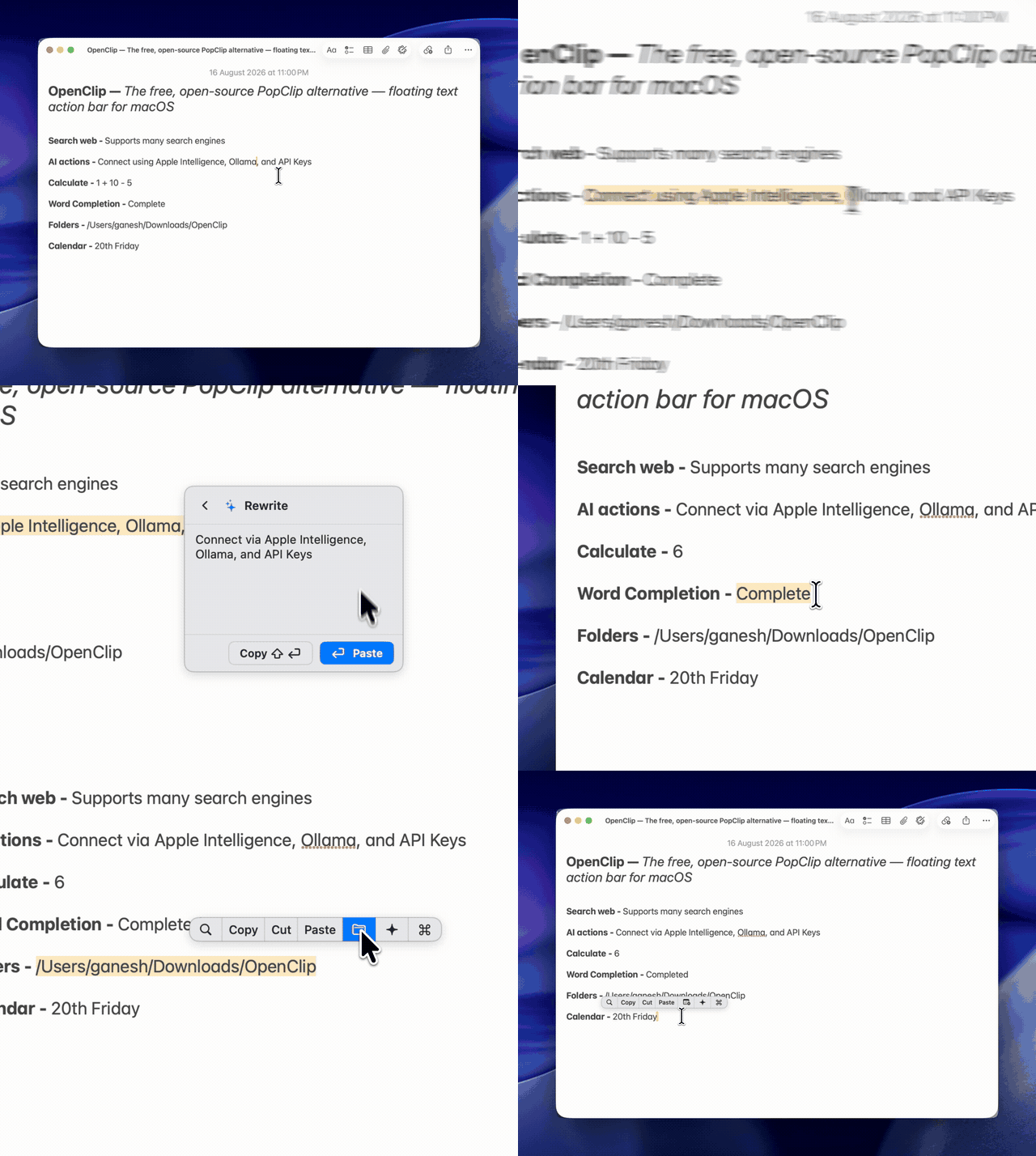
Select any text in any app, and OpenClip appears with contextual actions — copy, transform, calculate, AI writing, or custom extensions. Press ⌥⌘C to open a fuzzy search palette over your entire action library.
Features
| Action Search Palette (⌥⌘C) | Inline AI Writing & Tools |
|---|---|
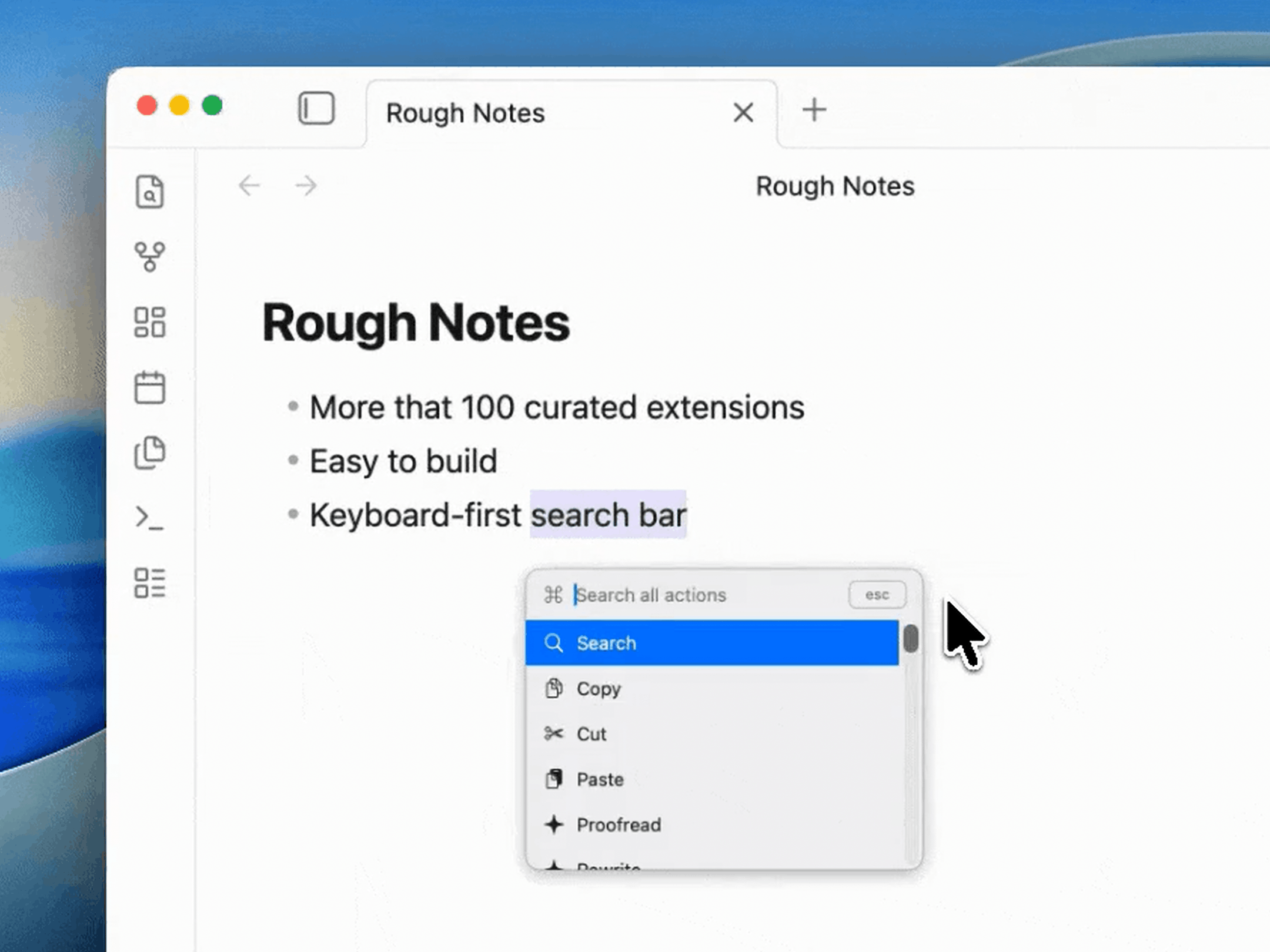 | 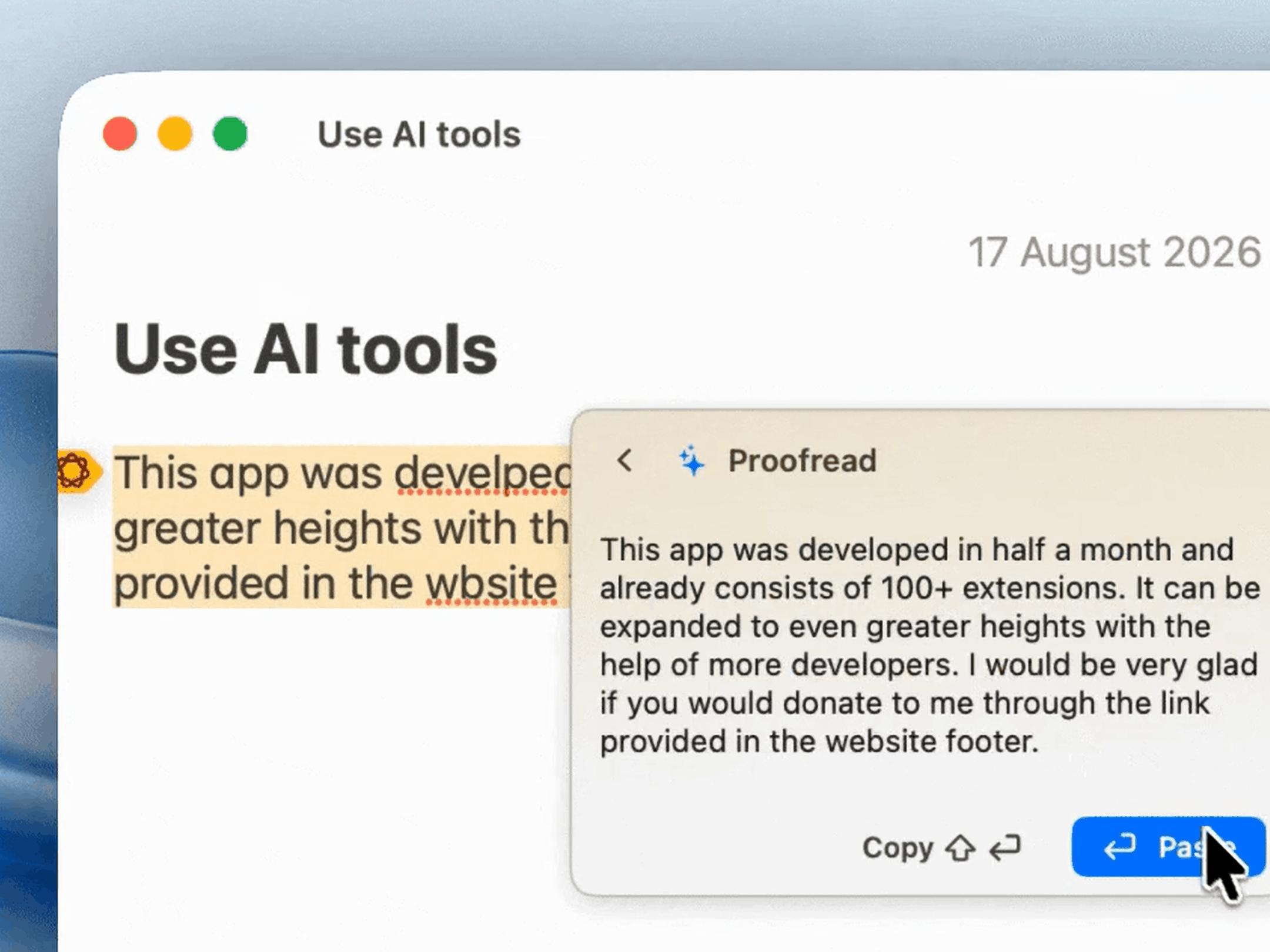 |
| Reach any action across your catalog instantly | Summarize, translate, or rewrite natively inline |
| Instant Math Evaluation | In-App Extension Store |
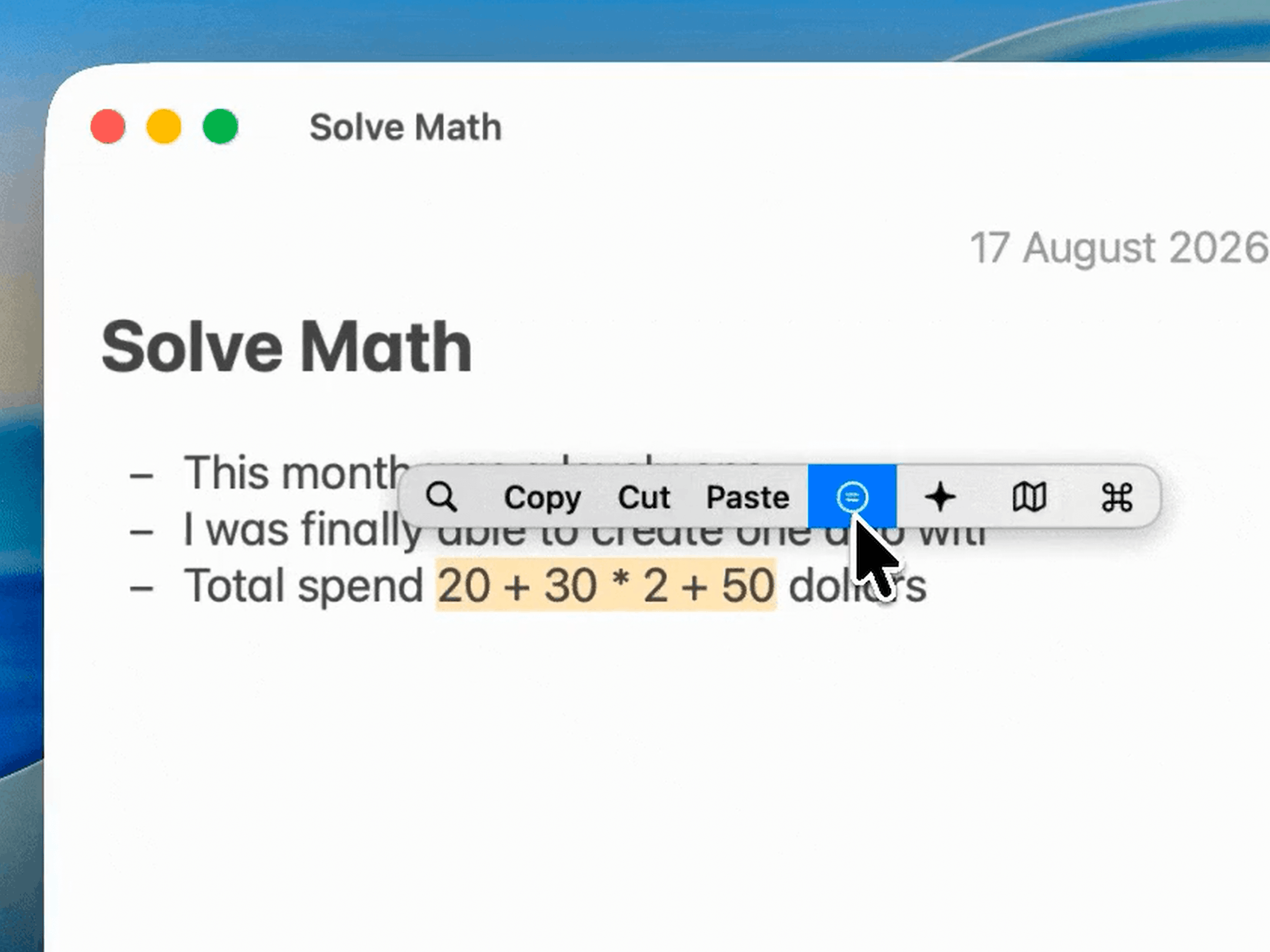 | 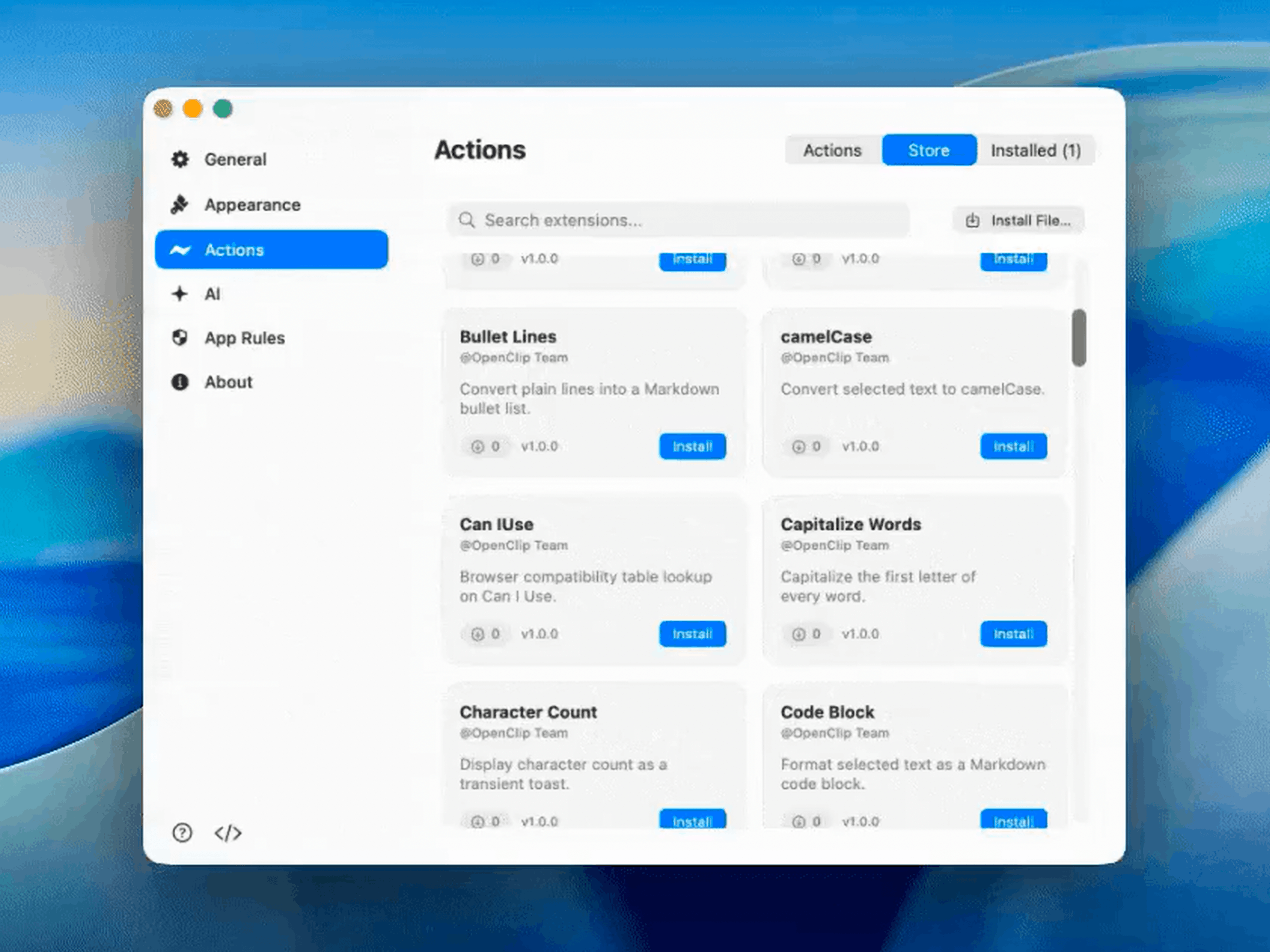 |
| Calculate math expressions on highlighted text | One-click install custom JS/Shell/AppleScript tools |
- Instant contextual popup — select text anywhere and a floating bar appears with the actions that make sense for it. Actions with no live selection (like Copy/Cut) drop out automatically, and a selection-free popup falls back to the current clipboard contents.
- Action-search palette — press ⌥⌘C to turn the bar into a fuzzy search field over the entire action catalog, including disabled actions. Results are ranked by recency, then bar order, so your most-used actions float to the top.
- Zero-config builtins — Search, Copy, Cut, Paste, Services, and a Transform group (UPPERCASE, lowercase, Title Case, camelCase) work out of the box.
- Extensions — install
.openclipextpackages (JavaScript, AppleScript, shell, URL templates, key presses, Shortcuts, Services) from the built-in store, a file, or by dropping a folder into~/.openclip/extensions. No compile step — a manifest plus a script is a complete extension. - Custom actions from the GUI — add a web-search URL template or an inline shell script straight from Preferences, no manifest authoring required.
- Built-in AI assistant — run selected text through Apple Intelligence, a local Ollama model, or a cloud provider (OpenAI/Claude), or hand the query to your browser. AI presets appear as regular actions in the palette.
- AI presets as first-class actions — every AI provider/model is a reorderable, toggleable action with its own keyboard-friendly entry point, so the AI flows you use live in the same bar as everything else.
- Deep customization — drag to reorder the bar, disable actions, override titles and icons, and pick a Classic or Glass theme (Liquid Glass on macOS 26+, frosted material on 14–15) in System, Light, or Dark.
- App-specific rules — scope actions to apps with allow/deny rules, selection regexes, and required options that prompt the user when missing.
- Fast by design — Swift 6 with strict concurrency, a pure
Coredomain module, and a hover model that never re-evaluates the whole view per mouse move.
Installation
Homebrew (Recommended)
brew install --cask ganeshmshetty/tap/openclipDirect Download
-
Download the latest release (
.dmg) directly from getopenclip.app/download (or browse all assets on the releases page). -
Drag
OpenClip.appinto your/Applicationsfolder. -
Launch OpenClip and grant Accessibility permission when prompted:
System Settings → Privacy & Security → Accessibility → enable OpenClip
[!IMPORTANT] Accessibility permission is required: it's how OpenClip detects selections and reads the selected text without relying on the clipboard. You can grant or revoke it any time from Preferences.
First launch walks you through a 4-step onboarding — permissions, essential extensions, and an interactive playground — before text-selection monitoring starts.
Getting started
1. Select some text in any app. The popup bar appears next to your selection:
- Click an action to run it (copy, search, transform, run your extension…).
- Click a group or the AI bar to open a scoped palette of its sub-actions.
- Run an AI action to see its output in a native result card (Replace/Copy buttons; back chevron or Esc to exit).
2. Use the hotkeys:
| Shortcut | Action |
|---|---|
| ⌥⌘C | Toggle the popup (or the action-search palette if the bar is up) |
| Esc | Dismiss the popup / drop back from a scoped palette |
| Cmd ⌘, | Open Preferences while the popup is focused |
3. Search everything. With the bar up, press ⌥⌘C (or start typing) to filter the full action catalog — including disabled actions — by title. Type a fragment of any action name to jump straight to it.
[!TIP] No text selected? The popup still appears and acts on the current clipboard contents — Copy/Cut just drop out because there's no live selection to copy from.
Extending OpenClip
OpenClip is designed to be extended without touching Swift. Anything in ~/.openclip/extensions/
is scanned at launch and turned into actions:
~/.openclip/extensions/
├── my-extension.openclipext/
│   ├── openclip.json        # manifest
│   ├── main.js              # script
│   └── icon.png
├── wikipedia.openclipext/   # single URL-template action
└── format-sql.sh            # standalone snippet with header metadata
A minimal extension is a folder with one openclip.json:
{
  "identifier": "com.example.wikipedia",
  "name": "Wikipedia",
  "actions": [
    { "title": "Look up", "icon": "symbol(book)", "type": "url",
      "url": "https://en.wikipedia.org/wiki/Special:Search?search={query}" }
  ]
}
Actions can also expose options (strings, booleans, dropdowns, SecretStore-backed secrets), gate
visibility with app/regex rules, and render rich results — status, notifications,
or chained effects — from JSON emitted by a shell script.
- Action kinds —
url,javascript(JavaScriptCore with anopenclip.*bridge + async/fetch),applescript,shell,textsnippet,keypress,shortcut,service, andgroupsub-menus. - Install one-liner —
./Extensions/scripts/install.sh path/to/extension.openclipext - From the app — browse and install from the built-in Extension Store in Preferences → Extension Store, or author URL/search/script actions in Preferences → Actions.
- Authoring guide — the full manifest schema, options, visibility rules, and the
openclip.*bridge:Extensions/AGENTS.md.
Building from source
Prerequisites: macOS 14+, Xcode 16+, and XcodeGen (brew install xcodegen).
git clone https://github.com/ganeshmshetty/openclip.git
cd openclip

# Populate the extension catalog submodule
git submodule update --init

# Generate the Xcode project (re-run after adding/removing .swift files)
xcodegen generate

# Build and run
./scripts/dev_run.sh

# Run the test suite
./scripts/test.sh

# Build a Release app + build/OpenClip.zip
./scripts/package_app.sh
[!NOTE] The repo is split into a pure-domain Core framework and the OpenClip app target (AppKit + SwiftUI), with XCTest suites for both. The
Extensions/folder is a git submodule hosting the official & community extension catalog (openclip-extensions).
Documentation
The full technical documentation lives in the docs/ hub:
- Architecture — target split, the six core subsystems, popup internals, text selection, and the action-search palette.
- Developer guide — extension package format, manifest schema, and action authoring.
- Runtimes — AppleScript, JavaScript, URL templates, and shell/Python execution (env vars, JSON effects, 30-second watchdog).
- User guide — installation, preferences, app rules, and extension management.
- Logging — the single
Logsurface and per-subsystem categories.
Community & Support
- 💬 Discord: Join our Discord community to share custom extensions, request features, and get support.
- ⭐️ AlternativeTo: Find and support OpenClip on AlternativeTo.
- 🚀 Product Hunt: Check out our launch on Product Hunt.
- 🐛 Issues & Feedback: Report bugs or suggest ideas on GitHub Issues.
License
OpenClip is released under the MIT License. Copyright (c) 2026 Ganesh M and OpenClip Contributors.