📸 SnapshotPreviews


Generate snapshot images from your Xcode previews with zero test code, and export them to disk for upload to Sentry Snapshots or any other visual diffing service. Works with SwiftUI and UIKit previews using PreviewProvider or #Preview, on all Apple platforms (iOS / macOS / watchOS / tvOS / visionOS).
Installation
Add the package as a Swift Package Manager dependency using the repository URL:
https://github.com/EmergeTools/SnapshotPreviews
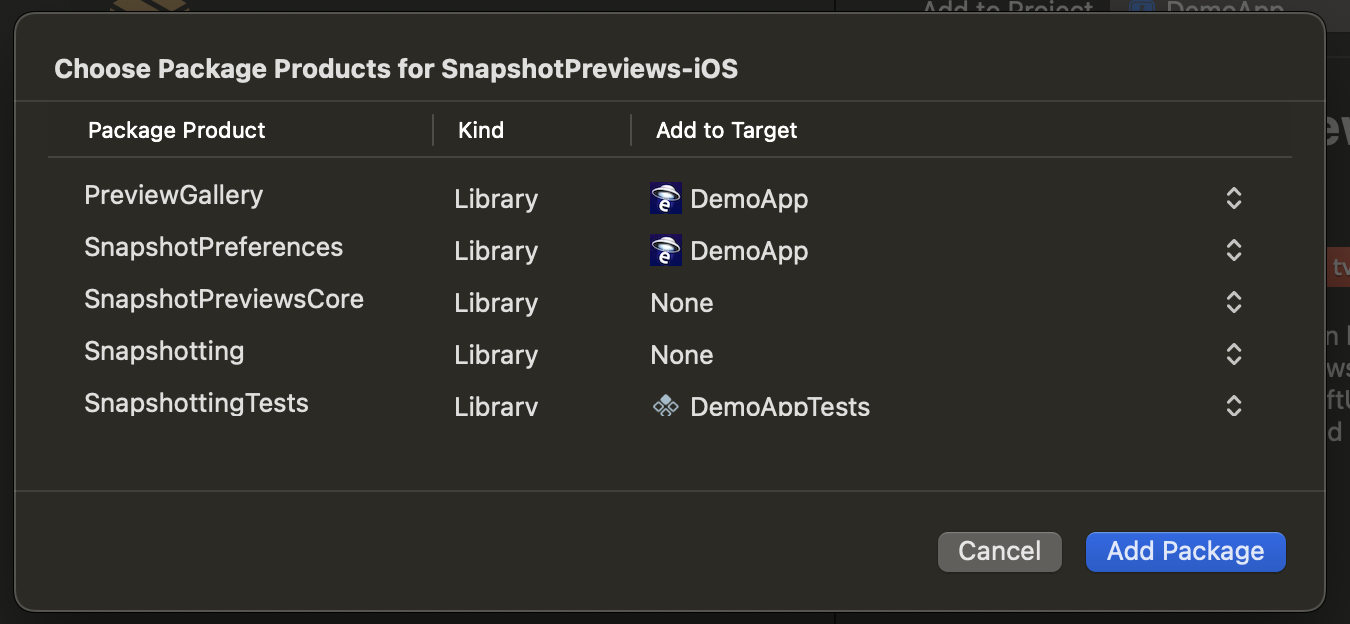
Link your XCTest target to the SnapshottingTests product. If you also want to customize per-preview rendering (e.g. precision, layout) you can link SnapshotPreferences to your app target.
Generating Snapshots
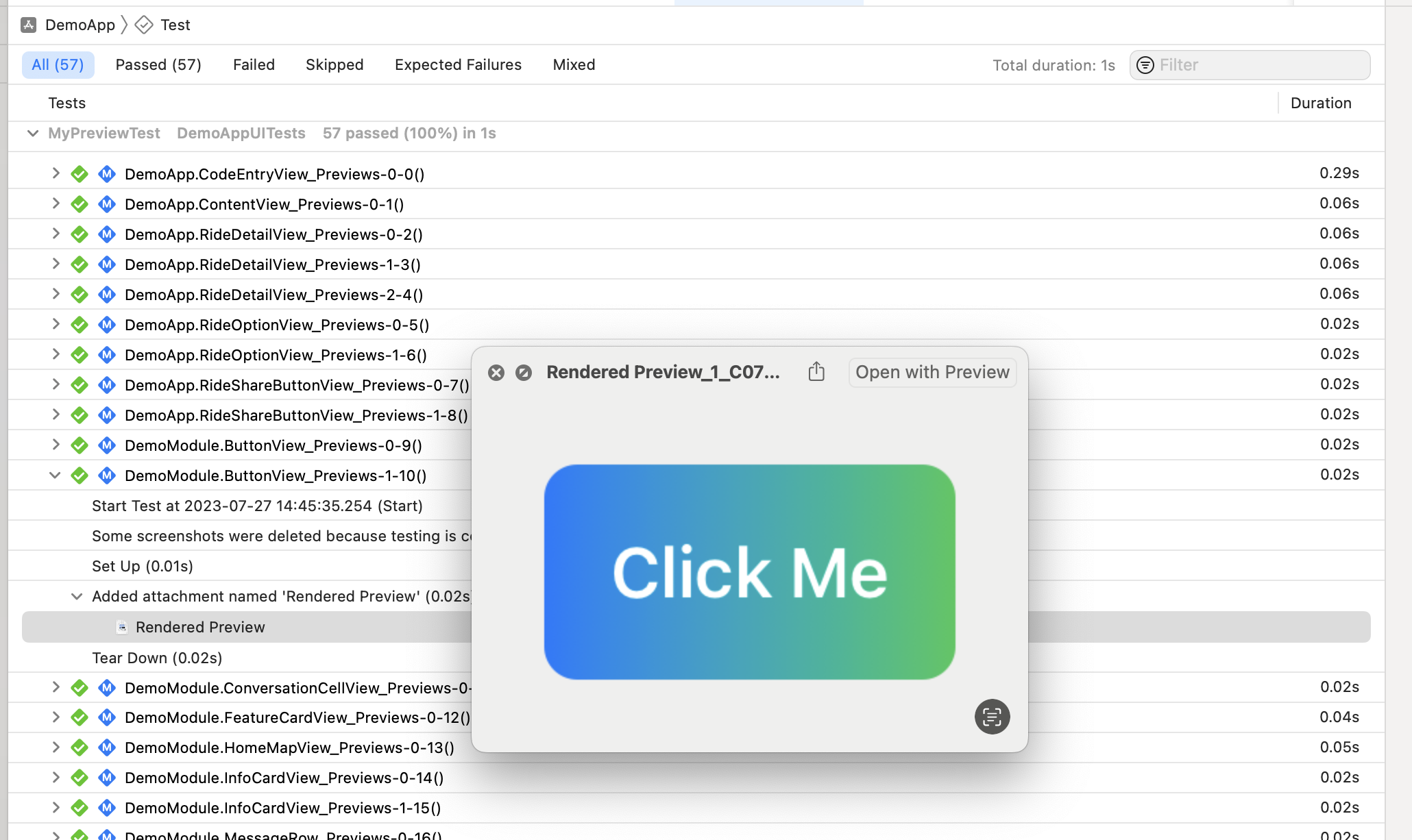
Create a test class that inherits from SnapshotTest. There are no test functions to write — they're added at runtime, one per discovered preview:
import SnapshottingTests

class DemoAppPreviewTest: SnapshotTest {

  // Optional: return preview type names like "MyApp.MyView_Previews" to render only a subset.
  override class func snapshotPreviews() -> [String]? {
    return nil
  }

  // Optional: exclude specific previews from rendering.
  override class func excludedSnapshotPreviews() -> [String]? {
    return nil
  }
}
By default each rendered preview is attached to the XCTest results bundle as a PNG. To write the rendered snapshots to disk locally, run xcodebuild test with TEST_RUNNER_SNAPSHOTS_EXPORT_DIR set and inspect the generated PNG and JSON files in that directory. For CI use, see Exporting snapshots for Sentry below.
Filtering by module
If your app links several frameworks, you can scope discovery to specific modules:
// Only snapshot previews from these modules
override class func snapshotPreviewModules() -> [String]? { ["MyFeatureModule"] }

// Skip previews from these modules
override class func excludedSnapshotPreviewModules() -> [String]? { ["LegacyModule"] }
[!NOTE] Preview macros (
#Preview("Display Name")) produce snapshot names based on file path and display name, for example:MyModule/MyFile.swift:Display Name.
Exporting snapshots for Sentry
SnapshotPreviews is the recommended iOS feeder for Sentry Snapshots. The flow has two steps: xcodebuild test writes PNGs + JSON sidecars to a directory, then sentry-cli build snapshots uploads that directory.
1. Export the snapshots from your test run
Set TEST_RUNNER_SNAPSHOTS_EXPORT_DIR on the test invocation. When set, SnapshotTest writes images directly to that directory instead of attaching them to the .xcresult bundle.
TEST_RUNNER_SNAPSHOTS_EXPORT_DIR="$PWD/snapshot-images" \
xcodebuild test \
  -scheme MyApp \
  -sdk iphonesimulator \
  -destination 'platform=iOS Simulator,name=iPhone 15 Pro'
For every rendered preview, two files are written:
<name>.png— the rendered preview image.<name>.json— metadata sidecar used by Sentry Snapshots. See JSON sidecar schema for field details.
No Xcode code-coverage data (.profraw / .profdata) is written by the exporter — only the PNGs and sidecars. If you need code coverage from the same test run, enable it on the scheme as usual; coverage output goes to the .xcresult bundle independently.
See Environment variables for all supported test-runner variables.
2. Upload to Sentry
Choose one of the upload options below.
Option A: sentry-cli
Use sentry-cli 3.4.0 or later and point it at the export directory:
sentry-cli build snapshots "$PWD/snapshot-images" \
  --auth-token "$SENTRY_AUTH_TOKEN" \
  --app-id com.example.MyApp \
  --project my-ios-project
A complete GitHub Actions step:
- name: Run snapshot tests
  env:
    TEST_RUNNER_SNAPSHOTS_EXPORT_DIR: ${{ github.workspace }}/snapshot-images
  run: |
    xcodebuild test \
      -scheme MyApp \
      -sdk iphonesimulator \
      -destination 'platform=iOS Simulator,name=iPhone 15 Pro'

- name: Upload snapshots to Sentry
  env:
    SENTRY_AUTH_TOKEN: ${{ secrets.SENTRY_AUTH_TOKEN }}
  run: |
    sentry-cli build snapshots "$GITHUB_WORKSPACE/snapshot-images" \
      --app-id com.example.MyApp \
      --project my-ios-project
Option B: Fastlane
Use Sentry's Fastlane integration if your CI already uploads Apple artifacts through Fastlane. See Sentry's iOS Snapshots setup docs for the Fastlane configuration.
See Sentry's CI integration docs for sharding across simulators and base/head SHA pinning.
Environment variables
SnapshotPreviews supports these test-runner environment variables:
| Variable | Description |
|---|---|
TEST_RUNNER_SNAPSHOTS_EXPORT_DIR | Writes rendered snapshot PNGs and JSON sidecars to the given directory instead of attaching PNGs to the .xcresult bundle. |
TEST_RUNNER_SNAPSHOTS_ALL_IMAGE_NAMES_FILE | Writes all discovered logical .png image names to the given file, then returns without rendering previews. Used to support selective testing workflows. |
These modes are mutually exclusive. If TEST_RUNNER_SNAPSHOTS_ALL_IMAGE_NAMES_FILE is set, SnapshotPreviews writes image names only and does not render or export snapshot images.
[!NOTE] The
TEST_RUNNER_prefix is how Xcode forwards an environment variable fromxcodebuildinto the test runner process. Inside the runner, SnapshotPreviews reads the variable without that prefix.
JSON sidecar schema
Each .json sidecar contains the following fields. The Source column shows where each value comes from: a snapshot modifier you apply to the preview, or Derived if SnapshotPreviews computes it automatically.
| Field | Type | Source | Description |
|---|---|---|---|
display_name | string | Derived | Snapshot name shown in Sentry. Derived from the preview name, file path, and module so exported filenames stay stable and unambiguous. |
group | string | Derived, override with .snapshotGroup(...) | Grouping key Sentry uses to organize related snapshots. |
diff_threshold | number | .snapshotDiffThreshold(...) | Optional visual difference allowed before Sentry marks the image as changed. For example, 0.05 allows up to a 5% changed-pixel share. |
tags | object | .snapshotTags(...) | Optional key-value pairs used to filter and group snapshots in Sentry. |
canvas_theme | string | .snapshotCanvasTheme(...) | Optional "light" or "dark" background canvas used to display the image in Sentry's web UI. Display metadata only; it does not change the rendered snapshot. |
context | object | Derived, extend with .snapshotAdditionalContext(...) | Supporting metadata (test name, simulator info, orientation, color scheme, source line, preview attributes) surfaced on the snapshot detail page in Sentry, plus any custom context you add. |
SnapshotPreviews adds these context keys by default when values are available: test_name, accessibility_enabled, simulator.device_name, simulator.model_identifier, preview.index, preview.display_name, preview.container_type_name, preview.container_display_name, preview.preferred_color_scheme, preview.orientation, and preview.line.
tags and context merge across repeated modifiers, with later duplicate keys winning; custom context keys override generated ones. An empty or whitespace-only .snapshotGroup(...) string falls back to the generated group. Custom context values may be strings, numbers, booleans, or nested objects.
For example, a preview configured like this:
import SnapshotPreferences

#Preview("Map") {
  MapPreview()
    .snapshotTags(["screen": "map"])
    .snapshotAdditionalContext(["fixture": "city-route"])
    .snapshotGroup("Navigation")
    .snapshotDiffThreshold(0.05)
    .snapshotCanvasTheme(.dark)
}
produces a sidecar like this:
{
  "display_name": "Map",
  "group": "Navigation",
  "diff_threshold": 0.05,
  "tags": { "screen": "map" },
  "canvas_theme": "dark",
  "context": {
    "test_name": "MapPreviewTests",
    "accessibility_enabled": false,
    "simulator": { "device_name": "iPhone 15" },
    "preview": {
      "index": 0,
      "preferred_color_scheme": "dark"
    },
    "fixture": "city-route"
  }
}
Tips
Unique display names
Give every preview a unique display name. This is what shows up in XCTest results and in the exported filenames / metadata:
struct MyView_Previews: PreviewProvider {
  static var previews: some View {
    MyView().previewDisplayName("My Display Name")
  }
}

#Preview("My Display Name") {
  MyView()
}
Display names should be unique within each PreviewProvider, or within a file when using preview macros.
Snapshot best practices
Snapshot previews should be deterministic. Avoid live network calls, timers, animations that do not settle, locale-dependent data, and dates generated from the current clock. Prefer fixed fixtures and mocked dependencies so the same preview renders the same pixels in Xcode, local test runs, and CI.
During snapshot rendering, UIActivityIndicatorView.startAnimating() is a no-op, so indeterminate spinners (including SwiftUI's default ProgressView) never start and are hidden instead of being captured mid-rotation. Set SNAPSHOTS_DISABLE_FREEZE_SPINNERS=1 in the test environment to opt out.
Detecting the snapshot environment
Set SNAPSHOTS_RUNNING_FOR_PREVIEWS=1 in your unit test scheme to mirror the variable Xcode sets when rendering live previews. You can then disable preview-unfriendly behavior (logging, analytics, network calls) with a single check:
extension ProcessInfo {
  var isRunningPreviews: Bool {
    environment["SNAPSHOTS_RUNNING_FOR_PREVIEWS"] == "1"
  }
}
Snapshot modifiers
Link the SnapshotPreferences product to your app target to customize individual previews before they are rendered by SnapshotTest.
| Modifier | Use it when | Effect on the snapshot |
|---|---|---|
.snapshotAccessibility(true) | You want an accessibility-focused variant. | On iOS, renders the snapshot through the accessibility overlay wrapper configured by your SnapshotTest, showing accessibility elements and labels instead of the plain view. The exported sidecar also records that accessibility was enabled. |
.snapshotRenderingMode(.coreAnimation) | The default renderer misses, flakes on, or incorrectly draws a view. | Changes the pixel capture backend. For example, .coreAnimation uses the layer tree, .uiView uses UIKit hierarchy drawing, and .window captures the full window. Different modes can affect blur/materials, maps, animations, and other renderer-sensitive content. |
.snapshotExpansion(false) | You want to preserve the visible scroll viewport instead of capturing all scroll content. | By default, scroll views are expanded so the snapshot includes their full content. Setting this to false keeps the scroll view at its normal visible height. |
.snapshotTags(["area": "checkout"]) | You want searchable labels on the exported snapshot. | Adds top-level tags to the JSON sidecar. Repeated tag modifiers merge, and later duplicate keys win. |
.snapshotAdditionalContext(["fixture": "loaded"]) | You want extra sidecar metadata for debugging or filtering. | Adds fields to the JSON sidecar context object. Repeated context modifiers merge, and later duplicate keys win. Custom keys override generated context keys. |
.snapshotGroup("Checkout") | You want to control how related snapshots are grouped in Sentry. | Overrides the top-level group in the JSON sidecar. Also accepts .snapshotGroup(.module) to group by the preview container's module name, and .snapshotGroup(.default) to keep the generated group. Empty or whitespace-only custom strings fall back to the generated group. Does not change exported filenames or all-image-names manifest output. |
.snapshotDiffThreshold(0.05) | A snapshot has small expected pixel differences. | Sets diff_threshold in the exported sidecar for this preview. 0.05 allows up to a 5% changed-pixel share before Sentry marks the image as changed. |
.snapshotCanvasTheme(.dark) | A transparent or framed image should be shown on a specific light/dark canvas in Sentry. | Sets top-level canvas_theme to "light" or "dark" in the JSON sidecar. Does not change the rendered snapshot image. |
Variants
[!TIP]
PreviewVariantssimplifies snapshot testing by ensuring a consistent set of variants and that every view has a name.
Rendering the same view under multiple variants (dark mode, RTL, large text, accessibility) gives you broader coverage from a single preview. SnapshotTest renders every variant emitted by the preview, so each previewVariant(named:) below becomes its own snapshot image and sidecar. SwiftUI provides most variant inputs (.dynamicTypeSize(.xxxLarge), .environment(\.layoutDirection, .rightToLeft), etc.). The package adds .snapshotAccessibility(true), which overlays VoiceOver elements on the snapshot.
The PreviewVariants view in the example app automates RTL, landscape, accessibility, dark mode, and large-text variants:
struct MyView_Previews: PreviewProvider {
  static var previews: some View {
    PreviewVariants(layout: .sizeThatFits) {
      MyView(mode: .loaded)
        .previewVariant(named: "My View - Loaded")

      MyView(mode: .loading)
        .previewVariant(named: "My View - Loading")

      MyView(mode: .error)
        .previewVariant(named: "My View - Error")
    }
  }
}
Additional Features
Preview rendering check (no PNGs)
If you only want to verify that every preview lays out without crashing — for example, to catch a missing @EnvironmentObject — inherit from PreviewLayoutTest instead of SnapshotTest. It runs the same discovery pipeline but skips the image render, so it's significantly faster. This gives you preview coverage (every preview was exercised); it does not produce Xcode code-coverage data.
Preview Gallery
PreviewGallery is an interactive SwiftUI view that turns your previews into a browsable gallery of components — useful for internal builds where Xcode isn't available. Link your app to the PreviewGallery product and present it from wherever makes sense:
[!NOTE]
PreviewGallerydiscovers previews from runtime metadata in the built app. If no previews are present in that build, the gallery will open with no previews to display.
Internal distribution builds
PreviewGallery is designed for development and trusted internal distribution. If you want to include it in a TestFlight or other internal build, create a dedicated build configuration or archive scheme instead of changing your production Release configuration. The previews must both compile into that build and survive optimization:
- Link the app target to the
PreviewGalleryproduct. - Configure Swift optimization so preview metadata is retained. Release configurations often use whole-module optimization, which can remove unreferenced preview declarations even when they compile successfully. For the internal gallery configuration, disable whole-module optimization or use a Debug-like compilation mode, then verify that the gallery shows the expected previews before distributing it.
- If your previews are wrapped in
#if DEBUG, add a custom Swift compilation condition, such asPREVIEW_GALLERY, to the internal build configuration. In Xcode, set this under Build Settings > Swift Compiler - Custom Flags > Active Compilation Conditions (SWIFT_ACTIVE_COMPILATION_CONDITIONS). Then keep preview declarations compiled for Debug and that internal configuration:
#if DEBUG || PREVIEW_GALLERY
#Preview {
  MyView()
}
#endif
For PreviewProvider previews, wrap the provider type the same way:
#if DEBUG || PREVIEW_GALLERY
struct MyView_Previews: PreviewProvider {
  static var previews: some View {
    MyView()
  }
}
#endif
If your previews rely on assets, JSON fixtures, or other resources from a Preview Content folder, make sure those resources are included in the internal gallery build. Xcode Development Assets are intended for previews and Simulator development without increasing final app size, so they may not be present in builds you distribute.
Only expose the gallery in trusted internal builds, and gate access appropriately, because previews can reveal unfinished UI, mock data, or internal states.
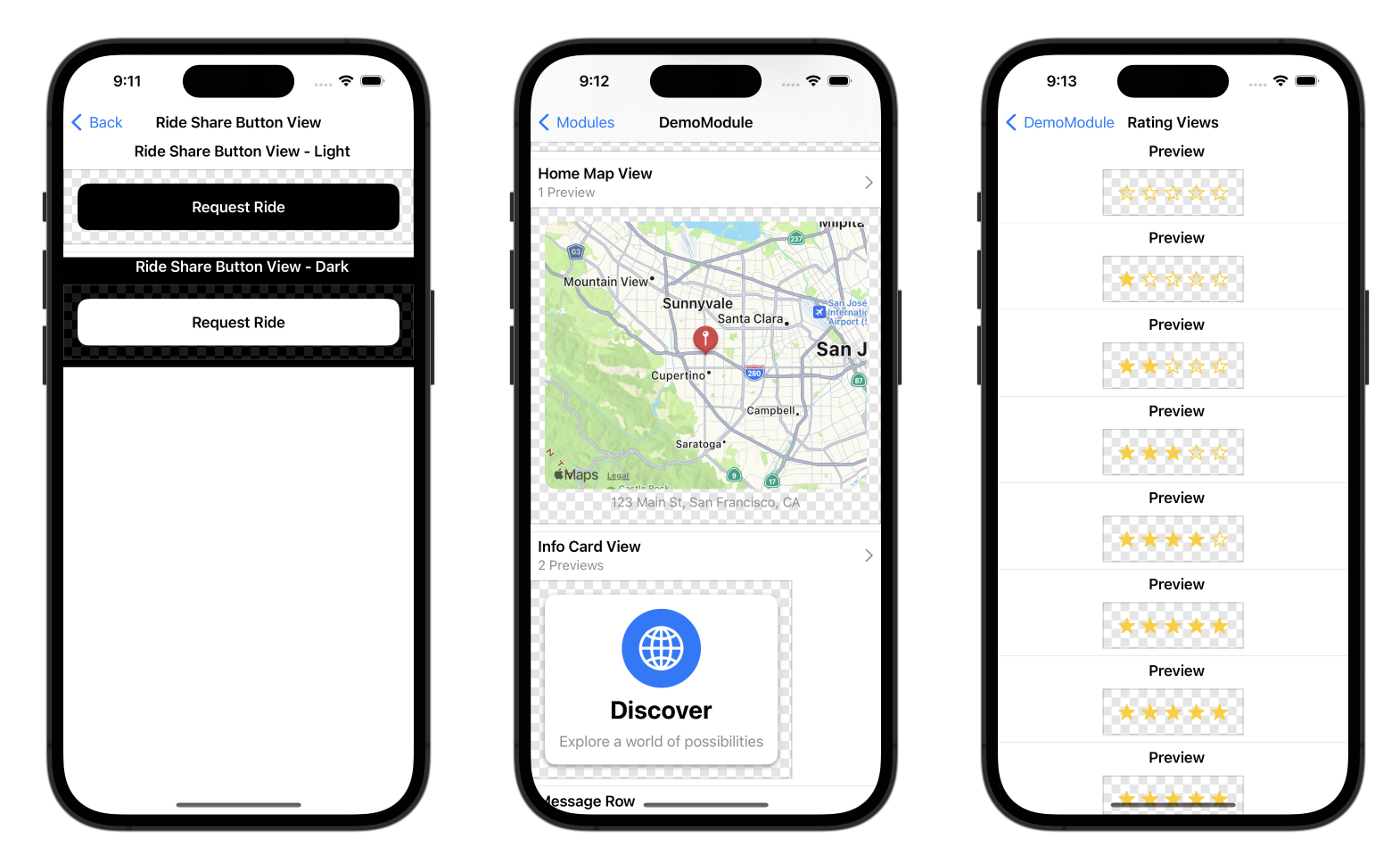
import SwiftUI
import PreviewGallery

struct InternalSettingsView: View {
  var body: some View {
    NavigationStack {
      Form {
        Section("Previews") {
          NavigationLink("Open Gallery") { PreviewGallery() }
        }
      }
    }
    .navigationTitle("Internal Settings")
  }
}
Accessibility audits
Xcode accessibility audits can run on every preview as part of a UI test. Inherit from AccessibilityPreviewTest and override the audit type / issue handler as needed:
import SnapshottingTests
import Snapshotting

class DemoAppAccessibilityPreviewTest: AccessibilityPreviewTest {

  override func auditType() -> XCUIAccessibilityAuditType {
    return .all
  }

  override func handle(issue: XCUIAccessibilityAuditIssue) -> Bool {
    return false
  }
}
See the demo app under Examples/ for a full example.
How does it work?
The XCTest dynamically inserts test functions by creating methods through the Objective-C runtime and overriding XCTest's testInvocations.
Previews are discovered in the test binary by parsing the __swift5_proto Mach-O section to find types that conform to PreviewProvider (and the related protocols generated by the #Preview macro). Background on how this works in the Swift runtime: The Surprising Cost of Protocol Conformances in Swift.
Binary frameworks
While Swift Package Manager is the recommended way to integrate SnapshotPreviews, every release also ships the frameworks as prebuilt XCFramework .zip assets:
SnapshotPreferences.xcframework.zip— user-facing SwiftUI preference modifiers.PreviewGallery.xcframework.zip— user-facing preview gallery UI.SnapshottingTests.xcframework.zip— user-facing XCTest snapshot and layout helpers.SnapshotSharedModels.xcframework.zip— required support dependency shared by the public APIs.SnapshotPreviewsCore.xcframework.zip— required support dependency for preview discovery and rendering.PreviewsSupport.xcframework.zip— required binary support dependency forSnapshotPreviewsCore.Snapshotting.xcframework.zip— compatibility/runtime artifact for inserted-dylib accessibility and UI-test workflows.
Xcode does not infer transitive dependencies between manually added binary frameworks, so add the full dependency set for each target:
- App target using per-preview rendering preferences: link and embed
SnapshotPreferences.xcframeworkandSnapshotSharedModels.xcframework. - App target using the gallery UI: link and embed
PreviewGallery.xcframework,SnapshotPreviewsCore.xcframework,SnapshotPreferences.xcframework,SnapshotSharedModels.xcframework, andPreviewsSupport.xcframework. - XCTest snapshot/layout target: link and embed
SnapshottingTests.xcframework,SnapshotPreviewsCore.xcframework,SnapshotSharedModels.xcframework, andPreviewsSupport.xcframework. - Accessibility/UI-test target using the inserted-dylib flow: link and embed
SnapshottingTests.xcframework,Snapshotting.xcframework,SnapshotPreviewsCore.xcframework,SnapshotSharedModels.xcframework, andPreviewsSupport.xcframework.
You don't need to build anything to use the released artifacts above. You can build them locally from source using bash build.sh from the repository root. It requires Xcode and writes the frameworks to XCFrameworks/.
Related Reading
- How to use VariadicView, SwiftUI's Private View API —
VariadicViewis how multiple images are rendered for onePreviewProvider. - The Surprising Cost of Protocol Conformances in Swift — how preview types are discovered in app binaries.