EnvHarness: Awakening Static Worlds for Agent Learning
Check out our paper and webpage for more details.
🔥 Updates
🏴 Overview
As LLMs become autonomous agents, they learn less from curated text and more from interactive environments. But those environments are expensive to build and, once built, stay static — they behave identically no matter which agent interacts with them or how much it has improved, so they can neither target a particular agent's weaknesses nor keep teaching once its tasks are solved. EnvHarness applies the agent harness idea to the other side of the interaction: just as an agent harness makes a frozen LLM capable through plug-in components (skills, memory, tools) without changing its weights, EnvHarness wraps a frozen environment with its own plug-in components to make it dynamically controllable — without touching the environment's internal code.
The layer is assembled from three plug-in components — Setup (reshape the
initial state), Rule (reshape the interaction: which actions are allowed,
what they do, and what the agent observes), and Link (compose in another
environment's tasks) — that operate strictly at the standard reset / step
interface and stack freely. They reshape only what the agent observes, what it
may do, and where it starts; the goal predicate that decides success is left
untouched, so every reshaped environment keeps the original benchmark's trusted,
human-built verifiers — and because nothing reaches into environment-specific
code, the same system works across domains.
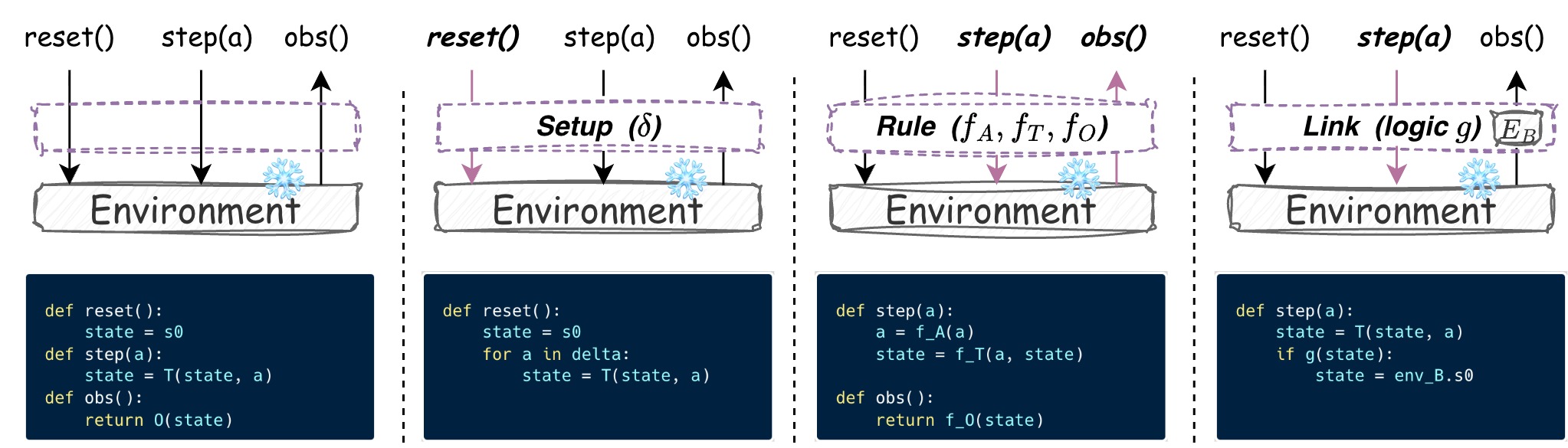
The three EnvHarness components against the environment interface. The leftmost panel is a bare environment; each of the others plugs in one component — Setup (reshapes the initial state), Rule (reshapes the interaction: which actions are allowed, what they do, and what the agent observes), and Link (composes another environment's tasks in) — and highlights the interface calls it intercepts. All panels expose the same contract and leave the underlying implementation, tasks, and verifiers untouched.
An LLM designer agent drives a diagnostic loop: it reads the agent's trajectories to diagnose a specific weakness, writes components that reshape the environment to target it, tests the policy in the new environment, and revises until the environment can actually teach what the agent lacks. The signal is targeted (written against diagnosed flaws) and lasting (the loop repeats as the agent improves, co-evolving the two).
Across ALFWorld, WebArena, SWE-bench Verified, OfficeQA, and SpreadsheetBench, skills learned in EnvHarness environments beat both the no-skill baseline and skills learned in the original environments — more effective (up to +9 points on held-out tasks) and more efficient (~9.8% fewer interaction steps). The same dynamic environments also produce stronger policies under reinforcement learning, and repeating the designer loop compounds the gains round after round.
Key Features
- Frozen environments, no internal edits: the benchmark's task set, its dynamics and its grading stay exactly as published. Only the layer the agent acts through changes.
- Code as the Envharness: the designer emits real Python — a
_Rules(Rules)subclass — not a selection from a fixed menu. It is compiled and executed in an isolated subprocess, so a bad mutation becomes a recorded trace instead of a dead run. - Composable by construction: an
EnvHarnessis anActionableEnvthat wraps another one, so layers stack arbitrarily and every benchmark is driven through a single interface. - Benchmark-agnostic: adding an environment means implementing one interface; the designer, the components, the loop and the evaluation stages need no changes.
⚡️ Quickstart Guide
0. LLM Configuration
Every stage -- corpus generation, skill induction, evaluation -- takes the same model string, so a provider is one line of config. Three families are supported:
-
GPT: to use OpenAI models (
gpt-4.1-mini,gpt-4.1,gpt-4o,o4-mini), set your API key:export OPENAI_API_KEY="your-openai-api-key" -
Claude: to use Claude (
claude-sonnet-4-6) on Vertex AI, set up Application Default Credentials (unnecessary on a GCE VM with an attached service account) and name your project:gcloud auth application-default login export GOOGLE_CLOUD_PROJECT="your-project-id" pip install "google-cloud-aiplatform>=1.38" -
Gemini: to use Gemini models (
gemini-3.5-flash,gemini-3.1-flash-lite) through the Gemini API, set your key:export GEMINI_API_KEY="your-gemini-api-key"
Name the model wherever a config takes one -- the provider prefix selects the
backend, and envharness.infra.model supplies that provider's auth and
parameter handling:
policy:
  model: openai/gpt-4.1-mini          # or gemini/... or vertex_ai/claude-...
mutator:
  type: llm
  model: vertex_ai/claude-sonnet-4-6  # the two roles can differ
A driver's MODEL env var accepts the same strings and applies to every
stage of that run -- corpus policy, harness agent, skill induction and
evaluation -- overriding whatever the YAML names, so a run never ends up
split across providers:
MODEL=openai/gpt-4.1 python experiments/swebench/reproduce.pyThe same override is available directly on the Stage 1 runner:
python scripts/run_harness.py --config <corpus.yaml> --model openai/gpt-4.1-miniLeave MODEL unset to keep the per-role models the config names -- which is
how you give the policy and the harness agent different models.
Concurrency follows your rate limit, not your CPU. Every benchmark runs
its tasks through a pool of workers (CORPUS_WORKERS, EVAL_WORKERS,
EVAL_CONCURRENCY, ... -- see each benchmark's README). The defaults suit a
modest quota; a pool large enough to saturate your provider's tokens-per-minute
tier turns into 429s that truncate episodes mid-task, which shows up as
unexpectedly low success rates rather than as an error. Raise the pool when
your quota allows, and on Gemini give it several keys (GEMINI_API_KEYS) --
that quota is metered per key, so the workers spread across them.
Embeddings
Skill retrieval needs an embedding model too. You do not normally pick one:
each provider is paired with an embedding model the same credentials already
reach, so setting MODEL is enough.
MODEL provider | embedding model | dim |
|---|---|---|
openai/... | openai/text-embedding-3-small | 1536 |
vertex_ai/... | vertex_ai/text-embedding-004 (same ADC) | 768 |
gemini/... | gemini/gemini-embedding-001 | 3072 |
EH_EMBED_MODEL overrides the pairing for both bank building and retrieval,
and takes any embedding model litellm supports (with that provider's own
credentials set):
EH_EMBED_MODEL=openai/text-embedding-3-small \
MODEL=vertex_ai/claude-sonnet-4-6 python experiments/alfworld/reproduce.py
That is also why the override exists: it holds one embedding space fixed while
the policy provider changes. A bank stores its vectors, and Bank.retrieve
rejects a query vector of a different width, so changing the embedding model —
including by changing provider — means rebuilding the bank.
1. Run a benchmark
Each benchmark has its own environment and its own one-command driver. Open the README in the experiment folder you want to run — it carries the environment setup, the run commands and the knobs for that benchmark:
experiments/toy24experiments/alfworldexperiments/swebenchexperiments/webarenaexperiments/officeqaexperiments/spreadsheetbench
Every folder follows the same shape:
python scripts/check_env.py <benchmark>           # preflight
bash experiments/<benchmark>/reproduce_smoke.sh   # the same stages, fewer tasks
python experiments/<benchmark>/reproduce.py       # the full protocol
The experiments above distill/evaluate skills. For RL training — a policy
trained with GRPO directly inside EnvHarness environments (via verl-agent) — see
rl/.
📊 Results
Skills induced from EnvHarness-adapted environments transfer back to the untouched benchmark and beat both controls — no skills at all, and skills induced from the original environments. All numbers are the mean over three independent runs, with standard deviations as subscripts. A dash marks a baseline that is benchmark-specific and cannot be applied to the other domain; EnvHarness covers every benchmark through the same interface.
ALFWorld and WebArena
| Skill Source | ALFWorld In-Dist | ALFWorld OOD | ALFWorld Avg. | Shopping | Shop Admin | GitLab | WebArena Avg. | |
|---|---|---|---|---|---|---|---|---|
| No Skills | 62.61.7 | 60.75.2 | 61.73.4 | 39.62.3 | 35.23.3 | 44.12.3 | 35.88.4 | 38.72.3 |
| Original Envs | 63.32.8 | 61.44.3 | 62.43.4 | 38.79.7 | 35.21.3 | 44.63.0 | 35.44.0 | 38.53.1 |
| GenEnv | 63.31.2 | 61.92.7 | 62.61.9 | — | — | — | — | — |
| VeriEnv | — | — | — | 39.64.2 | 30.20.0 | 49.72.4 | 38.95.6 | 39.61.4 |
| EnvHarness Envs | 66.20.3 | 70.42.3 | 68.31.3 | 40.64.7 | 37.40.3 | 50.81.5 | 37.73.1 | 41.61.8 |
| Δ (EnvHarness − Original) | +2.9 | +9.0 | +5.9 | +1.9 | +2.2 | +6.2 | +2.3 | +3.1 |
SWE-bench Verified, OfficeQA and SpreadsheetBench
| Skill Source | SWE-verified SR ↑ | SWE-verified AS ↓ | OfficeQA EM ↑ | OfficeQA F1 ↑ | SpreadsheetBench Pass@1 ↑ | SpreadsheetBench Mean Score ↑ |
|---|---|---|---|---|---|---|
| No Skills | 47.670.93 | 53.582.93 | 54.232.84 | 55.772.98 | 46.440.15 | 61.320.37 |
| Original Envs | 49.882.59 | 55.011.69 | 54.401.84 | 55.771.59 | 45.881.19 | 61.470.59 |
| SWE-smith | 50.121.74 | 54.722.03 | — | — | — | — |
| EnvHarness Envs | 52.582.72 | 49.612.49 | 56.202.34 | 57.732.29 | 49.150.36 | 62.480.27 |
| Δ (EnvHarness − Original) | +2.70 | −5.40 | +1.80 | +1.97 | +3.27 | +1.01 |
SR = success rate, AS = agent steps (lower is better), EM = exact match.
The three skill sources correspond to the conditions each reproduce.py prints:
nobank (No Skills), orig (Original Envs) and ours (EnvHarness Envs).
Models. Every number in both tables was produced with Gemini. The
configs in this repo default to openai/gpt-4.1-mini, so reproducing the
tables means pointing them back at Gemini:
MODEL=gemini/gemini-3.5-flash python experiments/swebench/reproduce.pyMODEL reaches every stage, embeddings included -- those runs used Gemini's
own gemini-embedding-001, which is what this one switch selects, so nothing
else needs setting. Alternatively edit the one model: line in that
benchmark's corpus.yaml and reasoning_bank_eval.yaml. Absolute numbers move
with the model; what the tables compare is skill sources at a fixed model.
🧱 Adding a New Benchmark
A benchmark joins EnvHarness by implementing one interface, ActionableEnv
(reset / step / observe / evaluate / get_env_state / save_state / from_state).
Everything downstream — the Environment Designer, the three components, the loop,
the evaluation — is benchmark-agnostic and needs no changes.
1. Implement the Bridge
The Bridge is the only layer that may know about a docker container, a
browser session, or a simulator. Subclass ActionableEnv, register a stable
tag, and implement the seven required methods.
tool_registry declares the action space. Its schemas are what the Policy is
given to act with, and what the Environment Designer is shown so a Rule's
action hook can match on action.name. Each entry is a Tool whose schema is
introspected from its invoke signature — see any
envharness/bridges/*/tools.py for the shape.
# envharness/bridges/mybench/bridge.py
from envharness.core.actionable_env import ActionableEnv
from envharness.core.registry import register_env
from envharness.core.types import (
    Action, EnvResetResponse, EnvResponse, EvaluationResult, Observation,
)
from .tools import Search      # declares name="search"

@register_env("mybench")                  # tag written into save files
class MyBenchEnv(ActionableEnv):
    tool_registry = [Search]              # -> tool_schemas() for the Policy

    def reset(self, seed=None, options=None) -> EnvResetResponse:
        # The orchestrator passes the per-task identifier as `seed`; it indexes
        # into the benchmark's task library, it is not a randomness source.
        ...
        return EnvResetResponse(observation=self.observe(), info={})

    def step(self, action: Action) -> EnvResponse:
        # Dispatch on action.name -- the same names the Tools declare.
        if action.name == "search":
            result = self._search(**action.kwargs)
        else:
            result = {"error": f"unknown action {action.name!r}"}
        return EnvResponse(observation=self.observe(), reward=0.0,
                           terminated=self._done, truncated=False,
                           info={"result": result})   # by convention: info["result"]

    def observe(self) -> Observation: ...
    def evaluate(self) -> EvaluationResult: ...
    def get_env_state(self): ...          # data only -- NO runtime handles
    def save_state(self) -> dict: ...
    @classmethod
    def from_state(cls, state: dict): ...
Two contracts matter:
get_env_state()must carry data, never handles. It is what the designer's generated hooks receive, and it crosses a subprocess boundary. A docker client or a browser page in there breaks both.save_state/from_stateare yours to define. In-memory benchmarks can snapshot everything; for a container or a browser, store{"reset_seed": ..., "reset_options": {...}}and letfrom_statere-runreset— valid at episode boundaries, which is where checkpoints are taken. Overrideclose()if there is external state to release; subprocess death does not free it for you.
2. Describe the state to the Environment Designer
env_state_schema() is injected verbatim into the designer's prompt. It is the
only thing telling it which fields its generated hooks may read, so be
explicit:
    @classmethod
    def env_state_schema(cls) -> str:
        return ("MyBenchState = {\n"
                "  query: str,          # the task's question\n"
                "  hits: list[str],     # results of the last search\n"
                "  submitted: bool,\n"
                "}")
Optional hooks, all with safe defaults: list_tasks() (enables agent-driven
task selection), notify_replay_complete() (rewind per-episode counters after
a Setup replay), default_reset_args() / reset_after_load() (checkpoint
loading), step_reward() (dense per-step signal; non-fatal).
3. Point a corpus config at it
Corpus generation needs no new code — scripts/run_harness.py is
bridge-agnostic. Copy the closest existing corpus.yaml and change the import
path:
env:
  import_path: envharness.bridges.mybench.bridge:MyBenchEnv
  reset_options: { ... }                 # forwarded to your reset()
policy:
  client_factory: envharness.infra.llm:LiteLLMClient
  client_kwargs: { model: openai/gpt-4.1-mini }
  action_format: function_calling        # or think_action for single-tool text
objective:
  type: difficulty_zone
  target_band: [0.4, 0.6]
Verify it boots before spending a run:
python -c "from envharness.bridges.mybench.bridge import MyBenchEnv; MyBenchEnv(); print('OK')"
python scripts/run_harness.py --config experiments/mybench/corpus.yaml --n-tasks 1
4. Reuse the downstream stages
Skill induction and evaluation are shared. scripts/induce_pair.py works
unchanged on per-task rollouts; write a benchmark-local induce.py only when the
induction prompt needs domain phrasing. For the evaluation, copy the driver
closest to your grading style — they differ only in how they load tasks and score
them. Then chain the stages in a reproduce.py mirroring an existing one.
5. Add a preflight target and a test
Add a check_<bench>() to scripts/check_env.py and register it in CHECKS,
so a missing dependency or dataset fails loudly before a run rather than
silently grading everything as failure. Then copy
tests/test_actionable_env_toy24.py — it walks the whole ActionableEnv
contract, including a save_state / from_state round-trip, and needs no GPU,
docker, or API key:
pytest🔩 Adding a Harness Layer
The three components ship as three layer classes: Setup (reshape the initial
state — replays a fixed action list on every reset), Rules (reshape the
interaction — per-step hooks on the inner env's actions / transition /
observation), and Link (compose another environment's tasks into the episode).
A new layer is how you add a capability those do not cover — reward shaping,
budget accounting, anything that belongs between the agent and the environment.
Because an EnvHarness is an ActionableEnv that wraps one, layers stack
arbitrarily and nothing above or below needs to know how many there are.
1. Subclass and register
from envharness.core.actionable_env import ActionableEnv
from envharness.core.envharness import EnvHarness
from envharness.core.registry import register_harness
from envharness.core.types import Action, EnvResponse

@register_harness("budget")                 # tag written into save files
class Budget(EnvHarness):
    def __init__(self, inner: ActionableEnv | None = None, max_steps: int = 50):
        super().__init__(inner)
        self.max_steps = max_steps
        self._n = 0

    # Override ONLY the methods this layer affects. reset / step / observe /
    # evaluate / get_env_state / step_reward all delegate to `inner` by
    # default, so a single-axis layer is a single method.
    def step(self, action: Action) -> EnvResponse:
        resp = self.inner.step(action)
        self._n += 1
        if self._n >= self.max_steps:
            resp = EnvResponse(observation=resp.observation, reward=resp.reward,
                               terminated=resp.terminated, truncated=True,
                               info={**resp.info, "budget_exhausted": True})
        return resp

    def save_state(self) -> dict:
        return {"max_steps": self.max_steps}        # THIS layer's fields only

    @classmethod
    def from_state(cls, state: dict, inner: ActionableEnv | None = None):
        return cls(inner=inner, max_steps=state.get("max_steps", 50))
Three contracts:
save_statereturns only this layer's own fields. The persistence walker saves the inner env and every other layer separately, and emitsharnesses: [innermost, ..., outermost]— index 0 sits closest to the environment, the last entry is what the agent sees.from_statetakes an extrainner. This is a deliberate divergence fromActionableEnv.from_state: a layer is meaningless without something to wrap, and the loader supplies it while rebuilding the stack inner-to-outer.- The tag is your on-disk format. Once a checkpoint is written with it, renaming it invalidates those files.
2. Put it in a stack
Any checkpoint naming your tag now loads, because load resolves tags through
the registry rather than through import paths:
{
  "env":       {"type": "mybench", "state": {"reset_seed": 12, "reset_options": {}}},
  "harnesses": [{"type": "setup", "state": {"actions": [...]}},
                {"type": "budget", "state": {"max_steps": 30}}]
}
For a corpus run, note that a Candidate carries exactly two levers —
rules_code and in_env_actions — so the episode runner composes Setup and
Rules and nothing else. To have the Environment Designer emit your layer
directly, extend Candidate, build_env_stack in
envharness/orchestration/runner.py, and the designer's propose schema in
envharness/agents/harness_agent.py. Until then the layer is usable by hand,
from a checkpoint, or wherever you build the stack yourself.
3. Test the composition
tests/test_envharness_composition.py is the template: it stacks layers around
a toy env and asserts the pass-through invariants (an un-overridden method must
reach the inner env unchanged) plus the save/load round-trip of the whole stack.
tests/test_link_envagnostic.py additionally shows how to prove a layer only
ever touches the ABC, by composing two dummy envs with deliberately different
action and observation shapes.
🙏 Acknowledgements
We adopt the memory design of ReasoningBank in our agent implementation, and we are grateful for their work.
💬 Citation
If our work is useful for you, please consider citing our paper:
@article{huang2026envharness,
      title={EnvHarness: Awakening Static Worlds for Agent Learning},
      author={Chengsong Huang and Zifeng Wang and Rujun Han and Jun Yan and Yanfei Chen and Zoey CuiZhu and Ke Jiang and Peng Xia and Han Yu and Yufan Zhuang and Yifei Ming and Jiaqi Pan and Bhavana Dalvi Mishra and Jiaxin Huang and Burak Gokturk and Tomas Pfister and Chen-Yu Lee},
      year={2026},
      eprint={2608.19880},
      archivePrefix={arXiv},
      primaryClass={cs.AI},
      url={https://arxiv.org/abs/2608.19880},
}
This is not an officially supported Google product. This project is not eligible for the Google Open Source Software Vulnerability Rewards Program.