Agent Development Kit (ADK) for Kotlin




An open-source, code-first Kotlin toolkit for building, evaluating, and deploying sophisticated AI agents with flexibility and control.
Important Links: Docs & Samples & Python ADK & Java ADK.
Agent Development Kit (ADK) is designed for developers seeking fine-grained control and flexibility when building advanced AI agents that are tightly integrated with services in Google Cloud. It allows you to define agent behavior, orchestration, and tool use directly in code, enabling robust debugging, versioning, and deployment anywhere – from your laptop to the cloud.
ADK for Kotlin now follows a stable release cycle, with regular releases published to Maven Central under semantic versioning.
✨ Key Features
-
Rich Tool Ecosystem: Utilize pre-built tools, custom functions, OpenAPI specs, or integrate existing tools to give agents diverse capabilities, all for tight integration with the Google ecosystem.
-
Code-First Development: Define agent logic, tools, and orchestration directly in Kotlin for ultimate flexibility, testability, and versioning.
-
Modular Multi-Agent Systems: Design scalable applications by composing multiple specialized agents into flexible hierarchies.
-
On-device & Cloud Agents on Android: Run agents fully on-device with LiteRT-LM (with tool calling) or Gemini Nano via ML Kit, reach the cloud with Firebase AI, and compose on-device and cloud models into a single hybrid system. See On-device and Cloud Agents on Android.
-
First-Class Java Interop: Build the same agents from plain Java, not just Kotlin, with a familiar, idiomatic API and no coroutines to learn. See Using ADK from Java.
🚀 Installation
If you're using Maven, add the following to your dependencies:
<dependency>
  <groupId>com.google.adk</groupId>
  <artifactId>google-adk-kotlin-core-jvm</artifactId>
  <version>1.4.0</version>
</dependency>
If you're using Gradle:
implementation("com.google.adk:google-adk-kotlin-core:1.4.0")📦 Modules
Every module is published under the com.google.adk group and shares the
version shown above.
| Module | Artifact | What it is for |
|---|---|---|
core | google-adk-kotlin-core | Agents, models, tools, sessions, memory, artifacts and runners. The only dependency most projects need. |
processor | google-adk-kotlin-processor | KSP processor that generates tools from @Tool-annotated functions. Add it with ksp(...). |
webserver | google-adk-kotlin-webserver | HTTP serving for your agents, headless or with the Development UI. |
integrations | google-adk-kotlin-integrations | All of the integrations/* modules below, in one dependency. JVM only. |
integrations/spring | google-adk-kotlin-integrations-spring | Use any Spring AI ChatModel (OpenAI, Anthropic, Vertex, ...) to drive an ADK agent. JVM only. |
integrations/anthropic | google-adk-kotlin-integrations-anthropic | Anthropic Claude models, built on the official Anthropic Java SDK. JVM only. |
integrations/openai | google-adk-kotlin-integrations-openai | OpenAI models, and others behind a compatible Chat Completions endpoint, such as Gemini. JVM and Android. |
integrations/bigquery | google-adk-kotlin-integrations-bigquery | BigQuery agent analytics: a plugin that logs agent invocation events to a BigQuery table. JVM only. |
a2a | google-adk-kotlin-a2a | Agent2Agent (A2A) support for talking to remote agents. |
litertlm | google-adk-kotlin-litertlm | On-device models through LiteRT-LM. Requires JDK 21+; see litertlm/README.md. |
firebase | google-adk-kotlin-firebase-android | Android-only model backed by Firebase AI Logic. |
mlkit | google-adk-kotlin-mlkit-android | Android-only on-device Gemini Nano through the ML Kit GenAI Prompt API. Published as a -beta pre-release. |
📚 Documentation
For building, evaluating, and deploying agents by follow the Kotlin documentation & samples:
🏁 Feature Highlight
Same Features & Familiar Interface As Python ADK:
import com.google.adk.kt.agents.LlmAgent
import com.google.adk.kt.agents.Instruction
import com.google.adk.kt.models.Gemini
import com.google.adk.kt.tools.GoogleSearchTool

val rootAgent = LlmAgent(
    name = "search_assistant",
    description = "An assistant that can search the web.",
    model = Gemini(name = "gemini-3.1-flash-lite-preview"),
    instruction = Instruction("You are a helpful assistant. Answer user questions using Google Search when needed."),
    tools = listOf(GoogleSearchTool())
)
GenAI SDK based Gemini currently prevents usage of API_KEY and
GoogleCredentials on Android. Use Firebase AI instead.
☕ Using ADK from Java
ADK Kotlin is built to be called from plain Java too, not only from Kotlin. Every builder-style API mirrors the Kotlin one, so the search agent above is the same agent in Java:
import com.google.adk.kt.agents.BaseAgent;
import com.google.adk.kt.agents.LlmAgent;
import com.google.adk.kt.models.Gemini;
import com.google.adk.kt.tools.GoogleSearchTool;

BaseAgent rootAgent =
    LlmAgent.builder()
        .name("search_assistant")
        .description("An assistant that can search the web.")
        .model(new Gemini("gemini-3.1-flash-lite-preview"))
        .instruction(
            "You are a helpful assistant. Answer user questions using Google Search when needed.")
        .tools(GoogleSearchTool.builder().build())
        .build();
Coroutines stay out of the way. The com.google.adk.kt.interop package exposes
Java-facing base types that replace the engine's suspend functions and Flow
with CompletableFuture and Reactive Streams Publisher:
PublisherRunnerwraps a runner and streams events as aPublisher<Event>, which adapts in one line to RxJava (Flowable.fromPublisher(...)), Reactor (Flux.from(...)), or Spring WebFlux.CompletableFutureSessionService,CompletableFutureArtifactService, andCompletableFutureMemoryServicewrap a session, artifact, or memory service so that each call returns aCompletableFuture, which Reactor adapts withMono.fromFuture(...). Closing a wrapper also closes the service it wraps, if that service isAutoCloseable.BaseFutureTool,BaseFutureToolset,BaseFuturePlugin,BasePublisherModel, and theBaseFuture*session, memory, and artifact services let you implement ADK extension points in Java by overridingCompletableFuture- orPublisher-returning methods.BaseFutureLiveConnection(experimental) lets a Java model support live connections: subclass it and return an instance in aCompletableFuturefrom the model'sBasePublisherModel.connectAsyncoverride. Its sends and close returnCompletableFutures, and each model turn is aPublisher.@Tool/@Paramannotations work from Java:ReflectiveTools.fromMethod(...)turns an annotated plain method into a tool forjavac-only modules, or KSP can process@Tooldirectly when you build with the Kotlin toolchain.
See examples/java/ for runnable ports of this repository's
agents written entirely in Java.
📱 On-device and Cloud Agents on Android
ADK Kotlin agents run on Android either fully on-device — no API key and no
network at inference time, for offline, low-latency, or privacy-sensitive use —
or against the cloud. Every backend is a Model behind the same LlmAgent
API, so switching between them is a one-line change.
| Backend | Module | Inference | Tools |
|---|---|---|---|
| LiteRT-LM | google-adk-kotlin-litertlm | On-device | ✅ Yes |
| ML Kit | google-adk-kotlin-mlkit-android | On-device | ❌ Not yet |
| Firebase AI | google-adk-kotlin-firebase-android | Cloud | ✅ Yes |
- LiteRT-LM runs open models such as Gemma on-device through LiteRT-LM, Google's on-device inference framework, with full tool / function calling so an on-device agent can drive custom tools. It runs on both Android and the JVM (desktop). See litertlm/README.md.
- ML Kit (Gemini Nano) runs the built-in Gemini Nano model through the ML
Kit GenAI Prompt API. It is Android-only and published as a
-betapre-release; tool calling is not supported yet (functionCall/functionResponseparts are dropped), so use it for plain chat/generation for now. - Firebase AI reaches a cloud Gemini model through Firebase AI Logic — the recommended way to call Gemini from Android without embedding an API key — with full tool calling.
Hybrid on-device + cloud systems
Because on-device and cloud models are interchangeable Model implementations,
you can compose them into a single multi-agent system: an on-device agent
can handle offline, cheap, or privacy-sensitive turns and delegate harder tasks
to a cloud agent, all within one LlmAgent hierarchy. See
Modular Multi-Agent Systems for how agents are composed.
All three backends have runnable multi-turn chat examples in the
examples/android/ Compose app — LiteRT-LM chat, ML
Kit chat, and Firebase AI. See the
Android examples README for how to build and run
the app, obtain the on-device models, and configure Firebase.
Serving agents over HTTP
Add com.google.adk:google-adk-kotlin-webserver alongside the core artifact.
AdkApiServer then serves the agent runtime contract — app discovery, sessions,
artifacts, the run endpoints, health and version — without the development
surface, so it can be deployed headlessly:
import com.google.adk.kt.webserver.AdkApiServer
import com.google.adk.kt.webserver.AdkServerConfig

fun main() = AdkApiServer(AdkServerConfig.inMemory(rootAgent)).start(wait = true)
That listens on port 8080. inMemory keeps session and artifact state in the
process, so it suits a local run; build AdkServerConfig directly to serve
several agents or to persist state.
Run it however you run any other main class. With the Gradle application
plugin that is mainClass = "com.example.MainKt" — a top-level main in
Main.kt compiles to MainKt, not Main — and then ./gradlew run.
The server binds loopback, because these endpoints are unauthenticated. Put your own authentication in front of it before widening that:
import com.google.adk.kt.webserver.AdkApiServer
import com.google.adk.kt.webserver.AdkServerConfig

fun main() =
  AdkApiServer(AdkServerConfig.inMemory(rootAgent).copy(host = "0.0.0.0")).start(wait = true)
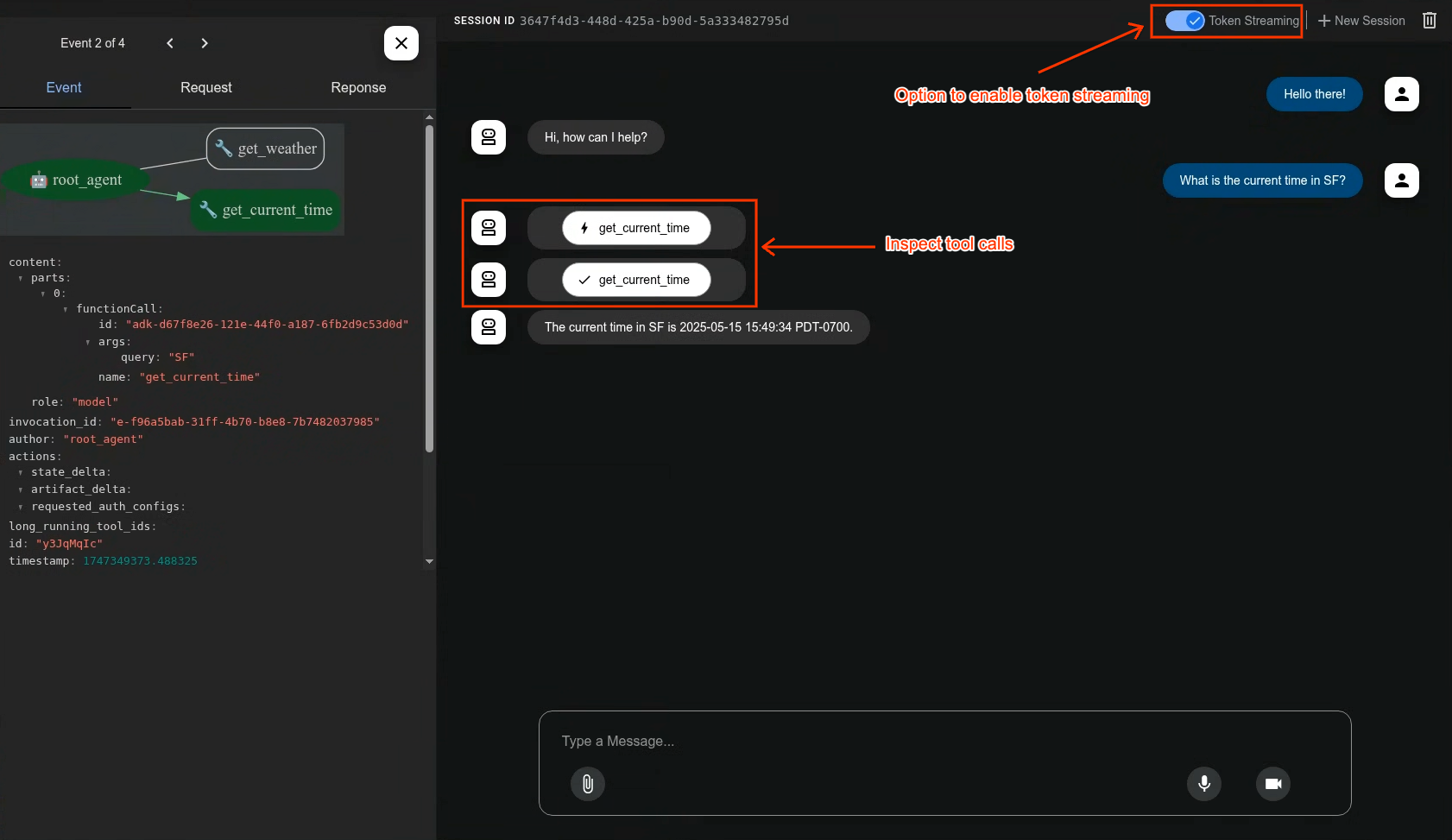
Development UI
Same as the beloved Python Development UI. A built-in development UI to help you test, evaluate, debug, and showcase your agent(s).
AdkDevServer takes the same config and adds the UI at
http://localhost:8080/dev-ui, together with the trace and agent-graph
endpoints it drives:
import com.google.adk.kt.webserver.AdkServerConfig
import com.google.adk.kt.webserver.dev.AdkDevServer

fun main() = AdkDevServer(AdkServerConfig.inMemory(rootAgent)).start(wait = true)
To leave the UI unmounted, set the webUiEnabled field on AdkServerConfig:
import com.google.adk.kt.webserver.AdkServerConfig
import com.google.adk.kt.webserver.dev.AdkDevServer

fun main() =
  AdkDevServer(AdkServerConfig.inMemory(rootAgent).copy(webUiEnabled = false)).start(wait = true)
Three things decide whether the UI is mounted. Highest wins:
- the
adk.web.ui.enabledsystem property, when it is set totrueorfalsein any casing — any other value is ignored with a warning - the
webUiEnabledfield onAdkServerConfig, when it is not null - the server class:
AdkApiServerleaves the UI unmounted,AdkDevServermounts it
So the system property is not an alternative to the field, it outranks it: a
stray -Dadk.web.ui.enabled=true in the launch environment re-mounts the UI even
though the config says webUiEnabled = false. It ranks highest so that a
deployment which cannot change code can still turn the UI off.
To try a few of this repository's own agents rather than your own:
GOOGLE_API_KEY=... ./gradlew :google-adk-kotlin-examples:runServer --args="--dev"
📂 Examples
The agent snippet above is the short version. Every runnable example lives under
the examples directory of this repository.
-
examples/— JVM examples. -
examples/java/— the same agents written in plain Java, compiled against the published JVM artifacts to exercise the Java-facing surface. -
examples/android/— a Compose app showing the Android side, including the on-device (LiteRT-LM, ML Kit) and cloud (Firebase AI) agents described in On-device and Cloud Agents on Android.
🤝 Contributing
We welcome contributions from the community! Whether it's bug reports, feature requests, documentation improvements, or code contributions, please see our CONTRIBUTING.md to get started.
📄 License
This project is licensed under the Apache 2.0 License - see the LICENSE file for details.
Preview
This feature is subject to the "Pre-GA Offerings Terms" in the General Service Terms section of the Service Specific Terms. Pre-GA features are available "as is" and might have limited support. For more information, see the launch stage descriptions.
Happy Agent Building!