
ytm-rs
YouTube Music in a fast, native desktop app.
Built in Rust with egui and rodio. No Electron, no browser-based player, and around 130 MB of memory while playing.






Website · Download · Features · Installation · Build from source · Discussions · Discord
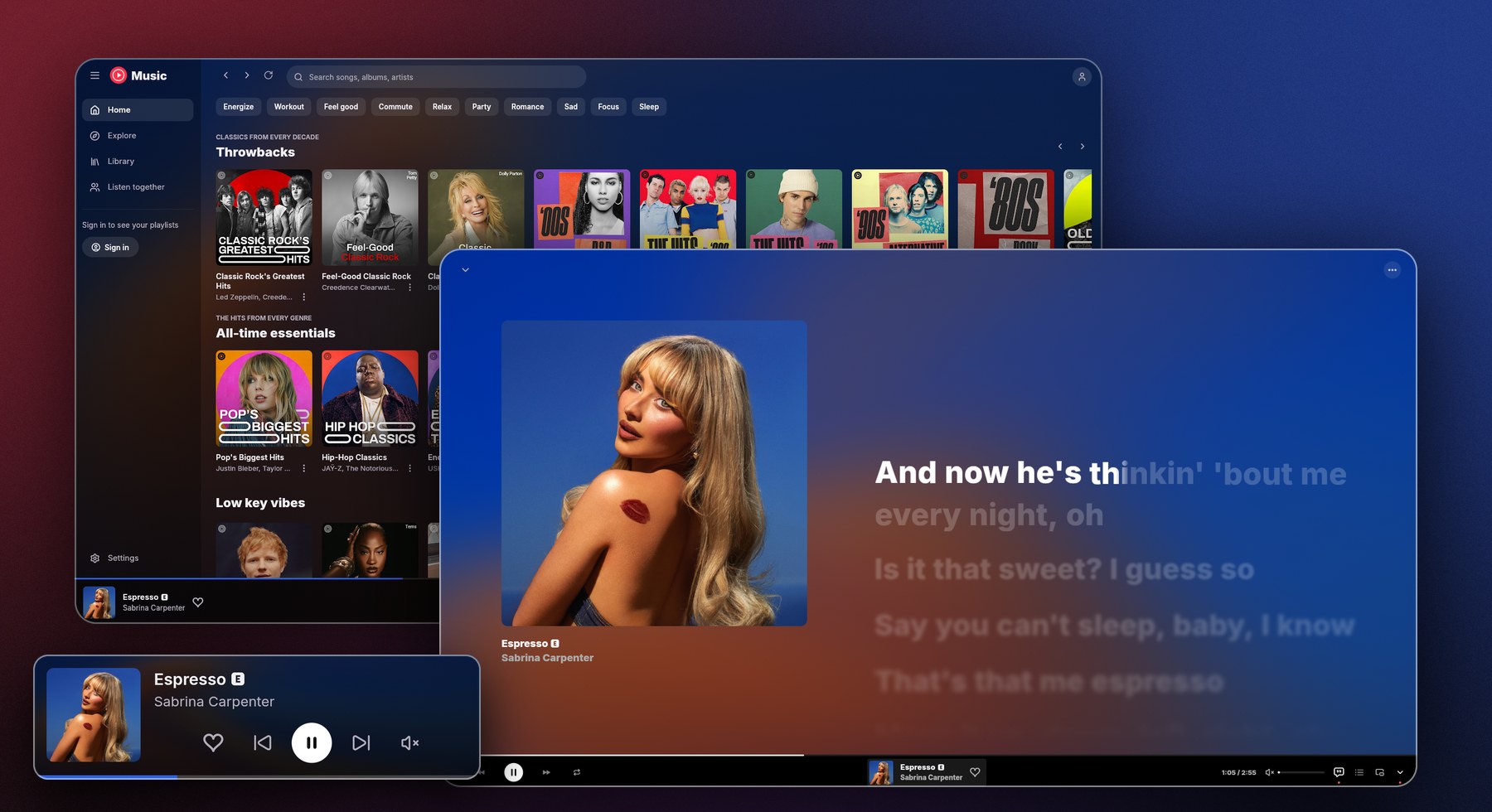
Why ytm-rs
Most YouTube Music desktop apps are the website running in a hidden browser. ytm-rs draws everything itself, so it starts quickly, stays light and leaves your memory for everything else.
| ytm-rs | YouTube Music in Chrome | Pear Desktop | |
|---|---|---|---|
| Memory with a song playing | ~130 MB | 496 MB | 638 MB |
| Windows download | 11 MB | – | 107 MB |
| Installed size | 36 MB | – | 397 MB |
| Runs a web browser inside | No | Yes | Yes |
Memory with a song playing on the same Windows 11 PC: ytm-rs 0.3.0, Chrome 155 with one tab and Pear Desktop 3.12.0. Sizes: ytm-rs 0.3.0 and Pear Desktop 3.12.0.
Table of contents
- Why ytm-rs
- Features
- Screenshots
- Installation
- Usage
- Building from source
- Notes
- Contributing
- License
- Acknowledgements
- Star History
Features
Listening
- Your music feed: Listen again, Quick picks, your mixes (My Supermix, Discover Mix and more) and mood filters, refreshed each time you open a page.
- Explore and search: new releases, charts, and search across songs, albums, artists and playlists.
- Your library: liked songs, saved albums and playlists, history and uploads. Upload your own songs from the Uploads tab or by dropping files on the window. Edit your own playlists, with a picture of your own as the cover. Turn on podcasts to see shows and episodes too.
- Song lists: drag songs to reorder the queue and your own playlists, or drop them on a playlist in the sidebar to add them. A find box narrows any list to the songs that match.
- Playback: queue, song radio, shuffle and Smart shuffle (songs like the one playing mixed in), repeat, autoplay, gapless playback, and crossfade that starts where a song's music ends, with the next track prefetched for instant skips. A-B repeat from a seek bar's right-click menu, a sleep timer, Skip silence at the end of a song, and the screen can stay on while music plays.
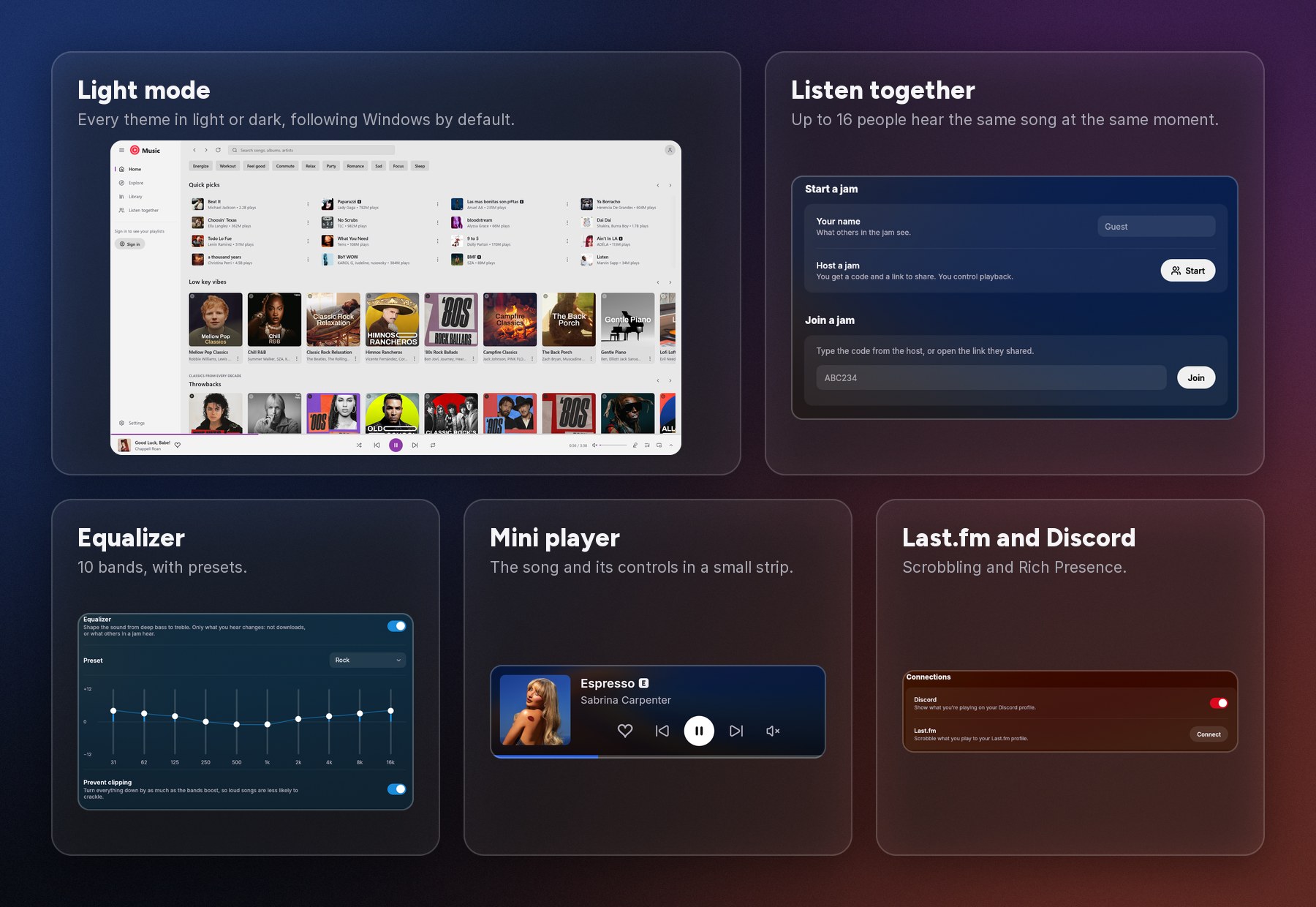
- Sound: volume normalization, a 10-band equalizer with presets, playback speed that keeps the pitch (or lets it go with the speed, like a record), and transpose.
- Play on: this computer's speakers or headphones, or AirPlay speakers on your network.
- Sound quality: songs play in Opus at about 256 kbps with YouTube Premium, the best stream YouTube offers, and Opus at about 130 kbps without it.
- Songs, not music videos: an official music video plays as its album recording, without the intros and skits, or switch to the video itself in Now playing.
- Skip non-music parts: jumps over talking, skits and sponsor breaks in music videos, as marked by SponsorBlock.
- Recognize song (experimental): the headphones button in the search box finds the song playing in another app.
- Explicit songs: marked with an E. Turn on Hide explicit songs to leave them out of lists, search, the queue and autoplay, and optionally use YouTube's Restricted Mode as well.
- Downloads: save any song as a tagged
.m4awith cover art: YouTube's own AAC file, not re-encoded, at the best quality your account gets, with its lyrics inside (timed as LRC where the source has them). Albums and playlists can each go in their own folder, and a playlist kept downloaded downloads the songs added to it later too. Saved songs are marked in lists, listed in Library › Downloads and play offline.
Lyrics and looks
- Karaoke lyrics: word-by-word lyrics drawn the way the Better Lyrics extension draws them, from every Better Lyrics source, with automatic fallback, romanization, translations and per-song timing offsets.
- Animated background: the album art drifts and pulses with the music behind everything. Go full-screen, or hide the lyrics to see just the artwork. A visualizer can move along the bottom of Now playing.
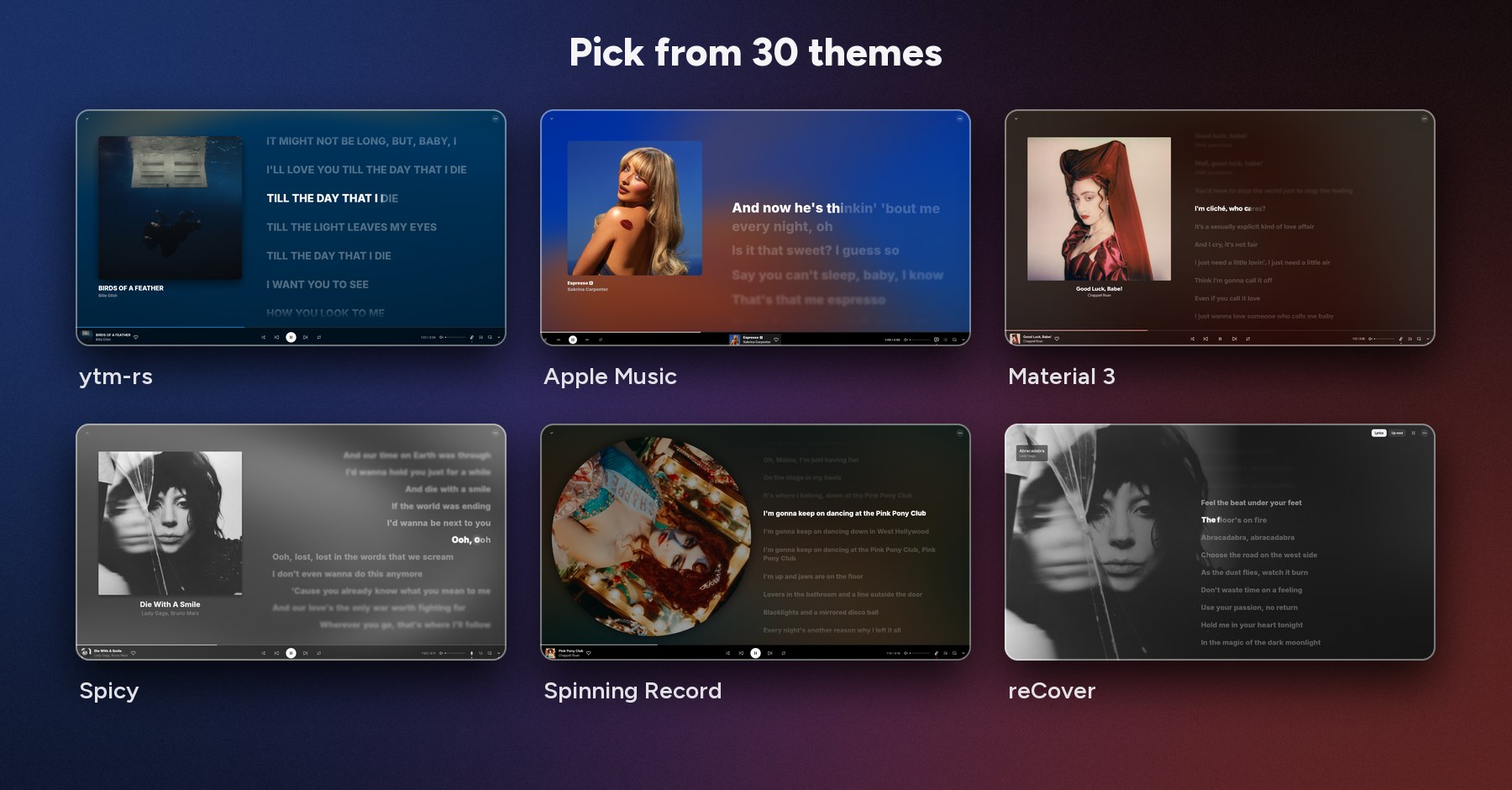
- 30 themes: 27 rebuilt from the Better Lyrics community themes, such as Apple Music, Spicy, Spinning Record, reCover and Material 3, plus the app's own ytm-rs and Classic looks and Fluent, in the style of Windows 11. Each one restyles the whole app, in light or dark mode, with real frosted glass where the theme has it. Use any bundled or installed font.
- Your colours: the accent can follow the theme or your system, or be any colour you pick. A
theme.conffile can set every colour in the app, for tools like wallust and pywal to write. Zoom makes everything bigger or smaller.
Together and across services
- Listen together: start a jam, share the code or link, and up to 16 people hear the same song at the same moment. The host decides whether guests can add songs or control playback.
- Transfer from Spotify: bring playlists and Liked Songs over to YouTube Music in the background. ytm-rs asks you when it isn't sure about a match and picks up where it left off if interrupted.
- Last.fm, ListenBrainz and Discord: scrobbling and Rich Presence.
Desktop
- System media controls with a seekable timeline, taskbar thumbnail buttons, close to tray (Wayland too) with a setting for a click on the tray icon to play or pause (Windows and macOS), song notifications while the window is in the background, a choice of page to open on, a collapsible sidebar and screen-reader-accessible controls.
- The app draws its own title bar on Windows, so the window is one surface, and on Linux desktops that draw none. On Windows 11, Mica or Acrylic can show behind the window.
- Your language: the interface comes in 21 languages, and song titles, shelves and charts can follow your language and country.
- Touch screens: swipe to scroll pages and lyrics, and swipe the player bar up to open Now playing.
- Mini player: shrink the window to a small strip with the song and controls (Ctrl+M), or try the experimental pill that sits in a corner and opens on hover. On Wayland, turn on Settings › Mini player › Keep on top on Wayland for the pin to keep the window above others (it opens through XWayland).
- System-wide media shortcuts: play/pause, next, previous, volume and Recognize song work while another app is in front or the window is in the tray. Change them in Settings › Keyboard shortcuts.
- Network: your system's proxy or one of your own (HTTP, HTTPS or SOCKS5), and, signed in, a Backup stream for when YouTube stops songs on a VPN, both in Settings › Advanced.
- Automatic updates in the background for both the installed and portable versions, with release notes when an update is ready. Pick the Nightly channel for builds of the newest changes.
Screenshots
Installation
Downloads for every platform are on the latest release. Once installed, ytm-rs keeps itself up to date; you can turn this off, or switch to nightly builds, in Settings › About › Updates.
Update checks use GitHub's API, which allows 60 requests an hour without a token, shared by everyone on your IP address. Behind a busy VPN, proxy or shared network, that can run out. If Settings says GitHub is limiting update checks, create a personal access token (it needs no permissions; public repositories only) and set it as the YTM_GITHUB_TOKEN environment variable. ytm-rs sends it only to api.github.com.
ytm-rs collects nothing about you; see Privacy for every service it talks to and why.
Windows
Download ytm-rs-setup-<version>.exe and run it. Most PCs (Intel or AMD) need this one. The -arm64 files are only for Windows on ARM PCs, such as Snapdragon laptops, and won't run on any other PC. It installs for the current user without administrator access, and adds a Start menu shortcut and an uninstall entry in Windows Settings.
macOS
Download ytm-rs-setup-<version>-macos-aarch64.dmg (Apple silicon) or -macos-x86_64.dmg (Intel), open it, and drag ytm-rs to Applications. Requires macOS 11 or later.
The app isn't notarized, so the first time, right-click it and pick Open, or run:
xattr -dr com.apple.quarantine /Applications/ytm-rs.appSign-ins are kept in your login Keychain. Jam links don't open the app on macOS yet; type the code on the Listen together page instead.
Linux
curl -fsSL https://raw.githubusercontent.com/grapedjuice/ytm-rs/main/linux/install.sh | shThis installs ytm-rs for your user (no root) in ~/.local/lib/ytm-rs, with a ytm-rs command and an app menu entry. If WebKitGTK, other required libraries or desktop-file-utils (which lets the browser open jam links in the app) are missing, it installs them too (that step asks for your password). You can also download ytm-rs-<version>-linux-x86_64.tar.gz, extract it and run ./install.sh.
On Debian, Ubuntu and their derivatives you can instead download ytm-rs_<version>_amd64.deb and open it, or run sudo apt install ./ytm-rs_<version>_amd64.deb. It doesn't update itself: when a new version is out, the app says so and links to the new .deb, which installs over the old one. To uninstall it, run sudo apt remove ytm-rs.
On Arch Linux and its derivatives you can instead download ytm-rs-<version>-1-x86_64.pkg.tar.zst and run sudo pacman -U ./ytm-rs-<version>-1-x86_64.pkg.tar.zst, which also installs the libraries it needs. It doesn't update itself either: when a new version is out, the app says so and links to the new package, which installs over the old one the same way. To uninstall it, run sudo pacman -R ytm-rs.
On other x86-64 distributions with glibc 2.35 or newer (Ubuntu 22.04's) you can also download ytm-rs-<version>-linux-x86_64.AppImage, make it executable (chmod +x) and run it. It uses your system's libraries, so it needs GTK 3, WebKitGTK 4.1 and the other libraries the installer would put in, and FUSE to start. It updates itself like the installed app: a new version downloads in the background and takes the AppImage file's place when the app closes, or at once with Restart to update. Where it can't replace the file (one that isn't yours, or in a folder you can't write to), it only says a new version is out and links to the new AppImage.
Sign-ins are kept in your keyring (GNOME Keyring or KWallet). To uninstall, run ~/.local/lib/ytm-rs/install.sh --uninstall.
Portable
Every platform has a portable download that keeps its settings in a data folder beside the app and updates itself in place.
| Platform | File | How to run |
|---|---|---|
| Windows | ytm-rs-portable-<version>.zip, or -arm64.zip only on a Windows on ARM PC | Unzip anywhere and run ytm-rs.exe. It stays portable while portable.txt is beside it. |
| macOS | ytm-rs-portable-<version>-macos-aarch64.zip or -macos-x86_64.zip | Unzip, run xattr -dr com.apple.quarantine on the folder, then open ytm-rs.app. Without that step macOS runs it from a read-only copy and it uses the normal data location. |
| Linux | ytm-rs-portable-<version>-linux-x86_64.tar.gz | Extract anywhere and run ./ytm-rs. |
Sign-ins are still kept by the system (Credential Manager, Keychain or your keyring), so on another computer you sign in again. Opening jam links needs the installed app; in the portable one, type the code on the Listen together page.
Usage
| To… | Do this |
|---|---|
| Sign in | Settings › Account › Sign in with Google. Unlocks your feed, library, likes and history. Browsing and search work without it. If your account has more than one YouTube channel, pick one there too. |
| Listen together | Click Listen together in the sidebar, start a jam and share the code or link. Songs guests add play next, marked with who added them, up to 5 waiting per guest. |
| Transfer from Spotify | Settings › Connections › Transfer from Spotify, then sign in to Spotify to pick a playlist or Liked Songs, or paste a public playlist link without signing in. Matches ytm-rs isn't sure about come to you for review before it creates a private playlist. |
| Upload music | Library › Uploads › Upload music, or drop MP3, M4A, FLAC, OGG or WMA files on the window. Title, artist, album and cover come from the file's tags. |
| Download songs | Open a song's menu and click Download. Files go to Music\ytm-rs; change this, the lyrics saved in the file and per-album or per-playlist folders in Settings › Downloads. |
| Scrobble to Last.fm | Settings › Connections, click Connect next to Last.fm, then allow ytm-rs in your browser. Songs scrobble after half their length or four minutes. |
| Send listens to ListenBrainz | Copy your user token from listenbrainz.org/settings, then in Settings › Connections paste it under ListenBrainz and click Connect. Songs count after half their length or four minutes. |
| Change the theme | Settings › Themes, click a theme card. Mode switches between light and dark, and Accent colour sets the highlight colour. |
| Shape the sound | Settings › Equalizer has the equalizer, Settings › Sound volume normalization and where the music plays, and Settings › Playback crossfade, gapless playback and the speed. |
| Tune the lyrics | Settings › Lyrics sets the source order, translation language and timing offsets. |
Building from source
You need the Rust toolchain.
git clone https://github.com/grapedjuice/ytm-rs.git
cd ytm-rs
Windows
Install the MSVC C++ build tools, then:
cargo build --releaseThe app is at target\release\ytm-rs.exe.
Linux (Debian/Ubuntu package names)
sudo apt install build-essential pkg-config libssl-dev libasound2-dev libgtk-3-dev \
  libwebkit2gtk-4.1-dev libxdo-dev libayatana-appindicator3-dev libdbus-1-dev
cargo build --release
The app is at target/release/ytm-rs.
macOS
Install the Xcode command line tools (xcode-select --install), then build and wrap it in an app bundle:
cargo build --release
sh macos/bundle.sh target/release/ytm-rs "$(grep -m1 '^version' Cargo.toml | cut -d'"' -f2)" target/release
The app is at target/release/ytm-rs.app.
Listen together relay
The relay in server/ is a separate Cloudflare Worker, also in Rust (workers-rs). You don't need it to build or run the app, which connects to the hosted relay. To run it locally, start npx wrangler dev --local in server/ and launch the app with YTM_JAM_SERVER=ws://127.0.0.1:8787.
Notes
- The interface and audio playback are native. Google and Spotify sign-in and lyrics verification open temporary system webview windows (WebView2 on Windows).
- Lyrics come from the providers Better Lyrics uses (Better Lyrics, Unison, Musixmatch, LRCLib and others), so availability depends on the track. Translations come from the lyrics when included, otherwise from Unison or Google Translate; machine translations and romanization can be rough.
- The first song after launch can take about 5 seconds to start while the app prepares YouTube's player. After that, songs start instantly.
- Premium-only and age-restricted songs play through your signed-in account. With YouTube Premium they play natively; without it, age-restricted songs fall back to
yt-dlp, which uses Node.js. If Node.js isn't installed, ytm-rs downloads it once (about 35 MB) the first time it's needed. - No audio goes through the Listen together relay. It only passes along what's playing and where; every listener streams the song from YouTube Music themselves.
- Themes are native translations of CSS themes, so some details differ from the originals. Fonts that can't be redistributed (SF Pro, Spotify's) are replaced with the closest open fonts.
- ytm-rs is an unofficial client. Changes to YouTube Music or third-party services can affect playback, sign-in or lyrics.
Contributing
Found a bug or have an idea? Open an issue. Questions, or a setup to show off? Head to Discussions, or chat with us on Discord. Pull requests are welcome: see Contributing to ytm-rs for how. So are translations: see Translating ytm-rs.
License
ytm-rs is licensed under GPL-3.0.
Acknowledgements
- egui for the interface, rodio and Symphonia for audio.
- Browsing, search and your library come straight from YouTube Music's own web API, the one music.youtube.com uses.
- Signed-in stream URLs are decoded with yt-dlp's EJS solver running in QuickJS.
- Listen together runs on a small relay built with workers-rs on Cloudflare Durable Objects.
- The animated background is based on Kawarp from Better Lyrics, and the theme presets are adapted from the Better Lyrics theme store, with credit to each theme's creators.
- Recognize song fingerprints audio with code from SongRec (GPL-3.0).
- Fonts: Inter, DM Sans, Google Sans Flex, Figtree and Instrument Sans (SIL OFL 1.1). Icons: Lucide.
Star History
Contributors
Thanks to everyone who has sent code, features and fixes to ytm-rs.


See everyone on the contributors page.