cc-multi-cli-plugin
One Claude Code session. Your models. Their native tools.







Multi brings external models and coding harnesses into one Claude Code session through the /model picker and named native workers, with each provider's own login and permissions. Providers are OpenAI (ChatGPT via Codex login), Cursor (official SDK), OpenCode Zen (API key), and Antigravity (official CLI).
Quick start · Providers · Documentation · Contributing · Changelog
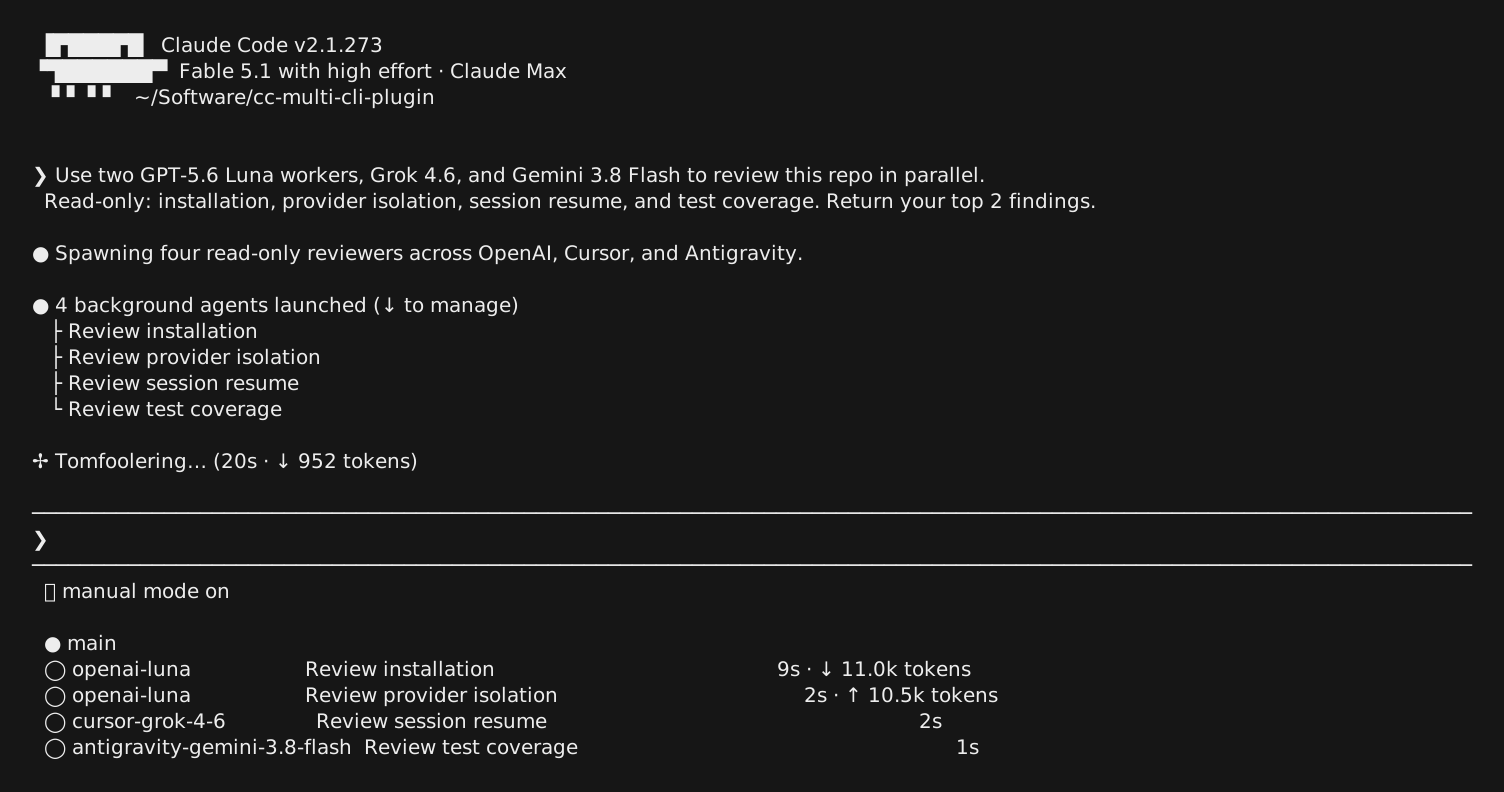
Fable 5.1 coordinating GPT-5.6 Luna, Grok 4.6, and Gemini 3.8 Flash in one Claude Code session.
Why Multi?
- Choose your model in place. Switch through
/modeland select supported reasoning effort with/effort. - Delegate to named workers. Run provider-specific subagents with progress, elapsed time, and cancellation.
- Keep native execution. OpenAI and Zen use Claude Code's tools; Cursor and Antigravity run their own SDK or CLI tools.
- Carry your session forward. Resume saved sessions while keeping provider credentials and native state separate.
- Stay in control. Claude's permission mode and explicit tool restrictions govern provider dispatch.
Install
In Claude Code, add the marketplace and install the providers you want:
/plugin marketplace add greenpolo/cc-multi-cli-plugin
/plugin install multi-openai@cc-multi-cli-plugin
/plugin install multi-cursor@cc-multi-cli-plugin
/plugin install multi-zen@cc-multi-cli-plugin
/plugin install multi-antigravity@cc-multi-cli-plugin
/reload-plugins
/multi-core:setup
Install any subset; each provider pulls in the shared multi-core plugin. Open a new terminal, run claude-multi, and connect the providers you installed:
Providers
| Plugin | Command | What it gives you |
|---|---|---|
multi-openai | /multi-openai:login | ChatGPT models through Codex |
multi-cursor | /multi-cursor:login | Official Cursor SDK models and workers |
multi-zen | /multi-zen:connect | OpenCode Zen models with an API key |
multi-antigravity | /multi-antigravity:connect | Antigravity models and workers through agy |
multi status shows what is installed and connected. multi uninstall removes the shell integration and keeps provider logins. Plain claude is never changed. Rename the launch command or trim the /model rows with /multi-core:setup --command <name> --models <ids>. Details: installation.
Installing with a coding agent
Paste this into any coding agent:
Install cc-multi-cli-plugin by following https://github.com/greenpolo/cc-multi-cli-plugin/blob/main/docs/installation.md#for-agents. Ask which providers I want, what to name the launch command (default
claude-multi), and which models to show in/model(default all). Hand browser logins and API-key entry to me, and never ask for credentials in chat.
Use
Launch with claude-multi. /model lists the external models next to Claude's; /effort sets effort where the model supports it. Named workers run as subagents with live progress, elapsed time and cancellation. Claude's permission mode governs every provider; see permissions. Resume a saved session with claude-multi --resume <session-id>.
Use /multi-usage to open a provider usage menu with quotas, billed spend where
available, session tokens, and worker receipts. Set MULTI_RECEIPTS_FILE before
launching to append JSONL receipts. See usage and receipts.
Platforms
Linux, macOS, and Windows are supported, with offline checks running in CI on all three for every commit. WSL behaves as Linux. See platform support for the live-verified matrix per provider.
Documentation
| Start here | Learn more |
|---|---|
| Installation and account setup | Permissions and review |
| OpenAI · Cursor | Architecture and execution flow |
| OpenCode Zen · Antigravity | Platform support and verification |
Does this change my normal Claude setup?
No. Launch Multi with claude-multi; plain claude stays unchanged. Provider plugins are opt-in, and each provider uses its own authentication. multi uninstall removes the shell integration while preserving provider logins.
Where do tools run?
OpenAI and Zen use Claude Code's tool execution loop. Cursor uses its official SDK, and Antigravity uses the real agy CLI. Native harness actions are displayed in the session and are never replayed as executable Claude tool calls. See architecture and permissions for the boundaries.
Contributing
Bug reports, provider improvements, and documentation fixes are welcome. Read the contributing guide for local setup and checks, or open a bug report or feature request.
CI runs the repository checks on Linux, macOS, and Windows. See the workflow results.
License
Apache 2.0. See NOTICE for upstream credits.