
DeepSeek Harness Desktop
A one-click desktop app for DeepSeek Harness — run the full agent harness locally without installing Node.js, pnpm, or Docker.






English · 中文
Status: developer preview. The upstream
dshis still iterating rapidly with compatibility-breaking changes; this project tracks it closely.
Features
- One-click install — No Node.js / pnpm / Docker needed; bundles the Harness kernel and a Node runtime with fully automatic first-run setup.
- Self-healing updates — Syncs to the latest release on every launch, with a silent "Update Now / Later" prompt when a newer version is found.
- Lightweight & cross-platform — A Tauri 2 shell with smaller installers and lower RAM; native windows on Windows / macOS / Linux with a bilingual UI.
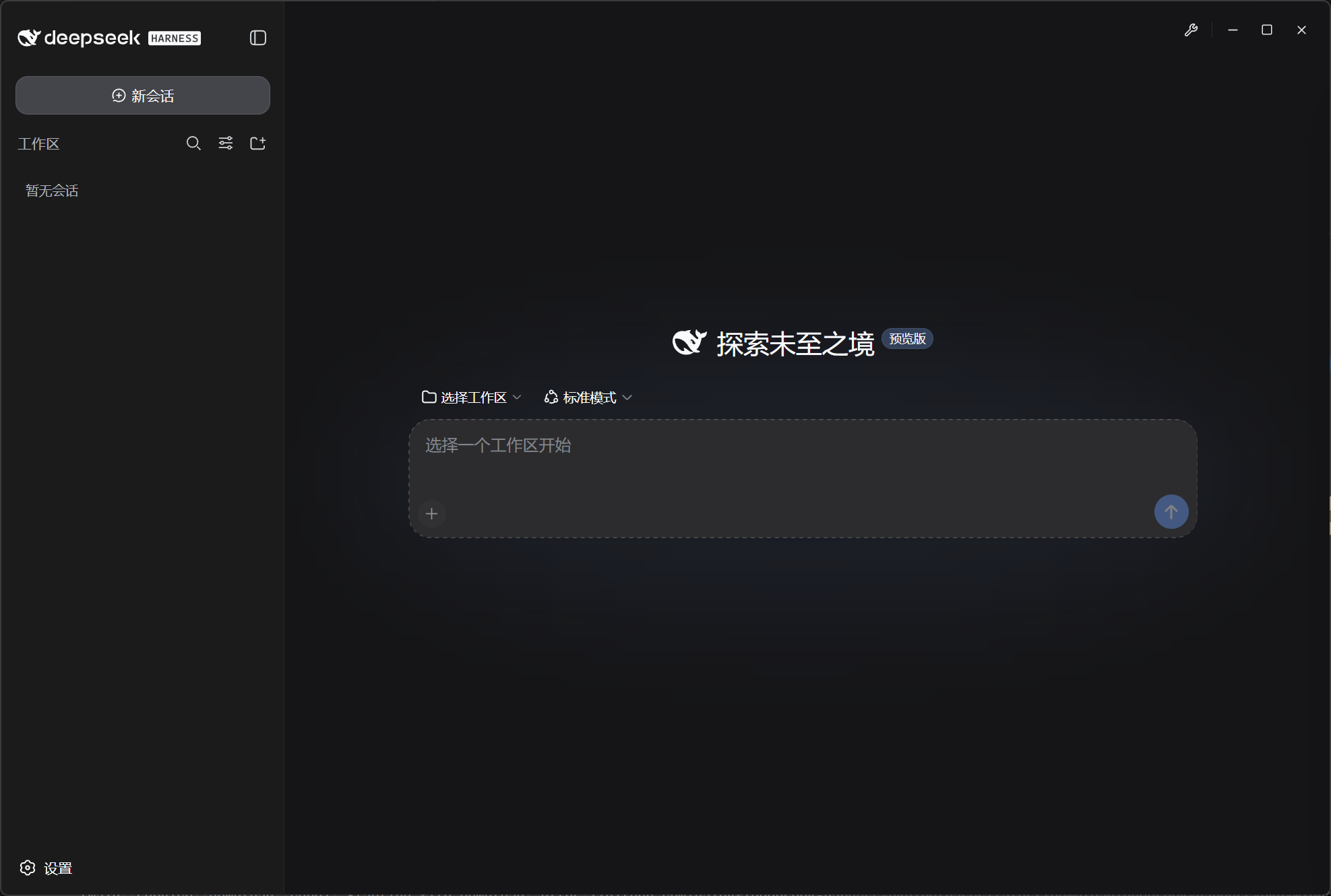
- Embedded web UI — The full Harness interface runs in-window, with a sidebar for service status, port, logs, auto-start, open in browser, data folder and language.
Why Tauri and not Electron? The same features run lighter: a smaller installer and lower idle RAM, with native window controls that stay snappy — important for a local agent host you may keep open all day. The embedded WebView2/WebKit (not a bundled Chromium) also shrinks the install footprint.
Preview
Quick Start
- Download the installer for your platform from the Releases page.
- Install and launch the app.
- On the first run the app installs its dependencies: if a compatible Node.js (v22.15.0+ / v23.8.0+) is already on your machine it is reused as-is; otherwise the Node.js runtime and the prebuilt Harness bundle are downloaded (a few hundred MB in total). When setup finishes, the embedded Harness UI opens at
http://127.0.0.1:3080.
First run requires a network connection. Everything after that runs locally. Once installed, later launches skip the setup screens and boot straight into the harness; a silent prompt appears when a newer Harness release is available.
Requirements
- Windows 10+ (64-bit)
- macOS 10.15+
- Linux (mainstream distributions that support AppImage)
- Network on first launch
The app bundles Node.js v22.22.0 LTS, which satisfies the Harness requirement of v22.15.0+ or v23.8.0+. On first launch it first checks for a local Node.js installation: any compatible version is reused directly and the bundled runtime download is skipped.
Development
Prerequisites
- Node.js 20+
- Rust 1.77+
- pnpm 9+
- Platform build toolchain (Windows: MSVC + WebView2; macOS: Xcode CLT; Linux: WebKit2GTK)
Run in dev mode
git clone https://github.com/hairyf/deepseek-harness-desktop.git
cd deepseek-harness-desktop
pnpm install
pnpm tauri dev
Build installers
pnpm tauri buildRegenerate icons
pnpm iconsHow It Works
┌──────────────────────────────────────────────┐
│ Tauri WebView (React)                        │
│   setup state machine → progress → iframe    │
│   loads the dsh web UI + sidebar controls    │
└──────────────────────┬───────────────────────┘
                       │ invoke commands + events
┌──────────────────────┴───────────────────────┐
│ Tauri Rust backend                           │
│   service/download  installer + extraction   │
│   service/workflow  dsh process lifecycle    │
│   task              dsh health checks        │
└──────┬───────────────────────────┬───────────┘
       │                           │
  runtime/ (Node.js v22.22.0)   dependencies/dsh/ (prebuilt bundle)
       └─────────────┬─────────────┘
                     ▼
   dsh --profile web --host 127.0.0.1 --port 3080
                     │  DSH_HOME=<app-data>/data/dsh
                     ▼
http://127.0.0.1:3080/ ← embedded UI- The prebuilt Harness bundle is published by deepseek-harness-pkg; see docs/PKG-CONTRACT.md for the release contract.
- On every launch the app fetches the latest release commit from
deepseek-harness-pkgand re-downloads the bundle when the installed one is outdated (the local install is kept when GitHub is unreachable). - Full architecture notes: docs/ARCHITECTURE.md.
Data Directory
The data directory follows the Tauri bundle identifier (io.github.hairyf.deepseek-harness-desktop):
- Windows:
%APPDATA%\io.github.hairyf.deepseek-harness-desktop\ - macOS:
~/Library/Application Support/io.github.hairyf.deepseek-harness-desktop/ - Linux:
~/.local/share/io.github.hairyf.deepseek-harness-desktop/
It contains:
runtime/— bundled Node.js runtimedependencies/dsh/— extracted Harness bundledata/dsh/— Harness user data ($DSH_HOME: profiles, sessions, settings)logs/— app and dsh service logs.store.dat— desktop settings (port, auto-start, language)
FAQ
- Port 3080 is already in use? Change the port in the sidebar settings and restart the service.
- What happens during the first-time setup? The sidebar shows the install log and the live service log.
- Why does the app download so much on first launch? It downloads the Node.js runtime and the prebuilt Harness bundle (a few hundred MB) once; afterwards everything runs offline.
- Why does the app contact GitHub on every launch? It compares the installed Harness bundle against the latest release commit and re-downloads automatically when they differ, so upstream fixes arrive without a manual reinstall. If GitHub is unreachable, the local install is kept as-is.
- How do updates work after the first install? Later launches skip setup, check in the background for a newer release, and show a small "Update Now / Later" prompt — updating re-downloads the bundle and restarts the service.
Security Notes
- This project is for personal learning, research, and testing only — please do not use it commercially.
dshis an agent harness with local code execution capability. Run it only in a trusted, isolated environment, and never import untrusted configurations or plugins from unknown sources.- The developers are not liable for any data loss or security issues arising from the use of this project.
Related Projects
| Project | Purpose |
|---|---|
| deepseek-harness | The upstream dsh (CLI + web UI + plugin architecture) |
| deepseek-harness-pkg | Prebuilt Harness bundles consumed by this app |
| n8n-desktop | Reference implementation for one-click local desktop apps |
Acknowledgements
- DeepSeek Harness — the upstream project
- n8n-desktop — reference implementation
- Tauri — the desktop framework
License
MIT © deepseek-harness-desktop contributors