Minted
Turn any SVG into a physically-lit 3D gold medallion for SwiftUI.
Cloisonne enamel, engraved lettering, orange-peel backs, and momentum spins. No 3D assets, ever.


Why
Achievement badges, collectibles, loyalty stamps, awards: they all want to feel like things. Minted takes flat vector art you already have and strikes it into a solid gold coin with glossy enamel inlays, real studio reflections that sweep across the metal as it turns, and a die-struck orange-peel back. Everything is generated geometry from your 2D paths, so your app ships zero model files.
Installation
In Xcode: File > Add Package Dependencies and paste
https://github.com/haplollc/Minted
Or in Package.swift:
dependencies: [
    .package(url: "https://github.com/haplollc/Minted", from: "1.0.0")
]
Two ways in
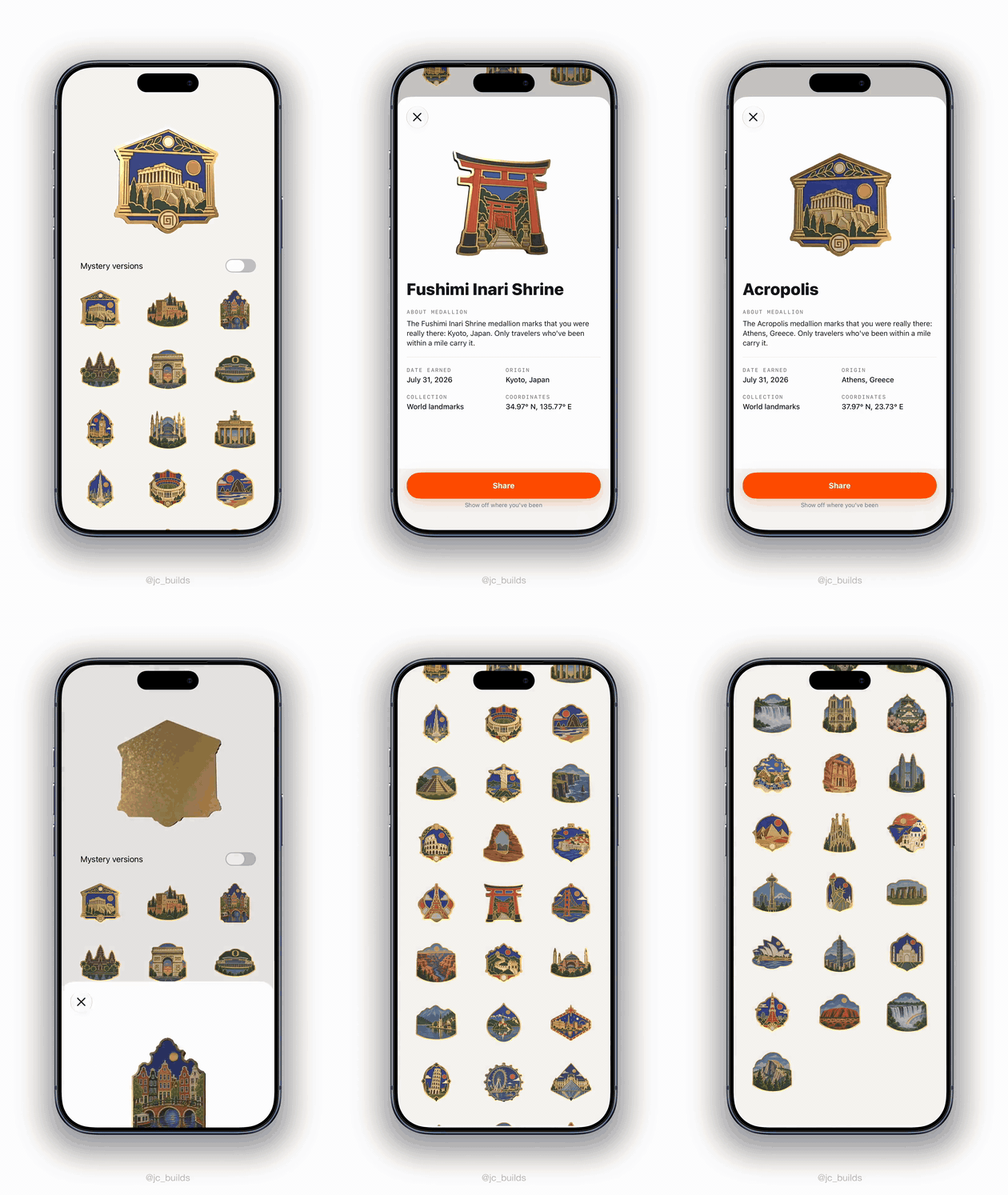
You have finished pin artwork. Hand Minted the image and it does the rest: the artwork becomes the coin's face, the outline is traced from the image, and the gold in the art is detected and rendered as real metal.
let coin = try ArtworkCoin(image: UIImage(named: "eiffel-pin")!)

SpinningArtworkCoinView(coin: coin)
    .frame(width: 300, height: 300)
That is the whole integration. A new pin means a new PNG and nothing else. Six sample pins ship with the package if you want to see it work first:
let coin = try ArtworkCoin(sample: .alhambra)You want to build a coin from vectors. Use CoinDesign, which composes a
coin out of silhouette, enamel, and engraving. Read on for that.
Mint your first coin
Three lines from SVG path data to a spinning medallion:
import Minted

let heart = CoinDesign(svgPathData: "M12 21s-6.7-4.35-9.33-8.11 ...")!

SpinningCoinView(design: heart)   // idles in a slow spin; drag to flick it
    .frame(width: 300, height: 300)
Have a whole SVG file? Hand it over and every <path> inside is merged and placed via the viewBox:
let logo = CoinDesign(svgFileData: try Data(contentsOf: fileURL))!Or skip SVG entirely and mint any CGPath or SwiftUI Path:
let starburst = CoinDesign(art: Path(ellipseIn: CGRect(x: 0, y: 0, width: 1, height: 1)))Make it yours
Every knob has a sensible default, so you add only what you want:
let award = CoinDesign(
    svgPathData: trophySVG,
    silhouette: .seal,                 // .seal, .octagon, .circle, .diamond, .custom(CGPath)
    palette: CoinPalette(
        field: .systemIndigo,          // the petals behind the art
        art: .white                    // the art's enamel
    ),
    engraving: .petals,                // .petals, .rays, .lattice, .plain
    topText: "EMPLOYEE",               // engraved along the crown
    bottomText: "OF THE MONTH"         // engraved along the base
)!
Two-tone art, like a snow-capped mountain:
CoinPalette(art: .white, artLower: .systemBlue, artSplit: 0.34)Grids and stills
Live SceneKit views are for hero moments. For a grid of coins, use the snapshot pipeline: it renders each design once, off the main thread, and caches to disk.
CoinThumbnailView(design: award, size: 120)Need the image itself (for sharing, notifications, widgets)?
let image = await CoinSnapshotter.shared.snapshot(design: award, pixelSize: 1024)And for locked or unearned states, the same design as quiet line work:
CoinLineArt(design: award, size: 120)Show the back
The reverse has a die-struck orange-peel texture. Start a coin turned around:
SpinningCoinView(design: award, initialRotation: .pi)How the artwork route works
Every step exists because a simpler version failed on real pins:
- The outline keys on content, not the background. Flooding the white paper inward seems obvious and is wrong: a pin's drop shadow is a desaturated halo the flood happily eats, so coins grow a ragged aura and swallow any caption underneath. Keying on saturated or dark pixels ignores shadows, which are neither.
- The outline is smoothed only as much as it must be. Hair-thin spires make SceneKit refuse the whole extrusion, and a shape that fails to tessellate renders as nothing at all. The smoothing radius backs off until it stops eating real art.
- The rim band is an offset of the same polygon. Shrinking the mask and tracing it again gives a second outline that wanders relative to the first, pinching the band to nothing on smooth curves. Offsetting the original keeps it concentric.
- The band matches the frame the artwork already paints. One fixed width covers the frame on chunky pins but eats buildings and trees at the edge of narrow ones, so the width is measured per pin.
- Texture coordinates follow the pin, not the shape's bounding box. SCNShape spreads UVs across a bounding box while the face image is square with the pin centred in it, so a tall pin squeezes its artwork inward and shows flat margins down both sides.
- Gold becomes relief, not print. The detected gold is baked into a normal map, so painted frames and filigree stand proud and catch light like metal.
How the vector route works
- Your path is extruded with SceneKit's
SCNShape: a solid gold body, stacked rim bands for the rounded lip, enamel cells sitting a hair proud of the face, and a raised gold wire hugging the art's every edge, the way a real cloisonne pin is built. - Materials are physically based (gold at metalness 1.0) and lit by a generated studio environment: softboxes, a window streak, a warm floor bounce. That is what sweeps across the metal when the coin turns.
- The SVG parser covers the full
dgrammar: absolute and relative commands, chained curves with reflection, elliptical arcs (converted to cubics per the SVG spec), implicit repeats, and packed numbers like1.5e-2-3. - Lettering is real type: CoreText glyph outlines laid along the arcs, letters upright, in a deeper engraved gold so they stay legible under hot reflections.
Requirements
- iOS 17.0+
- Swift 5.9+ / Xcode 15+
License
Minted is available under the MIT license.
The sample pin artwork in Sources/Minted/Resources/ReferenceArt was
generated with ChatGPT and then fed through this pipeline, which is exactly how
the collection in Bilbo was built: describe the pin you want, generate the art,
drop the image in, get a coin.
Made by Haplo LLC. Extracted from Bilbo, our travel planning app, where landmarks you visit are struck into a passport of medallions.